Candle Close Timer Matrix
- Indicatori
-
Sivakumar Paul Suyambu
 Full Lifecycle: develop → optimize → deploy → monitor → reoptimize → repeat
 - Versione: 1.0
Candle Close Timer Matrix – MT5 Candle Countdown Indicator
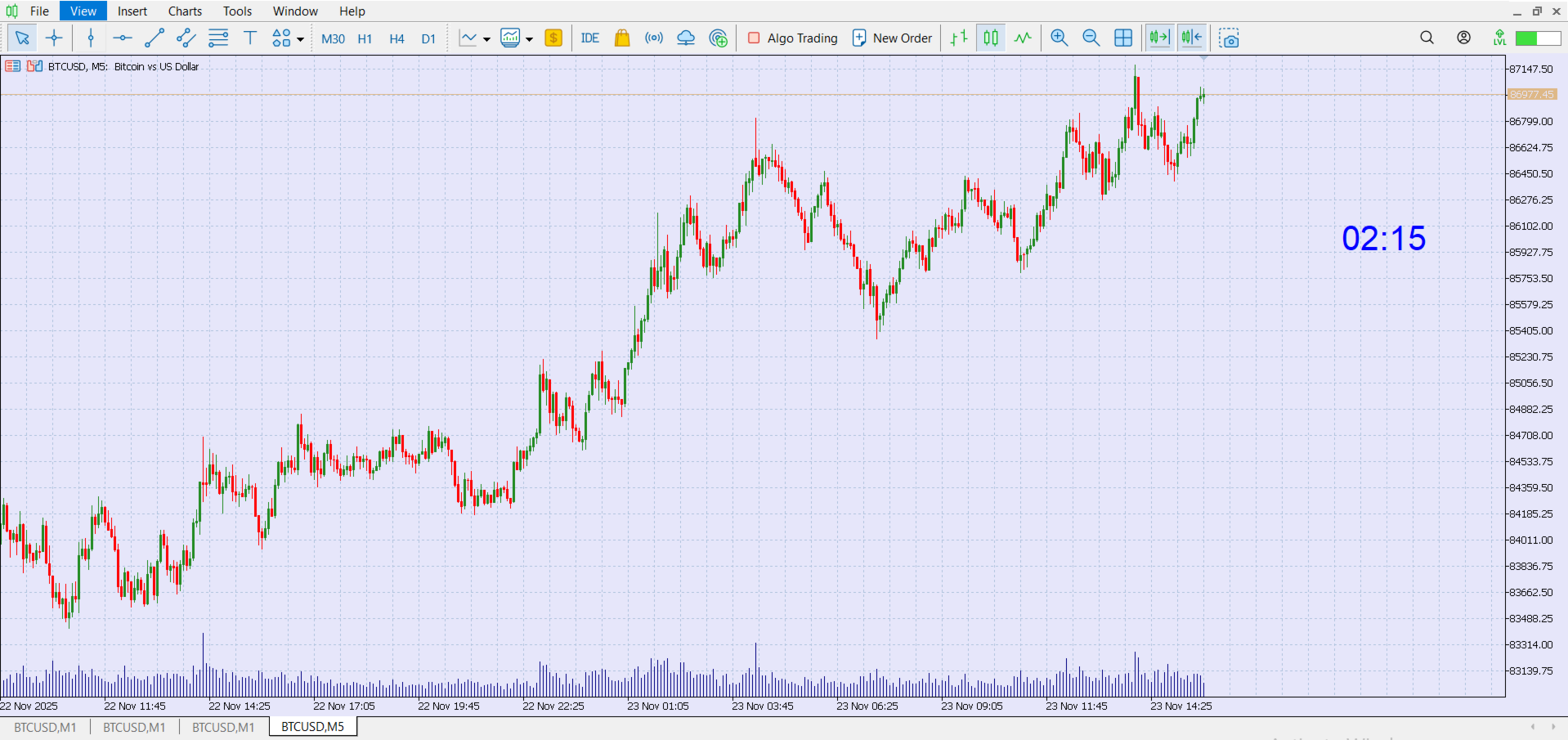
Candle Close Timer Matrix is a lightweight and powerful MetaTrader 5 (MT5) candle countdown indicator that shows exactly how many minutes and seconds are left before the current candle closes on any symbol and any timeframe.
Whether you are a scalper, intraday trader or swing trader, knowing the exact candle close time helps you:
-
Time your entries on candle close
-
Avoid impulsive mid-candle decisions
-
Sync your trades with price action, news and candle patterns
This tool sits neatly on your chart as a clean, customizable countdown label – always visible, zero clutter, and almost no CPU load.
🔍 What Candle Close Timer Matrix Does
-
Displays a real-time countdown for the current candle on the active chart
-
Works on all timeframes: M1, M5, M15, H1, H4, D1 etc.
-
Adapts to your chart’s timeframe automatically – no manual configuration
-
Can be placed in any chart corner with adjustable X/Y offset
-
Uses clear digital-style format:
-
For intraday timeframes (e.g. M1, M5, M15): MM:SS
-
For higher timeframes (e.g. H1, H4, D1): HH:MM:SS
-
You always know exactly when the bar will close, down to the second.
✅ Key Features
-
MT5 Candle Countdown Timer – precise remaining time for the current candle
-
Works on all symbols – Forex, Gold (XAUUSD), Indices, Crypto, Stocks, CFDs
-
Ideal for scalpers & day traders using lower timeframes (M1–M15)
-
Perfect companion for price action trading & candle close strategies
-
Clean chart overlay – no indicators, lines or buffers; only one label
-
Fully customizable display – font size, font name, colour and position
-
Ultra-lightweight – uses MT5 timer events, not tick-by-tick recalculation
-
No repainting, no lag – simply follows server time and chart period
👨💻 Who Is This Indicator For?
-
Scalpers who enter trades exactly at candle close on M1/M5
-
Day traders watching 5–15 minute candles for breakouts or rejections
-
Swing traders monitoring H1/H4 candle closes for confirmation
-
News traders who need to know when the next candle will lock in
-
Anyone who hates guessing “how much time is left in this candle?”
🧠 How Candle Close Timer Matrix Works (High-Level)
The indicator reads:
-
The open time of the current candle
-
The duration of the current timeframe in seconds
-
The broker server time
Then it calculates:
Remaining Time = (Candle Open Time + Timeframe Seconds) – Current Time
The result is shown as a live updating countdown label directly on your chart.
No buffers, no heavy calculations, no interaction with orders – just a pure utility candle timer designed for clarity and speed.
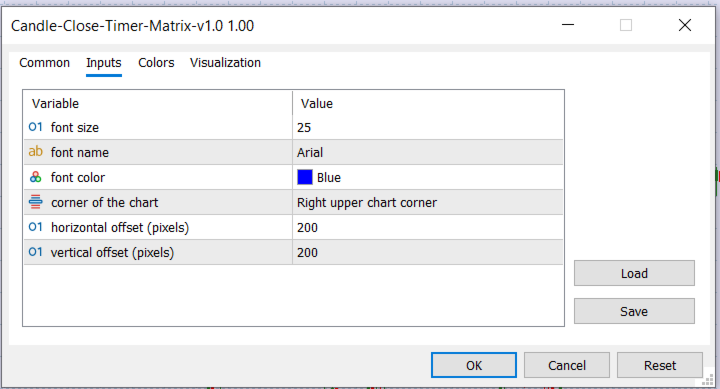
⚙️ Input Parameters (User Guide)
All settings are simple and focused on visual customization:
1. FontSize – font size
Controls how big the countdown text appears on your chart.
-
Example: 25 (default, medium–large size)
-
Increase for 4K or large monitors; decrease for compact charts.
2. FontName – font name
Name of the font used for the timer text.
-
Default: "Arial" – clean and readable
-
You can use any font installed in your system (e.g. "Calibri" , "Tahoma" ).
3. FontColor – font color
Controls the color of the countdown text.
-
Default: clrBlue
-
You can select any color (e.g. White for dark backgrounds, Black for light backgrounds, Red for high attention).
4. Corner – corner of the chart
Defines where the countdown label is anchored on the chart.
Available options (MT5 ENUM_BASE_CORNER ):
-
CORNER_LEFT_UPPER – Top left
-
CORNER_RIGHT_UPPER – Top right (default)
-
CORNER_LEFT_LOWER – Bottom left
-
CORNER_RIGHT_LOWER – Bottom right
Choose the corner that doesn’t conflict with your other indicators or panels.
5. OffsetX – horizontal offset (pixels)
Moves the label left/right from the chosen corner.
-
Default: 200
-
Increase to push the text more towards the center of the chart.
6. OffsetY – vertical offset (pixels)
Moves the label up/down from the chosen corner.
-
Default: 200
-
Increase to move the timer further down from the top, or up from the bottom.
📌 How to Use Candle Close Timer Matrix
-
Attach the indicator to any chart in MetaTrader 5
-
Choose your trading timeframe (M1, M5, M15, H1, etc.)
-
Adjust the font size, color and position if needed
-
Watch the countdown and plan your trade decisions around candle close
Typical usage examples:
-
Wait for candle close confirmation before entering a trade
-
Combine with support/resistance, supply-demand or candlestick patterns
-
Monitor multiple charts – you can attach the indicator to each one
-
Use it alongside EA/indicator signals that act on candle close
🎯 Why Candle Close Timer Matrix Is Useful
-
Helps you stop over-trading mid-candle
-
Encourages discipline – only act when the bar is fully formed
-
Great for backtest-style live discipline:
“If I wouldn’t take that trade in backtest before candle close, I won’t take it live either.” -
Reduces emotional decisions during volatile candles
-
Keeps your focus on timing and structure, not just price movement
📈 Typical Use Cases for Different Traders
-
Scalpers (M1/M5)
-
Time breakout entries exactly at the close of the signal candle
-
Avoid entering too early before the candle shape is confirmed
-
-
Day Traders (M5/M15/M30)
-
Combine with moving averages, VWAP, or trend indicators
-
Wait for candle close above/below key levels
-
-
Swing Traders (H1/H4/D1)
-
Know when the current bar will lock in
-
Perfect for end-of-candle decisions instead of mid-bar noise
-
❓ FAQ
Q: Does this indicator place trades or modify orders?
A: No. Candle Close Timer Matrix is a pure visual tool only. It does not open, close or manage any trades.
Q: Can I use it on multiple charts at the same time?
A: Yes, you can attach it to any number of charts and symbols simultaneously.
Q: Does it repaint?
A: No. It simply shows the live remaining time for the currently active candle using server time.
Q: Will it slow down my MT5 terminal?
A: No. It is extremely lightweight and uses a simple timer-based update once per second.
🔑 Tags
-
candle timer
-
candle countdown
-
MT5 candle timer
-
MT5 countdown indicator
-
candle close time
-
remaining candle time
-
scalping timer
-
forex timer indicator
-
MetaTrader 5 utility
-
day trading tool
-
price action timer