Smart Alert Manager
- Utilità
- Versione: 1.1
- Aggiornato: 20 luglio 2026
- Attivazioni: 5

Create custom alerts and advanced alerts based on price and indicator data, setup dynamic alert messages, and send these MT5 alerts to Telegram, Discord, webhooks, mobile, and more.
Stay in control of your trades with Smart Alert Manager, a powerful utility for MT5 that lets you create fully customizable alerts.
Whether you’re tracking price action or monitoring indicator signals, this tool ensures you never miss an opportunity.
It’s easy to set up, flexible to customize, and sending alerts across multiple delivery channels
-----Key Features-----
1. Create Alerts Based On Indicator Data
Not just price levels, Alerts Manager also allows you to create alerts based on any standard indicator supported by MQL5.
2. Flexible Comparations:
The following comparisons are supported (works with price vs price, price vs indicator, or indicator vs indicator)
- Greater, Less, Equal
- Between
- Cross, Cross Up, Cross Down
- Move Up, Move Down
- Move Up in %, Move Down in %
3. Customizable Alert Message:
Make your alert messages dynamic and informative by using these placeholders. (Real market data will be filled in automatically when the alert is triggered):
- {symbol}, {timeframe}, {time}
- {open}, {high}, {low}, {close}
- {bid}, {ask}, {spread}
- {realvolume}, {tickvolume}
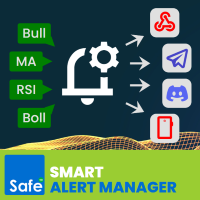
4. Multi-Channel Delivery:
- Terminal alert
- Terminal sound
- Mobile push notification
- Email
- Webhook
- Telegram<
- Discord
5. Extra Convenience:
- Save & load your alert configurations
- Light & Dark mode switch<
Please read Smart Alert Manager Guidelines for more details.
-----Sample Comparison Operators-----
1️. Get notified instantly when price breaks above a resistance level.
- Condition: Price > 1.1000 on EURUSD H1
- Setup: Add EURUSD to your chart, set condition to Greater, and enter the threshold value 1.1000
- Message Example: {symbol} {timeframe} breakout detected! Price closed above {close}
2️. Catch a bullish crossover.
- Condition: MA(20) crosses up MA(50)
- Setup: Apply two Moving Averages to your chart (20 & 50). In Alerts Manager, select Cross Up
- Message Example: {symbol} {timeframe} MA crossover! Fast MA crossed above Slow MA at {close}
3️. Detect when the market moves up by a percentage threshold.
- Condition: Price moves up 2% in 3 bars on Gold M15
- Setup: Choose Move Up % and set value = 2, bars = 3
- Message Example: {symbol} {timeframe} price jumped 2%. Current Close: {close}
-----Sample Alert Channels-----
1. Send trading alerts in MT5 with terminal popup/sound
- When to use: You're actively trading on MT5 and want an instant on-screen popup
- Example: You're watching EURUSD and get a popup when the price crosses 1.1000
- Benefit: Immediate visual notification without leaving the platform. Audio alert grabs your attention even if the MT5 window is minimized
2. Send trading alerts from MT5 to your mobile
- When to use: You're away from your PC but need real-time updates
- Example: Get a push notification when RSI(14) crosses below 30 on GBPUSD H1
- Benefit: Trade alerts follow you wherever you go—no missed opportunities
3. Send trading alerts from MT5 to your email
- When to use: You want a log of alerts or prefer email as a backup channel
- Example: A detailed email is sent when BTCUSD breaks a key support
- Benefit: Permanent record of signals, accessible anytime on your inbox
4. Send trading alerts from MT5 to Telegram chat
- When to use: You want alerts shared instantly in a private or group chat
- Example: A Telegram message is posted when EURJPY crosses its 200 MA
- Benefit: Fast, secure, and perfect for team trading or signal groups
5. Send trading alerts from MT5 to Discord channel
- When to use: You run a trading community or want alerts inside your Discord server
- Example: A bot posts to your #forex-alerts channel when NAS100 spikes 1%
- Benefit: Share alerts with groups, communities, or trading partners in real time
6. Send trading alerts from MT5 to webhook
- When to use: You integrate with third-party tools or custom trading dashboards
- Example: Alerts are sent to a webhook that automatically updates your private analytics system
- Benefit: Advanced automation and system-to-system integration