DailyRiskControl
- Utilità
- Versione: 3.1
- Aggiornato: 7 novembre 2025

Overview
Many proprietary trading firms enforce strict rules on daily drawdown limits. This Expert Advisor (EA) is specifically designed to help traders comply with such requirements by actively monitoring daily drawdown and profit levels. It automatically manages open positions to ensure adherence to prop firm criteria, enhancing risk control and account longevity.
Key Features
Daily Performance Monitoring:
The EA continuously calculates and displays the current day's drawdown directly on your trading chart. This real-time feedback allows traders to assess their performance and make informed decisions throughout the trading day.
Integrated Risk Management:
By enforcing a daily loss limit, the EA helps traders maintain disciplined risk management practices. When predefined thresholds are reached, all open trades are automatically closed, ensuring losses remain within acceptable levels.
Real-Time Data Updates:
Drawdown, Loss and profit figures are updated in real-time, providing accurate and current performance metrics to support active decision-making.
Trade Mangement for Trailing Stoploss / Breakeven:
Trailling stoploss levels can be set in points with steplevel and also breakeven after certain time.
Input Parameters Explained:
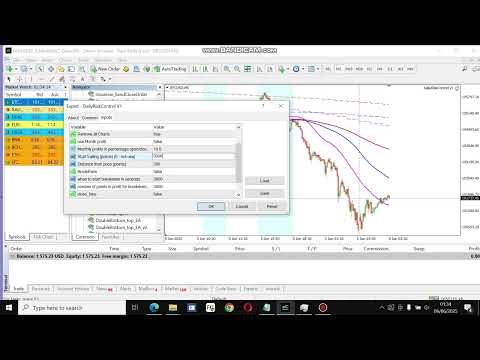
input Daily Drawdown protection(%):
Sets the maximum allowable daily loss or drawdown as a percentage. If this threshold is reached, all open trades are automatically closed. The daily cycle begins at 00:00 server/platform time.
input double dailyProfit:
Defines the daily profit target. Upon reaching this target, all open trades are closed. The daily count resets at 00:00 server/platform time.
input bool Remove All Charts:
When enabled, this feature not only closes all open positions upon reaching the drawdown, daily target, or monthly profit threshold, but also removes all charts on the current MT4 session to prevent further trading. (good to have templates to open the charts again when further trading is required)
input bool use_Month_profit:
Enables or disables monitoring of monthly profit thresholds.
extern double Month_Profit_Perc:
Specifies the monthly profit target in percentage terms. When this level is achieved, all open trades are closed. The month is based on the full calendar month (e.g., January, February).
input int trail_start:
Sets the starting point (in points) for initiating a trailing stop. A value of 0 disables trailing.
input int trail_step:
Defines the step size (in points) used for trailing stop adjustments.
extern bool BreakEven:
Activates the breakeven function. When enabled, positions can be moved to breakeven based on time and profit/loss conditions.
extern int TimeSecStartBreakEven:
Specifies the number of seconds after trade execution before the breakeven function becomes active.
extern int BreakEvenProfit:
Defines the number of points in profit or loss required to trigger breakeven. Negative values allow breakeven in a loss scenario.
input bool close_time:
Enables time-based closing of all trades regardless of profit or loss status.
extern int CloseHour = 22;
Sets the hour (24-hour format) for scheduled trade closure.
extern int CloseMinute = 30;
Sets the minute for scheduled trade closure.