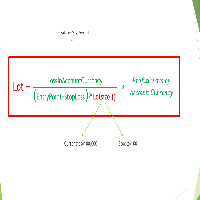
Optimum lot size calculator

Important Note:

Before using it in a real account test it in your demo account.


//+------------------------------------------------------------------+

//|                                             Optimum_Lot_Size.mq5 |

//|                                  Copyright 2023, MetaQuotes Ltd. |

//|                                             https://www.mql5.com |

//+------------------------------------------------------------------+

#property copyright "Copyright 2023, MetaQuotes Ltd."

#property link      "https://www.mql5.com"

#property version   "1.00"

#property script_show_inputs

#include <Trade/Trade.mqh>

#include <Trade/PositionInfo.mqh>


CTrade Trading;

//+------------------------------------------------------------------+

//| Script program start function                                    |

//+------------------------------------------------------------------+


input bool IsBuy=true;

input double StopLoss;

input double TakeProfit;

input double RiskPercent=0.01;

double LotSize; 

void OnStart()

  {   


      double temp_RiskPercent=RiskPercent;

      double Ask=SymbolInfoDouble(Symbol(),SYMBOL_ASK);

      double Bid=SymbolInfoDouble(Symbol(),SYMBOL_BID);


      if(temp_RiskPercent>0.04) temp_RiskPercent=0.04;


      if (IsBuy && StopLoss !=0.0)

      {

         LotSize=OptimumLotSize(Symbol(),Ask,StopLoss,temp_RiskPercent);

         Trading.Buy(LotSize,Symbol(),Ask,StopLoss,TakeProfit);  


      }


      if (!IsBuy && StopLoss !=0.0)

      {

         LotSize=OptimumLotSize(Symbol(),Bid,StopLoss,temp_RiskPercent);

         Trading.Sell(LotSize,Symbol(),Bid,StopLoss,TakeProfit);  


      }


  }


double OptimumLotSize(string symbol,double EntryPoint, double StoppLoss, double RiskPercent)

{

      int            Diigit         =SymbolInfoInteger(symbol,SYMBOL_DIGITS);

      double         OneLotValue    =MathPow(10,Diigit);


      double         ask            =SymbolInfoDouble("GBPUSD",SYMBOL_ASK);


      double         bid            =SymbolInfoDouble(symbol,SYMBOL_BID);


      string         BaseCurrency   =SymbolInfoString(symbol,SYMBOL_CURRENCY_BASE);

      string         ProfitCurency  =SymbolInfoString(symbol,SYMBOL_CURRENCY_PROFIT); 

      string         AccountCurency =AccountInfoString(ACCOUNT_CURRENCY);


      double         AllowedLoss    =RiskPercent*AccountInfoDouble(ACCOUNT_EQUITY);

      double         LossPoint      =MathAbs(EntryPoint-StoppLoss);

      double         Lotsize;


      if (ProfitCurency==AccountCurency) 

         { 

         Lotsize=AllowedLoss/LossPoint; 

         Lotsize=NormalizeDouble(Lotsize/OneLotValue,2);


         return(Lotsize); 

         }


      else if (BaseCurrency==AccountCurency)

         {

         AllowedLoss=ask*AllowedLoss;  //// Allowed loss in Profit currency Example: USDCHF-----> Return allowed loss in CHF

         Lotsize=AllowedLoss/LossPoint; 

         Lotsize=NormalizeDouble(Lotsize/OneLotValue,2); 

         return(Lotsize);

         }


         else

         {

            string TransferCurrency=AccountCurency+ProfitCurency;

            ask=SymbolInfoDouble(TransferCurrency,SYMBOL_ASK);


            if(ask!=0) 

            {

               AllowedLoss=ask*AllowedLoss;  //// Allowed loss in Profit currency Example: USDCHF-----> Return allowed loss in CHF

               Lotsize=AllowedLoss/LossPoint; 

               Lotsize=NormalizeDouble(Lotsize/OneLotValue,2); 

               return(Lotsize);   


            }

            else

            {

               TransferCurrency=ProfitCurency+AccountCurency;

               ask=SymbolInfoDouble(TransferCurrency,SYMBOL_ASK);

               ask=1/ask;

               AllowedLoss=ask*AllowedLoss;  //// Allowed loss in Profit currency Example: USDCHF-----> Return allowed loss in CHF

               Lotsize=AllowedLoss/LossPoint; 

               Lotsize=NormalizeDouble(Lotsize/OneLotValue,2); 

               return(Lotsize);


            }


            if (ProfitCurency=="JPY") 

               { 

               Lotsize=AllowedLoss*1.5/LossPoint; 

               Lotsize=NormalizeDouble(Lotsize/OneLotValue,2);


               return(Lotsize); 

               }


         return Lotsize; 

         }


}
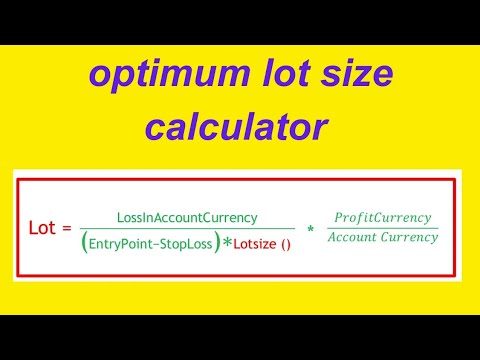

Video Optimum lot size calculator
Prodotti consigliati
Market book player
Aliaksandr Hryshyn
Playback of previously saved data from the order book. Key features: Historical data navigation Adjusting the playback speed with the "---" and "+++" buttons, as well as with the mouse, you can by scrolling the wheel over the area of ​​these buttons and between them Turning Price Centering On and Off Time display accurate to thousandths of a second Attention: This product also needs a utility to save data: https://www.mql5.com/en/market/product/71642
FREE
Auto Lot Equalizer
Bin Jumahat Johan
AutoLotEqualizer – Smart Position Balancing Tool AutoLotEqualizer is a precision trade management utility designed to keep your total BUY and SELL volumes balanced automatically. It detects differences between your open BUY and SELL positions and opens compensating trades — ensuring both sides stay equal in exposure. This helps grid, hedge, and basket systems maintain symmetry and control over total position risk — all while saving you time and manual effort. ️ Key Features Automatic Lot Ba
FREE
The magiciann
Abdelhak Benazizi
5 (2)
THE MAGICIAN - Indicatore Professionale di Zone di Domanda e Offerta Trasforma il Caos del Mercato in Opportunità di Trading Cristalline sui Grafici Oro a 15 Minuti Hai Difficoltà con il Trading dell'Oro? Stanco di indovinare dove entrare nelle operazioni su XAU/USD? Confuso su se COMPRARE, VENDERE o RESTARE FUORI? Perdi setup ad alta probabilità sul timeframe di 15 minuti? "THE MAGICIAN" rivela le forze invisibili di domanda e offerta che muovono i mercati! Cosa Rende THE MAGICIAN Unico? ANA
FREE
Monkey Lite
Dang Cong Duong
Monkey Lite  offers the following array of features: One-click instant order entry (short or long). Track total current orders and total current profit. Instant Close Buy, Close Sell, Close All button. Utility types Risk management, Graphical objects, Panels. Main features Take Profit and Stop Loss by money (not pip). After the price reached the Take Profit threshold, trailing stop 20% of the current profit. After the price reached the Stop Loss threshold, the orders will be closed immediately.
FREE
A simple button to completely close all existing open trades (both Buy and Sell) on the current chart . Warning : Once the button is pressed, all open trades on the current chart will be deleted immediately without any more questions or dialogue. Use this utility very carefully. We recommend that you do a trial of removing open trades on a demo account first, before trying to use this utility on a real account.
FREE
Bundle Risk Manager Pro EA "Risk Manager Pro EA is an all-in-one trading utility that combines advanced risk management tools, ensuring full control over your trading account while protecting your capital and complying with trading regulations. By bundling Limit Positions , Concurrent Risk Capital , and the newly added Limit Profit , this EA is the ultimate solution for disciplined trading and achieving evaluation goals. Key Features: 1. Limit Positions : Enforces a maximum number of open posi
FREE
https://www.mql5.com/en/users/gedeegi/seller    The GEN indicator is a multifunctional technical analysis tool for the MetaTrader 5 (MT5) platform. It is designed to automatically identify and display key Support and Resistance (S&R) levels and detect False Breakout signals, providing clear and visual trading cues directly on your chart. Its primary goal is to help traders identify potential price reversal points and avoid market traps when the price fails to decisively break through key levels
FREE
Order Book, known also as Market Book, market depth, Level 2, - is a dynamically updated table with current volumes of orders to buy and to sell specific financial instument at price levels near Bid and Ask. MetaTrader 5 provides the means for receiving market book from your broker, but in real time only, without access to its history. This expert adviser OrderBook History Playback allows you to playback the market book events on the history using files, created by OrderBook Recorder . The exper
FREE
Value Chart Candlesticks
Flavio Javier Jarabeck
4.69 (13)
The idea of a Value Chart indicator was presented in the very good book I read back in 2020 , " Dynamic Trading Indicators: Winning with Value Charts and Price Action Profile ", from the authors Mark Helweg and David Stendahl. The idea is simple and the result is pure genius: Present candlestick Price analysis in a detrended way! HOW TO READ THIS INDICATOR Look for Overbought and Oversold levels. Of course, you will need to test the settings a lot to find the "correct" one for your approach. It
FREE
这款专为MetaTrader 5设计的EA(Expert Advisor),能够在加载后自动关闭所有图表,并立即从当前图表中自行移除。它适合那些希望快速清理所有图表,并避免手动关闭每个图表的用户。 功能特点: 一次性清理: 加载后立即关闭所有打开的图表。 自动移除: 执行完毕后,EA自动从当前图表中移除,无需手动操作。 快速高效: 适用于快速清理交易环境,特别适合在需要快速重置或结束交易日的情境。 使用说明: 只需将此EA添加到任何一个图表上,它将自动执行关闭所有图表的操作并自行移除。使用前,请确保已保存所有重要的图表数据和设置。 风险提示: 请谨慎使用此EA,以防不小心关闭重要图表。 适用于MetaTrader 5平台。 技术支持: 如有任何技术问题或需求,请联系我以获得帮助。
FREE
Simple Order
Mikhail Nazarenko
5 (2)
Simple order is designed to make placing pending orders as easy and fast as possible. Setting a pending order takes just two steps. 1. Double-click on the price of placing an order, after that a panel with buttons for order names appears. 2. Click on the button of the required order That's it, the pending order is set. If necessary, we adjust the order by dragging, as well as change the sizes of stop loss and take profit. Don't forget to pre-set the size of the stop loss and take profit in the S
FREE
Trade assistant pro v8
Ahmed Mohammed Bakr Bakr
FREE FREE FREE Trade Assistant MT5 – Professional Trading & Risk Management Panel Trade Assistant MT5 is an advanced trading panel designed to help traders execute orders faster, safer, and more professionally . It simplifies manual trading by combining smart order management , precise risk control , and one-click execution , making it ideal for both beginners and advanced traders. This tool does not trade automatically . Instead, it empowers you with full control while applying professional-gra
FREE
BuyMarket
Pietro Caporale
Simple script for Buy by Market Execution on all financial instruments. Inputs Volume - default: 0.10 Deviation - default: 10 points Stoploss - default: 50 points Takeprofit - default: 50 points Comment - default: Order by Market Confirm - default: false Inputs Details Type Order Buy Order is preset. Deviation Maximum deviation from quoted price in points. Stoploss & Takeprofit In points value, be careful that this value will be added to minimum stop allowed by the broker. For example if you s
FREE
TradeGacha
Phongsphat Chanswat
## Version 2.50 I created this EA with the intention of making it free for everyone to use. It serves as a tool to assist in trading with money management, entering order lots according to a percentage of the account balance, and automatically setting TP/SL based on high/low prices. In Version 2.50, The Auto TP/SL feature adjusts from the Line In (entry point), and Auto price in this version only shifts the entry line to the current price. Input settings: Ato update SL/TP Line >>> In version
FREE
Neuro Edge
Agus Wahyu Pratomo
5 (3)
Please give review to support development of this Expert Advisor NeuroEdge EA is an advanced trend-following scalper designed to adapt dynamically to market behavior. Built with precision algorithms and smart averaging logic, it maintains minimal drawdown while capturing high-probability setups in trending conditions. NeuroEdge continuously analyzes market flow to ensure optimal entries and exits — giving traders the edge they need in volatile markets. ️ Core Features: Adaptive Trend Detection
FREE
This EA is a Trade Assistant designed to manage your manually opened trades automatically. It helps you control risk and maximize profits without staring at the screen all day. Perfect for Gold (XAUUSD) scalpers and day traders. Key Features: Auto Initial Stop Loss (ATR): Automatically places a Stop Loss immediately after you open a trade, based on market volatility (ATR). Manual SL Compatible (Hybrid Mode): You can still set your own Stop Loss manually when entering a trade. The EA will respect
FREE
Assistente Manuale TP (Manual Helper TP) Questo strumento è progettato per aiutarti a proteggere i tuoi profitti e a ridurre il tuo rischio. Imposterà lo Stop Loss e gestirà un Trailing Stop per le tue operazioni. Come si usa Collegalo al grafico del simbolo che tradi e gestirà le tue posizioni secondo le tue regole. Tutte le impostazioni sono in punti. È importante regolarle in base al tuo simbolo e alla tua strategia. L'impostazione predefinita può funzionare con XAUUSD. Per lo scalping è megl
FREE
AvgVolumes
Marco Montemari
5 (1)
This indicator is based on Volumes standard indicator, calculates the average of Volumes based on the last N bars set by users, and if the value of the volume is bigger then a set % respect the average a different color will be used. The indicator is shown in a separate indicator window. This version has now a limitation in setting the % about the threshold. If you are interested to set threshold consider to buy the PRO version ( https://www.mql5.com/en/market/product/35925 ) If you want to use
FREE
Arbitrage365
Themichl LLC
3 (1)
The Arbitrage365 EA is a basic script for MetaTrader that implements a triangular arbitrage strategy. It identifies and exploits price discrepancies between EURUSD, GBPUSD, and EURGBP to profit from temporary market mispricing. This EA capitalizes on the law of one price by simultaneously buying and selling currency pairs. Its advantages include speed, accuracy, scalability, consistency, cost-effectiveness, contribution to market liquidity, and portfolio diversification. However, it's a basic E
FREE
The indicator highlights the points that a professional trader sees in ordinary indicators. VisualVol visually displays different volatility indicators on a single scale and a common align. Highlights the excess of volume indicators in color. At the same time, Tick and Real Volume, Actual range, ATR, candle size and return (open-close difference) can be displayed. Thanks to VisualVol, you will see the market periods and the right time for different trading operations. This version is intended f
FREE
Automatically Close Trades at Your Desired Profit Target! Take the guesswork out of trading by automatically closing your positions as soon as they reach your set profit target. Add to any chart-  The Bot will monitor all open trades Key Features:     Automatic Trade Closing:     Set a profit target in USD, and let FinalStrike automatically close the trade when dollar amount is achieved     Multiple Positions Supported:     Whether you have one or multiple trades open across different pairs,
FREE
Second Level Candles And Alligator Indicators 每12秒产生一个K线,而且自带Alligator指标,对超短线选手交易非常有帮助。程序启动时可能不成功,是因为MT5 MqlTick 数据加载少的原因。可以通过修改显示的数据参数避免,比如display=100,程序正常之后再将参数调大 display=300 。如果数据不正常,也可以采用重新加载的方式解决。 如果您对这个指标有任何建议,请联系作者。  Second Level Candles And Alligator Indicators  produced a candle per 12 seconds,include Alligator, it's helpful to Short-Term Trading。You'd better reload the indicator every start MT5 or change display parameter to reslove data bug. Please attach author when  you had some su
FREE
QuickClose EA
Peechanat Chatsermsak
QuickClose EA: Manage Trades Quickly and Efficiently QuickClose EA is a tool designed to help traders manage orders on the current chart easily and quickly. It provides full control over your trading status with clear feedback. Key Features of QuickClose EA: User-Friendly Control Panel: Clearly displays essential information such as the current symbol name, total profit/loss for Buy and Sell positions, and open lot sizes, giving you an immediate overview of your trading status. Precise Lot Size
FREE
Exp Assistant 5
Vladislav Andruschenko
4.77 (122)
Impostazione automatica, stop loss, take profit, trailing stop, livelli di pareggio, attivazione di stop loss e take profit   virtuali   . Exp Assistant   ti aiuterà a organizzare il mantenimento delle tue posizioni. Questo programma, l'Expert Advisor, è progettato per impostare automaticamente il   Reale o il Virtuale       Livelli   di Stop Loss e Take Profit   per le tue posizioni durante il trading. Puoi gestire facilmente tutte le operazioni dell'Expert Advisor dal pannello di controllo sul
FREE
CloseAllPosition
Konstantin Chernov
4 (2)
A script for closing positions If you need to quickly close several positions, this script will make all the routine for you! The script does not have any input parameters. Allow AutoTrading before running the script. Usage: Run the script on a chart. If you need to specify the maximal deviation and the number of attempts to close positions, use the script with input parameters https://www.mql5.com/en/market/product/625 You can download MetaTrader 4 version here: https://www.mql5.com/en/market/
FREE
Brent Trend Bot
Maksim Kononenko
4.46 (13)
The Brent Trend Bot special feature is simple basic tools and logic of operation. There are no many strategies and dozens of settings, like other EAs, it works according to one algorithm. The operating principle is a trend-following strategy with an attempt to get the maximum profitability adjusted for risk. Therefore, it can be recommended for beginners. Its strong point is the principle of closing transactions. Its goal is not to chase profits, but to minimize the number of unprofitable trans
FREE
Bollinger Bands TP Guardian Questo Expert Advisor di utilità utilizza le Bande di Bollinger per modificare il livello di Take Profit (TP) degli ordini aperti, migliorando la gestione del tuo trading e lasciandoti le mani libere dopo che la transazione manuale è stata eseguita. Caratteristiche principali Regolazione automatica del TP: L'EA regola automaticamente il TP degli ordini aperti. Integrazione delle Bande di Bollinger: I livelli di TP sono impostati utilizzando la Banda Superiore, Media
FREE
OrderMarket
Pietro Caporale
Simple script for Order by Market Execution (only Buy or Sell) on all financial instruments. Inputs Buy - default: false Sell - default: false Volume - default: 0.10 Deviation - default: 10 points Stoploss - default: 50 points Takeprofit - default: 50 points Comment - default: Order by Market Confirm - default: false Inputs Details Type Order Buy Order set: just double click on Buy line Sell Order set: just double click on Sell line If you leave false or true both an error will be reported. De
FREE
The Magic SMA indicator is of great help in determining trend direction. It can be an excellent addition to your existing strategy or the basis of a new one. We humans can make better decisions when we see better visually. So we designed it to show a different color for rising and falling trends. Everyone can customize this in the way that suits them best. By setting the Trend Period, we can optimize it for longer or shorter trends for our strategy. It is great for all time frames. IF YOU NEED
FREE
Indicator and Expert Adviser  EA Available in the comments section of this product. Download with Indicator must have indicator installed for EA to work. Mt5 indicator alerts for bollinger band and envelope extremes occurring at the same time. Buy signal alerts occur when A bullish candle has formed below both the lower bollinger band and the lower envelope  Bar must open and close below both these indicators. Sell signal occur when A bear bar is formed above the upper bollinger band and upper
FREE
Gli utenti di questo prodotto hanno anche acquistato
Trade Assistant MT5
Evgeniy Kravchenko
4.41 (205)
It helps to calculate the risk per trade, the easy installation of a new order, order management with partial closing functions, trailing stop of 7 types and other useful functions. Additional materials and instructions Installation instructions - Application instructions - Trial version of the application for a demo account Line function -   shows on the chart the Opening line, Stop Loss, Take Profit. With this function it is easy to set a new order and see its additional characteristics bef
Forex Trade Manager MT5
InvestSoft
4.97 (583)
Benvenuto a Trade Manager EA, lo strumento definitivo per la gestione del rischio , progettato per rendere il trading più intuitivo, preciso ed efficiente. Non è solo uno strumento per l'esecuzione degli ordini, ma una soluzione completa per la pianificazione delle operazioni, la gestione delle posizioni e il controllo del rischio. Che tu sia un principiante, un trader avanzato o uno scalper che necessita di esecuzioni rapide, Trade Manager EA si adatta alle tue esigenze, offrendo flessibilità s
Local Trade Copier EA MT5
Juvenille Emperor Limited
4.96 (116)
Sperimenta una copia di trading eccezionalmente veloce con il   Local Trade Copier EA MT5 . Con la sua facile configurazione in 1 minuto, questo copiatore di trading ti consente di copiare i trades tra diversi terminali di MetaTrader sullo stesso computer Windows o su Windows VPS con velocità di copia ultra veloci inferiori a 0.5 secondi. Che tu sia un trader principiante o professionista,   Local Trade Copier EA MT5   offre una vasta gamma di opzioni per personalizzarlo alle tue esigenze speci
TradePanel MT5
Alfiya Fazylova
4.86 (147)
Trade Panel è un assistente commerciale multifunzionale. L'applicazione contiene più di 50 funzioni di trading per il trading manuale e consente di automatizzare la maggior parte delle operazioni di trading. Attenzione, l'applicazione non funziona nel tester di strategia. Prima dell'acquisto, puoi testare la versione demo su un conto demo. Versione demo qui . Istruzioni complete qui . Commercio. Ti consente di eseguire operazioni di trading con un clic: Apri ordini e posizioni pendenti con calco
Ultimate Extractor
Clifton Creath
5 (7)
Ultimate Extractor - Professional Trading Analytics for MT5 Ultimate Extractor transforms your MetaTrader 5 trading history into actionable insights with comprehensive analytics, interactive charts, and real-time performance tracking. What It Does Automatically analyzes your MT5 trading history across all Expert Advisors and generates detailed HTML reports with interactive visualizations. Tracks live performance metrics including open positions, floating P/L, and drawdown in real-time. Supports
Versione Beta Telegram to MT5 Signal Trader è quasi pronto per il rilascio ufficiale in versione alpha. Alcune funzionalità sono ancora in fase di sviluppo e potresti riscontrare piccoli bug. Se riscontri problemi, ti preghiamo di segnalarli, il tuo feedback aiuta a migliorare il software per tutti. Il prezzo aumenterà dopo 20 vendite. Copie rimanenti a $90:   2/20 . Telegram to MT5 Signal Trader è uno strumento potente che copia automaticamente segnali di trading da canali o gruppi Telegram a
Trade Dashboard MT5
Fatemeh Ameri
4.96 (107)
Tired of complex order placement and manual calculations? Trade Dashboard is your solution. With its user-friendly interface, placing orders becomes effortless, by a single click, you can open trades, set stop loss and take profit levels, manage trade lot size, and calculate risk to reward ratios, allowing you to only focus on your strategy. Say goodbye to manual calculations and streamline your trading experience with Trade Dashboard. Download  Demo Version  right now. You can find  Details of
Exp COPYLOT CLIENT for MT5
Vladislav Andruschenko
3.82 (34)
Trade copyr per MT5 è un trade copyr per la piattaforma МetaТrader 5   . Copia le negoziazioni forex   tra       eventuali conti   MT5   -   MT5, MT4   -   MT5 per la versione COPYLOT MT5 (o MT4   -   MT4 MT5   -   MT4 per la versione COPYLOT MT4) Fotocopiatrice affidabile! Versione MT4 Descrizione completa   +DEMO +PDF Come comprare Come installare     Come ottenere i file di registro     Come testare e ottimizzare     Tutti i prodotti di Expforex Puoi anche copiare le operazioni nel termina
YuClusters
Yury Kulikov
4.93 (43)
Attention: You can view the program operation in the free version  YuClusters DEMO .  YuClusters is a professional market analysis system. The trader has unique opportunities to analyze the flow of orders, trade volumes, price movements using various charts, profiles, indicators, and graphical objects. YuClusters operates on data based on Time&Sales or ticks information, depending on what is available in the quotes of a financial instrument. YuClusters allows you to build graphs by combining da
Trade copier MT5
Alfiya Fazylova
4.6 (35)
Trade Copier è un'utilità professionale progettata per copiare e sincronizzare le transazioni tra conti di trading. La copiatura avviene dal conto/terminale del fornitore al conto/terminale del destinatario, che sono installati sullo stesso computer o vps. Prima di acquistare, puoi testare la versione demo su un account demo. Versione demo qui . Istruzioni complete qui . Funzionalità e vantaggi principali: Supporta la copia degli ordini: MT5> MT5, MT4> MT5, MT5> MT4, inclusi i conti di compensaz
MT5 to Telegram Signal Provider è un'utilità facile da usare e completamente personalizzabile che consente l'invio di segnali specificati a una chat, canale o gruppo Telegram, rendendo il tuo account un fornitore di segnali. A differenza della maggior parte dei prodotti concorrenti, non utilizza importazioni DLL. [ Dimostrativo ] [ Manuale ] [ Versione MT4 ] [ Versione Discord ] [ Canale Telegram ]  New: [ Telegram To MT5 ] Configurazione Una guida utente passo-passo è disponibile. Nessuna cono
OrderManager MT5
Lukas Roth
4.83 (24)
Presentazione del   OrderManager : un rivoluzionario strumento per MT5 Gestisci le tue operazioni come un professionista con il nuovissimo utility Order Manager per MetaTrader 5. Progettato pensando alla semplicità e alla facilità d'uso, Order Manager ti permette di definire e visualizzare senza sforzo il rischio associato a ogni operazione, consentendoti di prendere decisioni informate e ottimizzare la tua strategia di trading. Per ulteriori informazioni sull'OrderManager, si prega di consultar
Seconds Chart MT5
Boris Sedov
4.59 (17)
Seconds Chart — uno strumento unico per creare grafici in secondi su MetaTrader 5 . Con Seconds Chart , puoi generare grafici con timeframe definiti in secondi, ottenendo una flessibilità e una precisione d'analisi ideali, non disponibili nei grafici standard in minuti o ore. Ad esempio, il timeframe S15 indica un grafico con candele di 15 secondi. Puoi utilizzare qualsiasi indicatore e Expert Advisor con supporto per simboli personalizzati. Lavorare con loro è comodo quanto operare sui grafici
Copy Cat More Trade Copier MT5 (Gatto Copiatore MT5) è un copiatore di trade locale e un framework completo di gestione del rischio ed esecuzione progettato per le sfide di trading odierne. Dalle sfide delle prop firm alla gestione di portafogli personali, si adatta a ogni situazione con una combinazione di esecuzione robusta, protezione del capitale, configurazione flessibile e gestione avanzata dei trade. Il copiatore funziona sia in modalità Master (mittente) che Slave (ricevente), con sincro
Smart Stop Scanner – Analisi multi-asset degli stop-loss basata sulla reale struttura di mercato Panoramica Smart Stop Scanner offre un monitoraggio professionale dei livelli di stop-loss su più mercati. Il sistema identifica automaticamente le zone di stop più rilevanti basandosi sulla reale struttura di mercato, sulle rotture significative e sulla logica del price action, presentando tutte le informazioni in un pannello chiaro, coerente e ottimizzato per schermi ad alta risoluzione (DPI-awar
KT Equity Protector MT5
KEENBASE SOFTWARE SOLUTIONS
4.25 (4)
Proteggi facilmente il tuo capitale di trading Proteggere il tuo capitale è importante tanto quanto farlo crescere. KT Equity Protector è il tuo gestore del rischio personale: monitora costantemente l’equity del conto e interviene automaticamente per prevenire perdite o bloccare i profitti chiudendo tutti gli ordini attivi e pendenti quando vengono raggiunti i livelli di profitto o perdita predefiniti. Niente più decisioni emotive o congetture: solo protezione affidabile dell’equity che lavora p
The News Filter MT5
Leolouiski Gan
4.74 (19)
Questo prodotto filtra tutti gli esperti consulenti e i grafici manuali durante il periodo delle notizie, così non dovrai preoccuparti di improvvisi picchi di prezzo che potrebbero distruggere le tue impostazioni di trading manuali o le negoziazioni effettuate da altri esperti consulenti. Questo prodotto viene fornito anche con un sistema completo di gestione degli ordini che può gestire le tue posizioni aperte e gli ordini in sospeso prima della pubblicazione di qualsiasi notizia. Una volta che
Grid Manual MT5
Alfiya Fazylova
4.9 (20)
Grid Manual è un pannello di trading per lavorare con una griglia di ordini. L'utilità è universale, ha impostazioni flessibili e un'interfaccia intuitiva. Funziona con una griglia di ordini non solo nella direzione delle perdite, ma anche nella direzione dell'aumento dei profitti. Il trader non ha bisogno di creare e mantenere una griglia di ordini, lo farà l'utilità. È sufficiente aprire un ordine e il manuale di Grid creerà automaticamente una griglia di ordini per esso e lo accompagnerà fino
VirtualTradePad One Click Trading Panel
Vladislav Andruschenko
4.58 (72)
Pannello di trading per il trading in 1 clic.   Lavorare con posizioni e ordini!   Trading dal grafico o dalla tastiera. Con il nostro pannello di trading, puoi eseguire operazioni con un solo clic direttamente dal grafico ed eseguire operazioni di trading 30 volte più velocemente rispetto al controllo MetaTrader standard. I calcoli automatici di parametri e funzioni rendono il trading più veloce e conveniente per i trader. Suggerimenti grafici, etichette informative e informazioni complete sugl
ChartSync MT5
Alfiya Fazylova
5 (2)
Indicatore di sincronizzazione del grafico: progettato per sincronizzare gli oggetti grafici nelle finestre del terminale. Può essere utilizzato come aggiunta a TradePanel . Prima dell'acquisto, puoi testare la versione Demo su un account demo. Demo qui . Per funzionare, installa l'indicatore sul grafico da cui desideri copiare gli oggetti. Gli oggetti grafici creati su questo grafico verranno automaticamente copiati su tutti i grafici con lo stesso simbolo. L'indicatore copierà anche eventuali
Telegram to MT5 Coppy
Sergey Batudayev
5 (7)
Da Telegram a MT5:   la soluzione definitiva per la copia del segnale Semplifica il tuo trading con Telegram su MT5, il moderno strumento che copia i segnali di trading direttamente dai canali e dalle chat di Telegram sulla tua piattaforma MetaTrader 5, senza bisogno di DLL. Questa potente soluzione garantisce un'esecuzione precisa dei segnali, ampie opzioni di personalizzazione, fa risparmiare tempo e aumenta la tua efficienza. [ Instructions and DEMO ] Caratteristiche principali Integrazione d
Smart Stop Manager – Esecuzione automatica dello stop-loss con precisione professionale Panoramica Smart Stop Manager è il livello di esecuzione della linea Smart Stop, progettato per i trader che richiedono una gestione dello stop-loss strutturata, affidabile e completamente automatizzata su più posizioni aperte. Monitora continuamente tutte le operazioni attive, calcola il livello di stop ottimale utilizzando la logica di struttura di mercato Smart Stop e aggiorna gli stop automaticamente se
Unlimited Trade Copier Pro MT5 is a tool to copy trade remotely to multiple MT4, MT5 and cTrader accounts at different computers/locations over internet. This is an ideal solution for you if you are a signal provider and want to copy your trades to other receivers globally on your own rules. One provider can copy trades to multiple receivers and one receiver can get trade from multiple providers as well. The provider can even set the subscription expiry for each receiver, so that receiver will n
Mt5 To InterativeBrokers Copier allows you to copy deals from MT5 account to Interactive Brokers. With this, you can run your EA strategy on a MT5 Demo/Real Account, then copy all the deals to Interactive Brokers account real time. Features: 1. Copy or Invert-Copy deals Realtime from MT5 to IB Account. 2. Synchronizing positions of both accounts periodicaly, in case any missing copying. 3. You can choose only Buy position or Sell position. Symbols Setup: General Format:  {MT Symbol} -> {IB S
The product will copy all telegram signal to MT5 ( which you are member) , also it can work as remote copier.  Easy to set up, copy order instant, can work with almost signal formats, image signal,  s upport to translate other language to English Work with all type of channel or group, even channel have "Restrict Saving Content", work with  multi channel, multi MT5 Work as remote copier: with signal have ticket number, it will copy exactly via ticket number. Support to backtest signal. How to s
Auto Trade Copier for MT5
Vu Trung Kien
4.41 (27)
Auto Trade Copier is designed to copy trades to multiple MT4, MT5 and cTrader accounts/terminals with 100% accuracy. The provider and receiver accounts must be on the same PC/VPS. With this tool, you can copy trades to receiver accounts on the same PC/VPS. All trading actions will be copied from provider to receiver perfectly. This version can be used on MT5 accounts only. For MT4 accounts, you must use Auto Trade Copier (for MT4). Reference: - For MT4 receiver, please download Trade Receiver Fr
EasyInsight AIO MT5
Alain Verleyen
4.91 (11)
EASY Insight AIO – La soluzione all-in-one per un trading intelligente e senza sforzo Panoramica Immagina di poter analizzare l’intero mercato — Forex, Oro, Cripto, Indici e persino Azioni — in pochi secondi, senza dover controllare manualmente i grafici, installare indicatori o affrontare configurazioni complicate. EASY Insight AIO è il tuo strumento definitivo di esportazione per il trading alimentato dall’IA, pronto all’uso. Offre una panoramica completa del mercato in un unico file CSV pul
News Filter EA: Advanced Algo Trading Assistant News Filter EA is an advanced algo trading assistant designed to enhance your trading experience. By using the News Filter EA , you can integrate a Forex economic news filter into your existing expert advisor, even if you do not have access to its source code. In addition to the news filter, you can also specify trading days and hours for your expert. The News Filter EA also includes risk management  and equity protection features. MT4 Version KEY
Trade Manager DashPlus
Henry Lyubomir Wallace
5 (12)
DashPlus è uno strumento avanzato di gestione delle operazioni progettato per migliorare l'efficienza e l'efficacia del trading sulla piattaforma MetaTrader 5. Offre una suite completa di funzionalità, tra cui calcolo del rischio, gestione degli ordini, sistemi di griglia avanzati, strumenti basati su grafici e analisi delle prestazioni. Caratteristiche Principali 1. Griglia di Recupero Implementa un sistema di griglia flessibile e di media per gestire le operazioni in condizioni di mercato avve
Crypto Ticks and Depth
Rajesh Kumar Nait
5 (1)
Crypto Ticks per MetaTrader 5 – Dati in tempo reale e integrazione libro ordini per criptovalute Panoramica Crypto Ticks trasmette dati tick-by-tick e profondità del book ordini dalle principali borse di criptovalute direttamente su MetaTrader 5. Ideale per scalping, trading algoritmico e test di strategie. Exchange supportati Binance: Spot (con profondità libro su grafico attivo) e Futures (multi-simbolo) KuCoin: Spot e Futures Bybit: Futures e Inverse Futures XT.com: Spot e Futures Caratteris
Altri dall’autore
//+------------------------------------------------------------------+ //|                                                   RSICascade.mq5 | //|                                  Copyright 2024, MetaQuotes Ltd. | //|                                              https://www.mql5.com | //+------------------------------------------------------------------+ #property copyright "Copyright 2024, MetaQuotes Ltd." #property link      " https://www.mql5.com " #property version   "1.00" #include <Most_Co
FREE
#property copyright "Copyright 2023, MetaQuotes Ltd." #property link      " https://www.mql5.com " #property version   "1.00" #include <Most_Common_Classes.mqh>    // Define parameters for the moving averages    input int fastMAPeriod = 10;  // Fast MA period (e.g., 10 for scalping)    input int slowMAPeriod = 20;  // Slow MA period (e.g., 20 for scalping)    input ENUM_MA_METHOD maMethod = MODE_SMA;    double lotSize;    int maShift_current = 0;     int maShift_Previous = 1;        bool enou
FREE
Questo consulente esperto non esegue alcuna operazione, ma esegue la scansione di tutti i simboli nel tuo orologio di mercato e scansiona ciascuna azione una per una in tempi diversi e alla fine ti mostra quale simbolo in quale periodo di tempo ha una potente candela avvolgente. Inoltre, puoi definire un periodo MA e un limite RSI alto e basso, e ti mostra quali simboli in quale intervallo di tempo attraverserà la media mobile regolata e quale simbolo in quale intervallo di tempo attraverserà
FREE
Filtro:
Nessuna recensione
Rispondi alla recensione