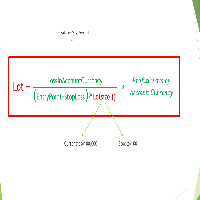
Optimum lot size calculator

Important Note:

Before using it in a real account test it in your demo account.


//+------------------------------------------------------------------+

//|                                             Optimum_Lot_Size.mq5 |

//|                                  Copyright 2023, MetaQuotes Ltd. |

//|                                             https://www.mql5.com |

//+------------------------------------------------------------------+

#property copyright "Copyright 2023, MetaQuotes Ltd."

#property link      "https://www.mql5.com"

#property version   "1.00"

#property script_show_inputs

#include <Trade/Trade.mqh>

#include <Trade/PositionInfo.mqh>


CTrade Trading;

//+------------------------------------------------------------------+

//| Script program start function                                    |

//+------------------------------------------------------------------+


input bool IsBuy=true;

input double StopLoss;

input double TakeProfit;

input double RiskPercent=0.01;

double LotSize; 

void OnStart()

  {   


      double temp_RiskPercent=RiskPercent;

      double Ask=SymbolInfoDouble(Symbol(),SYMBOL_ASK);

      double Bid=SymbolInfoDouble(Symbol(),SYMBOL_BID);


      if(temp_RiskPercent>0.04) temp_RiskPercent=0.04;


      if (IsBuy && StopLoss !=0.0)

      {

         LotSize=OptimumLotSize(Symbol(),Ask,StopLoss,temp_RiskPercent);

         Trading.Buy(LotSize,Symbol(),Ask,StopLoss,TakeProfit);  


      }


      if (!IsBuy && StopLoss !=0.0)

      {

         LotSize=OptimumLotSize(Symbol(),Bid,StopLoss,temp_RiskPercent);

         Trading.Sell(LotSize,Symbol(),Bid,StopLoss,TakeProfit);  


      }


  }


double OptimumLotSize(string symbol,double EntryPoint, double StoppLoss, double RiskPercent)

{

      int            Diigit         =SymbolInfoInteger(symbol,SYMBOL_DIGITS);

      double         OneLotValue    =MathPow(10,Diigit);


      double         ask            =SymbolInfoDouble("GBPUSD",SYMBOL_ASK);


      double         bid            =SymbolInfoDouble(symbol,SYMBOL_BID);


      string         BaseCurrency   =SymbolInfoString(symbol,SYMBOL_CURRENCY_BASE);

      string         ProfitCurency  =SymbolInfoString(symbol,SYMBOL_CURRENCY_PROFIT); 

      string         AccountCurency =AccountInfoString(ACCOUNT_CURRENCY);


      double         AllowedLoss    =RiskPercent*AccountInfoDouble(ACCOUNT_EQUITY);

      double         LossPoint      =MathAbs(EntryPoint-StoppLoss);

      double         Lotsize;


      if (ProfitCurency==AccountCurency) 

         { 

         Lotsize=AllowedLoss/LossPoint; 

         Lotsize=NormalizeDouble(Lotsize/OneLotValue,2);


         return(Lotsize); 

         }


      else if (BaseCurrency==AccountCurency)

         {

         AllowedLoss=ask*AllowedLoss;  //// Allowed loss in Profit currency Example: USDCHF-----> Return allowed loss in CHF

         Lotsize=AllowedLoss/LossPoint; 

         Lotsize=NormalizeDouble(Lotsize/OneLotValue,2); 

         return(Lotsize);

         }


         else

         {

            string TransferCurrency=AccountCurency+ProfitCurency;

            ask=SymbolInfoDouble(TransferCurrency,SYMBOL_ASK);


            if(ask!=0) 

            {

               AllowedLoss=ask*AllowedLoss;  //// Allowed loss in Profit currency Example: USDCHF-----> Return allowed loss in CHF

               Lotsize=AllowedLoss/LossPoint; 

               Lotsize=NormalizeDouble(Lotsize/OneLotValue,2); 

               return(Lotsize);   


            }

            else

            {

               TransferCurrency=ProfitCurency+AccountCurency;

               ask=SymbolInfoDouble(TransferCurrency,SYMBOL_ASK);

               ask=1/ask;

               AllowedLoss=ask*AllowedLoss;  //// Allowed loss in Profit currency Example: USDCHF-----> Return allowed loss in CHF

               Lotsize=AllowedLoss/LossPoint; 

               Lotsize=NormalizeDouble(Lotsize/OneLotValue,2); 

               return(Lotsize);


            }


            if (ProfitCurency=="JPY") 

               { 

               Lotsize=AllowedLoss*1.5/LossPoint; 

               Lotsize=NormalizeDouble(Lotsize/OneLotValue,2);


               return(Lotsize); 

               }


         return Lotsize; 

         }


}
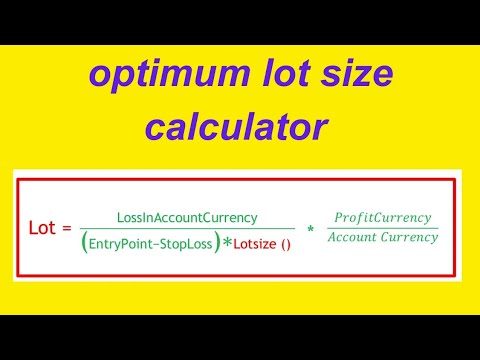

Video Optimum lot size calculator
Önerilen ürünler
Playback of previously saved data from the order book. Key features: Historical data navigation Adjusting the playback speed with the "---" and "+++" buttons, as well as with the mouse, you can by scrolling the wheel over the area of ​​these buttons and between them Turning Price Centering On and Off Time display accurate to thousandths of a second Attention: This product also needs a utility to save data: https://www.mql5.com/en/market/product/71642
FREE
Swift Close Utility for closing Buy and Sell positions in MetaTrader 5. Purpose This utility is designed for batch closing of Buy or Sell positions on the current symbol. Operating Modes Close BUY   — Close all open Buy positions on the current symbol. Close SELL   — Close all open Sell positions on the current symbol. Magic Number Filtering The   MagicNumber   parameter allows the utility to target only positions opened by an Expert Advisor with the specified magic number. If   MagicNumber =
FREE
AutoLotEqualizer – Smart Position Balancing Tool AutoLotEqualizer is a precision trade management utility designed to keep your total BUY and SELL volumes balanced automatically. It detects differences between your open BUY and SELL positions and opens compensating trades — ensuring both sides stay equal in exposure. This helps grid, hedge, and basket systems maintain symmetry and control over total position risk — all while saving you time and manual effort. ️ Key Features Automatic Lot Ba
FREE
XAUUSD Grid EA – Adaptive Risk-Controlled Strategy (MT5) Adaptive grid EA for   XAUUSD , based on ATR volatility and EMA trend filter. Structured risk management with separate basket TP, order limits, and margin checks. Recommended timeframe:   M1 . Overview This Expert Advisor is an adaptive grid trading strategy designed specifically for XAUUSD , with a strong focus on risk control , operational stability , and predictable behavior . The EA follows a non-martingale approach , based on: r
FREE
Phoenix Moving Average Meter
PHOENIX GLOBAL INVESTMENTS LTD
Phoenix Hareketli Ortalama Ölçer (MT5) MetaTrader 5 için profesyonel hareketli ortalama trend analizi ve görselleştirme aracı. Akıllı eğim analizi, bulut genişliği ölçümü ve rejim sınıflandırmasını temiz, gerçek zamanlı bir gösterge panosunda birleştirir. Genel Bakış Phoenix Hareketli Ortalama Ölçer, trend yönünü, gücünü ve olgunluğunu belirlemek için hızlı ve yavaş hareketli ortalamalar arasındaki ilişkiyi analiz eder. Gösterge, mevcut piyasa rejimini gerçek zamanlı olarak sınıflandırmak içi
FREE
Monkey Lite  offers the following array of features: One-click instant order entry (short or long). Track total current orders and total current profit. Instant Close Buy, Close Sell, Close All button. Utility types Risk management, Graphical objects, Panels. Main features Take Profit and Stop Loss by money (not pip). After the price reached the Take Profit threshold, trailing stop 20% of the current profit. After the price reached the Stop Loss threshold, the orders will be closed immediately.
FREE
A simple button to completely close all existing open trades (both Buy and Sell) on the current chart . Warning : Once the button is pressed, all open trades on the current chart will be deleted immediately without any more questions or dialogue. Use this utility very carefully. We recommend that you do a trial of removing open trades on a demo account first, before trying to use this utility on a real account.
FREE
Bundle Risk Manager Pro EA "Risk Manager Pro EA is an all-in-one trading utility that combines advanced risk management tools, ensuring full control over your trading account while protecting your capital and complying with trading regulations. By bundling Limit Positions , Concurrent Risk Capital , and the newly added Limit Profit , this EA is the ultimate solution for disciplined trading and achieving evaluation goals. Key Features: 1. Limit Positions : Enforces a maximum number of open posi
FREE
https://www.mql5.com/en/users/gedeegi/seller    The GEN indicator is a multifunctional technical analysis tool for the MetaTrader 5 (MT5) platform. It is designed to automatically identify and display key Support and Resistance (S&R) levels and detect False Breakout signals, providing clear and visual trading cues directly on your chart. Its primary goal is to help traders identify potential price reversal points and avoid market traps when the price fails to decisively break through key levels
FREE
Order Book, known also as Market Book, market depth, Level 2, - is a dynamically updated table with current volumes of orders to buy and to sell specific financial instument at price levels near Bid and Ask. MetaTrader 5 provides the means for receiving market book from your broker, but in real time only, without access to its history. This expert adviser OrderBook History Playback allows you to playback the market book events on the history using files, created by OrderBook Recorder . The exper
FREE
Value Chart Candlesticks
Flavio Javier Jarabeck
4.69 (13)
The idea of a Value Chart indicator was presented in the very good book I read back in 2020 , " Dynamic Trading Indicators: Winning with Value Charts and Price Action Profile ", from the authors Mark Helweg and David Stendahl. The idea is simple and the result is pure genius: Present candlestick Price analysis in a detrended way! HOW TO READ THIS INDICATOR Look for Overbought and Oversold levels. Of course, you will need to test the settings a lot to find the "correct" one for your approach. It
FREE
这款专为MetaTrader 5设计的EA(Expert Advisor),能够在加载后自动关闭所有图表,并立即从当前图表中自行移除。它适合那些希望快速清理所有图表,并避免手动关闭每个图表的用户。 功能特点: 一次性清理: 加载后立即关闭所有打开的图表。 自动移除: 执行完毕后,EA自动从当前图表中移除,无需手动操作。 快速高效: 适用于快速清理交易环境,特别适合在需要快速重置或结束交易日的情境。 使用说明: 只需将此EA添加到任何一个图表上,它将自动执行关闭所有图表的操作并自行移除。使用前,请确保已保存所有重要的图表数据和设置。 风险提示: 请谨慎使用此EA,以防不小心关闭重要图表。 适用于MetaTrader 5平台。 技术支持: 如有任何技术问题或需求,请联系我以获得帮助。
FREE
Simple Order
Mikhail Nazarenko
5 (2)
Simple order is designed to make placing pending orders as easy and fast as possible. Setting a pending order takes just two steps. 1. Double-click on the price of placing an order, after that a panel with buttons for order names appears. 2. Click on the button of the required order That's it, the pending order is set. If necessary, we adjust the order by dragging, as well as change the sizes of stop loss and take profit. Don't forget to pre-set the size of the stop loss and take profit in the S
FREE
FREE FREE FREE Trade Assistant MT5 – Professional Trading & Risk Management Panel Trade Assistant MT5 is an advanced trading panel designed to help traders execute orders faster, safer, and more professionally . It simplifies manual trading by combining smart order management , precise risk control , and one-click execution , making it ideal for both beginners and advanced traders. This tool does not trade automatically . Instead, it empowers you with full control while applying professional-gra
FREE
Simple script for Buy by Market Execution on all financial instruments. Inputs Volume - default: 0.10 Deviation - default: 10 points Stoploss - default: 50 points Takeprofit - default: 50 points Comment - default: Order by Market Confirm - default: false Inputs Details Type Order Buy Order is preset. Deviation Maximum deviation from quoted price in points. Stoploss & Takeprofit In points value, be careful that this value will be added to minimum stop allowed by the broker. For example if you s
FREE
## Version 2.50 I created this EA with the intention of making it free for everyone to use. It serves as a tool to assist in trading with money management, entering order lots according to a percentage of the account balance, and automatically setting TP/SL based on high/low prices. In Version 2.50, The Auto TP/SL feature adjusts from the Line In (entry point), and Auto price in this version only shifts the entry line to the current price. Input settings: Ato update SL/TP Line >>> In version
FREE
Neuro Edge
Agus Wahyu Pratomo
5 (4)
Please give review to support development of this Expert Advisor NeuroEdge EA is an advanced trend-following scalper designed to adapt dynamically to market behavior. Built with precision algorithms and smart averaging logic, it maintains minimal drawdown while capturing high-probability setups in trending conditions. NeuroEdge continuously analyzes market flow to ensure optimal entries and exits — giving traders the edge they need in volatile markets. ️ Core Features: Adaptive Trend Detection
FREE
This EA is a Trade Assistant designed to manage your manually opened trades automatically. It helps you control risk and maximize profits without staring at the screen all day. Perfect for Gold (XAUUSD) scalpers and day traders. Key Features: Auto Initial Stop Loss (ATR): Automatically places a Stop Loss immediately after you open a trade, based on market volatility (ATR). Manual SL Compatible (Hybrid Mode): You can still set your own Stop Loss manually when entering a trade. The EA will respect
FREE
Manuel Yardımcı TP Bu araç, kârlarınızı korumanıza ve riskinizi azaltmanıza yardımcı olmak için tasarlanmıştır. İşlemleriniz için Stop Loss belirleyecek ve İz Süren Kâr Al (Trailing Stop) yönetimini yapacaktır. Nasıl kullanılır İşlem yaptığınız sembolün grafiğine ekleyin, pozisyonlarınızı kurallarınıza göre yönetecektir. Tüm ayarlar 'point' cinsindendir. Bunları kendi sembolünüze ve stratejinize göre ayarlamanız önemlidir. Varsayılan ayarlar XAUUSD ile çalışabilir. Scalping için daha küçük SL, B
FREE
AvgVolumes
Marco Montemari
5 (1)
This indicator is based on Volumes standard indicator, calculates the average of Volumes based on the last N bars set by users, and if the value of the volume is bigger then a set % respect the average a different color will be used. The indicator is shown in a separate indicator window. This version has now a limitation in setting the % about the threshold. If you are interested to set threshold consider to buy the PRO version ( https://www.mql5.com/en/market/product/35925 ) If you want to use
FREE
The Arbitrage365 EA is a basic script for MetaTrader that implements a triangular arbitrage strategy. It identifies and exploits price discrepancies between EURUSD, GBPUSD, and EURGBP to profit from temporary market mispricing. This EA capitalizes on the law of one price by simultaneously buying and selling currency pairs. Its advantages include speed, accuracy, scalability, consistency, cost-effectiveness, contribution to market liquidity, and portfolio diversification. However, it's a basic E
FREE
The indicator highlights the points that a professional trader sees in ordinary indicators. VisualVol visually displays different volatility indicators on a single scale and a common align. Highlights the excess of volume indicators in color. At the same time, Tick and Real Volume, Actual range, ATR, candle size and return (open-close difference) can be displayed. Thanks to VisualVol, you will see the market periods and the right time for different trading operations. This version is intended f
FREE
Automatically Close Trades at Your Desired Profit Target! Take the guesswork out of trading by automatically closing your positions as soon as they reach your set profit target. Add to any chart-  The Bot will monitor all open trades Key Features:     Automatic Trade Closing:     Set a profit target in USD, and let FinalStrike automatically close the trade when dollar amount is achieved     Multiple Positions Supported:     Whether you have one or multiple trades open across different pairs,
FREE
Second Level Candles And Alligator Indicators 每12秒产生一个K线,而且自带Alligator指标,对超短线选手交易非常有帮助。程序启动时可能不成功,是因为MT5 MqlTick 数据加载少的原因。可以通过修改显示的数据参数避免,比如display=100,程序正常之后再将参数调大 display=300 。如果数据不正常,也可以采用重新加载的方式解决。 如果您对这个指标有任何建议,请联系作者。  Second Level Candles And Alligator Indicators  produced a candle per 12 seconds,include Alligator, it's helpful to Short-Term Trading。You'd better reload the indicator every start MT5 or change display parameter to reslove data bug. Please attach author when  you had some su
FREE
QuickClose EA: Manage Trades Quickly and Efficiently QuickClose EA is a tool designed to help traders manage orders on the current chart easily and quickly. It provides full control over your trading status with clear feedback. Key Features of QuickClose EA: User-Friendly Control Panel: Clearly displays essential information such as the current symbol name, total profit/loss for Buy and Sell positions, and open lot sizes, giving you an immediate overview of your trading status. Precise Lot Size
FREE
JVH Trading Information Panel – Professional Account Dashboard (MT5) The JVH Trading Information Panel is a clean, accurate, and professional account monitoring dashboard for MetaTrader 5. It gives traders full control and insight into account performance, risk, drawdown, and trading statistics — all in real time , directly on the chart. Designed for manual traders, funded traders, scalpers, and algorithmic traders , this panel focuses on clarity, correctness, and stability . What This Indic
FREE
Exp Assistant 5
Vladislav Andruschenko
4.77 (122)
Otomatik Ayarlama, zararı durdurma, kar alma, takip eden durdurma, başabaş seviyeleri, zararı   sanal olarak   durdurma ve kar almayı etkinleştirme. Exp Assistant,   pozisyonlarınızın bakımını organize etmenize yardımcı olacaktır. Uzman Danışman olarak adlandırılan bu program,   Gerçek veya Sanal'ı   otomatik olarak ayarlamak için tasarlanmıştır.       İşlem yaparken pozisyonlarınız için   Zararı Durdur ve Kar Al   seviyeleri. Expert Advisor'ın tüm işlemlerini grafik üzerinde yer alan kontrol pa
FREE
CloseAllPosition
Konstantin Chernov
4 (2)
A script for closing positions If you need to quickly close several positions, this script will make all the routine for you! The script does not have any input parameters. Allow AutoTrading before running the script. Usage: Run the script on a chart. If you need to specify the maximal deviation and the number of attempts to close positions, use the script with input parameters https://www.mql5.com/en/market/product/625 You can download MetaTrader 4 version here: https://www.mql5.com/en/market/
FREE
Brent Trend Bot
Maksim Kononenko
4.46 (13)
The Brent Trend Bot special feature is simple basic tools and logic of operation. There are no many strategies and dozens of settings, like other EAs, it works according to one algorithm. The operating principle is a trend-following strategy with an attempt to get the maximum profitability adjusted for risk. Therefore, it can be recommended for beginners. Its strong point is the principle of closing transactions. Its goal is not to chase profits, but to minimize the number of unprofitable trans
FREE
Bollinger Bands TP Guardian Bu yardımcı Expert Advisor, açık emirlerin Kâr Al (TP) seviyesini değiştirmek için Bollinger Bantlarını kullanır, işlem yönetiminizi geliştirir ve manuel işlem gerçekleştirildikten sonra eller serbest kalmanızı sağlar. Ana Özellikler Otomatik TP Ayarı: EA, açık emirlerin TP'sini otomatik olarak ayarlar. Bollinger Bantları Entegrasyonu: TP seviyeleri, Üst, Orta veya Alt Bollinger Bandı kullanılarak ayarlanır. Özelleştirilebilir Ayarlar: Kullanıcılar Bollinger Bantları
FREE
Bu ürünün alıcıları ayrıca şunları da satın alıyor
Trade Assistant MT5
Evgeniy Kravchenko
4.42 (207)
It helps to calculate the risk per trade, the easy installation of a new order, order management with partial closing functions, trailing stop of 7 types and other useful functions. Additional materials and instructions Installation instructions - Application instructions - Trial version of the application for a demo account Line function -   shows on the chart the Opening line, Stop Loss, Take Profit. With this function it is easy to set a new order and see its additional characteristics bef
Trade Manager EA’ye hoş geldiniz! Ticaretin daha sezgisel, hassas ve verimli hale gelmesi için tasarlanmış nihai risk yönetim aracı ile tanışın. Bu sadece bir emir verme aracı değil; ticaret planlaması, pozisyon yönetimi ve risk kontrolü için kapsamlı bir çözüm. İster yeni başlayan bir yatırımcı olun, ister deneyimli bir trader ya da hızlı emir gerektiren bir scalper, Trade Manager EA ihtiyaçlarınıza uyum sağlar ve forex, endeksler, emtialar ve kripto paralar dahil tüm piyasalarda esneklik sunar
TradePanel MT5
Alfiya Fazylova
4.86 (148)
Ticaret Paneli çok işlevli bir ticaret asistanıdır. Uygulama, manuel ticaret için 50'den fazla ticaret işlevi içerir ve çoğu ticaret işlemini otomatikleştirmenize olanak tanır. Dikkat, uygulama strateji test cihazında çalışmıyor. Satın almadan önce demo sürümünü bir demo hesabında test edebilirsiniz. Demo sürümü burada . Talimatların tamamı buraya . Ticaret. Tek tıklamayla alım satım işlemlerini gerçekleştirmenizi sağlar: Otomatik risk hesaplaması ile bekleyen emir ve pozisyonları açın. Tek tıkl
Local Trade Copier EA MT5
Juvenille Emperor Limited
4.96 (124)
Local Trade Copier EA MT5   ile olağanüstü hızlı işlem kopyalama deneyimi yaşayın. Kolay 1 dakikalık kurulumuyla bu işlem kopyalayıcısı, aynı Windows bilgisayarda veya Windows VPS'te birden fazla MetaTrader terminali arasında işlemleri kopyalamanıza olanak tanır ve 0.5 saniyenin altındaki şimşek hızında kopyalama hızları sunar. Başlangıç seviyesinde veya profesyonel bir tüccar olsanız da,   Local Trade Copier EA MT5 , spesifik ihtiyaçlarınıza göre özelleştirmek için geniş bir seçenek yelpazesi s
Beta Sürümü Telegram to MT5 Signal Trader resmi alfa sürümüne neredeyse hazır. Bazı özellikler hâlâ geliştirilmekte olup küçük hatalarla karşılaşabilirsiniz. Sorun yaşarsanız lütfen bildirin, geri bildiriminiz yazılımın herkes için gelişmesine yardımcı olur. Fiyat 20 satıştan sonra artacaktır. Kalan $90 kopya: 2/20 . Telegram to MT5 Signal Trader , Telegram kanallarından veya gruplarından gelen işlem sinyallerini otomatik olarak MetaTrader 5 hesabınıza kopyalayan güçlü bir araçtır. Herkese açı
Tired of complex order placement and manual calculations? Trade Dashboard is your solution. With its user-friendly interface, placing orders becomes effortless, by a single click, you can open trades, set stop loss and take profit levels, manage trade lot size, and calculate risk to reward ratios, allowing you to only focus on your strategy. Say goodbye to manual calculations and streamline your trading experience with Trade Dashboard. Download  Demo Version  right now. You can find  Details of
Trade copier MT5
Alfiya Fazylova
4.61 (36)
Trade Copier, ticaret hesapları arasındaki işlemleri kopyalamak ve senkronize etmek için tasarlanmış profesyonel bir yardımcı programdır. Kopyalama, tedarikçinin hesabından/terminalinden alıcının aynı bilgisayarda veya vps'de kurulu olan hesabına/terminaline gerçekleşir. Satın almadan önce demo sürümünü bir demo hesabında test edebilirsiniz. Demo versiyonu burada . Tüm talimatlar burada . Ana işlevler ve avantajlar: Emirlerin kopyalanmasını destekler: МТ5> МТ5, МТ4> МТ5, МТ5> МТ4. Emirlerin kopy
Farmed Hedge Yield Farming - Professional Pair Trading Dashboard (Manual - Hybrid - Semi/Automated EA) VERSION 3 - WILD HARVEST UPDATE Trading Approach: - Manual Trading: Primary focus - Auto Pilot: Optional supplementary feature - Full Automation: Not the main purpose Recommended Timeframe: H1-H4 DEMO VERSION Download the free demo to test functionality. Use Strategy Tester with Visual Mode to see how it works. VERIFIED TRADING RESULTS - Farmed Hedge Yield Axi Copy: https://www.mql5.com/en/si
HINN MAGIC ENTRY – the ultimate tool for entry and position management! Place orders by selecting a level directly on the chart! full description   ::  demo-version Key features: - Market, limit, and pending orders - Automatic lot size calculation - Automatic spread and commission accounting - Unlimited partitial take-profits  - Breakeven and trailing stop-loss and take-profit  functions - Invalidation leves - Intuitive, adaptive, and customizable interface - Works with any assets and account t
Copy Cat More Trade Copier MT5 (Kopyalayıcı Kedi MT5) , günümüzün ticaret zorluklarına yönelik tasarlanmış yerel bir ticaret kopyalayıcısı ve eksiksiz risk yönetimi ve yürütme çerçevesidir. Prop firması zorluklarından kişisel portföy yönetimine kadar, sağlam yürütme, sermaye koruması, esnek yapılandırma ve gelişmiş ticaret işleme kombinasyonu ile her duruma uyum sağlar. Kopyalayıcı hem Master (gönderici) hem de Slave (alıcı) modunda çalışır, piyasa ve bekleyen emirlerin, ticaret değişikliklerini
Exp COPYLOT CLIENT for MT5
Vladislav Andruschenko
3.82 (34)
MT5 için ticari kopyalayıcı, МetaТrader 5 platformu için bir ticari kopyalayıcıdır   . arasındaki   forex işlemlerini kopyalar.       COPYLOT MT5 sürümü için   herhangi bir hesap   MT5   -   MT5, MT4   -   MT5 (veya COPYLOT MT4 sürümü için   MT4 -   MT4 MT5   -  MT4) Güvenilir fotokopi makinesi! MT4 sürümü Tam tanım   +DEMO +PDF Nasıl alınır Nasıl kurulur     Günlük Dosyaları nasıl alınır?     Nasıl Test Edilir ve Optimize Edilir     Expforex'in tüm ürünleri Ayrıca МТ4 terminali   (МТ4   -  
Telegram'dan MT5'e:   Nihai Sinyal Kopyalama Çözümü Telegram'dan MT5'e işlemlerinizi basitleştirin, DLL'lere ihtiyaç duymadan işlem sinyallerini doğrudan Telegram kanallarından ve sohbetlerinden MetaTrader 5 platformunuza kopyalayan modern araç. Bu güçlü çözüm hassas sinyal yürütme, kapsamlı özelleştirme seçenekleri sağlar, zamandan tasarruf sağlar ve verimliliğinizi artırır. [ Instructions and DEMO ] Temel Özellikler Doğrudan Telegram API Entegrasyonu Telefon numarası ve güvenli kod ile kimlik
Equity Protect Pro: Endişesiz İşlem İçin Kapsamlı Hesap Koruma Uzmanınız Hesap koruması, öz sermaye koruması, portföy koruması, çoklu strateji koruması, kar koruması, kar toplama, işlem güvenliği, risk kontrol programları, otomatik risk kontrolü, otomatik tasfiye, koşullu tasfiye, planlı tasfiye, dinamik tasfiye, iz süren stop loss, tek tıklamayla kapatma, tek tıklamayla tasfiye ve tek tıklamayla geri yükleme gibi özellikler arıyorsanız, Equity Protect Pro ihtiyacınız olan programdır. Kurulumu
Ultimate Extractor - Professional Trading Analytics for MT5 *****this is the local HTML version of Ultimate Extractor. Check out Ultimate Extractor Cloud on mql5 for the Cloud version****** Ultimate Extractor transforms your MetaTrader 5 trading history into actionable insights with comprehensive analytics, interactive charts, and real-time performance tracking. What It Does Automatically analyzes your MT5 trading history across all Expert Advisors and generates detailed HTML reports with inte
Trade Manager DashPlus
Henry Lyubomir Wallace
5 (13)
DashPlus , MetaTrader 5 platformunda işlem verimliliğinizi ve etkinliğinizi artırmak için tasarlanmış gelişmiş bir işlem yönetim aracıdır. Risk hesaplama, emir yönetimi, gelişmiş ızgara sistemleri, grafik tabanlı araçlar ve performans analitiği gibi kapsamlı bir özellik yelpazesi sunar. Temel Özellikler 1. Kurtarma Izgarası Olumsuz piyasa koşullarında işlemleri yönetmek için ortalama alma ve esnek bir ızgara sistemi uygular. İşlem kurtarma çabalarını optimize etmek için stratejik giriş ve çıkış
YuClusters
Yury Kulikov
4.93 (43)
Attention: You can view the program operation in the free version  YuClusters DEMO .  YuClusters is a professional market analysis system. The trader has unique opportunities to analyze the flow of orders, trade volumes, price movements using various charts, profiles, indicators, and graphical objects. YuClusters operates on data based on Time&Sales or ticks information, depending on what is available in the quotes of a financial instrument. YuClusters allows you to build graphs by combining da
MT5 to Telegram Signal Provider , hesabınızı bir sinyal sağlayıcı haline getirerek belirtilen sinyalleri Telegram'ın sohbetine, kanalına veya grubuna göndermeyi sağlayan kullanımı kolay, tamamen özelleştirilebilir bir araçtır. Rakip ürünlerin çoğunun aksine, DLL içe aktarması yapmaz. [ Demo ] [ Kılavuz ] [ MT4 Versiyonu ] [ Discord Versiyonu ] [ Telegram Kanalı ]  New: [ Telegram To MT5 ] Kurulum Adım adım bir kullanıcı kılavuzu mevcuttur. Telegram API'si hakkında bilgi gerekmemektedir; ihtiyac
The product will copy all telegram signal to MT5 ( which you are member) , also it can work as remote copier.  Easy to set up, copy order instant, can work with almost signal formats, image signal,  s upport to translate other language to English Work with all type of channel or group, even channel have "Restrict Saving Content", work with  multi channel, multi MT5 Work as remote copier: with signal have ticket number, it will copy exactly via ticket number. Support to backtest signal. How to s
Riskinizi otomatik olarak hesaplarken işlemlere hızlı bir şekilde girip çıkmanıza yardımcı olacak Ticaret Yöneticisi. Aşırı Ticaret, İntikam Ticareti ve Duygusal Ticaretten korunmanıza yardımcı olacak özellikler içerir. İşlemler otomatik olarak yönetilebilir ve hesap performans ölçümleri bir grafikte görselleştirilebilir. Bu özellikler, bu paneli tüm manuel yatırımcılar için ideal kılar ve MetaTrader 5 platformunun geliştirilmesine yardımcı olur. Çoklu Dil desteği. MT4 Sürümü  |  Kullanım Kılavu
Seconds Chart — MetaTrader 5 için saniye bazlı grafikler oluşturmanıza olanak sağlayan eşsiz bir araçtır. Seconds Chart sayesinde saniye cinsinden zaman dilimleriyle grafik oluşturabilir, standart dakika veya saatlik grafiklerde mümkün olmayan esneklik ve analiz hassasiyetine ulaşabilirsiniz. Örneğin, S15 zaman dilimi 15 saniyelik mum çubuklarını ifade eder. Desteklenen özel sembollerle herhangi bir gösterge ve danışman kullanabilirsiniz. Onlarla çalışmak, standart grafiklerde işlem yapmak kadar
Professional Footprint Chart EA - Complete Order Flow Trading Suite DEMO USERS - PLEASE SELECT EVERY TICK WHEN TESTING  See What Market Makers See! The most comprehensive order flow analysis tool for MetaTrader 5. Get institutional-grade volume analysis, real-time DOM, Time & Sales, and intelligent trade signals - all in one powerful EA. 6 Professional Panels - Complete order flow analysis suite Real-Time Tick Data - Live bid/ask volume at every price level Automatic Imbalance Detection - Spot
DrawDown Limiter
Haidar Lionel Haj Ali
5 (20)
Drawdown Limiter EA You are in the right place if you were searching for Drawdown control, Drawdown limiter, Balance protection, Equity Protection or Daily Drawdown Limit related to Prop Firm, FTMO, or Funded account trading, or if you want to protect your trading account. Have you suffered from controlling your drawdown when trading funded accounts? This EA is meant for you. Prop firms usually set a rule called “Trader Daily Drawdown”, and if it is not respected, you are disqualified.  I am an
Smart Stop Manager – Profesyonel hassasiyetle otomatik stop-loss yönetimi Genel Bakış Smart Stop Manager, Smart Stop ürün serisinin yürütme katmanıdır. Birden fazla açık pozisyonda yapılandırılmış, güvenilir ve tamamen otomatik stop-loss yönetimi isteyen trader’lar için tasarlanmıştır. Tüm açık işlemleri sürekli izler, Smart Stop piyasa yapısı mantığını kullanarak en uygun stop seviyesini hesaplar ve stopları net ve şeffaf kurallarla otomatik olarak günceller. İster tek bir varlıkla işlem yapı
Custom Alerts AIO: Tüm Piyasaları Takip Et — Hiçbir Kurulum Gerekmez Genel Bakış Custom Alerts AIO , hiçbir ek yapılandırma gerektirmeyen, kullanıma hazır bir piyasa izleme çözümüdür. Gerekli tüm göstergeler — FX Power, FX Volume, FX Dynamic, FX Levels, IX Power — iç yapısına gömülüdür. Grafik görüntülemesi olmadan çalışır, bu da onu sessiz ve verimli bir şekilde gerçek zamanlı alarm üretimi için mükemmel hale getirir. Brokerınızın sunduğu tüm varlık sınıflarını destekler: Forex, Metaller, End
Grid Manual MT5
Alfiya Fazylova
4.9 (20)
Grid Manual, sipariş ızgarasıyla çalışmak için kullanılan bir ticaret yardımcı programıdır. Yardımcı program evrenseldir, esnek ayarlara ve sezgisel bir arayüze sahiptir. Sadece kayıpların ortalaması yönünde değil, aynı zamanda kazanç artışı yönünde de bir emir ızgarası ile çalışır. Tüccarın bir emir ızgarası oluşturmasına ve eşlik etmesine gerek yoktur, bu yardımcı programı yapacaktır. Emri açmanız yeterlidir ve Grid manual otomatik olarak ona bir emir ızgarası oluşturacak ve kapanana kadar ona
MT4 için Expert Advisor Risk Manager çok önemli ve bence her yatırımcı için gerekli bir program. Bu Uzman Danışman ile ticaret hesabınızdaki riski kontrol edebileceksiniz. Risk ve kar kontrolü hem parasal hem de yüzdesel olarak yapılabilir. [Instruction for Risk Manager parameters] Danışman işlevleri Bu risk yöneticisi, riskleri kontrol etmenize yardımcı olacaktır: - bir anlaşma için - günlük - bir hafta için - Bir ay için Ayrıca kontrol edebilirsiniz 1) Ticaret yaparken izin verilen ma
MT5 için Dynamic Fibonacci Grid Dashboard’un en son sürümünü tanıtıyoruz. Artık birçok yeni özellikle donatılmış olan bu yeni gösterge paneli, ticaret deneyiminizi tamamen değiştirir ve piyasayı ile fiyat hareketlerini tamamen farklı bir bakış açısıyla görmenizi sağlar. Birden fazla zaman dilimi ve sembolün eşzamanlı analizleriyle yeni fırsatları keşfedin. Manuel işlem ve pozisyon yönetimi için kullanıcı dostu arayüz ve önceden tanımlanmış otomatik stratejileri uygulama yeteneğinin genişletilmi
Entry In The Zone and SMC Multi Timeframe is a real-time market analysis tool developed based on Smart Money Concepts (SMC). It is designed to analyze market structure, price direction, reversal points, and key zones across multiple timeframes in a systematic way. The system displays Points of Interest (POI) and real-time No Repaint signals, with instant alerts when price reaches key zones or when signals occur within those zones. It functions as both an Indicator and a Signal System (2-in-1), c
Smart Stop Scanner – Gerçek piyasa yapısına dayalı çoklu varlık stop-loss analizi Genel Bakış Smart Stop Scanner, birden fazla piyasadaki stop-loss seviyelerini profesyonel bir şekilde takip etmek için tasarlanmıştır. Sistem, gerçek piyasa yapısına dayanan breakout’ları, daha yüksek zirveleri ve daha düşük dipleri otomatik olarak algılar ve en önemli stop bölgelerini tespit eder. Tüm bilgiler, yüksek çözünürlüklü ekranlarla uyumlu (DPI-aware) net ve düzenli bir panelde sunulur. Forex, Altın, E
Comprehensive on chart trade panel with the unique ability to be controllable from mobile as well. Plus has a library of downloadable configuration, e.g. exit rules, extra panel buttons, pending order setup and more. Please see our product video. Works with all symbols not just currency pairs. Features On chart panel plus controllable from free app for Windows, iPhone and Android Built-in script engine with library of downloadable configuration, e.g. add 'Close All Trades in Profit' button, exit
Yazarın diğer ürünleri
#property copyright "Copyright 2023, MetaQuotes Ltd." #property link      " https://www.mql5.com " #property version   "1.00" #include <Most_Common_Classes.mqh>    // Define parameters for the moving averages    input int fastMAPeriod = 10;  // Fast MA period (e.g., 10 for scalping)    input int slowMAPeriod = 20;  // Slow MA period (e.g., 20 for scalping)    input ENUM_MA_METHOD maMethod = MODE_SMA;    double lotSize;    int maShift_current = 0;     int maShift_Previous = 1;        bool enou
FREE
//+------------------------------------------------------------------+ //|                                                   RSICascade.mq5 | //|                                  Copyright 2024, MetaQuotes Ltd. | //|                                              https://www.mql5.com | //+------------------------------------------------------------------+ #property copyright "Copyright 2024, MetaQuotes Ltd." #property link      " https://www.mql5.com " #property version   "1.00" #include <Most_Co
FREE
This Expert advisor does not do any trade, but it scans the whole symbols in your market watch and scan each shares one by one in different timeframes and at the end it shows you which symbol in which timeframe has a powerful engulfing candle. Furthermore, you can define a MA period and a high and low RSI limit, and it shows you which symbols in which timeframe is going to cross the adjusted moving average, and which symbol in which timeframe is going to cross high or low limit of the RSI.  The
FREE
Filtrele:
İnceleme yok
İncelemeye yanıt