Ultima Hybrid Gold V2
- Experts
- Version: 2.0
- Activations: 10

"The Ultimate Institutional Hybrid Trading System designed specifically for Gold (XAUUSD)."
📌 1. INTRODUCTION & STRATEGY OVERVIEW
Ultima Hybrid Gold v2 is an advanced, high-performance Expert Advisor built exclusively for Gold (XAUUSD) on the M5 timeframe. This EA combines Institutional Smart Money Concepts (SMC) — such as Order Blocks (OB), Premium/Discount Arrays, and Liquidity Sweeps from H1/H4 timeframes — with multi-layered algorithmic risk management.
Unlike standard grid or martingale bots that expose accounts to unlimited risk, Ultima Hybrid Gold v2 utilizes a Smart Hedge Recovery & Dynamic Basket Closing system, supported by automated drawdown control and a high-impact news filter.
⚙️ 2. KEY FEATURES & TRADING MECHANICS
-
Multi-Strategy Entry Modes: Supports multiple signal filters including EMA Cross + RSI, Dynamic ATR Volatility Filter, Pure Candle Engulfing, and Stochastic Pullback, plus a high-accuracy Big Signal (H1 Sniper) module.
-
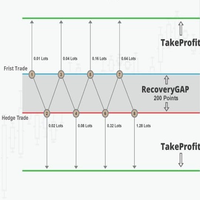
Smart Hedge Recovery: When the market moves against the initial entry, the EA deploys controlled hedging layers with a dynamic distance grid and fail-safe multipliers.
-
Dynamic Basket TP & Floating Profit Timer: Automatically locks in profits when the cumulative basket target is reached, equipped with a time-based safety cutoff during prolonged floating profits.
-
Advanced Drawdown Protection (Cantas DD): Features an automated or manual equity protection mode (1-to-1, Many-to-1, and 1-to-Many closing logic) to cut heavy losses safely.
-
Built-in High-Impact News Filter: Automatically pauses trading during high-impact USD & EUR news events via real-time XML data feeds (ForexFactory).
-
Live Performance Visual Dashboard: Real-time on-chart telemetry displaying spread, margin level, active layer count, drawdown status, and performance counters.
📊 3. RECOMMENDED SETTINGS & REQUIREMENTS
To achieve optimal performance, please configure your terminal and inputs according to these specifications:
-
Currency Pair: XAUUSD (Gold) only.
-
Timeframe: M5 (5-Minute chart).
-
Execution Type: ECN / Raw Spread account with low latency.
-
Minimum Capital Requirement:
-
Cent Account: Minimum 10 USD (1,000 Cents).
-
Standard Account: Minimum 1,000 USD .
-
-
Broker Leverage: Recommended 1:500 or higher.
-
Important Terminal Setting:
-
Go to Tools -> Options -> Expert Advisors -> Check "Allow WebRequest for listed URL" and add: [https://nfs.forexfactory.com](https://nfs.forexfactory.com) .
-
🛠️ 4. FULL INPUT PARAMETER GUIDE (USER MANUAL)
1. Main Settings
-
InmagicNumber (Default: 8826055 ): Unique identification number for the EA to recognize its own orders.
-
InpFixedLot (Default: 0.01 ): Base lot size for the first order or compounding reference.
-
UseCompounding (Default: true ): Set to true to scale lot sizes automatically based on account balance growth.
-
InpBaseBalance (Default: 1000.0 ): Baseline balance for compounding calculations (restricted to 50% - 100% of current balance).
-
InpMaxLotSize (Default: 1.00 ): Maximum allowed initial lot size.
-
InpMaxHedgeLotSize (Default: 30.00 ): Ceiling limit for recovery/hedge lot sizes to manage margin safety.
2. Distance Settings
-
InpManualSL_Point (Default: 10000.0 ): Stop Loss distance (in points) for the first order.
-
InpRewardRatio (Default: 2.0 ): Take Profit reward ratio relative to Stop Loss ( SL * RewardRatio ).
-
InpMaxSpreadAllowed (Default: 35.0 ): Maximum allowable spread in points. Trading pauses if the spread exceeds this limit.
3. First Order Signals
-
InpFirstOrderSignal (Default: SIGNAL_BODY_FILTER ): Core entry algorithm selection ( SIGNAL_ORIG , SIGNAL_BODY_FILTER , SIGNAL_TWO_CANDLE , or SIGNAL_STOCHASTIC ).
-
InpSlowEMA / InpFastEMA (Default: 200 / 20 ): Period settings for trend and entry moving average filters.
-
InpRSIPeriod (Default: 14 ): Period for the Relative Strength Index filter.
-
InpStochK / InpStochD / InpStochSlowing (Default: 14 / 3 / 3 ): Stochastic oscillator configuration parameters.
4. Hedge Recovery & Grid Settings
-
InpHedgeFilterMode (Default: FILTER_KORIDOR_M5 ): Filtering mode for triggering hedge layers ( FILTER_NONE , FILTER_KORIDOR_M5 , FILTER_KORIDOR_M1 , or FILTER_PATTERN_M5_M15 ).
-
InpMaxHedgeLayers (Default: 15 ): Maximum number of hedge layers allowed per cycle.
-
InpHedgeDistance (Default: 1500.0 ): Base distance (in points) before deploying the next hedge layer.
-
UseDynamicHedgeDistance (Default: true ): Set to true to make the hedge grid tighter as layers accumulate.
-
InpFailSafeMultiplier (Default: 3.0 ): Distance multiplier for emergency recovery entries during high-speed market spikes.
-
InpTargetProfitUSD (Default: 15.0 ): Cumulative profit target (in USD) to close all positions ( Basket Close ).
-
InpHedgeDistancePercent (Default: 85.0 ): Percentage target for basket lot recovery formula scaling.
-
InpHedgeProfitMaxTimeMinutes (Default: 15 ): Maximum time limit (in minutes) a floating profit hedge basket is held before forced closure.
5. Trailing Stop Settings
-
InpTrailingIncrement (Default: 400.0 ): Base step distance for trailing stop adjustments.
-
InpTrailingStart / InpTrailingStep (Default: 500.0 / 250.0 ): Activation distance and step size for normal trailing.
-
InpUseAltTrailingStep / InpMomTrailingStart / InpMomTrailingStep (Default: true / 1000.0 / 500.0 ): Configuration for Momentum Trailing mode.
-
InpUseAltBigSigTrailingStep / InpBigSigTrailingStart / InpBigSigTrailingStep (Default: true / 2500.0 / 1000.0 ): Configuration for Big Signal Trailing mode.
6. Equity Protection & Drawdown Cutting
-
InpModCantasDD (Default: MOD_MANUAL ): Drawdown management mode ( MOD_AUTOMATIK for margin-based or MOD_MANUAL for fixed percentage).
-
InpMaxDrawdownPercent (Default: 40.0 ): Manual drawdown percentage limit (used when MOD_MANUAL is selected).
-
InpCantasTolerance (Default: -3.0 ): Net tolerance value (in USD) permitted during partial basket order cutting.
-
InpTargetMultiplier (Default: 1.5 ): Multiplier factor to adjust lot contraction distance during protection phases.
7. News Filter Controls
-
EnableNewsFilter (Default: false ): Set to true to activate the automated news filter.
-
FilterHighImpact (Default: false ): Restricts trading only during high-impact news events (Red Folders).
-
MinsBeforeNews / MinsAfterNews (Default: 30 / 30 ): Time window (in minutes) to pause new position openings before and after news releases.
8. Time & Visual Controls
-
TradeMonday to TradeFriday (Default: true ): Active trading days of the week.
-
InpStartHour / InpEndHour (Default: 1 / 23 ): Daily operating hours limit based on server time.
-
InpMaxSlippage (Default: 50 ): Maximum allowable price slippage in points.
-
InpFontSize / InpTextColor / InpValColor (Default: 10 / clrOrange / clrAqua ): Text size and color settings for the on-chart dashboard.
🚀 5. INSTALLATION & SETUP GUIDE
-
Download & Compile: Download the EA via MQL5 Market and attach it to your XAUUSD M5 chart.
-
Enable Permissions: Ensure "Allow DLL imports" and "Allow Live Trading" are checked in the EA settings pop-up, along with the WebRequest URL for ForexFactory.
-
Monitor: Built-in safety checks will automatically verify your account type, balance, and symbol. Once validated, the dashboard will display SCANNING... WAITING SIGNAL .
Disclaimer: Past performance from backtests does not guarantee future results. Always test your settings on a Demo account before deploying real capital.