
Scale Enforcer
- Indicateurs
- Version: 1.40
- Mise à jour: 5 octobre 2026

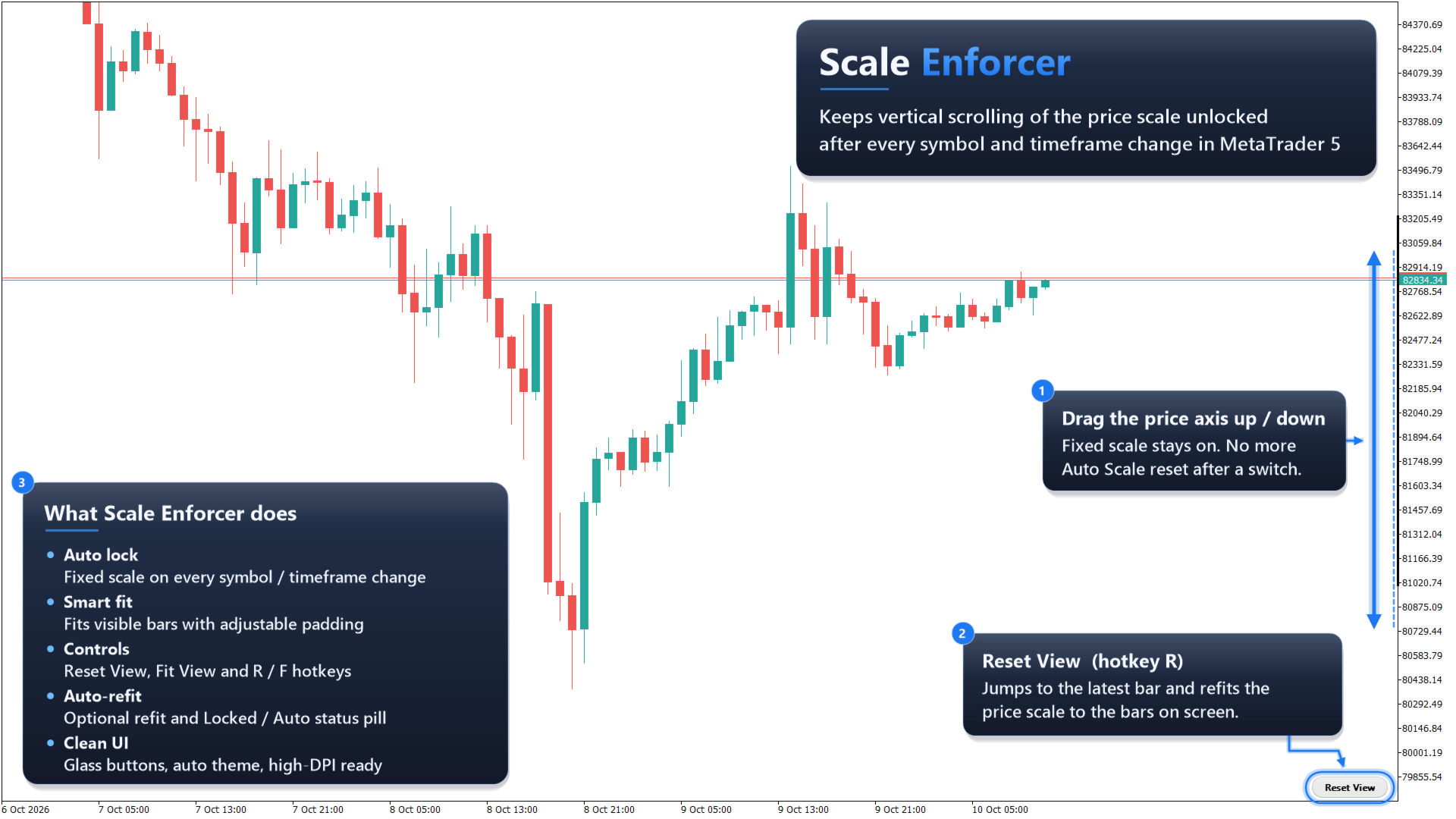
Scale Enforcer is a chart utility for MetaTrader 5. It addresses a common platform behavior: every time you change the symbol or timeframe, MT5 switches the chart back to automatic price scaling, and vertical dragging of the price axis stops working until you re-enable the fixed scale manually.
The indicator switches the chart to a fixed scale automatically and fits it to the bars on screen, so the chart can be dragged up and down at once after any symbol or timeframe change. When the indicator is removed, the standard MT5 auto scale is restored.
Scale Enforcer does not open, modify or close trades, does not draw signals and does not use DLLs. It only manages the chart's price scale.
Main features
- Fixed price scale applied automatically on load and after every symbol or timeframe change
- The fit uses only the bars currently visible on the chart, with adjustable top and bottom padding
- Reset View button: scrolls the chart to the latest bar and refits the price scale
- Optional Fit View button: refits the price scale to the visible bars without scrolling
- Keyboard hotkeys for both actions (default R and F, configurable, ignored while Ctrl or Alt is held)
- Optional inclusion of the current Bid and Ask prices in the fit when the latest bar is visible
- Optional auto-refit when price moves outside the visible range (only while the latest bar is on screen, so viewing history is not interrupted)
- Optional status indicator showing whether the scale is Locked or Auto
- Rounded semi-transparent buttons that follow the chart color scheme automatically, with hover and click feedback
- Placement in any chart corner, adjustable sizes and fonts, and scaling for high-DPI screens
- Only one copy runs per chart to avoid conflicting scale settings
- Works on any symbol and timeframe
How to use
1. Attach Scale Enforcer to a chart.
2. Drag the price axis vertically as needed. The scale stays unlocked when you switch symbol or timeframe.
3. Press Reset View (or the hotkey) to return to the latest bar with a fresh fit.
4. Press Fit View (or the hotkey) to refit the bars currently on screen.
5. Remove the indicator to return the chart to the standard MT5 auto scale.
Input parameters
Scaling
- Top padding (% of visible range): space added above the highest visible price
- Bottom padding (% of visible range): space added below the lowest visible price
- Padding when visible range is flat (points): used when the visible bars have no price range
- Include Bid/Ask in fit: keeps the current price lines inside the view when the latest bar is visible
- Auto-refit when price leaves the view: refits automatically when a new price falls outside the current scale
Controls
- Show Fit View button
- Hotkey: Reset View (A-Z or 0-9, empty to disable)
- Hotkey: Fit View (A-Z or 0-9, empty to disable)
- Show scale status label
Layout
- Corner, horizontal gap and vertical gap from the chart edge
- Button width, button height
- Font size, font
- Scale sizes for high-DPI screens
Style
- Corner radius
- Glass opacity (%)
- Highlight buttons on mouse hover
Colors
- Match chart theme automatically
- Button background, text and border colors (used when automatic colors are off)
- Accent color for hover and click feedback
- Status dot colors for Locked and Auto states
Notes
- While the fixed scale is active, the chart does not rescale by itself as new prices arrive unless auto-refit is enabled. Use Reset View or Fit View to refit at any time.
- Changing chart colors or the color scheme updates the button colors automatically when "Match chart theme automatically" is enabled.













































just tool is all i want, thank you so much