Why your London session is one hour off in March: broker time, daylight saving and a small MQL5 library

If your EA or indicator uses session hours, it probably works in server time: "London opens at 10:00", "trade the range from 03:00 to 10:00". That is fine for most of the year. For about four weeks a year it is wrong by one hour, and nothing in the terminal warns you.
Where the hour comes from
Session hours belong to a city. London opens at 08:00 London time and New York at 09:30 New York time. Your chart shows the broker's server time, which is UTC plus an offset. Most MT5 brokers use GMT+2 in winter and GMT+3 in summer, and they switch on the US dates, so that the New York close at 17:00 is always 00:00 on the server.
The problem is that the US and Europe change their clocks on different Sundays:
- US: second Sunday of March to first Sunday of November.
- EU and UK: last Sunday of March to last Sunday of October.
In 2026 that left two gaps: 8–29 March and 25 October–1 November. In those weeks the server has already moved, London has not, and the London open lands at 11:00 server time instead of 10:00.
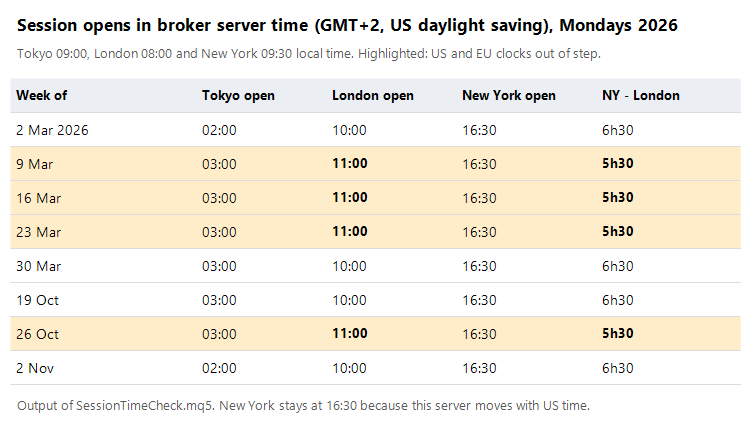
The table is the output of the check script below, for a GMT+2 server on US daylight saving. New York always opens at 16:30, because the server moves together with New York. Tokyo has no daylight saving, so it moves by one hour twice a year in server time. London is the one that jumps for a few weeks.
What it looks like on a chart
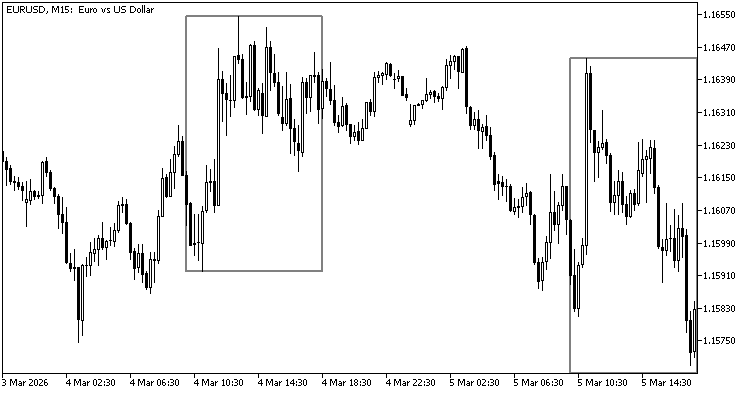
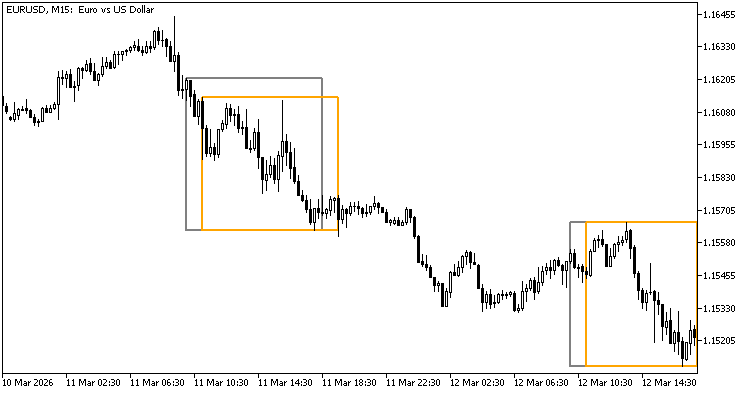
Both charts are EURUSD M15. The orange box is the London session (08:00–16:30 London time), converted day by day. The grey box uses fixed server hours, 10:00–18:30.
Normal week (4–5 March 2026): the boxes are the same.
Gap week (11–12 March 2026): the fixed box starts an hour before London opens and stops an hour before London closes. Any range, breakout level or time filter built on it is measured over the wrong hour.
The model I use
Server time = UTC + winter offset + 1 hour while the server is in its daylight-saving period. That needs two settings per broker: the winter offset (usually 2) and which rule the server follows (US, EU or none). Every session is then stored in its own time zone and converted for the day you are drawing or trading:
- zone time to UTC, using that zone's rule for that date;
- UTC to server time, using the broker's offset for that date.
Two details matter more than they look:
- Reading the offset on a live chart. TimeTradeServer() - TimeGMT() gives the current offset, but only after the terminal has connected. Read it too early and you get 0 or a stale value. I wait for TERMINAL_CONNECTED, round to the hour and remove the summer hour to get the winter offset.
- The Strategy Tester. There, TimeGMT() returns the simulated server time, so the difference is always zero. In the tester the offset has to come from an input.
The library (free in CodeBase)
I've put the code in CodeBase as a small library with no dependencies: Session Time - session hours to broker server time with daylight saving
- SessionTime.mqh: time zones (London, New York, Tokyo, Sydney, GMT), US/EU/Sydney daylight saving, zone to server time and back, offset detection on live charts.
- SessionTimeCheck.mq5: 15 hand-calculated cases (all pass on MT5) and the table above for your own broker settings.
Usage is three lines:
ST_Broker b;  b.winter = 2;  b.dst = ST_DST_US;
datetime open = ST_ZoneToServer(b, ST_ZONE_LONDON, D'2026.03.16 08:00');   // 11:00 server time
Check your own broker
Open Market Watch, look at the server time and compare it with UTC. If it is UTC+2 in January and UTC+3 in July, your winter offset is 2. If it changed in the second week of March, the server follows the US rule; if it changed at the end of March, the EU rule. Run the check script with those two values and you have the session opens for every week of the year.
If you only need the boxes
The same conversion is built into my free indicator Session Range DST, which draws Asia, London and New York with high, low, middle and size: https://www.mql5.com/en/market/product/209362



