

PRODUCT NAME
HyperPILOT – Smart Trade Management
SHORT DESCRIPTION
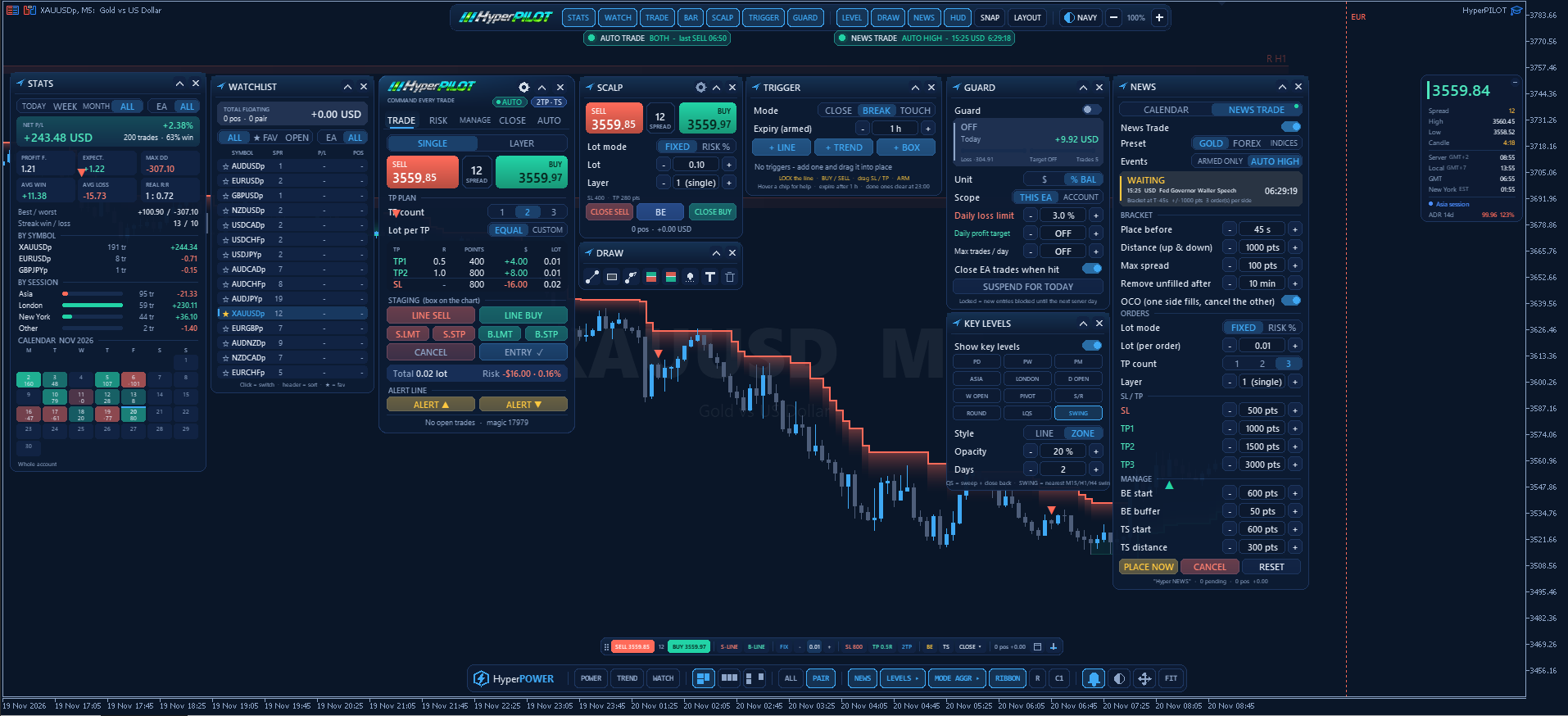
Command every trade from one toolbar. Risk-based entries, multi-TP management, chart triggers, one-click scalping, AUTO TRADE from HyperPOWER signals, NEWS TRADE brackets, daily guard, stats, news and key levels – all in one trade manager for MetaTrader 5.
FULL DESCRIPTION
HyperPILOT is a complete trade management EA for MetaTrader 5. You make the decision, HyperPILOT places, sizes, manages and closes the trade exactly by your rules. Two optional modes can also open trades for you: AUTO TRADE (signals of the HyperPOWER indicator) and NEWS TRADE (a stop bracket before the news). Everything is controlled from clean panels on the chart, opened from a single toolbar.
Built for discretionary and semi-automatic traders who want fast, precise execution and strict risk control without leaving the chart.
USER MANUAL: Below
MAIN FEATURES
TRADE PANEL
• Lot modes: fixed lot, risk % of balance, risk % of equity, or fixed $ risk
• SL in points or ATR, up to 3 take-profits with R:R lock (TPs follow the SL)
• Lot per TP: equal split or custom lot / % per TP
• Staging box: preview entry, SL and TPs on the chart, drag into place, then send market or pending orders (buy/sell limit and stop)
• Single or layer entries
• Price alert lines: drag, lock with a double-click, right-click to delete; popup, sound and push alerts
AUTO MANAGEMENT
• Pure TP, Step SL (break-even after TP1, SL to TP1 after TP2) or trailing stop
• Break-even buffer, trailing from entry or after TP1
• BE ALL, manual trailing, partial close
• Optional virtual SL / TP: levels hidden from the broker, shown as lines on the chart and moved by the trailing stop
CLOSE TOOLS
• Close profit, close loss, close buy, close sell, close all, delete pending orders
• Optional second-click confirmation on every close button
SCALP PANEL
• One-click (or double-click) buy and sell
• Independent lot, fixed or risk %
• Layers per click with lot per position or split, market or stepped entries
• Close sell | BE | Close buy in one row
TRADE BAR
• Ultra-slim bar for maximum chart space – horizontal or vertical
• Buy/sell, staging lines, lot, SL/TP, TP count, BE, trailing and a close menu in one line
CHART TRIGGERS
• Horizontal line, trendline or box entries
• Fire on candle CLOSE, BREAK or TOUCH
• Simple flow: draw › LOCK › choose BUY/SELL › drag the SL/TP rectangle › ARM
• Box triggers can work both ways as OCO
• Expiry time and automatic daily clean-up
AUTO TRADE – HyperPOWER SIGNALS
• Trades the BUY / SELL signals of HyperPOWER on the same chart (closed bar)
• Own settings with GOLD / FOREX / INDICES presets
• SL on the HyperPOWER ribbon (with buffer, min/max and optional ribbon trail), in points or ATR
• Up to 3 TPs in R, points or ATR; BE and trailing in R, points or ATR
• Direction filter, strong-signal filter, opposite signal ignore / close, add-on groups
• Asia / London / New York session switches, news block, max spread
• Status strip under the toolbar: ON / PAUSED (reason) / NO SOURCE
NEWS TRADE – BRACKET BEFORE THE NEWS
• Pick events in the calendar (ARM) or trade every high-impact news automatically
• Buy stop / sell stop bracket placed 45 s before the release (adjustable)
• OCO on/off, layers, 1-3 TPs, BE and trailing, max spread, auto-removal of unfilled orders
• Presets for gold, forex and indices; countdown strip under the toolbar
HyperPOWER INTEGRATION
• HyperPILOT and HyperPOWER arrange their toolbars and windows on one chart without overlapping
• One shared theme
GUARD – DAILY PROTECTION
• Daily loss limit, daily profit target, max trades per day
• In $ or % of the day's start balance, for this EA or the whole account
• Blocks new entries until the next server day and can close open trades
STATS DASHBOARD
• Net P/L, win rate, profit factor, expectancy, max drawdown, average win/loss, real R:R
• Results by symbol and by session (Asia, London, New York)
• Monthly P/L calendar
• Today / week / month / all, this EA or whole account
WATCHLIST
• Spread, floating P/L and open positions (▲ buys / ▼ sells) per symbol
• Favourites, sorting, click to switch the chart
NEWS
• Today's economic calendar with countdown, actual / forecast / previous
• Optional news lines on the chart
KEY LEVELS
• Previous day / week / month, Asia and London ranges, daily and weekly open, pivots, S/R, round numbers, liquidity sweeps, multi-timeframe swings
• Line or zone style with adjustable opacity
DRAW TOOLS
• Trendline, rectangle, path, long / short position tool, alert line, text
PRICE HUD
• Large price, spread, high/low, candle timer, server / local / GMT / New York time, session and ADR
DESIGN
• Three themes: Dark, Navy and Light – or follow the theme of a HyperALGO indicator on the same chart
• Scalable UI (zoom %), magnetic windows, automatic layout that remembers windows you move
SAFE DEFAULTS
• Default lot is a fixed 0.01 to keep mistakes small
• Manages only its own trades (magic number 7979, changeable)
• Works on any symbol: forex, gold, indices, crypto
REQUIREMENTS
• MetaTrader 5, hedging account recommended for multi-TP groups
• Algo Trading enabled
• Optional: allow WebRequest for https://nfs.faireconomy.media for the online news feed (the built-in MT5 calendar works without it)
• Virtual SL/TP requires the terminal to stay online (VPS recommended)
NOTE
HyperPILOT is a trade manager. In manual mode it executes and manages your trades; AUTO TRADE and NEWS TRADE open trades only when you switch them on. It does not guarantee profits. Please test on a demo account first.
Part of the HyperALGO Series.
Files:
HyperPILOT_User_Manual New.zip
1879 kb



