

🔗Indicator Download Links- MT4 | MT5
➡️ Read the full detailed version this manual here: https://www.intraquotes.com/guide/iq-trade-status-manual or continue reading below for quicker short user manual guide.
▶ MQL5 Seller Page | MQL5 Channel (for daily market analysis with powerful trading tools)
Managing multiple open positions while keeping track of daily profit, account risk and margin usage can be challenging. IQ Trade Status is a professional MetaTrader trade dashboard that brings essential account statistics and live trade information together in one compact interface.
Instead of constantly switching to the Terminal window, you can monitor your trading activity directly from your chart.
What Does IQ Trade Status Do?
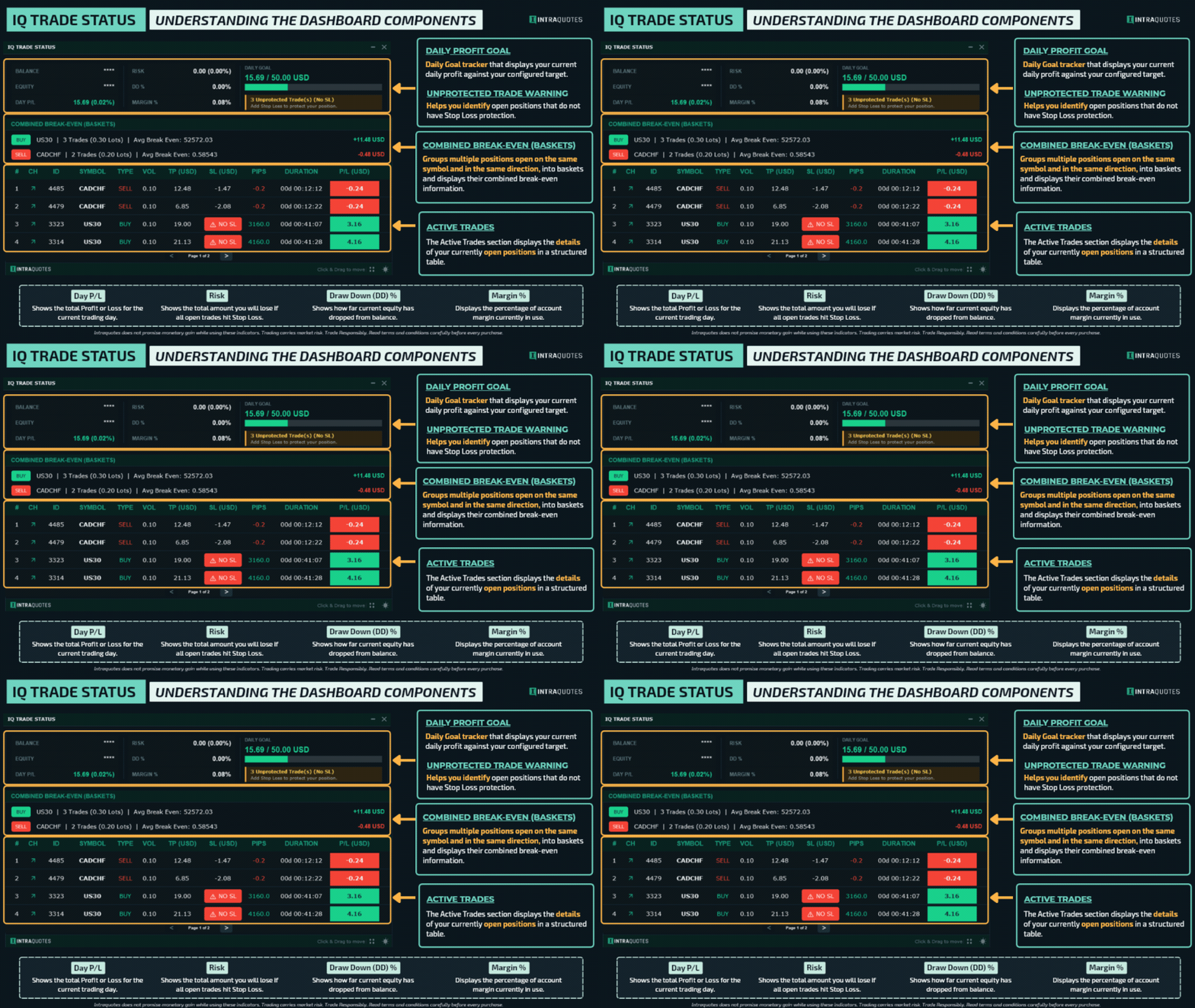
IQ Trade Status provides a consolidated overview of your account and open positions.
Account Monitoring
- Balance and Equity monitoring, with an optional Privacy Mode.
- Daily Profit/Loss, including closed trades from today and floating P/L.
- Estimated monetary risk based on open trades with Stop Loss.
- Account Drawdown (DD%) and Margin Usage (%).
- Daily Profit Goal tracker with a visual progress bar.
- Warning notifications for trades without Stop Loss.
Live Trade Monitoring
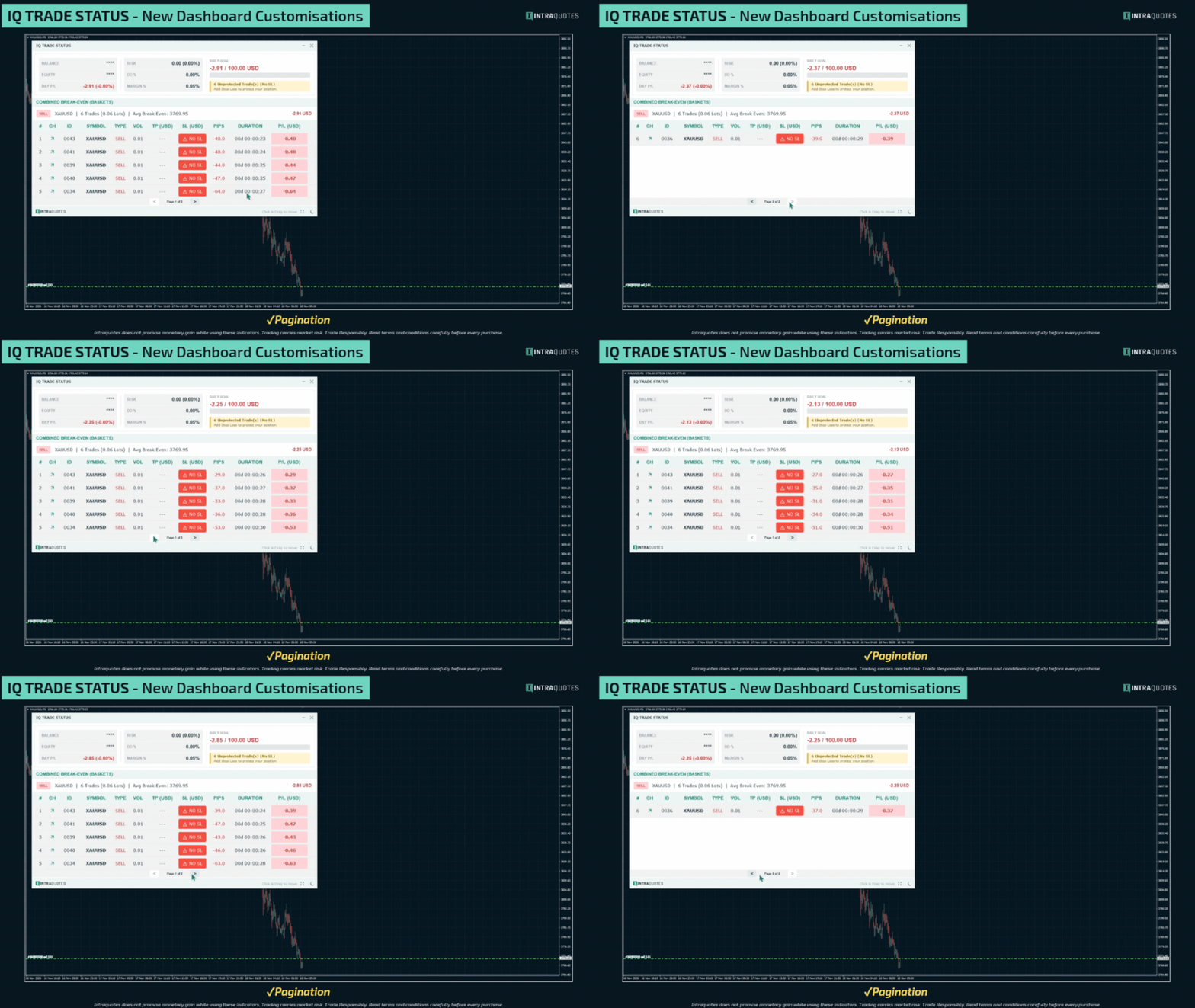
The dashboard displays up to 25 recent open positions with pagination. Each trade includes its symbol, direction, volume, Take Profit, Stop Loss, pips, duration and floating P/L.

Combined Break-Even Baskets
When multiple positions are open on the same symbol and in the same direction, the dashboard automatically groups them into a combined basket.

It displays the total trade count, cumulative lot size, volume-weighted average break-even price and combined floating P/L, including swaps and commissions.
This is particularly useful for traders using grid, DCA and scale-in strategies.
How to Install IQ Trade Status?
- Download and install IQ Trade Status through your MQL5 account.
- Open MetaTrader and locate the indicator in the Navigator window.
- Drag the indicator onto your preferred chart.
- Configure the indicator settings and click OK.
The dashboard will appear directly on your chart.
Note: The indicator supports all chart timeframes and Forex, Metals and Indices symbols. Only one dashboard instance is supported per MetaTrader terminal.
Important Indicator Settings
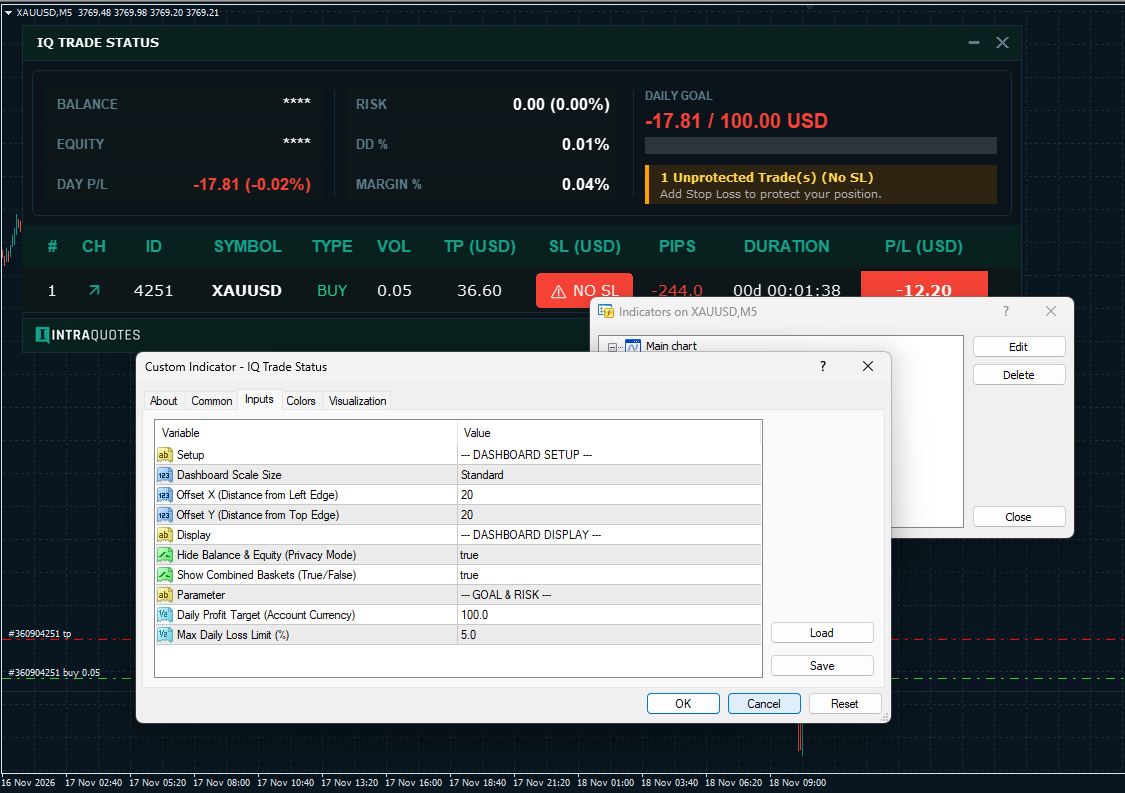
The following settings allow you to customize the dashboard according to your trading requirements.
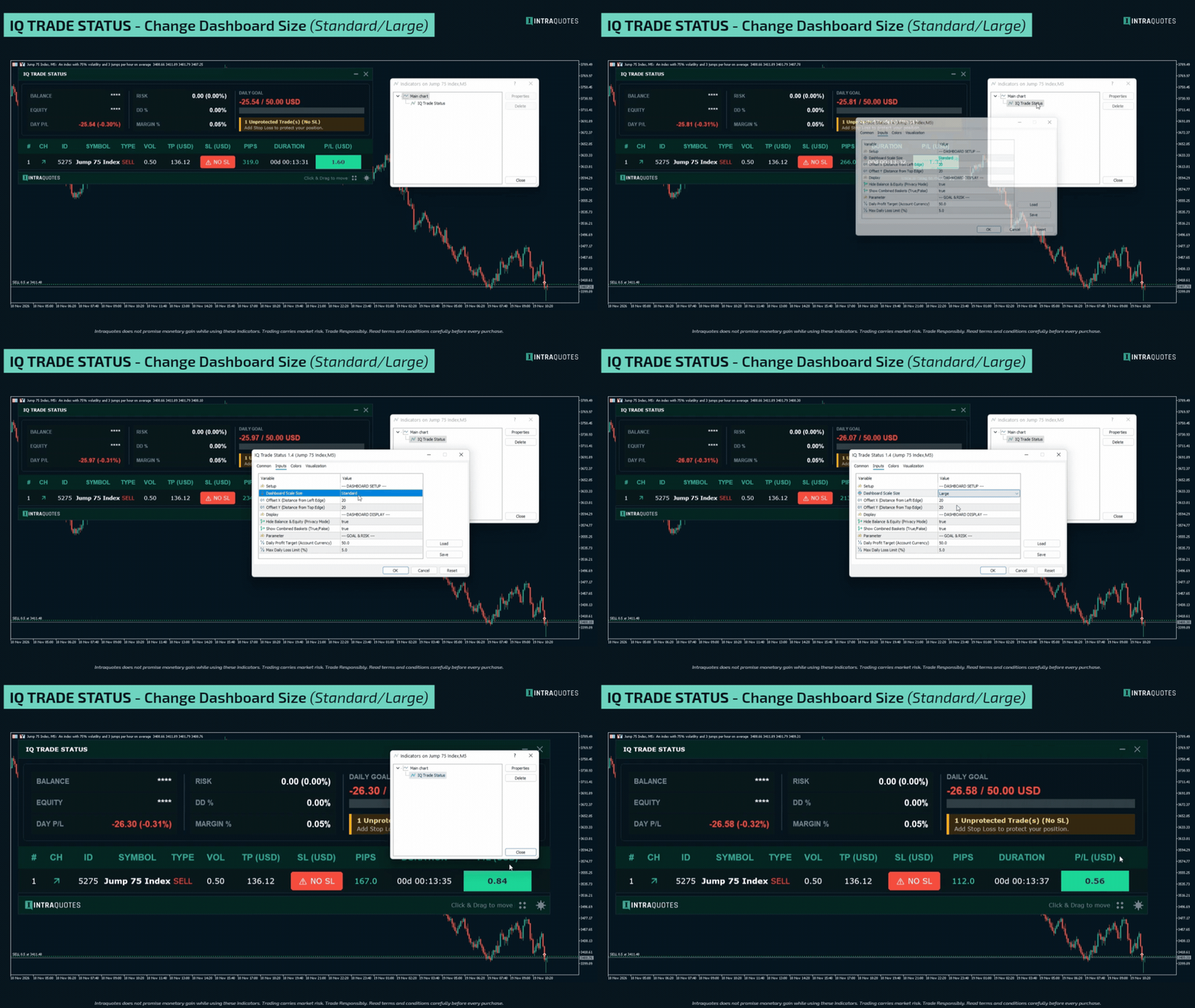
1. Dashboard Scale Size
Choose between Standard and Large dashboard scaling to suit your screen resolution. Large scaling is particularly useful for 2K and 4K high-DPI displays.
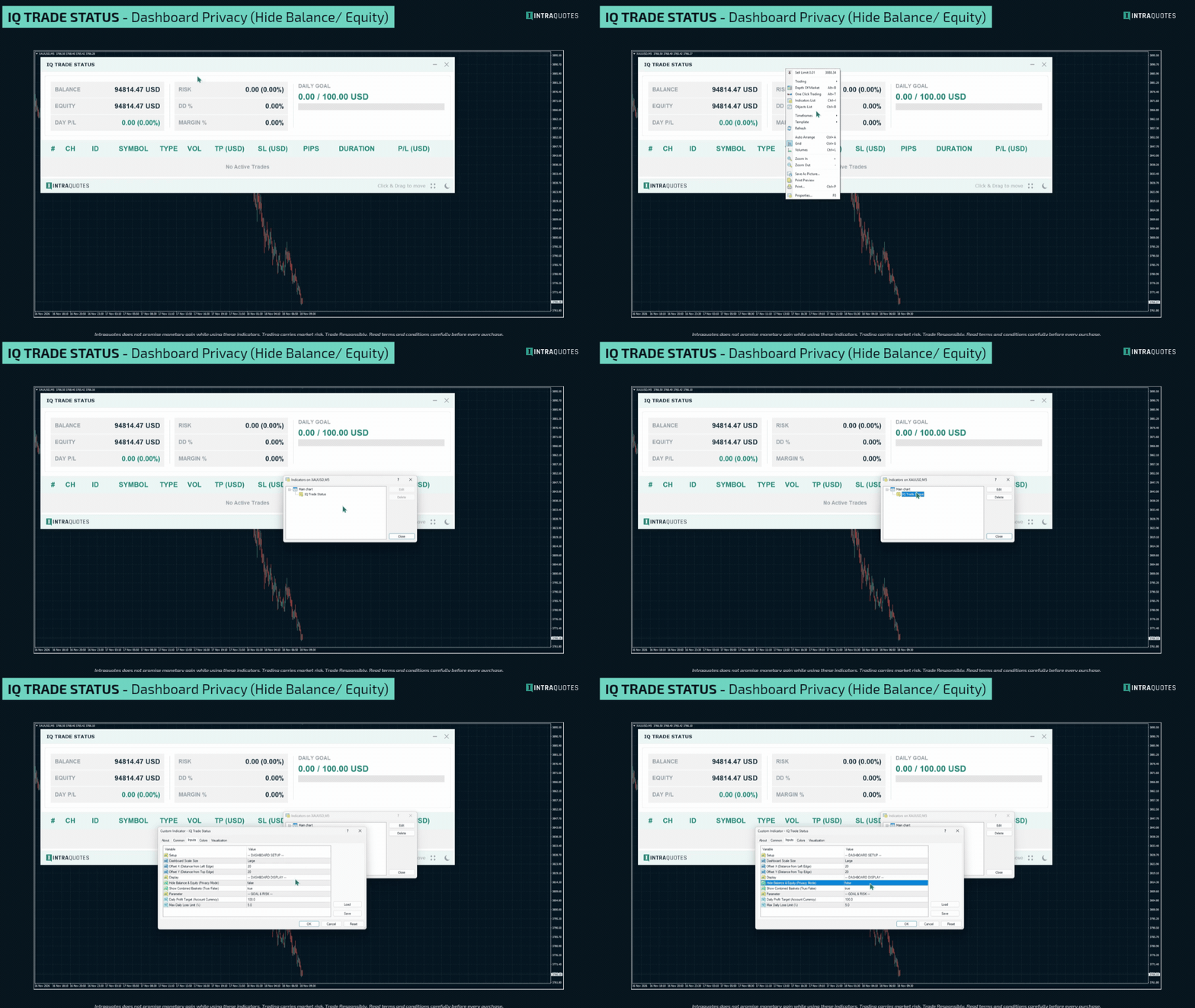
2. Privacy Mode
Enable this option to mask your actual Balance and Equity values. This is useful when recording trading videos, sharing your screen or publishing chart screenshots.
3. Show Combined Baskets
Enable this option to automatically group two or more open trades on the same symbol and in the same direction. The dashboard calculates their combined volume, average break-even price and net P/L.
4. Daily Profit Target
Set your daily profit objective in your account currency. The dashboard displays your current daily progress with a visual completion bar.
For example, enter 100.0 to set a daily profit target of 100 account currency units.
5. Max Daily Loss Limit (%)
Set your maximum allowable daily drawdown percentage. A prominent red warning appears when your drawdown reaches 80% of the configured threshold.
For example, setting this value to 5.0 triggers the warning when the drawdown reaches 4%.
Dashboard Customization
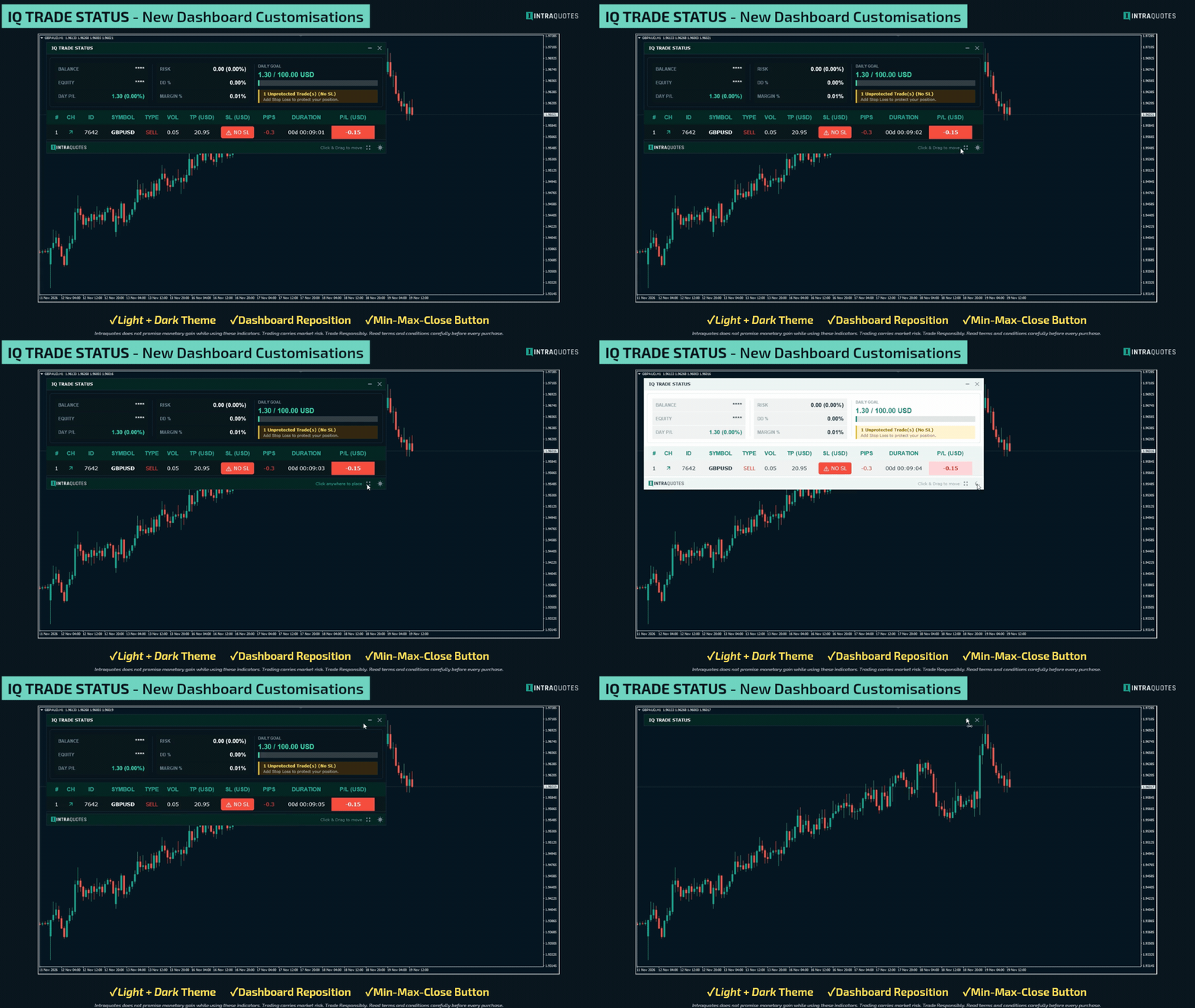
IQ Trade Status also includes convenient display controls:
- Minimize and maximize the dashboard.
- Move the dashboard to your preferred chart position.
- Switch between Dark and Light themes.
- Navigate between trade pages using pagination.
Final Thoughts
IQ Trade Status is designed for traders who want better visibility into their account performance and open-position exposure. Whether you are a day trader, prop firm trader or grid strategy user, it provides a structured overview of your trading activity in one place. Know your daily performance, monitor your exposure and keep track of every open trade with IQ Trade Status.
Disclaimer:
• Trading involves financial risk. Know all the risks before investing. Read all the Terms & conditions of each of the product pages before purchasing indicators.
• Our products are available only on mql5.com.
• We never contact anyone or sell our products privately.
• We do not provide any personal trading advice.
• We do not sell any of the Intraquotes products on Telegram or any other platform or website.
©intraquotes | DO NOT COPY THIS CONTENT
RISK DISCLOSURE
Trading financial markets carries inherent risks and may not be suitable for every investor. This indicator is designed as a tool to assist in trading decisions but does not guarantee profits or prevent losses, which could exceed your initial investment. Past performance is not a reliable indicator of future outcomes. Users are encouraged to fully understand the risks and seek independent financial advice if needed. Any trading decisions made using this indicator are at the user's discretion and responsibility.



