What a Chart Video Can't Prove About an AI-Written Indicator

An AI model can write an indicator in an afternoon. We use AI every day, and in most of our tests it produces code that compiles, plots and follows the request. So this is not a post about AI being unable to code. It can.
Our point is narrower: writing the indicator was never the hard part. The hard part is proving it does live what it appears to do on a chart, and a chart that "looks right" is the least evidence an indicator can offer. We don't deliver an indicator before we have counted its signals at the bar close.
The examples below come from TradingView and Pine Script, where the current wave of "AI indicator" posts lives, but the mechanism is the same one every MetaTrader developer meets with bar 0 and bar 1.
Historical bars are not live bars
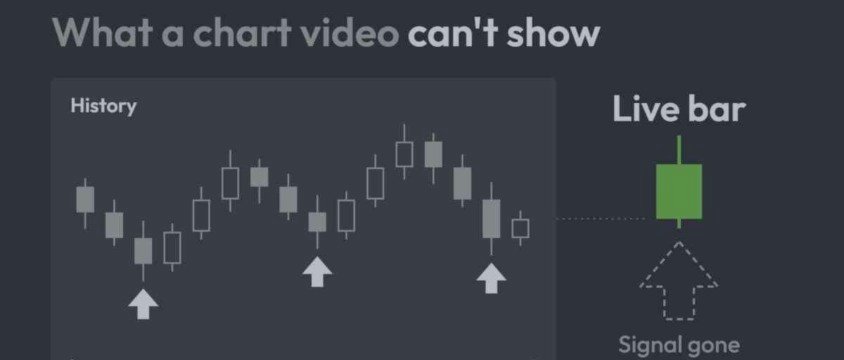
On a recorded chart, every signal sits on a finished bar. Live, the script runs on a bar that is still forming. TradingView's own documentation defines repainting as "script behavior causing historical vs realtime calculations or plots to behave differently."
Two mechanisms do most of the damage:
- Signals decided before the bar closes. On the live bar an indicator's values follow the most recent price and only become final at the close. An arrow can appear at 10:03, vanish at 10:07 and never exist in the history. A video recorded afterwards shows only the arrows that survived.
- Data requested from another timeframe. In Pine, request.security() returns only confirmed values on historical bars, while on live bars it can return values that are still changing. Used carelessly with lookahead, it returns data from the future on historical bars, which the documentation calls "dangerously misleading". The documented fix is to request the value one bar back and turn lookahead on, both together.
The MetaTrader equivalent is the reason an EA should usually read bar 1, not bar 0: bar 0 is still forming, and a decision taken on it can change before the bar is done.
Code that compiles and draws can still decide on the wrong bar
Even an indicator that does not repaint can be wrong in a way no chart glance shows.
We met this in our own work. Our specification for a client's Pine v6 alert indicator gave the decision as one expression: a bar-close check and a data check, joined by the "and" operator to a ta.crossover(...) call. TradingView's v6 migration guide states that "and" and "or" conditions are now evaluated lazily rather than strictly: when the first condition is false, the rest is skipped. On every bar where the bar-close check was false, the crossover call did not run, so it never recorded that bar and its idea of "the previous value" went stale.
Built as written, it would have compiled, plotted and still fired now and then, on the wrong bars, with no error. We caught it in our own review of the specification against the migration guide, during the build and before the first run, and moved the crossover calls to their own variables, calculated on every bar, as the guide instructs. That code was ours, not an AI's. This class of defect does not care who wrote the line, and only a review against the documentation, or a measurement, finds it.
Count the signals before you trust the rule
The cheapest real evidence for an indicator is a count: how many signals the rule gives over a stated window, at the bar close, on the symbols you actually trade.
A client of ours expected a Pine crossover-alert rule to fire about three times a month. Before they armed it, we counted with the script's own counters over about three and a half weeks of history per symbol, with the shipped settings: roughly ten times what they expected, on every symbol we measured. Nothing in the code was wrong; the rule simply fired far more often than its owner pictured. Our first count had run on symbols carried over from an earlier project, and the re-count on the client's own symbols told the same story. The delivery note said so plainly and named the two settings that make the rule rarer.
When an indicator claims results rather than signals, the evidence is a strategy report, and two of its settings decide whether it means anything. In Pine, commission comes from commission_type and commission_value in the strategy() declaration, and none is applied if they are not specified; slippage defaults to 0. A report with both at their defaults trades for free. And results on the same period the settings were chosen from measure the fit, not the rule.
Where it runs is the first check
A TradingView indicator runs inside TradingView. A script published publicly appears in the Community scripts feed with one of three visibility types: open (anyone can read the code), protected (only the author can) or invite-only (only invited users can run it). Nothing legitimate needs a modified copy of the app.
An offer that only works inside a "reverse-engineered TradingView Premium" app for Windows or Mac describes an installer, not an indicator. Malwarebytes reported in March 2025 that cracked TradingView downloads posted on crypto-trading subreddits carried Lumma Stealer on Windows and a new variant of the AMOS stealer on Mac. Bitdefender reported in September 2025 that the same lure ran as paid ads on Meta, then on Google Ads and YouTube, through a hijacked verified channel, delivering malware that collects cookie and password data, logs keystrokes and steals crypto wallet data. We did not install any of these apps; the descriptions are the vendors'. Saved passwords and session cookies are what stand between a stranger and your broker account.
The short version
Before you install or pay for any indicator, ask where it runs and what was measured, over what window, at the bar close. AI has made the code cheap. It has not made the evidence cheap, and a video was never evidence. The count is.