Expert Advisors for Prop Firm Challenges: A Rule-Check Worksheet

An Expert Advisor can end a test in profit and still breach a prop firm evaluation along the way. The contract may measure equity during the day, include positions the EA did not open, or apply a reset at an hour the software does not recognise. Start by writing down the exact rules and the behaviour you need to observe. Treat “prop-firm ready” as a vendor description until you can match it to the product, phase and configuration you intend to test.
Define the contract before comparing EAs
Write down the firm, product, phase, account size, platform, fees and date of the terms. Keep a copy of the provider documentation you relied on. Evaluation and later account conditions can differ, including whether trading is simulated. A similarly named account elsewhere can use a different loss calculation or apply different restrictions to copying and third-party software.
Review trading evidence and account compatibility as separate decisions. A permitted strategy can have weak evidence. A strategy with positive historical results can also be incompatible with an equity floor. Our pre-live EA evaluation checklist covers the evidence review. Use a second worksheet for the account rules.
Record how the loss limits are calculated
For each limit, record its starting reference, whether the floor is fixed or moves, and whether it follows balance, equity or another defined value. Record the daily reset time and time zone, and check treatment of open profit or loss, commissions and financing. A percentage alone does not tell you when the threshold is assessed or whether a restart changes what the EA remembers.
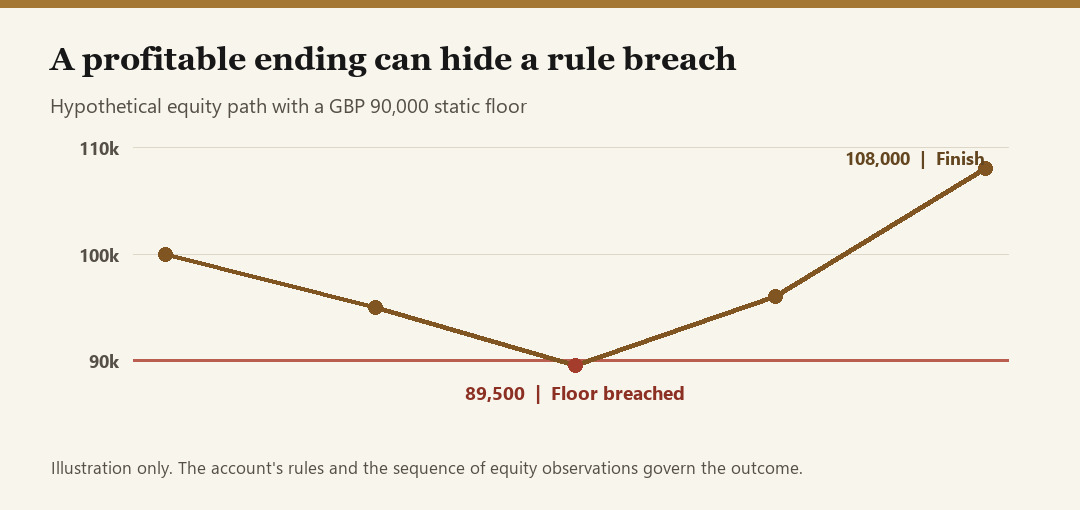
Consider a simplified hypothetical evaluation starting at £100,000 with a static overall floor of £90,000. The account ends at £108,000, but equity reached £89,500 before it recovered. Under those example rules, it crossed the overall floor. A separate daily threshold could be breached on another path even when overall equity stays above £90,000. The example is arithmetic and illustrates a rule check. It is not a provider quotation, actual result or forecast.
Check whether the EA sees all account exposure
Find out whether any control reads account-wide equity and open orders, or measures only positions managed by that program. Check how it treats another EA’s positions, manual trades and pending broker-side orders. Identify which component can stop fresh entries and who manages positions already open. A pause on one chart can leave another strategy free to open more exposure.
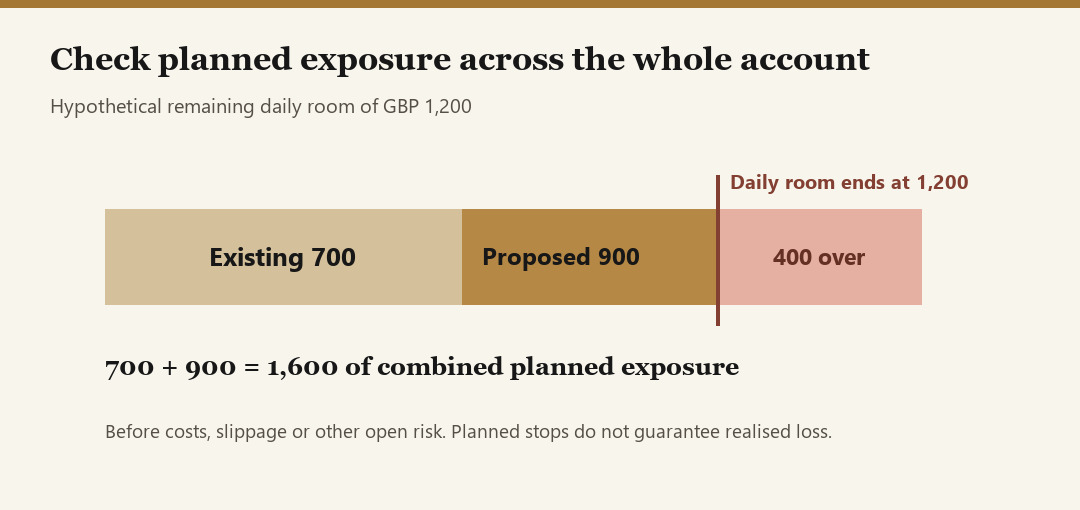
Suppose £1,200 of daily room remains in another hypothetical account. One program has £700 of planned exposure to its stop, and a second proposes £900. On these assumptions the combined amount is £1,600, or £400 above the room available before additional cost or execution uncertainty. Checking only the proposed order would miss that conflict. Planned stops do not establish the realised loss. Gaps, rejected close requests or slippage can make the loss larger.
Rehearse the failure conditions
Use a disposable demo setup to test the documented configuration. Start with the ordinary case, then repeat it after a restart, with simultaneous positions and around the documented reset time. Check what is retained after loss of connectivity. Review pending orders independently of local entry permission because a broker-side order may still trigger while a terminal is disconnected.
- Record which account, EA version and inputs were tested.
- Preserve timestamps, account-equity observations and execution messages.
- Check the saved reference values after the reset and restart.
- Record whether the control stopped a new entry, cancelled a pending order or managed an open position.
A successful demo rehearsal describes what happened under those conditions. Historical checks are useful for understanding the equity path, while a separate demo observation helps check operating behaviour. Neither supplies a future pass probability. Use the testing and forward-observation guide to document the distinction.
Ask about your actual trading behaviour
Confirm restrictions on news, weekends, order requests, copying, outside EAs and account allocation. Check the provider’s documentation for the product you are considering. The linked SmiteFX article includes dated examples from FTMO, E8 and FundedNext. Read the applicable current terms before relying on a historical example.
When a rule is ambiguous, describe the proposed setup in writing. Include the program version, ownership, number of positions, volume progression, news exposure and any other accounts using the same strategy. Keep the response with the dated terms and leave unresolved items open in your worksheet. A software vendor’s support reply cannot grant permission on the provider’s behalf.
Use one row per rule. Write the source and date, the tested behaviour, the observed result and the question that remains. Distinguish a failed restart test from a rule breach and from an ordinary losing sequence. If you change risk settings or switch programs, rerun the affected checks. A smaller position by itself does not verify reset logic, shared exposure or minimum lot behaviour.
Use a repeatable purchase decision
For a worked review, use the Fortune MT5 Market listing to identify the exact EA and platform, then record which features and account behaviours you can confirm. Apply the same worksheet to any shortlisted product. A listing or track record alone cannot confirm that a separate evaluation account permits a configuration, includes a particular daily cutoff, or will produce a similar outcome.
Budget for software, hosting, applicable fees and an unsuccessful attempt. Before retrying, identify changed evidence such as a corrected configuration or clarified contract term. Keep the tested version and a short decision note. An unanswered permission or exposure question may justify deferring the purchase entirely.
Automated trading and evaluation fees can lead to losses. This worksheet is educational and carries no passing guarantee. See the full SmiteFX Insights guide and rule-check examples.