EURUSD scalping costs: spread, commission and ATR, and when not to trade

EURUSD has some of the lowest trading costs in forex, which is one reason it is a favourite for scalping. Low is not zero. A scalp that aims for a few pips pays the spread and the commission on every trade, and those costs take a much larger share of a 5 pip move than of a 50 pip move. This article shows how to work out the real cost of a round trip in pips and in money, how to compare the spread with ATR, which hours and events make costs jump, and how the conditions light in EuroScalper (user guide) puts it on one chip. The numbers are examples: costs differ between brokers and account types, so check your own broker's contract specification and commission.
What a round trip costs
A round trip is opening and closing one trade. On EURUSD it costs:
- The spread: the gap between the bid and the ask. You buy at the ask and sell at the bid, so a new trade starts with a loss equal to the spread.
- Commission, on raw spread or ECN style accounts: a fixed amount per lot, often quoted per side. A broker quoting US$3.50 per lot per side charges US$7 per lot for the round trip.
- Slippage: the difference between the price you expected and the fill, mostly on stops and in fast markets.
- Swap, only if the trade is held past the broker's daily rollover. Most scalps are closed before it.
On EURUSD, 1 standard lot is 100,000 euros and 1 pip is 0.0001. For an account in US dollars, 1 pip on 1 lot is worth US$10. For an account in another currency the value is converted, so it moves with the exchange rate.
Two example accounts, 1 lot, US dollar account:
- Raw spread account: spread 0.2 pip (US$2) plus commission US$7 (0.7 pip) = 0.9 pip, US$9 per round trip.
- Standard account: spread 1.2 pips (US$12), no commission = 1.2 pips, US$12 per round trip.
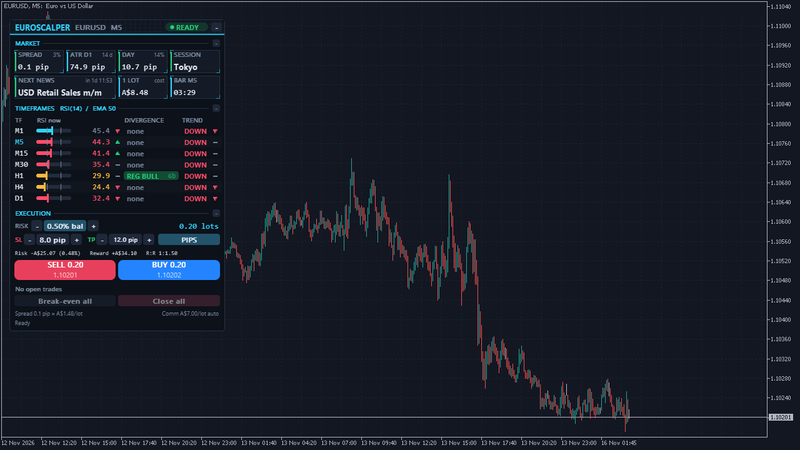
Neither is always cheaper: it depends on the spread you actually get at the hours you trade. EuroScalper's 1 LOT tile does this sum live in your account currency: the spread now plus the commission, measured from your own closed trades or typed in the inputs. The cost footer in the execution section splits it into spread per lot and commission per lot.
Costs against your stop and target
Costs matter most in relation to the size of the trade. With the raw spread example above (0.2 pip spread, 0.7 pip commission):
- A 20 pip stop pays about 0.9 pip of costs, under 5% of the stop.
- An 8 pip stop pays the same 0.9 pip, about 11%.
- A 3 pip stop pays the same 0.9 pip, about 30%.
Take a scalp with an 8 pip stop and a 12 pip target, an R:R of 1:1.5 on paper. Commission is paid on both outcomes, so a loss costs 8.7 pips and a win makes 11.3 pips. The spread does something less visible: a buy is filled at the ask, but its stop and target are triggered by the bid. From the moment of entry the bid has to rise 12.2 pips to reach the target, and only fall 7.8 pips to reach the stop.
The break-even win rate shows the effect. Without costs, an 8 pip stop and a 12 pip target need to win 40% of the time to break even (8 / 20). With commission it is 8.7 / 20 = 43.5%, before the spread shifts the odds of each outcome. Tight scalps can still work, but their edge has to be larger than these numbers.
EuroScalper's readout under the SL and TP shows this for your own settings: the money at risk including commission, the reward after commission, and the R:R. The lot size is worked out with the commission included, so a 0.5% risk stays 0.5% after costs, at the stop price.
Spread as a share of ATR
The spread in pips says what a trade costs. The spread as a share of ATR says what it costs compared with how much the market is moving.
ATR(14) on M5 is the average range of the last 14 five-minute bars, a typical five-minute move. EuroScalper shows the spread as a percentage of it on the SPREAD tile. Two example moments, same pair:
- London morning: spread 0.3 pip, ATR(14) M5 2.5 pips. The spread is 12% of a typical five-minute move.
- Late in the Asian session: spread 0.8 pip, ATR(14) M5 1.5 pips. The spread is 53% of a typical move.
The second moment is four times as expensive for a scalper, even though 0.8 pip still sounds cheap. The conditions light turns to SPREAD when the spread is above 1.5 pips or above 20% of the short ATR, by default. Both limits are inputs, so you can set them to what your own strategy can carry.
ATR helps with stops too. A fixed 8 pip stop is wide on a quiet day and tight on a busy one. EuroScalper can set the SL and TP in multiples of ATR(14) on M5 instead of pips, for example 1.5 x ATR for the stop and 2 x ATR for the target. The lot size then adjusts to the stop, so the money at risk stays the same while the distance follows volatility.
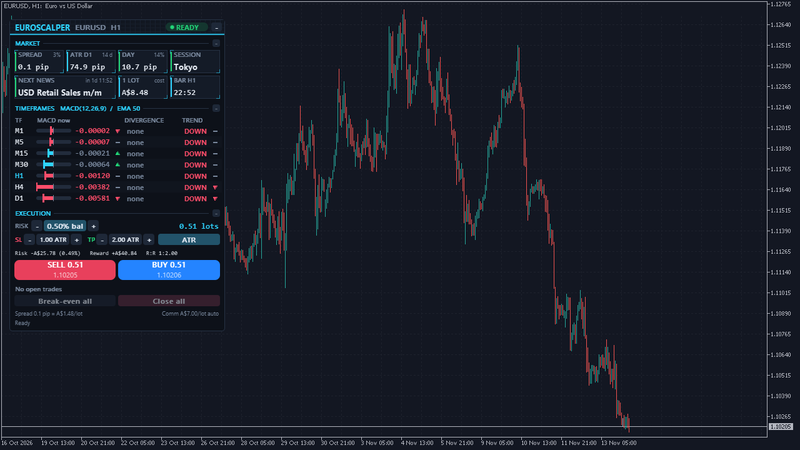
The ATR D1 and DAY tiles add the daily picture: the average daily range over 14 days, and how much of it today has already covered. Above 100%, today has already moved a typical day. That does not mean it must stop, but some traders size down or step aside when a scalp would chase an extended day.
Sessions: when EURUSD spreads are usually tight
EURUSD tends to be most liquid when London is open, and most of all when London and New York overlap. Spreads are usually at their tightest and ATR at its largest then, which is the combination a scalper wants. Spreads typically widen:
- in the late Asian hours, when Europe and the US are closed;
- around the broker's daily rollover, often 17:00 New York time, when liquidity thins and some brokers widen spreads for some minutes;
- at the Sunday open and late on Friday;
- on bank holidays in the UK, the euro area or the US.
The SESSION tile shows which of Tokyo, London and New York are open now, each in its own local time with daylight saving. By default the conditions light shows QUIET (amber) when neither London nor New York is open. You can change the session check to any main session, or switch it off.
News: when costs jump
High-impact releases move EURUSD fast. Around US Non-Farm Payrolls, US CPI, FOMC and ECB rate decisions and the euro area CPI flash, spreads can widen many times over for a minute or two, prices can jump, and a stop can fill well past its level. A 3 pip stop can turn into a much larger loss in a few seconds. Many scalpers simply do not hold a position through these releases.
EuroScalper shows the next high-impact release and a countdown on the NEXT NEWS tile, and the light turns to NEWS from 15 minutes before to 5 minutes after it, by default. On MT5 it reads the terminal's economic calendar. On MT4 it uses bundled calendars of US and euro area releases to 31 December 2027; after that date the light shows NEWS? rather than pretending nothing is scheduled. An alert can fire when the window starts, and if you want a hard rule, the news block refuses panel orders inside the window.
Using the conditions light as a routine
The light sums up the checks above on one chip in the header:
- READY: spread within your limits, no high-impact release near, London or New York open.
- QUIET: only the session check fails.
- SPREAD: the spread is above your limit in pips or as a share of ATR.
- NEWS or NEWS?: inside a news window, or the bundled calendar has ended.
- CLOSED: the market is closed.
A simple routine before each scalp: look at the light; if it is not READY, hover it to see why, and decide whether that reason matters for this trade. Then check the readout under SL and TP: is the reward after commission still worth the risk? The light is a guide and never blocks an order unless you switch on the news block. The decision stays yours.
When not to trade: a checklist
- The spread is a large share of a typical five-minute move (the SPREAD tile in red, or above your own limit).
- A high-impact release is minutes away, or has just come out.
- The market is in its quiet hours and your strategy needs movement.
- The stop is so tight that costs are a large share of it, for example 30% or more.
- The day has already covered its average range and the trade would chase it.
- You do not know your real commission. Measure it from a few trades, or ask your broker, and enter it in the inputs.
None of these is a rule for every strategy. They are the moments when costs, not the market, decide most of the result.
EuroScalper is available for MT5 and MT4. More on euroscalper.com. For reading momentum and divergences across timeframes, see How to read multi timeframe RSI and divergence for EURUSD scalping.
Risk note: trading forex and CFDs carries a high risk of loss. The cost figures in this article are examples, not any broker's prices: check your own broker's contract specification, spreads and commission. Stops can fill further away in gaps and fast markets. Knowing your costs to the cent is what lets a good setup keep its profit.