How to post MT5 and MT4 trade notifications and indicator alerts to Discord

Post your alerts from any indicator, any EA's trades and your price lines to a Discord channel as colour-coded embeds, with the chart attached, using DuoFX Alert Relay Pro for MT5 or MT4. Great for your own alerts channel, a trade log channel or a trading group.
Only need alerts from DuoFX tools? The free DuoFX Alert Relay does that, and this guide works for it too (without the sources step).
Full reference: the DuoFX Alert Relay Pro user guide. Telegram instead? See How to send any indicator alert and your EA trades to Telegram.
Step 1: create a channel webhook
- 1. In Discord, open the server, then the channel's settings (the gear next to its name).
- 2. Integrations, Webhooks, New Webhook. Give it a name, for example "DuoFX alerts".
- 3. Click Copy Webhook URL. It starts with https://discord.com/api/webhooks/.
Anyone with the webhook URL can post to that channel, so keep it private.
Step 2: allow Discord in MetaTrader
Tools, Options, Expert Advisors: tick "Allow WebRequest for listed URL" and add https://discord.com. Click OK.
Step 3: attach the relay and test
- 1. Open a chart of a quiet symbol and drag DuoFX Alert Relay Pro onto it.
- 2. In the inputs: Send to Discord = true and paste the webhook URL. Leave "Attach a chart screenshot" on to get the chart in each embed.
- 3. Press Send test alert on the panel.
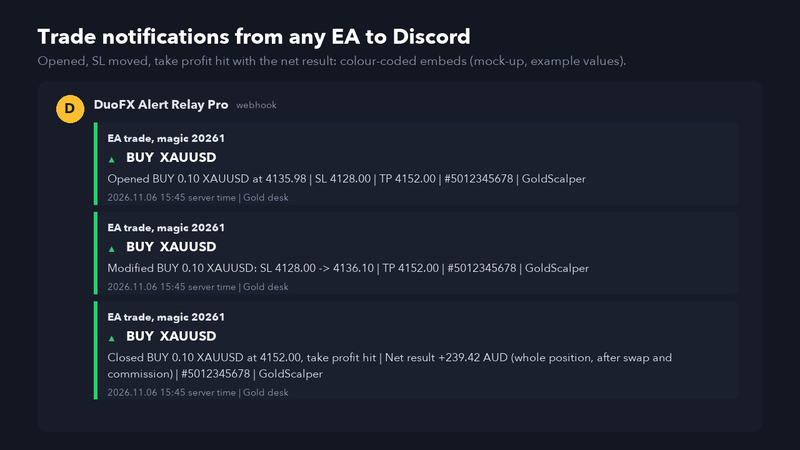
Alerts arrive as embeds: green for buy, red for sell, grey for info, with the symbol, timeframe, source, message, server time and the chart.
If the panel says "URL not allowed", go back to Step 2. If it asks for a webhook URL, the one pasted does not look like a Discord webhook.
Step 4: choose what to send
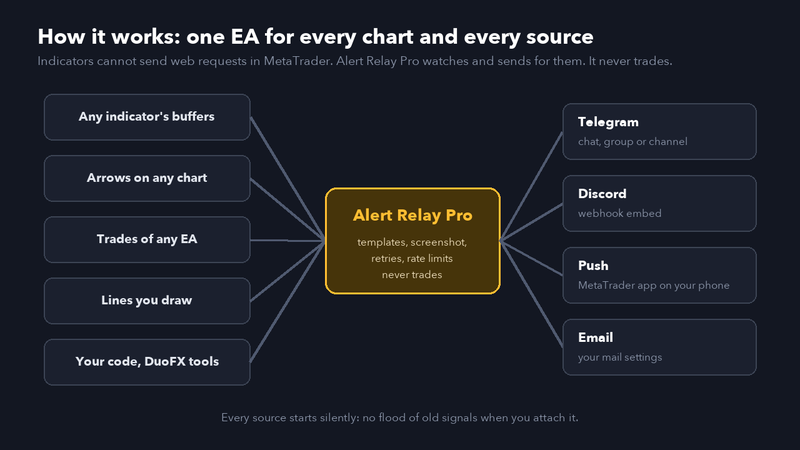
- Trades and price lines are on by default: open or close a trade, or draw a horizontal line named alert ..., and a message arrives.
- Any indicator: in an Indicator slot, type its path as in the Navigator (for example Examples\RSI), its inputs and the buffer to watch. See the user guide for the two modes.
- Arrows drawn by an indicator: switch on "Alert on new chart objects".
- Your own code: RelayProSend("buy", "message"); with the free header from the user guide. DuoFX tools with "Send to DuoFX Alert Relay" arrive too.
Telegram and Discord together
Switch on both outputs and each alert goes to both. Push and email can be added the same way, each with its own switch.
Tips
- The relay respects Discord's rate limits: if Discord asks it to slow down, it waits and then sends.
- Add a label (for example "Account 1") in the inputs if several computers post to the same channel.
- Delete and recreate the webhook if the URL ever leaks.
Alerts are information, not trading advice, and can be delayed or lost. Trading carries a high risk of loss.



