DuoFX Alert Relay user guide: Telegram, Discord, push and email alerts for DuoFX tools on MT5 and MT4

This is the user guide for the free DuoFX Alert Relay for MT5 and DuoFX Alert Relay for MT4. More about the product is on duofxlabs.com.
Important: the free Alert Relay works with DuoFX products only. It forwards alerts from DuoFX indicators and tools that have the "Send to DuoFX Alert Relay" option. It does not forward alerts from other indicators or Expert Advisors.
Supported today: DuoFX Divergence Scanner (MT5, MT4) from version 1.3. More DuoFX tools get the option in their next updates; the current list is on duofxlabs.com.
How-tos: How to send MT5 and MT4 alerts to Telegram with a chart screenshot and How to send MT5 and MT4 alerts to Discord.
What it is
- An Expert Advisor that never trades. It has no trading code at all.
- MetaTrader does not let indicators send web requests, so an indicator cannot post to Telegram or Discord by itself. DuoFX indicators hand their alerts to the relay, and the relay sends them on.
- Outputs: Telegram (bot token and chat id), Discord (channel webhook), MetaTrader push to your phone and email. Each has its own switch.
- Optional chart screenshot on Telegram and Discord alerts.
- One relay serves every chart and every DuoFX indicator on the computer. MT4 and MT5 on the same computer share the same queue, so an MT4 chart can feed an MT5 relay and the other way round.
Install and first run
- 1. Install the relay from the Market (Ctrl+T, Market tab, Purchased, Install). It is free.
- 2. Open Tools, Options, Expert Advisors. Tick "Allow WebRequest for listed URL" and add https://api.telegram.org and https://discord.com (only the ones you use). Click OK.
- 3. Open a chart of a quiet symbol, one you do not run heavy indicators on. The relay's timer shares that symbol's thread, so on a busy chart alerts can be delayed. AutoTrading is not needed, because the relay does not trade.
- 4. Drag DuoFX Alert Relay onto that chart, switch on the outputs you want and paste the details (see the how-tos for Telegram and Discord).
- 5. Press Send test alert on the panel. One sample message goes to every output you switched on.
- 6. In each DuoFX indicator that supports it, set "Send to DuoFX Alert Relay" to true.
Run one relay per computer with outputs switched on. Two relays would share the queue and split the alerts between them.
The status panel
The panel at the top left shows the relay's version, how many alerts are waiting, how many were skipped as too old or repeated, and one line per output.
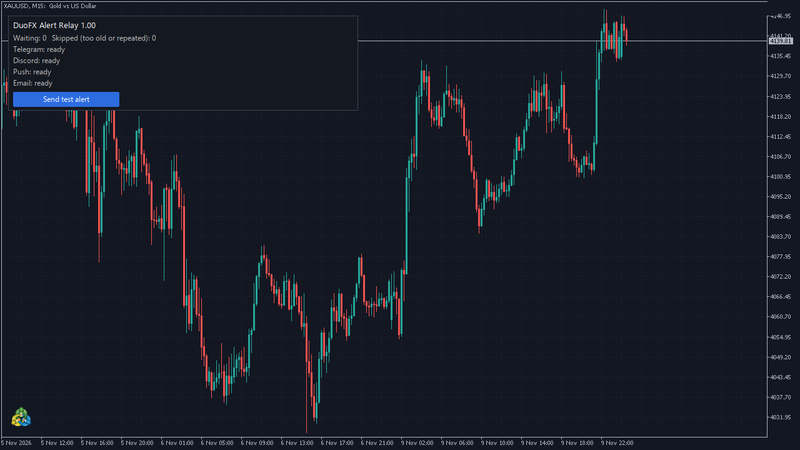
- ready: the output is switched on and its details look right.
- off: the output is switched off in the inputs.
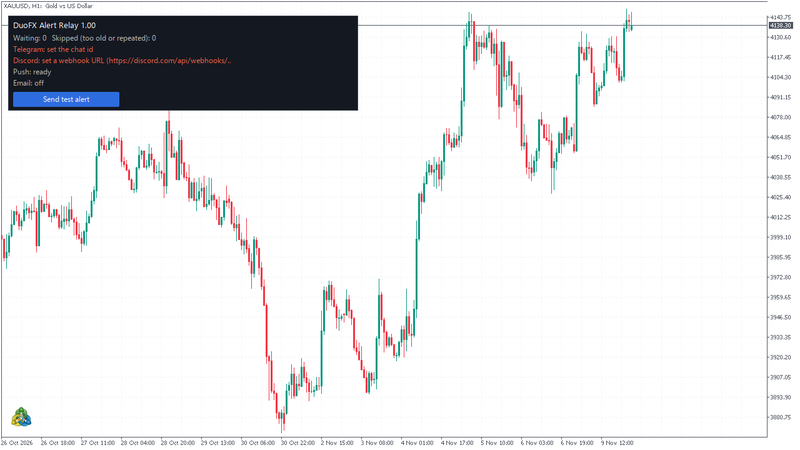
- set the bot token, set the chat id, set a webhook URL: a detail is missing or does not look right. Open the inputs (F7) and fix it.
- retrying in N s: a send failed (for example no connection). The relay waits a little longer after each try and sends the alert when the connection is back.
- URL not allowed: the web address is not in Tools, Options, Expert Advisors. The line says which address to add.
- rate limited, waiting: Telegram or Discord asked the relay to slow down. It waits the time they ask for, then carries on.
- error: the service refused the message, with the reason. Push and email are given up after 3 tries.
When something is missing, the panel names it in red. Here the chat id and the webhook are not set yet.
Every input
Telegram
- Send to Telegram: on or off.
- Bot token: from @BotFather. It has two parts, a number, a colon and a long code, for example 8123456789:AAEx.... Paste the whole line.
- Chat id: a positive number for a private chat, -100... for a group or channel, or @channelname for a public channel.
Discord
- Send to Discord: on or off.
- Webhook URL: from Channel settings, Integrations, Webhooks. It starts with https://discord.com/api/webhooks/.
MetaTrader push and email
- Send MetaTrader push notification: uses the MetaQuotes ID set in Tools, Options, Notifications.
- Send email: uses the mail settings in Tools, Options, Email.
Behaviour
- Skip alerts older than (seconds): default 300. An alert that waited longer than this (for example while the internet was down) is skipped, so you never get a pile of stale signals.
- Attach a chart screenshot: default on, for Telegram and Discord.
- Ignore an identical alert repeated within (seconds): default 10, 0 turns it off.
- Check the queue every (seconds): 1 or 2.
- Label added to every message: for example "Account 1", useful if several computers post to the same channel.
- Send one test alert when the relay starts: off by default.
- Show the status panel: on by default.
- Dry run: writes each request to a file in MQL5\Files\DuoFX\Relay instead of sending it. For checking only.
Troubleshooting
- The panel says URL not allowed. Add the address it names in Tools, Options, Expert Advisors, "Allow WebRequest for listed URL", then press Send test alert again.
- Telegram says the token is wrong. Check that you pasted the whole token, including the number before the colon. In @BotFather send /mybots, pick your bot and tap API Token to see it again.
- Telegram works in a private chat but not in the group or channel. Add the bot to the group, or as an admin of the channel, and use the -100... id.
- Push fails with error 4517. Set your MetaQuotes ID in Tools, Options, Notifications.
- Email fails with error 4510. Fill in Tools, Options, Email.
- Nothing arrives from an indicator. Check that the indicator has "Send to DuoFX Alert Relay" on, that the relay is running on a chart, and that the indicator is a DuoFX product with the option. The free relay does not forward alerts from other products.
- Alerts arrive late. Move the relay to a quiet chart.
- In the Strategy Tester nothing is sent. That is by design: the tester cannot send web requests, so the relay stays idle and says so in the log.
FAQ
- Does it trade? Never.
- Is it free? Yes, for DuoFX products.
- Is my bot token safe? It is stored only in the EA's inputs on your computer and is sent only to Telegram. It is never written to the log. Do not share your .set files, and revoke the token in @BotFather if it ever leaks.
- Does it need a VPS? No, but it only sends while the terminal is running, like any EA.
- Which DuoFX products work with it? Today DuoFX Divergence Scanner (MT5, MT4) from version 1.3. The current list is on duofxlabs.com.
Alerts depend on your internet connection and on Telegram, Discord, MetaQuotes push and your mail server, and can be delayed or lost. They are not trading advice.



