DuoFX Alert Relay Pro user guide: Telegram, Discord, push and email alerts from any indicator, EA trades and price lines

This is the user guide for DuoFX Alert Relay Pro for MT5 and DuoFX Alert Relay Pro for MT4. More about the product is on duofxlabs.com.
Only need alerts from DuoFX tools? The free DuoFX Alert Relay does that. Pro adds alerts from any indicator, any EA's trades, chart objects, your own price lines and your own code.
How-tos: How to send any indicator alert and your EA trades to Telegram and How to post trade notifications and indicator alerts to Discord.
What it is
- An Expert Advisor that never trades. It contains no trading code.
- It watches five kinds of source and sends what they raise to Telegram, Discord, MetaTrader push and email, with an optional chart screenshot on Telegram and Discord.
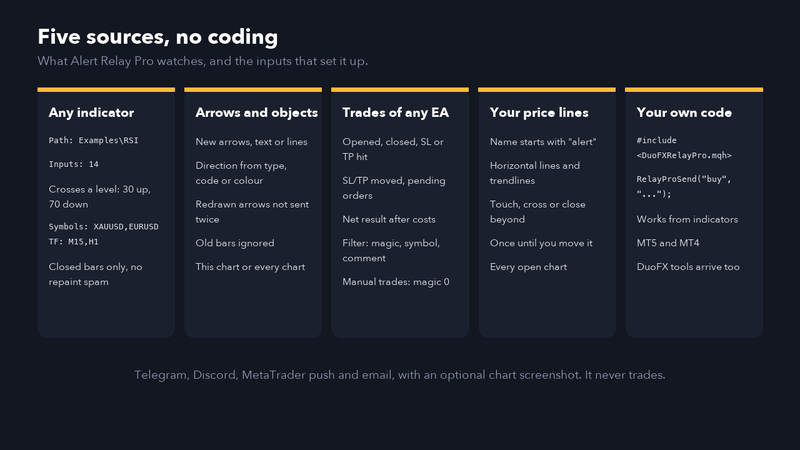
- Sources: indicator buffers (any indicator, no coding), arrows and objects that indicators draw, trades of any EA or manual trading, price lines you draw, and your own code through a one-line header. Alerts from DuoFX tools arrive too.
- Every source starts silently: it never alerts on what was already there when you attached it.
Install and first run
- 1. Install Alert Relay Pro from the Market (Ctrl+T, Market tab, Purchased, Install).
- 2. Tools, Options, Expert Advisors: tick "Allow WebRequest for listed URL" and add https://api.telegram.org and https://discord.com (only the ones you use). Click OK.
- 3. Open a chart of a quiet symbol, one you do not run heavy indicators on. The relay's timer shares that symbol's thread. AutoTrading is not needed: the relay does not trade.
- 4. Drag DuoFX Alert Relay Pro onto that chart, switch on the outputs you want and paste the details (see the how-tos).
- 5. Press Send test alert on the panel. One sample message goes to every output you switched on.
- 6. Choose your sources in the inputs. Trades and price lines are on by default.
Run one Pro per terminal. If the free Alert Relay runs on the same terminal, Pro takes over and the free one waits (its panel says another relay is running).
Source 1: any indicator (buffer alerts)
Most indicators write their lines, histograms and arrows into buffers, which you can see in the Data Window (Ctrl+D) when you move the mouse over the chart. Pro reads those buffers on closed bars.
For each of the 4 indicator slots:
- Watch indicator N: on or off.
- Indicator path as in the Navigator: the folder and name under Indicators, without .ex5. Examples: Examples\RSI, Examples\Custom Moving Average, MyIndicators\SuperArrows. A Market indicator: Market\Indicator Name.
- Inputs in order, comma separated: the indicator's inputs in the order they appear in its Inputs tab, for example 14,30,70. Empty means the indicator's defaults. You can give the first few and leave the rest at their defaults. Use numbers for numbers, true or false, and text as it is. For a drop-down list give the value behind the option: for most lists the first item is 0, but price types start at 1 (Close = 1) and timeframes use MetaTrader's own codes, so leave those at their defaults when you can. MT4 takes numbers and true/false only, up to 8 (a terminal limit), so put only the inputs before the first text input.
- Signal when: the buffer has a value on the bar (arrow and signal indicators: a buy arrow buffer that is empty except on signal bars), or the buffer crosses a level (lines and histograms).
- Buy buffer and Sell buffer: the buffer numbers, counting from 0 in the order the Data Window lists them. -1 means none. If both are the same buffer in value mode, a positive value is a buy and a negative value a sell.
- Cross mode levels: buy when the buy buffer crosses up through its level, sell when the sell buffer crosses down through its level. RSI example: buy buffer 0 with level 30, sell buffer 0 with level 70.
- Bar to read: 1 is the bar that just closed. Indicators that confirm a signal a few bars later (fractals, swing points) need 3 or more.
- Symbols and Timeframes: comma lists, for example XAUUSD,EURUSD and M5,H1. Empty means the chart's. Up to 64 symbol and timeframe pairs in total. No chart has to be open for them.
- Name in messages: shown as the source, for example "Indicator: Gold Arrows".
- Value mode: a value of 0 counts as no signal (one switch for all slots, on by default): many arrow indicators fill empty bars with 0.
Each pair is read once when a new bar opens, for the bar that just closed. The live bar is never read, so an indicator that repaints its current bar cannot spam you, and history is never sent when you attach the relay.
Example, RSI crossing 30 and 70 on gold M15: path Examples\RSI, inputs 14, Signal when = crosses a level, buy buffer 0, sell buffer 0, buy level 30, sell level 70, symbols XAUUSD, timeframes M15.
If the panel says cannot load, the path or the inputs are wrong. Check the spelling against the Navigator and try with no inputs first. Loads but does not calculate (MT5) means the indicator started but refused its inputs.
Use crosses a level for line indicators (RSI, moving averages, oscillators): has a value fires on every bar for them, since a line always has a value. Each of the three chart sources (indicators, chart objects, price lines) sends at most 20 alerts a minute, and the panel and Journal say when more were held back. Trade alerts are never capped.
Source 2: arrows and objects drawn by indicators
Some indicators draw their signals as arrows or text objects instead of buffers.
- Alert on new chart objects: on or off (off by default).
- Object types: arrows only (default), arrows and text, arrows text and lines, or any object with a time.
- Name contains: only objects whose name contains this text (empty = any). Open the Objects List (Ctrl+B) to see what an indicator calls its objects.
- Watch every open chart: or only the relay's chart.
- Only objects placed on the last bars: default 3. Objects drawn on older bars are history, not new signals.
- Arrow codes meaning buy / sell: Wingdings codes of arrow objects. Defaults cover the usual up arrows (217, 225, 228, 233, 241) and down arrows (218, 226, 230, 234, 242).
- Colour meaning buy / sell: if the indicator colours its arrows, pick the buy and sell colours here. None means not used.
Direction comes from the colour you set, then the arrow type (buy, sell, up, down, thumbs), then the arrow code, then the words buy, sell, long, short, bull or bear in the object's name or text. Anything else is sent as a neutral alert.
Indicators that delete and redraw all their objects on every tick are handled: an object that comes back with the same type, bar, price, code, colour and text, even under a new name, is not sent again. Each object name is judged once, so an indicator that moves one object to each new signal under the same name is not supported (almost every arrow indicator draws a new object per signal). Charts are read a slice at a time, a few milliseconds a second and the charts with fewest objects first, so terminals with thousands of objects never stall; the Journal says when every chart has been read once, and until then new drawings on an unread chart are learned silently. A new object is sent after it has been on the chart for a second, so the indicator has finished setting its code and colour. At most 5 new objects a second are sent, across all charts.
Source 3: trades of any EA or manual trading
- Alert on trades: on by default.
- Magic numbers: comma list, empty = all, 0 = manual trades.
- Symbols: comma list, empty = all.
- Comment contains: empty = any.
- Switches: opened and added, closed, partly closed, SL or TP hit, SL, TP or pending price changed, pending orders placed, filled, cancelled, expired.
- At most one change alert per position every (seconds): default 30. A trailing stop that moves every few seconds sends one message per period with the latest levels.
Closes say why: stop loss hit, take profit hit, stop out or closed, with the net result in the account currency after swap and commission. On MT5 the relay reacts to every trade event at once. On MT4 it checks every second, and a partial close (which MT4 does by giving the rest a new ticket) is reported as one partial close.
Source 4: price lines you draw
- 1. Draw a horizontal line or a trendline.
- 2. Open its properties and start its name or its description with alert (for example alert R1 or alert trend).
That is all. Settings:
- Name or description starts with: default alert, not case sensitive.
- Alert when: touch (the live price reaches the line), cross (the bid crosses it) or close beyond (a bar of that chart's timeframe closes on the other side, so wicks do not count).
- Watch every open chart: on by default.
- Alert again after price moves away by (points): 0 means once per line until you move the line.
A trendline counts from its first point onwards and follows its slope to the right. A line drawn or moved starts armed from where price is at that moment.
Source 5: your own code (developers)
Indicators cannot send web requests in MetaTrader, but any indicator, EA or script can hand an alert to Pro with one call. Copy the header below into MQL5\Include\DuoFXRelayPro.mqh (or MQL4\Include), then:
#include <DuoFXRelayPro.mqh>

// direction: "buy", "sell" (also long, short, up, down) or anything else for a neutral alert
RelayProSend("buy", "Breakout above the Asian high");

// all arguments: direction, message, source name, symbol, timeframe, screenshot, price
RelayProSend("sell", "RSI divergence on H1\nTarget 2650", "My Divergence Tool", _Symbol, PERIOD_H1, true, 2661.40);

if(!RelayProSend("info", "Session open")) Print(RelayProLastError); - It returns false and never raises an error in the Strategy Tester, when Alert Relay Pro is not running (so nothing piles up while it is off), or when 200 alerts are waiting. RelayProLastError says why. RelayProRunning() tells you if Pro is up.
- The message is plain text, up to 1,500 characters, \n for a new line. Pro escapes it for Telegram and Discord.
- Call it once per signal (for example on a new bar), not on every tick. Pro also drops an identical alert repeated within 10 seconds.
- MT4 and MT5 on the same computer share the folder it writes to, so an MT4 indicator can feed Pro running in MT5.
- The header is free to include in your own products. It writes one small file per alert in the terminal's Common folder; Pro reads it, sends it and deletes it.
The header file is printed in full at the end of this guide.
DuoFX tools with the "Send to DuoFX Alert Relay" option are forwarded too, as long as Forward DuoFX tools and RelayProSend() posts is on (default).
Message templates
Each message is built from five one-line templates:
- Title: default {arrow} {dir} {symbol} {tf}, for example "▲ BUY XAUUSD M15".
- Source line: default {source}: the indicator name, "EA trade, magic 1234", "Manual trade", "Price line", "Chart object" or the source your code passes.
- Message: default {msg}.
- Footer: default {time} server time. The label from Behaviour is added after it unless the footer uses {tag}.
- Email subject: default {dir} {symbol} {tf} - {source}.
Placeholders: {arrow} (▲ ▼ ●), {dir} (BUY, SELL, ALERT), {side} (buy, sell, info), {symbol}, {tf}, {msg}, {price}, {time} (server time), {source}, {tag}, {account} (account number). Write \n for a new line. On Telegram the title is bold and the footer italic; on Discord the title, source, message and footer fill the embed; push and email join the lines with " | ".
Example for a signals channel: title {dir} {symbol} @ {price}, message {msg}\n{tf} chart, footer {tag}.
The status panel
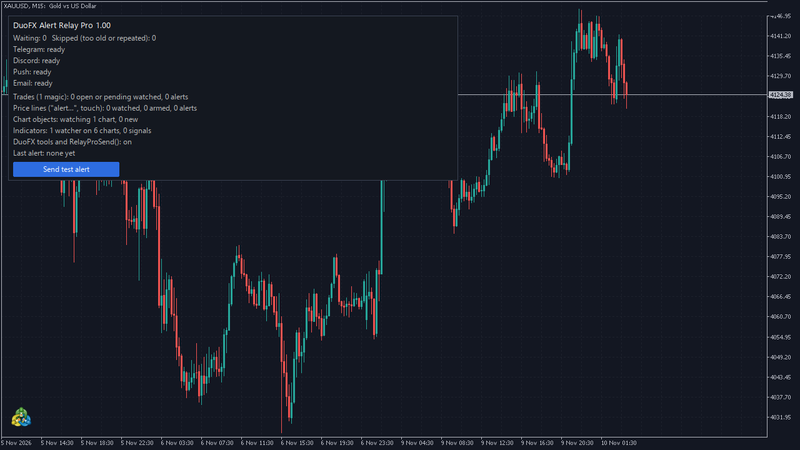
Top left: version, alerts waiting, alerts skipped (too old or repeated), one line per output, then one line per source and the last alert.
- ready, off, retrying in N s, URL not allowed (with the address to add), rate limited, waiting, error (with the reason): as in the outputs list.
- Trades: the filter and how many positions and orders are watched.
- Price lines: how many lines match the prefix, how many are armed, how many alerts.
- Chart objects: how many charts are watched.
- Indicators: watchers, pairs, signals, and any problem (cannot load, unknown symbol, unknown timeframe).
Behaviour inputs
- Skip alerts older than (seconds): default 300.
- Attach a chart screenshot: default on (Telegram and Discord). The relay uses a chart of the alert's symbol and timeframe if one is open, otherwise any chart of the symbol, otherwise text only.
- Ignore an identical alert repeated within (seconds): default 10, 0 = off.
- Label added to every message: for example "Account 1".
- Send one test alert when the relay starts, Show the status panel, Dry run (writes each request to MQL5\Files\DuoFX\Relay instead of sending).
Troubleshooting
- URL not allowed: add the address the panel names in Tools, Options, Expert Advisors.
- Indicator: cannot load: check the path in the Navigator (folder and name, no .ex5), then the inputs. Try with no inputs first.
- Indicator watched but no alerts: open the Data Window and check which buffer holds the signal and what it contains on signal bars (a price, 1, or empty). Try value mode with that buffer, and check "Bar to read" for indicators that confirm late.
- Arrows not sent: open the Objects List (Ctrl+B) after an arrow appears. If the object's time is older than "Only objects placed on the last bars", raise that number. Check the type filter and the name filter.
- Price line not sent: its name or description must start with the prefix. Moving the line re-arms it.
- Push fails (error 4517 on MT5, 4250 to 4253 on MT4): set your MetaQuotes ID in Tools, Options, Notifications. Email fails (error 4510 on MT5): fill in Tools, Options, Email.
- Alerts arrive late: move the relay to a quiet chart.
- Nothing in the Strategy Tester: by design. The tester cannot send web requests.
FAQ
- Does it trade? Never.
- Does it need a VPS? No, but it only sends while the terminal runs, like any EA. On a VPS it keeps sending when your computer is off.
- Is my bot token safe? It stays in the EA inputs on your computer and is sent only to Telegram. The relay never writes it into its own log messages or the panel.
- Can I copy signals to a group? Yes, Telegram groups and channels and Discord channels work. The relay sends alerts as messages; it does not copy trades into other accounts.
The DuoFXRelayPro.mqh header
Save this as MQL5\Include\DuoFXRelayPro.mqh (or MQL4\Include\DuoFXRelayPro.mqh).
//+------------------------------------------------------------------+
//| DuoFXRelayPro.mqh - send alerts from your own MQL code through    |
//| DuoFX Alert Relay Pro (Telegram, Discord, push, email).           |
//| Copyright 2026, DuoFX - https://duofxlabs.com                     |
//|                                                                  |
//| Free to use in your own indicators, EAs and scripts, MT5 and MT4.|
//| Copy this file to MQL5\Include (or MQL4\Include) and:            |
//|                                                                  |
//|   #include <DuoFXRelayPro.mqh>                                   |
//|   RelayProSend("buy", "Breakout above the Asian high");          |
//|                                                                  |
//| It works from indicators too: nothing here calls WebRequest. The |
//| call writes one small file in the terminal's Common folder, and  |
//| Alert Relay Pro (running on any chart of a terminal on this PC)  |
//| formats it with your templates, adds a screenshot and sends it.  |
//| It returns false, and never raises an error, in the Strategy     |
//| Tester, when Alert Relay Pro is not running (so nothing piles up |
//| while it is off), or when 200 alerts are already waiting.        |
//| RelayProLastError says why.                                      |
//+------------------------------------------------------------------+
#ifndef DUOFX_RELAY_PRO_PUBLIC_MQH
#define DUOFX_RELAY_PRO_PUBLIC_MQH

#define RELAYPRO_DIR    "DuoFX\\AlertsPro\\"
#define RELAYPRO_HB     "DuoFX\\relaypro.hb"

string RelayProLastError = "";
int    g_relayProSeq     = 0;
long   g_relayProLastMs  = 0;

// true while Alert Relay Pro runs (its heartbeat file is under a minute old)
bool RelayProRunning()
  {
   int h=FileOpen(RELAYPRO_HB,FILE_READ|FILE_TXT|FILE_ANSI|FILE_COMMON|FILE_SHARE_READ|FILE_SHARE_WRITE);
   if(h==INVALID_HANDLE)
      return false;
   string s=FileReadString(h);
   FileClose(h);
   long t=StringToInteger(s);
   long d=(long)TimeGMT()-t;
   return t>0 && d>=-5 && d<=60;
  }

string RelayProEsc(string s)
  {
   StringReplace(s,"\\","\\\\");
   StringReplace(s,"\r","");
   StringReplace(s,"\n","\\n");
   return s;
  }

string RelayProTf(ENUM_TIMEFRAMES tf)
  {
   if(tf==PERIOD_CURRENT)
      tf=(ENUM_TIMEFRAMES)Period();
   string s=EnumToString(tf);          // PERIOD_H1
   if(StringFind(s,"PERIOD_")==0)
      s=StringSubstr(s,7);
   return s;
  }

int RelayProWaiting()
  {
   string name;
   int n=0;
   long h=FileFindFirst(RELAYPRO_DIR+"*.alr",name,FILE_COMMON);
   if(h==INVALID_HANDLE)
      return 0;
   do
      n++;
   while(FileFindNext(h,name) && n<1000);
   FileFindClose(h);
   return n;
  }

//+------------------------------------------------------------------+
//| direction : "buy", "sell" (also long, short, up, down, bull,      |
//|             bear) or anything else for a neutral alert            |
//| message   : plain text, up to 1500 characters, \n for a new line |
//| source    : the {source} line, for example your indicator's name |
//|             ("" = this program's name)                            |
//| symbol    : "" = the chart's                                      |
//| timeframe : PERIOD_CURRENT = the chart's                          |
//| screenshot: attach a chart screenshot (Telegram and Discord)      |
//| price     : the {price} value, 0 = the symbol's bid               |
//+------------------------------------------------------------------+
bool RelayProSend(string direction,string message,string source="",string symbol="",
                  ENUM_TIMEFRAMES timeframe=PERIOD_CURRENT,bool screenshot=true,double price=0)
  {
   RelayProLastError="";
   if(MQLInfoInteger(MQL_TESTER)!=0 || MQLInfoInteger(MQL_OPTIMIZATION)!=0)
     {
      RelayProLastError="strategy tester";
      return false;
     }
   if(!RelayProRunning())
     {
      RelayProLastError="DuoFX Alert Relay Pro is not running (attach it to any chart)";
      return false;
     }
   if(RelayProWaiting()>=200)
     {
      RelayProLastError="queue full";
      return false;
     }
   if(source=="")
      source=MQLInfoString(MQL_PROGRAM_NAME);
   if(symbol=="")
      symbol=_Symbol;
#ifdef __MQL5__
   string srv=TimeToString(TimeTradeServer(),TIME_DATE|TIME_MINUTES);
#else
   string srv=TimeToString(TimeCurrent(),TIME_DATE|TIME_MINUTES);
#endif
   long t=(long)TimeGMT();
   string text="v=p1\n";
   text+="t="+IntegerToString(t)+"\n";
   text+="product="+RelayProEsc(StringSubstr(source,0,80))+"\n";
   text+="symbol="+RelayProEsc(StringSubstr(symbol,0,32))+"\n";
   text+="tf="+RelayProTf(timeframe)+"\n";
   text+="dir="+RelayProEsc(direction)+"\n";
   text+="srv="+srv+"\n";
   text+="chart="+IntegerToString(ChartID())+"\n";
   text+="shot="+(screenshot?"1":"0")+"\n";
   text+="price="+DoubleToString(price,8)+"\n";
   text+="msg="+RelayProEsc(StringSubstr(message,0,1500))+"\n";
   uchar b[];
   int n=StringToCharArray(text,b,0,WHOLE_ARRAY,CP_UTF8);
   FolderCreate("DuoFX",FILE_COMMON);
   FolderCreate("DuoFX\\AlertsPro",FILE_COMMON);
   // file names start with the time in ms, which sets the sending order: keep it rising within one program
   long ms=t*1000+(long)(GetTickCount()%1000);
   if(ms<=g_relayProLastMs)
      ms=g_relayProLastMs+1;
   g_relayProLastMs=ms;
   for(int attempt=0;attempt<5;attempt++)
     {
      g_relayProSeq++;
      string base=StringFormat("%013I64d_%08X_%04d_%d",ms,
                               (uint)(ChartID()&0xFFFFFFFF),g_relayProSeq%10000,attempt);
      string tmp=RELAYPRO_DIR+base+".tmp";
      int h=FileOpen(tmp,FILE_WRITE|FILE_BIN|FILE_COMMON);
      if(h==INVALID_HANDLE)
        {
         RelayProLastError="cannot write to the Common folder (error "+IntegerToString(GetLastError())+")";
         return false;
        }
      if(n>1)
         FileWriteArray(h,b,0,n-1);
      FileClose(h);
      if(FileMove(tmp,FILE_COMMON,RELAYPRO_DIR+base+".alr",FILE_COMMON))
         return true;
      FileDelete(tmp,FILE_COMMON);
     }
   RelayProLastError="cannot rename the alert file";
   return false;
  }

#endif
Alerts depend on your internet connection, your broker feed, the indicators you watch and on Telegram, Discord, MetaQuotes push and your mail server, and can be delayed or lost. They are not trading advice. Trading carries a high risk of loss.



