
Available on the MQL5 Market: Session & Killzones PRO
Risk notice. Trading involves risk of loss. This indicator marks trading sessions, killzones and reference levels on the chart; it does not predict the market, does not place trades and does not guarantee any result. Use it together with your own analysis and risk management, and test on a demo account first.
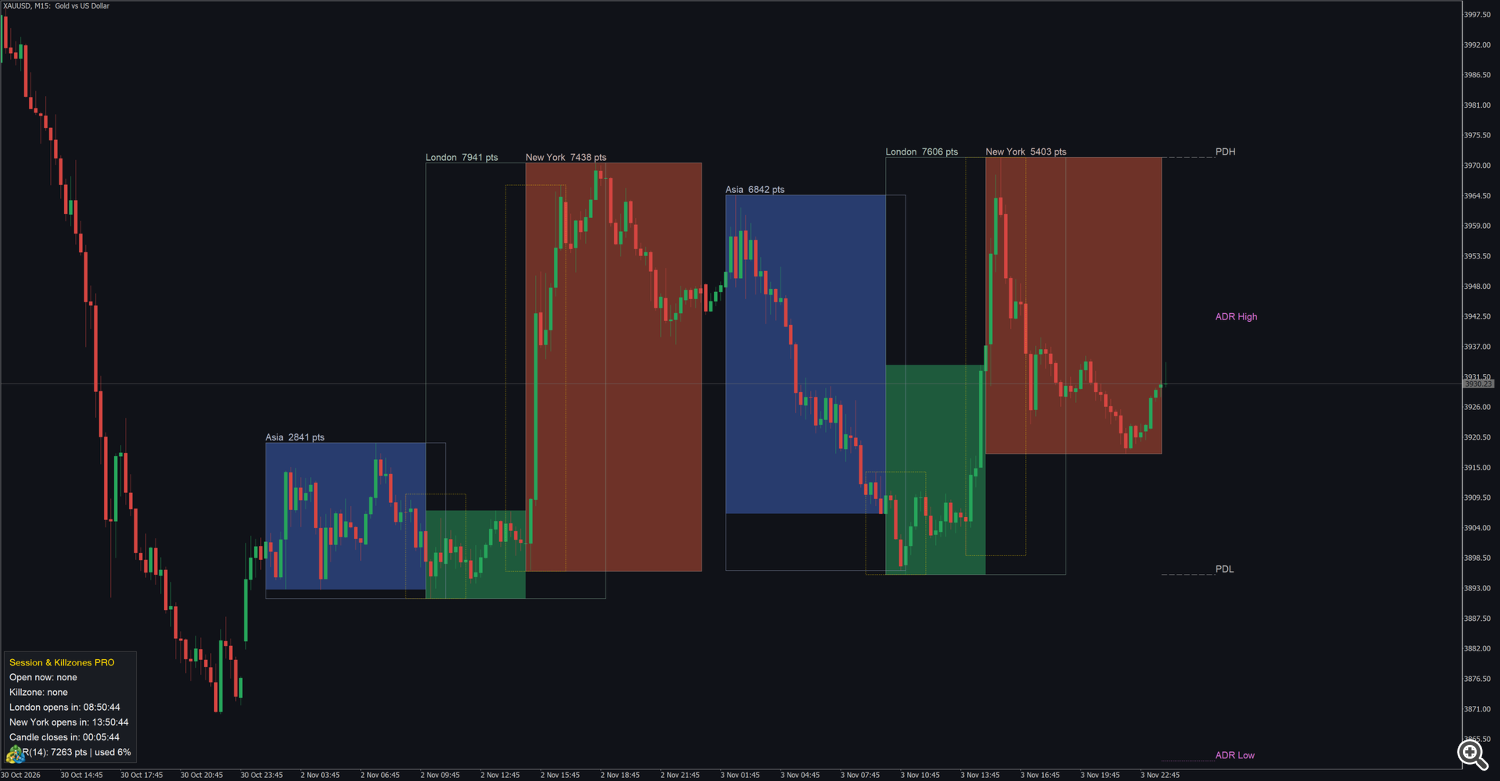
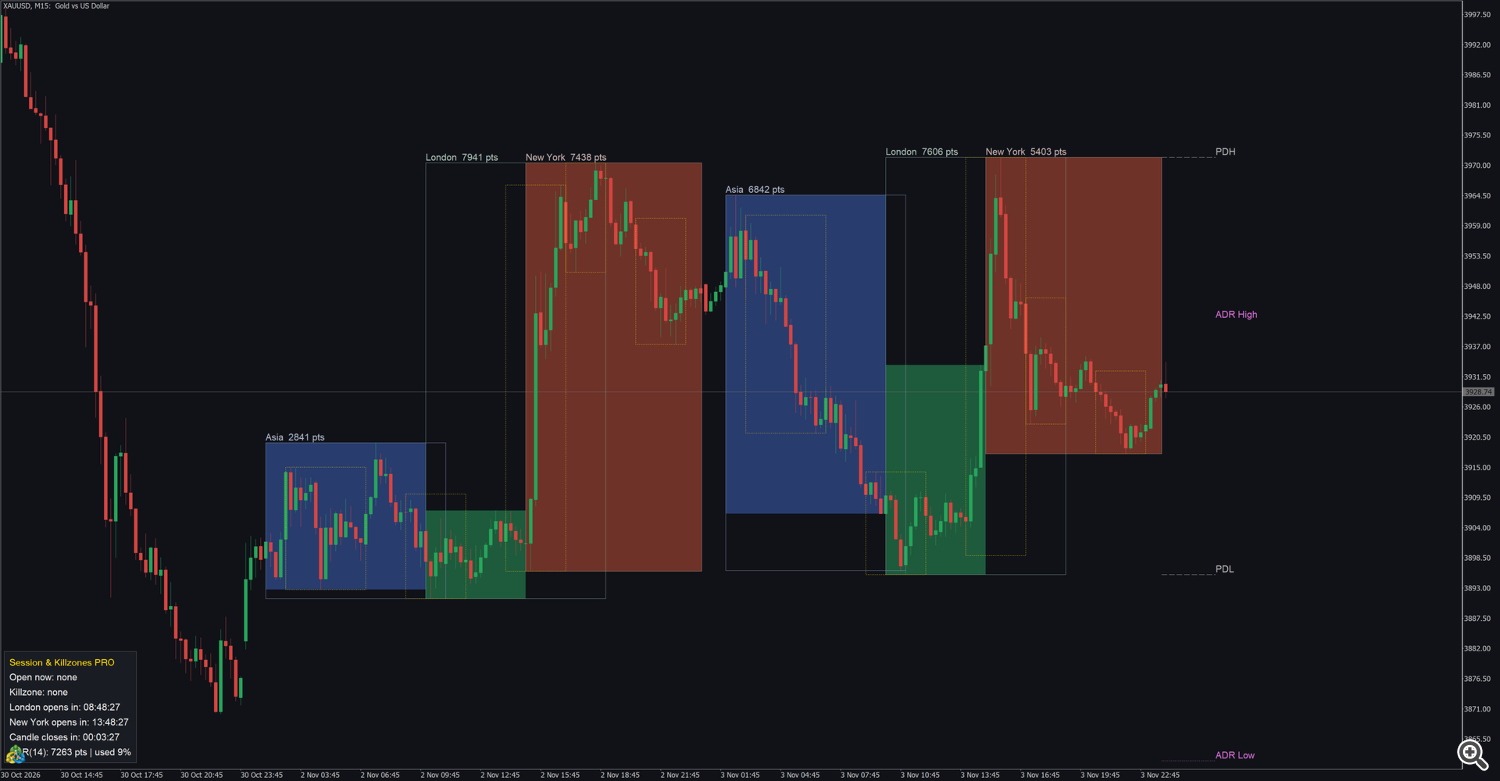
Session & Killzones PRO draws the Asia, London and New York sessions and the ICT killzones on your chart, with the range of each session in points, the previous day high and low (PDH / PDL) and ADR projections. Each session follows the local time of its own market, with US and UK daylight saving applied separately, so the boxes stay in the right place all year without changing any setting. A panel shows the sessions open now, the current killzone, the countdown to the London and New York open, the candle close countdown and the ADR. Alerts can fire at each session open and killzone start. Two buffers give the session and killzone state to Expert Advisors.
It works on any symbol (forex, gold, indices, crypto). Session boxes are drawn on H1 and lower timeframes. It does not open trades.
1. Installation and quick start
- Install the indicator from the Market tab of the terminal (Toolbox → Market → Purchased → Install).
- Open a chart on H1 or lower (M5 and M15 are the most common for intraday) and drag Session & Killzones PRO from the Navigator (Indicators → Market) onto it.
- Keep the default inputs or adjust them (section 9) and press OK.
Quick start
- Most forex and gold brokers run on GMT+2 / GMT+3; with Broker time zone = Auto the indicator detects the server time by itself. If your broker uses another server time, see section 3.
- By default the London and NY AM killzones are shown; turn on the others in the KILLZONES group.
- Use the session ranges and PDH / PDL as reference levels, and the killzones as the time windows where you focus your attention.
- To be warned at a session open or a killzone start, set Session open alert or Killzone start alert (section 8).
2. Chart legend
| On the chart | Meaning |
|---|---|
| Dark blue box | Asia session (Tokyo 09:00 – 18:00, Tokyo time). |
| Dark green box | London session (08:00 – 17:00, London time). |
| Dark red box | New York session (08:00 – 17:00, New York time). |
| Lighter outline around a session | The full high and low of that session (Box style Filled + outline and Outline only). |
| Text such as London 1234 pts | Name and range of the session (high − low in points), at the top left of the box. |
| Gold dotted outline | A killzone, from its first to its last bar, around the high and low of that time. |
| Silver dashed lines PDH / PDL | Previous day high and low, drawn over today. |
| Orchid dotted lines ADR High / ADR Low | ADR projections for today (section 6). |
| Panel | Sessions open now, current killzone, countdowns, ADR (section 7). |
Hover the mouse over a box or line to read its tooltip, for example London | 1234 pts , NY AM KZ | 456 pts or PDH 2655.40 . The boxes are drawn in the background, behind the candles. When two range texts would overlap on the screen (for example London and New York on H1), the later one is lifted above the earlier one.
3. Sessions and time zones
| Session | Local hours | Daylight saving |
|---|---|---|
| Asia | Tokyo 09:00 – 18:00 | none (Japan has no daylight saving) |
| London | London 08:00 – 17:00 | UK rules |
| New York | New York 08:00 – 17:00 | US rules |
The indicator converts the broker server time to the local time of each market. The US and the UK change their clocks on different dates; for 2 to 3 weeks a year only one of them has changed, and the boxes stay correct in those weeks too.
Broker time zone
| Broker time zone | Use it when |
|---|---|
| Auto (live) / GMT+2/+3 in tester (default) | Most brokers. On a live chart the server offset is detected when the indicator starts. For GMT+2 / GMT+3 brokers the summer / winter change is followed through the whole history. For brokers with another offset, the offset detected now is used for all past days, so boxes of past days in the other daylight saving period can be one hour off; use Fixed GMT offset if that matters. In the Strategy Tester, Auto works as GMT+2 / GMT+3. |
| GMT+2 / GMT+3 (New York close brokers) | Your broker is GMT+2 in winter and GMT+3 in US summer time. Same result live and in the tester. |
| Fixed GMT offset | Your broker keeps one offset all year. Type it in Broker GMT offset (for example 0, 1, 3). Use this mode also in the Strategy Tester when your broker is not GMT+2 / GMT+3. |
- Broker GMT offset (fixed mode and tester) is used by the Fixed GMT offset mode, live and in the tester. With Auto, the tester uses GMT+2 / GMT+3 and does not read this value: choose Fixed GMT offset to use your own offset in the tester.
- Sessions and killzones are not drawn on Saturdays and Sundays, also on symbols that trade on weekends (crypto).
- Days to draw (default 5) counts calendar days back from the last bar, weekend days included.
4. Box styles
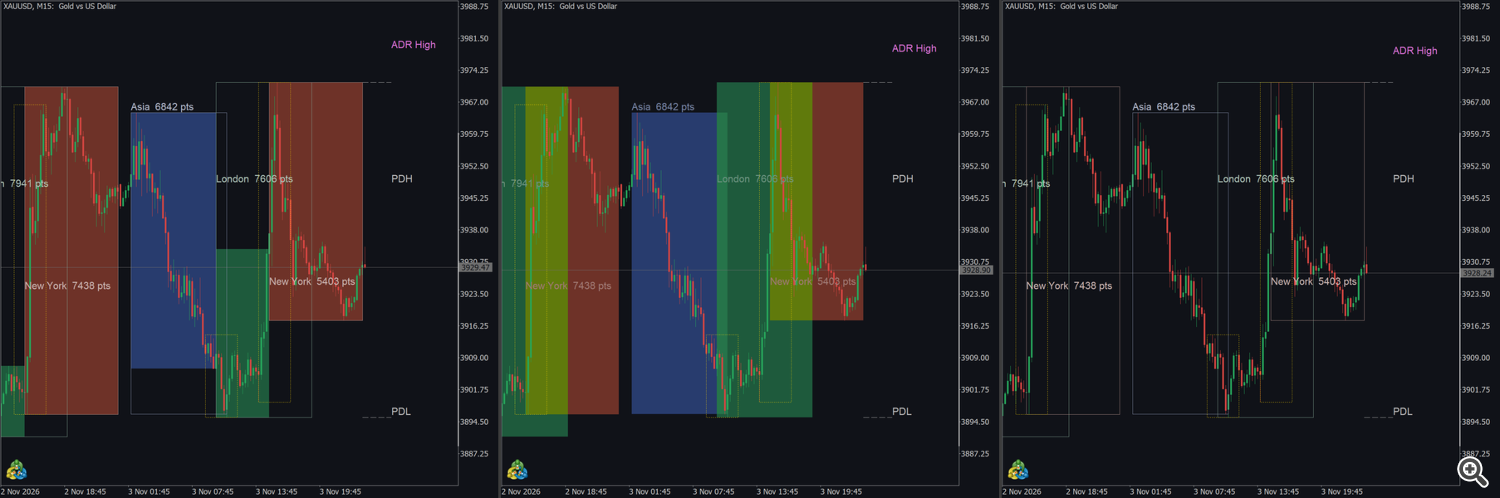
MetaTrader rectangles have no transparency: two filled boxes on top of each other mix their colours. Box style chooses how the London / New York overlap is shown:
| Box style | Result |
|---|---|
| Filled, overlaps shown in the later session + full-range outline (default) | Each bar is filled with the colour of the session that opened last (New York over London over Asia). Every session also keeps a lighter outline with its full high and low and its range text. |
| Filled full range (overlaps mix colors) | Each session is filled over its whole range; the overlap shows the mixed colour. |
| Outline only | Only the lighter outlines and the range texts; the candles stay fully visible. |
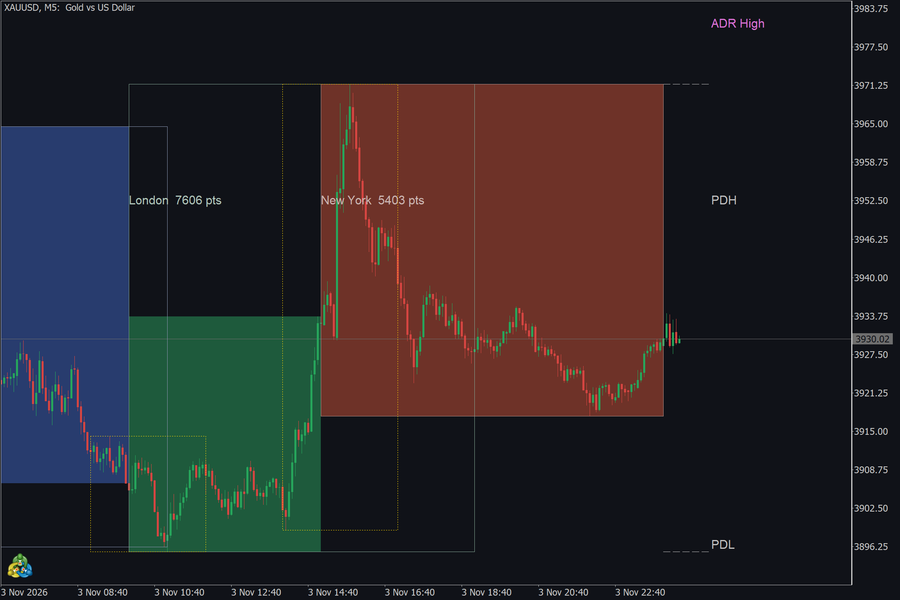
Show range size on boxes = false hides the texts; the range stays in the tooltip.
5. Killzones
The killzones follow the ICT definition and are set in New York time:
| Killzone | New York time | Default |
|---|---|---|
| Asian KZ | 20:00 – 00:00 | off |
| London KZ | 02:00 – 05:00 | on |
| NY AM KZ | 07:00 – 10:00 | on |
| London Close KZ | 10:00 – 12:00 | off |
| NY PM KZ | 13:30 – 16:00 | off |
- Each killzone has its own on / off input. All use Killzone outline color (gold).
- A killzone is drawn as a dotted outline around the high and low of its bars; the tooltip shows its name and range in points.
- On H1, a killzone that starts at :30 (NY PM) begins on the next full hour bar. Use M30 or lower to see it at its exact start.
6. Levels: PDH / PDL and ADR
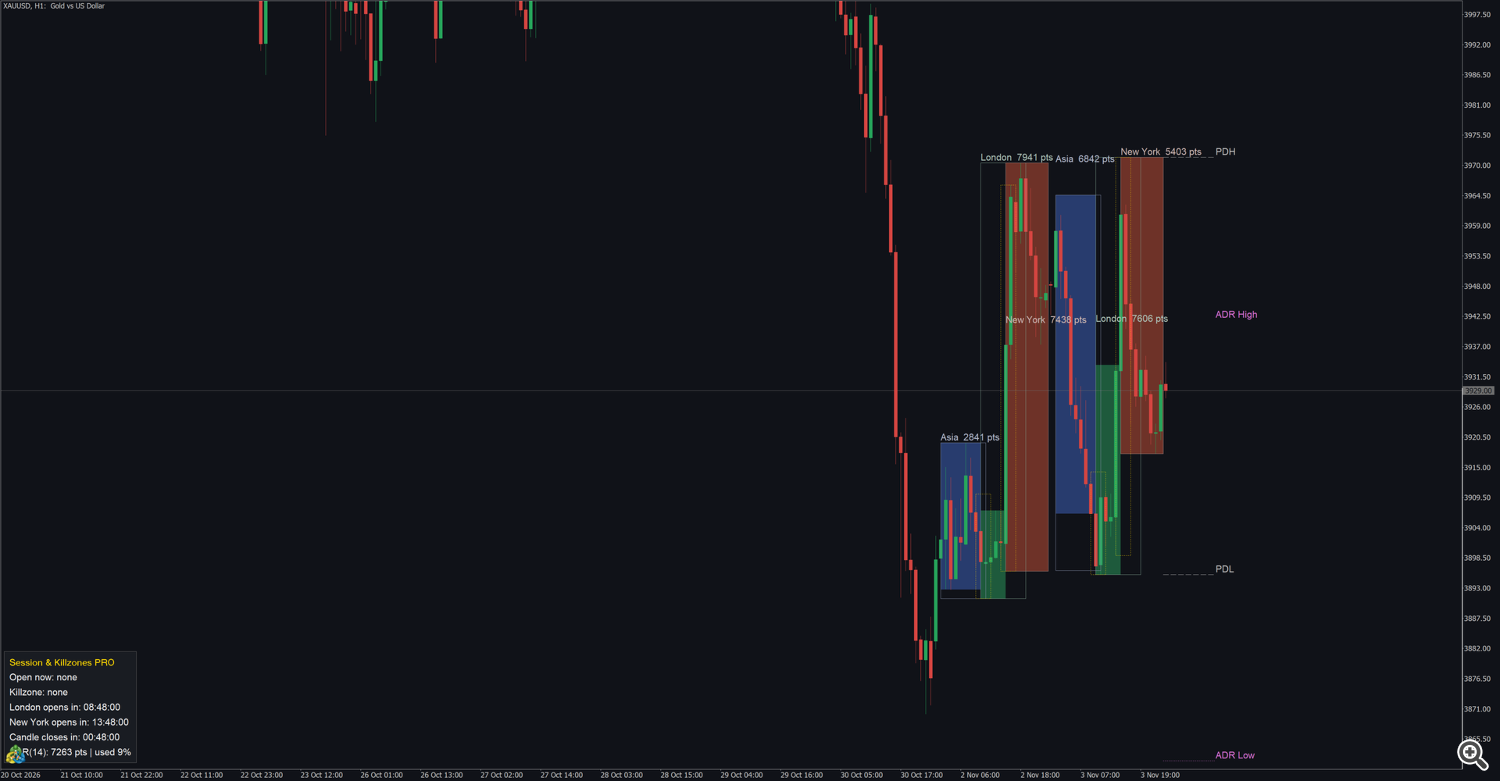
PDH / PDL — the high and the low of the previous daily bar of your broker, drawn from the start of today to a few bars to the right of the last bar, with the labels PDH and PDL .
ADR projections — ADR is the average daily range of the last ADR days (default 14) finished days.
- ADR High = today's low + ADR: where the day's high would be if today reached its average range from the current low.
- ADR Low = today's high − ADR: where the day's low would be if today reached its average range from the current high.
- The lines move while today's high and low change. The panel shows the ADR in points and how much of it today has already used ( used 63% ).
Many traders read a day that has used most of its ADR as a day with less room left in the same direction; it is a reference, not a signal.
The levels are drawn on every timeframe, also above H1.
7. Panel
| Line | Content |
|---|---|
| Open now: London + New York | Sessions open at the current server time, or none . |
| Killzone: NY AM KZ | Current killzone, or none . |
| London opens in: 05:12:30 / London: open | Countdown to the next London open ( 1d 02:15 when more than a day away). |
| New York opens in: ... / New York: open | Countdown to the next New York open. |
| Candle closes in: 00:04:12 | Time left in the current candle; Market closed on weekends for symbols that do not trade on weekends. |
| "ADR(14): 2350 pts | used 63%" | ADR in points and the share used today; ADR: loading while the daily history loads. |
- The countdowns update every second, also without new ticks.
- Panel corner (default lower left) places the panel in any corner of the chart; Show panel = false hides it.
- The panel line Killzone names the current killzone among all five, also when its outline is turned off.
8. Alerts
| Input | Fires when | Message |
|---|---|---|
| Session open alert | the first bar of the Asia, London or New York session opens | Asia session open , London session open , New York session open |
| Killzone start alert | the first bar of a killzone that is turned on opens | London KZ started , NY AM KZ started , ... |
The text includes the product, symbol and timeframe, for example Session & Killzones PRO: XAUUSD | M15 | London session open .
- Modes: Off (default), Popup, Sound, Smartphone notification, Popup + Sound, Notification + Sound, Popup + Notification, Popup + Sound + Notification. Sound: one of 13 terminal sounds (default alert).
- Also send e-mail sends each alert by e-mail as well (Tools → Options → Email). The e-mail is sent even when the two alert modes are Off.
- The alert comes when the first bar inside the session or killzone opens, so the timeframe sets how exact it is: on M5 a London open alert comes at the London open; on H1 a killzone that starts at :30 alerts on the next full hour.
- The session open alert is sent for the three sessions, also when the box of a session is turned off. Killzone alerts are sent only for the killzones that are turned on.
- No alert is sent on weekends, when the indicator is attached in the middle of a session, or in the Strategy Tester.
- Push notifications need the MetaQuotes ID in Tools → Options → Notifications.
9. Inputs
The headings are the input groups of the Inputs tab.
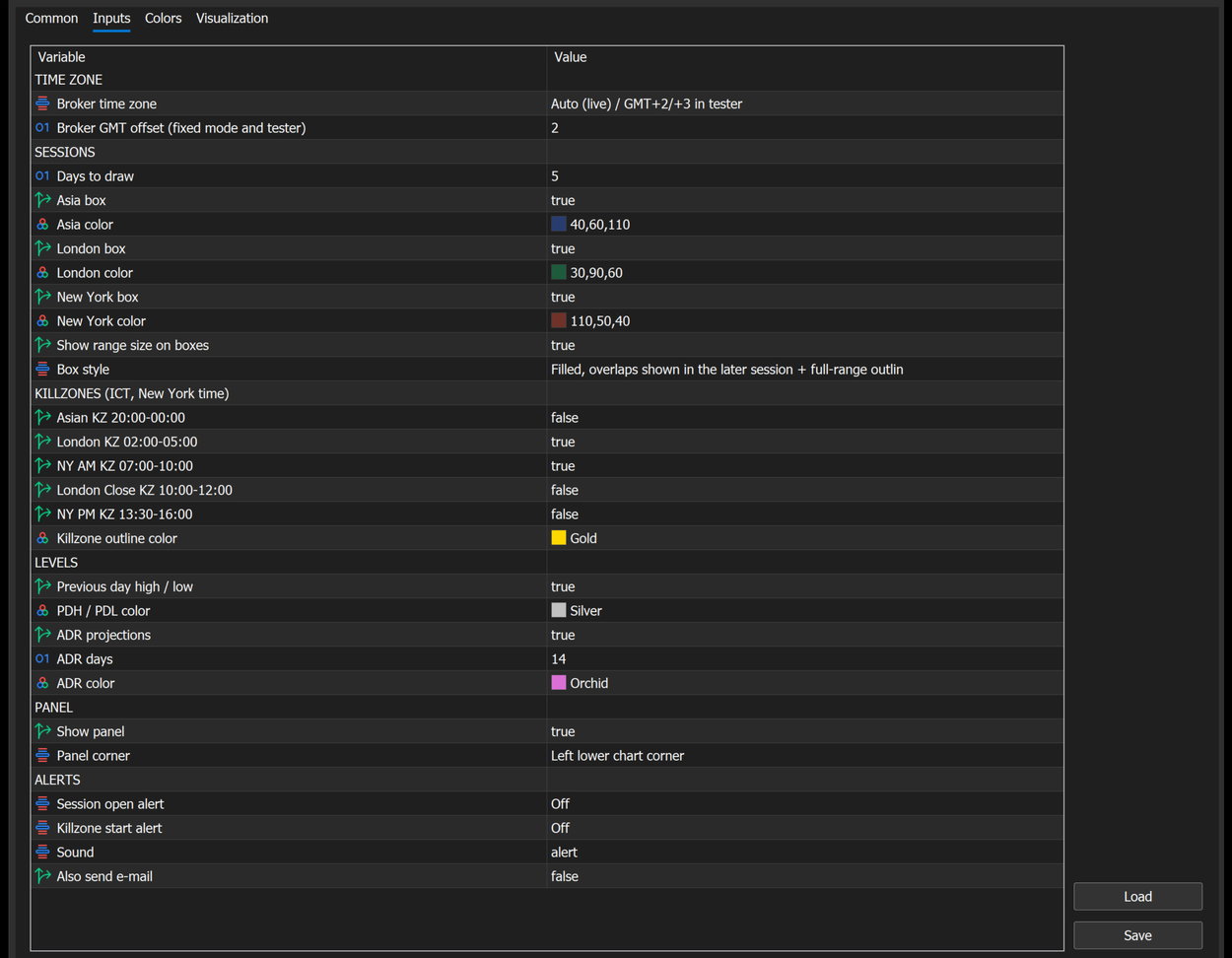
TIME ZONE
| Input | Default | Description |
|---|---|---|
| Broker time zone | Auto (live) / GMT+2/+3 in tester | Auto, GMT+2 / GMT+3 (New York close brokers), Fixed GMT offset (section 3). |
| Broker GMT offset (fixed mode and tester) | 2 | Server offset in hours for the Fixed mode. |
SESSIONS
| Input | Default | Description |
|---|---|---|
| Days to draw | 5 | Calendar days with boxes, counted back from the last bar. |
| Asia box | true | Asia boxes on / off. |
| Asia color | dark blue (40,60,110) | Fill of the Asia box; the outline and text use a lighter shade. |
| London box | true | London boxes on / off. |
| London color | dark green (30,90,60) | Fill of the London box. |
| New York box | true | New York boxes on / off. |
| New York color | dark red (110,50,40) | Fill of the New York box. |
| Show range size on boxes | true | Range text on the boxes. |
| Box style | Filled, overlaps shown in the later session + full-range outline | Section 4. |
Choose dark colours for the fills: the boxes are behind the candles and the outlines are drawn in a lighter shade of the same colour.
KILLZONES (ICT, New York time)
| Input | Default | Description |
|---|---|---|
| Asian KZ 20:00-00:00 | false | Asian killzone. |
| London KZ 02:00-05:00 | true | London killzone. |
| NY AM KZ 07:00-10:00 | true | New York morning killzone. |
| London Close KZ 10:00-12:00 | false | London close killzone. |
| NY PM KZ 13:30-16:00 | false | New York afternoon killzone. |
| Killzone outline color | Gold | Colour of all killzone outlines. |
LEVELS
| Input | Default | Description |
|---|---|---|
| Previous day high / low | true | PDH / PDL lines. |
| PDH / PDL color | Silver | Colour of PDH / PDL. |
| ADR projections | true | ADR High / ADR Low lines. |
| ADR days | 14 | Finished days used for the ADR (1 or more). |
| ADR color | Orchid | Colour of the ADR lines. |
PANEL
| Input | Default | Description |
|---|---|---|
| Show panel | true | Panel on / off. |
| Panel corner | Left lower chart corner | Corner of the chart for the panel. |
ALERTS
| Input | Default | Description |
|---|---|---|
| Session open alert | Off | Alert mode for session opens. |
| Killzone start alert | Off | Alert mode for killzone starts. |
| Sound | alert | alert, alert2, connect, disconnect, email, expert, news, ok, request, stops, tick, timeout, wait. |
| Also send e-mail | false | E-mail for each alert. |
10. Buffers for Expert Advisors
The indicator exposes 2 buffers that can be read with iCustom + CopyBuffer , also in the Strategy Tester. They draw nothing and are listed in the Data Window.
| Buffer | Name in the Data Window | Value on each bar |
|---|---|---|
| 0 | Session mask (1 Asia, 2 London, 4 New York) | sum of the sessions open at the bar's open time: 1 Asia, 2 London, 4 New York (6 = London + New York) |
| 1 | Killzone mask (1 Asia, 2 London, 4 NY AM, 8 London Close, 16 NY PM) | sum of the killzones active at the bar's open time: 1 Asian, 2 London, 4 NY AM, 8 London Close, 16 NY PM |
- The masks include all sessions and killzones, whether their box or outline is turned on or not, so an EA can use a killzone without drawing it.
- 0 = no session / no killzone. Saturdays and Sundays are 0. Bars older than the drawn days (Days to draw plus a small margin) are 0: raise Days to draw if your EA needs older bars.
- The value of a bar depends only on its open time, so it never changes once the bar exists. Read them on H1 or lower.
- Test a session with a bit mask: ((int)mask & 2) != 0 is true when London is open.
Loading. The Market version is installed in MQL5\Indicators\Market\ , and the example below loads it as "Market\\Session and Killzones PRO" . If the Navigator (Indicators → Market) shows a different name, use that name. With no parameters after the name the default inputs are used. To change inputs, pass them in the order of section 9. Every input group heading (TIME ZONE, SESSIONS, ...) is a parameter too: pass an empty string "" in its place, otherwise every following value shifts. Inputs left out at the end keep their defaults. Broker time zone is passed as a number: 0 = Auto, 1 = GMT+2 / GMT+3, 2 = Fixed GMT offset.
```mql5 // "" = TIME ZONE group; Fixed GMT offset 0 (broker on GMT all year); other inputs default int h = iCustom(_Symbol, PERIOD_M15, "Market\Session and Killzones PRO", "", 2, 0);
double ses[1], kz[1]; if (h != INVALID_HANDLE && BarsCalculated(h) > 0 && CopyBuffer(h, 0, 0, 1, ses) == 1 && CopyBuffer(h, 1, 0, 1, kz) == 1) { const bool london_open = ((int)ses[0] & 2) != 0; const bool ny_am_kz = ((int)kz[0] & 4) != 0; if (london_open && ny_am_kz) Print("London open and inside the NY AM killzone"); } ```
An indicator created by iCustom also draws its boxes, lines and panel on the chart of the calling program. Pass Show panel = false if you do not need the panel. Use one copy per chart: two copies on one chart share object names and overwrite each other's drawing.
11. Tips
- Cleaner chart:Box style = Outline only, and keep only the killzones you trade.
- Gold and indices: London open and NY AM are the most watched windows; the default killzones cover them.
- Brokers outside GMT+2 / GMT+3: use Fixed GMT offset when your broker keeps one offset all year; check one known open (for example the London open at 08:00 London time) against the chart after setting it.
- Strategy Tester: with Auto, the tester assumes GMT+2 / GMT+3. For another server time choose Fixed GMT offset before testing.
- Higher timeframes: on H4 or D1 only the PDH / PDL, ADR lines and the panel are shown. Open a second chart on M15 for the boxes.
- Overlap on H1: London and New York start a few bars apart and often share the same high; their texts are lifted apart automatically. Zoom in if they are still close.
12. Questions and troubleshooting
- Does it repaint? Closed sessions never change. The session in progress grows with each new candle until it closes. The buffers depend only on the bar time.
- The boxes are one hour off. Your broker's server time is not what the indicator assumes. Choose Fixed GMT offset with your broker's offset, or GMT+2 / GMT+3 if your broker follows US daylight saving (section 3).
- No boxes on the chart. The timeframe is above H1 (the Experts log says use H1 or lower timeframes to see session boxes ), or it is a weekend, or the boxes are turned off.
- A killzone is missing. Only London and NY AM are on by default; turn on the others in the KILLZONES group.
- Why is the overlap of London and New York in the New York colour? That is the default Box style: each bar takes the colour of the session that opened last, and the London outline still shows the full London range. Choose Filled full range to fill both.
- I got no alert at the session open. The alert modes are Off by default; check them. The alert comes when the first bar of the session opens on the chart's timeframe, not on a weekend, and not in the Strategy Tester.
- Which symbols? Any symbol: forex, gold, indices, crypto. The sessions are forex / exchange hours and are not drawn on weekends.
Support: send a private message on MQL5 to the author.




