Prop Firm Drawdown and Code Leak Auditor: User Guide & Technical Reference
1 November 2026, 13:28

0
25
If you test an EA in the MT5 Strategy Tester, you're looking at closed balance curves and static peak-to-valley equity calculated in your broker's server time. Live multi-step evaluation accounts don't use those rules. An EA that shows a 2% max drawdown over a year in the tester can still breach a 5% daily loss limit in live trading.
I built Prop Firm Drawdown and Code Leak Auditor to run offline post-mortem checks on MT5 Strategy Tester HTML reports using historical M1 bars and static .mq5 code scanning. Here is how the math works and how to set up the tool.
Market Link: https://www.mql5.com/en/market/product/205308
1. Four Things Standard MT5 Backtests Miss
A) Midnight High-Water Mark (HWM) Reset at 00:00 CE(S)T
The MT5 tester tracks drawdown from initial deposit or closed balance. Most evaluation models reset the daily loss floor at 00:00 CE(S)T (Prague time) using whichever is higher at that exact minute: closed Balance or floating Equity.
Suppose your EA carries +$3,000 floating profit across midnight and closes the position two hours later at +$500. The MT5 report logs a +$500 winning trade. Under HWM rules, your daily anchor locked in at +$3,000 at midnight, meaning you just took a $2,500 drawdown hit against the new floor.
B) Commission Differentials
If your backtest report recorded zero commission (or a lower rate than a raw ECN evaluation account charging $5 to $7 per round lot), high-frequency scalpers will look far safer on paper than they actually are. You need to inject the missing commission differential directly into the historical balance and M1 equity chain.
C) M1 Close vs. Intrabar Wick Excursions
Checking equity only when a trade closes isn't enough. A position that survives at the M1 bar close might still touch the daily equity floor mid-minute during a volatility spike. Because MT5 stores only Bid prices in M1 OHLC history, simulating short (SELL) excursions also requires adding the M1 bar's recorded spread to the Bid High (though transient rollover Ask-spread spikes beyond recorded bar spread require Real Ticks mode).
D) Look-Ahead Bias in AI-Written .mq5 Code
If you use LLMs to write or modify MQL5 code, two bugs show up constantly: reading unclosed bar values (shift=0 on current or multi-timeframe indicator handles) and forgetting ArraySetAsSeries(buffer, true) after CopyBuffer. Both bugs create fake backtest curves that fail immediately on live ticks.
2. 3-Step Setup Workflow
This tool is an offline diagnostic utility. It doesn't place trades and uses zero DLLs.
1. Export the HTML Report: Run your backtest in the MT5 Strategy Tester. Open the "Backtest" tab, right-click anywhere on the report, click "Report -> HTML", and save the file into your MQL5\Files folder. Make sure all traded symbols are enabled in your Market Watch window so the engine can read their M1 history.
2. Drop the .mq5 File (Optional): If you want to run Section 5 static code scanning for shift=0 leaks or missing ArraySetAsSeries calls, put your EA's main .mq5 source file into the same MQL5\Files folder.
3. Attach to Any Chart: Drop Prop Firm Drawdown and Code Leak Auditor onto any open MT5 chart. If you leave InpReportFileName empty, it automatically picks the newest HTML report in MQL5\Files (or Common\Files), replays every trade across M1 bars, draws the on-chart HUD, and saves the full 5-section report to MQL5\Files\Audit_Report.html.
3. Input Parameters
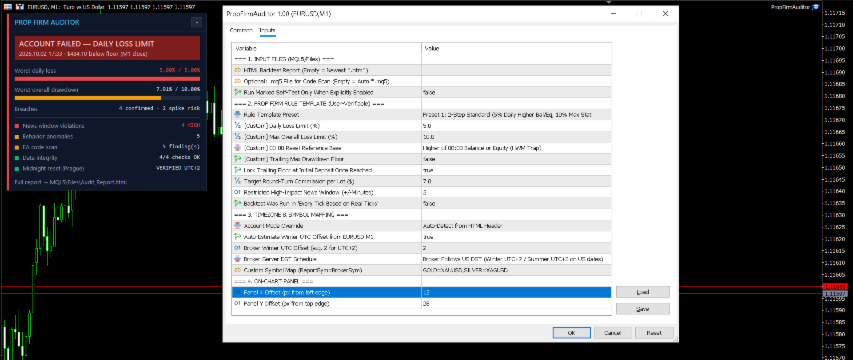
- InpReportFileName: HTML report filename inside MQL5\Files. Leave blank to auto-select the latest report.
- InpEAFileName: Optional .mq5 source file inside MQL5\Files for static code scanning (scans the main .mq5 file and counts external .mqh includes).
- InpRulePreset: 5 built-in evaluation math models (Static vs. Trailing, Balance/Equity HWM) plus a Custom mode.
- InpCustomDailyDDPct & InpCustomMaxDDPct: Your custom daily and overall loss limits when InpRulePreset is set to Custom.
- InpTargetCommPerLot: Target round-turn commission per 1.0 lot in USD. If the HTML report recorded lower or zero commission, the engine injects the exact difference 50/50 at entry and exit.
- InpNewsWindowMin: Window in minutes before and after high-impact MT5 Economic Calendar events to flag trades opened or closed during news.
- InpSymbolMap: Custom mapping (e.g., GOLD=XAUUSD,SILVER=XAGUSD) if the report uses different symbol names than your terminal.
- InpRealTicksMode: Strict spread-handling diagnostics for reports generated using Real Ticks.
4. What You Get in Audit_Report.html
Open MQL5\Files\Audit_Report.html in any browser after the chart HUD finishes running:
- Section 1 (Metadata & Checksum): Verifies accounting math down to $0.0000 variance, M1 price-in-bar alignment percentage, injected commission totals, and winter UTC to Prague CE(S)T offset calibration.
- Section 2 (Rolling 30-Day Windows & Daily Log): Shows your Closest Survival Margin, the Top 10 worst intraday drawdown days sorted by distance to the floor, and an expandable table for all audited days.
- Section 3 (2-Tier Breach Log): Splits hits into CONFIRMED BREACH (M1 Close) and INTRABAR SPIKE RISK (M1 Envelope). Account termination locks onto the first confirmed M1 close breach; any later breaches are tagged [POST-TERMINATION].
- Section 4 (News & Execution Anomalies): Flags NEWS_WINDOW_VIOLATION, INTRABAR_TPSL_AMBIGUITY (when TP and SL sit inside the same M1 bar), CONSECUTIVE_BAR_STACKING, and SCALPER_COST_ILLUSION.
- Section 5 (Static .mq5 Scanner): Prints exact line numbers for MTF_ZERO_BAR_SHIFT, CURRENT_TF_ZERO_SHIFT, COPY_START_ZERO_BAR, and MISSING_ARRAY_SET_AS_SERIES.
Disclaimer: Prop Firm Drawdown and Code Leak Auditor is an independent diagnostic and simulation utility. It is not affiliated with, endorsed by, or sponsored by any proprietary trading firm. All rule presets represent generalized evaluation mathematical models for educational and analytical testing.