Cross Pair Forge EA Manual: a Prop Firm EA for FTMO, FundedNext, Blueberry, The5ers, Eightcap and FT+ on MT5 and MT4

An expert advisor cannot make a prop firm challenge pass faster than the market allows. What it can do is refuse to break the rules while it waits, count the things the firm counts, and stop before a line instead of after it. That is the whole job, and most accounts are lost because something in that list was missing rather than because the entries were bad.
This is the complete settings manual for Cross Pair Forge, a cross-pair momentum EA with a prop-firm rule guard built in. It covers what each firm profile applies, the engine values measured per firm, every input and when to change it, and what the testing did and did not show. The honest parts are in here too, including the windows where this engine loses.
- MetaTrader 5: Cross Pair Forge MT5
- MetaTrader 4: Cross Pair Forge MT4
What a prop firm EA can and cannot do
A challenge has two clocks. One is the profit target. The other is the set of limits that end the account: a daily loss cap, a total loss cap, and on many programs a consistency rule and a minimum number of trading days. Only the second clock is under a robot's control. An EA can be precise about the limits in a way a human cannot, because it never gets bored, never rounds a number in its favour, and never decides that today is different.
The 14-day question
The most common question about any prop firm EA is how fast it passes. On these pairs the fastest phase measured in any Strategy Tester run was 56 calendar days, about 40 trading days, and that was from a favourable start. In flat markets the same settings took 99 to 140 days where they reached the target at all. Across the eighteen measured MetaTrader 5 runs, thirteen reached the target inside the window and five did not. A pass inside 14 days was never observed at any setting.
That matters because it is the number most often promised. If a product tells you 14 days on currency crosses, it is describing something the data does not contain.
Why quiet weeks are the filter working
Cross Pair Forge has an hourly regime gate. When the market is not moving, it does not trade. That produces weeks with no entries, which feels like a broken robot and is the opposite. Flat markets are where challenges are lost, because a trader watching a stalled account starts forcing trades. The gate is there to make the waiting automatic.
How the engine trades AUDCAD and NZDCAD
The pairs are deliberate. AUDCAD and NZDCAD are slow, mean-reverting crosses with no dollar leg, so they do not lurch on every American release. AUDNZD was tested and dropped: it lost money in both regimes.
Multi-timeframe momentum
The entry read is a weighted composite of RSI and Stochastic across four timeframes, with the higher ones carrying most of the weight. A single five-minute spike cannot produce a trade on its own. The engine then looks for a turn away from a recent extreme rather than an extreme itself, which is why it is a reversal engine and not an oscillator crossover.
The regime gate and the zone check
Two filters sit on top. The hourly ADX gate blocks entries when the market is not trending enough to carry a trade to target. The hourly supply and demand check finds the ground left behind by impulse candles and refuses to buy into supply or sell into demand. By default the zone is a veto only, never a requirement.
Exits
The stop and target are sized from ATR, not from a pip constant, so the same settings behave sensibly on any instrument. Then: break-even once the trade is far enough ahead, a partial close that banks part of the position, an ATR trailing stop on the remainder, and an optional exit when momentum turns against what is left.
Introducing Cross Pair Forge EA on the MQL5 Market
The EA is listed for both platforms. Installation is automatic after purchase: it appears under Navigator, Expert Advisors, Market, and you drag it onto a chart. There is no file copying, and the free demo runs in the Strategy Tester before you spend anything.
- MetaTrader 5: Cross Pair Forge MT5
- MetaTrader 4: Cross Pair Forge MT4
The prop firm guard, rule by rule
The daily loss floor
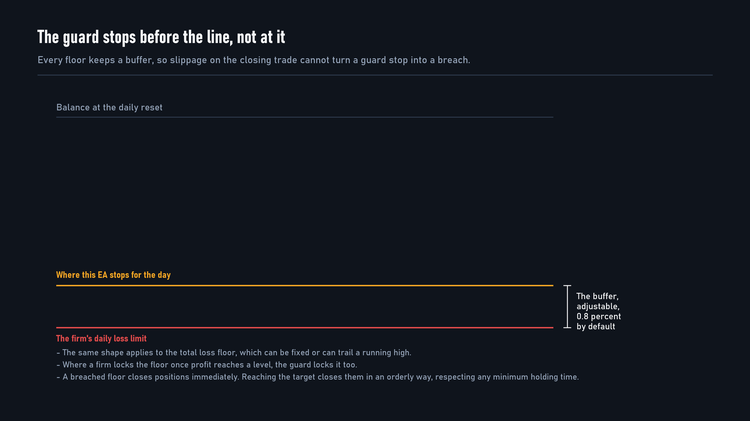
The guard measures the day on the firm's own clock and holds a buffer back from the limit. If your firm allows 5 percent and the buffer is 0.8, the EA stops the day at 4.2 percent. The difference is what pays for the spread on the closing trade. A guard that stops exactly at the line breaches the line whenever the last fill is poor.
Firms measure the day differently. Some use a percentage of your starting account size. Others use whatever the account was worth at the reset moment, and one uses the higher of balance and equity at that moment, which is stricter when you carry a floating loss into the new day. The profile sets the right basis for you.
The total loss floor, static or trailing
A static floor sits at a fixed distance below your starting size and never moves. A trailing floor follows your account up, which means profit you have made can be taken back into the breach zone. Some firms trail from the end-of-day balance high, others from the intraday equity high, and several stop trailing once profit reaches a set level, which locks the floor at your starting size. All three behaviours are supported because all three exist in the market.
The reset clocks
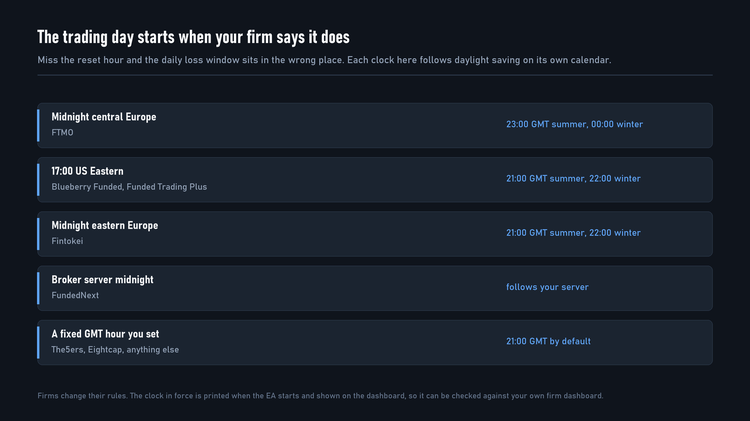
This is the most common configuration mistake in prop-firm automation. The daily window does not start at midnight on your broker's clock unless your firm says so.
The target latch, minimum days and profitable days
When the target is reached the EA closes and pauses rather than continuing to trade an account that has already passed. It closes slightly above the official target so the closing spread does not drop you back under it.
Two counting rules sit in front of that. Minimum trading days is what it sounds like. Profitable days is stricter: several programs only count a day where the closed result was at least half a percent up. The EA counts days the same way the firm does, and will keep trading after the target is technically reached if the day count is not yet satisfied.
Consistency, handled as a gate and not a block
Several firms cap how much of your total profit may come from your single best day. Cross Pair Forge treats this as a gate on declaring the phase finished, not as a block on entries. Blocking entries would deadlock the account after the first profitable day, because the ratio can only improve by trading on more days.
The size ratchet
At least one firm defines martingale as any position larger than the last one after a loss. When that profile is selected, a losing close caps the next position on that symbol at the losing trade's size, and a winning close clears the cap.
Minimum holding time
One firm requires positions to be held at least 60 seconds. That interacts badly with a target latch, which can otherwise close a position that opened seconds earlier. When a minimum hold is set, the orderly closes respect it. Protective closes do not: a breached floor outranks a holding-time rule, and that is the correct priority.
Firm profiles: the numbers each profile applies
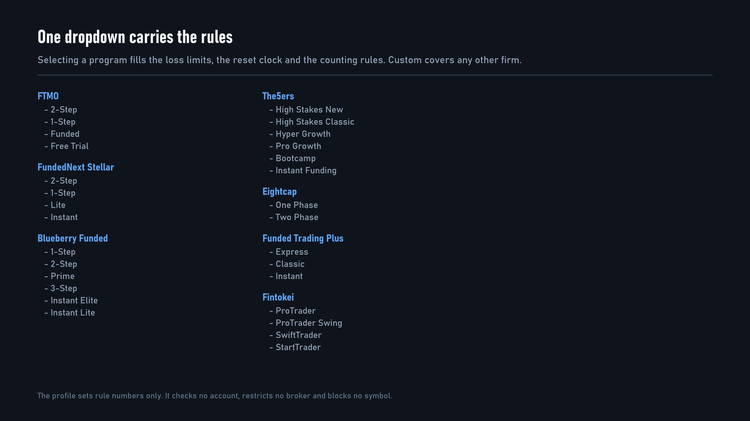
Selecting a profile fills the guard numbers only. It does not check your account, restrict your broker or block any symbol. The values below were recorded on 6 September 2026. Firms change their rules, so check them against your own firm dashboard. The EA prints the numbers in force when it starts and shows them on the dashboard for exactly that reason.
Table A: guard values by profile
| Profile | Target | Daily loss | Total loss | Reset clock | Min days | Notes |
|---|---|---|---|---|---|---|
| FTMO 2-Step | 10 then 5 | 5% of start | 10% static | Midnight central Europe | 4 | |
| FTMO 1-Step | 10 | 3% of start | 10% trailing | Midnight central Europe | 0 | Consistency gate on |
| FTMO Funded | none | 5% | 10% static | Midnight central Europe | 0 | Swing: turn the Friday exit off |
| FTMO Free Trial | 5 | 5% | 10% static | Midnight central Europe | 2 | |
| FundedNext 2-Step | 8 then 5 | 5% of start | 10% static | Server midnight | 5 | Consistency cap 25% |
| FundedNext 1-Step | 10 | 3% of start | 6% static | Server midnight | 2 | Tight, keep risk low |
| FundedNext Lite | 8 then 4 | 4% | 8% static | Server midnight | 5 | |
| FundedNext Instant | none | 3% | 6% trailing | Server midnight | 0 | |
| Blueberry 1-Step | 10 | 4% | 6% static | 17:00 US Eastern | 3 | Size ratchet on |
| Blueberry 2-Step | 10 then 5 | 5% | 10% static | 17:00 US Eastern | 3 | Size ratchet on |
| Blueberry Prime | 8 then 6 | 4% | 10% static | 17:00 US Eastern | 5 | Size ratchet on |
| Blueberry 3-Step | 6 per step | 3% | 5% trailing | 17:00 US Eastern | 5 | Trend markets only |
| Blueberry Instant Elite | none | 4% | 10% trailing, locks at +10 | 17:00 US Eastern | 0 | |
| Blueberry Instant Lite | none | 2% | 4% trailing, locks at +4 | 17:00 US Eastern | 0 | |
| The5ers High Stakes New | 10 then 5 | 5% | 10% static | 21:00 GMT | 3 profitable | |
| The5ers High Stakes Classic | 8 then 5 | 5% | 10% static | 21:00 GMT | 3 profitable | |
| The5ers Hyper Growth | 10 | 3% | 6% static | 21:00 GMT | 0 | Never above 1.0 risk |
| The5ers Pro Growth | 10 | 3% | 6% static | 21:00 GMT | 3 profitable | |
| The5ers Bootcamp | 6 per step | none | 5% static | 21:00 GMT | 0 | Stop loss mandatory |
| The5ers Instant Funding | none | none | 6% static | 21:00 GMT | 0 | |
| Eightcap One Phase | 10 | 4% | 8% static | 21:00 GMT | 5 | 60 second minimum hold |
| Eightcap Two Phase | 9 then 5 | 5% | 10% static | 21:00 GMT | 3 | 60 second minimum hold |
| Funded Trading Plus Express | 10 | 3% | 6% trailing, locks at +6 | 17:00 US Eastern | 0 | |
| Funded Trading Plus Classic | 7 then 7 | 3% | 8% static | 17:00 US Eastern | 0 | |
| Funded Trading Plus Instant | none | 3% | 6% trailing, locks at +6 | 17:00 US Eastern | 0 | |
| Fintokei ProTrader | 8 then 6 | 5% of prior close | 10% static | Midnight eastern Europe | 3 profitable | Open risk capped at 3% |
| Fintokei ProTrader Swing | 8 then 6 | 5% of prior close | 10% static | Midnight eastern Europe | 3 profitable | Open risk capped at 3% |
| Fintokei SwiftTrader | 6 | 2% | 3% static | Midnight eastern Europe | 3 | Daily profit cap, 60 day limit |
| Fintokei StartTrader | 2, 3, 6 | 3% | 6% static | Midnight eastern Europe | 3 | Daily profit cap per phase |
| Custom | your value | your value | your value | your choice | your value | For any firm not listed |
Two caveats belong with that table. The Eightcap reset hour is an assumption rather than a documented figure, so confirm it on your dashboard. The Fintokei profiles carry rule numbers only: this engine has never been backtested on a Fintokei feed, and Fintokei requires that commercial robots be individually configured rather than run at a vendor's defaults.
Table B: the reset clocks in GMT
| Clock | Firms | GMT in summer | GMT in winter |
|---|---|---|---|
| Midnight central Europe | FTMO | 22:00 | 23:00 |
| 17:00 US Eastern | Blueberry, Funded Trading Plus | 21:00 | 22:00 |
| Midnight eastern Europe | Fintokei | 21:00 | 22:00 |
| Broker server midnight | FundedNext | follows your server | follows your server |
| Fixed GMT hour | The5ers, Eightcap, custom | as you set it | as you set it |
Engine values per firm
The guard is filled by the profile. The engine is not: those values were measured per feed and are entered by hand, because they are recommendations rather than rules.
Table C: MetaTrader 5
| Firm | Momentum sensitivity | Hourly ADX gate | Target, ATR multiple |
|---|---|---|---|
| FTMO | 62 | 33 | 5.0 |
| FundedNext | 58 | 33 | 4.5 |
| Blueberry Funded | 62 | 36 | 4.5 |
| The5ers | 62 | 40 | 7.5 |
| Funded Trading Plus | 62 | 40 | 7.5 |
| Eightcap | 66 | 48 | 8.5 |
| Fintokei | not measured | not measured | not measured |
Shared across all of them: stop at 1.6 times ATR with a 15 pip floor, break-even at 1.3R, a 50 percent partial close at 1R, trailing at 2.6 times ATR from 1.5R, a 12 bar cooldown between entries, the Friday exit at 20:00 GMT, and a 12 pip spread ceiling.
The pattern in that table is worth reading. The firms with wider targets and higher gates are the ones charging commission per lot: a trade has to be worth more to survive the round trip.
Table D: MetaTrader 4
The engine values are the same on both platforms. Use the row for your firm in Table C above, including the shared settings underneath it. There is one difference, and it is about the platform rather than the strategy.
| Setting | Value |
|---|---|
| Engine values | as Table C, per firm |
| Symbols | AUDCAD only |
The MetaTrader 4 Strategy Tester runs one symbol at a time. It will not provide a second symbol's trading context, so a two pair setup cannot be verified there and the MetaTrader 4 version is documented and tested for AUDCAD alone. That is also why MetaTrader 4 figures are lower than the MetaTrader 5 ones: they come from one pair rather than two, and the two sets are not comparable.
Measured on MetaTrader 4 over January 2025 to September 2026, on a 100,000 account: the fastest run to reach a phase target was 92 days, and the slowest that reached one took 199. Several windows did not reach a target at all.
Risk per program
Higher risk does not pass faster. It fails sooner, because the drawdown that a slow market produces scales with the setting while the target does not move.
| Program type | Standard | Conservative |
|---|---|---|
| Two-step phase 1 | 1.0 to 1.5 | 0.75 |
| One-step, tight floors | 0.75 | 0.5 |
| Three-step and trailing floors | 0.5 | 0.35 |
| Funded and instant accounts | 0.5 | 0.25 |
Testing rejected several higher settings outright because their worst drawdown came within a fraction of a percent of the halt level. Those are documented as rejected rather than hidden.
Download the presets
Both archives are attached to this post. The MQL5 Market does not allow preset files on a product page, which is the reason this manual is a blog post: a blog post takes attachments.
- CrossPairForge_Presets_MT5_v1.02.zip - 180 presets, AUDCAD and NZDCAD
- CrossPairForge_Presets_MT4_v1.02.zip - 180 presets, AUDCAD
Each archive holds one folder per firm and one file per program and account size, named CPF_<firm>_<program>_<size>.set . Thirty programs across seven firms, at 5k, 10k, 25k, 50k, 100k and 200k.
Every file is complete: it carries all 112 of the EA's inputs, so loading one puts the EA in a known state rather than leaving ninety settings at whatever you had loaded before. That is not a detail on MetaTrader 4, which keeps the previous value for any input a preset does not mention.
A preset sets the firm profile, the phase, the engine values measured for that firm and the account size. It cannot know two things, so check them yourself after loading: your real account size, and whether your broker adds a suffix to the symbol names.
Setting it up in five steps
- Install from the Market. In the terminal, open Navigator, expand Expert Advisors, then Market, and drag Cross Pair Forge onto a chart. No file copying is needed.
- Attach it to an AUDCAD M5 chart. One chart, one instance. On MetaTrader 5 it trades NZDCAD from that same chart, so do not attach it twice.
- Choose your firm program in the profile dropdown, then set the phase.
- Set your account size in the guard section, and enter the engine values for your firm from Table C. Never change the account size mid-phase.
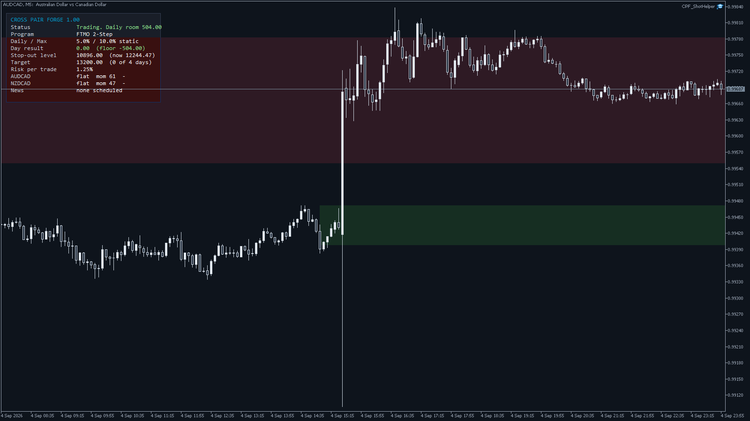
- Enable algo trading and check the dashboard. The status line tells you what the EA is doing and, when it is not trading, why.
A VPS is worth having. The guard counts days and tracks floors continuously, and it can only do that while the terminal is running.
Input reference
Firm profile
| Input | Default | What it does | When to change it |
|---|---|---|---|
| Prop program | Custom | Fills the guard numbers for a firm program | Set it to your program |
| Phase | Phase 1 | Picks the target from the program ladder | Phase 2 after passing phase 1; Funded removes the target |
Position sizing
| Input | Default | What it does | When to change it |
|---|---|---|---|
| Size by percent of equity | on | Sizes each trade from the stop distance | Leave on |
| Risk per trade | 1.0 | Percent of equity risked | Per the risk table above |
| Max open lots per symbol | 0 (off) | Hard ceiling on size per symbol | If your firm caps lots |
| Max open risk across symbols | 12 | Ceiling on combined open risk | Lower it on tight programs |
Signal engine
| Input | Default | What it does | When to change it |
|---|---|---|---|
| Signal engine | Momentum | Which entry logic runs | Leave on momentum unless testing |
| Momentum sensitivity | 25 | How far from neutral counts as an extreme | To your firm's value in Table C |
| Detect supply and demand zones | on | Finds zones on the hourly chart | Off only to reduce load |
| Require a zone | off | Demands a zone rather than vetoing | On to trade far less often |
| Hourly ADX regime gate | off | Blocks entries in flat markets | On, at your firm's value |
| Minimum hourly ADX | 20 | The gate threshold | To your firm's value |
| Bars between entries | 0 | Cooldown per symbol | 12 for the documented setups |
| Cross-pair agreement | off | Requires the other pair to agree | Optional extra filter |
Exit management
| Input | Default | What it does | When to change it |
|---|---|---|---|
| ATR stops | on | Sizes stop and target from volatility | Leave on |
| Stop, ATR multiple | 1.6 | Stop distance | Rarely |
| Target, ATR multiple | 3.4 | Target distance | To your firm's value in Table C |
| Minimum stop, pips | 18 | Floor under the stop | 15 for the documented setups |
| Break even at | 0.7R | Where the stop moves to entry | 1.3 for the documented setups |
| Trailing from | 1.0R | Where trailing starts | 1.5 for the documented setups |
| Trailing distance | 1.4 ATR | How far behind price | 2.6 for the documented setups |
| Partial close at | 1.0R, 50% | Banks part of the trade | Rarely |
| Exit on reverse | on | Leaves when momentum turns | Off for the documented setups |
Challenge guard
Under a firm profile these are filled for you and the manual values are ignored. They apply under Custom.
| Input | Default | What it does |
|---|---|---|
| Enable the guard | on | Turns the whole guard on or off |
| Compliant mode | on | Forces a stop on every trade, one position per symbol, no series |
| Account size | 0 | The size the rules are measured against; 0 captures it at attach |
| Profit target | 0 | Percent target for the phase |
| Daily loss and buffer | 5.0 and 0.8 | The daily limit and how far inside it to stop |
| Total loss and buffer | 10.0 and 0.8 | The total limit and how far inside it to stop |
| Trailing total loss | off | Whether the floor follows the account up |
| Lock the floor at | 0 | Profit level that fixes the floor at your starting size |
| Reset clock and hour | Server midnight, 21 | When the trading day starts |
| Minimum trading days | 0 | Days required before the phase can complete |
| Count only profitable days | off | Requires each day to close at least 0.5 percent up |
| Consistency gate and cap | off, 50 | Caps the share of profit from the best day |
| Minimum holding seconds | 0 | Youngest a position may be when the EA closes it |
| No size increase after a loss | off | The size ratchet |
Session, execution and news
| Input | Default | What it does | When to change it |
|---|---|---|---|
| Broker GMT offset | -98 | -98 uses the European server rule, -99 reads the clock | Set the number if your broker is elsewhere |
| Friday flatten hour, GMT | 20 | Closes before the weekend | 24 disables it, for swing programs |
| Maximum spread, pips | 30 | Spread ceiling | 12 for the documented setups |
| Spread against ATR | 50 | Only blocks when the spread is also large for the pair | Leave |
| News filter | Calendar | Off, calendar, or the built-in schedule | Off only for repeatable tests |
| Minutes before and after | 15 and 10 | The blackout window | Widen for stricter firms |
What the backtests show, and what they do not
Every figure below is a Strategy Tester simulation on historical data. None of it is live trading, and none of it is a prediction.
The runs behind these numbers used an AUDCAD M5 chart trading AUDCAD and NZDCAD, a 100,000 account, one-minute modelling and the engine values in Table C. The feed was a broker demo account, not each firm's own server, so spreads and commission differ from what you will see.
[Figures 6 to 11: one tester report per firm]
Three windows were used: a trending period through 2026, a flat half-year through the second half of 2025, and a run starting in the worst period in the data.
The pattern across them is the point. In trending markets every profile reached its target. In the flat window most did too, but slowly, and one firm's configuration produced almost no progress at all in six months: it did not lose, and it did not advance. In the shock period of early 2025 the engine loses at every setting tested, which is why conservative settings exist and why the risk table above is not decoration.
What could not be tested
MetaTrader 4 results come from a broker demo used as a stand-in, with history only from mid 2025, so the early 2025 shock window could not be tested on that platform at all. Funded Trading Plus figures in the original edition were re-priced from a proxy feed rather than measured on that firm's server. Fintokei has never been tested with this engine.
Troubleshooting, permission first
Before touching a single setting, check whether the account will let a robot trade at all. Most "the EA is not working" reports are permission problems.
| Symptom | Likely cause | What to do |
|---|---|---|
| Every order rejected, dashboard says the account blocks robots | The firm has not enabled expert advisors on this account | FundedNext charges a separate fee for this and does not allow robots on trial or competition accounts |
| Nothing happens at all | Algo trading is off in the terminal | Turn on the algo trading button |
| No trades for days, status shows the gate | The regime gate is closed | Normal in a flat market |
| Status says the daily guard halted | The day hit its floor | Trading resumes at the next reset |
| Status says the target was reached | The phase is done | Move to the next phase and re-attach |
| Guard halts while the firm dashboard shows less loss | The buffer, by design | Reduce the buffer only if you understand the risk |
| Lots smaller than expected | The size ratchet, or the account is small | Check whether the last close was a loss |
| The reset looks an hour out | Wrong clock or daylight saving | Compare the dashboard against your firm dashboard |
| Symbol not found | Your broker uses a suffix | Enter the exact symbol names |
Questions people actually ask
Can an EA pass an FTMO challenge? It can trade one within the rules. Whether it reaches the target depends on the market. In testing the fastest phase was 56 calendar days, about 40 trading days, and the slowest window that reached the target took well over 300.
Does FundedNext allow expert advisors, and is there a fee? Yes, with a separate fee, and not on free trial or competition accounts. Without it every order is rejected.
What time does the FTMO daily loss reset, and how does the EA know? Midnight in central Europe, which moves against GMT with daylight saving. The EA computes it rather than assuming.
Does Blueberry Funded count any lot increase after a loss as martingale? That is how it reads in practice, which is why the profile switches on a ratchet that prevents it.
Does The5ers allow expert advisors? Yes, and several of its programs require a minimum number of profitable days, which the EA counts the same way.
What is the Eightcap 60-second rule? Positions must be held at least a minute. The EA respects it on orderly closes and overrides it only for protective ones.
Can this pass a challenge in 14 days? Not on these pairs, on the evidence available. The fastest measured was 56 calendar days, about 40 trading days.
Why does it take no trades for days? Usually the regime gate. The dashboard says which filter is holding it back.
What is a consistency rule? A cap on how much of your profit came from your best day. The EA treats it as a gate on finishing rather than a block on trading.
Which pairs, and why not AUDNZD? AUDCAD and NZDCAD. AUDNZD was tested and lost in both regimes.
Does the MetaTrader 4 version trade NZDCAD? No. It was measured and rejected there.
Do I still need my firm's own dashboard? Yes. The EA enforces what you tell it. Your firm is the authority on its own rules.
Is Fintokei supported? The rule numbers are in, the engine has never been tested on that feed, and Fintokei asks that commercial robots be individually configured.
What happens after the target is reached? The EA closes slightly above the target and pauses.
Closing
The useful parts of a prop firm EA are unglamorous: the right reset hour, a buffer before the line, counting days the way the firm counts them, and refusing to trade a market that is not moving. Those are what this manual is mostly about, because those are what decide accounts.
- MetaTrader 5: Cross Pair Forge MT5
- MetaTrader 4: Cross Pair Forge MT4
Risk disclaimer
Trading foreign exchange carries a high level of risk and is not suitable for every investor. The high degree of leverage available can work against you as well as for you. Before deciding to trade you should carefully consider your objectives, experience and risk appetite. The possibility exists that you could sustain a loss of some or all of your initial investment, and you should not invest money you cannot afford to lose.
All performance figures in this article are Strategy Tester simulations on historical data. They are not live trading results and they are not a prediction of future results. Past performance does not guarantee future results. No expert advisor can promise that a prop firm challenge will be passed.