

- Working trading pairs: XAUUSD, GOLD
- Timeframe: H1
- Min deposit: $500 ($1000+ for safety trading)
- Min leverage 1:20
- Works with any broker, though an ECN broker is recommended
- If you want to run EA on low risk, your minimum deposit needs to be around $2,000, and the risk parameter in the settings should not exceed 0.5% per strategy
- It is also highly recommended to use a good-quality VPS for stable and uninterrupted operation - Recommended VPS
✅ Recommended Brokers for EA Trading
🔵 IC Markets
One of the most popular choices for Forex & EA trading.
👉 Open Account / Learn More
🔵 IC Trading
A strong alternative for automated trading.
👉 Open Account / Learn More
🔵 RoboForex
Convenient for automated trading and testing different account types.
👉 Open Account / Learn More
🔵 Vantage
Another solid option for Forex, Gold and Expert Advisors.
👉 Open Account / Learn More
🔵 Weltrade
Alternative broker suitable for automated trading.
👉 Open Account / Learn More

In this section, you can activate or deactivate the independent trading strategies (logic) built into the EA. It is recommended to distribute your risks if you are using multiple systems simultaneously.
-
EnableSystem1 — Enables ( true ) or disables ( false ) the first trading system.
-
EnableSystem2 — Enables ( true ) or disables ( false ) the second trading system.
-
EnableSystem3 — Enables ( true ) or disables ( false ) the third trading system.
-
EnableSystem4 — Enables ( true ) or disables ( false ) the fourth trading system.
This is an intraday strategy that exploits short-term price action and market momentum. It focuses on quick, precise entries and exits to systematically capture small but consistent price movements, all while maintaining the strictest risk control thanks to the mandatory Stop Loss.
System Settings (System 1 Settings — System 4 Settings)
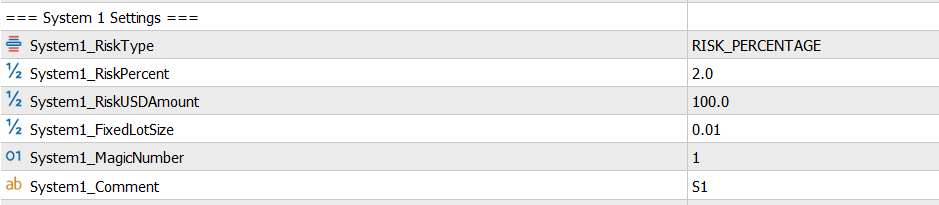
The settings blocks for each of the four systems are absolutely identical, but parameters are set individually for each, allowing for flexible money management. Below is a description using one system as an example (where X is the system number from 1 to 4):
-
SystemX_RiskType — The method for calculating the trade volume. In the screenshot, it is set to RISK_PERCENTAGE . Usually, options for calculating by fixed lot or by a fixed currency amount are also available here.
-
SystemX_RiskPercent — The percentage of the deposit to risk per trade. This parameter is active if RiskType is set to percentage risk (the default is 2.0).
-
SystemX_RiskUSDAmount — The risk amount in the deposit's base currency (e.g., dollars). Used if the fixed amount risk type is selected (the default is 100.0).
-
SystemX_FixedLotSize — A fixed trading volume. Applied if the fixed lot trading mode is selected (the default is 0.01).
-
SystemX_MagicNumber — A unique identifier (magic number) for the orders of a specific system. It allows the EA to track its own trades without confusing them with manual orders or trades from other systems (set as 1, 2, 3, and 4 for the respective systems).
-
SystemX_Comment — A text comment for the orders. It helps to visually distinguish the trades of different systems in the terminal and account history (e.g., "S1" for the first system).
Approximate risk levels
Risk 0.2 Conservative Risk (DD up to 5-7%)
Risk 0.5 Low Risk (DD up to 15%)
Risk 1.0 Normal Risk (DD up to 30%)
Risk 2.0 High Risk (by default) (DD up to 50%)
Risk 3.0 Extreme Risk (DD up to 70%)
Risk 4.0 Crazy Risk (Potential loss deposit in case of a bad market behavior)
Deposit Size and Risk Accuracy
For the EA to calculate position size with approximately 1% risk accuracy, the recommended deposit should be at least $2,000. For even more accurate risk calculation, a deposit of $3,000 or more is preferable.
The reason is that the minimum trading volume for Gold is usually 0.01 lot, which is approximately equal to 1 ounce of Gold. At current Gold prices, this represents roughly $4,500 of notional value. Because the minimum lot cannot be reduced below 0.01, smaller account sizes do not allow the EA to calculate percentage-based risk with the same precision.
Recommended deposit levels:
- Minimum deposit: $500 — suitable only for higher-risk trading.
- Medium risk: from $1,000.
- Low risk: from $2,000.
- For the most accurate percentage-based risk calculation: preferably $2,000–$3,000 or more.
With deposits below these levels, the EA will still work, but the actual risk percentage may differ from the selected value because of the minimum 0.01 lot limitation.
Global Account Protection

This block is responsible for the overall safety of your trading account and allows you to limit losses or lock in a target profit.
-
UseMaxDailyRisk — Enables ( true ) or disables ( false ) the maximum loss control for a single trading day.
-
MaxDailyRiskPercent — The daily drawdown limit in percentages. If the total account loss for the day reaches this value (default is 5.0%), the EA will stop opening new trades until the next day.
-
UseMaxEquityTarget — Enables ( true ) or disables ( false ) the function to stop trading upon reaching a target balance (equity).
-
MaxEquityTarget — The target equity value in the deposit currency. If the account funds reach the specified figure, the EA will execute its pre-programmed logic (e.g., close all trades or stop working). A value of 0.0 disables this option.
-
MaxLotPerTrade — The limit on the maximum lot size for a single trade. It protects against accidentally opening an excessively large volume due to aggressive martingale or a money management setting error. A value of 0.0 removes this restriction.



![[iVISTscalp5]: XAUUSD. Forecast First. Market Reaction Afterwards](https://c.mql5.com/6/1035/splash-preview-777232.png "[iVISTscalp5]: XAUUSD. Forecast First. Market Reaction Afterwards")