

AGS Strategy Broker Guide ✅ Ultimate Trader Checklist
Product Link:https://www.mql5.com/en/market/product/161554
Live Signal: https://www.mql5.com/en/signals/2333073
Looking to run the AGS trading strategy? 📊 Choosing the right broker is the key to steady profits!
The AGS strategy is extremely sensitive to trading conditions. Poor broker settings will greatly increase your trading risks.
Bookmark this practical checklist before you pick a broker 👇
✅ Non-Negotiable Broker Rules for AGS
1️⃣ Spread < 10
No crazy sudden spikes! Multiplied floating spreads will trigger losing orders easily.
2️⃣ Stop Level = 0 (Max 20)
The higher the stop level, the lower the chance of break-even stop loss. AGS auto-adapts, but high stop level = higher risk.
3️⃣ Low Trading Latency
Check server latency + order execution speed. Seconds-level execution is not suitable for scalping.
4️⃣ Controlled Slippage (0-20 pips acceptable)
Focus on entry & closing slippage. Scam brokers have huge slippage (0.5+ USD) that eats all profits.
5️⃣ Volatile Spread Fix
If your broker has unstable floating spreads, set Trailing Stop = 5 to reduce risks.
6️⃣ Must Use ECN Account
Only ECN mode provides real market trading conditions for AGS strategy.
📝 3 Reliable Overseas Brokers Review (Real Test)
1. 👍 Amillex(Increased slippage on newly opened accounts)
Real market data, minor disadvantage: occasional large slippage.
👉 Official Registration Channel
Best setting: Default Set
Live signal 1:AGS Amillex Main - Strategy X-Ray
Live signal 2:AGS Amillex-No.1 - Strategy X-Ray
2. 👍Vantage(Recommended by clients)
Overall performance is favorable. Some clients earned profits exceeding 10,000 USD within just one month.👉 Official Registration Channel
Best setting: Default Set
Live signal:AGS Vantage - Strategy X-Ray
3. 🚫🚫🚫TMGM
4. 👍UltimaRecently, high slippage has led to unsatisfactory performance.
👉 Official Registration Channel
Best setting: Default Set
Live signal:AGS TMGM - Strategy X-Ray
Stable overall performance, Recently, high slippage has led to unsatisfactory performance..
👉 Official Registration Channel
Best setting: Default Set
Live signal:AGS TMGM - Strategy X-Ray
5. TickMill
Low entry & closing slippage ✅
Shortcoming: floating spread fluctuates greatly, The backtest results are not ideal.
👉 Official Registration Channel
Best setting: TickMill Set ( Suitable for brokers with volatile floating spreads)
Live Signal: AGS Tickmill - Strategy X-Ray
6. Exness (Recommended by clients)
Tight spreads, fast order execution and minimal slippage on close positions ✅
👉 Official Registration Channel
Best setting: Default Set (V2.0 auto-adapts to 3-decimal pricing without extra setup)
7. 👍 Black Bull(Recommended by clients)
Best setting: Default Set
8. VT Markets(Recommended by clients)
Best setting: Default Set
9. EC Markets(Recommended by clients, high slippage)
Best setting: Default Set
10. Mex Atlantic(Recommended by clients)
2 cent spread on ECN and ultra low slippage.
👉 Official Registration Channel
Best setting: Default Set
*The brokers recommended by clients have not been verified with live trading accounts, please use them with caution.
Not recommended:
🚫IC Markets (Losses on real signals,Slippage and order lag)
🚫Juno Markets (Withdrawal issues)
📊4 Recommendation
It is recommended that you first test your broker’s trading environment with a lot size of 0.01. Everyone’s VPS, account spreads and slippage may vary, so preliminary is essential. Once you achieve consistent profits on your test account, you may gradually increase your trading lot size.
However, never use excessively large lot sizes. AGS may occasionally trigger a large stop-loss hit; oversized lots will significantly deplete your principal and prevent AGS from delivering steady long-term profitability.
⚠️ How to check slippage on order execution and closing?
1️⃣ Closing slippage: Check the gap between your closing price and stop-loss price. Negative slippage will eat into your profits.
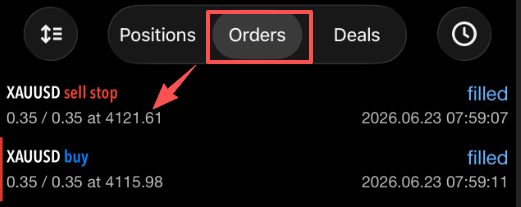
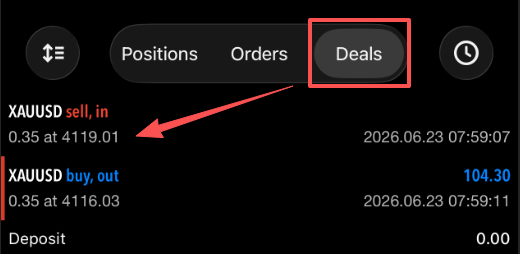
2️⃣Execution slippage: Check the difference between your pending order price and filled price. Larger execution slippage increases the chance of hitting stop loss.
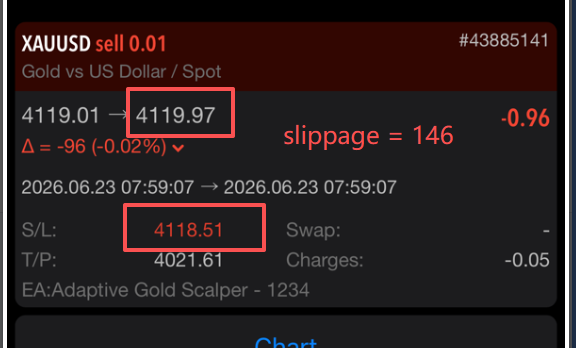
First check the pending order price in Orders Then check the filled price in DealsThe price difference between the two is the execution slippage.For the order in the picture: 4121.61 - 4119.01 = 2.60 (Slippage = 260)
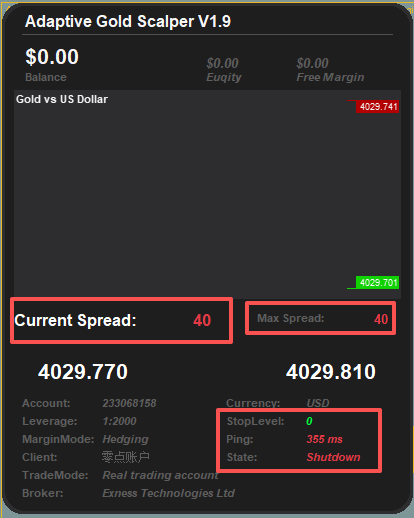
⚠️ How to check the spread and stop level?
Load the EA onto the chart, then check the 3 parameters within the red box. The spread must be less than 10, with limited fluctuation even during extreme market conditions. Meanwhile, the stop level shall be set to 0.
✨ EA PARAMETER BREAKDOWN✨
1.1 TP = 10000 → just leave it, no need to change.
1.2 SL = 400 → this is your max stop loss.
2.1 Magic number = 1234 → this is the unique order ID. The EA only manages orders with this number, everything else it ignores
3.1 Position Size Calculation Mode → three ways to set your lot size 👇
BASE_FIXED_LOTS → fixed trade size. Turn this on and fill in 3.1.1 with whatever lot size you want, the EA trades exactly that
BASE_DEPOSIT_LOAD → uses a % of your balance as margin. Turn this on and 3.2.1 + 3.2.2 kick in. 3.2.2 stays at 80, don't touch it. 3.1.1 is where you put the % – put 5 and it uses 5% of your balance. Heads up: leverage changes how this actually works
BASE_PER_BALANCE → lot size based on your balance. Turn this on and 3.3.1 works. Put 100 and it means every $100 in balance = 0.01 lot. $500 balance = 0.05 lot. Simple math
4.1 Enable Trailing Stop → must be TRUE. This is the core feature of AGS, do not turn it off
4.2 Trailing stops mode 👇
TRAILING_REAL → classic trailing stop mode. Works best with brokers that have stable prices and tight spreads
TRAILING_SMART → smart adaptive mode. Use this if your broker has big spreads or high stop levels
4.3 Trailing Points = 20 → this is the distance between stop loss and current price. Leave it alone.
4.4 + 4.5 → adaptive spread adjustment mode for when your broker's quotes are unstable. Keep the defaults, they help reduce losing trades a little but don't expect magic
S.1 Price statistics algorithm mode 👇
ALGO_HIGH_FREQUENCY → more orders, focuses on filling speed. Lower win rate in theory, but test it yourself to see real results
ALGO_HIGH_PROBABILITY → fewer orders, waits for price breakouts. Better win rate in theory
S.2 Shift Point = 1000 → keeps orders from being placed too close to current price. Stops you from getting a bunch of weak breakout orders that just get stopped out.
S.3 Trade Mode → pick PENDING. That's the order‑by‑order mode. MARKET mode is still shaky, don't use it
S.4 Order Expiry Days = 7 → orders auto‑cancel if they don't get triggered within 7 days
S.5 Show Price Lines = true → turns on support and resistance lines on your chart so you can see exactly where the EA is placing orders
S.6 Order Price Gap = 5000 → this is a calculation parameter for ALGO_HIGH_PROBABILITY mode. Controls how often it places orders at the same price.
S.7 Enable high profit trail mode = false → profit chasing mode. Turn it on and the EA will chase bigger profits on winning trades. But be careful – it might also create more small losing trades. There's a chance it catches a big winner, but use it with caution
P.1 Show panel? = true → turns the display panel on or off. Your call
⚠️ Important Risk Reminder
All leveraged trading carries high financial risk. This post is for knowledge sharing only, not investment advice or transaction guidance. Please trade rationally and comply with local financial regulations.
#AGSstrategy #ForexTrading #BrokerGuide #TradingTips #ForexKnowledge #InvestmentTips




