
Lazy Trader is a universal tool for automating trading strategies.
Show it your zone of interest and expectation — it will take positions on its own, manage them, control risk, and follow your plan to the letter: no tilt, no FOMO, strictly by the parameters you set
The core idea: using the user interface, you configure the parameters the chart must meet before entering a position (or positions), choose which entry models to use, and set the rules for when trading and planning should end. Lazy Trader takes over all the routine chart watching and execution. Lazy Trader handles the rest.
What can it do?
- Understands Larry Williams market structure
- Understands swing market structure by Michael Huddleston (ICT) / Linda Raschke
- Can work with opening ranges based on Peter Steidlmayer's concept
- Keeps all types of moving averages in mind
- Lets you combine different concepts for defining directional bias for opening positions and finding entries
- Knows both trend-following and reversal structural candlestick entry patterns
- Can manage, analyze, and handle an unlimited number of positions simultaneously
- Operates strictly within the limits of what it was told to do
- Locks risk in hard according to the settings
- Sees all timeframes at once and checks relevance on every tick
- Works on any account type and any asset
- Can operate fully automatically (using preconfigured parameters)
- Has a flexible trading time settings system
- Lets you lock in overnights and adapt to broker requirements
All positions opened by Lazy Trader have preset stop-losses placed immediately at market entry. Risk for each position is defined by the user in advance, along with the exact entry parameters.
Lazy Trader does not open positions that do not meet the requirements loaded by the user.
Lazy Trader does not trade on intuition, but it can trade in a fully automatic, autonomous mode based on the scenario defined by the user.
Any strategy is 6 questions:
- What has to happen on the chart before it even makes sense to look for entries?
- Which rules define whether it will be a long or a short?
- Which entry models should be used?
- When, at what time of day, should you trade?
- When should you definitely stop
- What risk should be used?
The "Trading Plan" menu exists to answer these questions
PLAN menu

As long as the plan toggle is off, no new operations will take place. The search for new positions and condition checks starts the moment the toggle is turned on
In the Trading Plan menu, the Start after, End at, Time, Direction, and Models buttons open their corresponding settings sections.
END AT menu
This section defines the conditions that will stop the search for new positions and switch off the trading plan. Trades already opened under this plan will still be managed to their logical completion.

The occurrence of any selected (enabled) condition will switch off the trading plan — and stop the search for new positions.
TIME menu
Trading time settings are designed to help match timings to the strategy or the broker conditions that are most suitable for trading. Using this menu, you can set up an unlimited number of trading blocks — time intervals when trading is allowed. Overnights and permissions to trade by day of week are also configured in this block.
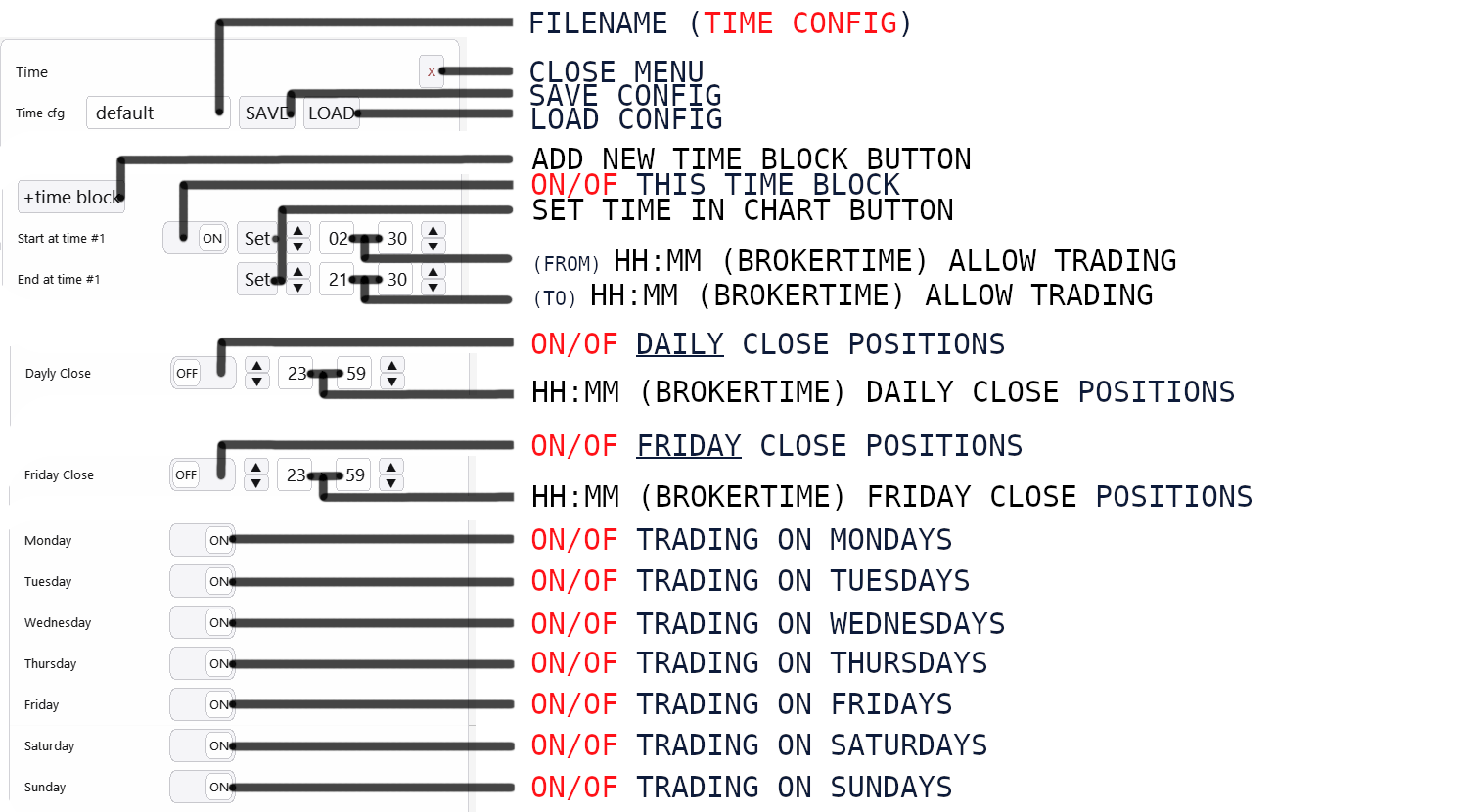
Use time settings to build a configuration that meets your broker's requirements and the spreads they provide, especially during overnight hours.
Automatic direction detection for opening positions
By combining options from the Direction and Start After sections, you can build a flexible, well-thought-out, full-fledged system for automatically determining trade direction. The methods built into Lazy Trader are based on the work of such trading legends as Linda Raschke, Larry Williams, Michael Huddleston (ICT), and others. Using the interface, you can combine these approaches and build a renewable decision-making chain that adapts to current chart conditions on its own.
DIRECTION menu
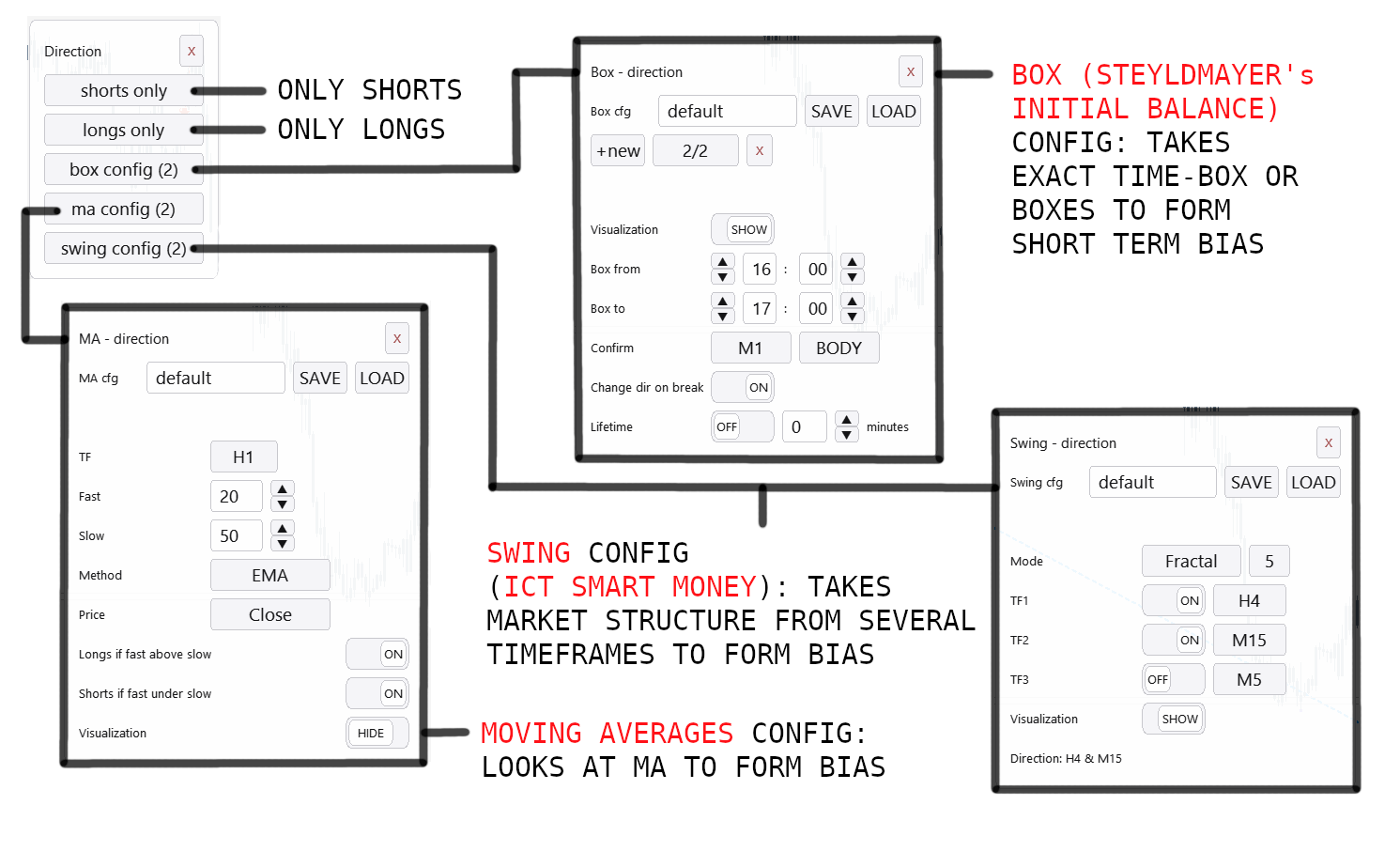
Lets you configure different scenarios for determining the direction of positions to be opened. You can choose one of five direction modes:
- Shorts only
- Longs only
- Time ranges (inspired by Initial Balance, Peter Steidlmayer)
- Swing structure (ICT Smart Money Concept, Michael J. Huddleston)
- Moving averages
START AFTER menu
This section defines the conditions that must occur before positions can be opened directly. This section works together with the Direction section by the rule: all conditions are independent. That means before actual entry model execution begins, Lazy Trader will wait for all conditions from both sections to be met — both from Start after and from Direction
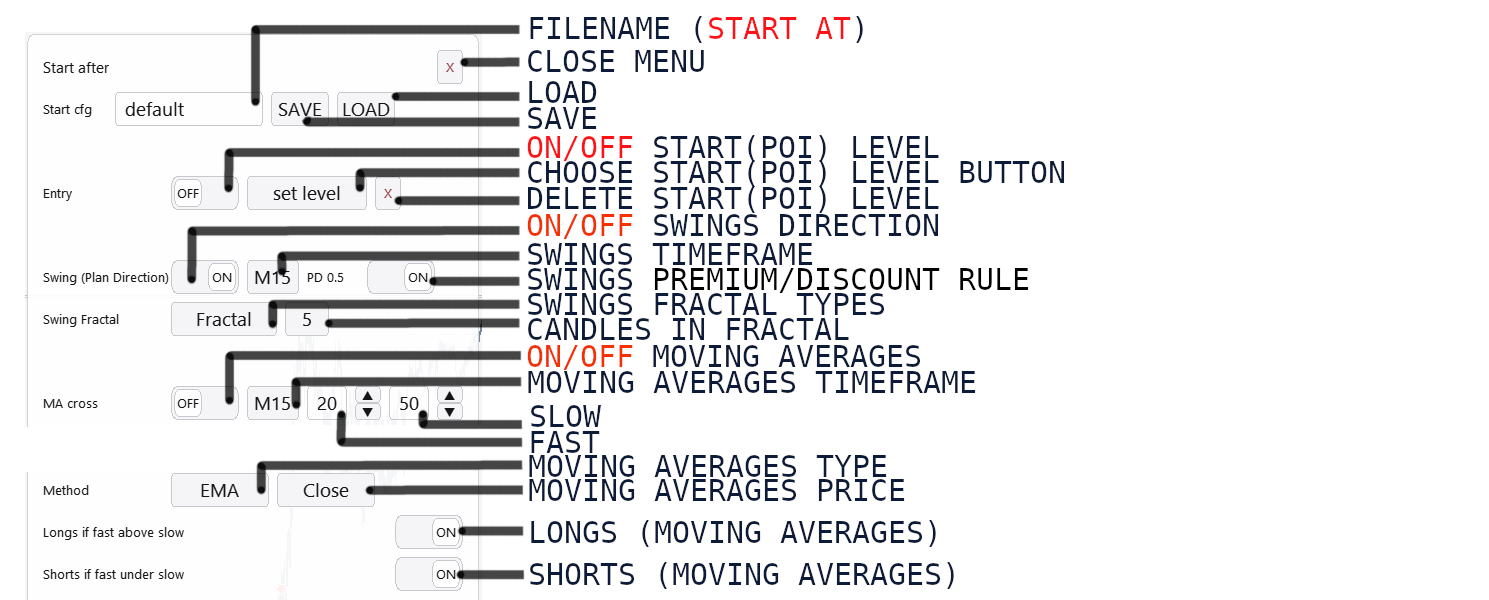
Start after lets you add the following conditions (rules):
- Touch of a specific level (Entry = POI start)
- Swing structure direction on the selected timeframe
- Touch of premium/discount on the selected timeframe
- Selected moving averages: fast above slow for longs, slow above fast for shorts
The rules themselves are independent, so you can choose either just one or all of them at once.
If any enabled rule is not met, trades will not be opened
Models menu
In Lazy Trader, you can add any number of entry models to a single trading plan — one, two, ten, or even a hundred. There are no limits here, and most importantly, each model works with its own unique settings.
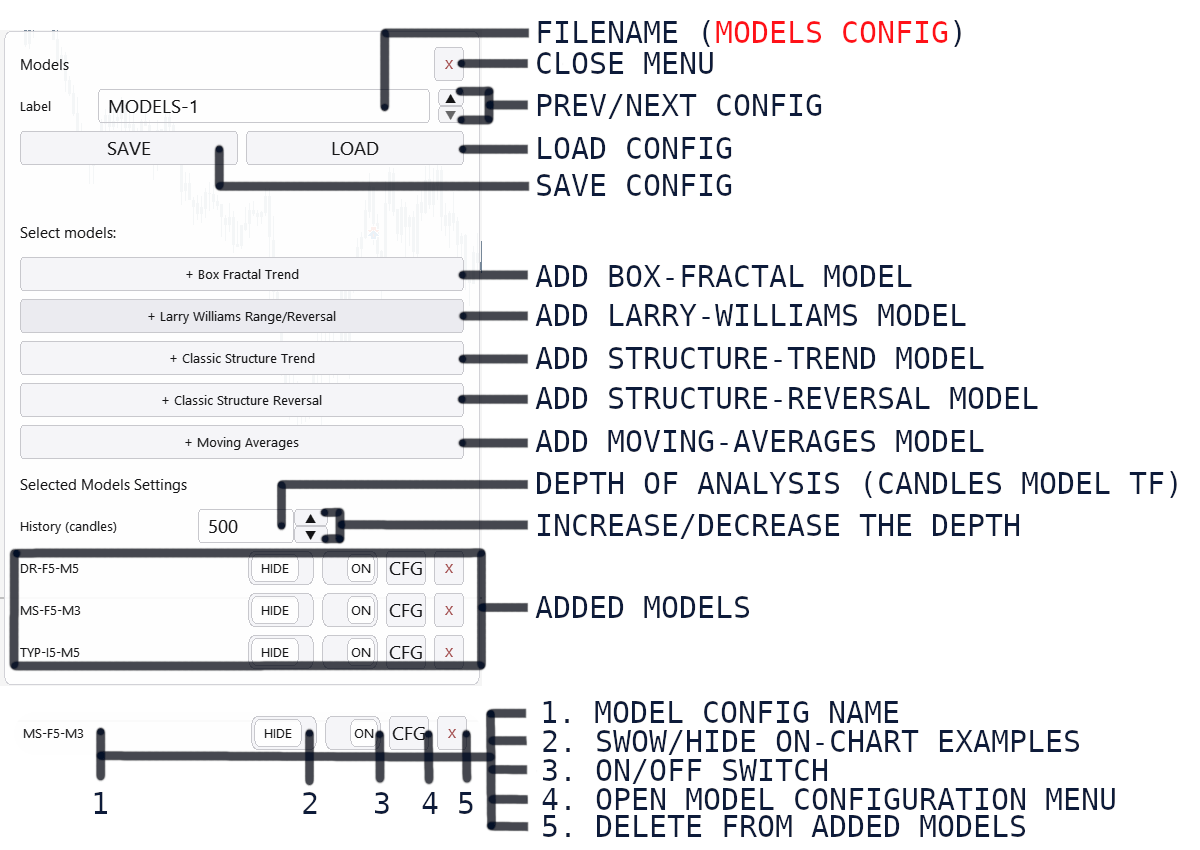
Each added model is displayed as a separate row. What is in the model row:
— The name of the configuration file — the config used by that model. More details about model configs can be found below.
— Show / Hide — enables or hides visualization of the approximate entry logic directly on the chart. This is only for visually displaying the model logic based on its config.
— On / Off — actually enables or disables the use of this model in the trading plan.
— CFG — opens the model config for parameter setup.
— Model delete button
Base config
Each model has both type-specific settings and base settings available to all models.
A separate unique base config can be connected to each model.
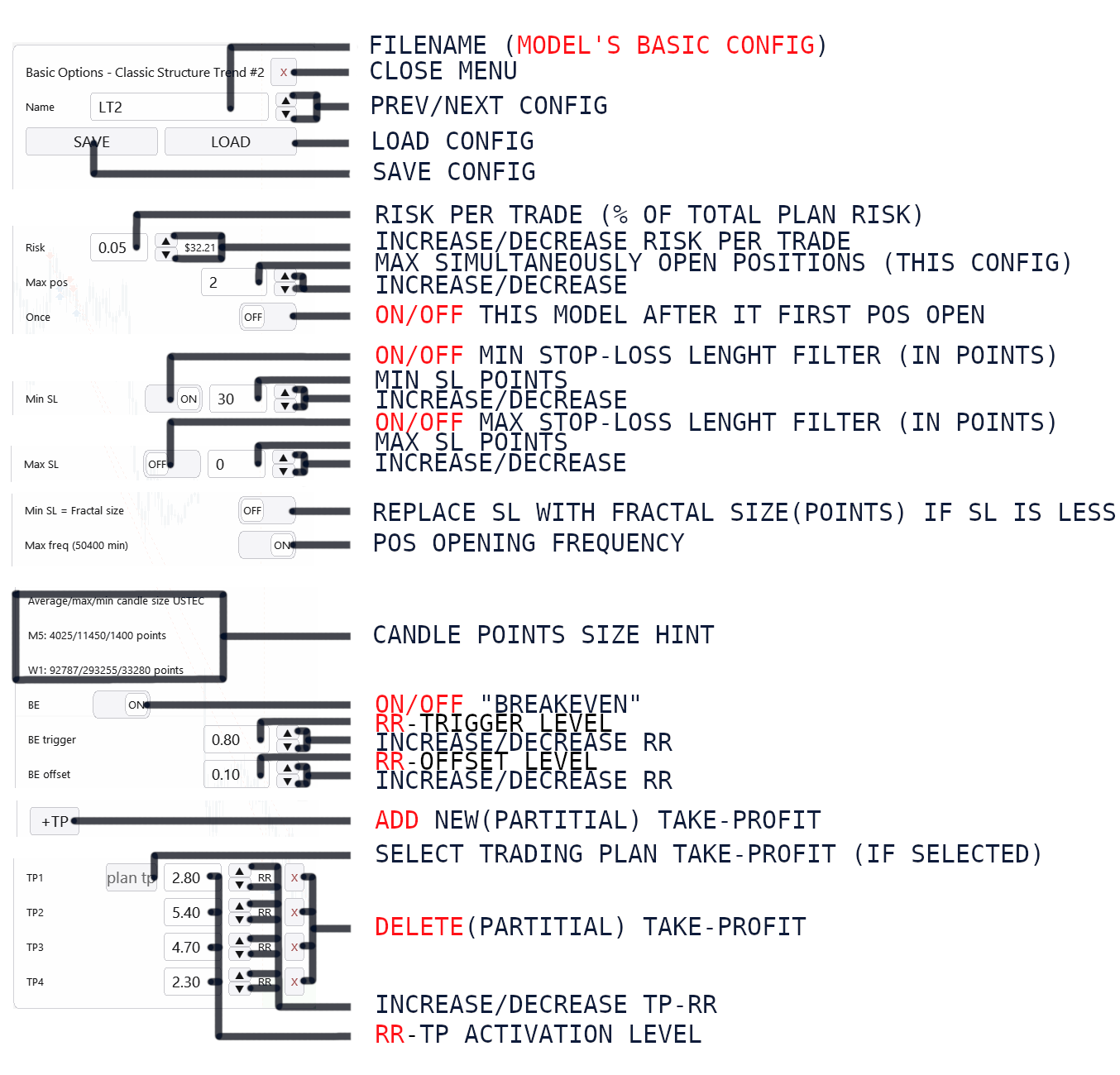
Base settings are:
— Risk per trade — set as a percentage of the plan's total risk. For example, 0.05 means 5% of the total trading plan risk.
— Maximum number of simultaneously open positions for this config — you can specify any number, and Lazy Trader will make sure that no more positions are open under this specific model than allowed.
— Once toggle — disables the model after its first entry. The trading plan itself keeps running, but this specific model stops looking for new entries after the first trade.
If a trading plan (a strategy configured using Lazy Trader) dynamically determines the direction for opening positions, meaning Swing, MA, or Box is selected in the Direction Menu, then when the plan changes direction, the model with the "once" option enabled will re-arm. This means that when the plan's direction changes, it will re-enable itself until the first open.
— Stop-loss size limit in points — these are filters; if they are not met, Lazy Trader will skip the trade. There are hints below for typical sizes on the current timeframe to make navigation easier.
— Stop-loss replacement with fractal size toggle — if the stop-loss calculated by the model config is smaller than the size of the fractal it is tied to, then with this option enabled Lazy Trader will automatically increase the stop-loss to the size of that fractal. Since all models use fractal highs and lows one way or another for entries and stop placement, this setting helps align the stop-loss better with market structure.
— Position opening frequency limit — depends on the fractal type used and the selected timeframe. In simple terms, this condition allows positions to be opened under this model no more often than once every specified number of minutes. Filters like this help cut down entries in chop and reduce potential losses.
— Break Even: BE-trigger is the level at which price is moved to the BE-offset level.
— Take profits Their base risk-reward is calculated from the position's stop-loss size, and the values you can change are set relative to that base risk-reward.
Super important to understand that there are 2 built-in parameters that cannot be disabled:
A trade will be skipped if its stop-loss in points is smaller than 2 spreads.
A trade will be skipped if its stop-loss in points is smaller than half of the candle size of its timeframe.
If take-based shutdown is enabled in the plan, one of the model's takes can use the plan's own take. At the same time the number of takes in a model is unlimited, and volume is distributed evenly between them.
Changing break-even and take-profit parameters immediately updates the visualization both in the specific model preview and on the chart, if those display settings are enabled.
Box-Fractal Model
Changing break-even and take-profit parameters immediately updates the visualization both in the specific model preview and on the chart, if those display settings are enabled.
The model config includes:
— timeframe where fractals are searched;
— type of fractals used;
— number of candles for fractal identification
— confirmation timeframe;
— confirmation price.
— fractal lifetime in Lazy Trader memory
— entry level;
— stop-loss level.

1 - Show/hide schematic preview
2 - Close menu
3 - Previous/next saved config
4 - Load config by name
5 - Save config
6 - Fractal search timeframe
7 - Fractal type
8 - Number of candles in the fractal
9 - Confirmation timeframe
10 - Confirmation price
11 - Input for the number of minutes to track the fractal
12 - Increase/decrease the number of minutes to track the fractal
13 - Entry level relative to the Fibonacci grid stretched over the found fractal
14 - Increase/decrease
15 - Stop-Loss level relative to the Fibonacci grid stretched over the found fractal
16 - Increase/decrease
Larry-Williams Model
This model uses a break beyond medium-term or long-term fractal extremes as the entry point into a position. By themselves, such extremes most often form when price is moving sideways, meaning it is in a range. So the core idea of the model is to look for:
— longs from the lows of the range;
— shorts from the highs of the range.
Just like in the Box Fractal model, the basis for calculating the entry and stop-loss here is the fractal extremes — the distance from the fractal high to the fractal low. Relative to this basis, the following are calculated and placed:
— entry level;
— stop-loss level.
This model provides two entry options:
— immediately when price breaks beyond the element;
— after price returns back inside, i.e. open on reversal.
And the reversal itself is not determined on every tick, but on the close of the selected timeframe candle. If that candle close returns price back into the range, the situation is defined as a raid, and the model opens a position. The corresponding reversal / return entry toggle in the model config is responsible for this.
The remaining parameters are already familiar and standard:
— fractal search timeframe;
— fractal type;
— number of candles in the fractal;
— Lifetime — the amount of time in minutes that defines how old formations are still worth considering;
— entry and stop levels relative to fractal extremes

1 - Show/hide schematic preview
2 - Close menu
3 - Previous/next saved config
4 - Load config by name
5 - Save config
6 - Fractal search timeframe
7 - Fractal type
8 - Number of candles in the fractal
9 - Input for the number of minutes to track the fractal
10 - Increase/decrease the number of minutes to track the fractal
11 - Open-on-return option
12 - Entry level relative to the Fibonacci grid stretched over the found fractal
13 - Increase/decrease
14 - Stop-Loss level relative to the Fibonacci grid stretched over the found fractal
15 - Increase/decrease
Classic Structure models
We are talking about two very similar models that use classic market structure to open positions. This structure is built from fractal lows and highs, forming a sequence of key extremes and swings. It is also often called swing structure. Here is a schematic view of it:
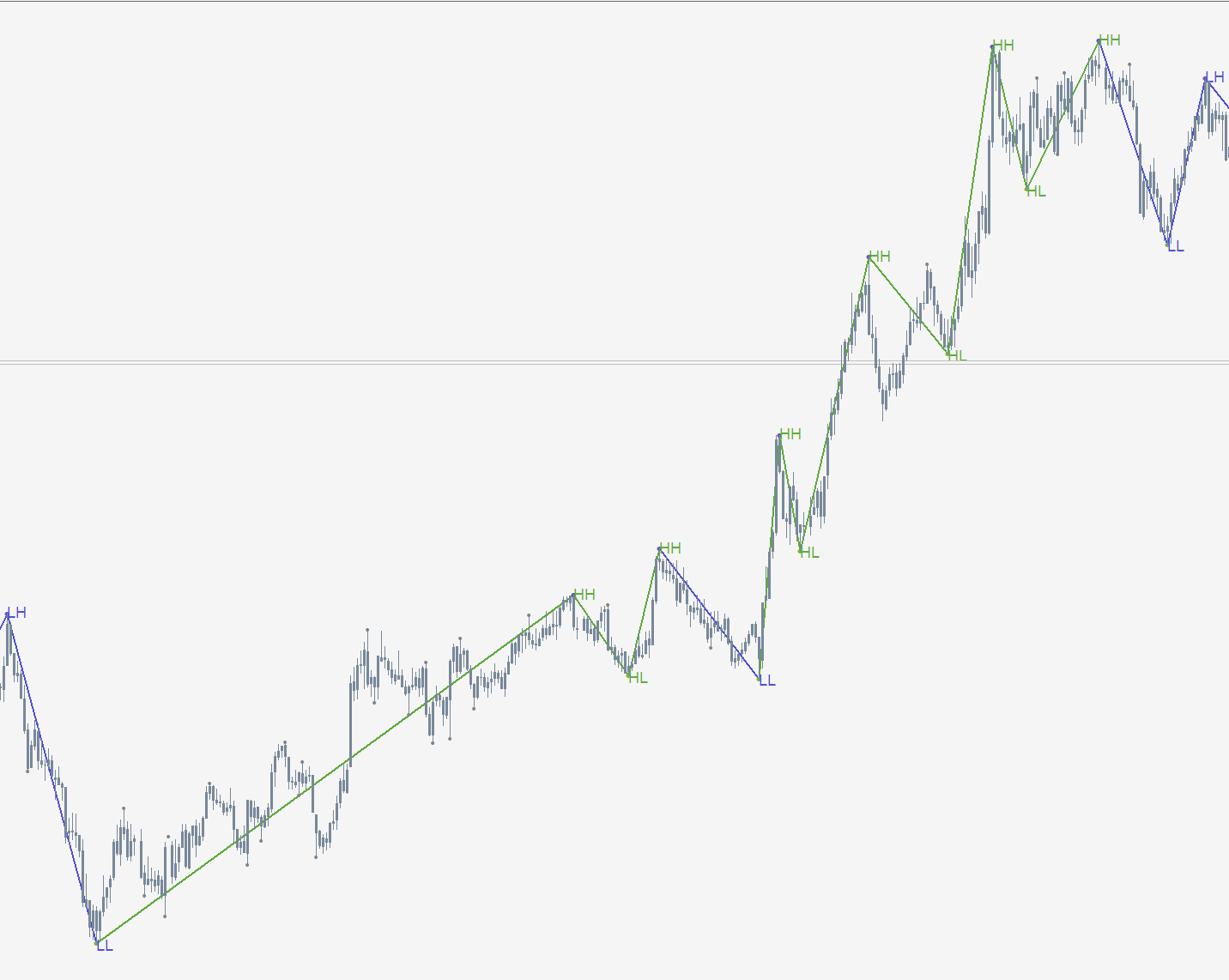
By the highlighted lows and highs, as well as by their sequence, Fibonacci grid levels are determined and applied to the corresponding high-low or low-high pair. Relative to this Fibonacci grid, the entry and stop-loss placement level are calculated.
So here the basis is built not from just one fractal, but from the current or latest swing structure leg on the selected timeframe.
In the config, just like in other models, you define:
— timeframe;
— fractal type;
— number of candles used to define the fractal.
As well as two key levels:
— entry;
— stop-loss, which are calculated relative to the current or latest swing structure leg
— Trend model — opens positions on a retracement within the current structure, without changing its direction:

— Trend model through primary liquidity grab — opens positions on the initial structure violation, kind of against the immediate move, in the direction of the previous swing-structure pair

1 - Show/hide schematic preview
2 - Close menu
3 - Previous/next saved config
4 - Load config by name
5 - Save config
6 - Fractal search timeframe
7 - Fractal type
8 - Number of candles in the fractal
9 - Entry level relative to the Fibonacci grid stretched over the found fractal
10 - Increase/decrease
11 - Stop-Loss level relative to the Fibonacci grid stretched over the found fractal
12 - Increase/decrease
— Reversal model — opens positions at the moment when the structure reverses, meaning it changes from bearish to bullish or from bullish to bearish:

The main difference between these models and the others is that they use swing structure as the basis for calculating entry and stop-loss.
A mandatory condition for the reversal model is that the direction of the previous swing must differ from the direction of the current one.
All other parameters are similar to the trend structural model: the entry is a pullback into the last swing, and once the required level is reached, a position is opened.
Stop-loss is placed relative to the structure basis — most often:
— below the low for longs;
— above the high for shorts.
But the config also allows more aggressive stop-loss placement..
Moving-Averages
This is an entry model that opens a position on a touch of the fast moving average.
A position is opened on a touch of the fast MA only if the nearest valid fractal to the left matches the model conditions. Old fractals are not used for entry — only the single nearest valid fractal to the left is considered. After a position is opened, that fractal is marked as used. This means the model will not open another position with the same stop-loss from the exact same fractal. A re-entry is possible, but only under a specific condition:
— for shorts, price must go back below the fast average again;
— for longs, price must go back above the fast average again.
And only after that, on a repeated touch of the fast MA, will the model consider another entry — provided that there is again a suitable fractal to the left.
In the model config, the standard buttons are used to set:
— the timeframe used by the model;
— which moving averages should be used;
— the fractal mode used for stop-loss placement.

1 - Show/hide schematic preview
2 - Close menu
3 - Previous/next saved config
4 - Load config by name
5 - Save config
6 - Fractal search timeframe
7 - Fast moving average
8 - Increase/decrease
9 - Slow moving average
10 - Increase/decrease
11 - Moving average type
12 - Moving average price
13 - Fractal type for Stop-Loss
14 - Number of candles in the Stop-Loss fractal
It makes sense to experiment with the settings and find the config that best fits your trading style and your view of market movement.
Strategy optimization and advisor inputs
There are действительно many parameters that can be used in the final config. In essence, you can build a trading plan from any number of models, on different timeframes, with completely different parameters.
To speed up this process, the video shows a simple approach:
— save different plan configs in advance;
— name them in sequence: 1, 2, 3, 4, 5, and so on;
— enable optimization mode in the tester tab;
— in the tester inputs, switch the optimization parameter to true;
— set a value range to iterate through, for example from 1 to 5 with step 1.
This way the tester will run through all saved configs one by one: 1 → 2 → 3 → 4 → 5
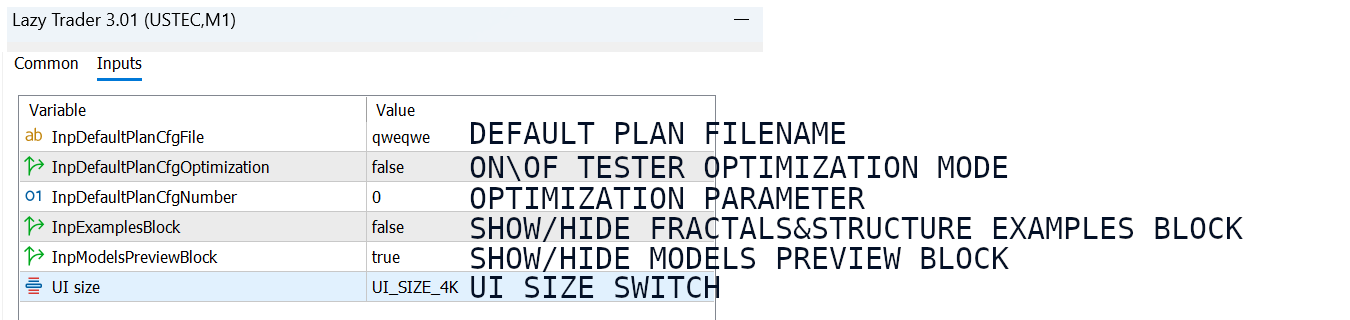
After testing is complete, you will get a final table with brief results for each config. This lets you quickly see which option performed better than the others.
In the Backtest tab after a single run, standard MetaTrader statistics will be available. There is a lot of useful information there, but in this video I focus mainly on the Journal tab.
That is exactly where Lazy Trader logs:
— the number of positions for each model;
— the total profit or loss for those models.
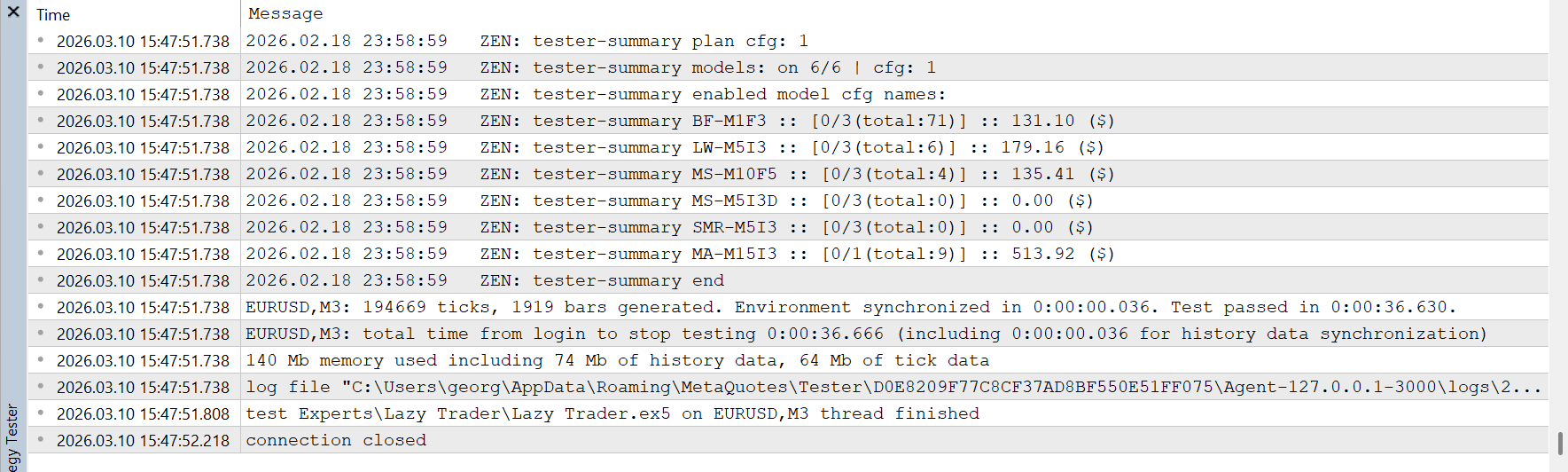
— experiment with model settings;
— change Start After and Direction parameters;
— analyze the log;
— find losing models;
— disable them or refine them.
Step by step, this allows you to build a more robust and understandable trading system based not on feelings, but on actual test results. And one important point: when you want to test single configs again, do not forget to disable optimization mode in the tester inputs, otherwise config names will not load correctly into the tester.
If you have questions - join the project Discord server, where you can ask any questions about Lazy Trader logic and settings. Separate posts about key updates can be found in the AlgoFlow Telegram channel.
Good luck!




