User Guide: StoplossHunt Filter User Guide — Filtering "SL Sweep" Signals


1. Introduction
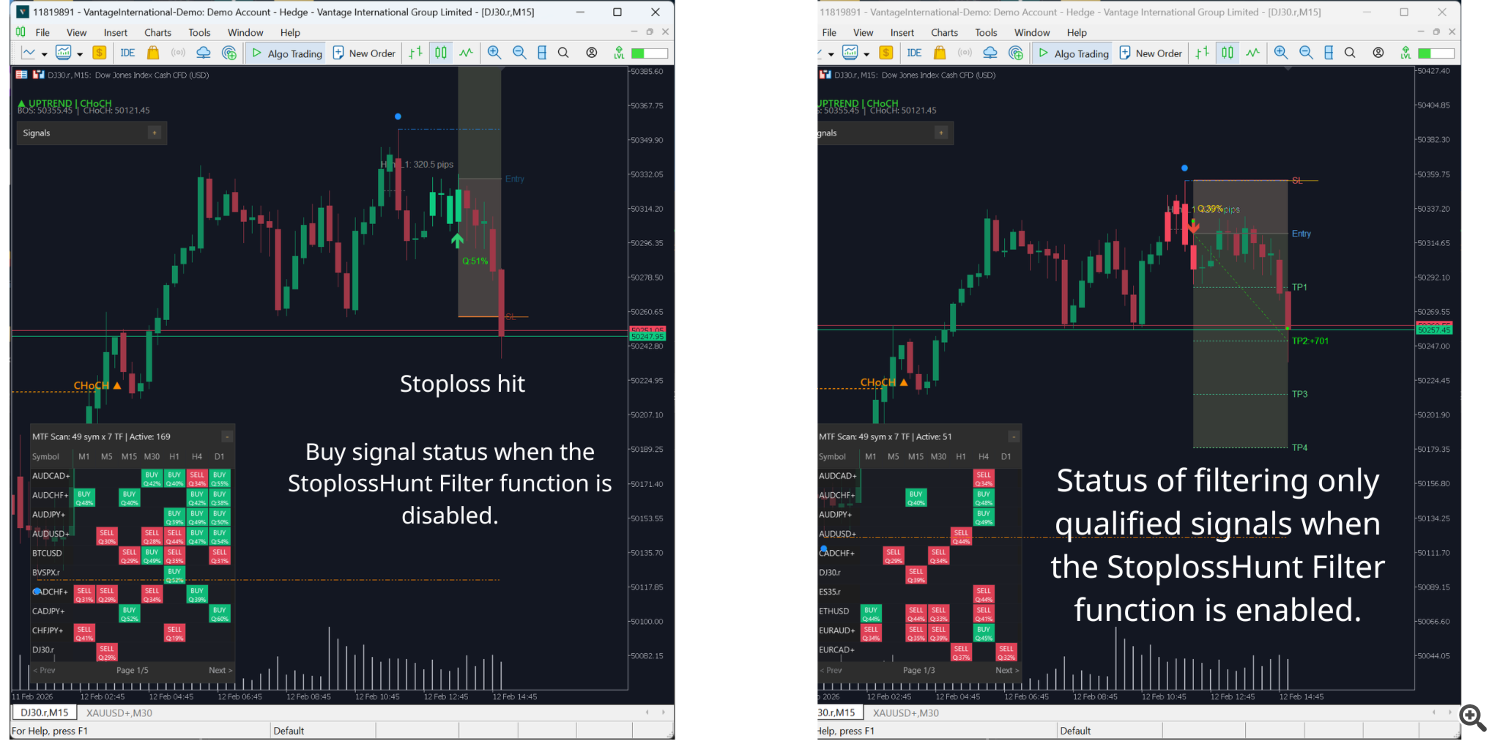
StoplossHunt Filter is an intelligent tool that helps you identify trading signals with higher win probability by checking whether price "swept stoploss" before forming a pattern.
What is StoplossHunt Filter?
This is an automated filter that checks:
- For BUY signals (bullish): Did price touch below the previous bottom? (sweeping buyers' stoploss)
- For SELL signals (bearish): Did price touch above the previous top? (sweeping sellers' stoploss)
If price did not sweep stoploss → signal is rejected (weak, high risk) If price already swept stoploss → signal is accepted (strong, high probability)
Why should you use it?
When this filter is enabled, you will:
- Only trade signals where "Smart Money" has already acted (swept the crowd's SL)
- Avoid mid-air signals (no clear momentum)
- Increase win rate because you enter AFTER the market has purged weak liquidity
- Better understand market structure — know which levels have been swept
-
2. Why do you need StoplossHunt Filter?
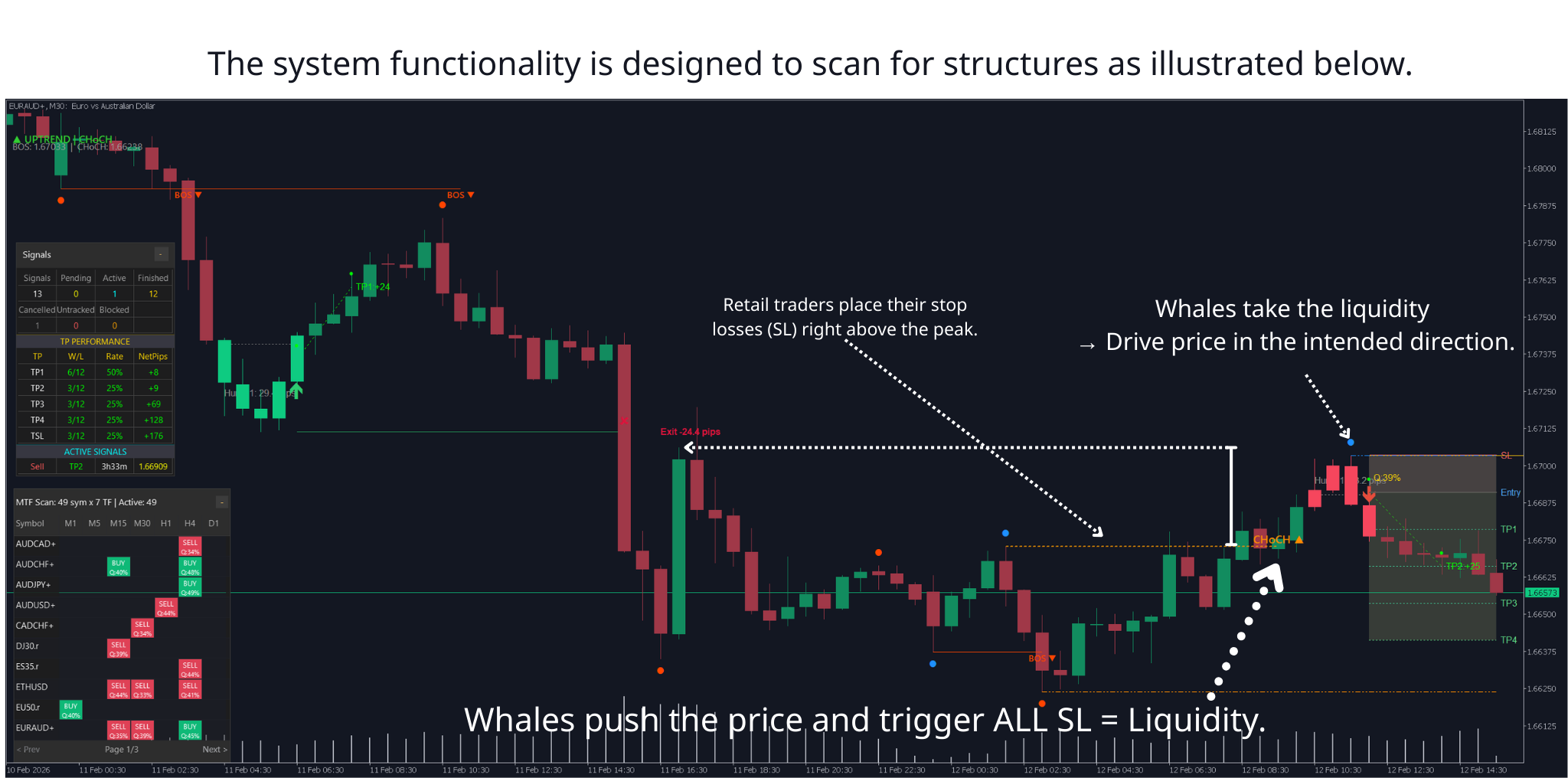
How "sharks" (Smart Money) operate
Step 1: Market creates tops/bottoms → many traders sell/buy Step 2: SL orders cluster just below/above those tops/bottoms Step 3: Sharks push price past the top/bottom slightly → trigger all SL (massive liquidity) Step 4: Sharks absorb all that liquidity at a good price → then push price in the real direction
Without vs With the Filter
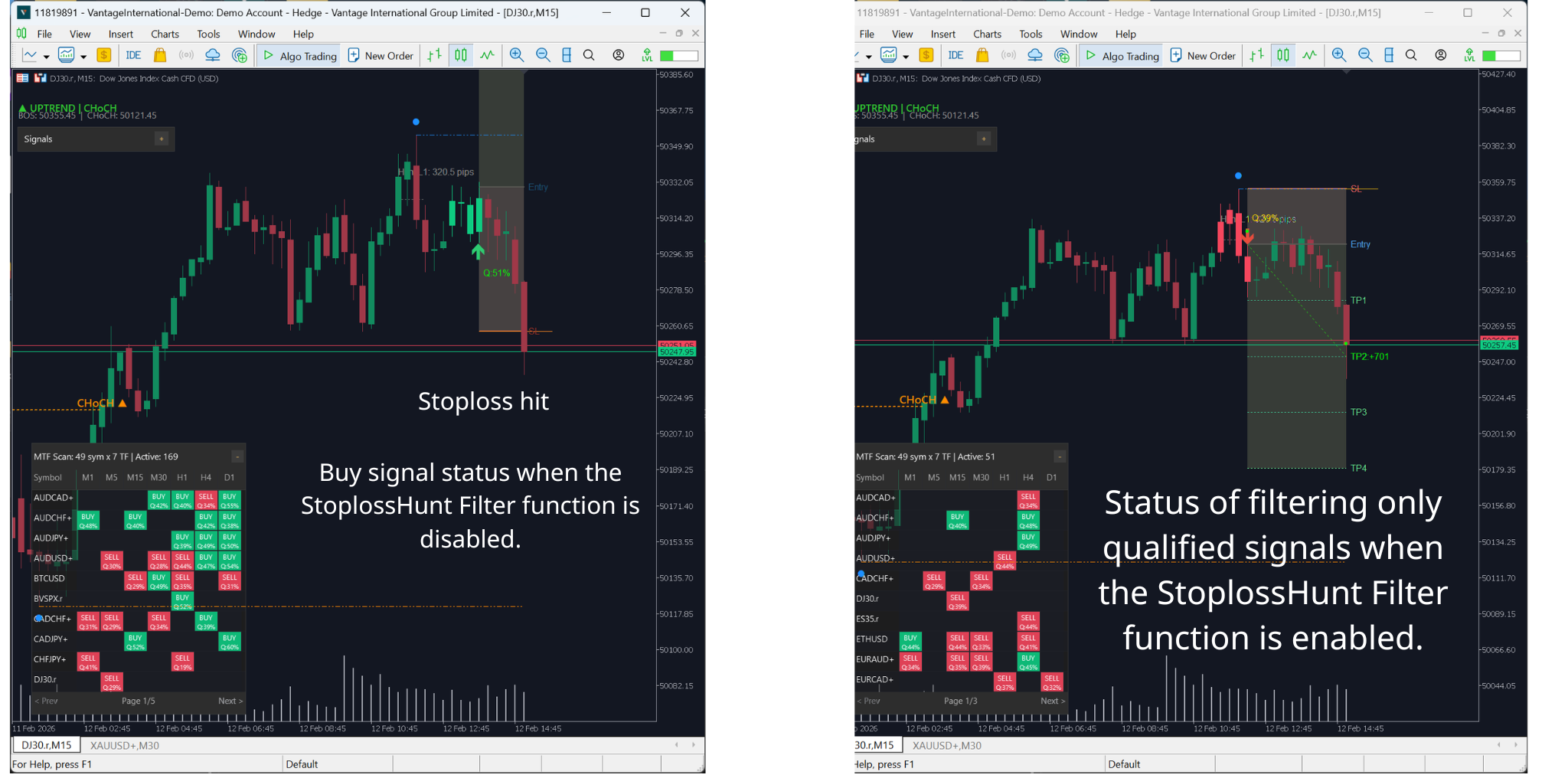
WITHOUT StoplossHunt Filter: You enter at "random" patterns mid-air, don't know if sharks have acted yet, easy to fall into traps.
WITH StoplossHunt Filter: You ONLY enter AFTER sharks have finished sweeping, you move IN THE SAME DIRECTION as the big money flow. Fewer signals but much higher quality.
3. Step-by-step Parameter Setup Guide
When you load the indicator onto a chart, you'll see 9 settings related to StoplossHunt Filter.
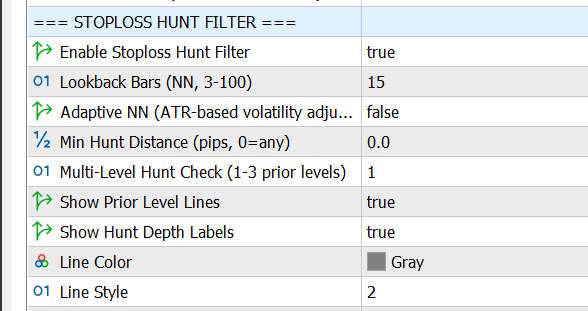
3.1. Enable Stoploss Hunt Filter (On/Off)
| Parameter name | InpSH_Enable |
|---|---|
| Data type | true/false |
| Default value | false (OFF) |
- false : All signals are accepted (no filtering)
- true : ONLY accept signals with stoploss sweep
Enable when: Trading Gold, major Forex pairs, Smart Money / ICT style, want quality over quantity. Disable when: Testing new strategy, trading erratic small coins, already using many other filters.
3.2. Lookback Bars (Number of candles to look back)
| Parameter name | InpSH_LookbackBars |
|---|---|
| Data type | Integer (3-100) |
| Default value | 15 candles |
| Recommendation | Small TF → 10-20, Large TF → 30-50 |
The filter scans backwards this many candles to find previous tops/bottoms.
- Increasing (e.g. 15 → 50): Finds more/older tops/bottoms, easier to pass filter, but may find levels no longer important
- Decreasing (e.g. 15 → 5): Only recent tops/bottoms, stricter, but may miss important levels
Recommended Lookback by Timeframe:
| Timeframe | Lookback Bars | Notes |
|---|---|---|
| M5 | 8-15 | Scalping, nearby bottoms/tops only |
| M15 | 15-25 | Intraday, balanced |
| H1 | 20-35 | Swing, look further |
| H4 | 30-50 | Position, wide scan |
General rule: High volatility products (indices, crypto) → increase 30-50% from the table above.
3.3. Adaptive NN (Automatic adjustment based on volatility)
| Parameter name | InpSH_AdaptiveNN |
|---|---|
| Data type | true/false |
| Default value | false |
When ENABLED, the filter automatically adjusts Lookback Bars based on market volatility (ATR):
- Strong volatility (high ATR) → Automatically INCREASE lookback
- Weak volatility (low ATR) → Automatically DECREASE lookback
Example: You set Lookback = 20, Adaptive = true. US session (strong vol) → system adjusts to ~30. Asian session (weak vol) → system adjusts to ~14.
Enable when: Trading across sessions, trading Gold, want auto-adjustment. Disable when: Only trade one fixed session, backtesting (need fixed parameters).
3.4. Min Hunt Distance (Minimum sweep distance)
| Parameter name | InpSH_MinHuntPips |
|---|---|
| Data type | Decimal (pips) |
| Default value | 0.0 (accept any) |
Price must sweep at least this many pips past the previous top/bottom to count as a "hunt". This filters out market noise (spread, slippage touches of 0.1-0.2 pips).
Recommended MinHuntPips:
| Product type | MinHuntPips | Notes |
|---|---|---|
| Low volatility (Forex majors) | 0.5 - 2.0 | Small spread, slow moves |
| Medium volatility (Gold, Forex cross) | 2.0 - 5.0 | Filter noise more clearly |
| High volatility (Indices, Crypto) | 5.0 - 50.0 | Depends on average ATR |
Tip: Start with MinHuntPips = 0 → observe → gradually increase until noise is filtered but real hunts are kept. Large broker spread → increase MinHuntPips.
3.5. Multi-Level Hunt Check
| Parameter name | InpSH_MultiLevel |
|---|---|
| Data type | 1, 2, or 3 |
| Default value | 1 (only check 1 level) |
| Recommendation | 2 (balanced), 3 (sideways market) |
The filter checks this many levels of previous tops/bottoms:
- Level 1: ONLY checks the nearest top/bottom → strictest
- Level 2: Checks 2 levels → balanced (recommended)
- Level 3: Checks 3 levels → easiest to pass, more opportunities
When to use: Level 1 for strong trending market. Level 2 for most cases. Level 3 for sideways market with many alternating tops/bottoms.
3.6. Show Prior Level Lines
| Parameter name | InpSH_ShowLines |
|---|---|
| Data type | true/false |
| Default value | true (SHOW) |
Displays horizontal lines on chart marking swept tops/bottoms. Enable during learning phase, disable for cleaner chart in live trading.
3.7. Show Hunt Depth Labels
| Parameter name | InpSH_ShowLabels |
|---|---|
| Data type | true/false |
| Default value | true (SHOW) |
Displays text label on chart, e.g.: "Hunt L1: 3.5 pips" showing which level was swept and how deep.
Reading hunt depth:
- Shallow (1-3 pips): Light hunt, may just be testing level
- Deep (5-10 pips): STRONG hunt, many SL triggered → very good signal
- Extremely deep (>15 pips): May be structure change, need caution
Recommendation: Keep ENABLED — helps assess signal quality quickly.
3.8. Line Color
| Parameter name | InpSH_LineColor |
|---|---|
| Default value | clrGray (gray) |
| Parameter name | InpSH_LineColor |
|---|---|
| Default value | clrGray (gray) |
Color of horizontal lines. Suggestions: clrGray (neutral), clrDimGray (dark background), clrSilver (softer). Avoid red/green (confuses with candle colors).
3.9. Line Style
| Parameter name | InpSH_LineStyle | |
|---|---|---|
| Default value | STYLE_DOT (dotted) | |
| Value | Name | Appearance |
| 0 | STYLE_SOLID | __________ (solid) |
| 1 | STYLE_DASH | - - - - - - (dashed) |
| 2 | STYLE_DOT | . . . . . . . (dotted) |
| 3 | STYLE_DASHDOT | -.-.-.-.-(dash-dot) |
| 4 | STYLE_DASHDOTDOT | -..-..-..-(dash-dot-dot) |
Recommendation: STYLE_DOT — easy to distinguish from other chart lines.
4. How to Read Signals on Chart
4.1. BULLISH (BUY) Signal with Hunt
When you see: (1) Gray dotted horizontal line below candle pattern, (2) Label "Hunt L1: X pips", (3) Reversal candle (e.g.: Fakey, Pin Bar) forms AFTER touching the line.
Reading: Line = previous bottom. Price touched past this line = swept buyers' SL. Price reversed up = sharks finished feeding. → CONSIDER BUY (if other filters also PASS).
4.2. BEARISH (SELL) Signal with Hunt
Same logic reversed: horizontal line above candle = previous top. Price touched past it = swept sellers' SL. Price dropped = sharks pushing down. → CONSIDER SELL.
4.3. No Line = No Hunt = FILTERED OUT
Beautiful candle pattern but no horizontal line and no "Hunt" label → signal FILTERED OUT → SKIP (low probability "random" pattern).
4.4. Reading Hunt Depth
| Hunt Depth | Meaning | Action |
|---|---|---|
| 0.5 - 2 pips | Light hunt | Cautious, wait for confirmation |
| 3 - 7 pips | Moderate hunt | Can enter trade |
| 8 - 15 pips | STRONG hunt | High priority |
5. 7 Practical Tips
Tip 1: Don't Enter IMMEDIATELY When Seeing Hunt
WRONG: See "Hunt" → enter immediately. RIGHT: See "Hunt" → wait for candle CLOSE → check other filters → enter.
Price often sweeps and sweeps again. Waiting for close = confirming real reversal.
Tip 2: Deeper Hunt = Stronger Signal
Hunt < 3 pips → Weak, need more confirmation. Hunt 5-10 pips → Good signal. Hunt > 10 pips → Extremely strong, high priority. Note: High volatility products have higher thresholds. Hunt too deep vs normal volatility → may be real breakout.
Tip 3: Trade During Peak Hours
Strongest hunts: US session (20:00-02:00 VN / 13:00-19:00 UTC), European session (14:00-20:00 VN / 07:00-13:00 UTC), London open (14:00-15:00 VN). Weak hunts: Asian session (early morning VN) — low volume, rare/unclear. If trading M15/M5 → ONLY trade European-US session.
Tip 4: Combine with Risk Management
Stop Loss: Place SL past the hunt point (below/above lowest/highest sweep by 1-3 pips). Take Profit: Deep hunt (>10 pips) → larger TP (R:R 1:3 to 1:5). Shallow hunt (<5 pips) → smaller, safer TP.
Tip 5: Read Market Structure
Hunt at important support/resistance (H4, D1) → extremely strong signal (confluence). Hunt in middle of range → weaker signal.
Tip 6: Multi-Level Hunt = Super Signal
Label "Hunt L2: 15 pips" or "Hunt L3: 20 pips" = price swept deep, reaching level 2 or 3. Level 2-3 + hunt > 10 pips = great opportunity. Level 1 + hunt < 5 pips = weak signal.
Tip 7: Don't Trade Against Major Trend
No matter how strong the hunt, NEVER trade against H4/D1 trend. StoplossHunt Filter + Direction Filter (same trend) = Perfect combo.
6. Real-World Scenarios
Scenario 1: Bullish Hunt — US Session
Setup: M15, US session (~21:00-23:00 VN), H1 uptrend. What happened: Price created a bottom 12 candles ago → price touched past it by 2 pips → bullish Pin Bar formed → Label: "Hunt L1: 2.0 pips". Analysis: Hunt exists but shallow (2 pips). However: H1 uptrend + US session + Pin Bar = good confluence. Decision: ENTER BUY at 50% lot (shallow hunt → cautious). Result: TP1 (1:2) hit after ~35min, TP2 (1:4) hit after ~1.5h. Lesson: Shallow hunt + strong confluence = still profitable.
Scenario 2: Bearish Hunt — London Open
Setup: M15, London open (~14:00 VN), H4 downtrend. What happened: Price touched past old top by 3 pips → bearish engulfing → Label: "Hunt L1: 3.0 pips". Decision: ENTER SELL full lot (3 pip hunt + downtrend + London open + strong pattern). Result: TP1 (1:2) hit after ~20min. Lesson: Hunt at London Open + trend alignment = golden formula.
Scenario 3: When to SKIP
Setup: M15, 08:00 (weak Asian session), H1 sideways. What happened: Price touched past range bottom only 0.5 pips → Fakey pattern → Label: "Hunt L1: 0.5 pips". Decision: SKIP (hunt too shallow + Asian session + no trend). Result: Price reversed against → skip was correct. Lesson: Not every hunt should be traded. Must have context (time, trend, depth).
7. Combining with Other Features
StoplossHunt Filter is extremely powerful when combined with other filters.
7.1. Hunt + Direction Filter (Trend Alignment)
Direction Filter only allows signals in H1/H4 trend direction. When both PASS → signal with trend + with hunt = extremely high win probability.
| Filter | Setting |
|---|---|
| Direction Filter | ON, Timeframe = H1, Trend Period = 50 |
| StoplossHunt Filter | ON, Lookback = 20, MultiLevel = 2 |
7.2. Hunt + Quality Filter (High-Quality Only)
Quality Filter only accepts patterns with Quality Score > 0.7. When both PASS → beautiful pattern + hunt = golden signal.
7.3. Hunt + Extreme Zone Filter (Overbought/Oversold)
Extreme Zone Filter accepts signals when RSI is in extreme zone. When both PASS → extreme + hunt = strong reversal.
| Filter | Setting |
|---|---|
| Extreme Zone Filter | RSI < 30 or > 70 |
| StoplossHunt Filter | ON, MinHuntPips = 5.0 |
7.4. 3-Filter Stack (Hunt + Quality + Direction)
Most powerful combo for medium/long-term traders:
| Filter | Setting | Role |
|---|---|---|
| Direction Filter | H4 trend | Major trend alignment |
| Quality Filter | Min = 0.7 | Beautiful pattern |
| StoplossHunt Filter | MinHunt = 5, MultiLevel = 2 | Strong hunt |
Result: 1-3 signals/week, win rate 75-85%, R:R 1:3 to 1:5. Best for busy traders who want quality over quantity.
7.5. Strategy by Timeframe
M5 (Scalping): Direction=M15 trend, Hunt MinHunt=1.0 Lookback=10, Quality Min=0.6. Target: 5-15 pips/trade.
M15 (Intraday): Direction=H1 trend, Hunt MinHunt=3.0 Lookback=20 MultiLevel=2, Quality Min=0.7. Target: 20-50 pips/trade.
H1 (Swing): Direction=H4 trend, Hunt MinHunt=5.0 Lookback=30 MultiLevel=2, Quality Min=0.75, Extreme Zone RSI<35 or >65. Target: 80-150 pips/trade.
H4 (Position): Direction=D1 trend, Hunt MinHunt=10.0 Lookback=50 MultiLevel=3, Quality Min=0.8. Target: 200-500 pips/trade.
8. FAQ
Q1: Enabled filter but no signals?
Try: (1) Increase Lookback to 25-30, (2) Set MinHuntPips = 0.0, (3) Increase MultiLevel to 3, (4) Disable other filters temporarily. If still nothing → check indicator is running correctly.
Q2: What hunt depth is "good enough"?
Hunt depth > 2x your MinHuntPips = good. > 4x = very good. Higher volatility products have higher thresholds.
Q3: Trade EVERY signal with hunt?
NO. Hunt is necessary but not sufficient. Still need: trend alignment, quality pattern, good trading hours, reasonable context.
Q4: Is Adaptive NN useful?
Yes if trading across sessions or Gold. Not needed if only one session or backtesting. Rule: ENABLE for live, DISABLE for backtesting.
Q5: Why do signals with hunt still lose?
Possible: "fake hunt" (trap), news/events, hunt too shallow (<2 pips), no confirmation. Solutions: Only trade deep enough hunts, avoid major news, wait for candle close + 1 confirmation candle.
Q6: MultiLevel = 1, 2, or 3?
Level 1 = strictest. Level 2 = recommended for most. Level 3 = sideways market. Start with 2, adjust based on signal count.
Q7: Works for crypto?
Yes with adjustments: increase MinHuntPips (based on ATR), increase Lookback, Adaptive = true (required). Note: crypto has "wash trading" → combine with Quality + Volume filter.
Q8: How to know settings are good?
Backtest 1 month (20+ trading days). Target: Win rate >60%, 1-5 signals/day (M15/H1), avg R:R >1:2. Too low win rate → settings too loose. Too few signals → too strict. Too many → too loose.
Q9: Show Lines and Labels?
Learning (1-3 months): ENABLE both. Proficient: disable Lines, keep Labels. Live trading: Labels ON for quick decisions.
Q10: Compatible with SMC (Smart Money Concepts)?
Absolutely! StoplossHunt Filter automates Liquidity Sweep / Stop Hunt. Combine with Order Block, FVG, BOS for a powerful automated SMC system.
SMC + Hunt workflow: (1) Identify Order Block on H1/H4 → (2) Wait for price to return → (3) Hunt + reversal pattern at OB → ENTER.
9. Conclusion
StoplossHunt Filter helps you filter out 70-80% of junk signals, only trade when Smart Money has acted, and increase win rate by 15-25%.
Remember: Hunt is necessary but not sufficient. Combine with other filters, maintain strict risk management, and don't FOMO.
Next steps:
- Load indicator onto chart
- Set according to recommendation table (section 8)
- Observe 1 week (no trades, just watch)
- Demo backtest 2 weeks
- Live trade with small lots
Wishing you successful trading!
Author: Ich Khiem Nguyen Version: 1.0 Last updated: 2026-02-11




