

What is Signal Zone Filter?
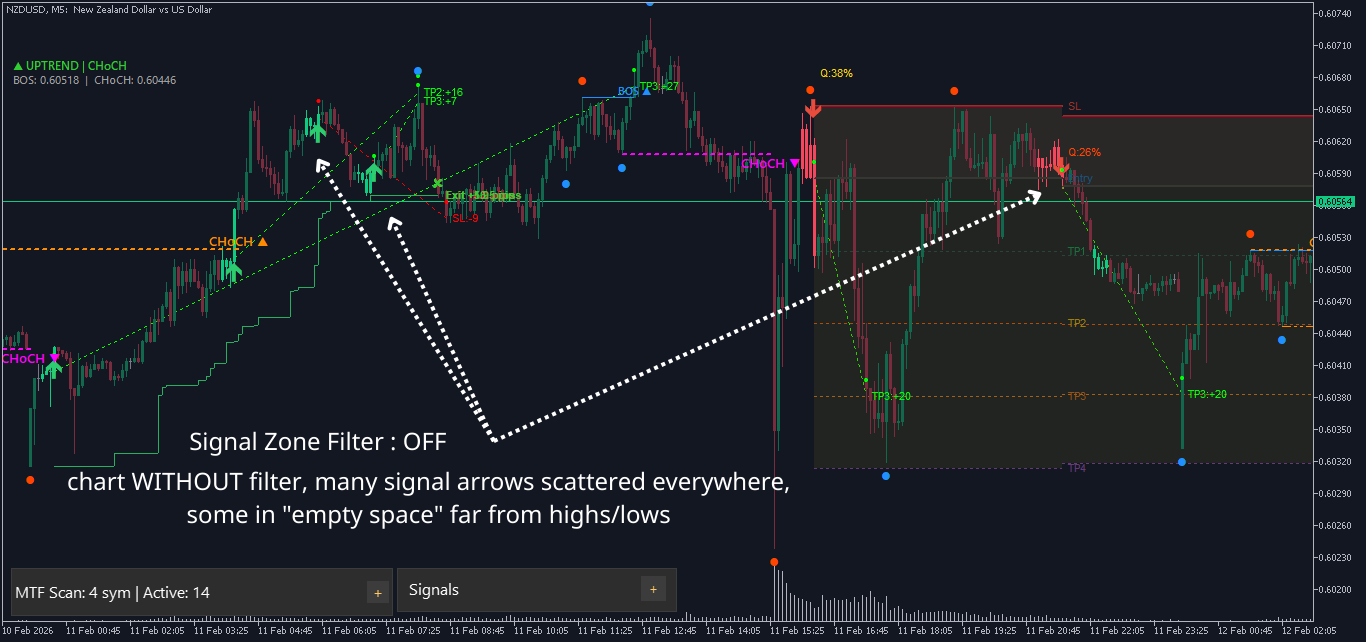
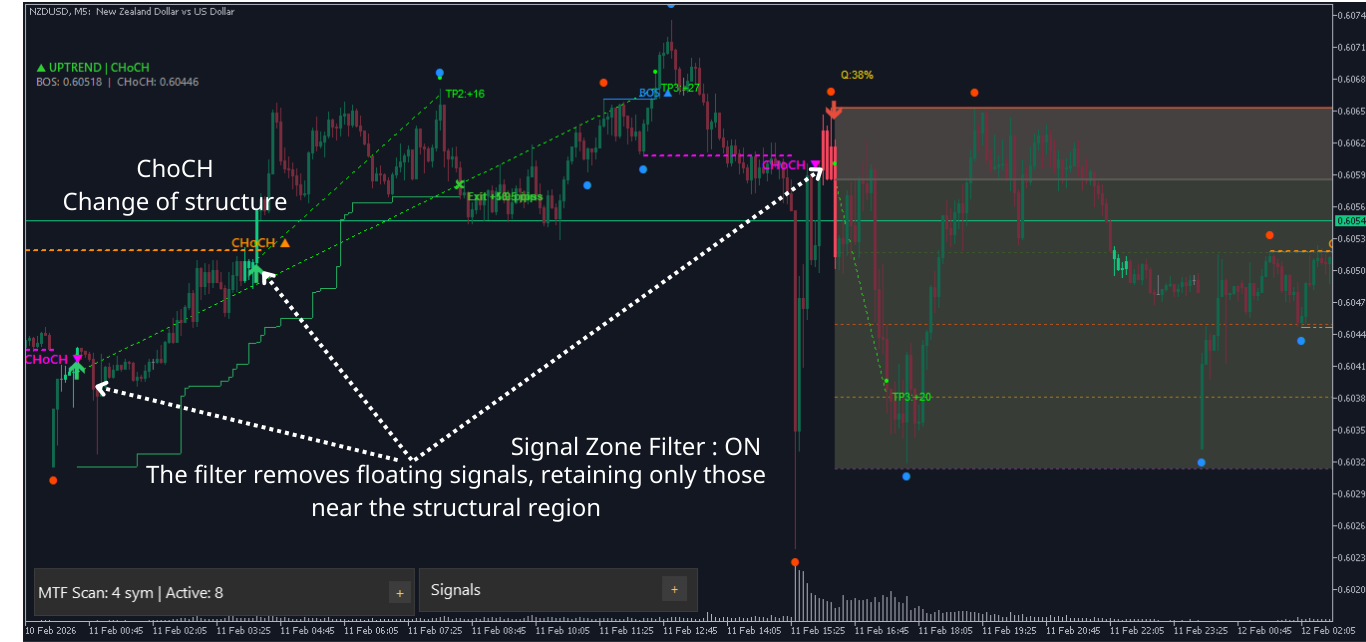
Signal Zone Filter helps eliminate signals that appear in "floating" positions — meaning they are not near any important price zones. It only keeps signals that are connected to market structure zones (swing high/low, BOS, CHoCH).
Simply put:
-
When a Buy signal appears → the filter checks: "Did this pattern sweep through a nearby support zone? Or was there a recent bullish BOS/CHoCH event?"
-
If yes → signal is kept (displayed on chart)
-
If no → signal is blocked (not displayed)
-
Purpose: Reduce noise signals, trade only at structurally significant price zones.
How it works (2 OR conditions)
The filter uses 2 independent checks; only 1 of the 2 needs to be satisfied for a signal to pass:
Check 1: Swing Sweep
-
Buy: Pattern low must touch below a nearby swing low (sweep support zone HL/LL)
-
Sell: Pattern high must spike above a nearby swing high (sweep resistance zone HH/LH)
-
Sweep distance is limited by Swing Sweep Max Depth to avoid mistaking real breakouts
Why "sweep"? In price action analysis, when price sweeps past a high/low then reverses → this is often a sign of liquidity sweep. Signals appearing right after a sweep typically have higher success probability.

Check 2: Event Recency
-
Look for a BOS or CHoCH event in the same direction occurring within the last N candles
-
Buy: needs recent bullish BOS or bullish CHoCH
-
Sell: needs recent bearish BOS or bearish CHoCH
-
Why recent events? If there was just a BOS/CHoCH → market structure just confirmed the direction → signals in that direction are more reliable.

How to enable Signal Zone Filter
Signal Zone Filter is built into these indicators: Mirage (Fakey), PinBar, InvertedHammer (and Template). By default, the filter is off (false).
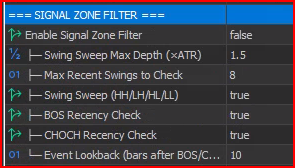
To enable: right-click the indicator → Properties (or press F7) → find parameter Enable Signal Zone Filter → change to true.
Important note: Signal Zone Filter requires Market Structure to be running (because it needs swing and BOS/CHoCH data from Market Structure). Market Structure is always enabled by default, so you don't need to do anything extra.
Input parameters explained
1. Enable Signal Zone Filter — Turn filter on/off
| Info | Details |
|---|---|
| Name in indicator | Enable Signal Zone Filter |
| Default | false (off) |
| Values | true / false |
Meaning: Main switch. When false, all signals are kept (filter does not interfere). When true, filter starts checking and blocking signals that don't meet criteria.
Tip: Enable filter when you see the indicator displaying too many signals, especially signals in "empty space" (not near any high/low).
2. Swing Sweep Max Depth (×ATR) — Maximum sweep distance
| Info | Details |
|---|---|
| Name in indicator | Swing Sweep Max Depth (×ATR) |
| Default | 1.5 |
| Range | 0.1 to 5.0 |
| Unit | ATR multiplier (×ATR) |
Formula: Max sweep distance = Swing Sweep Max Depth × ATR
Example: ATR = 50 pips, Max Depth = 1.5 → pattern can only sweep maximum 75 pips (1.5 × 50) past the swing level. If it sweeps more than 75 pips → doesn't count as sweep.
When changing:
-
Increase (2.0, 3.0...) → accept farther sweeps → easier to pass filter → more signals
-
Decrease (0.5, 0.8...) → only accept sweeps close to swing level → fewer signals but more accurate
Tip: 1.5 works for most cases. If trading Gold (large range), can increase to 2.0–2.5. If trading forex majors (smaller range), keep 1.0–1.5.
3. Max Recent Swings to Check — Number of recent swings to check
| Info | Details |
|---|---|
| Name in indicator | Max Recent Swings to Check |
| Default | 8 |
| Range | 1 to 20 |
| Unit | Number of swings |
Meaning: Filter will check up to N most recent swings (from newest to oldest) to see if pattern swept past any of them.
When changing:
-
Increase (12, 15, 20) → check more older swings → easier to find a sweep → more signals pass
-
Decrease (3, 5) → only check a few recent swings → signal must be near newer swings to pass
Tip: Value of 8 is well balanced. On small timeframes (M5–M15) can increase to 10–12 because swings form faster. On large timeframes (H4–D1) keep 5–8.
4. Swing Sweep (HH/LH/HL/LL) — Enable/disable swing sweep check
| Info | Details |
|---|---|
| Name in indicator | Swing Sweep (HH/LH/HL/LL) |
| Default | true |
| Values | true / false |
Meaning: Enable/disable the swing sweep check (check 1). If disabled, filter relies only on recent BOS/CHoCH events.
Tip: Should keep true. Only disable if you want the filter to rely entirely on BOS/CHoCH events instead of swing zones.
5. BOS Recency Check — Enable/disable recent BOS check
| Info | Details |
|---|---|
| Name in indicator | BOS Recency Check |
| Default | true |
| Values | true / false |
Meaning: Allow signal to pass if there's a same-direction BOS (Break of Structure) event recently.
-
Bullish BOS (BOS ▲) → allows Buy signal to pass
-
Bearish BOS (BOS ▼) → allows Sell signal to pass
Tip: Should keep true. BOS is a trend continuation signal — very reliable.
6. CHOCH Recency Check — Enable/disable recent CHoCH check
| nfo | Details |
|---|---|
| Name in indicator | CHOCH Recency Check |
| Default | true |
| Values | true / false |
Meaning: Allow signal to pass if there's a same-direction CHoCH (Change of Character — reversal sign) event recently.
-
Bullish CHoCH → allows Buy signal to pass
-
Bearish CHoCH → allows Sell signal to pass
When to disable: If you only want to trade with the trend (not trade reversals), disable CHOCH Recency Check so filter only passes signals with BOS or sweep.
7. Event Lookback (bars after BOS/CHOCH) — Event time window
| Info | Details |
|---|---|
| Name in indicator | Event Lookback (bars after BOS/CHOCH) |
| Default | 10 |
| Range | 1 to 50 |
| Unit | Number of candles (bars) |
Meaning: After BOS/CHoCH occurs, signal must appear within the next N candles to be considered "recent". If signal appears after more than N candles → event is considered old → doesn't count.
Example: Event Lookback = 10, on H1 timeframe. If BOS ▲ occurs at 10:00 → Buy signal must appear before 20:00 (10 H1 candles = 10 hours) to pass because of this event.
When changing:
-
Increase (20, 30, 50) → wider "window" → older events still count → easier to pass but less meaningful
-
Decrease (3, 5) → only signals appearing very soon after event pass → stricter, more accurate
Tip: On M15–H1, value of 10 works well. On H4–D1, should decrease to 5–7 (each candle is already long, 10 H4 candles = nearly 2 days). On M1–M5 can increase to 15–20.
Signals visible on chart
Signal Zone Filter is a hidden filter — it doesn't draw any additional objects on the chart. Instead, it blocks or allows pattern signals (Fakey, PinBar, Inverted Hammer) to be displayed.
When filter is ON (enabled = true):
-
Signal passes filter → displays normally (arrow, zone fill, trading line...)
-
Signal is blocked → not displayed on chart (disappears completely)
When filter is OFF (enabled = false):
-
All signals display normally (as if there's no filter)
How to know filter is working:
-
Enable Debug Mode (in indicator parameters) → open Expert tab → find log lines tagged [SZ-FILTER] or [SZ_FILTER]
-
Log will show: which signal PASS (and reason: swept which swing, or which event), which signal BLOCK
Before/after filter comparison:
| Status | Number of signals | Quality |
|---|---|---|
| Filter OFF | More | Mix of good signals and noise |
| Filter ON | Fewer (typically 30–60% reduction) | Only keeps signals near structure zones |
Trading scenarios (examples)
Scenario 1: Buy signal passes via Swing Sweep
-
Market Structure shows ▲ UPTREND , latest swing low (HL) at 2,030
-
Buy pattern appears (e.g., Fakey Bullish), pattern low touches 2,028 (2 pips below HL)
-
Filter checks: "Pattern low 2,028 < HL 2,030? → Yes. Distance 2 pips < Max Depth 75 pips? → Yes"
-
Result: PASS — Pattern swept support zone → reliable signal → displays on chart
-
Scenario 2: Buy signal passes via recent BOS
-
No nearby swing (pattern doesn't sweep past any high/low)
-
But 5 candles ago, BOS ▲ (bullish Break of Structure) occurred
-
Filter checks: "Is there bullish BOS within 10 candles? → Yes (5 candles ago)"
-
Result: PASS — Structure just confirmed bullish → Buy signal is reasonable
Scenario 3: Signal blocked
-
Sell signal appears, but pattern high doesn't spike above any swing high
-
And no bearish BOS/CHoCH within the last 10 candles
-
Filter checks: "Sweep? → No. Event? → No"
-
Result: BLOCK — Signal is "floating", not connected to structure zone → eliminated
Practical tips
Tip 1: Start with default values, fine-tune later
Enable filter with all default parameters first. Observe for 1–2 weeks how many signals the filter removes. If too few signals blocked → increase strictness. If too many good signals blocked → decrease strictness.
Tip 2: Combine with Market Structure to understand meaning
When signal passes filter, open Expert tab to see reason:
-
If passed via sweep HL → pattern swept bullish support zone → very strong in Uptrend
-
If passed via sweep LL → pattern swept new low → may be reversal sign (be more careful)
-
If passed via same-direction BOS → momentum is strong → trend-following signal
Tip 3: Disable CHoCH if you only trade with trend
If your trading style is trend-only (no catching reversals):
-
Keep BOS Recency Check = true
-
Set CHOCH Recency Check = false
-
Result: signals only pass when sweeping swing or having BOS (trend continuation) — don't pass because of CHoCH (reversal)
Tip 4: Warning about "false sense of security"
Filter helps eliminate weak signals, but doesn't guarantee 100% remaining signals will win. Risks still exist:
-
Sweep might be a real breakout (price continues far, doesn't return)
-
Recent BOS/CHoCH doesn't guarantee momentum will sustain
-
Always use stop loss and proper money management, regardless of what filter says
Tip 5: Adjust Event Lookback by timeframe
| Timeframe | Suggested Event Lookback | Reason |
|---|---|---|
| M1–M5 | 15–20 bars | Short candles, "recent" event needs more candles |
| M15–H1 | 8–12 bars | Balanced (default 10 works well) |
| H4–D1 | 5–7 bars | Each candle is long, too-old event loses meaning |
Tip 6: Use Debug Mode to understand filter
Enable Debug Mode = true in indicator parameters, then open MT5 → View → Toolbox → Expert tab. You'll see log lines like:
text
Use this information to:
-
Understand why signal was blocked
-
Fine-tune parameters appropriately
Tip 7: Be careful using filter on small timeframes + ranging markets
In ranging markets (Market Structure shows ◆ RANGING ), swing highs/lows alternate close together. Patterns easily "sweep" past swings → most signals pass → filter is less effective.
Recommendation: Combine Signal Zone Filter with Direction Filter. Direction Filter will block signals in ranging markets, while Signal Zone Filter filters position in trending markets.
Optimize by trading style
| Style | Swing ATR Mult | Max Zones | Event Lookback | CHoCH | Notes |
|---|---|---|---|---|---|
| Scalp (M1–M5) | 1.0–1.5 | 10–12 | 15–20 | true | Need many swings, wide event window |
| Intraday (M15–H1) | 1.5 (default) | 8 | 10 | true | Balanced — recommended for most |
| Swing (H4–D1) | 2.0–2.5 | 5–8 | 5–7 | false | Strict filtering, only large sweeps + BOS, no CHoCH |
Quick summary
| If you want to... | Do this |
|---|---|
| Enable filter | Set Enable Signal Zone Filter = true |
| Keep more signals | Increase Swing ATR Mult, Max Zones, Event Lookback |
| Filter more strictly | Decrease above values, disable CHoCH |
| Only trade with trend | Disable CHOCH Recency Check |
| Understand why signal was blocked | Enable Debug Mode, read Expert tab |
| Signals disappeared after enabling | Normal — filter is removing weak signals |
Frequently Asked Questions (FAQ)
Q: After enabling filter, all signals disappeared?
A: Possibly market is ranging + no recent BOS/CHoCH. Try increasing Event Lookback or Swing ATR Mult. If still none → market truly has no suitable structure zones.
Q: Does filter draw anything on chart?
A: No. Filter works "behind the scenes" — only blocks/allows signals. To see swing zones (HH/HL/LH/LL) and BOS/CHoCH, enable Show Swing Markers and Show BOS/CHOCH Lines in Market Structure section.
Q: Must Market Structure be enabled for filter to work?
A: Yes. Market Structure provides swing and event data for the filter. Market Structure is always enabled by default, so no need to worry.
Q: Should I enable filter from the start or only when needed?
A: Recommended to use indicator without filter first to get familiar with signals. Then enable filter to reduce noise once you understand how the indicator works.




