Aura Ultimate — How to Setup
- Working trading pairs: XAUUSD (GOLD)
- Timeframe: H1
- Recommended deposit: $500 and above
- Minimal deposit: $100 (High risk trading)
- Min leverage 1:20
- Good ECN broker is required (Recommended broker)
- Best Broker for European Clients with trading leverage 1:500
✅ Recommended Brokers for EA Trading
🔵 IC Markets
One of the most popular choices for Forex & EA trading.
👉 Open Account / Learn More
🔵 IC Trading
A strong alternative for automated trading.
👉 Open Account / Learn More
🔵 RoboForex
Convenient for automated trading and testing different account types.
👉 Open Account / Learn More
🔵 Vantage
Another solid option for Forex, Gold and Expert Advisors.
👉 Open Account / Learn More
🔵 Weltrade
Alternative broker suitable for automated trading.
👉 Open Account / Learn More
RECOMMENDED PROP FIRM
⭐⭐⭐⭐⭐ IC Funded (Get Funded up to $200k — Passed with EA) (open PROP account) ⭐⭐⭐⭐⭐
30% DISCOUNT COUPON ---------- FPQCBM -----------
Important Notes Before Purchase:
-
A Stop Loss is an integral part of the strategy — it indicates normal risk management, not a system error.
-
Performance should be evaluated over an entire trading month or more, rather than over a few individual days.
-
Periods with no open trades are also normal.
The system may intentionally pause if its model detects irregularities or unstable market structures. -
If you already have the Aura Neuron or Aura Black advisors, keep in mind that some trades may overlap with the Aura Ultimate advisor. Since the advisors use partially similar logic of the previous day high or low breakout.
HOW TO SET UP
The Expert is easy to use, with all default settings. You only need to select the Risk and Strategy.
STEP1 - CHOOSE A STRATEGY
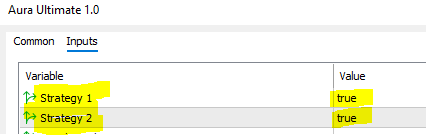
The expert has three strategies. By default, all strategies enabled to work. To disable one of the strategies, you need to change the value from True to False.
Strategy #1 – The most aggressive
Opens up to two trades per day.
Has less precise entries.
Uses the Recovery function (lot increases after losses).
High risk, high volatility.
Strategy #2 – More accurate
Opens maximum one trade per day.
Entries are more precise than Strategy #1.
Also uses the Recovery function by default.
Medium risk.
Strategy #3 – The most conservative
Does NOT use the Recovery function.
Opens only one trade per day.
Risk-to-Reward ratio is 1:2.
Best choice for large deposits and long-term trading.
Lower risk, more stable performance.
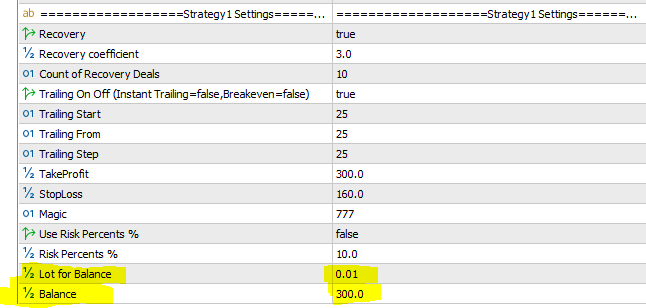
Risk settings are set for each strategy separately. The risk is controlled by the Balance parameter.
Balance - The parameter refers to the calculation of the auto lot (The auto lot is calculated according to the formula Deposit/Balance*Lot for balance = trading volume.
For example, your deposit is $1,000. You set the Balance risk parameter to 300. This means the risk will be calculated as follows: 1,000 / 300 x 0.01. The trading lot will be 0.03
Note: To trade at low risks, your deposit must be at least $1,000
Enable Range Filter (Optional) based at ATR indicator (disabled by default)
If you need more accurate trade entries but are willing to sacrifice the number of trades, you can activate the range filter.
This allows you to reduce the number of unsuccessful entries during periods of sideways movement in the market.
*The range filter settings are fully open for more detailed customization and optimization for advanced users.
True - Enable Range Filter
False - Disable Range Filter

Enable NEWS FILTER (Optional)
To enable the News filter
True - Enable
False - Disable
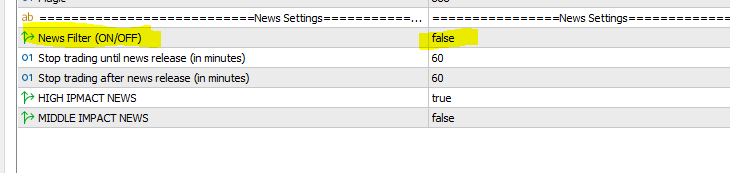
For correct work of the news filter you need to add the link to the terminal settings. You do not need to add a link for Metatrader 5 terminal, only for MT4.
Please allow web requests to the following URL for the news filter https://sslecal2.forexprostools.com/
A few helpful tips:
If you use high-risk settings, it’s better to run each strategy on a separate trading account. This keeps your account safer and gives better diversification, since high-risk trading can lead to large drawdown’s or even a total loss of deposit.
If you use medium or low risk, you can run both strategies together on one account.
✅ All MQL Signals and Experts: https://www.mql5.com/en/users/stanislav110685/seller ✅
--------------------------------------------------------------------------------------------------------------
🔵 Recommended Broker
🔵 Best Broker for Europeans ( Leverage 1:500)
🔵 Telegram Channel
🔵 MyFX Book signals in Profile
🔵 Mail fintexea@gmail.com
🎁 SUPER PROMOTION 🎁 🎁 SUPER PROMOTION 🎁 🎁 SUPER PROMOTION 🎁
------------------------------------------------------------------------------------------------------------------------------------------------------
Buy any EA and get Second EA for FREE as a bonus
https://www.mql5.com/en/users/stanislav110685/seller
How? Simply send me a direct message, after Purchase. Please ask in private messages for more details.
https://www.mql5.com/en/users/stanislav110685
-----------------------------------------------------------------------------------------------------------------------------------------------------
📌 Note: The bonus Expert is sent as a .ex file with a license to 2 account numbers