
📘 SuperScalp Pro v9.2
📌 1. Introduction to SuperScalp Pro
SuperScalp Pro – Professional Multi-Layer Confluence Scalping System is an advanced scalping indicator for MetaTrader 5 that combines SuperTrend with multiple technical filters, ATR-based risk management, and customizable trading signals.
Outstanding Features:
-
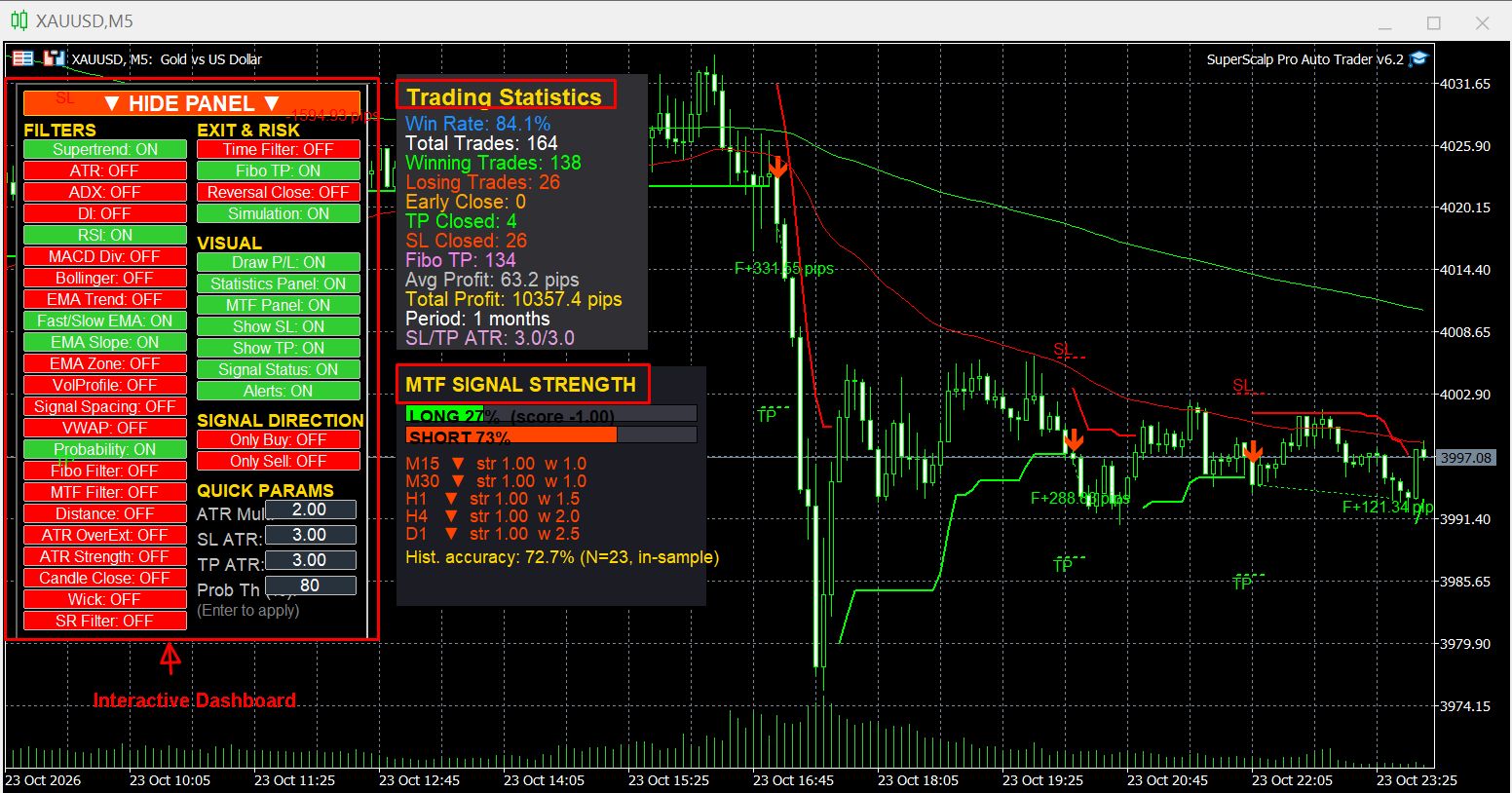
Interactive Control Panel: Adjust parameters, enable or disable filters, and monitor signals directly on the chart.
-
MTF Signal Strength: Assess trend strength across multiple timeframes to help confirm market direction.
-
Trading Statistics & Simulation: Analyze historical performance and compare results across different configurations and timeframes.
This guide explains these features and the essential settings for using SuperScalp Pro effectively.
🚀 2. Key Features
SuperScalp Pro combines multiple analytical tools and signal customization options in one integrated system.
-
📈 Advanced SuperTrend System: Uses an advanced SuperTrend algorithm to identify trends and support Buy/Sell signal generation.
-
🎯 Multi-Layer Signal Filtering: Provides more than 16 filters and trading tools that can be enabled or disabled independently, depending on the configuration.
-
🖱️ Interactive Control Panel: Manage filters and functions directly from the chart.
-
⚙️ Quick Parameter Adjustment: Quickly adjust ATR Multiplier, SL ATR, TP ATR, and Probability Threshold.
-
📊 EMA Trend Analysis: Combines multiple EMA lines to help confirm market direction.
-
💹 Momentum & Volatility Filters: Includes RSI, MACD Divergence, ADX, DI, ATR, and related tools.
-
📉 VWAP & Volume Profile: Analyze price relative to VWAP and display POC, VAH, and VAL levels.
-
🌀 Fibonacci Filter: Filters signals using dynamic Fibonacci zones calculated from Moving Average and ATR.
-
🎯 Fibonacci Take Profit: Supports Fibonacci-based profit targets.
-
🛡️ ATR-Based SL/TP: Set Stop Loss and Take Profit distances according to market volatility.
-
🧪 Trading Simulation: Simulate trades using historical price data.
-
📋 Performance Statistics: Displays Win Rate, Total Trades, Winning Trades, Losing Trades, Avg Profit, and Total Profit.
-
🔔 Real-Time Signal Status: Monitor signal direction, entry price, and SL/TP levels.
-
🟢 Profit/Loss Visualization: Draw lines connecting the entry and exit points of simulated trades.
-
↕️ Flexible Signal Direction: Supports Only Buy and Only Sell modes.
-
📱 Multiple Alert Options: Supports Popup Alerts, Email Notifications, and Push Notifications on MT5 Mobile.
These features allow users to select the tools that best fit their trading strategies rather than having to use every filter simultaneously.
🖥️ 3. Control Panel – Interactive Dashboard
The Control Panel is the central area for enabling or disabling filters, adjusting parameters quickly, and managing chart display functions.
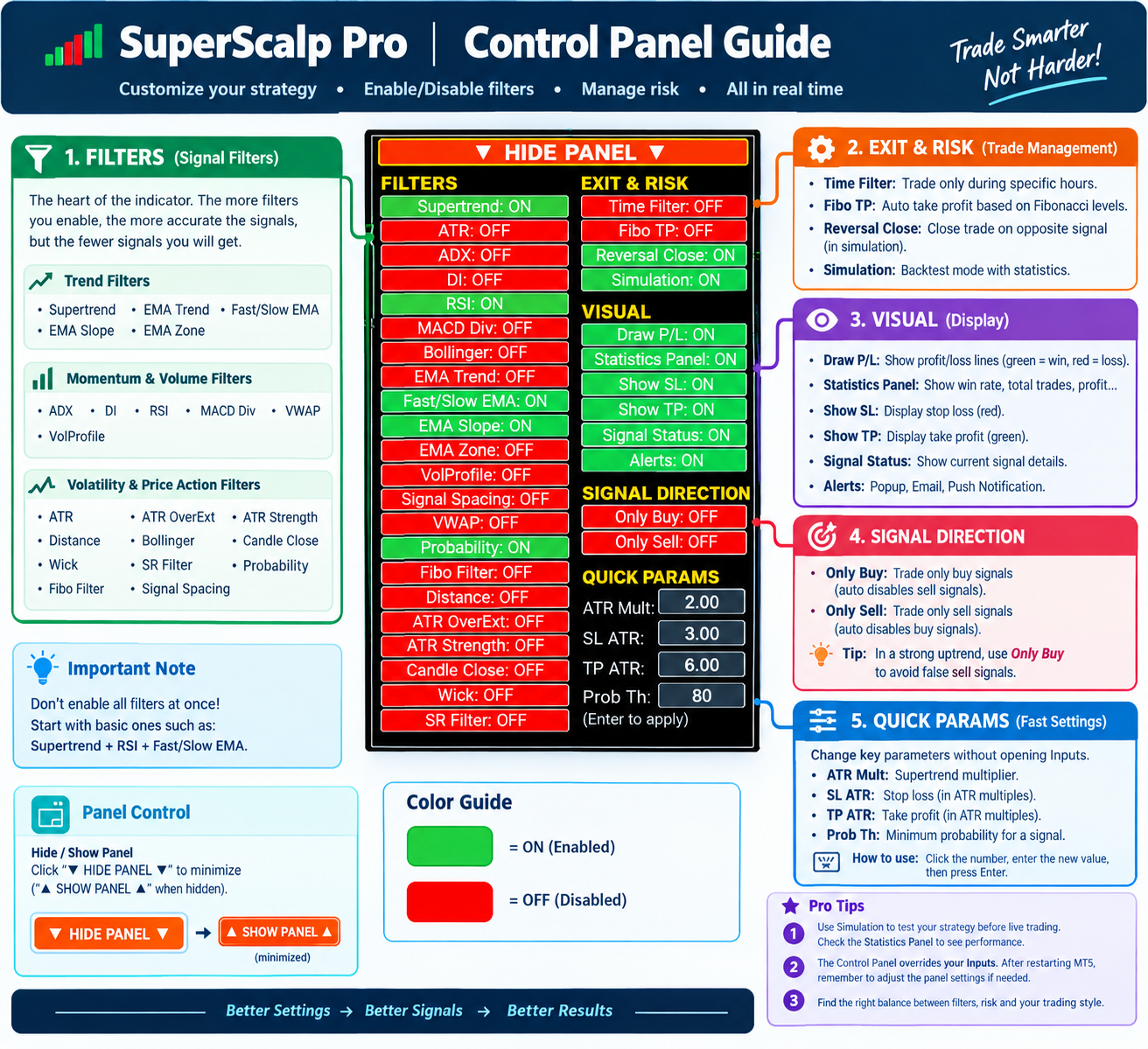
📊 Watch this tutorial to learn how to use the Interactive Control Panel to adjust trading parameters, enable or disable filters, and customize signal settings directly on the chart — without opening the Inputs window.
3.1. General Principles
-
🟢 Green = ON: The function is enabled.
-
🔴 Red = OFF: The function is disabled.
-
🖱️ Left-click a button to change its state.
-
🔄 The indicator updates the relevant conditions and results when the configuration changes.
-
▼ HIDE PANEL ▼: Hide the Control Panel.
-
▲ SHOW PANEL ▲: Display the Control Panel again.
3.2. FILTERS Section
The FILTERS section contains the available signal filters:
- SuperTrend, EMA Trend, Fast/Slow EMA, EMA Slope, EMA Zone, ADX, DI, RSI, MACD Div, VWAP, VolProfile, ATR, ATR OverExt, ATR Strength, Distance, Bollinger, Candle Close, Wick, SR Filter, Probability, Fibo Filter, Signal Spacing
The available filters may vary depending on the indicator version and configuration.
💡 Usage tip: Enabling more filters generally makes signal confirmation stricter and may reduce the number of signals. Start with a few basic filters, then add others gradually to evaluate their impact.
3.3. EXIT & RISK Section
⏰ Time Filter
Restricts signal generation to the configured trading hours.
🎯 Fibo TP
Enables or disables the use of Fibonacci levels as Take Profit targets.
🔄 Reversal Close
Allows the simulation system to close trades early when reversal conditions are met according to the configuration.
🧪 Simulation
Enables historical trade simulation and updates the Statistics Panel.
⚠️ Important: Trade management functions used in the indicator's simulation do not mean that the indicator automatically executes real trades. To automate trading, you need a compatible Expert Advisor (EA) with its own configuration.
3.4. VISUAL Section
📈 Draw P/L
Draws lines connecting the entry and exit points of simulated trades:
-
🟢 Green: Positive result.
-
🔴 Red: Negative result.
📋 Statistics Panel
Shows or hides the simulated performance statistics.
🛑 Show SL / Show TP
Shows or hides the Stop Loss and Take Profit lines on the chart:
-
🔴 Red: Stop Loss.
-
🟢 Green: Take Profit.
📡 Signal Status
Displays the current signal status, including Buy/Sell direction, entry price, and configured SL/TP levels.
🔔 Alerts
Manages the supported notification options:
-
Popup Alert
-
Email Notification
-
Push Notification on MT5 Mobile
To receive email or push notifications, configure the corresponding settings in MetaTrader 5.
3.5. SIGNAL DIRECTION Section
🟢 Only Buy
Allows only Buy signals according to the function's conditions.
🔴 Only Sell
Allows only Sell signals according to the function's conditions.
These options are useful when you want to focus on one trading direction during a clearly trending market.
Always check the button states to avoid unintentionally restricting signals in the direction you want to trade.
3.6. QUICK PARAMS Section
QUICK PARAMS allows you to adjust important parameters directly from the Control Panel.
How to change a parameter
-
🖱️ Click the field containing the value.
-
⌨️ Delete the existing value and enter a new one.
-
↵ Press Enter to apply the change.
⚙️ ATR Mult
Adjusts the SuperTrend multiplier.
-
⬆️ Increase: The SuperTrend line becomes smoother and generally produces fewer signals.
-
⬇️ Decrease: The SuperTrend becomes more sensitive and generally produces more signals.
A range of 1.2–2.0 is a reference range for testing.
🛑 SL ATR
Adjusts the Stop Loss distance based on ATR.
-
1.0: A closer Stop Loss that may be hit more easily during price fluctuations.
-
1.5–2.0: A medium-distance range to test.
-
3.0: A wider Stop Loss.
⚠️ A wider Stop Loss does not automatically mean lower risk. Position size must be adjusted appropriately.
🎯 TP ATR
Adjusts the Take Profit distance based on ATR.
A wider target requires a larger price movement to reach Take Profit. Consider the Risk/Reward ratio and the characteristics of the market.
📊 Prob Th (%)
Sets the minimum Probability threshold.
For example, setting this value to 80% applies the threshold according to the indicator's Probability calculation logic. It does not guarantee that 80% of actual trades will be profitable.
3.7. Important Control Panel Tips
-
Avoid enabling every filter at the beginning.
-
Consider starting with SuperTrend + RSI + Fast/Slow EMA + Signal Spacing.
-
Enable Simulation and the Statistics Panel to evaluate your configuration.
-
Change one group of parameters at a time so that you can assess its impact more easily.
-
The Control Panel may override the Inputs settings during the current session. When MT5 restarts, values may return to the saved Inputs settings. To maintain your preferred configuration, update and save the corresponding Inputs values.
📊 4. Trading Statistics – Performance Dashboard
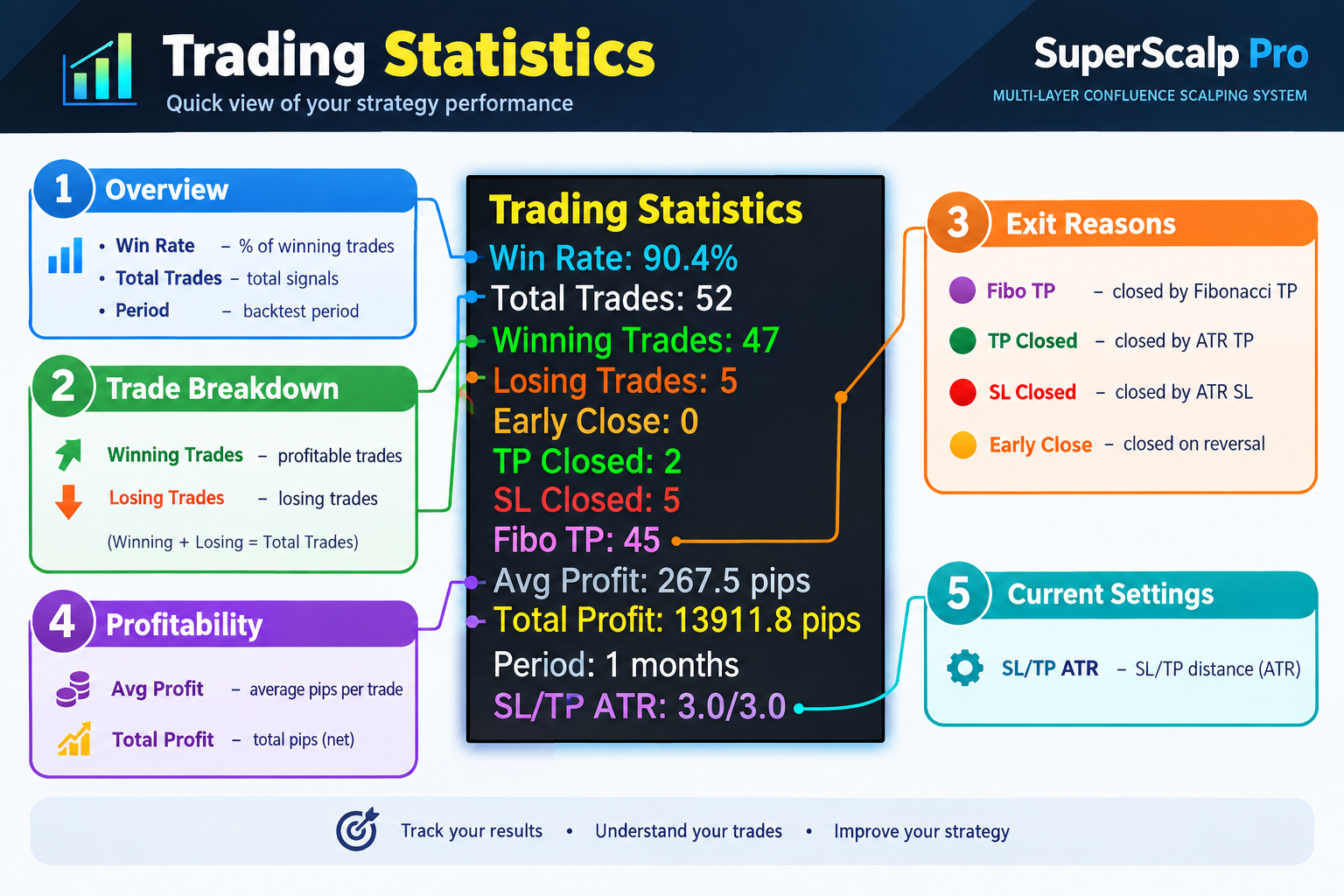
The Statistics Panel helps you evaluate simulated results and compare different configurations.
4.1. How to Enable Statistics
-
🖥️ Open the Control Panel.
-
🧪 Enable Simulation.
-
📋 Enable the Statistics Panel.
-
⏳ Wait for the indicator to process historical data and update the results.
Results depend on the simulation period, historical data, timeframe, and current parameters.
4.2. Overall Performance Metrics
📈 Win Rate
The percentage of simulated trades that were profitable.
Formula:
Win Rate = (Winning Trades / Total Trades) × 100%
🔢 Total Trades
The total number of trades recorded during the simulation.
📅 Period
The period of historical data used for the simulation, such as 30 days.
4.3. Trade Outcome Classification
🟢 Winning Trades: The number of simulated trades with positive results.
🔴 Losing Trades: The number of simulated trades with negative results.
These metrics help you evaluate the number of winning and losing trades during the tested period.
4.4. Trade Exit Reasons
🌀 Fibo TP
The number of trades closed according to Fibonacci Take Profit conditions.
🎯 TP Closed
The number of trades closed after reaching the ATR-based Take Profit target.
🛑 SL Closed
The number of trades closed after reaching the ATR-based Stop Loss.
🔄 Early Close
The number of trades closed early because reversal conditions were met while Reversal Close was enabled.
These metrics help you understand how SL/TP settings and exit conditions affect simulated results.
4.5. Profit Metrics
💰 Avg Profit
The average profit per trade, generally displayed in pips according to the indicator's calculation method.
📈 Total Profit
The total pip result of all simulated trades during the selected period.
When comparing two configurations, do not focus on Win Rate alone. Evaluate Total Trades, Avg Profit, Total Profit, and the number of losing trades together.
4.6. Current Configuration
⚙️ SL/TP ATR
Displays the SL and TP ATR multipliers currently in use.
For example, SL/TP ATR = 3.0/3.0 means that both the Stop Loss and Take Profit multipliers are set to 3.0 ATR under the current configuration.
4.7. Important Simulation Limitations
-
📉 Historical results do not guarantee similar performance in the future.
-
💸 Results may not fully account for spread, commission, slippage, or broker execution conditions.
-
🔢 Pip values do not represent a fixed monetary amount across all symbols, contract specifications, or position sizes.
-
⚠️ Differences in historical data, execution prices, and market conditions can cause actual results to differ from simulated results.
💡 Recommendation: Use Simulation to compare configurations, then conduct additional testing on a demo account before trading with real money.
🎯 5. Signal System
5.1. SuperTrend – Primary Trend Filter
SuperScalp Pro uses an advanced SuperTrend algorithm that combines the HL2 price with ATR bands to determine the market trend direction.
How to Read SuperTrend
-
🟢 Uptrend – Green: Price is above the SuperTrend line, favoring the search for Buy signals.
-
🔴 Downtrend – Red: Price is below the SuperTrend line, favoring the search for Sell signals.
⚙️ Basic Parameters
-
ATR Period: 14
-
ATR Multiplier: The default reference value is 2.0 and can be adjusted through the Control Panel.
How ATR Multiplier Affects Signals
-
⬆️ Increasing ATR Multiplier makes SuperTrend less sensitive, produces smoother trend lines, and generally generates fewer signals.
-
⬇️ Decreasing ATR Multiplier makes SuperTrend more sensitive to price movements and generally generates more signals.
The appropriate value depends on the symbol, timeframe, and market conditions.
5.2. Trend Filters
📈 SuperTrend
The primary trend filter, determining the preferred trading direction according to SuperTrend conditions.
📊 EMA Trend
Uses EMA 50, EMA 200, and EMA 400 to identify the main trend.
-
Buy: EMA 50 > EMA 200 > EMA 400.
-
Sell: EMA 50 < EMA 200 < EMA 400.
This filter helps prioritize signals aligned with the broader trend.
⚡ Fast/Slow EMA
Uses fast and slow EMAs to confirm the short-term trend. Signals are filtered according to the alignment of the EMA lines and the intended trading direction.
📐 EMA Slope
Checks the EMA slope to assess market direction and help limit signals during sideways conditions.
🎯 EMA Zone (EMA Price Zone)
Checks the price position relative to an EMA zone defined using ATR. This helps limit entries when the price has moved too far away from its moving average.
5.3. Momentum & Volume Filters
📊 RSI
Evaluates momentum and identifies potentially overbought or oversold conditions.
Reference examples:
-
RSI > 70: Use caution when considering Buy signals.
-
RSI < 30: Use caution when considering Sell signals.
Actual conditions depend on the RSI settings and configured filtering logic.
🔀 MACD Divergence
Detects divergence between price and MACD momentum. It can help identify potential reversals or confirm price behavior according to the system's conditions.
📉 VWAP
Uses the price position relative to VWAP to confirm trading direction:
-
Buy: Price is above VWAP.
-
Sell: Price is below VWAP.
📊 Volume Profile (VolProfile)
Displays important price areas based on volume distribution:
-
POC (Point of Control): The price level with the highest concentration of trading volume within the calculated data range.
-
VAH (Value Area High): The upper boundary of the value area.
-
VAL (Value Area Low): The lower boundary of the value area.
These levels help traders identify areas that may act as support or resistance.
💡 Note: VolProfile is a visual analysis tool. It does not directly filter or determine whether trading signals are generated.
5.4. Volatility & Price Action Filters
🌊 ATR Volatility
Checks market volatility and helps limit trading when volatility falls outside the configured range.
↗️ ATR Over-Extension
Limits signals when the price has moved unusually far over a recent period relative to ATR. This can help reduce late entries following strong upward or downward movements.
💪 ATR Strength
Compares the current ATR with historical average ATR to assess volatility strength according to the configured threshold.
📈 ADX
Measures trend strength. An ADX level above 20–25 is commonly used as a reference when prioritizing markets with clearer trends.
↕️ DI Direction
Confirms direction using the two Directional Indicator lines:
-
Buy: +DI > −DI.
-
Sell: −DI > +DI.
DI can be combined with ADX to evaluate both trend direction and strength.
📊 Bollinger Bands
Supports two filtering modes:
-
Breakout: Confirms a breakout beyond the Bollinger Bands according to the configured conditions.
-
No-Breakout: Limits signals under conditions where price breaks the bands or becomes excessively extended, according to the configured logic.
🕯️ Candle Close
Requires the candle to close before confirming a signal, helping avoid decisions based on an unfinished candle.
📏 Wick
Filters candles with long wicks that indicate potential price rejection or price action that does not meet the configured trading conditions.
📐 Distance
Limits the distance between price and the SuperTrend line to help prevent chasing the price after it has already moved too far.
🛡️ Support & Resistance Filter (SR Filter)
Helps limit signals when price is too close to support or resistance zones identified by the system.
📊 Probability
Sets the minimum Probability threshold for selecting signals that meet the configured conditions.
For example, Probability Threshold = 80% requires a signal to meet the 80% threshold according to the system's calculation method.
⚠️ Probability values do not guarantee the actual future win rate.
⏳ Signal Spacing
Sets the minimum distance between signals to help prevent signals from appearing too frequently and reduce overtrading.
5.5. Time Filter
The Time Filter restricts the hours during which the system is allowed to generate signals.
For example, you can allow signals only between 08:00 and 17:00, according to the configured time settings.
You can use this filter to focus on the London or New York session and avoid periods of lower liquidity.
⚠️ Check the time zone used by the settings before configuring your trading schedule.
🌀 6. Fibonacci System – Fibonacci Filter & Fibonacci Take Profit
SuperScalp Pro includes dynamic Fibonacci tools to help identify trading zones and profit targets based on market volatility.
6.1. Fibonacci Filter
The Fibonacci Filter builds dynamic price zones using Moving Average (MA) and Average True Range (ATR), then applies Fibonacci levels to filter signals.
Supported Fibonacci Levels
-
23.6%
-
38.2%
-
50%
-
61.8%
-
100%
You can customize the levels used according to your configuration.
📈 Breakout Mode
Requires price to break out of the Fibonacci channel according to the configured conditions. This mode may suit momentum-based trading strategies.
↔️ Inside Mode
Requires price to remain inside the Fibonacci channel. This mode may suit strategies that trade within a defined price range.
✅ Benefits of the Fibonacci Filter
-
Dynamic price zones that adapt to volatility through ATR.
-
Can be combined with EMA, SuperTrend, and other filters.
-
Helps traders evaluate entry conditions based on dynamic price structure.
Actual effectiveness depends on the market, timeframe, and configuration.
6.2. Fibonacci Take Profit (Fibo TP)
Fibo TP allows dynamic Fibonacci levels to be used as profit targets instead of relying exclusively on fixed ATR-based Take Profit distances.
Individual target levels can be enabled according to the configuration.
🎯 Reference Fibonacci Target Ranges
-
23.6%–38.2%: Closer targets that may suit fast scalping.
-
50%–61.8%: Medium-distance targets that may suit a more balanced approach.
-
61.8%–100%: Wider targets that may suit stronger trending markets.
These are configuration suggestions for testing, not guarantees of a particular win rate or that price will reach the targets.
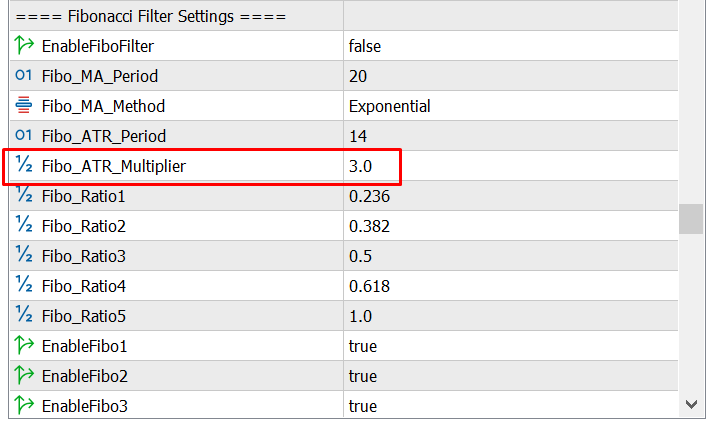
6.3. Fibo_ATR_Multiplier
This parameter affects the distance of Fibonacci zones according to the configuration.
-
⬆️ Increasing the multiplier generally expands the distance between target levels.
-
⬇️ Decreasing the multiplier generally narrows the target distances.
💡 Configuration Ideas by Trading Style
-
Fast scalping: Test the 23.6%–38.2% levels.
-
Balanced approach: Test the 50%–61.8% levels.
-
Trend-following: Test the 61.8%–100% levels.
After changing the parameters or Fibonacci levels, enable Simulation and Statistics to compare the results with the previous configuration.
🛠️ 7. Basic Installation & Usage Guide
Step 1: Install the Indicator
Install SuperScalp Pro from the MQL5 Market, open MetaTrader 5, and attach the indicator to your preferred chart.
Step 2: Open the Control Panel
Check the dashboard, ON/OFF states, and current parameters.
Enable the Statistics Panel if you want to monitor simulation results.
Step 3: Select a Symbol
The following symbols are examples for testing:
-
🥇 XAUUSD (Gold)
-
₿ BTCUSD (Bitcoin)
-
💱 EURUSD
-
💱 GBPUSD
-
💱 USDJPY
-
📊 US30
-
📊 US100
Suitability depends on your broker, trading conditions, historical data, and configuration.
Step 4: Select a Timeframe
Reference timeframes for testing:
-
M5: Suitable for testing scalping strategies with potentially more trading opportunities.
-
M15: May offer a balance between signal frequency and market noise.
-
M30: Suitable for evaluating signals on a longer timeframe.
-
H1: May suit a slower trading style.
No timeframe is always the best under all market conditions.
Step 5: Configure the Filters
Start with:
-
SuperTrend
-
RSI
-
Fast/Slow EMA
-
Signal Spacing
Then consider adding ADX, DI, VWAP, Fibonacci Filter, or other filters as needed.
Step 6: Evaluate Performance
Enable Simulation and the Statistics Panel, review historical results, and adjust the parameters.
Change one parameter at a time and record the configurations you test so you can compare them more easily.
Step 7: Manage Risk
-
🛡️ A risk level of 1–2% of account equity per trade is only a reference range and may be too high for some strategies or accounts.
-
🛑 Always determine your Stop Loss and position size before entering a trade.
-
📉 Set a daily loss limit appropriate to your risk tolerance. A 5% limit is only an example, not a universally safe threshold.
-
🧪 Test your strategy on a demo account before trading with real money.
🔧 8. Troubleshooting
❓ No Signals Appear
Possible cause: Too many filters are enabled, or market conditions do not meet the configured requirements.
Solutions:
-
Check the Only Buy and Only Sell states.
-
Temporarily disable some filters to test whether they are restricting signals.
-
Check the Probability threshold.
-
Try adjusting ATR Multiplier.
-
Use Simulation to evaluate the changes.
🔁 Too Many Signals Appear
You can try:
-
Enabling Signal Spacing.
-
Enabling ADX or DI to help confirm the trend.
-
Increasing ATR Multiplier to reduce SuperTrend sensitivity.
-
Adding EMA Trend or other suitable filters.
Change one parameter at a time to identify its effect.
🛑 SL/TP Levels Are Not as Expected
Check the following:
-
SL ATR and TP ATR values.
-
Fibo TP status.
-
Symbol and timeframe.
-
Contract specifications and the symbol's decimal precision.
-
Differences between simulation and actual order execution conditions.
🔔 Alerts Are Not Working
Check the following:
-
Alert settings in the indicator.
-
Email or Push Notification settings in MT5.
-
The Experts and Journal tabs for error messages.
-
MT5 Mobile notification settings when using Push Notifications.
🖥️ Control Panel Is Not Visible
Check the following:
-
The EnableControlPanel parameter in Inputs.
-
The Control Panel's position and size.
-
Chart display settings.
-
Whether the indicator has been attached and initialized successfully.
If the issue persists, send a screenshot of the chart together with any relevant messages from the Experts or Journal tab to help diagnose the problem.
⚠️ Important Trading Principles
-
Do not enable every filter indiscriminately.
-
Do not evaluate a strategy based on Win Rate alone.
-
Always define your Stop Loss, position size, and loss limits.
-
Avoid revenge trading after a loss.
-
Do not change your trading plan arbitrarily while a trade is open.
-
Keep a trading journal and test configurations on a demo account.
SuperScalp Pro is a tool for technical analysis and developing trading conditions. It does not guarantee profits. Results depend on configuration, market conditions, trading costs, and risk management.
📥 9. Download & Support
📊 SuperScalp Pro Indicator
Find SuperScalp Pro on the MQL5 Market:
🔗 https://www.mql5.com/en/market/product/149074
🤖 SuperScalp Pro Auto Trader EA
The EA supports automated trading based on indicator signals and the selected configuration mode:
🔗 https://www.mql5.com/en/market/product/176681
⚠️ Important: SuperScalp Pro Auto Trader EA is a separate product. Read the EA documentation carefully to configure the correct trading mode, symbol, timeframe, and parameters compatible with the indicator.
💬 Contact & Support
MQL5 Profile:
🔗 https://www.mql5.com/en/users/minhnguyen1504
If you need assistance with installation, configuration, or usage, please submit your question along with a screenshot and relevant details to make troubleshooting easier.
🎯 Wishing you a productive experience with SuperScalp Pro. Manage your risk carefully, remain patient, and trade with discipline!




