

IMPORTANT BEFORE PURCHASE
To get results as close as possible to my signals, please use the same brokers that I use. The EA is sensitive to broker conditions and by default it is optimized for the following brokers: ICMarkets, ICTrading, Roboforex, Tickmill, Darwinex, Darwinex Zero, XM, ActiveTrades.
EA can work with other brokers as well, but it is recommended to use low-spread accounts such as RAW Spread or ECN accounts. Cent accounts and accounts with high spreads are not recommended, because trading results may be significantly worse. It is also highly recommended to use a good-quality VPS for stable and uninterrupted operation - Recommended VPS
Please note that results in the strategy tester may look slightly better than in real market conditions. For this reason, you should rely mainly on real signal performance rather than back test results. This applies to all EAs, not only mine.✅ Recommended Brokers for EA Trading
🔵 IC Markets
One of the most popular choices for Forex & EA trading.
👉 Open Account / Learn More
🔵 IC Trading
A strong alternative for automated trading.
👉 Open Account / Learn More
🔵 RoboForex
Convenient for automated trading and testing different account types.
👉 Open Account / Learn More
🔵 Vantage
Another solid option for Forex, Gold and Expert Advisors.
👉 Open Account / Learn More
🔵 Weltrade
Alternative broker suitable for automated trading.
👉 Open Account / Learn More
>>>> HOW TO INSTALL <<<<
The EA is very simple to use.
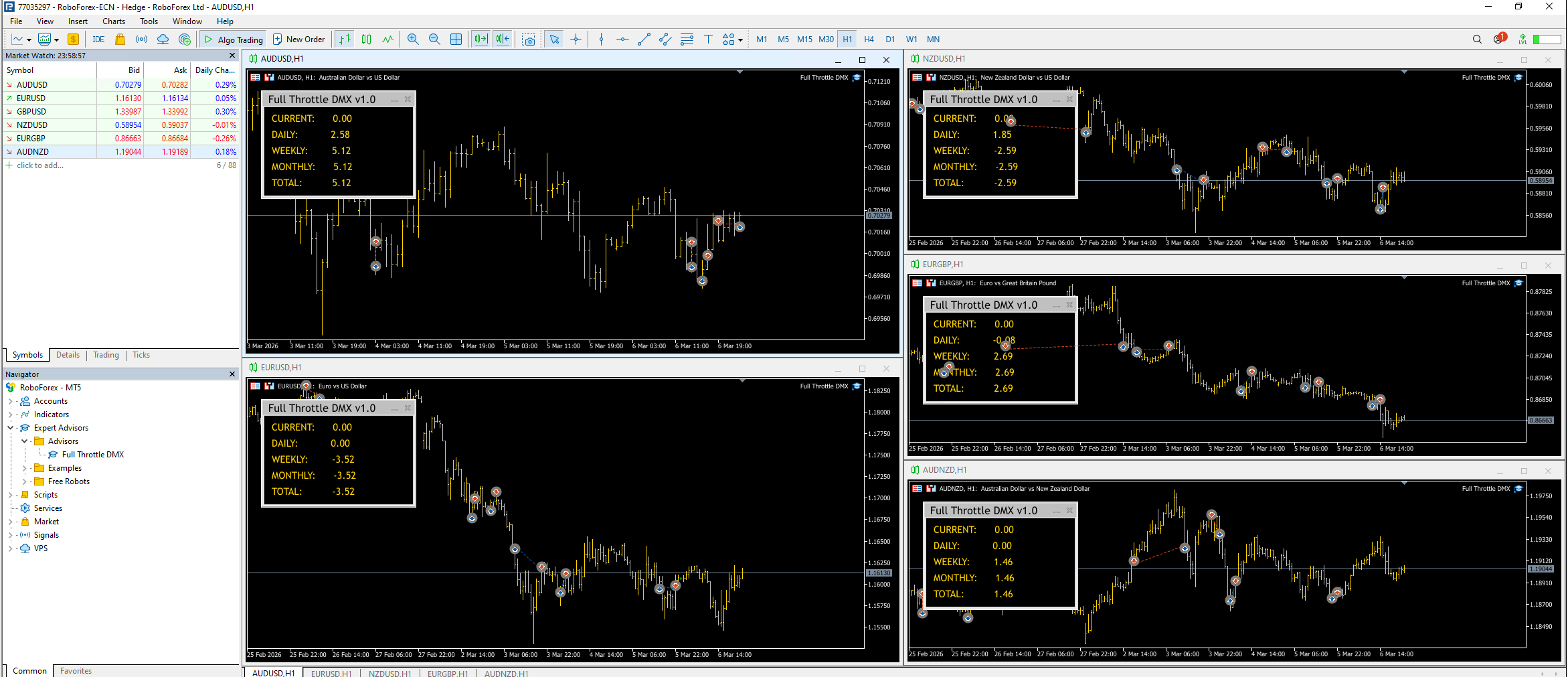
Just attach the EA to the following currency pairs on the H1 timeframe:
EURUSD, AUDUSD, NZDUSD, EURGBP, and AUDNZD
After attaching the EA, simply choose the risk level you want to trade with. No additional settings are required.
>>>> RISK CONTROL <<<<
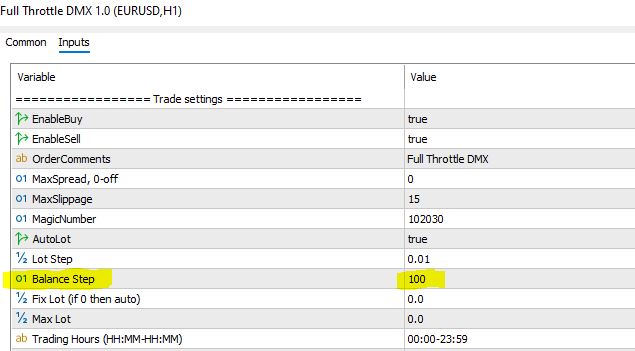
The Balance Step parameter controls the EA risk.
It defines how the lot size grows with your account balance.
- Lower value → higher risk → bigger lot sizes
- Higher value → lower risk → smaller lot sizes
Recommended Values
25 – Extreme risk (for small account acceleration, high chance of losing the deposit)
50 – High risk
100 – Moderate risk
200 – Medium risk
500 – Low risk
750–1000 – Very low risk (recommended for prop firm accounts)
Simply set the Balance Step according to the risk level you want to trade.
>>>> NEWS FILTER <<<<
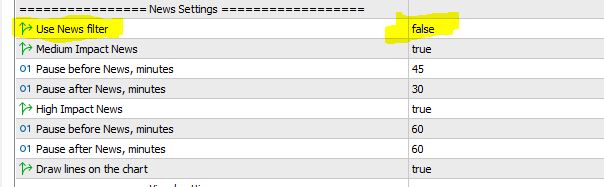
To enable the news filter, simply set Use News filter = true instead of false.
By default, the news filter is disabled.
If you have any questions or need assistance with the setup, please feel free to contact me via private message.
Please read - Important:
- A Stop Loss is an integral part of the strategy — it indicates proper risk management, not a system error.
- Performance should be evaluated over 3-6 months or more, rather than over just a few individual days.
- Periods with no open trades are also normal. The system may intentionally pause if its model detects irregularities or unstable market structures.
- This EA is based on a real trading strategy that uses Stop Loss as a normal part of risk management. Because of that, not every month will necessarily be profitable. Markets go through volatile phases and unfavorable conditions, and even strong strategies can experience temporary drawdowns.
- For this reason, the system’s performance should be evaluated over at least three months, and ideally six months or longer. This is a long-term professional trading strategy.
- It is not a high-win-rate system that produces 20 profitable trades and then wipes out all the profit with one losing trade, which is something we have seen many times with many EAs on the market.
- If you are looking for a “tester grail”, a system that produces a perfectly smooth equity curve, or simply a beautiful back test without Stop Loss events, then this EA is probably not for you.
- This system follows a transparent and realistic approach to trading. The only meaningful way to evaluate its performance is through real trading results and live signals, which reflect actual market conditions.