

In the second article of the series dedicated to the Delta Fusion Pro indicator, we analyze two key functions for reading market flow: POC Delta (Point of Control based on delta) and VWAP Delta (Volume-Weighted Average Price weighted by delta).
These tools help identify intraday equilibrium levels and directional bias using a logic based on the aggressive behavior of market participants.
1) What is POC Delta
Concept
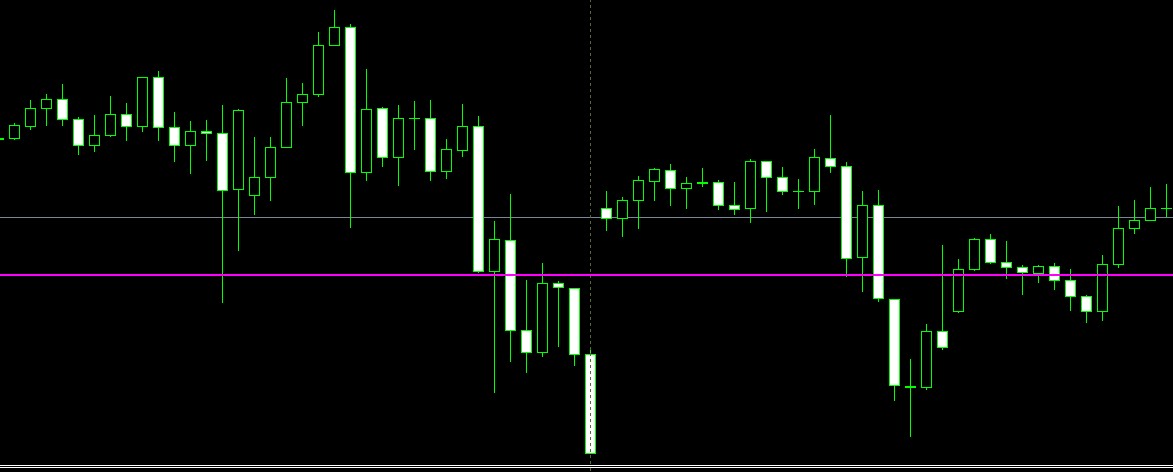
The Point of Control (POC) is the price level where the highest volume—or, in this case, the highest delta—has been concentrated during the current session.
In Delta Fusion Pro, the POC is not static: it is dynamically calculated based on the delta distribution across the session’s price range.
Main Parameters
EnablePOC = true → activates the function.
-
POC_DrawHLineMain = true → draws the main horizontal line on the chart.
-
POC_DrawBand = false (optional) → draws a highlighted band showing the dominant bin.
-
ResetHourCustom / ResetMinuteCustom → define the session start time.
-
POC_AutoStepModeSel → vertical step calculation mode:
-
AUTO_FD (Freedman–Diaconis) → based on IQR and number of bars,
-
AUTO_ATR → based on average volatility (ATR).
-
-
POC_SnapToTick = true → aligns the step to the tick size.
-
POC_CenterLine = true → centers the POC line in the dominant bin.
Calculation Workflow
Session Identification
The function GetSessionStart() determines the session start timestamp. All subsequent bars are considered for computation.
Step Auto-Tuning and Distribution
AutoTunePOCParams() analyzes the session range and volatility to determine the optimal step size. It also decides whether to use absolute delta (when directional bias is weak) or net delta (when one side clearly dominates).
Delta Accumulation per Bin
ComputeSessionPOC_DeltaProfile() distributes each candle’s delta across the price bins covered by its range.
If distrib = 1 , delta is split between the body and the wicks, with a bias toward the candle body ( bodyBias ).
Dominant Bin Selection
The bin with the highest value becomes the POC Delta. The code calculates the bin’s central price and draws it as a horizontal line ( DrawOrUpdatePOCLine() ).
If enabled, it also draws the band ( DrawOrUpdatePOCBand() ).
Interpretation
-
High and stable POC Delta → indicates an intraday equilibrium level where aggressive activity has concentrated.
-
POC shift → signals institutional interest changes or accumulation/distribution zones.
-
Useful for defining dynamic support/resistance levels and filtering entries in trend or reversal setups
2) What is VWAP Delta
Concept
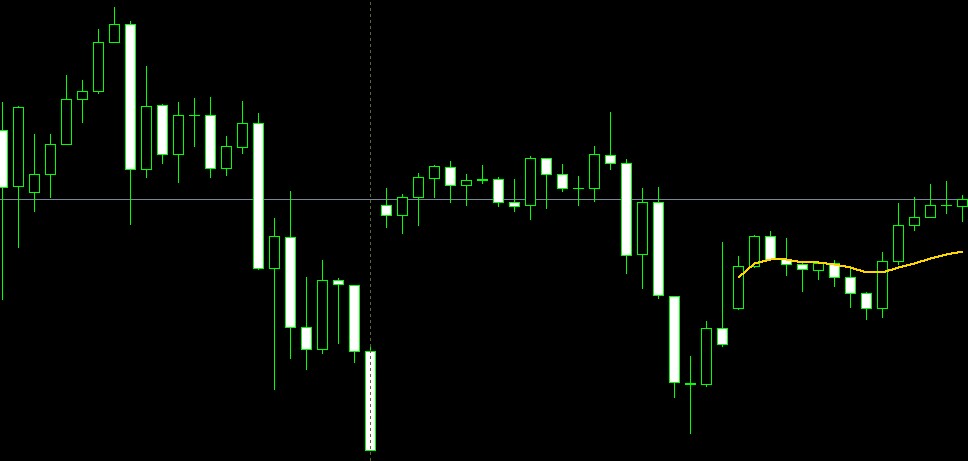
The VWAP Delta is an advanced version of the classic VWAP: instead of weighting price by total volume, it weights it by aggressive delta (Ask vs Bid).
This provides an average price weighted by directional pressure, not just by traded volume.
Main Parameters
-
EnableVWAP_OnChart = true → activates the function.
-
VWAP_OnChart_ShowBuy, ShowSell, ShowNet → control which curves are drawn:
-
Buy = VWAP weighted only on Ask volume,
-
Sell = VWAP weighted only on Bid volume,
-
Net = VWAP weighted on net delta.
-
-
VWAP_Net_Mode:
-
NET_DELTA_WEIGHTED → delta-weighted average,
-
NET_ALL_VWAP → classic VWAP on Ask + Bid,
-
NET_AVG_BUY_SELL → average between VWAP Buy and VWAP Sell.
-
-
Colors and Style: VWAP_Buy_Color, VWAP_Sell_Color, VWAP_Net_Color, VWAP_LineWidth
Calculation Workflow
Progressive Accumulation For each bar, the code calculates the typical price tp = (high + low + close) / 3 and updates the weighted sums:
-
sumP_Ask / sumAskW → VWAP Buy,
-
sumP_Bid / sumBidW → VWAP Sell,
-
sumP_All / sumAllW → classic VWAP,
-
sumP_Net / sumAbsNet → VWAP Net (delta-based).
Chart Rendering
The curves are plotted as line segments ( OBJ_TREND ) for the last VWAP_MaxBarsOnChart bars. Colors and line thickness are defined by the input parameters.
Interpretation
-
VWAP Net above price → dominance of aggressive selling (bearish bias).
-
VWAP Net below price → dominance of aggressive buying (bullish bias).
-
Distance between VWAP Buy and VWAP Sell → measures flow polarization: wider = more imbalance.
Useful for trade location and intraday trend confirmation.
3) POC Delta vs VWAP Delta: Synergy
-
POC Delta shows where trading flow has concentrated during the session.
-
VWAP Delta shows at what average price directional pressure has developed.
Together, they provide a map of equilibrium and directional bias:
-
If price is above VWAP Net but far from POC, the trend is strong.
-
If price oscillates around POC and VWAP Net, the market is balanced.
Quick Setup
-
Enable/disable from the on-chart panel (“POC Session” and “VWAP Net”).
-
Customize colors and modes in the input settings.
-
For scalping, keep VWAP_MaxBarsOnChart low for higher responsiveness.
-
For swing trading, increase it for a broader view.
In the next article, we will delve into Delta divergences in DeltaFusionPro.
If you wish to purchase the indicator, you can find it here: https://www.mql5.com/it/market/product/150494
Happy trading!




