User Manual for OPS Software
The OPS software is designed to select Pareto points from optimization and forward testing results from CSV format files.
Prior to running OPS, go to each table of results (optimization and forward) and create two separate CSV files by first exporting each table to a XML format files, then saving such files in CSV format. It takes one minute to do that.
Once you have the two csv files, run this script and read the results from the "Expert" tab in the Metatrader 5 terminal. Examples are given below.
Approach
The software processes two CSV files: one containing optimization results (back test) and the other containing forward testing results. It selects parameter sets based on user-defined criteria and calculates the Pareto front, which represents the optimal trade-offs between different performance metrics. The results are printed in the Expert Tab of the MetaTrader platform.
Input Parameters
The software accepts several input parameters that allow users to customize the filtering criteria for selecting Pareto points. Below is a detailed description of each parameter:
| Parameter | Type | Default Value | Description |
|---|---|---|---|
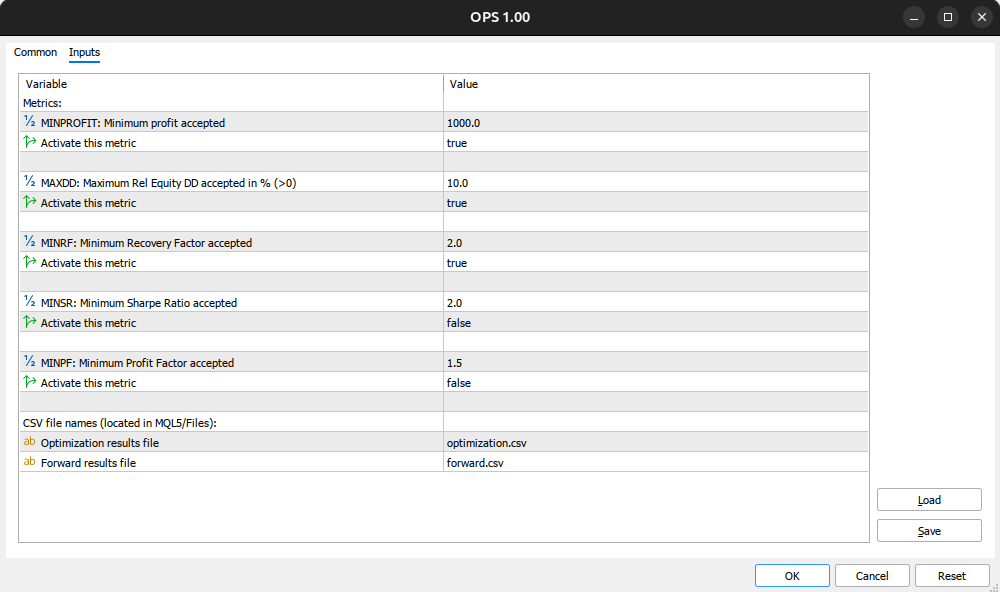
| MINPROFIT | double | 1000 | Minimum profit accepted for the optimization results. |
| FlagMinProfit | bool | true | Activates the minimum profit filter. |
| MAXDD | double | 10 | Maximum relative equity draw down accepted in percentage. |
| FlagMaxDD | bool | true | Activates the maximum draw down filter. |
| MINRF | double | 2 | Minimum recovery factor accepted. |
| FlagMinRF | bool | true | Activates the minimum recovery factor filter. |
| MINSR | double | 2 | Minimum Sharpe ratio accepted. |
| FlagMinSR | bool | false | Activates the minimum Sharpe ratio filter. |
| MINPF | double | 1.5 | Minimum profit factor accepted. |
| FlagMinPF | bool | false | Activates the minimum profit factor filter. |
| Ofile | string | "optimization.csv" | Name of the optimization results CSV file (must be located in MQL5/Files). |
| Ffile | string | "forward.csv" | Name of the forward results CSV file (must be located in MQL5/Files). |
Output
Upon execution, the software will produce the following outputs:
1. Filtered Results: The software filters the optimization and forward results based on the specified input parameters. If no rows meet the criteria, a message will indicate that no results were found.
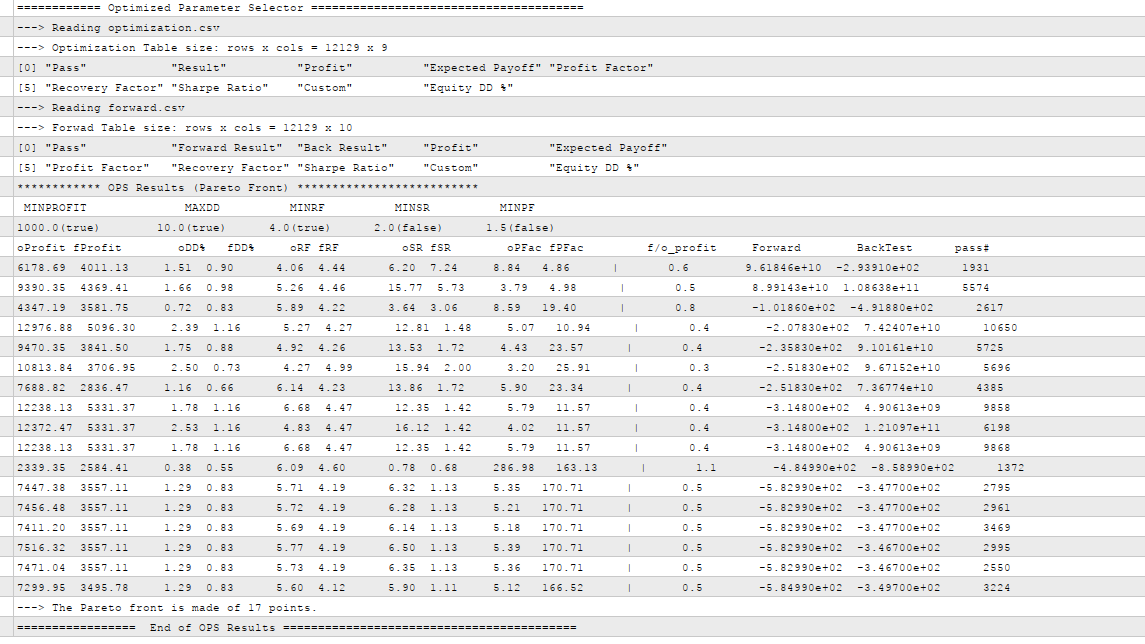
2. Pareto Front Points: The software calculates and prints the Pareto front points, which include:
◦ oProfit: Optimization profit.
◦ fProfit: Forward profit.
◦ oDD%: Optimization draw down percentage.
◦ fDD%: Forward draw down percentage.
◦ oRF: Optimization recovery factor.
◦ fRF: Forward recovery factor.
◦ oSR: Optimization Sharpe ratio.
◦ fSR: Forward Sharpe ratio.
◦ oPF: Optimization profit factor.
◦ fPF: Forward profit factor.
◦ f/o_profit: Ratio of forward profit to optimization profit.
◦ CustomObjForward: Custom object from forward results.
◦ CustomObjOpt: Custom object from optimization results.
◦ pass#: Pass number associated with the results.
3. Summary: A summary of the number of points on the Pareto front will be printed, along with the metric criteria used.
Usage Instructions
1 Prepare CSV Files: Ensure that the optimization and forward results CSV files are created manually and placed in the MQL5/Files directory.
1.1 Go to the “Optimization Results” tab
1.2 Right click on the table and select “Export to XML”
1.3 Save the file with name “optimization.xml”. Make sure the file is save in the folder MQL5/Files.
1.4 Repeat 1.1, 1.2 and 1.3 on the “Forward Results” tab
1.5 Open the optimization.xml file with a spread sheet app (like Excel) and save the file as a CSV (comma separated values) file with the same name “optimization.csv”
1.6 Repeat 1.5 on the forward.xml file.
2 Set Input Parameters: Run the script, and adjust the input parameters as needed to filter the results according to your trading strategy. The more restrictive the filters are, the less parameter set you will get in the results.
3 Review Results: Analyze the printed Pareto front points and summary to make informed trading decisions.
3.1 If you get no results, you need to relax the requirements you set in the input parameters for OPS. You may de-activate some of the metrics too.
3.2 If you get too many parameter sets, your requirements need to be tighten in the input parameters for OPS. You may activate more metrics too.
Input parameters for OPS:
OPS Results (look inside the Expert Tab)