T Manager for Price action Traders

4.5

T Manager, the ultimate trade management solution designed by traders for traders.

If you are searching for a simple and efficient trade panel, trade manager, or trade assistant, you are at the right place. 

The market contains a diverse number of those tools, but this one is designed by traders for traders. I designed this tool, and I am using it daily.
Take my advice and stop buying tools blended with un-useful features that you will never use, T Manager provides you with the essential yet complete features to manage your trades daily.

  • Its user-friendly interface and advanced features allow you to quickly and easily plan, take, and manage your trades.
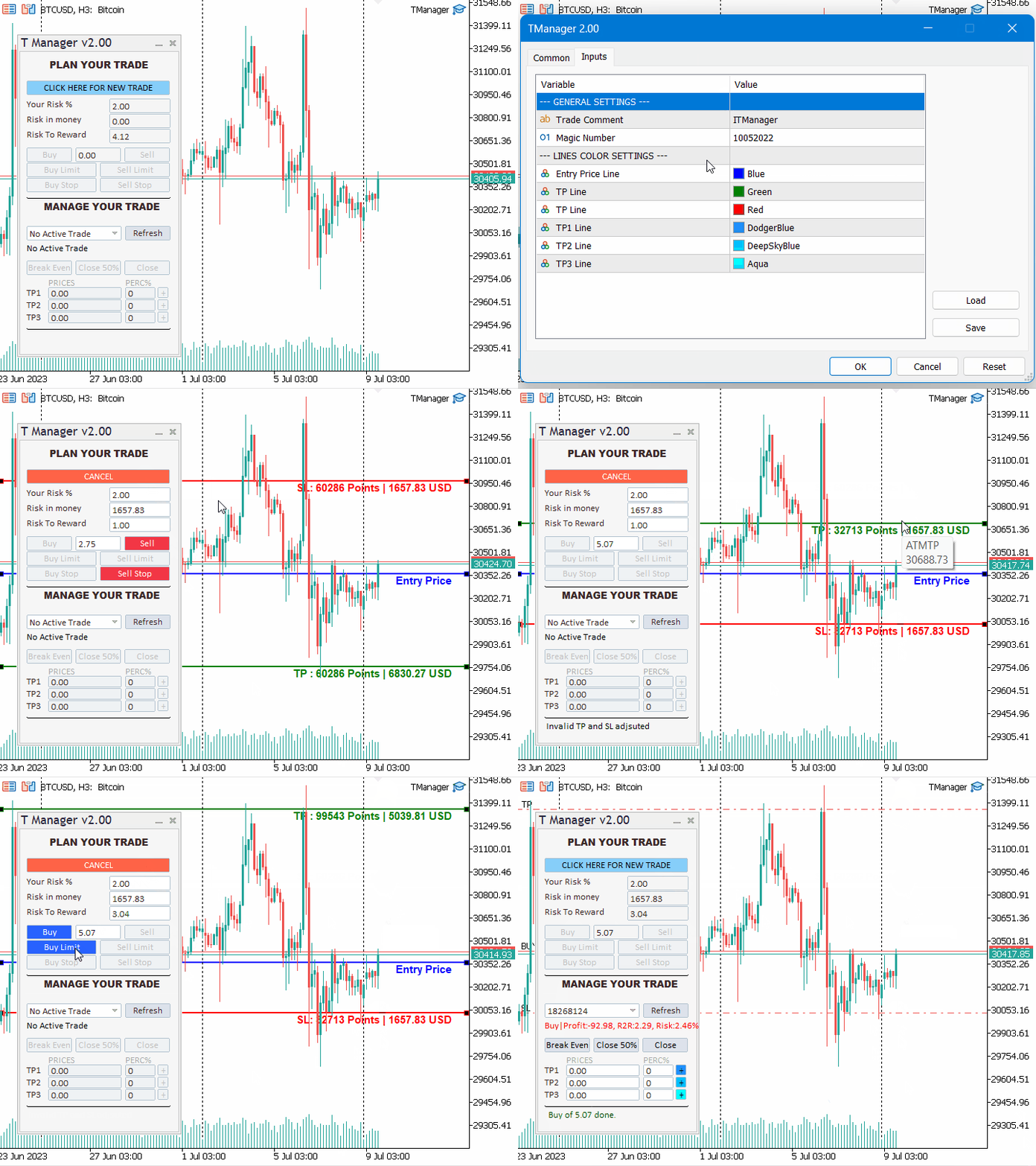
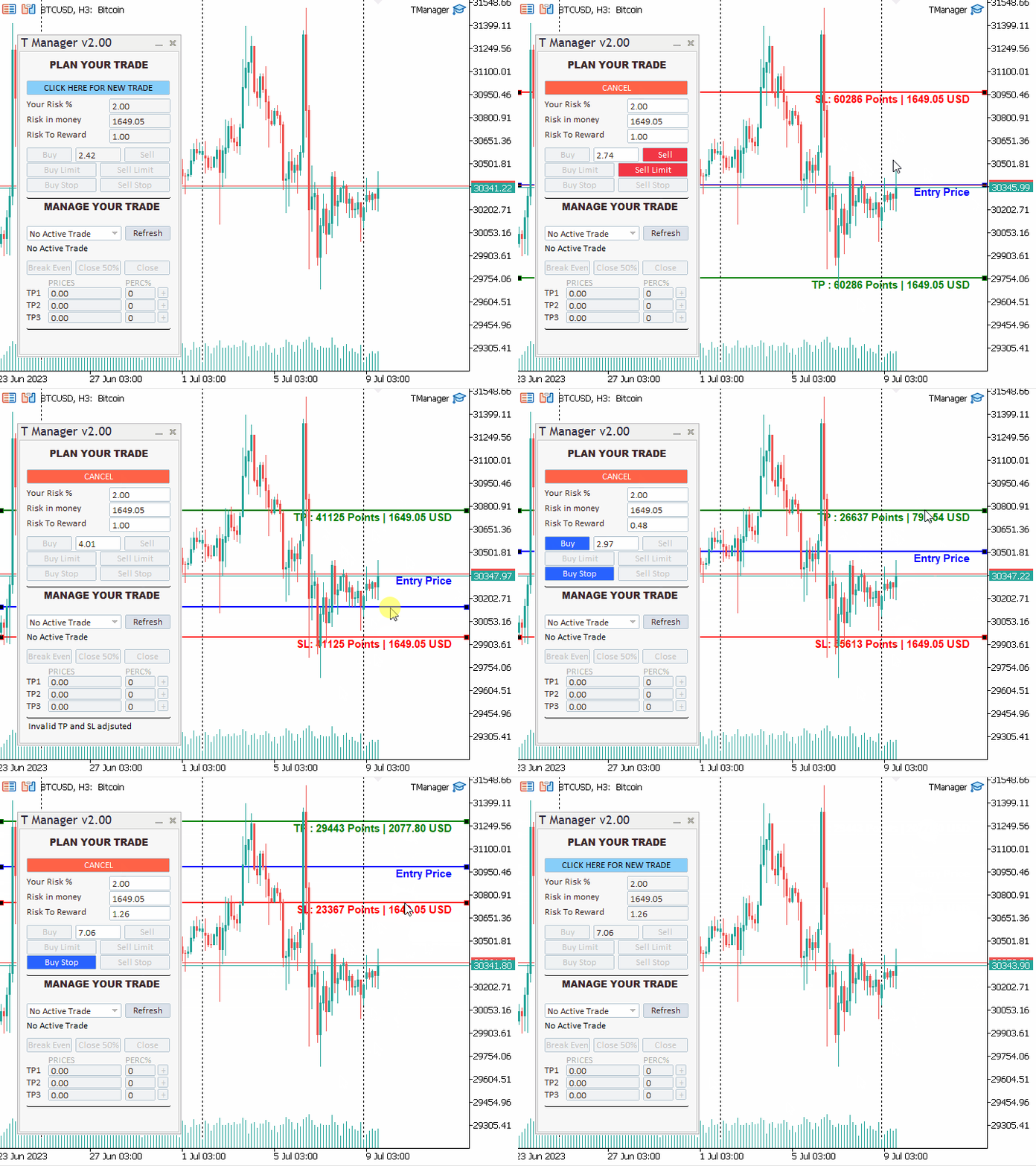
  • Three lines are all that you need to set your trade, stop loss and take profit with ease.
  • Manage your risk with precision and calculate the monetary value of your risk.
  • Benefit from automated rules that help you set your SL and TP and enjoy instant alerts to stay informed of your market position.
  • A centralized interface for trade execution and trade management makes it simple to manage all your open trades from one screen.
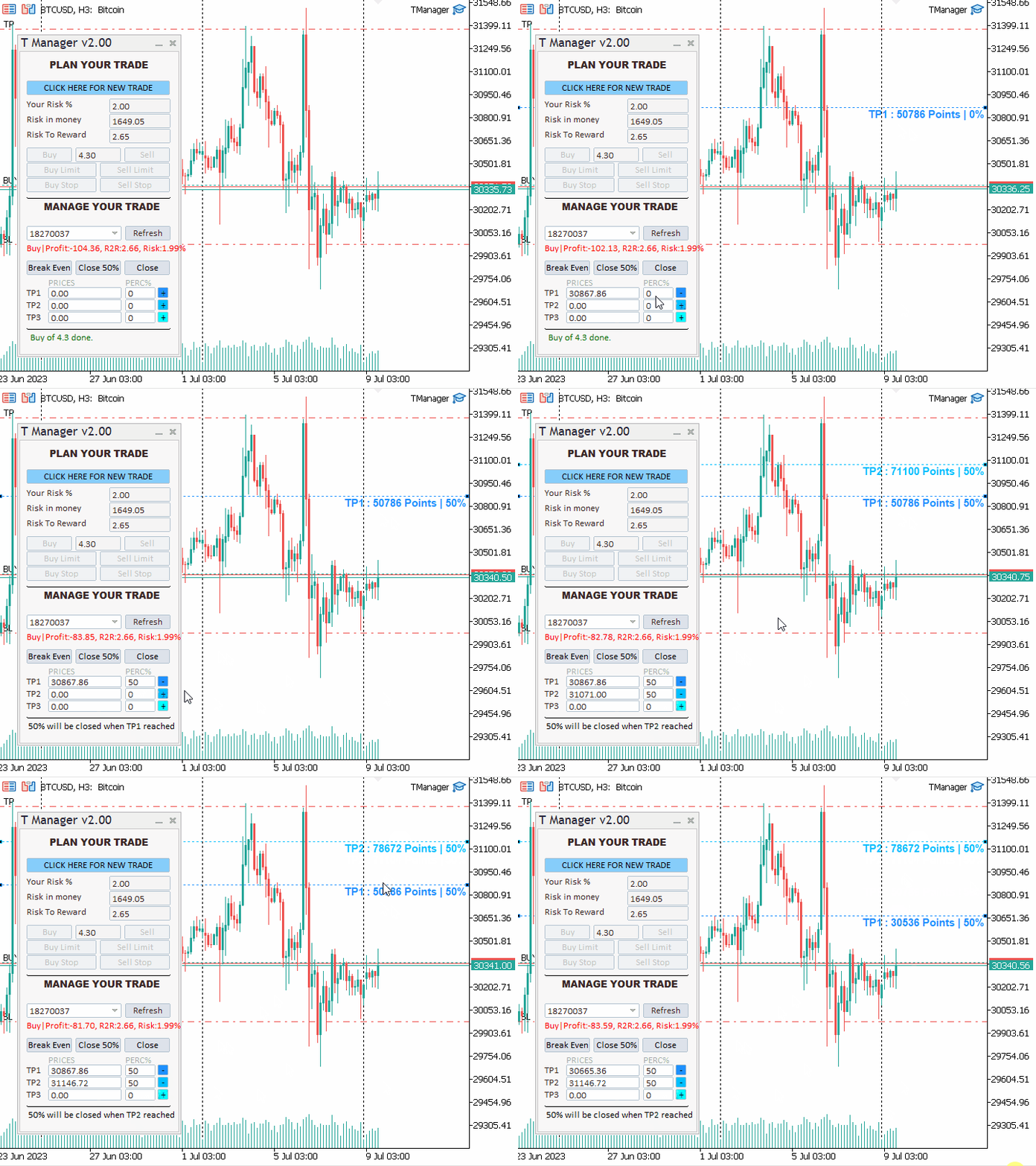
  • Get real-time updates on trade status, set multiple take profit levels, and easily take live actions.
  • Take your trading to the next level with T Manager, the smart choice for intelligent traders.

Need help or have questions? I am Lio, don't hesitate to reach out!  We are always available to respond, help, and improve.

You can simply download the limited versions of the panel from this blog so you can test before making your choice: DEMO Version here

Please note that this EA suits best forex and certain commodities and indices depends on your broker. So please make sure to try the demo version before buying.


How to Use T Manager?

Once activated, make sure to enable Auto-Trading.

You can specify your preferred colors in the inputs and that's it! Forget an unlimited number of parameters that you need to insert before even start using the tool.

IT IS SIMPLE. The intuitive design will guide you by it self to easily plan and take your first trade!


T Manager Features:

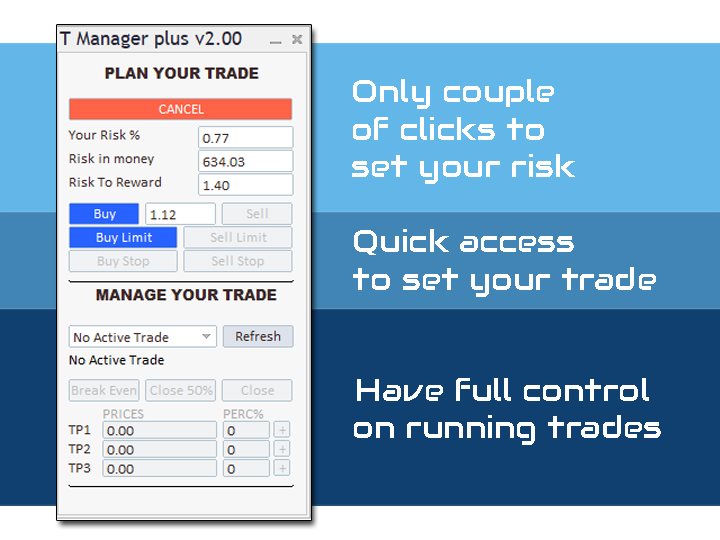
  • One panel to plan, take, and manage your trades
  • Set your risk from your :
    • percentage of your current equity
    • In monetary value
    • Or simple set your volume
  • T Manager and based on last input of the above parameters will update the 2 others to keep you informed
  • Set your risk to reward ratio, and be informed of your risk to reward simply by dragging your TP, SL, and Entry price lines.
  • T Manager will automatically adjust your TP lines in accordance with your Entry price and Stop loss on the chart.
  • Once your trade is planned, in one click you can set your orders.
  • T Manager will eliminate any order type that does not fit your current on-chart trade configuration
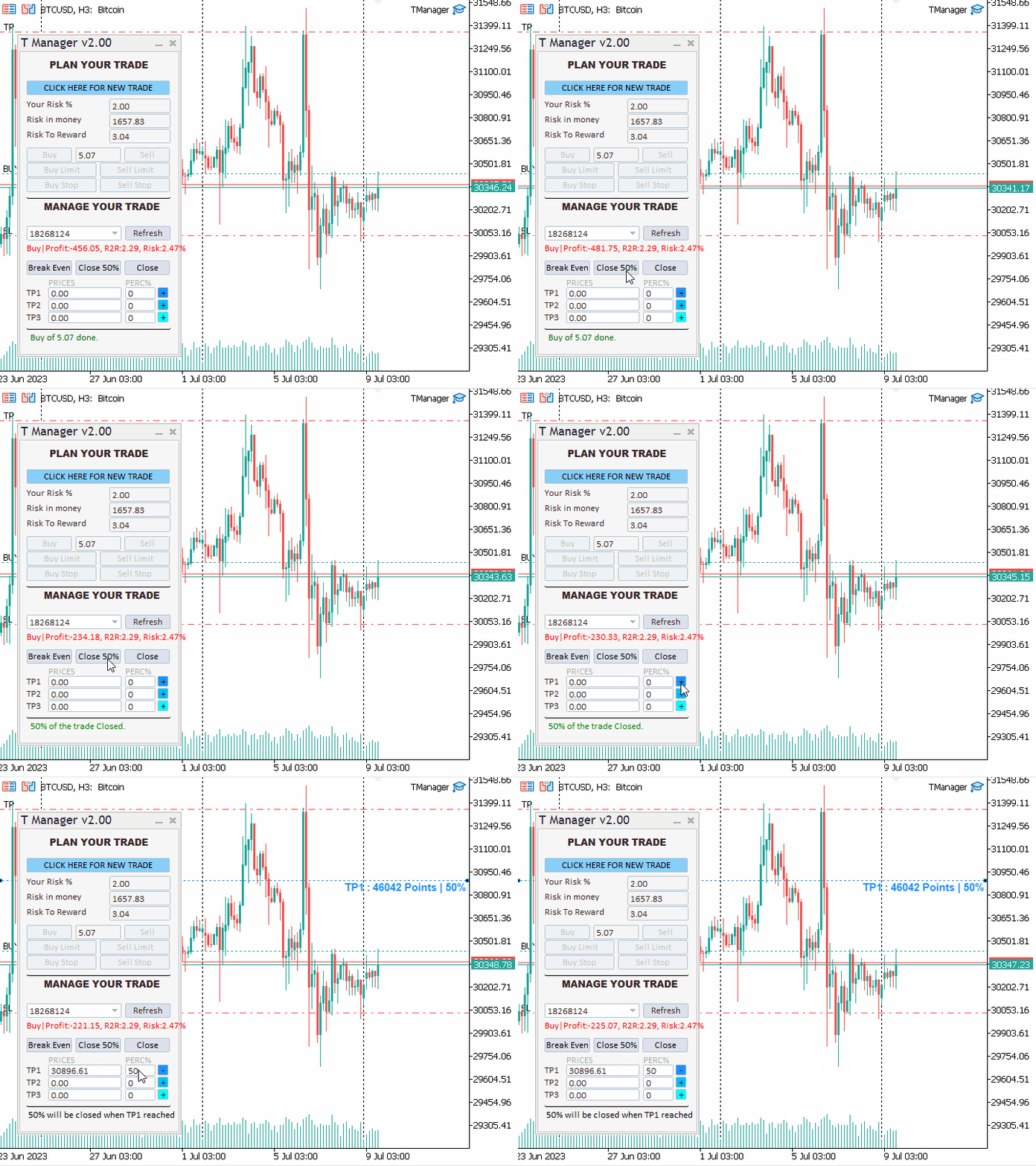
  • As the price and spread are moving, whenever you place an instant buy or sell order, a message will inform you based on the current market price of your risk and risk-to-reward
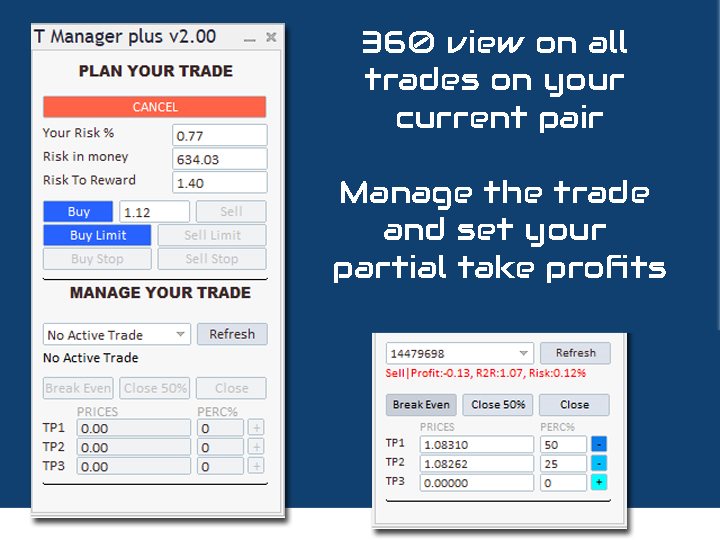
  • All your open trades for the current symbol are available in a dropdown list - easy to access from one place. 
  • Order and position info are shown: Type, Profit, Risk, ...
  • In one click you can close your position, or half of it, or set to breakeven the winning trades
  • And finally, every trade has three levels of partial take profit, each level has it own percentage to take out of the current position size when reached.
评分 17
Lai Choon Hoe Kevin
123
Lai Choon Hoe Kevin 2025.09.19 14:41 
 

The panel works well for my intended purpose and use and is flexible to configure based on my trading style . Top notch support when I reached out to Lio

Cristian-gabriel Amarandei
174
Cristian-gabriel Amarandei 2025.08.25 18:19 
 

Very good trade manager, and very good support.

RobertSzpakowicz
19
RobertSzpakowicz 2024.01.17 06:55 
 

Great product !!!!

推荐产品
该工具可以帮助你一键平仓所有持仓订单,只需要点击“Close all”.如果你只想平仓盈利中的订单时,就点击“Close profitable"按钮,点击之后,所有浮盈中的订单都会被全部平掉;如果你只想平仓浮亏中的订单,就点击“Close losable”按钮,点击之后,所有浮亏中的订单就会被全部平掉。 该工具经过一年的真实测试,一键平仓功能非常完善,平仓及时,延迟范围较小,当然,延迟和你所处的地区以及网络环境也有关系,这一点还请注意。 在历史数据的回测过程中,该工具表现更加完美,100张订单全部平仓完成最多只需要0.495秒。在真实交易过程中,本人最多持仓订单数量只有26笔,全部平仓完成的时间是1.28秒。
One Click Trader  is a tool designed for MetaTrader 4 platform, which enables you to take your trading to the next level. It enables you to open, manage and close your trades in simple an efficient way by just one click of your mouse button. "-"   ,  "+"  change OCT window size  Up arrow minimizes the OCT panel Down arrow maximizes the OCT panel Right arrow displays the next panel with additional features Left arrow hides the panel with additional features Red  SELL  button enables you to open s
HotKey Trade
Juan Pablo Sanchez Correa
HotKey Trade: Invisible and Fast Execution It is a minimalist order executor designed for scalpers and price action traders. It eliminates cumbersome panels and operates at maximum speed using only your keyboard. Key Points: 100% Clean Chart: No panels or buttons blocking your view of the price. Instant Execution: Fires orders to the market without menus or clicks. Dynamic Lot Management: Change your volume and view it only when you need it Quick Commands: [ C ] – Buy (BUY) [ V ] – Sell (SELL
FREE
Trade Control Panel
Jerry Jilun Anak Liban
Trade Control Panel Function Normal One Click Function Close All Close All Profit Close All Loss Close All Pending Order Close All Sell Close All Buy Advance One Click Function 1.  Close Partial Lot Sell by Percent It will help you partial close for all open position by desire percent you wanted. No longer partial close one by one for every open position Manual input for desire percent 2. Close Partial Lot Buy by Percent It will help you partial close for all open position by desire percent

该智能交易顾问(EA)会在 MetaTrader 5 中监控所有交易品种上的所有持仓。一旦在任意持仓上 手动设置或调整 了止损(SL)或止盈(TP),EA 会将该值 自动应用于其他所有未平仓头寸 ,无论是买单还是卖单、哪个交易品种。这确保整个账户的 SL 和 TP 水平始终保持同步。 非常适合通过平板或智能手机进行移动交易!    ......................................................................................................................................................
AW Metatrader to Telegram MT5
AW Trading Software Limited
5 (1)
用于发送通知的自动化系统,这样您的订阅者就不会错过您交易终端上的交易事件。一种实用程序,可向 Telegram Messenger 发送有关您账户上任何交易操作的通知。 将实用程序连接到 Telegram ->   HERE   / MT4 ->   HERE 中的频道的分步说明 优点: 简单的设置和详细的说明, 可以发送可调整的屏幕截图, 使用表情符号可定制的通知文本, 调整有关开仓、全部或部分平仓以及订单修改的通知, 默认发送通知时,会自动下载文本文件, 调整有关放置或删除挂单的通知, 通过符号和幻数方便地过滤。 输入变量: TELEGRAM BOT AND CHAT SETTINGS Telegram bot token - Enter the token number received after registering the bot in "BotFather" Telegram Chat ID - Enter the identification number received from "userinfobot" SETTING TRIGGERS SETTINGS
Utility TimeLs Close Positions 是一个用于在 MetaTrader 5 中管理和自动关闭仓位的工具。 它允许根据时间、交易品种、方向、魔术号码和备注内容灵活控制仓位的关闭方式和时间。 您可以选择在特定的星期几关闭交易 您可以设置一个具体时间来关闭所有持仓 您可以通过交易品种、方向(买/卖)、魔术号码或备注进行过滤 您可以设置最多三个一次性定时关闭操作(交易1、交易2、交易3),每个都有独立的过滤条件 您可以开启或关闭图表上的信息面板,显示当前设置和即将执行的关闭操作 您可以自定义图表中文字的字体大小和颜色 Utility TimeLs Close Positions is a tool for managing and automating trade closing operations in MetaTrader 5.
SAFETYLOCK for MetaTrader 5 是一款高级风险管理工具,旨在通过自动放置反向安全订单来保护已开仓位免受突发行情反转的影响。 当交易者或 Expert Advisor (EA) 开立仓位时, SAFETYLOCK for MT5 会立即创建相应的挂单(Buy Stop 或 Sell Stop)。 如果原始仓位开始进入回撤,挂单将被激活并形成保护性 safety lock,从而帮助降低风险并稳定交易管理。 该 Expert Advisor 提供灵活的交易控制逻辑:您可以关闭原始仓位、对已激活的安全仓位进行追踪、更高效地管理利润,或者增加手数以增强恢复方案。 此外, SAFETYLOCK for MT5 还可以实时动态移动挂单价格,使安全结构始终与实时市场条件保持一致,从而实现更精确的执行。 通过 SAFETYLOCK for MetaTrader 5,体验 2026 级别的高级保护、更智能的恢复控制以及更先进的安全交易逻辑。     Exp SafetyLock PRO for MT4 完整说明 +DEMO +PDF   如何购买    如何安装       如何
Spread and Swap monitor
Gennadiy Stanilevych
5 (1)
本指标的目的是判断点差和利率大小,以及按照存款货币每一个点的风险,设置从当前价位计算的止损距离。 本指标告知交易者有关金融工具在每个时段之间转换时可能的额外费用和利润。它还告知有关的点差和挂单的距离,从当前价位的尾随止损位。此外,指标告知交易者有关存款货币每一个点的风险。 信息被显示在图表下方的单独子窗口里。它可以避免图表被不同的信息塞满。点差和利率监控指标适合任何自定义模板。
This utility provides the ability to use hot keys in manual trading instantly responding to the current market situation. You can assign hot keys to open/close positions by their type, open/close all positions on the current chart and remove all orders on the current chart. You can also assign hot keys for five predefined trade volumes and switch between them if necessary with no need to change the volume manually from time to time. It is also possible to set the auto calculation of a trade volu
One click to close all (OCCA) provides you posibility to close all open position with one click. Here is no any settings, just run the script and all your open positions will be closed and it will happen very fast ! Works with all types of accounts, with all currency pairs and any broker. The number of open positions is not limited. The script will be useful for trading strategies, in which you need to manage a large number of positions.


Visual Trade Manager for MT5 is an interactive trade execution and position management tool designed for traders who want fast chart-based control over risk and execution. The panel provides a visual trade box with entry, stop and target lines directly on the chart. Position size is calculated from the selected risk percentage, and the tool supports both market execution and pending order placement. Main features - BUY and SELL switching directly from chart buttons - Draggable Entry, Stop and
Horizontal Line Trade Assistant EA  Semi-Automated Trading Assistant      IMPORTANT :     On the main/purchased program a user can click on the Horizontal line and change it to Buy or Sell, and drag by double clicking on it. Please keep in mind that this option is not available on demo version, due to some restrictions/limitations of Strategy Tester, some Object related operations are not available in the  Strategy Tester. But, it will not prevent you from Testing, please drop an Object to chart
GS trade report
Aleksander Gladkov
5 (1)
Session panel
Timo Mario Hoffmann
Session Panel for MT5 Session Panel is a free MT5 indicator that gives you a fast and convenient live overview of the major trading sessions directly from the chart. Monitor Tokyo, London, and New York session times, see which session is currently active, track countdowns to the next session, and view session overlap information in one compact dashboard. Built for traders who want better market timing, clearer session awareness, and a cleaner chart workflow in live market conditions. Session Pan
FREE
Forget about enabling templates when you launch the window. Auto Template Master Service  is a professional utility tool that runs as a system service in MetaTrader 5, and it will do it for you. Unlike traditional indicators or expert advisors (EAs), the program runs in the background of the entire terminal and doesn't require you to add it to each window individually. As soon as you open a new chart of any instrument (Forex, Stocks, Crypto), the service immediately detects the new window and a
Boleta de negociação, adiciona automáticamente as ordens Take Profit e Stop Loss quando excutada uma ordem de compra ou venda. Ao apertar as teclas de atalho (A, D, ou TAB), serão inseridas duas linhas de pre-visualização, representando as futuras ordens de take profit (azul) e stop loss (vermelho), as quais irão manter o distanciamento especificado pelo usuário. Ditas ordens só serão adicionadas ao ser executada a ordem inicial. Ao operar a mercado, as ordens pendentes de take profit, e stop lo
各位交易员好!我是您的交易助手。话不多说,让我来告诉你我的专长: 1. 我擅长管理您的持仓,不论你在哪一端下单,我都能第一时间帮你加上合理的止损线以及移动止损。 2. 我能帮你规避追涨杀跌,从根源根除守不住原则的人性弱点。 3. 我会在最佳点位给你发出通知消息到您移动端的MT5客户端,供您参考,当然,您需要将您移动设备内 MetaTrader 5 APP里 的  MetaQuotes ID 注册到  MetaTrader 5 客户端-->选项-->通知--> MetaQuotes ID的编辑框内并勾选开启通知点确定 。 4. 我很好地支持在策略测试中进行手动模拟操盘练习。 5. 联系我您还能获得一个配套的附加AI辅助客户端超级助理程序。 备注:本 项目不承诺您一定能盈利,它只是交易助理工具。 消息通知的效果展示请参阅截图效果。 期待您选择我成为您的助理,让我们共同奔赴财务自由!!!
This tool is part of the Stein Investments ecosystem.  Browse all 18 tools, get AI-powered setup recommendations,  and join the community at https://stein.investments Crosshair is a fantastic tool that simplifies our chart analysis by bringing the price candles perfectly in line with the indicator values in the subwindows. You can enable and disable it via a single press on the "C" of your keyboard, and it provides a ruler mode for precise measurements that can be enabled and disabled via th
这个QuickCloseMT5帮助您一键即可立即关闭所有订单,其工作非常快。您可以选择您想要的符号或关闭所有符号,因此它将有助于您在交易中更快地管理交易。该EA可以通过选定的符号或总数快速关闭所有买入和卖出订单和删除全部挂单。此SymbolButton专为关闭订单而设计。有手动和自动关闭功能。自动关闭功能将根据参数关闭订单。 SymbolButton有两种类型的自动关闭参数:利润:当前货币利润或全部货币利润等于或高于预设值时,订单将被关闭. 输入参数 ALLPROFIT:30.00 全部货币利润等于或高于预设利润率时,订单将被关闭。 PROFIT:25.00 一个货币对利润等于或高于预设利润率时,订单将被关闭。 关于作者 作者:dayingcao,我是一个具有丰富经验的软件工程师.
AUTO RISK MANAGER PRO:您在外汇交易中的可靠伙伴! AUTO RISK MANAGER PRO_MT4 (MT4版本) 演示版本 + 详细说明 停止因为情绪而亏钱!现在是时候把风险管理交给专业算法了。 想象一下:市场突然朝着与你的仓位相反的方向急剧移动,而此时你正在睡觉、工作或陪伴家人。很常见,对吗?有了 Auto Risk Manager Pro —— 不再如此! 优势: 革命性的风险管理方式 24/7 自动保护资金 无需您参与 —— 即使您不在电脑前 精准的获利目标 —— 在合适的时机锁定利润 严格的亏损限制 —— 避免重大损失 多货币支持 —— 适用于任何交易工具 自动关闭图表(同时卸载所有挂载的EA) 控制面板 Control Panel Settings(控制面板设置) PanelColor = clrDarkSlateGray — 面板颜色 PanelX = 10 — 面板距离图表左侧的偏移 PanelY = 60 — 面板距离图表顶部的偏移 风险管理设置 Risk Management Settings(风险管理设置) Work = false/tru
停止对交易进行微观管理 — MT5 外汇交易助手 你还在手动管理每一笔交易、不断调整止损、对每一次波动做出反应吗? 这正是错误、犹豫和 FOMO(错失恐惧)产生的地方。 这个工具帮助你直接在图表上进行交易计划、执行和管理——更清晰、更可控。 专为减少过度交易、犹豫和情绪化决策而打造。 抢先体验价 — $30(限时) 仅限前 100 名用户 之后 → 价格恢复为 $69 早期用户可获得: 更低价格 优先支持 直接参与未来更新的改进 这个工具的功能 基于图表的交易规划 可视化设置入场(Entry)、止损(Stop Loss)和止盈(Take Profit) 直接在图表上调整价格水平 即时查看结构与风险 智能风险管理 固定手数 固定风险金额($) 按账户余额百分比 自动计算仓位大小 无需再手动计算 可视化交易管理 保本(Break-even)控制 最多 3 个分批止盈 拖动止损(Trailing Stop)完全可视化显示在图表上 让你的交易逻辑从开始到结束都清晰可见 高级移动止损系统 固定点数 基于 ATR(波动率) 基于K线
Signals Executor for Telegram is a Utility that allows you to execute and manage positions from messages sent in Telegram Chats. Chat messages are processed to check for the existence of commands, and the command will be executed if its parameters are valid. You need the Telegram Bot Token and Chat Id to configure the input parameters. It is possible to restrict the sending of commands through the User Id, which must be configured in the input parameters. Valid Commands: Buy and Sell: Market or
Simple Stats is utility for trades history management. (works as Expert Advisor) Allowing you to:   see trading performance for each symbol separately , and so it     helps you to find the M0ST and the W0RST profitable type of trades  based on past results. filters: see only manual trades see only EA trades see only EA trades from one specific Magic Number select time period for history SS will  distinguish reports with filename - each history report is named with account number an
RRPP Script
Mikhail Ostashov
RRPP Script A script for placing a pending order prepared by the Risk Ratio Trade Panel indicator. Reads the entry price, Take Profit, Stop Loss and lot size directly from the indicator lines on the chart. Requirements The Risk Ratio Trade Panel indicator must be attached to the chart and the panel must be open before running the script. How it works Attach the Risk Ratio Trade Panel indicator to the chart, open the panel and set the Entry, TP and SL lines to the desired levels. Then run RRPP Sc
FREE
EW Close All – 一键全平。全部关闭 。 EW Close All 是一款轻量级、多语言 EA 专家顾问,只需点击一次按钮,即可瞬间关闭所有持仓并取消全部挂单。 关闭所有已开仓位   取消所有挂单   适用于任意交易品种和任意时间周期   多语言界面   干净、快速、可靠 完美适用于快速离场、风险控制或每日收盘前的清理工作。 保持绝对掌控 —— 用 EW Close All 几秒钟内关闭一切! EW Close All – 一键全平。全部关闭 。 EW Close All   是一款轻量级、多语言 EA 专家顾问,只需点击一次按钮,即可瞬间关闭所有持仓并取消全部挂单。 关闭所有已开仓位   取消所有挂单   适用于任意交易品种和任意时间周期   多语言界面   干净、快速、可靠 完美适用于快速离场、风险控制或每日收盘前的清理工作。 保持绝对掌控 —— 用 EW Close All 几秒钟内关闭一切!
FREE
Premium Trade Panel Pro MT5 is a professional trading utility designed to assist traders in executing and managing trades efficiently within the MetaTrader 5 platform. The panel provides a convenient dashboard directly on the chart, allowing traders to open, manage, and control positions quickly while maintaining proper risk management. This tool is suitable for manual traders who require faster trade execution and efficient position management. One-Click Trading Open BUY or SELL positions inst
Ultimate MT5 to Telegram Public Channel sends controlled trades (via symbol, magic, comment) to a public telegram channel. It sends open and closed trades, including pending orders and TP/SL modifications, along with chart screenshots, to this public telegram channel. Additionally, you can send trade reports of open trades and summary profit/pip reports for day, week, or month. You can customize the design of the trade actions or reports with variables and emoticons.  A beautiful panel allows
FREE
Professional utility that automatically sends real-time trading signals, position updates, and custom alerts from MetaTrader 5 to any Telegram group, channel, or private chat. Supports multiple chat destinations, fully customizable message formats, and comprehensive event filtering. Perfect for signal providers, trading communities, and personal trade journals. The   MT5 to Telegram Signal Sender   is a sophisticated yet easy-to-use utility that bridges your MetaTrader 5 platform with Telegram m
Master Close via Telegram can help you perform some management tasks on MT4/MT5 remotely via your Telegram by one click, easy to set up & use. Demo here (see more Master Notify   Master Control ) ************************************************************************************ LIST OF COMMANDS: info_acc -  Get account info info_pen -   Get pending orders details info_pos -   Get positions details info_pos_sum -   Get positions summary close_pen -   Delete all pending orders close_pos_all -  
该产品的买家也购买
Trade Assistant MT5
Evgeniy Kravchenko
4.42 (208)
它有助于计算每笔交易的风险,容易安装新的订单,具有部分关闭功能的订单管理, 7 种类型的追踪止损和其他有用的功能。   附加材料和说明 安装说明   -   应用程序说明   -   模拟账户应用程序的试用版 线条功能  - 在图表上显示开仓线、止损线、止盈线。 有了这个功能,就可以很容易地设置一个新的订单,并在开仓前看到它的附加特性。   风险管理  - 风险计算功能在考虑到设定的风险和止损单的大小的情况下,计算新订单的成交量。它允许你设置任何大小的止损,同时观察设定的风险。 批量计算按钮 - 启用 / 禁用风险计算。 在 " 风险 " 一栏中设置必要的风险值,从 0 到 100 的百分比或存款的货币。 在 " 设置 " 选项卡上选择风险计算的变量: $ 货币, % 余额, % 资产, % 自由保证金, % 自定义, %AB 前一天, %AB 前一周, %AB 前一个月。   R/TP 和 R/SL - 设置止盈和止损的关系。 这允许你设置相对于损失的利润大小。 例如, 1 : 1 - 这决定了 TP = SL 的大小。 2 : 1 - 这意味着 TP 是 SL 的两倍。 RR -
欢迎来到 Trade Manager EA——这是一个终极风险管理工具,旨在使交易变得更直观、精准和高效。它不仅仅是一个下单工具,而是一个用于无缝交易计划、仓位管理和风险控制的全面解决方案。不论您是新手交易员、资深交易员,还是需要快速执行的剥头皮交易员,Trade Manager EA 都可以满足您的需求,适用于外汇、指数、大宗商品、加密货币等各种市场。 借助 Trade Manager EA,复杂的计算已成过去。只需分析市场,在图表上用水平线标记入场、止损和止盈,设置您的风险水平,Trade Manager 就会立即计算出理想的头寸规模,并实时显示以点、账户货币计价的止损和止盈。每笔交易都得以轻松管理。 主要功能: 头寸规模计算器 :根据定义的风险瞬间确定交易规模。 简单的交易计划 :在图表上用可拖动的水平线直接计划交易,设置入场、止损和止盈。 实时显示 SL 和 TP :以账户货币、点或分显示止损和止盈,便于分析。 高级保护工具 盈亏平衡选项 : 基本盈亏平衡 :当您的交易达到设定水平时自动保护利润。 多级盈亏平衡 :设置多达 4 个级别以逐步保护利润。 尾随止损选项 : 基本尾随
Local Trade Copier EA MT5
Juvenille Emperor Limited
4.96 (135)
通过 Local Trade Copier EA MT5 获得非常快速的交易复制体验。它的简单1分钟设置,使您可以在同一台Windows计算机或Windows VPS上在多个MetaTrader终端之间复制交易,具有闪电般快速的复制速度,低于0.5秒。 无论您是初学者还是专业交易者, Local Trade Copier EA MT5 都提供了广泛的选项,可根据您的特定需求进行自定义。对于任何希望增加利润潜力的人来说,这都是终极解决方案。 今天就尝试一下,看看为什么它是市场上最快、最简单的贸易复印机! 提示: 您可以在您的模拟账户中下载并试用 Local Trade Copier EA MT5 模拟版: 这里 将下载的免费演示文件粘贴到您的 MT5 >> 文件 >> 打开数据文件夹 >> MQL5 >> 专家文件夹并重新启动您的终端。  免费演示版本每次可在 4 小时内发挥全部功能,仅限演示帐户。 要重置试用期,请转至 MT5 >> 工具 >> 全局变量 >> Control + A >> 删除。 请仅在非关键模拟账户上执行此操作,不要在挑战道具公司账户中执行此操作。 如果您无法
TradePanel MT5
Alfiya Fazylova
4.87 (151)
交易面板是一款多功能交易助手。该应用包含超过50种手动交易功能,并允许您自动执行大多数交易任务。 注意!折扣时间有限,每周二价格将上涨5美元。(直到100美元)。 在购买之前,您可以在演示账户上测试演示版本。下载用于演示账户的试用版应用程序: https://www.mql5.com/zh/blogs/post/762579 。 完整说明 这里 。 贸易. 只需单击一下即可执行交易操作: 打開掛單和頭寸,並自動計算風險。 一鍵打開多個訂單和頭寸。 打開訂單網格。 按組別關閉掛單和頭寸。 反轉頭寸方向(關閉買入>打開賣出,關閉賣出>打開買入)。 鎖定頭寸(通過開啟缺少的頭寸,使買入和賣出頭寸的數量相等)。 一鍵部分關閉所有頭寸。 將所有頭寸的止盈和止損設置在同一價格水平。 將所有頭寸的止損設置在盈虧平衡水平。 開倉時,可使用以下功能: 在多個訂單或倉位之間分配計算出的數量(在單擊一次時開啟多個訂單和倉位)。 在開啟訂單前在圖表上可視化交易水平。 僅在當前點差不超過設定值時才開啟倉位。 止盈和止損之間的自動比例。 虛擬止損和止盈。 自動將止損和止盈的大小增加為當前點差的大小。 基於ATR指
测试版发布 Telegram to MT5 Signal Trader 即将进入正式的 Alpha 版本。一些功能仍在开发中,您可能会遇到一些小错误。如果您遇到问题,请反馈,您的意见将帮助我们改进软件。 Telegram to MT5 Signal Trader 是一款强大的工具,能够将 Telegram 频道或群组的交易信号自动复制到您的 MetaTrader 5 账户。 支持公开和私人频道,可将多个信号提供者连接至一个或多个 MT5 账户。软件优化、高效、稳定,精准控制每笔复制交易。 界面简洁,仪表盘美观,图表交互性佳,导航直观。您可以管理多个信号账户,自定义每个提供者的设置,并实时监控所有操作。 系统需求 由于 MQL 限制,EA 需要配合 PC 端应用与 Telegram 通信。 安装程序可通过官方 安装指南 获取。 核心功能 多提供者支持: 从多渠道复制信号至多个 MT5 帐户 高级信号识别: 关键词、模式和标签全面自定义 逐提供者控制: 可启用/禁用特定信号类型、平仓策略等 灵活风险管理: 固定手数、固定金额、余额/权益百分比、部分平仓设置 可定制 SL/TP: 覆盖信号
Farmed Hedge Yield Farming | All Markets (Manual - Hybrid - Semi/Automated EA) MULTI-ASSET SUPPORT Trade any asset available on your broker - Forex: Major, Minor, Exotic pairs - Crypto: BTC, ETH, XRP, SOL, BNB - Stocks: Apple, Tesla, Amazon, Google, etc. - Commodities: Gold, Silver, Oil, Gas - Indices: US30, NAS100, SPX500, DAX40 - Any CFD your broker offers VERIFIED TRADING RESULTS - Farmed Hedge Yield Axi Copy:  https://www.mql5.com/en/signals/2356376 - Farmed Hedge Yield Exn Copy:   https:/
Trade Dashboard MT5
Fatemeh Ameri
4.94 (121)
疲于复杂的订单下达和手动计算?Trade Dashboard 是您的解决方案。凭借其用户友好的界面,订单下达变得轻而易举,只需点击一下,您就可以开设交易、设置止损和止盈水平、管理交易手数,并计算风险回报比,让您只需专注于您的策略。告别手动计算,使用 Trade Dashboard 简化您的交易体验。 立即下载演示版本 。 您可以在这里找到仪表盘功能和特性的详细信息 。 加入 Telegram 频道 。 购买后请给我发消息以获取支持。如果您需要添加更多功能,可以在产品的评论区留下您的想法,我愿意听取任何建议,希望您能在使用我的产品时获得最佳体验 。 这是 MT4 版本。 风险管理:使用 Trade Dashboard,可以将您的风险设置为账户余额或权益的百分比,或将风险设置为总金额。在图表上直观地定义您的止损,让工具准确计算每个货币对的适当手数。该工具还可以根据您期望的风险回报比自动设置止盈水平。它甚至可以在手数计算中涵盖佣金和点差费用。此外,您的止损和止盈可以转变为虚拟水平,隐藏于经纪商。通过 Trade Dashboard 的高级风险管理功能,掌控风险,保护您的资本。 交易线
Exp COPYLOT CLIENT for MT5
Vladislav Andruschenko
3.82 (34)
适用于 MetaTrader 5 的专业交易复制器 快速、专业、稳定可靠的 交易复制器 ,适用于 MetaTrader 。 COPYLOT 可在 MT4 和 MT5 终端之间复制 Forex 交易,并支持 Hedge 和 Netting 账户。 COPYLOT 的 MT5 版本支持: - MT5 Hedge → MT5 Hedge - MT5 Hedge → MT5 Netting - MT5 Netting → MT5 Hedge - MT5 Netting → MT5 Netting - MT4 → MT5 Hedge - MT4 → MT5 Netting MT4 版本 完整说明 + DEMO + PDF 如何购买 如何安装 如何获取日志文件 如何测试和优化 Expforex 的所有产品 您也可以将交易复制到 MT4 终端(MT4 → MT4,MT5 → MT4): COPYLOT CLIENT for MT4 COPYLOT 是一款专业的交易和持仓复制器,可同时与 2、3 甚至 10 个终端协同工作。 支持从 模拟账户和投资者账户 复制,也支持同时在多个终端上运行。 您可以使
Footprint Chart Pro — Professional OrderFlow EA for MetaTrader 5 Version 6.34 | Professional tool for real traders | Institutional-Grade Visualization DEMO USERS - PLEASE SELECT EVERY TICK / REAL TICK WHEN TESTING AND YOU HAVE DOWNLOADED HISTORICAL DATA. IF YOU SEE A WAITING SCREEN AND IT IS NOT DOWNLOADING, IT MEANS YOU HAVE LOW HISTORICAL DATA. TRY 1 MIN AND 5 MIN FIRST ON 1 DAY DATA. ONE DAY DATA SHOULD BE THE NEWEST AND MOST CURRENT DATE. PLEASE WAIT UNTIL THE MARKET HAS ROLLED OVER PERIOD.
HINN Lazy Trader
ALGOFLOW OÜ
5 (2)
Limited time offer: 20% off for a few days only!  - Annual subscription $360 instead of $450  - Lifetime plan $550 instead of $690 The core idea: using the user interface, you configure the parameters the chart must meet before entering a position (or positions), choose which entry models to use, and set the rules for when trading and planning should end. Lazy Trader  handles the rest: it  takes over all the routine chart watching and execution! full description  :: 3 key videos [1] ->  [2]   -
Trade copier MT5
Alfiya Fazylova
4.58 (40)
Trade Copier 是一种专业实用程序,旨在复制和同步交易账户之间的交易。 复制发生从供应商的帐户/终端到收件人的帐户/终端,安装在同一台计算机或 vps 上。 促销活动 - 如果您已经购买了“Trade copier MT5”,您可以免费获取“Trade copier MT4”(用于 MT4 > MT5 和 MT4 < MT5 的复制)。欲了解更多详细条款,请通过私人消息与我们联系! 在购买之前,您可以在演示帐户上测试演示版本。 演示 这里 。 完整说明 这里 。 主要功能和优点: 支持复制MT5>MT5、MT4>MT5、MT5>MT4,包括МТ5 netting账户。 供应商和收件人模式在同一产品中实现。 简单直观的界面,允许您直接从图表中实时控制复制。 连接中断或终端重新启动时不会丢失设置和位置。 允许您选择要复制的符号,也可以替换接收者的符号,例如 EURUSD> USDJPY。 支持回拷贝。 能够仅复制某些订单。 允许您设置开仓交易价格的最大差异和最大时间延迟。 正确复制部分订单关闭的执行。 计算复制手数的几种方法。 同步止盈和止损。有几种方法可以计算它们的位置。 支持
Copy Cat More Trade Copier MT5 (复制猫MT5) 是一个本地跟单软件,也是一个完整的风险管理和执行框架,专为当今的交易挑战而设计。从资金管理公司挑战到个人投资组合管理,它能适应各种情况,结合了稳健的执行、资本保护、灵活配置和高级交易处理功能。 该跟单软件可在主端(发送方)和从端(接收方)模式下工作,实时同步市价单和挂单、交易修改、部分平仓和对冲平仓操作。它兼容模拟和实盘账户、交易或投资者登录,并通过持久的交易记忆系统确保恢复功能,即使EA、终端或VPS重启也不例外。可以同时管理多个主端和从端,使用唯一ID,并通过前缀/后缀调整或自定义品种映射自动处理跨经纪商差异。 手册/设置  | Copy Cat More MT4 | 频道  特色功能: 易于设置——快至30秒(见视频)。 快速、稳定、准确——Turbo模式下低延迟复制(见截图)。 高安全性——不使用潜在危险的DLL或WebRequest。 持久交易记忆,避免孤立、丢失或不准确的交易。 可从手动或EA复制,支持所有账户类型。 品种自动前缀/后缀,快速设置;支持MT4和MT5之间复制。 非常灵活的多主端
MT5 to Telegram Signal Provider 是一个易于使用且完全可自定义的工具,它允许向 Telegram 的聊天室、频道或群组发送 指定 的信号,将您的账户变为一个 信号提供商 。 与大多数竞争产品不同,它不使用 DLL 导入。 [ 演示 ] [ 手册 ] [ MT4 版本 ] [ Discord 版本 ] [ Telegram 频道 ]  New: [ Telegram To MT5 ] 设置 提供了逐步的 用户指南 。 不需要了解 Telegram API;开发者提供了您所需的一切。 关键特性 能够自定义发送给订阅者的订单详情 您可以创建分层的订阅模型,例如铜、银、金。其中金订阅获得所有信号等。 通过 id、符号或评论过滤订单 包括执行订单的图表截图 在发送的截图上绘制已关闭的订单,以便额外核实 延迟发送新订单消息的可能性,以便在发送前对位置进行调整 订单详情完全透明: 新的市场订单*带截图 订单修改(止损、获利) 已关闭的订单*带截图 部分关闭的订单** 新的挂单 修改的挂单(进场价格) 挂单激活(作为新的市场订单附加) 已删除的挂单 历史订单报告
Timeless Charts
Samuel Manoel De Souza
5 (4)
Timeless Charts is an advanced charting solution designed for professional traders seeking for custom charts / custom timeframes , including seconds charts / seconds timeframe, renko charts / renko bars, cluster charts / footprint charts and advanced tools present in most of the popular platforms. Unlike traditional offline charts or simplistic custom indicators, this solution constructs fully custom bars with true timestamp accuracy , down to miliseconds, allowing for a powerful and precise tr
The News Filter MT5
Leolouiski Gan
4.77 (22)
这个产品在新闻时间过滤所有的专家顾问和手动图表,因此您不必担心突然的价格波动会破坏您的手动交易设置或其他专家顾问输入的交易。此产品还带有完整的订单管理系统,可在任何新闻发布前处理您的持仓和挂单。一旦您购买了   The News Filter ,您将不再需要依赖以后的专家顾问内置的新闻过滤器,因为这个产品可以从此过滤它们所有。 新闻选择 新闻来源于Forex Factory的经济日历。 选择可以基于任何一种货币,如USD,EUR,GBP,JPY,AUD,CAD,CHF,NZD和CNY等。 选择也可以基于关键识别,例如Non-Farm (NFP),FOMC,CPI等。 能够选择新闻影响级别的筛选,从低、中、到高影响。 自动模式只选择与图表相关的新闻。 新闻来源每小时自动刷新,以确保最新的新闻数据。 为每个新闻影响级别提供单独的输入,以确定您要过滤掉的新闻发布前后的分钟数。 订单管理选项 在新闻发布前关闭未平仓头寸的选项,并在新闻发布后恢复它们。 在新闻发布前删除挂单的选项,并在新闻发布后恢复它们。 在新闻发布前移除止损和止盈水平的选项,并在新闻发布后恢复它们。 在新闻发布前移动止损和
HINN MagicEntry Extra
ALGOFLOW OÜ
4.71 (14)
HINN MAGIC ENTRY – the ultimate tool for entry and position management! Place orders by selecting a level directly on the chart! full description   ::  demo-version  :: 60-sec-video-description Key features: - Market, limit, and pending orders - Automatic lot size calculation - Automatic spread and commission accounting - Unlimited partitial take-profits  - Breakeven and trailing stop-loss and take-profit  functions - Invalidation leves - Intuitive, adaptive, and customizable interface - Works
Ultimate Extractor
Clifton Creath
5 (9)
Ultimate Extractor - Professional Trading Analytics for MT5 *****this is the local HTML version of Ultimate Extractor. !!!!!it is not compatible with Cloud!!!! For the online version please reach out to me directly****** Ultimate Extractor transforms your MetaTrader 5 trading history into actionable insights with comprehensive analytics, interactive charts, and real-time performance tracking. What It Does Automatically analyzes your MT5 trading history across all Expert Advisors and generates
Trader Evolution
Siarhei Vashchylka
5 (7)
" Trader Evolution " - A utility designed for traders who use wave and technical analysis in their work. One tab of the utility is capable of money management and opening orders, and the other can help in making Elliott wave and technical analysis. Manual (Be sure to read before purchasing) | Version for MT4 Advantages 1. Trading in a few clicks. Immediate and pending orders are available in the panel 2. Money management. The program automatically selects the appropriate lot size 3. Simplifies
Equity Protect Pro:全方位账户保护专家,让您的交易更安心 如果您正在寻找账户保护、净值保护、投资组合保护、多策略保护、利润保护、利润收割、交易安全、风控程序、自动风控、自动清仓、条件清仓、定时清仓、动态清仓、跟踪止损、一键关闭、一键清仓、一键还原等功能,Equity Protect Pro 就是您要找的程序。 它配置简单,当到达预设条件时,可关闭所有图表,同时支持关闭信号订阅(这意味着所有交易程序也将停止运行)。此时,将不再有新订单产生,最后再关闭所有订单,有效防止意外损失,让您在交易过程中高枕无忧。 Equity Protect Pro (Technical Manual) Equity Protect Pro Demo Version for yo u to test   Equity Protect Pro MT4 Demo.ex4        Equity Protect Pro MT5 Demo.ex5 Equity Protect Pro 拥有 14 个核心功能,它们都是独立运行的。您可以根据您的交易策略,选择合适的功能组合使用。这些功能默认为关闭状态,
实时扫描您的整个观察列表,发现极端K线。 Power Bar Scanner 同时监控您所有的交易品种,在出现极端价格K线的瞬间向您发出警报。无需再逐个翻看图表。在一个面板中查看所有机会。 适用于任何时间周期。Forex、指数、黄金、加密货币 - 全部集中在一个视图中。 工作原理 扫描器检查您 Market Watch 中的每个品种,寻找实体超过 N x ATR 的K线。当发现这样的K线时,该品种会亮起并显示方向(BUY/SELL)、ATR 比率以及信号出现在多少根K线之前。您可以一目了然地看到哪些品种当前处于活跃状态。 一键导航 点击扫描器中的任何品种名称,您的图表会立即切换到该品种。发现信号,点击它,分析它。无需手动切换品种,无需在图表标签中搜索。 可排序列 点击任何列标题,按品种、价格、信号、比率或时间排序。想先看最强的信号?按 Ratio 排序。想看最新的信号?按 Age 排序。再次点击可反转排序顺序。 与 Power Bar MT5 完美配合 扫描器发现机会。 Power Bar 指标 进行分析。两者结合使用:扫描器在您的观察列表中提醒您出现极端K线,然后点击该品种,让
Trade Manager DashPlus
Henry Lyubomir Wallace
5 (13)
DashPlus 是一款先进的交易管理工具,旨在提升您在 MetaTrader 5 平台上的交易效率和效果。它提供一整套功能,包括风险计算、订单管理、先进的网格系统、基于图表的工具和绩效分析。 主要功能 1. 恢复网格 实施一个平均和灵活的网格系统,以在不利的市场条件下管理交易。 允许设置战略性进出点,以优化交易恢复。 2. 叠加网格 通过在强劲的市场波动中增加仓位,最大化有利交易的潜在回报。 帮助您通过扩展获利交易来利用趋势市场。 3. 盈亏线 在图表上直接提供潜在利润和损失场景的可视化表示。 调整设置并拖动盈亏线,以在执行之前评估各种交易结果。 4. 篮子模式 简化同一交易品种的多仓位管理,将它们合并为一个聚合仓位。 基于平均价格,便于监控和应用止损、止盈以及其他订单修改。 5. 图表上的新闻 将预定的经济新闻事件整合到您的交易图表中。 帮助您随时掌握可能影响市场波动的即将发生的事件,从而更好地规划交易。 6. 警报 设置基于时间或价格的警报,通知会显示在 MT5 中,或通过 MT5 应用发送到您的移动设备。 对监控关键价格水平或重要的交易时段非常有用。 7. 绩效统计 提供详细的
Trade Manager DaneTrades
Levi Dane Benjamin
4.36 (28)
交易管理器可帮助您快速进入和退出交易,同时自动计算风险。 包括帮助您防止过度交易、报复性交易和情绪化交易的功能。 交易可以自动管理,账户绩效指标可以在图表中可视化。 这些功能使该面板成为所有手动交易者的理想选择,并有助于增强 MetaTrader 5 平台。多语言支持。 MT4版本  |  用户指南+演示 交易经理在策略测试器中不起作用。 如需演示,请参阅用户指南 风险管理 根据%或$自动调整风险 可选择使用固定手数或根据交易量和点自动计算手数 使用 RR、点数或价格设置盈亏平衡止损 追踪止损设置 最大每日损失百分比,在达到目标时自动平仓所有交易。 保护账户免遭过多提款并阻止您过度交易 最大每日损失(以美元为单位)在达到目标时自动关闭所有交易。 保护账户免遭过多提款并阻止您过度交易 一键实现所有交易的盈亏平衡 自动计算从手机/电话发送的交易的风险 OCO 在设置中可用 交易和头寸管理 通过设置每月、每周、每天、每小时或每分钟的最大交易次数,停止过度交易和报复性交易。 高级挂单管理。 调整何时关闭挂单的规则 追踪挂单 支持市价订单和挂单 每日最大利润目标(以美元为单位)以确保头寸并停止
Cerberus Equity Watcher
Samuel Bandi Roccatello
5 (3)
Cerberus the Equity Watcher 是一种风险管理工具,可以持续监控您的账户资产并避免因错误的 EA 或您的情绪行为(如果您是全权交易者)导致的重大亏损。对于依赖 EA 的系统交易者来说,它非常有用,EA 可能包含错误,或者在意外的市场条件下可能表现不佳。 Cerberus 允许您设置最小净值和(可选)最大值,如果达到其中任何一个,则所有头寸都被平仓,所有挂单被关闭,所有 EA 被“杀死”。在展平所有位置后,将向用户手机发送通知,并在屏幕上显示一条清晰的消息。在“扁平化”之后, Cerberus 继续关注股权价值,并继续扼杀任何进一步的交易尝试,直到它被重新初始化。 Cerberus 执行的任何操作都清楚地显示在屏幕上,报告在“专家顾问”选项卡上,并向用户发送通知。为了避免用户错误,对用户输入的输入值和自动交易的当前状态进行了多次检查。 ****** 特征 最小和最大权益值可以以账户货币或初始权益的百分比设置 最大净值是可选的 如果达到最小/最大净值,则所有 EA 将独立于它们交易的符号被终止 第一次压扁后几秒钟进行双重检查 Cerberus 在拉平后也继续监控股权
Grid Manual MT5
Alfiya Fazylova
4.9 (21)
Grid Manual是一个交易面板,用于处理订单网格。 该实用程序是通用的,具有灵活的设置和直观的界面。 它不仅可以在亏损方向上设置订单网格,还可以在盈利方向上设置订单网格。 交易者不需要创建和维护订单网格,实用程序会这样做。 打开一个订单就足够了,Grid manual会自动为它创建一个订单网格,并伴随它直到非常关闭。 完整说明和演示版 此處 。 该实用程序的主要特性和功能: 伴隨以任何方式打開的訂單,包括從移動終端打開的訂單。 適用於兩種類型的網格:“限制”和“停止”。 使用兩種方法計算網格間距:固定和動態(基於 ATR 指標)。 允許您更改未結訂單網格的設置。 顯示圖表上每個網格的盈虧平衡水平。 顯示每個網格的利潤率。 允許您一鍵關閉網格中的盈利訂單。 讓您一鍵關閉每個訂單網格。 允許您對訂單網格應用追踪止損功能。 允許您在訂單網格上應用將訂單網格的止損轉移到盈虧平衡水平的功能。 相對於訂單網格的盈虧平衡水平自動重新排列止盈(僅在限價網格模式下,距離取決於所選的計算類型:“保守”或“激進”)。 最多可管理 20 個訂單網格,每個網格最多可包含 100 個訂單。 計算初始手數時,
The Ultimate TradingView to MT5 Bridge Automation 告别手动交易和延迟问题。 TradingView to MT5 Copier PRO 是最快、最可靠的桥接工具,可直接在 MetaTrader 5 上执行您的 TradingView 警报。无论您使用的是自定义指标、策略测试脚本还是手动绘图,该 EA 都能利用 高速 WebSocket 技术 瞬间执行您的交易。 与简单的跟单工具不同,此 PRO 版本包含 Arena Statistics —— 一个内置的专业仪表板,可直接在图表上分析您的交易表现、回撤(Drawdown)和夏普比率。 主要功能 跟单交易 (Trade Copier) 超快速执行: 使用 WebSocket 连接(比标准 WebRequest 更快),最大限度地减少滑点。 通用经纪商支持: 适用于 任何经纪商 和 自营交易公司 (Prop Firm) (如 FTMO, MyForexFunds 等)。您无需在两个平台上使用相同的经纪商。 智能资产映射: 自动检测并映射代码(例如,将 XAUUSD 转换为 GOLD.pro,
Telegram to MT5 Coppy
Sergey Batudayev
5 (8)
Telegram 到 MT5: 终极信号复制解决方案 使用 Telegram 到 MT5 简化您的交易,这款现代化工具可直接从 Telegram 频道和聊天室复制交易信号到您的 MetaTrader 5 平台,无需 DLL 文件。这款强大的解决方案可确保精准的信号执行、丰富的自定义选项,节省时间并提高您的效率。 [ Instructions and DEMO ] 主要特点 直接 Telegram API 集成 通过电话号码和安全码进行身份验证。 通过用户友好的 EXE 桥轻松管理聊天 ID。 添加、删除和刷新多个频道/聊天以同时复制信号。 使用高级过滤器进行信号解析 跳过包含异常词(例如“报告”、“结果”)的不需要的信号。 支持灵活的 SL 和 TP 格式:价格、点数或点数。 自动计算指定点而不是价格的信号的切入点。 订单定制和灵活性 使用多种模式配置订单大小:固定手数、动态手数(% 风险)或特定符号手数。 使用信号数据或自定义参数调整 SL/TP。 设置滑点限制、挂单到期时间和重试参数,以实现无缝执行。 综合符号管理 排除特定符号或映射到特定经纪人的符号。 自定义信号和经纪商符号之间
Smart Stop Scanner – 多品种结构化止损扫描系统 概述 Smart Stop Scanner 为交易者提供跨市场的专业止损结构监控。系统基于真实市场结构、关键突破点以及价格行为逻辑,自动识别最有意义的止损区域,并在统一的、高度清晰、DPI 自适应面板中展示所有信息。 适用于 Forex、黄金、指数、金属、加密货币等多种资产。 止损如何计算 本系统并未使用传统指标或任意公式,而是通过纯价格行为识别 突破、更高高点、更低低点 等结构事件。 止损位置基于这些结构节点生成,因此更加真实、自然,并与实际市场行为紧密吻合。 核心功能亮点 • 多品种精准兼容 完整支持外汇、黄金、指数、金属、加密资产及其他工具,自动处理不同的点值和小数位。 • 即时结构识别 实时检测新的、失效的和当前有效的止损结构,并提供方向、形成时间、距离等关键信息。 • SL %ADR – 自适应止损质量评估 每个止损都会与该品种历史的结构性止损事件进行统计对比。 自适应颜色区间清晰显示止损是 极紧、紧、适中、宽、非常宽 。 基于真实波动率,而非固定阈值。 • Dist % – 实时止损距离
Anchor Trade Manager
Kalinskie Gilliam
5 (2)
Anchor: The EA Manager A coordination system for traders running multiple EAs. Anchor ensures only one EA can trade at a time, preventing conflicting positions and keeping your portfolio safer. Attach Anchor to any chart. Configure your EAs and their magic numbers. Anchor handles the rest. Built for portfolios. Built for discipline. Built for prop firms. The Problem Running multiple EAs on the same account creates risk. Two gold EAs can open opposite positions on the same candle. Three EA
EasyTrade MT5
Alain Verleyen
5 (3)
Easy Trade – 智能、简洁且强大的交易管理工具 Easy Trade 是为 MetaTrader 用户打造的一体化交易管理解决方案,帮助您轻松掌控风险,实现流畅交易执行。 它是根据交易者的反馈从零开始开发的,简化了多品种交易的执行、监控和管理流程,无需繁琐的操作。 无论您是手动短线交易者,还是管理多个交易设置的小型投资组合,Easy Trade 都能让您专注于明智决策和稳定盈利。 ⸻ 为什么选择 Easy Trade? 精准风险管理:可选择固定手数或按百分比定义每笔交易的风险。实时显示风险与潜在收益。 篮子式跟踪止盈:追踪多笔交易的总利润,目标达成时自动锁定部分收益,适用于组合交易。 交易截图记录:每笔交易都可截图保存,方便日记记录、回顾与绩效分析。 定时自动平仓:可设定具体日期和时间自动关闭持仓,适合日终或周末前平仓。 界面可自定义:可调整按钮排序与大小、线条样式与颜色、缩放比例等,满足个人使用习惯。 ⸻ 主要功能(版本 1.0) 魔术号与策略标签: 使用注释标记轻松区分不同策略的交易,便于统计与复盘。 手数设置: 支持固定手数或基于止损与账户资金百分比的动态手
The product will copy all telegram signal to MT5 ( which you are member) , also it can work as remote copier.  Easy to set up, copy order instant, can work with almost signal formats, image signal,  s upport to translate other language to English Work with all type of channel or group, even channel have "Restrict Saving Content", work with  multi channel, multi MT5 Work as remote copier: with signal have ticket number, it will copy exactly via ticket number. Support to backtest signal. How to s
作者的更多信息
ORB Revolution
Haidar Lionel Haj Ali
5 (23)
ORB Revolution — MetaTrader 5 专家顾问 ORB Revolution 是一款 专业级开盘区间突破(ORB)专家顾问 ,专为 MetaTrader 5 平台设计,适用于 纪律严明且风险可控的自动化交易 。该系统以机构级标准打造,优先考虑 资金保护 、 可重复执行 以及 透明的决策逻辑 ——非常适合严肃的交易者以及参与自营交易公司考核的用户。ORB Revolution 完全支持 净额(NETTING)和对冲(HEDGING)账户 ,并内置多重安全机制,以防止过度交易、过度风险以及违反规则,这些问题通常会导致自营交易公司账户被取消资格。  警告: 此为 限时优惠 价格,仅适用于接下来的 25 份或在下次更新前有效!当前价格仅剩少量名额! EA 的默认设置适用于 Nasdaq(请根据需要调整风险)。Gold、USDJPY 和 GBPUSD 的预设文件可按需提供,其他预设将逐步发布 —  点击此处联系我们 。 实时信号监控结果   可在此查看:   MQL5 信号 。 购买 ORB Revolution 即可免费获得任意 EA - 联系我们获取更多详情 核心功能
DrawDown Limiter
Haidar Lionel Haj Ali
5 (20)
Drawdown Limiter EA You are in the right place if you were searching for Drawdown control, Drawdown limiter, Balance protection, Equity Protection or Daily Drawdown Limit related to Prop Firm, FTMO, or Funded account trading, or if you want to protect your trading account. Have you suffered from controlling your drawdown when trading funded accounts? This EA is meant for you. Prop firms usually set a rule called “Trader Daily Drawdown”, and if it is not respected, you are disqualified.  I am an
Step Ahead
Haidar Lionel Haj Ali
4.86 (14)
"Step Ahead" is the ultimate breakout expert advisor The basic strategy is trading breakouts from a time range. It takes a start time and an end time as inputs. The EA sets breakout trades at the end of the ranges and manages the trades via breakeven and trailing stops mechanisms. The trades will be closed if SL or TP hits, and you can configure to close all open trades and orders at a specific time as part of the range settings. The strategy requires an SL for each trade. It is not a risky stra
Gravity Bands MT5
Haidar Lionel Haj Ali
5 (7)
一款集市场结构、动量与趋势于一体的强大工具,适用于所有日内交易者。 请注意:限量副本现以49美元出售!下一价格为69美元 购买该指标后,您将获得完整的机械化交易方案以及免费的EA代码,用于自动化您的交易!   联系我们   在购买指标后联系我们! Gravity Bands 指标专为追求清晰而非噪音的交易者而设计。 无论您是做剥头皮交易还是日内交易,这个工具都能为您提供清晰的市场结构可视化: 趋势所在位置 动量加速的位置 结构发生变化的位置 价格处于合理区间还是延伸区间,以及交易时段启动和波动性开始的位置 它不预测市场,而是揭示市场。 Gravity Bands 已经成为许多交易者的核心工具,因为它将杂乱的图表转变为简洁、逻辑清晰、结构化的市场视图,让您专注于高质量的交易机会。 为什么选择 Gravity Bands? 大多数指标会出现信号滞后、重绘摆动或让图表充满噪音。 Gravity Bands 通过结合以下要素解决这些问题: 多层趋势云 动态波动区间 实时结构突破(BOS)识别 基于交易时段的过滤器 清晰且精准的摆动逻辑 该指标适用于任何交易品种,但在黄金(XAUUSD)、指数以
NewStorm
Haidar Lionel Haj Ali
5 (2)
N ewStorm  专为  新闻事件发生后进行交易而设计, 并根据新闻结果开立交易。  该 EA 可用于波段交易,基于基本面分析并结合其止损(SL)和止盈(TP)开仓;也可作为剥头皮工具,在新闻发布期间利用市场的快速波动获取利润。 内置了先进的网格恢复系统,集成了多项高级功能,例如基于 ATR 的网格间距、动态手数分配、智能回撤降低、追踪止损以及基于新闻触发的开仓机制。该 EA 可在多种模式下运行,并提供图表面板用于手动控制和实时信息显示。 该 EA 是一个框架,为交易者提供多种选择,使其能够配置自己的交易策略,而不是局限于单一策略。 计数器刚刚重置!接下来的 20 份仅售 199 美元 ,下一价格为 249 美元。 访问我们的网站,查看信号并下载适用于 Gold 和 EURUSD 的参数集。 这是一个易于到中等难度的 EA。由于新闻事件无法进行回测,因此不提供回测结果。 需要帮助或有任何问题?我是   Lio ,欢迎随时联系我!我始终乐意回复、提供帮助并持续改进。  它提供以下功能: 新闻触发模式 :在新闻触发模式下,EA 会监控外部新闻日历,并根据指定货币的高影响力新闻事件启
FVG EA Pro
Haidar Lionel Haj Ali
4.59 (32)
FVG EA PRO   is a must-have smart money concept EA, highly customizable and using advanced techniques of FVG "Fair Value Gap" and market structure to capture high probability trades.  It is highly configurable,  you can build various strategies based on market structure and FVG as entry criteria. FVG EA PRO can be used to trade Kill Zones and Silver Bullet Windows. It is fully compatible with swing trade strategies. It contains all the functionalities  needed by any  successful traders to automa
DrawDown Limiter MT4
Haidar Lionel Haj Ali
5 (8)
Drawdown Limiter EA You are in the right place if you were searching for Drawdown control, Drawdown limiter, Balance protection, Equity Protection or Daily Drawdown Limit related to Prop Firm, FTMO, or Funded account trading, or if you want to protect your trading account. Have you suffered from controlling your drawdown when trading funded accounts? This EA is meant for you. Prop firms usually set a rule called “Trader Daily Drawdown”, and if it is not respected, you are disqualified.  I am an
Ultimate SMC
Haidar Lionel Haj Ali
4.67 (6)
Ultimate SMC is a sophisticated MetaTrader 5 Expert Advisor designed to act as a framework for traders using advanced Smart Money Concepts (SMC). If you are a smart money concept trader and want to enhance and automate your trading strategies, this EA is for you. It is designed to cater to advanced traders seeking a robust and versatile tool to implement precise and strategic trading maneuvers based on the smart money concept. The EA combines multiple sophisticated trading techniques and risk ma
Structure Blocks
Haidar Lionel Haj Ali
5 (4)
Structure Blocks: a structured way to analyze market structure  This indicator is for you if you are a price action or smart money concept trader. It identifies market trends' ultimate highs and lows and intermediaries' swing lows and highs. It adjusts based on candles' body where most of the volume is, disregarding wicks. Need help or have questions? I am   Lio , don't hesitate to reach out! I am always available to respond, help, and improve.  How it works: Each block consists of a move with
FREE
ICT Silver Bullet MT4
Haidar Lionel Haj Ali
5 (14)
ICT Silver Bullet If you are searching for a reliable indicator to trade the ICT Silver Bullet concept, or ICT concepts, Smart Money Concepts, or SMC, this indicator will respond to your need!  This indicator will help you identify the following: FVG - fair value gaps Market structure: BOS and CHOCH. It is based on ZIGZAG as it is the most subjective way to do it. ICT Silver Bullet windows and related notifications when it starts and when an FVG appears  Swing High and low that are potential bu
ICT Silver Bullet MT5
Haidar Lionel Haj Ali
5 (21)
ICT Silver Bullet If you are searching for a reliable indicator to trade the ICT Silver Bullet concept, or ICT concepts, Smart Money Concepts, or SMC, this indicator will respond to your need!  Before version 2.2, this indicator was focused only on ICT Silver Bullet, but moving forward, we will include the different elements for smart money concept trading. This indicator will help you identify the following: FVG - fair value gaps Market structure: BOS and CHOCH. It is based on swing high and l
筛选:
Lai Choon Hoe Kevin
123
Lai Choon Hoe Kevin 2025.09.19 14:41 
 

The panel works well for my intended purpose and use and is flexible to configure based on my trading style . Top notch support when I reached out to Lio

Haidar Lionel Haj Ali
21150
来自开发人员的回复 Haidar Lionel Haj Ali 2025.09.19 18:51
Thanks a lot for the review, much appreciated 👍👍
Cristian-gabriel Amarandei
174
Cristian-gabriel Amarandei 2025.08.25 18:19 
 

Very good trade manager, and very good support.

Haidar Lionel Haj Ali
21150
来自开发人员的回复 Haidar Lionel Haj Ali 2025.08.26 10:27
Thanks a lot for this awesome review, don't hesitate to reach out if you need any further support
Daniel Monzo
43
Daniel Monzo 2024.03.12 08:52 
 

用户没有留下任何评级信息

Haidar Lionel Haj Ali
21150
来自开发人员的回复 Haidar Lionel Haj Ali 2024.03.12 08:58
Thanks for this fantastic review
Isaac Alvarez Martin
123
Isaac Alvarez Martin 2024.02.06 20:27 
 

用户没有留下任何评级信息

Haidar Lionel Haj Ali
21150
来自开发人员的回复 Haidar Lionel Haj Ali 2024.02.06 22:20
Thanks a lot for this awesome review, I will keep you posted when the TP are implemented
RobertSzpakowicz
19
RobertSzpakowicz 2024.01.17 06:55 
 

Great product !!!!

Haidar Lionel Haj Ali
21150
来自开发人员的回复 Haidar Lionel Haj Ali 2024.01.17 06:56
Thanks a lot, Appreciated your feedback 🌟
julia.pretzl
34
julia.pretzl 2023.12.29 10:41 
 

Great tool for trading and excellent customer service. The trade manager does exactly what it is supposed to do and is easy to use. Five stars from me.

Haidar Lionel Haj Ali
21150
来自开发人员的回复 Haidar Lionel Haj Ali 2023.12.29 10:58
Thanks a lot Julia, super happy yo read your review, I wish you a super trading year in 2024 !
Oliver Pablo
80
Oliver Pablo 2023.12.09 19:32 
 

Works just as advertised. A valuable tool for every trader’s toolkit. Suggestion for improvement: to add an option to enter price manually. If this option was added I’d give is 10x stars

Haidar Lionel Haj Ali
21150
来自开发人员的回复 Haidar Lionel Haj Ali 2023.12.10 07:40
Thanks Oliver for your review much Appreciated 🙂 well noted for the price entry 👍
Daniel Barbosa De Lima
666
Daniel Barbosa De Lima 2023.10.09 23:39 
 

Five stars in all possible ways. Haidar is very helpfull and the product is great for day traders who need to make fast decisions.

Haidar Lionel Haj Ali
21150
来自开发人员的回复 Haidar Lionel Haj Ali 2023.10.10 06:20
Thanks Daniel for your review! much appreciated
juan gallo
32
juan gallo 2023.10.03 10:39 
 

Hello, I wanted to know what the I and P button next to the BUY or SELL button is for.

Mustafa Magdy
1393
Mustafa Magdy 2023.09.01 13:22 
 

I recently acquired this EA for trade management, and it has proven to be a dependable asset. I appreciate the developer's attentive support and his willingness to consider user input for future enhancements. Thank you for a useful tool.

Haidar Lionel Haj Ali
21150
来自开发人员的回复 Haidar Lionel Haj Ali 2023.09.01 13:46
Thanks a lot Mustafa, I appreciate your review.
chuvanthanh888
19
chuvanthanh888 2023.09.01 09:52 
 

用户没有留下任何评级信息

Haidar Lionel Haj Ali
21150
来自开发人员的回复 Haidar Lionel Haj Ali 2023.09.01 10:04
Hello, Thanks for the review, much appreciated! As for gold, the calculation is quite standard, you should not face any problem unless you have specific broker/symbol properties. I will get in touch with you to get more information and help on this point.
Jorge Isaac
60
Jorge Isaac 2023.08.28 14:50 
 

amigo algo que verdad no se como no penso en eso , el BE deberia saltarse automaticmnete para que quiero una aplicacaion si el BE tengo que ponerlo manualmente , es como estar sentado el dia entero observando la aplicacaion .. sl , tp , be , trailing creo que es lo minimo que un gestor de ordenes debe tener , ya lo demas que quiras anadirle es por su parte , lo otro pra poner los tp parciales si o si tiene que estar en ganacia la orden si esta en negativo aunquesea por 0.01 % no deja anadir tp parciales , si vi su video y la opcion donde explica la parte del BE nunca la dio observe la explicacaion de los video le falto explicar los BE . Page su sofwer porque BE es una de las funcionaliddes basicas que tre casi todos los EA que he decargado . Hoy voy ha dejar de trabajar con su sofwer tengo que salir y no puedo estar sentado las 24 horas en el pc . creo que deberia actalizar ess funcion es algo basico que el 99% de los sofwer gestores de riego tienen , que objetivo cumple se sofwer si tengo que poner bE manual ..

Haidar Lionel Haj Ali
21150
来自开发人员的回复 Haidar Lionel Haj Ali 2023.08.28 19:09
Hi Jorge I think the product description and the video explaining it are quite clear, and the functionality you are searching for is not part of it. You could have contacted me to check if this feature is available or not or even to ask for a demo version to test before buying. That said I found giving me 2 stars for an error that is not mine is not right. You could have reached me first and I may have accommodate your request. So please even rate the product based on the product description or delete your review. Don't hesitate to reach me out fr any clarification. Lio First I appreciate if you can write your review in english, second if you can read it "In one click you can close your position, or half of it, or set to breakeven the winning trades" , so you need to click ... Again as explained, I want to help in a constructive way, but you are try to just throw the blame on the EA because you didn't check how it works before you buy it...
Jahangir Mohammad Al Siddique
126
Jahangir Mohammad Al Siddique 2023.08.20 12:30 
 

after i purchased i have faced some issue and contact with developer. he is to helpful and i was surprise he update EA on my requirement. thanks for your update. i hope you can make it more friendly. wish you best of luck

Haidar Lionel Haj Ali
21150
来自开发人员的回复 Haidar Lionel Haj Ali 2023.08.20 12:32
Thanks a lot ⭐⭐⭐⭐⭐
CryptorT
417
CryptorT 2023.03.30 23:09 
 

用户没有留下任何评级信息

Haidar Lionel Haj Ali
21150
来自开发人员的回复 Haidar Lionel Haj Ali 2023.05.06 15:01
Thanks for your purchase and review. I will be very interested in helping you solve those points and turn the 4 stars review into 5 stars. I think in your chart configuration you are setting the chart in the foreground which may explain the above.
CURTES
156
CURTES 2023.01.15 19:24 
 

用户没有留下任何评级信息

Haidar Lionel Haj Ali
21150
来自开发人员的回复 Haidar Lionel Haj Ali 2023.01.15 20:13
Thanks a lot Curtes! I appreciate your review, great client!
dario1133
97
dario1133 2023.01.05 10:37 
 

用户没有留下任何评级信息

Haidar Lionel Haj Ali
21150
来自开发人员的回复 Haidar Lionel Haj Ali 2023.01.05 14:22
Hi Dario, thanks for your review! Ans thanks for trying different products from our list. Excellent suggestion. We will add your new suggestion to our backlog and notify you once a new version is available. Thanks again.
ivoivanoff
14
ivoivanoff 2023.01.02 20:27 
 

用户没有留下任何评级信息

Haidar Lionel Haj Ali
21150
来自开发人员的回复 Haidar Lionel Haj Ali 2023.01.02 20:40
Gracias, muy apreciada! Don't hesitate to look at our different products and don't hesitate if you have any question for us.
回复评论