
Close all with one click

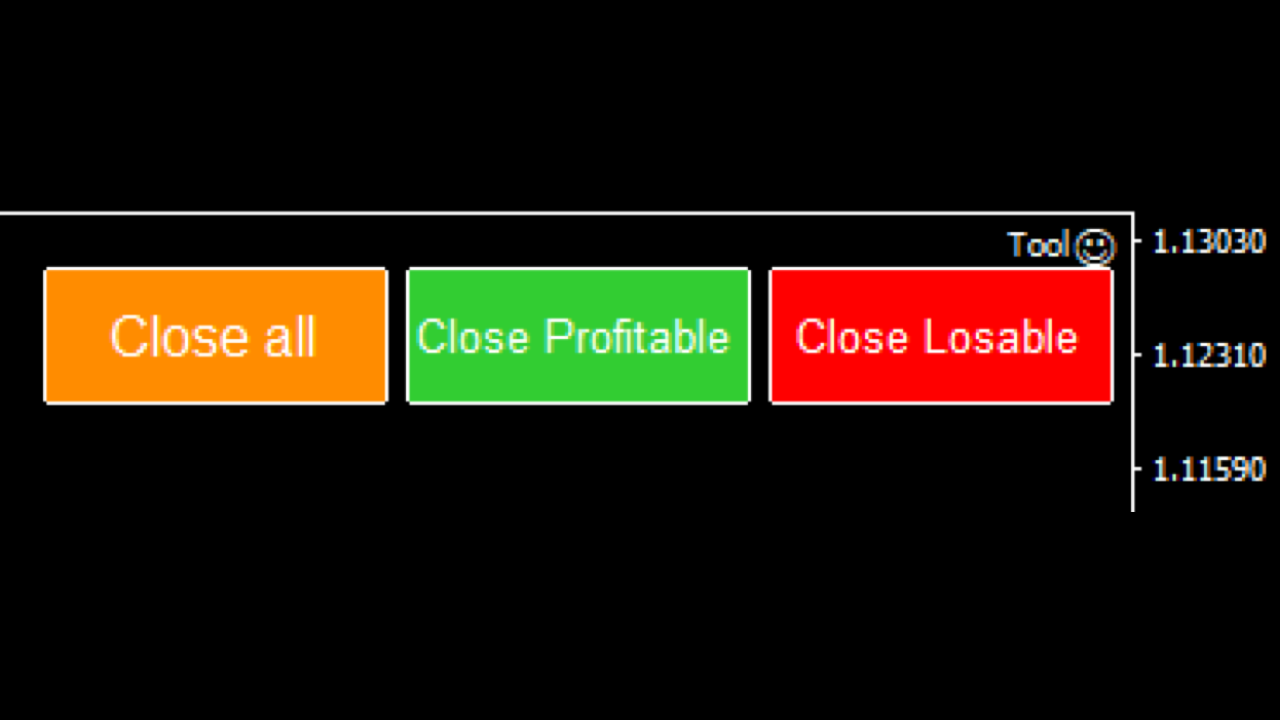
该工具可以帮助你一键平仓所有持仓订单,只需要点击“Close all”.如果你只想平仓盈利中的订单时,就点击“Close profitable"按钮,点击之后,所有浮盈中的订单都会被全部平掉;如果你只想平仓浮亏中的订单,就点击“Close losable”按钮,点击之后,所有浮亏中的订单就会被全部平掉。

该工具经过一年的真实测试,一键平仓功能非常完善,平仓及时,延迟范围较小,当然,延迟和你所处的地区以及网络环境也有关系,这一点还请注意。

在历史数据的回测过程中,该工具表现更加完美,100张订单全部平仓完成最多只需要0.495秒。在真实交易过程中,本人最多持仓订单数量只有26笔,全部平仓完成的时间是1.28秒。
推荐产品
One Click Trader  is a tool designed for MetaTrader 4 platform, which enables you to take your trading to the next level. It enables you to open, manage and close your trades in simple an efficient way by just one click of your mouse button. "-"   ,  "+"  change OCT window size  Up arrow minimizes the OCT panel Down arrow maximizes the OCT panel Right arrow displays the next panel with additional features Left arrow hides the panel with additional features Red  SELL  button enables you to open s
HotKey Trade
Juan Pablo Sanchez Correa
HotKey Trade is a fast-execution panel that lets you trade with just the press of a key. Open BUY (C), SELL (V), or close all (X) orders instantly, without menus or clicks. Additionally, you can adjust the lot size with the ↑↓ arrows and view P&L, margin, and lot size in real time. Ideal for scalpers, manual traders, and those who value speed. Key-based operation - P&L and margin display - Dynamic lot size control - Compatible with any symbol and timeframe Key to BUY (Default: C) Key to SELL (De
T Manager for Price action Traders
Haidar, Lionel Haj Ali
4.5 (10)
T Manager, the ultimate trade management solution designed by traders for traders. If you are searching for a simple and efficient trade panel, trade manager, or trade assistant, you are at the right place.   The market contains a diverse number of those tools , but this one is designed by traders for traders . I designed this tool, and I am using it daily. Take my advice and stop buying tools blended with un-useful features that you will never use,   T Manager provides you with the essential y
AW Metatrader to Telegram MT5
AW Trading Software Limited
5 (1)
用于发送通知的自动化系统,这样您的订阅者就不会错过您交易终端上的交易事件。一种实用程序,可向 Telegram Messenger 发送有关您账户上任何交易操作的通知。 将实用程序连接到 Telegram ->   HERE   / MT4 ->   HERE 中的频道的分步说明 优点: 简单的设置和详细的说明, 可以发送可调整的屏幕截图, 使用表情符号可定制的通知文本, 调整有关开仓、全部或部分平仓以及订单修改的通知, 默认发送通知时,会自动下载文本文件, 调整有关放置或删除挂单的通知, 通过符号和幻数方便地过滤。 输入变量: TELEGRAM BOT AND CHAT SETTINGS Telegram bot token - Enter the token number received after registering the bot in "BotFather" Telegram Chat ID - Enter the identification number received from "userinfobot" SETTING TRIGGERS SETTINGS
Trade Control Panel
Jerry Jilun Anak Liban
Trade Control Panel Function Normal One Click Function Close All Close All Profit Close All Loss Close All Pending Order Close All Sell Close All Buy Advance One Click Function 1.  Close Partial Lot Sell by Percent It will help you partial close for all open position by desire percent you wanted. No longer partial close one by one for every open position Manual input for desire percent 2. Close Partial Lot Buy by Percent It will help you partial close for all open position by desire percent
GS trade report
Aleksander Gladkov
5 (1)
Virtual TP SL TS
Andrei Sviatlichny
使經紀人看不到您的止盈,止損和追踪止損水平! 主要選項: 隱身模式 虛擬尾隨止損 虛擬獲利 虛擬盈虧平衡點 虛擬止損 虛擬訂單生命週期 警告: EA交易本身不會下訂單。 您必須自己打開訂單(包括通過“專家”面板),或在同一貨幣對的另一張圖表上使用第三方專家。 請在專家設置中指定魔術數字“ -1”,以便專家處理這些訂單。 用於測試使用視覺模式!!! 工作算法 當您(或其他EA交易)打開買/賣定單,或觸發掛單或圖表上可能已經有未平倉頭寸/定單時,專家將安裝控制面板並開始跟踪v-StopLoss, v-BreakEven,v-TakeProfit參數。 提醒: 當您使用“ -1”以外的幻數時,專家將僅跟踪通過其面板開立的訂單/頭寸。 使用的縮寫:v-SL =虛擬止損,v-BR =虛擬收支平衡,v-BRD =虛擬收支平衡距離,v-TS =虛擬尾隨停止,UP =刷新尾隨停止。 看圖片 “OPTIONS HELP CHART” 用於視覺感知算法. 當價格達到[v-SL]水平時,頭寸將被平倉。 當價格達到[v-BR + v-BRD]水平時,v-BR標記將設置為[v-BR]水平。 如果價格接近v-BR
One click to close all (OCCA) provides you posibility to close all open position with one click. Here is no any settings, just run the script and all your open positions will be closed and it will happen very fast ! Works with all types of accounts, with all currency pairs and any broker. The number of open positions is not limited. The script will be useful for trading strategies, in which you need to manage a large number of positions.
Pending Orders Grid Complete System   opens any combination of Buy Stop, Sell Stop, Buy Limit and Sell Limit pending orders and closes all existing pending orders. Only one time of the pending order at the same time!!! You will have a possibility to put a legitimate   Open Price   for the first position in the grid. Usually it should in the area of Support/Resistance lines. You just need to drop this script on the chart of a desired currency pair. Input Parameters Before placing all pending ord
Fast Manager (MT5 Manager) is a high-speed utility designed for traders who need rapid execution and automated trade management. Built to streamline manual trading, this EA provides on-chart buttons for instant Buy/Sell execution and "Close All" functions, while automatically handling risk management behind the scenes. MT4 Version: https://www.mql5.com/en/market/product/132477?source=Site+Profile+Seller Key Features: One-Click Trading Panel: execute trades instantly using the on-chart Buy, Sel
This utility provides the ability to use hot keys in manual trading instantly responding to the current market situation. You can assign hot keys to open/close positions by their type, open/close all positions on the current chart and remove all orders on the current chart. You can also assign hot keys for five predefined trade volumes and switch between them if necessary with no need to change the volume manually from time to time. It is also possible to set the auto calculation of a trade volu
You can see Binance Spot data instantly in Metatrader 5 and it allows you to use all the features that Metatrader has provided to you. You can access the data of all symbols listed on Binance Futures. Don't forget to set the timezone. Binance it's 00:00 UTC. You need to fix it according to your own country You need to install the free Binance Spot Symbol List plugin. https://www.mql5.com/tr/market/product/83507 After loading, it automatically downloads the data of the cryptos in the market obser
Trade Condition Logger MT5
AbelPM Enterprises Pty Ltd
The   Trade   Condition   Logger   is   an   essential   tool,   offering   crucial   insights   into: Current   swap   and   spread   values Automatic   logging   of   fluctuations   in   swap   values Logging spread   value   range over   time Optimise   spread   values for specific instrument Displays   a   comprehensive   summary   on   the   chart,   providing   traders   with   insights   into   trade   conditions.  Review trade conditions for your various   broker   accounts   enabling  
Horizontal Line Trade Assistant EA  Semi-Automated Trading Assistant      IMPORTANT :     On the main/purchased program a user can click on the Horizontal line and change it to Buy or Sell, and drag by double clicking on it. Please keep in mind that this option is not available on demo version, due to some restrictions/limitations of Strategy Tester, some Object related operations are not available in the  Strategy Tester. But, it will not prevent you from Testing, please drop an Object to chart
Apex StopLoss Manager
Muhammad Hassan Muhammad Ahmad Atiyah
️ Apex StopLoss Manager: Total Control Over Your Risk Tagline: Stop Losing to the Spread. Start Trading with Absolute Control. Overview: The Ultimate SL Command Center Are you tired of your "Breakeven" trades closing at a minor loss due to spread and commission? Do you sometimes need to instantly remove all safety nets to let a massive winner run? Apex StopLoss Manager is not just another utility—it's your finger on the panic button, your safeguard against hidden costs, and your master key
Spread and Swap monitor
Gennadiy Stanilevych
5 (1)
本指标的目的是判断点差和利率大小,以及按照存款货币每一个点的风险,设置从当前价位计算的止损距离。 本指标告知交易者有关金融工具在每个时段之间转换时可能的额外费用和利润。它还告知有关的点差和挂单的距离,从当前价位的尾随止损位。此外,指标告知交易者有关存款货币每一个点的风险。 信息被显示在图表下方的单独子窗口里。它可以避免图表被不同的信息塞满。点差和利率监控指标适合任何自定义模板。
键盘交易 MT5 是一个热键 MT5 实用程序 加载 EA 的图表必须是活动图表(用鼠标点击)才能使用热键进行交易。如果开立多个仓位,则移动的止损为第一笔交易的止损,但其余交易需要调整用鼠标。   可供选择的输入:   1.添加注释1和2显示在左上角 1.手数(最小0.01) 2. 止损和获利点数(0 = 禁用):适用于所有订单 3. 以点为单位的预定义距离:下限价单和止损单(不是市价单:热键 1 和 2)与当前价格的距离。 4. 移动止损距离,以点为单位(必须是最小移动报价的倍数) 请注意,如果仪器以 25 点的增量移动,那么您设置的距离必须是 25 的倍数,否则它将不起作用。 5.幻数:以上所有键盘交易和订单都具有相同的幻数 6. 键盘热键:您可以输入您选择的按键。   注意:如果热键不是数字,请使用大写字母。   默认热键:   在市场键购买=“W” 以市场键=“Q”出售 买入限价订单键=“S” 卖出限价单键=“1” 买入止损订单键=“2” 卖出止损单键=“A” 关闭未平仓交易键=“C” 删除挂单键 =“D” 反转当前位
Master Close via Telegram can help you perform some management tasks on MT4/MT5 remotely via your Telegram by one click, easy to set up & use. Demo here (see more Master Notify   Master Control ) ************************************************************************************ LIST OF COMMANDS: info_acc -  Get account info info_pen -   Get pending orders details info_pos -   Get positions details info_pos_sum -   Get positions summary close_pen -   Delete all pending orders close_pos_all -  
Simple Telegram Notification – Stay Informed on Your MT5 Trading Activity! Stay connected with your MetaTrader 5 trading activity using Simple Telegram Notification , the Expert Advisor that sends real-time notifications to your Telegram app whenever orders are opened, modified, or closed . Whether you're at your desk or on the move, you’ll always be up-to-date with critical trading information. Key Features: Order Notifications : Receive instant Telegram alerts whenever an order is opened, mod
该智能交易顾问(EA)会在 MetaTrader 5 中监控所有交易品种上的所有持仓。一旦在任意持仓上 手动设置或调整 了止损(SL)或止盈(TP),EA 会将该值 自动应用于其他所有未平仓头寸 ,无论是买单还是卖单、哪个交易品种。这确保整个账户的 SL 和 TP 水平始终保持同步。 非常适合通过平板或智能手机进行移动交易!    ......................................................................................................................................................
Visit our all-new   Stein Investments Welcome Page   to get the latest information, updates and trading strategies. Do you want to become a constantly profitable 5-star forex trader? Then  get our Stein Investments trading tools  and send us a screenshot to get your personal invitation to our exclusive trading chat with 500+ members. Crosshair is a fantastic tool that simplifies our chart analysis by bringing the price candles perfectly in line with the indicator values in the subwindows. Yo
This utility sends notification to trader’s MT5 (for MT4 version, checkout this link ) mobile app, to remind traders about their open positions. Super useful for part time traders to keep track and not forget any positions. To turn on notification, please visit   this link   (https://www.metatrader4.com/en/trading-platform/help/setup/settings_notifications) Features Keep track on open orders (pending orders, running orders) Customize time to send notification Customize notification interval (se
Telegram ChartSnap MT5 is an utility tool to bridge your MetaTrader 5 activities to your Telegram chat/group/channel. It will screen shot your MetaTrader 5 chart and send it to your dedicated Telegram chat/group/channel through a Telegram bot. The whole process will keep repeating based on a time cycle that predetermined by the user. It is a convenient tool for those who like to get access to their favorite system/dashboard that only available at MetaTrader Desktop. Beside that, trader can easi
Telegram to mt5 signal copier
Chukwuemeka Kingsley Anyanwu
Copies Signal from any Telegram channel and instantly executes the trade on MT5 without admin rights! Do you receive trading signals on Telegram and wish they could execute instantly on Meta Trader 5? READ THIS FOR SETUP GUIDE Telegram to MT5 Signal Copier is a powerful bridge between your Telegram signal channels and MetaTrader 5. It listens to messages from a specific Telegram channel and automatically extracts trading signals — including symbol, action, entry price, stop loss, and take prof
Utility TimeLs Close Positions 是一个用于在 MetaTrader 5 中管理和自动关闭仓位的工具。 它允许根据时间、交易品种、方向、魔术号码和备注内容灵活控制仓位的关闭方式和时间。 您可以选择在特定的星期几关闭交易 您可以设置一个具体时间来关闭所有持仓 您可以通过交易品种、方向(买/卖)、魔术号码或备注进行过滤 您可以设置最多三个一次性定时关闭操作(交易1、交易2、交易3),每个都有独立的过滤条件 您可以开启或关闭图表上的信息面板,显示当前设置和即将执行的关闭操作 您可以自定义图表中文字的字体大小和颜色 Utility TimeLs Close Positions is a tool for managing and automating trade closing operations in MetaTrader 5.
Position Limit Monitor Full: Total Control of Your Trading Operations Are you looking for an efficient way to manage both your open positions and pending orders? Position Limit Monitor Full is the all-in-one solution you need to maintain total control over your trading activity. Key Features: Real-time Monitoring: Constantly tracks the number of open positions and pending orders in your account. Customizable Limits: Easily set the maximum number of open positions and pending orders you want to m
AUTO RISK MANAGER PRO:您在外汇交易中的可靠伙伴! AUTO RISK MANAGER PRO_MT4 (MT4版本) 演示版本 + 详细说明 停止因为情绪而亏钱!现在是时候把风险管理交给专业算法了。 想象一下:市场突然朝着与你的仓位相反的方向急剧移动,而此时你正在睡觉、工作或陪伴家人。很常见,对吗?有了 Auto Risk Manager Pro —— 不再如此! 优势: 革命性的风险管理方式 24/7 自动保护资金 无需您参与 —— 即使您不在电脑前 精准的获利目标 —— 在合适的时机锁定利润 严格的亏损限制 —— 避免重大损失 多货币支持 —— 适用于任何交易工具 自动关闭图表(同时卸载所有挂载的EA) 控制面板 Control Panel Settings(控制面板设置) PanelColor = clrDarkSlateGray — 面板颜色 PanelX = 10 — 面板距离图表左侧的偏移 PanelY = 60 — 面板距离图表顶部的偏移 风险管理设置 Risk Management Settings(风险管理设置) Work = false/tru
This EA helps to Close all Positions opened. It saves you the time of closing multiple positions manually. Parameters: Buy:  Close Buy Positions Only Sell:  Close Sell Positions Only Buy & Sell: Close Buy & Sell Positions Pending: Close Pending Orders More Advanced MT5 version available at:  https://www.mql5.com/en/market/product/93301?source=Unknown%3Ahttps%3A%2F%2Fwww.mql5.com%2Fen%2Fmarket%2Fmy More Advanced MT4 version available at:   https://www.mql5.com/en/market/product/93468?source=Unk
Excellent Multiplatform Copier of deals. I use it regularly on VPS (copy from Mt5 to Mt4). Multiplatform : copying from MetaTrader 4 to MetaTrader 4; copying from MetaTrader 4 to MetaTrader 5; copying from MetaTrader 5 to MetaTrader 4; copying from MetaTrader 5 to MetaTrader 5. Modes: master   - the current terminal is   source of trades (deals are copied from it); slave   - the current terminal is the receiver of trades (trades are copied to it). from myself  - mode "deals multiplier" (usefu
Order Trailing
Makarii Gubaydullin
订单追踪:随着市场变动获得最佳执行价格 挂单追踪将允许您保持与入场价格的指定距离。 如果市场价格远离订单,订单将会移动。 多功能工具 : 66+ 功能,包括此工具 | 如有问题请联系我 | MT4版本 要激活订单追踪,您需要设置面板上的4个主要参数: 1. 符号 或 交易 ,将应用追踪: 对于当前[Symbol] / 对于[ALL]符号,或对于特定交易[Ticket]。 除了[Symbol]或[ALL]规则外 - 您可以为特定交易设置单独规则, 通过其票号:单独[Ticket]的规则将优先。 2. 追踪挂单的激活时刻 : [ 执行后立即 ]: 无延迟 当订单放置时; [如果挂单 > 比]:追踪将在 指定时间后 开始; 3. 当前市场价格与入场价格的距离 。 如果市场远离入场点,此距离将在追踪时保持: 但如果市场价格接近入场点,订单将不会移动。可以是: [ 自动 ]:将在追踪开始时确定(第2点)。 或者您可以[ 手动 ]设置:以点/百分比/市场价格百分比。 4. 移动SL / TP水平的规则 。 您可以禁用它们的移动,也可以启用其中每一个的移动。 从入场价格到水平的初始距离将始终被保持
该产品的买家也购买
Ultimate Extractor
Clifton Creath
5 (7)
Ultimate Extractor - Professional Trading Analytics for MT5 Ultimate Extractor transforms your MetaTrader 5 trading history into actionable insights with comprehensive analytics, interactive charts, and real-time performance tracking. What It Does Automatically analyzes your MT5 trading history across all Expert Advisors and generates detailed HTML reports with interactive visualizations. Tracks live performance metrics including open positions, floating P/L, and drawdown in real-time. Supports
EasyInsight AIO MT5
Alain Verleyen
4.91 (11)
EASY Insight AIO – 全能智能交易一站式解决方案 概述 想象一下,您可以在几秒钟内扫描整个市场——外汇、黄金、加密货币、指数,甚至股票——无需手动筛选图表、繁琐安装或配置指标。 EASY Insight AIO 是您专为 AI 交易打造的即装即用数据导出工具。它将整个市场快照一次性输出为简洁的 CSV 文件,直接支持 ChatGPT、Claude、Gemini、Perplexity 等各类 AI 平台的即时分析。 无需窗口切换,无需图表叠加,也没有任何杂乱。只需纯净、结构化的数据自动导出,让您专注于基于数据的高效决策,无需再盯盘耗时。 为什么选择 EASY Insight AIO? 真正的一体化 • 无需设置,无需安装指标,无图表叠加。只需安装、运行并导出——就是这么简单。 多资产全覆盖 • 扫描分析外汇、金属、加密货币、指数、股票——您的券商所能提供的一切市场。 AI 专属数据导出 • 高度结构化、针对 AI 优化的 CSV 文件,直接适配主流智能工具和平台。 完整导出内容: • 三个可选周期的货币强度分析 • 净多头头寸变化体现市场情绪 • 成交量变化、
The product will copy all telegram signal to MT5 ( which you are member) , also it can work as remote copier.  Easy to set up, copy order instant, can work with almost signal formats, image signal,  s upport to translate other language to English Work with all type of channel or group, even channel have "Restrict Saving Content", work with  multi channel, multi MT5 Work as remote copier: with signal have ticket number, it will copy exactly via ticket number. Support to backtest signal. How to s
MT5 To Tradovate
Laurent Xavier Richer
MT5 → Tradovate Bridge (Prop-Firm Ready) Mirror your MT5 trades into Tradovate in real time—perfect for running your favorite indices/gold EA on MT5 while meeting the rules of top prop firms like Apex , etc. What it does Live mirroring: Replicates MT5 market executions (open/close) to Tradovate as market orders. Symbol routing:  Map your chart (e.g., US100/USTEC) to the right futures contract (MNQ/NQ/MES/ES/…); roll-aware (quarterly/monthly). Position cap: Limit how many MT5 positions are mirro
Custom Alerts AIO:多市场智能监控,一键启动,无需设置 概述 Custom Alerts AIO 是一款“开箱即用”的高级市场扫描工具,无需额外安装任何其他指标或进行复杂设置。它内置了 Stein Investments 的所有核心指标(FX Power、FX Volume、FX Dynamic、FX Levels 和 IX Power),可帮助您轻松监控所有主要资产类别,如外汇、黄金、指数和加密货币。如果您的经纪商支持股票,您也可以手动添加个股进行监控。 1. 为什么选择 Custom Alerts AIO? 无需额外购买任何指标 • 所有关键指标均已内置,开箱即用。 • 专注于实时预警,不包含任何图形元素,性能高效,界面简洁。 全面覆盖所有主要市场 • 支持监控外汇、金属、加密货币和指数市场。 • 无需手动输入任何交易品种,只需在设置中勾选资产类别即可启用。 • 股票并不属于默认类别,如有需要可手动通过参数输入添加。 高效、专业、便捷 • 无需图表模板和手动加载,适合自动化或远程交易环境。 • 非常适合 VPS 上长期运行,或作为后台市场预警工具使用。 2
The  Easy Strategy Builder (ESB)  is a " Do It Yourself " solution that allows you to create a wide range of the automated trading strategies without any line of codes. This is the world’s easiest method to automate your strategies that can be used in STP, ECN and FIFO brokers. No drag and drop is needed. Just by set conditions of your trading strategy and change settings on desired values and let it work in your account. ESB has hundreds of modules to define unlimited possibilities of strategi
YuClusters
Yury Kulikov
4.93 (42)
Attention: You can view the program operation in the free version  YuClusters DEMO .  YuClusters is a professional market analysis system. The trader has unique opportunities to analyze the flow of orders, trade volumes, price movements using various charts, profiles, indicators, and graphical objects. YuClusters operates on data based on Time&Sales or ticks information, depending on what is available in the quotes of a financial instrument. YuClusters allows you to build graphs by combining da
Telegram To MT5 Receiver
Levi Dane Benjamin
4.53 (15)
将信号从您所属的任何渠道(包括私人和受限渠道)直接复制到您的 MT5。 该工具在设计时充分考虑了用户的需求,同时提供了管理和监控交易所需的许多功能。 该产品采用易于使用且具有视觉吸引力的图形界面。 自定义您的设置并在几分钟内开始使用该产品! 用户指南 + 演示  |   MT4版本  |   不和谐版本 如果您想尝试演示,请参阅用户指南。 Telegram To MT5 接收器在策略测试器中不起作用! Telegram 至 MT5 功能 一次复制多个通道的信号 从私人和受限频道复制信号 不需要机器人令牌或聊天 ID(如果出于某种原因需要,您仍然可以使用这些) 使用风险百分比或固定手数进行交易 排除特定符号 选择复制所有信号或自定义要复制的信号 配置单词和短语以识别所有信号(默认值应适用于 99% 的信号提供商) 配置时间和日期设置以仅在需要时复制信号 设置一次打开的最大交易量 交易和头寸管理 使用信号或自动设置的管理 通过设置每月、每周、每天、每小时或每分钟的最大交易次数,停止过度交易和报复性交易。 支持市价订单和挂单 每日最大利润目标(以美元为单位)以确保头寸并停止过度交易 确
ManHedger MT5
Peter Mueller
4.8 (5)
THIS EA IS A SEMI-AUTO EA, IT NEEDS USER INPUT. Manual & Test Version Please DON'T BUY this product before TESTING  and watching my video about it. The price of the ManHedger will increase to 250$ after 20 copies sold. Contact me for user support or bug reports or if you want the MT4 version! MT4 Version  I do not guarantee any profits or financial success using this EA. With this Expert Advisor, you can: Implement your own Zone Recovery strategy to capitalize on trending markets. Create Grid
Bots Builder Pro MT5
Andrey Barinov
4.17 (6)
This is exactly what the name says. Visual strategy builder . One of a kind. Turn your trading strategies and ideas into Expert Advisors without writing single line of code. Generate mql source code files with a few clicks and get your fully functional Expert Advisors, which are ready for live execution, strategy tester and cloud optimization. There are very few options for those who have no programming skills and can not create their trading solutions in the MQL language. Now, with Bots Builde
Mentfx Mmanage mt5
Anton Jere Calmes
4.25 (8)
The added video will showcase all functionality, effectiveness, and uses of the trade manager. Drag and Drop Trade Manager. Draw your entry and have the tool calculate the rest. Advanced targeting and close portions of a trade directly available in tool (manage trades while you sleep). Market order or limit order on either side with factored spread. Just draw the entry, the tool does the rest. Hotkey setup to make it simple. Draw where you want to enter, and the stop loss, the tool calculates al
The product will copy all  Discord  signal   to MT5   ( which you are member  ) , also it can work as remote copier.  Easy to set up. Work with almost signal formats, support to translate other language to English Work with multi channel, multi MT5. Work with Image signal. Copy order instant, auto detect symbol. Work as remote copier: with signal have ticket number, it will copy exactly via ticket number. How to setup and guide: Let read all details about setup and download Discord To MetaTrader
RiskGuard Management
MONTORIO MICHELE
5 (22)
注意 :要获取免费试用版,请访问我的网站。 使用手册 用户手册 RiskGuard Management — 您进行无妥协交易的终极盟友。 Lot Calculator — 自动计算手数。 Quantum — 自动风险控制,最大化利润并减少回撤。 Automatic Journal — 包含并可从我的网站免费下载。 Automatic Screenshot — 两张截图:开仓时一张,平仓时一张。 Partial Profit — 智能管理的部分平仓功能。 Smartphone Trading — 可通过手机下单,自动管理。 Stop Loss & DD Block — 每日资金的全面保护。 Automatic Break-Even — 轻松降低风险。 Closing Time — 精准控制交易时间。 Automatic Spread — 实时正确设置止损和止盈。 详细的多语言文档以及意大利语和英语的视频教程,可在我的网站上获取。
Crypto Charting
Rajesh Kumar Nait
5 (4)
Crypto Charting for MT5 – MetaTrader 5 加密货币图表集成工具 概述 Crypto Charting for MT5 通过 WebSocket 提供实时 OHLC 图表数据。支持多家交易所,并可在 MT5 中自动更新历史数据。 功能 实时 WebSocket 数据传输 自动历史数据同步 网络中断后的计划更新 兼容所有 MT5 时间周期 支持 OHLCV 数据格式 支持策略测试器 自动重新连接 支持的交易所 Binance, Bybit, OKX, KuCoin, MEXC, Gate.io, Bitget, XT.com 补充说明 如需获取 Tick 数据和深度数据,可查看名为 Crypto Ticks 的相关产品。 注意事项 不使用 DLL,适用于 VPS 环境。 Strategy Tester 不支持 WebRequest 功能。 如需试用版本,请通过 MQL5 私信联系作者。 Full Documentation & Setup Guide : Click Here
HINN Lazy Trader
ALGOFLOW OÜ
5 (2)
Lazy Trader is your personal risk management assistant that independently finds the best market entries, manages positions, and helps you extract maximum profit from every trading idea! It monitors charts from M1 to W1 , finds optimal entry points based on your parameters, and manages trades without your involvement: - Got an idea on the daily chart? No need to wait for lower timeframes to form a signal — Lazy Trader will check everything and open all necessary positions while you live your lif
Trade Copier Pro MT5
Vu Trung Kien
3.67 (3)
Trade Copier Pro MT5 is a tool to copy trade remotely to multiple MT4, MT5 and cTradfer accounts at different computers/locations over internet. This is an ideal solution for you if you are a signal provider and want to copy your trades to other receivers globally on your own rules. One provider can copy trades to multiple receivers and one receiver can get trade from multiple providers as well. The provider can even set the subscription expiry for each receiver, so that receiver will not be abl
What Exactly Is A Smart Trading Tool? Smart Trading Tool   was developed for fast and comfortable trading of the financial markets especially for   ORDER BLOCKS TRADERS .   It provides traders functionalities, such as: A Drawing Tool One-Click Trading Panel Automated Lot Sizes Calculation   based on your risk appetite & Money Management ( Watch this video , how this tool can help manage your risk per trade better!) Built in PRICE LEVELS (Fibonacci, Round Numbers, Daily hi-low, etc) Shows Trading
部分平仓专家 是一款将多种功能整合到一个自动化系统中的工具。该 EA 提供多种风险管理选项,并最大化潜在收益,从而帮助交易者更有效地管理仓位。 使用部分平仓专家,交易者可以设置   部分关闭   锁定利润的水平,     追踪止损   保护利润和限制损失的水平,     收支平衡   水平,以确保即使价格朝着不利于交易的方向变动,交易也能实现盈亏平衡,以及其他一些功能。 使用这款一体化智能交易系统,交易者可以节省时间和精力,因为他们无需时刻监控交易。相反,EA 会根据市场情况执行预设指令,从而为交易者提供更大的灵活性和对交易的控制力。 附加部分关闭专家,     按下键盘上的“p”   ,更改设置,然后就可以开始了。 部分关闭专家   安装和输入指南 如果您想收到有关 EA 的通知,请添加 URL(   http://www.betasoft.dev   )MT4/MT5 终端(见截图)。 MT4版本 https://www.mql5.com/en/market/product/14965 MT5版本 https://www.mql5.com/en/market/product/15
I present to your attention a powerful utility for predicting the future movement of an asset based on W.D. Ganna’s law of vibration. This utility analyzes the selected market model and provides codes for future possible market movement patterns. If you enter the selected code into the appropriate box, you will receive a forecast of the potential market movement. The utility has the ability to display several potential forecast models. The forecast is not yet tied to time and price and gives th
Trading Chaos Expert
Gennadiy Stanilevych
5 (11)
世界上没有本软件的同等产品,它代表一个覆盖交易信号的通用交易 "控制台",自动入场,设置止损和止盈,还有在单一窗口里同时进行多交易尾随终止。EA 的 "三次点击" 直观控制,确保在不同计算机上全方位使用所有功能,包括平板电脑。 与附加的信号指标交互来标记图标,给出实际市场的全貌,EA 令您做出正确的选择,以及在大多数情况下成为胜者一方。内置资金管理算法, 还有自动计算手数, 虚拟订单交易, 以及一些其它从崩溃账户里挽救交易者的 "诀窍"。它不是一个 "黑盒子"。而是一个深思熟虑的交易员的不可或缺的助理, 至少要尝试一次它的动作。 注,在面板上形成的 EA 不能在策略测试员中测试。可以在您的模拟账户里以实时模式检查它, 您可以下载本 EA 的免费版 - 混沌交易 EA 演示 。 EA 表现为一个面板,带有内置功能的交易机器人的,自动基于交易者可直观检查的交易信号入场,完全按照比尔·威廉姆斯的策略“混沌交易:第二版”和“新贸易维度”。在单独的窗口里,EA 识别价格走势的导向,用于指定品种和时间帧的全自动交易模式,也可以多品种并发。 它同时分析 MetaTrader 5“市场观察”窗口中显示
Remote Trade Copier is an advanced tool designed for efficiently copying trades between accounts in both local and remote modes. It allows for lightning-fast order replication from a master account to a slave account. In local mode, trades are copied instantly, while in remote mode, the copying process takes less than 1 second. MT4 Version (Only Local) MT5 Version (Only Local) MT4 Full Version (Local & Remote) Local mode refers to both MetaTrader platforms being installed on the same system,
Botonera MT5
Jose Antonio Soto Mendoza
5 (1)
交易鍵盤 一款先進的工具,助您在金融市場中實現敏捷精準的交易。 這款鍵盤專為交易 DAX、XAU/USD、外匯和其他市場(剝頭皮交易、日內交易、波段交易等)的交易者而設計,讓您只需單擊即可執行交易,並提供多種專業配置。 「每日剝頭皮交易鍵盤」讓您只需點擊即可開倉、平倉和保護交易,非常適合在 M1/M5 上交易,無需浪費時間。它包含對沖、損益平衡、全倉和快速手數控制按鈕。專為不想浪費寶貴時間的活躍交易者而設計。 主要功能: 直接和預定入場:以市價執行買入或賣出訂單,或使用買入/賣出限價或買入/賣出停損來安排交易。 手數管理:配置您的部位規模並自動執行對沖策略。 自動對沖:使用智慧對沖系統最大限度地降低風險。 反白顯示的按鈕: TSL(交易停損):當交易獲利時,停損就會跟著價格走。停損與價格的距離可以手動調整,適用於單筆和多筆交易。僅在交易盈利時啟動。 BE(損益兩平):保護您的利潤。如果市場反轉,交易將在損益兩平點平倉,不盈不虧。 多重對沖系統:非常適合在市場開盤或相關新聞發布期間進行交易。讓您配置停損距離、避險和交易手數,以便同時執行買入和賣出,確保在市場動能下獲利。 (
50% off. Original price: $375 Reward Multiplier is a semi-automatic trade manager based on pyramid trading that opens additional orders with the running profit of your trades to maximize return exponentially without increasing the risk. Unlike other similar EAs, this tool shows potential profit/loss and reward to risk ratio before even entering the first trade! Download Demo here  (starting lot is fixed at 0.01) Guide + tips here MT4 version   here You only open the first order. When your trade
Mt5 To InterativeBrokers Copier allows you to copy deals from MT5 account to Interactive Brokers. With this, you can run your EA strategy on a MT5 Demo/Real Account, then copy all the deals to Interactive Brokers account real time. Features: 1. Copy or Invert-Copy deals Realtime from MT5 to IB Account. 2. Synchronizing positions of both accounts periodicaly, in case any missing copying. 3. You can choose only Buy position or Sell position. Symbols Setup: General Format:  {MT Symbol} -> {IB S
Fly With Gold – Scenario Dashboard PRO Market Condition & Trend Analysis Dashboard for MT4 / MT5 Fly With Gold – Scenario Dashboard PRO is a professional market condition analysis indicator designed to help traders identify trend, range (lateral), and neutral market phases in real time. This product is an analysis and decision-support tool . It does not generate trading signals , does not open trades , and does not guarantee profits . What the Indicator Does Analyzes market conditions and classi
GRat Crypto
Ivan Titov
4.5 (2)
Trade on crypto exchanges in MT5! GRat_Crypto is a tool for manual and automated trading , including ANY available EA, ANY  cryptocurrency  on most popular crypto exchanges in the familiar MT5 environment 24/7. Features 1. ALL instruments of the 9 most popular crypto exchanges are available: Binance, BingX, Bybit, Coinbase, CoinEx, Kraken,   KuCoin, MEXC and OKX . 2. The ability to place ANY type of order available in MT5, both market and pending, to modify orders and positions, to delete order
FTMO Protector 8
Vyacheslav Izvarin
PROTECT YOUR FTMO Account in a simplest way Must-Have Account Protector for any Prop-trading Account and Challenge MT4 / MT5 Expert Advisor that protects your Forex Prop Trading account from an unexpected drawdown! FTMO Protector  is a Tool that lets you manage trades and control your profit and loss across multiple Robots and currency pairs using a simple parameters and settings. Use as many EAs and Instruments you need, the Protector will: 1.   Calculate your midnight (01:00 System time) Balan
Professional-Grade Chart Analysis – AI-Powered & Visually Enhanced The AInalyzer is an Expert Advisor for MetaTrader 5 that leverages artificial intelligence to analyze market structures and automatically places visual objects directly on your charts. Instead of spending hours manually examining charts, you'll get a clear overview of support levels, resistance zones, trend structures, and potential trading opportunities in no time – all logically presented, visually marked, and available at you
币安 MT5 交易工具 1. 本产品包含通过 WebSocket 获取的实时图表、历史图表, 并在 MT5 终端重启时自动更新,确保运行流畅,无需人工干预,让您在币安交易时体验流畅无阻。 现货和期货均可交易、实时图表和历史数据 图表功能: 1. 通过 WebSocket (WSS) 获取实时 OHLC 图表 2. 通过 API 更新历史记录 3. 每次打开 MT5 时自动更新图表历史记录 4. 支持从 M1 到 MN1 的所有时间范围 5. 可用数据:开盘价、最低价、收盘价、实际交易量和即时成交量 6. 您可以使用策略测试器,通过您的专家顾问对加密货币数据进行任何策略的回测 图表和历史记录使用说明: 1. 将 URL 添加到 MT5 选项 2. 在任何图表上加载实用程序,并选择“模式”为“实时”,然后选择交易所(例如币安现货),并在首次运行时将“创建交易品种”设置为“真”,以便创建交易品种。 3. 所有交易品种创建完成后,右键退出 EA,选择“Utility Crypto charts”(实用程序加密货币图表),然后点击“Remove”(移除)。重启 MT5(重要提示) 4
Best Renko Chart Generator
Mohammad Taher Halimi Tabrizi
5 (1)
This is the Best Renko chart generator ever in the market you can set the box sizes based on ATR or Fixed Size: 1. Fixed Box Size 2. Current ATR Size 3. ATR size of the Chart Start Time. also you can set the Renko chart cut of date and time to start as reference of creating renko charts. you need to attach to a symbol chart that want the renko chart of it, then immediately a new chart will be opened which is based on renko, you can use this generated chart and attach your EA to trade on or you e
作者的更多信息
该工具可以帮助你一键平仓所有持仓订单,只需要点击“Close all”.如果你只想平仓盈利中的订单时,就点击“Close profitable"按钮,点击之后,所有浮盈中的订单都会被全部平掉;如果你只想平仓浮亏中的订单,就点击“Close losable”按钮,点击之后,所有浮亏中的订单就会被全部平掉。 该工具经过一年的真实测试,一键平仓功能非常完善,平仓及时,延迟范围较小,当然,延迟和你所处的地区以及网络环境也有关系,这一点还请注意。 在历史数据的回测过程中,该工具表现更加完美,100张订单全部平仓完成最多只需要0.495秒。在真实交易过程中,本人最多持仓订单数量只有26笔,全部平仓完成的时间是1.28秒。

筛选:
无评论
回复评论




















