OneClick Risk Manager

OneClick Risk Manager — Manual Trading Assistant

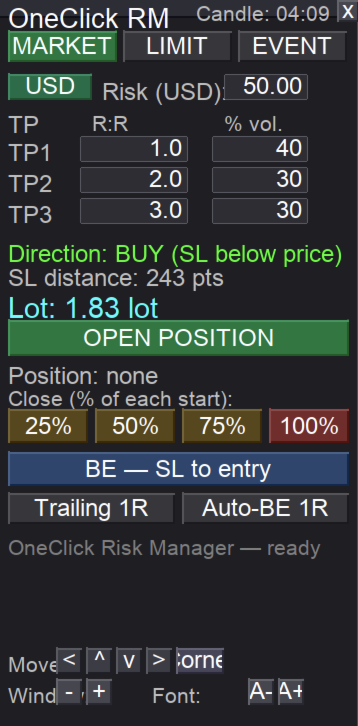
OneClick Risk Manager is a manual trading panel for MetaTrader 5. It does not trade on its own — you stay in control and open, close and manage every position with one click. Its job is to do the math for you: position size, risk, partial take-profits, break-even and trailing, so you can trade fast and precisely without manual calculations.

Works on any symbol — XAUUSD (gold), US100/NAS100, US30/DJ30, FX pairs and more. The panel is fully scalable and movable, so it fits small laptops and 4K monitors alike.

Key features

Position sizing — two modes, one toggle

  • USD risk mode: type the amount you want to risk; the lot is calculated automatically from your Stop Loss distance so a stop-out equals exactly that amount.
  • Fixed lot mode: type the lot directly and trade with a constant size.
  • Switch between the two with a single button on the panel.

MARKET tab — instant entry from a line

  • Drag the horizontal SL line to where you want your stop.
  • Direction (BUY/SELL) is detected automatically from the line position.
  • One click opens the position with the calculated lot and the stop already in place.

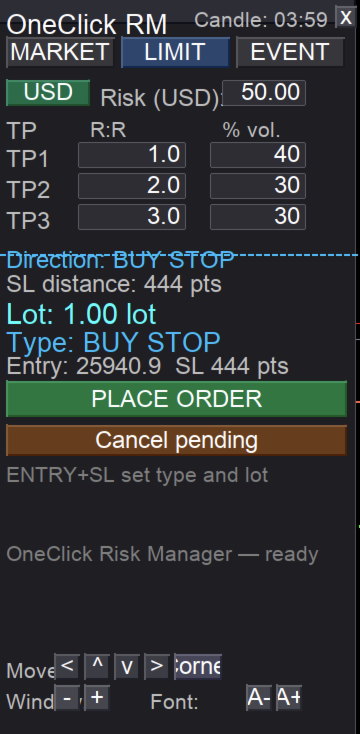
LIMIT tab — pending orders from two lines

  • Use an ENTRY line and an SL line.
  • The order type is detected automatically from the line layout: BUY LIMIT, BUY STOP, SELL LIMIT or SELL STOP.
  • The lot is sized to your risk (or fixed), with an optional expiry.

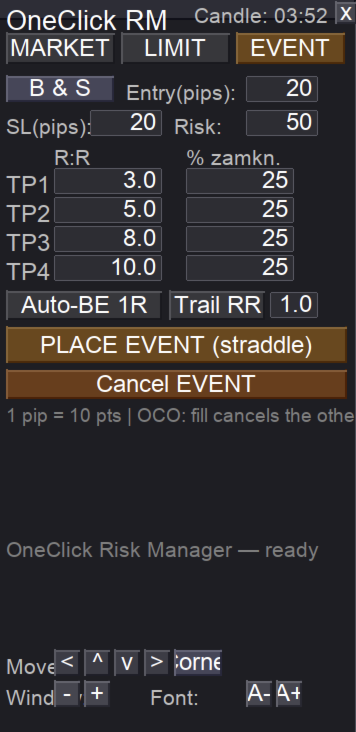
EVENT tab — OCO straddle for news and volatility

  • Places a BUY stop and SELL stop at a set distance from price.
  • OCO: when one side is triggered, the other is cancelled automatically.
  • Choose BOTH / BUY only / SELL only.
  • Four take-profit levels (R:R) with a percentage of the position closed at each.
  • Built-in auto break-even and trailing for the active position.

Trade management (one click each)

  • Partial close buttons 25% / 50% / 75% / 100% — always measured from the original lot of each position, so "50%" means half of the start size even after earlier partials.
  • Break-even button — moves the stop of all positions to entry (+ a small buffer).
  • Auto break-even at 1R — moves the stop to entry once price reaches 1R.
  • Trailing by R — steps the stop up as price advances (1R, 2R, 3R...).
  • Multiple take-profits (R:R) with partial closes at each level.

Panel and usability

  • Live candle countdown — time left until the current candle closes.
  • Scalable panel — separate window scale and font scale (great for 4K).
  • Movable panel — drag by the title bar, or use on-panel arrow buttons and a "snap to corner" button (useful on macOS where dragging can be awkward).
  • Panel position, scale and font are remembered per symbol after restart.
  • Controls can be hidden once the panel is placed, for a clean workspace.

How to use

  1. Attach the EA to a chart and enable Allow Algo Trading.
  2. Pick the tab you need: MARKET, LIMIT or EVENT.
  3. Set your risk (USD) or a fixed lot, your SL line, and your TP levels.
  4. Click to open. Manage the trade with the partial-close, break-even and trailing buttons.

Important notes

  • This is a manual assistant. It never opens or closes positions by itself — every action is a button click by you.
  • Always test on a demo account first to confirm lot sizing matches your broker's contract specifications (tick value can differ between brokers, especially on gold and indices).
  • Trading involves risk. You trade and use this tool at your own risk. Past performance and backtests do not guarantee future results.

Requirements

  • MetaTrader 5
  • Any broker / any symbol
  • "Allow Algo Trading" enabled

Author / contact

Questions, feedback or support? Reach the author on Telegram: @MatKus92

Tip: for best results, keep the panel on the chart you actively trade and use the window/font scale buttons to size it comfortably for your screen.
推荐产品
TradeHam Manager is a trade panel for manual traders. You decide when and where to trade. The panel takes care of the lot size, the order and the clean-up. It does not open trades on its own. It has no entry logic and does not promise any profit. Main features Risk-based lot size. Set the risk as a percent of balance, a fixed amount of money or a fixed lot. Drag the stop-loss line on the chart and the lot is recalculated. One-click orders. BUY / SELL buttons place the order with stop loss and ta

该工具可以帮助你一键平仓所有持仓订单,只需要点击“Close all”.如果你只想平仓盈利中的订单时,就点击“Close profitable"按钮,点击之后,所有浮盈中的订单都会被全部平掉;如果你只想平仓浮亏中的订单,就点击“Close losable”按钮,点击之后,所有浮亏中的订单就会被全部平掉。 该工具经过一年的真实测试,一键平仓功能非常完善,平仓及时,延迟范围较小,当然,延迟和你所处的地区以及网络环境也有关系,这一点还请注意。 在历史数据的回测过程中,该工具表现更加完美,100张订单全部平仓完成最多只需要0.495秒。在真实交易过程中,本人最多持仓订单数量只有26笔,全部平仓完成的时间是1.28秒。
T Manager for Price action Traders
Haidar Lionel Haj Ali
4.5 (10)
T Manager, the ultimate trade management solution designed by traders for traders. If you are searching for a simple and efficient trade panel, trade manager, or trade assistant, you are at the right place.   The market contains a diverse number of those tools , but this one is designed by traders for traders . I designed this tool, and I am using it daily. Take my advice and stop buying tools blended with un-useful features that you will never use,   T Manager provides you with the essential y
Manager Trader
Muhammad Firdaus Bin Zainun
Manual Trade Manager for MT5 This is not auto trade ea. It Manage your manually opened trades from one simple chart panel. Monitor your positions in real time and act on multiple layers with a single click. Features CLOSE ALL: Sends fast asynchronous close requests for managed manual positions. BE ALL: Checks each layer individually and sets its stop loss only when that layer has reached your chosen profit threshold. BE SET: Applies your current BE step setting to eligible layers. Optional Avera
One Click Trader  is a tool designed for MetaTrader 4 platform, which enables you to take your trading to the next level. It enables you to open, manage and close your trades in simple an efficient way by just one click of your mouse button. "-"   ,  "+"  change OCT window size  Up arrow minimizes the OCT panel Down arrow maximizes the OCT panel Right arrow displays the next panel with additional features Left arrow hides the panel with additional features Red  SELL  button enables you to open s
Global Stop Loss and Take Profit Manager Drag Lines Auto Apply Already using my free Global Stop Loss and Take Profit Setter? This is the always on version. Instead of setting levels once, you drag two lines on the chart and every manual position on that symbol — plus every new one you open — instantly inherits the Stop Loss and Take Profit. No clicking into each order. No forgetting a stop. Global Stop Loss and Target Manager is a drag-and-drop risk tool for manual traders on MetaTrader 5. Pu
All In One Trade Manager is a trade manager and one-click trading panel for manual traders on MetaTrader 5. It works as a trading assistant, risk manager and position size calculator in one dashboard. It brings together everything below in one panel: order entry with risk sizing automatic trade management advanced order types account protection statistics Its entry checks run in the background and tell you, before you click BUY or SELL, when something speaks against the trade. Also available
This utility provides the ability to use hot keys in manual trading instantly responding to the current market situation. You can assign hot keys to open/close positions by their type, open/close all positions on the current chart and remove all orders on the current chart. You can also assign hot keys for five predefined trade volumes and switch between them if necessary with no need to change the volume manually from time to time. It is also possible to set the auto calculation of a trade volu
Spread and Swap monitor
Hennadii Stanilevych
5 (1)
本指标的目的是判断点差和利率大小,以及按照存款货币每一个点的风险,设置从当前价位计算的止损距离。 本指标告知交易者有关金融工具在每个时段之间转换时可能的额外费用和利润。它还告知有关的点差和挂单的距离,从当前价位的尾随止损位。此外,指标告知交易者有关存款货币每一个点的风险。 信息被显示在图表下方的单独子窗口里。它可以避免图表被不同的信息塞满。点差和利率监控指标适合任何自定义模板。
只需输入一次您所在公司的每日亏损和回撤限制。Multi-Account Risk Sync Panel 会全天根据这些限制检查您的账户,一旦触及限制,立即平掉您的持仓、删除您的挂单并自行停止运行。专为自营交易公司挑战、资金账户以及任何设有硬性亏损限制的账户而设计。 它不会开仓,不会复制交易,也不会触及任何其他账户。本页所有截图均来自实时模拟图表。 主要功能 每日亏损限制,可按百分比或固定金额设置,可按余额、净值或两者中较高者计算 总回撤,静态或跟踪式,可使用日内峰值或收盘峰值 图表上的紧急停止(Kill Switch)按钮,每次触及限制时执行相同操作:先平仓,再删除挂单(独立的开/关选项) 只要仍有持仓就绝不停止:被拒绝的请求会记入日志并重试 按贵公司所在时区设置重置时间,包含夏令时 同一台电脑或 VPS 上多个账户的合并每日结果 根据您的风险百分比和止损距离计算手数,使用经纪商自己的品种数据 面板可拖动、可折叠为一行,并可在纵向和横向布局之间切换 通过弹窗、声音、Telegram 或 MT5 手机通知发出提醒 您可控制的规则 每日限制:百分比或金额,参考基准为余额、净值或两者中较高者
该智能交易顾问(EA)会在 MetaTrader 5 中监控所有交易品种上的所有持仓。一旦在任意持仓上 手动设置或调整 了止损(SL)或止盈(TP),EA 会将该值 自动应用于其他所有未平仓头寸 ,无论是买单还是卖单、哪个交易品种。这确保整个账户的 SL 和 TP 水平始终保持同步。 非常适合通过平板或智能手机进行移动交易!    ......................................................................................................................................................
FREE
Instructions for Using Reverse Copier EA Attach EA to Charts Open MetaTrader and attach the EA to any chart on both accounts (master & slave). Make sure AutoTrading is enabled. Master Account (Signal Sender) Set Mode = Master in EA settings. This account will send trade signals. Slave Account (Signal Receiver) Set Mode = Slave in EA settings. This account will receive trades in reverse (opposite direction). Lot Multiplier In Slave EA settings, set Multiplier to control lot size. Example: 1.0
Virtual TP SL TS
Andrei Sviatlichny
使經紀人看不到您的止盈,止損和追踪止損水平! 主要選項: 隱身模式 虛擬尾隨止損 虛擬獲利 虛擬盈虧平衡點 虛擬止損 虛擬訂單生命週期 警告: EA交易本身不會下訂單。 您必須自己打開訂單(包括通過“專家”面板),或在同一貨幣對的另一張圖表上使用第三方專家。 請在專家設置中指定魔術數字“ -1”,以便專家處理這些訂單。 用於測試使用視覺模式!!! 工作算法 當您(或其他EA交易)打開買/賣定單,或觸發掛單或圖表上可能已經有未平倉頭寸/定單時,專家將安裝控制面板並開始跟踪v-StopLoss, v-BreakEven,v-TakeProfit參數。 提醒: 當您使用“ -1”以外的幻數時,專家將僅跟踪通過其面板開立的訂單/頭寸。 使用的縮寫:v-SL =虛擬止損,v-BR =虛擬收支平衡,v-BRD =虛擬收支平衡距離,v-TS =虛擬尾隨停止,UP =刷新尾隨停止。 看圖片 “OPTIONS HELP CHART” 用於視覺感知算法. 當價格達到[v-SL]水平時,頭寸將被平倉。 當價格達到[v-BR + v-BRD]水平時,v-BR標記將設置為[v-BR]水平。 如果價格接近v-BR
This utility sends notification to trader’s MT5 (for MT4 version, checkout this link ) mobile app, to remind traders about their open positions. Super useful for part time traders to keep track and not forget any positions. To turn on notification, please visit   this link   (https://www.metatrader4.com/en/trading-platform/help/setup/settings_notifications) Features Keep track on open orders (pending orders, running orders) Customize time to send notification Customize notification interval (se
Trade HotKeys 是一款手动交易工具,可通过键盘快捷键快速执行交易操作。 它专为自主交易者(Discretionary Traders)和剥头皮交易者(Scalpers)设计,帮助用户无需使用 MetaTrader 5 界面按钮即可快速控制订单。 无需点击图表按钮或切换菜单,您可以直接通过键盘完成交易操作。 功能特点 使用快捷键快速开仓 BUY / SELL 分别关闭 BUY 或 SELL 持仓 一键关闭全部持仓 快速反转持仓方向 暂停交易,防止误操作 直接在图表上监控 BUY/SELL 持仓量与浮动盈亏 为什么交易者会使用它 减少决策与执行之间的延迟 帮助建立更快的手动交易肌肉记忆 适用于剥头皮交易与快速行情环境 减少交易过程中对终端界面的操作依赖 支持任何经纪商和账户类型(净额 / 对冲) 轻量稳定,无复杂计算负载 界面 UI 位置可自由调整(4 个角落) 可配置字体大小与布局 文本、标签和颜色可轻松自定义 实时图表状态显示 低 CPU 占用
FREE
Position Prime
Mariana Cordeiro Neves Fernandes
立即下載免費試用版,在購買前測試策略測試器中的所有風險管理功能! Position Prime 是一款专为 MetaTrader 5 打造的机构级可视化执行助手和风险管理器。专为追求速度与精度的交易者设计,它免去了手动计算手数的烦恼,将您的图表变成一个真正的交易终端。只需几分之一秒,即可完成交易的计划、执行和保护。 ️ 风险管理与自动计算手数 动态计算: 自定义您的风险金额($)或账户百分比(%)。当您在图表上拖动止损线时,面板会自动计算精确的交易手数。 实时预测: 在开仓前,直接在屏幕上可视化您的盈亏比(RR)、预期利润和潜在亏损。 日亏损锁定 (Daily Loss): 设置每日最大资金亏损限制。一旦触及,面板将锁定新交易,保护您的资金免受过度交易和情绪失控的影响。 可视化操作与极速执行 (快捷键) 快捷键 (Hotkeys): 以光速交易。映射键盘按键以切换选项卡、更改风险、开启保护、执行订单或触发“恐慌 (Panic)”一键平仓按钮,全程无需使用鼠标。 交互式线条 (拖放): 在图表上自由拖动入场线、止损线 (SL) 和止盈线 (TP)。 混合执行: 使用完全相
Trade Plan Desk MT5 是一款交易计划与执行前检查面板,帮助交易者在下单前建立清晰、系统化的交易流程。 设置交易方向、入场价、止损、止盈和风险后,工具可以自动计算合适的交易手数、计划风险收益比,并根据经纪商条件执行完整的交易前检查。 主要功能: • 入场价 / 止损 / 止盈计划 • 按百分比或金额设置风险 • 根据经纪商限制自动计算交易手数 • PASS / WARNING / FAIL 交易前检查 • 点差、保证金、最小止损距离和经纪商规则检查 • Market、Stop 和 Limit 订单 • 支持 Netting 和 Hedging 账户 • 监控 SL/TP 修改、部分平仓和仓位变化 • Planned vs Actual 对比 • R 倍数、P&L、MFE、MAE、giveback 和 capture efficiency • 持久化历史记录和重启恢复 • 可调整大小的 Compact / Details 界面 Trade Plan Desk 不提供交易信号,也不预测市场方向。它的目标是帮助交易者以清晰、纪律化的流程计划、验证、监控和复盘每一笔交易
Forget about enabling templates when you launch the window. Auto Template Master Service  is a professional utility tool that runs as a system service in MetaTrader 5, and it will do it for you. Unlike traditional indicators or expert advisors (EAs), the program runs in the background of the entire terminal and doesn't require you to add it to each window individually. As soon as you open a new chart of any instrument (Forex, Stocks, Crypto), the service immediately detects the new window and a
TradeDesk EA — MT5半自动交易与账户纪律管理面板 让交易更快,也让纪律真正落地 TradeDesk EA 是一款专为 MetaTrader 5 设计的中英文半自动交易助手。它把下单、仓位计算、持仓管理、条件任务、账户统计和纪律风控集中在一个紧凑面板中,适用于外汇、贵金属、指数、能源、股票及其他由券商提供的差价合约品种。 TradeDesk EA 不提供交易信号,也不会替您决定买卖方向。它的作用是把您的交易计划转化为清晰、可执行的规则:下单前计算风险,持仓后自动执行管理方案,并在账户达到预设纪律边界时停止新增风险。 主要功能 快速下单与订单管理 一键市价买入和卖出。 支持 Buy Limit、Sell Limit、Buy Stop、Sell Stop。 支持固定手数、固定风险金额和净值风险百分比三种手数模式。 可按价格、点数距离或图表拖线设置入场、止损和止盈。 实时显示预估手数、潜在亏损、目标收益、收益风险比和保证金占用。 提供平多、平空、全部平仓、平盈利单、平亏损单、最近单、部分平仓、反手及双倍反手等快捷操作。 支持 Magic ID、订单注释和可自定义快捷手数。
ApexForge Economic Calendar Safety Dashboard MT5 經濟日曆 | Forex 財經日曆 | News Filter | 重大數據提醒 | 經濟事件倒數 | 緊急平倉 | Close All | 市場假日提醒 | 提早收盤提醒 | KTimer | K線倒數 | 手機推送 | 12 種語言 + Auto ApexForge Economic Calendar Safety Dashboard 是一套整合 MT5 Economic Calendar 經濟日曆、Forex News Filter、重大經濟數據提醒、經濟事件倒數、緊急平倉、市場假日提醒、提早收盤提醒、KTimer / K線倒數、手機 Push Notification 與 12 種語言 + Auto 自動偵測 的 MetaTrader 5 綜合交易資訊面板。 專為 Forex 外匯、XAUUSD 黃金、指數、Scalping 超短線、Intraday 日內及手動交易者 設計。 Demo 試用版 在購買正式版本前,您可以使用 MT5 Demo Account 實際測試產品功能。
RealCost Auditor MT5 is an execution-cost monitor for MetaTrader 5. It does not open, close, or modify trades. It watches the chart symbol, samples live spread, records executed deals, estimates signed slippage when the terminal exposes the requested price, and saves a local CSV audit file. Many backtests use spread, slippage, commission, and swap assumptions that are cleaner than real trading conditions. This utility gives you broker and account data from your own terminal before you trust a s
Risk Control Utility MT5 designed for manual trading. It helps to calculate and control your risks, transfer transactions to breakeven and accompany positions with trailing stop. Easy to set up and use. It can be used for calculating a trading lot, calculating stop loss and take profit levels. Works with currency pairs, CFDs, stocks, indices, futures, cryptocurrencies Displays   volume,   potential loss and profit before   placing an order Ability to set the expiration time of a pending order Tr
# Universal Smart Manual Trade Manager MT5 v1.00 ## What the EA does Universal Smart Manual Trade Manager MT5 is a protective and management Expert Advisor for manually opened trades. It does not open new entries by itself. It only adopts already open positions that pass the selected filters, and can add missing SL/TP, manage break-even, profit lock, ATR trailing, send Telegram notifications, and display status information on the chart. The default setup is intentionally safe: the EA manages
Every panel tells you how much you're risking. This one tells you how much you have left. You didn't lose the challenge because your strategy failed. You lost it because one more trade pushed you past the daily limit while you were chasing the target. PropDesk is the desk that helps stop that from happening. 1. Size against your ROOM, not your equity. Every order shows "risk $X = Y% of your daily room left". You always know if the next trade fits inside what the firm allows today - before you
Trade Control Panel
Jerry Jilun Anak Liban
Trade Control Panel Function Normal One Click Function Close All Close All Profit Close All Loss Close All Pending Order Close All Sell Close All Buy Advance One Click Function 1.  Close Partial Lot Sell by Percent It will help you partial close for all open position by desire percent you wanted. No longer partial close one by one for every open position Manual input for desire percent 2. Close Partial Lot Buy by Percent It will help you partial close for all open position by desire percent
GS trade report
Aleksander Gladkov
5 (1)
Trade Panel HotKey – MT5 Scalping Utility Fast Trade Panel HotKey is a lightweight MT5 trading utility designed for traders who need to open, manage, and close positions as quickly as possible . The main purpose of this tool is to reduce the time between a trading decision and execution. Instead of moving the mouse, opening order windows, or manually modifying multiple positions, most important actions can be performed instantly through customizable keyboard hotkeys or directly from the compact
Launch price: $39 - increases to $49 once the first 10 copies sell. Message me after purchase and I'll help you set it up for your exact symbol/broker. Drag a line. Watch every chart update. Never break your risk plan by accident. Most risk panels stop at "drag SL, see lot size." This one goes further: move your Stop Loss and Take Profit follows automatically to hold your exact R:R — move your Entry and SL/TP travel with it, so your risk never silently drifts. And every level you plan appears
Telegram to mt5 signal copier
Chukwuemeka Kingsley Anyanwu
5 (2)
**从任何 Telegram 频道复制信号,并立即在 MT5 上执行交易,无需管理员权限!** 您是否通过 Telegram 接收交易信号,并希望它们能在 MetaTrader 5 上即时执行? **Telegram to MT5 Signal Copier** 是连接您的 Telegram 信号频道与 MetaTrader 5 的强大桥梁。它会监听指定 Telegram 频道的消息,自动提取交易信号(包括品种、方向、入场价、止损和止盈),并立即执行。 无论您是跟随付费信号提供商,还是自动化您自己的 Telegram 提醒,此工具都能帮助您优化交易流程,减少手动操作,避免错失机会。 ️ **核心功能:** 直接连接您的 Telegram 频道 解析关键交易指令(买入/卖出或挂单、品种、入场价、止损、止盈) 保存信号供 MQL5 访问 兼容任何 MT5 智能交易系统或自定义逻辑 使用您的 Telegram 凭证即可轻松设置 **设置指南:** 请阅读此文档以获取设置指南 **支持的品种:**  # 外汇     "EURUSD", "GBPU
Overview Equity Watching Telegram Pro is an advanced, intelligent portfolio guardian designed for professional traders and investors who demand real-time control over their MetaTrader accounts. This Expert Advisor continuously monitors your account's Balance, Equity, and Floating P/L, instantly dispatching structured, mobile-optimized status cards directly to your Telegram account or group chats. Whether you are running multiple automated trading strategies simultaneously, managing high-volatil
该产品的买家也购买
Trade Assistant MT5
Evgeniy Kravchenko
4.43 (216)
它有助于计算每笔交易的风险,容易安装新的订单,具有部分关闭功能的订单管理, 7 种类型的追踪止损和其他有用的功能。   附加材料和说明 安装说明   -   应用程序说明 线条功能  - 在图表上显示开仓线、止损线、止盈线。 有了这个功能,就可以很容易地设置一个新的订单,并在开仓前看到它的附加特性。   风险管理  - 风险计算功能在考虑到设定的风险和止损单的大小的情况下,计算新订单的成交量。它允许你设置任何大小的止损,同时观察设定的风险。 批量计算按钮 - 启用 / 禁用风险计算。 在 " 风险 " 一栏中设置必要的风险值,从 0 到 100 的百分比或存款的货币。 在 " 设置 " 选项卡上选择风险计算的变量: $ 货币, % 余额, % 资产, % 自由保证金, % 自定义, %AB 前一天, %AB 前一周, %AB 前一个月。   R/TP 和 R/SL - 设置止盈和止损的关系。 这允许你设置相对于损失的利润大小。 例如, 1 : 1 - 这决定了 TP = SL 的大小。 2 : 1 - 这意味着 TP 是 SL 的两倍。 RR - 它禁用比率。   订单管理 该面板支
Farmed Hedge Yield Farming | All Markets (Manual - Hybrid - Semi/Automated EA) VERIFIED TRADING RESULTS - Farmed Hedge Yield Axi Copy:  https://www.mql5.com/en/signals/2356376 - Farmed Hedge Yield Exn Copy:   https://www.mql5.com/en/signals/2356404 - Farmed Hedge Yield V Copy:  https://www.mql5.com/en/signals/2357156 IMPORTANT NOTICE: FarmedHedge is a MANUAL-FOCUSED TRADING UTILITY ,not a fully automated EA. Results shown on this Signal include manual trades and overall strategic management.
欢迎来到 Trade Manager EA——这是一个终极风险管理工具,旨在使交易变得更直观、精准和高效。它不仅仅是一个下单工具,而是一个用于无缝交易计划、仓位管理和风险控制的全面解决方案。不论您是新手交易员、资深交易员,还是需要快速执行的剥头皮交易员,Trade Manager EA 都可以满足您的需求,适用于外汇、指数、大宗商品、加密货币等各种市场。 借助 Trade Manager EA,复杂的计算已成过去。只需分析市场,在图表上用水平线标记入场、止损和止盈,设置您的风险水平,Trade Manager 就会立即计算出理想的头寸规模,并实时显示以点、账户货币计价的止损和止盈。每笔交易都得以轻松管理。 主要功能: 头寸规模计算器 :根据定义的风险瞬间确定交易规模。 简单的交易计划 :在图表上用可拖动的水平线直接计划交易,设置入场、止损和止盈。 实时显示 SL 和 TP :以账户货币、点或分显示止损和止盈,便于分析。 高级保护工具 盈亏平衡选项 : 基本盈亏平衡 :当您的交易达到设定水平时自动保护利润。 多级盈亏平衡 :设置多达 4 个级别以逐步保护利润。 尾随止损选项 : 基本尾随
Telegram to MT5 Multi-Channel Copier   可将您 Telegram 和 Discord 频道中的交易信号自动复制到 MetaTrader 5。无需机器人、无需浏览器扩展、无需手动复制。信号一到 Telegram 或 Discord,EA 几秒内就在您的终端开仓。 在复制某个频道之前,内置回测器还能告诉您该频道在您的账户上会有怎样的表现。 产品包含两个组件:一个监听您 Telegram 频道的 Windows 应用程序,以及在 MT5 终端执行信号的本 EA。同时提供 MT4 版本   点此 . 购买前先试用:   应用程序可免费下载。连接您自己的频道,查看每条信号的读取结果。Backtest 选项卡和实际交易需要已购买或已租用的 EA。本页面的免费演示版只能在策略测试器中运行,而策略测试器无法读取 Telegram 和 Discord。 设置指南与应用下载:   https://www.mql5.com/zh/blogs/post/779480 了解如何 回测任何 Telegram 信号频道 。 当前价格将来会上调。 工作原理 应用通过您自己的 Te
TradePanel MT5
Alfiya Fazylova
4.88 (172)
交易面板是一款多功能交易助手。该应用包含超过50种手动交易功能,并允许您自动执行大多数交易任务。 应用程序说明 : https://www.mql5.com/zh/blogs/post/761102 用于模拟账户的应用程序试用版: https://www.mql5.com/zh/blogs/post/762579 如何安装应用程序: https://www.mql5.com/zh/blogs/post/762580 如何在可视化模式下测试应用程序: https://www.mql5.com/zh/blogs/post/770278 如何在VPS MetaTrader上安装应用程序: https://www.mql5.com/zh/blogs/post/770196 贸易. 只需单击一下即可执行交易操作: 打開掛單和頭寸,並自動計算風險。 一鍵打開多個訂單和頭寸。 打開訂單網格。 按組別關閉掛單和頭寸。 反轉頭寸方向(關閉買入>打開賣出,關閉賣出>打開買入)。 鎖定頭寸(通過開啟缺少的頭寸,使買入和賣出頭寸的數量相等)。 一鍵部分關閉所有頭寸。 將所有頭寸的止盈和止損設置在同一價格水平。
News Trade EA MT5
Konstantin Kulikov
4.55 (11)
在此向大家介绍一款我本人使用多年的机器人。该产品支持半自动和全自动交易模式。 >>> Chat <<< 本程序包含基于经济日历新闻的灵活交易设置功能。不支持策略测试器检验。仅可进行实际操作。 下載最新的設定檔: https://www.mql5.com/en/blogs/post/747929 訊號監控: https://www.mql5.com/en/signals/author/test-standart 请参考博客中各类参数说明自行实现个性化设置   : https://www.mql5.com/en/blogs/post/748545   。 主要默认设置说明 单一图表英镑/GBP(英镑美元/GBPUSD、欧元英镑/EURGBP、英镑日元/GBPJPY、英镑加拿大元/GBPCAD、英镑澳大利亚元/GBPAUD、英镑瑞士法郎/GBPCHF)货币对操作。英镑/GBP是波动性最大的货币,能够为用户顺利完成交易提供更多机会。 Use_Symbols_from_Line = true; Symbols_Line = GBPUSD, EURGBP, GBPJPY, GBPCAD, GB
按照自己的交易规则复制 Telegram 信号 Telegram to MT5 Signal Trader 可将 Telegram 公开及私密频道和群组中的文字交易信号自动复制到 MetaTrader 5。通过一个桌面应用管理多个信号提供者和 MT5 账户,并为 每个提供者单独设置风险和交易参数 。 复制信号无需 Telegram 机器人,也无需配置 API。 只需通过手机号或二维码登录您自己的 Telegram 账户,然后选择您已加入的频道或群组。您无需创建机器人,也无需提供 Telegram API 令牌、API ID 或 API hash。 自行选择仓位大小,将平仓分配到多个止盈价位,并自动执行保本止损和移动止损。在跟随信号提供者的同时,掌握信号的实际交易方式。 本产品由这款 MT5 EA 和必须配合使用的 Windows 桌面应用组成。请参阅 安装指南及应用下载 。 管理多个信号提供者和账户 为每个提供者单独设置: 为每个频道设置专属的仓位计算方式、入场规则、止损、止盈和交易管理参数。 灵活分配至不同账户: 将同一提供者的信号复制到多个已连接的 MT5 账户,并为每个账户使用不
================================================================================ POC BREAKOUT - V20.72. Full Professional Grade Toolkit ================================================================================ POC Breakout is a full MetaTrader 5 trading dashboard for discretionary traders who want breakout signals, Point of Control (POC) context, volume profiles, order flow, market structure, news, alerts, and advanced trade planning in one professional workspace. Attached directly to you
The product will copy all telegram signal to MT5 ( which you are member) , also it can work as remote copier.  Easy to set up, copy order instant, can work with almost signal formats, image signal,  s upport to translate other language to English Work with all type of channel or group, even channel have "Restrict Saving Content", work with  multi channel, multi MT5 Work as remote copier: with signal have ticket number, it will copy exactly via ticket number. Support to backtest signal. How to s
EA Overfitter
Stephen J Martret
5 (3)
回测看起来很漂亮。但它明天、下周、下个月还能继续赚钱吗? EA Overfitter 让您的 EA 在 100 段它从未见过的价格历史上重新运行。一个分数告诉您这个优势是否真实。 回测告诉您的,是 EA 在某一段价格历史上的表现——那段恰好发生过的历史。您无法从中判断,这个结果有多少来自策略本身,又有多少只是那一条特定路径带来的。 EA Overfitter 回答的正是这个问题。它构建最多 100 段您的 EA 从未交易过的合成价格历史,让策略在全部这些历史上重新运行,并展示它所产生的完整结果区间。您得到的不再是一条幸运或不幸路径上的单个数字,而是一幅真实的图景:策略在陌生数据上多久能赚钱、典型结果是什么样(而不是最好的那一次),以及您的回测离它有多远。 这些世界是由您自己的近期历史重建而成,因此这不是预测——任何从历史数据出发的检验都不可能是预测。它告诉您的是:这个优势是否依赖于价格的某一种特定排列,以及回测数字距离典型结果有多远。在投入资金之前,这才是值得回答的问题。 三个步骤 1. 构建。在图表上选择时间区间和世界数量,然后按 Build。EA Overfitter 会
Power Candles 策略扫描器——自优化多符号设置查找器 Power Candles策略扫描器 采用与Power Candles指标相同的自优化引擎,可同时扫描您“市场观察”中的所有交易品种。一个面板即可显示当前哪些品种在统计上具备交易价值、每种策略的最佳应用方向、最优止损/止盈组合,并在新信号触发时立即向您发送提醒。 本工具是 Stein Investments 生态系统的一部分 - 18+ 款工具,加上 Max,您的一对一 AI 交易导师。  随时在线,深入了解每一款指标,在您需要梳理思路的那一刻就在那里。  立即认识他: https://stein.investments 您的全面市场监控。每个交易品种超过3,000次自动优化。2种警报类型。一键切换图表并采取行动。 为何您需要此工具 大多数多标的扫描器仅展示价格 波动 。每只股票的波动率、百分比变化、RSI。您仍需自行摸索正确的策略、合适的止损位以及理想的入场阈值。Power Candles策略扫描器针对每只股票自动解答这些问题,仅在数学验证过的交易设置中触发实际入场信号时才会向您发出提示。这就是全部卖点。 自动
Anchor Trade Manager
Kalinskie Gilliam
5 (8)
Your EAs cannot see each other, but Anchor can. Anchor gives you one place to coordinate your EAs, manage risk, and decide when trading is allowed. It works alongside the trading bots you already use without any changes to them. The Problem One EA opens a trade. Then another starts trading. The next thing you know, you wake up to multiple grids built across your account. Each EA may be doing exactly what it was designed to do, but together they can place far more risk on your account than you in
下一次更新 — 版本 2.52 即将推出![全新功能] 准备迎接 4 项重大新功能,全面提升您的市场分析能力与交易流程! 我们将通过 4 项全新功能,进一步提升市场分析水平,满足您的交易需求。现为您介绍: 1. TRADE OVERVIEW DASHBOARD 2. CONFLUENCE AT ZONE 3. STRONG & WEAK HIGH/LOW 4. OTE 1. TRADE OVERVIEW DASHBOARD 一个帮助您更轻松地了解整体市场状况的仪表盘,为您的交易决策提供参考指引,帮助您系统地分析市场并规划交易,所有信息尽在一个屏幕中。 多时间周期市场概览(Multi-Timeframe Market Overview) 更清晰地了解市场方向与价格结构 快速查看市场状况 为系统化市场分析和入场规划提供指引。 2. CONFLUENCE AT ZONE 当价格进入关键区域时……您将了解有多少项支持因素相互吻合。 关键区域是交易决策至关重要的地方。但仅仅是价格进入某个区域还不够。此功能可帮助您在入场交易前,识别相互吻合的因素,包括信号及其他相关因素,从而进行更全面的分析,并
VirtualTradePad PRO SE MT5 — MetaTrader 5 专业交易控制中心 VirtualTradePad PRO SE 是一款基于图表的高级交易面板,也是适用于 MetaTrader 5 的交易管理工作区。它专为希望获得更快执行、更清晰持仓控制、结构化交易管理、可视化价位规划,以及直接在图表上完成专业交易流程的交易者而设计。 这不仅仅是一个 BUY / SELL 面板。PRO SE 将手动交易、挂单、持仓管理、部分平仓、篮子利润/亏损控制、加仓均价层级、ATM 规则、信号监控、实时市场信息、策略测试器 (Strategy Tester) 流程以及面向 VPS 的运行方式整合到一个互相关联的界面中。 MT4 版本 | 完整说明和截图 | 如何购买 | 如何安装 | 如何获取日志文件 | 如何测试与优化 | Expforex 的所有产品 为什么交易者会选择这套面板 图表一键交易 ,并支持键盘快速操作 快速完成开仓、平仓、修改、反转、锁仓与部分平仓 深度控制仓位、挂单、总利润与风控逻辑 自动参数计算,减少手动输入与重复劳动 为什么 PRO SE 比标准手动交易更高
Trade Indicator Assistant   is a powerful MT5 utility designed to turn indicators into automated trading systems. Its main feature is the ability to automatically detect an indicator’s   BUY and SELL signal buffers , without requiring you to know the buffer numbers, search through indicator settings, or modify the indicator source code. Bonus Indicator:   After purchasing Trade Indicator Assistant, contact me to receive   Trade Signal Pro   completely free as a bonus indicator. [Download Demo V
EA Auditor
Stephen J Martret
5 (7)
EA Auditor is an independent analysis tool for traders evaluating Expert Advisors and trading signals on MetaTrader 5. It audits backtest reports, reviews posted developer signals, and cross-verifies the two against each other to help traders assess strategies before committing capital. The MQL5 market offers a wide range of Expert Advisors from many developers, with varying approaches, quality, and transparency. EA Auditor provides a consistent, data-driven framework for reviewing them, answer
Trade Manager DaneTrades
Levi Dane Benjamin
4.13 (31)
交易管理器可帮助您快速进入和退出交易,同时自动计算风险。 包括帮助您防止过度交易、报复性交易和情绪化交易的功能。 交易可以自动管理,账户绩效指标可以在图表中可视化。 这些功能使该面板成为所有手动交易者的理想选择,并有助于增强 MetaTrader 5 平台。多语言支持。 MT4版本  |  用户指南+演示 交易经理在策略测试器中不起作用。 如需演示,请参阅用户指南 风险管理 根据%或$自动调整风险 可选择使用固定手数或根据交易量和点自动计算手数 使用 RR、点数或价格设置盈亏平衡止损 追踪止损设置 最大每日损失百分比,在达到目标时自动平仓所有交易。 保护账户免遭过多提款并阻止您过度交易 最大每日损失(以美元为单位)在达到目标时自动关闭所有交易。 保护账户免遭过多提款并阻止您过度交易 一键实现所有交易的盈亏平衡 自动计算从手机/电话发送的交易的风险 OCO 在设置中可用 交易和头寸管理 通过设置每月、每周、每天、每小时或每分钟的最大交易次数,停止过度交易和报复性交易。 高级挂单管理。 调整何时关闭挂单的规则 追踪挂单 支持市价订单和挂单 每日最大利润目标(以美元为单位)以确保头寸并停止
MT5 to Telegram Signal Provider 是一个易于使用且完全可自定义的工具,它允许向 Telegram 的聊天室、频道或群组发送 指定 的信号,将您的账户变为一个 信号提供商 。 与大多数竞争产品不同,它不使用 DLL 导入。 [ 演示 ] [ 手册 ] [ MT4 版本 ] [ Discord 版本 ] [ Telegram 频道 ]  New: [ Telegram To MT5 ] 设置 提供了逐步的 用户指南 。 不需要了解 Telegram API;开发者提供了您所需的一切。 关键特性 能够自定义发送给订阅者的订单详情 您可以创建分层的订阅模型,例如铜、银、金。其中金订阅获得所有信号等。 通过 id、符号或评论过滤订单 包括执行订单的图表截图 在发送的截图上绘制已关闭的订单,以便额外核实 延迟发送新订单消息的可能性,以便在发送前对位置进行调整 订单详情完全透明: 新的市场订单*带截图 订单修改(止损、获利) 已关闭的订单*带截图 部分关闭的订单** 新的挂单 修改的挂单(进场价格) 挂单激活(作为新的市场订单附加) 已删除的挂单 历史订单报告
RETAILBERG FOOTPRINT CHART PRO — Order-Flow Workspace for MetaTrader 5 Version 7.00  |  Professional System  |  31 tools  |  One chart A full 150-page illustrated User Manual is included. Please read the full manual to understand this feature packed footprint chart elements and ui. https://www.mql5.com/en/blogs/post/777982 DEMO / STRATEGY TESTER — PLEASE READ FIRST
Trader Evolution
Siarhei Vashchylka
5 (7)
" Trader Evolution " - A utility designed for traders who use wave and technical analysis in their work. One tab of the utility is capable of money management and opening orders, and the other can help in making Elliott wave and technical analysis. Manual (Be sure to read before purchasing) | Version for MT4 Advantages 1. Trading in a few clicks. Immediate and pending orders are available in the panel 2. Money management. The program automatically selects the appropriate lot size 3. Simplifies
DrawDown Limiter
Haidar Lionel Haj Ali
5 (23)
DrawDown Limiter v5.0 — 高级账户保护控制器 DrawDown Limiter v5.0 是一款运行于客户端的交易账户保护控制器,用于监控您的交易账户,并在达到您所设定的风险、盈利、新闻、时间计划、Rollover 或持仓数量限制时自动采取相应措施。 它可以通过一个独立图表监控 手动交易、自动化策略、多个 EA、挂单以及浮动持仓 。它既可以保护整个交易账户,也可以通过 Magic Number 仅监控特定 EA 或一组 EA。 DrawDown Limiter 的目的不仅仅是显示回撤,而是 主动执行您设定的交易规则 ,并在保护条件保持有效期间持续执行这些规则。 DrawDown Limiter v5.0 不仅用于监控您的亏损程度,还用于控制策略何时可以继续运行、哪些风险敞口可以保留、何时必须停止交易,以及自动化交易环境何时可以安全恢复运行。 需要帮助或有任何问题?  请查看   DrawDown Limiter 用户指南 我是  Lio ,欢迎随时联系我!  我们始终愿意为您解答问题、提供帮助并持续改进产品。 统一的保护系统 DrawDown Limiter v
图表交易助手与风险管理面板 功能全面的图表级交易工具:支持多模式止损(SL)和止盈(TP)(ATR、风险收益比R:R、点数、账户货币)、实时分析和财经日历 Ergotick Trade Manager 是一款专为主观交易员、自营挑战交易员和剥头皮交易员打造的多合一专业交易面板。它将瞬时自动手数计算、多模式止损止盈设置、高级一揽子订单(Basket)管理、实时账户统计以及集成的财经新闻日历融为一体,提供单一、清爽的 MetaTrader 5 交互界面。 告别手动计算仓位大小!在毫秒级内自动计算出精准手数,立即执行带风险管理的订单,并通过内置的每日亏损限制保护来捍卫您的资本安全。 核心功能 1. 交互式视觉工具与手数自动计算器 图表拖拽设置(Drag & Drop): 在入场交易前,直接在图表上拖放和调整入场线、止损(SL)、止盈(TP)、保本(BE)、移动止盈1(TP1)和移动止盈2(TP2)线条。 自动手数计算器: 根据您的 账户风险百分比(%) 或 固定美元风险($) 立即计算出精确的仓位大小;或者输入 固定手数 来自动反向计算您的美元风险。 内置风险计算与 ATR 仓位管理: 支持
Master Your Trading Discipline   Stop losing your hard-earned gains to overtrading and emotional decisions. The Discipline Tool is your ultimate trading assistant, ensuring strict risk management in real-time. Key Protection Features: Advanced Drawdown Defense : Automatically halts trading if your daily drawdown exceeds a preset threshold (percentage or dollar amount). Real-Time Equity Lock : Safeguard profits by referencing peak equity, ensuring drawdown stays within control. Hard Profit Target
PROFESSIONAL MULTI-ACCOUNT TRADE COPYING FOR METATRADER 5 Sentinel Master is a trade-publishing Expert Advisor designed to work together with Sentinel Follower , providing a reliable and configurable solution for copying trades between MetaTrader 5 accounts. The system is designed for traders who manage multiple accounts and want to replicate their trading activity without manually opening and closing positions on every account. Sentinel Master continuously monitors the source account and publis
Dealer's Panel No signal decides anything here — a hand does. One click, and the panel calculates what's underneath: lot size from risk, target from a 30-step balance ladder that remembers exactly how far an account has climbed. Toggle between market and pending without touching an input field. Set a stop, and the take-profit can write itself — a fixed share of the balance, translated into price with no arithmetic left for the trader to get wrong. One trade live at a time; it won't let a seco
Astro Trade MT5
Indra Maulana
5 (8)
25% discount on the release of the tool: only for the next 3 buyers Send a message to receive a demo version. AstroTrade Trading Assistant AstroTrade is a comprehensive multi-functional trading utility developed for the MetaTrader 5 platform. It integrates essential tools for trade execution, risk management, and technical monitoring into a single unified interface. The application is designed to assist traders in managing their daily operations through a visual and structured environment. Vi
My Chart Generator
Trade The Volume Waves Single Member P.C.
5 (1)
What if your chart adapted to the market instead of the clock?   THE PROBLEM IT SOLVES   Instead of trying to find the best indicator that fits your timeframe chart, build a chart and find the most appropriate indicator.   My Chart Generator is a MetaTrader 5 background service that builds  live, fully historical three types of custom charts :1. Range/Volume Balanced chart, 2.  Range/Volume Absorption chart and 3. Constant Volume chart from any symbol — Forex pairs, crypto, indices, commodities,
AlgoRadar
Stephen J Martret
5 (4)
AlgoRadar is an on-chart analytics dashboard for MT5 that aggregates Expert Advisor performance across multiple accounts, brokers, and platforms, including both MT4 and MT5 data, into a single live view on your MT5 chart. All analysis runs from the chart interface, with no external applications or manual report processing required. EA Analysis and Ranking For traders running multiple Expert Advisors, AlgoRadar provides a consolidated view of each EA's performance across accounts. Active EAs a
REVDEN AI Desk:依托 REVDEN 的市场背景,在与您自己的 AI 的一场对话中运作您的交易 设想一下,在一场对话中运作您的全部交易。 REVDEN AI Desk 将这一切带入 MetaTrader 5:您询问自己的 AI 如何解读市场,它依据 REVDEN 对您所交易品种的完整背景信息作答,包括这些品种的状态、风险画像和即将到来的数据发布。它的提案附带入场、止损、目标和风险,您批准合适的那些。您的规则也以同样的方式修改:写下需要改变的内容,您的 AI 就会为您起草新的规则手册,采用与否由您决定。围绕这场对话,整个市场呈现在同一个屏幕上。 查看交易台和设置指南。 每个界面、每项设置,以及与您自己的 AI 共同迈出的第一步: stein.investments/products/revden-ai-desk 与您的 AI 进行一场对话,用一个屏幕纵览市场,两者共享同一个数据基础。  用您自己的话: 就在图表旁边,询问市场、某个品种或某项提案。  依托 REVDEN 的背景信息: 您的 AI 读取您所选每个品种的状态、风险画像、即将到来的数据发布,以及您的持仓和您的规则手
MULTI-ACCOUNT TRADE COPYING WITH ADVANCED RISK MANAGEMENT Sentinel Follower is an automated trade-copying Expert Advisor for MetaTrader 5, designed to receive and execute trading positions published by Sentinel Master . The system allows traders to replicate trading activity across multiple accounts while maintaining independent control over position sizing, risk exposure, basket management, and trade execution. Unlike traditional trade copiers, Sentinel Follower includes additional risk-managem
筛选:
无评论
回复评论