DYJ TradePanelMT5

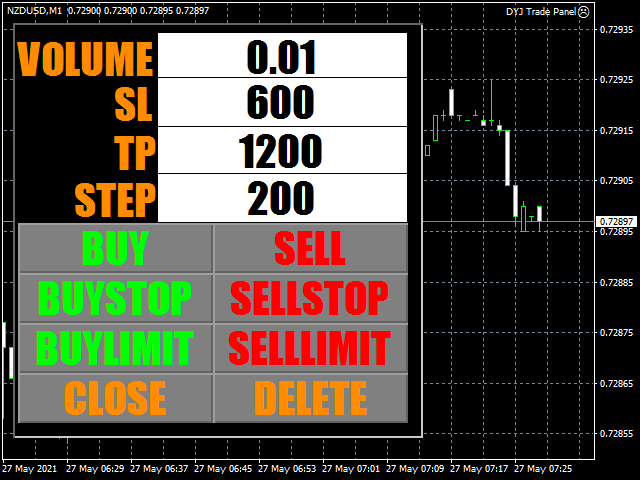
DYJ TradePanelMT5 allows you to perform trading operations ,opening market positions, placing pending orders, removing pending orders, and closing all positions

When you use the "DYJ TradePanelMT5" to make a mistake in the direction of manual trading, you can cooperate with our remote order rescue service to turn the order back into profit.

Parameters

  • Volume = 0.01 -- default volume;
  • InpTP    = 1200 -- default takeprofit POINTS;
  • InpSL     = 600 -- default stop loss POINTS;
  • InpStep  = 200 --  default order step POINTS
  • InpBuyStopCounts        =  1 
  • InpSellStopCounts        =  1 
  • InpBuyLimitCounts       =  1 
  • InpSellLimitCounts       =  1
  • InpMagic                      =  6532


推荐产品
Trade Copier Professional — 本地复制解决方案   Trade Copier Professional 是一款可靠的本地交易复制系统,适用于 MetaTrader 4/5。它允许交易者在同一台电脑上的多个账户之间即时复制仓位,内置安全控制,并配备专业级仪表盘。   概览   该 EA 可在单一文件中同时运行 Master 和 Slave 模式,并可无缝切换。交易可在 MT4 与 MT5 终端之间复制,无需依赖互联网,采用本地文件通信以实现最高速度与稳定性。实时仪表盘显示连接状态、复制统计以及每日表现。   手数与风险管理   提供四种手数模式:固定手数、倍数、风险百分比和余额百分比。止损与止盈可按比例调整或缩放,必要时可反向复制信号。安全功能包括每日亏损与交易限制、最小/最大手数控制、断线保护以及错误跟踪与自动关闭。   过滤与可靠性   交易可按品种或 magic number 进行过滤,配置灵活。系统通过错误检测、重试逻辑、安全关闭和全面日志确保可靠性。优化后的执行速度几乎即时,且资源占用极低。   使用方法   将 EA 附加到图表,设置
ID Trade_Bot BS - an effective tool for automated trading using RSI Trade_Bot BS is an efficient solution for automated trading based on RSI, allowing flexible parameter customization and risk management. Thanks to the ability to choose a trading mode, dynamic Stop-Loss and Take-Profit levels, and trading mode adjustment (buying, selling, or both), it is suitable for various trading strategies. Key Features: Uses the RSI indicator to determine market conditions. Automatically opens an
King Trade Copier
Mohammed Maher Al-sayed Mohammed Ahmed Saleh
KingCopier – Lightning-Fast Local Trade Copier for MetaTrader (Master + Slave) KingCopier is a professional local trade copier that mirrors every trading action from one Master account to unlimited Slave accounts on the same PC or VPS — with an internal copy latency of just a few milliseconds. It was built by a real trader for daily real-money use, with one goal: whatever happens on the Master must happen on the Slave, instantly and without exceptions. Watch the demo video to see the real cop
QuickCopy – Simple MT5 Local Trade Copier with Volume Factor QuickCopy is a lightweight and efficient MT5 local trade copier designed for traders who want to copy trades between accounts on the same computer quickly and reliably. With its simple setup and intuitive interface, QuickCopy makes managing multiple accounts easier than ever. Key Features: Local Account Copying: Instantly copies trades from your master account to one or more client accounts running on the same computer. Volume Factor A
CopyIQ
Stephen Sanjeeve Sahayam
CopyIQ mirrors your trades between MetaTrader 5 terminals running on the same Windows PC - one source account feeding as many receiver accounts as you need. Everything happens locally on the one machine: no VPS, no DLLs, and no internet link between terminals to lag or break. A trade on your source account reaches every receiver in milliseconds. CopyIQ was built by studying where other local copiers let traders down - copies that arrive late, lot sizes that ignore the receiving account, symbols
Ultimate Pro Trading Panel — All-In-One Manual & Grid Trading Dashboard Pro Trading Panel   is an all-in-one on-chart control panel that gives discretionary and semi-automated traders a complete toolkit for entries, exits, risk management, and grid trading — without leaving the chart. Every function is visual, draggable, and updates in real time. If you want to test this utility feel free to download the basic preview version of this tool here:  https://www.mql5.com/en/market/product/181435 Who
Aegis DAX Scalper EA
Damiano Donatello
Aegis DAX Scalper EA is a MetaTrader 5 Expert Advisor designed for short-term trading on GER40/DAX40. The system combines a M5 trend filter with M1 pullback entries, RSI confirmation, candle structure analysis, spread filtering, volatility filtering and automated trade management. The EA does not use grid, martingale or recovery basket logic. Each trade is opened with a real stop loss and managed through break-even and trailing stop rules. Version 1.01 includes improved compatibility with di
Bastion is a monitor-and-close-only risk manager for prop-firm traders. It watches your account against your firm's daily-loss and maximum-drawdown limits in real time and force-closes your open positions BEFORE you cross a line. It never opens a trade of its own, so it stays fully within the tools allowed by FTMO, FundedNext, The5ers, FTUK and FXIFY. Why traders fail challenges A large share of failed evaluations end on a single daily-loss breach: a moment of inattention, a news spike, one tra
Trade Assistant 38 in 1
Makarii Gubaydullin
4.91 (23)
多功能工具:手数计算器,网格订单,风险回报比,交易管理器,供求区域,价格行为等等 演示版本   |   用户手册 交易助手   不能在策略测试器中工作 :您可以下载   此处的演示版本  来测试此 工具 。 联系我   如有任何问题  / 改进建议 / 发现错误 如需MT4版本,请访问 此处 简化、加速并自动化您的交易   流程 。通过此   仪表板 扩展标准终端功能。 交易面板  适用于任何交易品种:外汇、股票、指数、加密货币等。 1. 开立新交易 :手数 / 风险 / 风险回报比计算 :手动交易的风险管理 手数计算器(根据风险大小计算交易量) 风险计算器(根据手数大小计算风险金额) 风险回报   比率 网格订单:  + 动态距离选项,及拆分手数选项 订单激活触发器,+ 买入止损限价 / 卖出止损限价 虚拟止损,虚拟止盈(隐藏止损,隐藏止盈:经纪商不可见) 智能止损 / 入场价位:若K线收盘突破则避免虚假触发 隐藏订单(虚拟挂单) 计划订单:即使市场休市也可挂单交易(周末计划器) 额外多级止盈价位 具有不同ID的OCO(一单取消另一单)订单 图表上的交易可视化 + 调整 止损 /
Fox Wave Pro Copier - Professional Multi-Master Trade Copier Copy trades from multiple Master accounts simultaneously with advanced risk management Key Features Multi-Master Architecture Copy from unlimited master accounts simultaneously Automatic master account detection or manual configuration Real-time trade synchronization via file system Independent risk management for each master Advanced Risk Management Individual risk settings per master account Automatic lot size calculation based
Trading panel for manual trading. Has a fairly wide functionality. Allows you to automatically calculate the order size, open both market and pending orders. It has a wide range of options for closing orders, it is possible to partially close orders, close orders after reaching a certain profit or loss, separately close profitable and unprofitable, buy and sell, as well as pending orders. The panel also contains a simple implementation of a grid of pending orders, reverse and lock functions, tr
| Fully-automated Smart Money Concept (ICT) inspired trading solution with multi-strategy capabilities | Built by a grid trader >> for grid traders.  This is MT5 version, click  here  for  Blue CARA MT4  (settings and logics are same in both versions)     Real monitoring signal  -->  Cara Gold Intro Blue CARA EA   ('CARA') - short for  C omprehensive  A lgorithmic   R esponsive   A dvisor is a next-gen  multi-currency    multi-timeframe  EA base on the widely known (and perhaps the most popul
Exclusive EA for FOREX HEDGE account The EA (FuzzyLogicTrendEA) is based on fuzzy logic strategies based on the analysis of a set of 5 indicators and filters. Each indicator and filter has a weight in the calculation and, when the fuzzy logic result reaches the value defined in the EA parameter, a negotiation is opened seeking a pre-defined gain. As additional functions it is possible to define maximum spread, stop loss and so on . Recommended Symbol: EURUSD, AUDUSD, GBPUSD, NZDUSD, USDCAD, AUD
Viking Alpha DAX Ivar Edition
Valdeci Carlos Dos Passos Albuquerque
Viking Alpha DAX — Germany 40 Expert Advisor for MetaTrader 5 LAUNCH PROMO Only 10 copies at launch price. Price increases with each sale. Launch price: $297 Next price: $497 Final price: $997 Live Performance: FX Blue — Vikingtradingbots What Makes Viking Alpha DAX Different Most DAX robots fail for one simple reason: they treat the Germany 40 like a forex pair. It isn't. The DAX has a heartbeat — a specific rhythm tied to the Frankfurt Stock Exchange opening, the European session structure, an
Smart Prop Firm Trader
Fhulufhelo Norman Mamushiana
NOTE: FOR SETTINGS AND TECHNICAL SUPPORT HERE IS OUR SMART MONEY TELEGRAM LINK:  https://t.me/ +g51Apb2W5Ck0ZGFk WHAT IS SMART MONEY EA? Smart Money EA is not just another trading robot. It's a high precision trend following EA that leverages the Smart Money concept, price action, and market momentum to enter trades with exceptional accuracy." It's your all-in-one solution for trading EURUSD, Crude Oil, Nasdaq 100, Germany 40, and even volatility indices, including Step index . STAY INFORMED AN
The Ultimate All-In-One Trade Manager & Prop Firm Guardian for MT5. Nexus Pro Trade Manager is the most advanced, all-in-one trading assistant designed for both manual traders and Prop Firm challengers. Featuring a stunning, lag-free UI (Dark/Light mode), it completely transforms your MT5 into a professional trading terminal. Whether you are trading a personal account or trying to pass evaluations for FTMO, FundedNext, or other prop firms, Nexus Pro protects your capital, automates your risk cal
TradePilotmt5
Hossein Khalil Alishir
TradePilot Expert Advisor (EA) for MetaTrader 5 TradePilot is a professional and user-friendly Expert Advisor (EA) for MetaTrader 5 (MT5) . It simplifies automated trading , risk management , and trade execution with a smart trading panel . Perfect for beginners and experienced traders looking for a reliable trade manager EA with automated lot size calculation and smart position management. Key Advantages User-Friendly Trading Panel: Customizable panel with buttons and hotkeys for fast ex
MT5 to MT5 Trade Copier – Fast and Reliable Trade Copying Solution The MT5 Trade Copier is a powerful tool designed to copy trades seamlessly between MetaTrader 5 accounts with minimal latency and high accuracy. Built for speed, flexibility, and ease of use, the copier works across different brokers, even when symbols use different prefixes or suffixes. This Expert Advisor is suitable for professional traders, signal providers, fund managers, and traders who manage multiple accounts. Key Featur
US30NinjaMT5
Satyaseelan Shankarananda Moodley
US30 Ninja is a 5 minute scalping indicator that will let know you when there is a trade set up (buy or sell). Once the indicator gives the trade direction, you can open a trade and use a 30 pip stop loss and a 30 pip to 50 pip take profit. Please trade at own own risk. This indicator has been created solely for the US30 market and may not yield positive results on any other pair. 
Copier Master RAlabs (receiver) and Copier Provider RAlabs (signal source) — a system for local copying of trades between MetaTrader terminals on a single PC/VPS. It consists of two products: Provider (signal source) and Master (receiver/copier with a control panel). Provider is installed on the donor account (the account whose trades are being copied) — it publishes the trades. Master is installed on the recipient account — it reads the donors and opens copies; it hosts the entire copy setting
CopyMaster mt5
Evgenii Aksenov
5 (3)
此实用程序将允许您将任何交易从一个具有主设置的终端复制到具有从设置的其他终端 与此同时,您可以选择要复制的对,通过几个参数设置复制顺序的大小。 通过回撤或只复制有利可图的交易来设定限额损失 您可以将mt4或MT5的交易复制到MT4或MT5其他经纪商 现在,将在MT4中工作的任何Ea交易的信号复制到MT5终端或返回将不难 使用复制主复制任何交易从其他信号,EAs,手动交易.  使用设置,您可以更改批量大小,交易方向,只复制利润交易和setdbvalue来保存您的存款  复制大师可以在一个帐户上统一不同订阅信号的几种策略 要复制MT4的交易,你需要复制主MT4版本: https://www.mql5.com/en/market/product/62132 有关复制主设置的更多信息: https://www.mql5.com/en/blogs/post/749356
Mine Farm
Maryna Kauzova
Mine Farm is one of the most classic and time-tested scalping strategies based on the breakdown of strong price levels. Mine Farm is the author's modification of the system for determining entry and exit points into the market... Mine Farm - is the combination of great potential with reliability and safety. Why Mine Farm?! - each order has a short dynamic Stop Loss - the advisor does not use any risky methods (averaging, martingale, grid, locking, etc.) - the advisor tries to get the most
EA Risk Manager is a professional risk‑management Expert Advisor designed to protect your trading account and enforce disciplined money management. The EA does not open trades by itself – it only monitors and manages all existing positions (manual and automated) on the account. It is especially useful for traders who want to: Hard‑limit daily / weekly / monthly losses and profits. Restrict lot size and the number of open trades. Trade a basket of G7‑related Forex pairs using one centralized
Golden Gestion TP SL No Limit MT5
Matthias Hubert Patrick Snidaro
Auto SL/TP Manager EA – Gestion Automatique Intelligente Auto SL/TP Manager EA est un Expert Advisor conçu pour automatiser la gestion des commandes avec une efficacité maximale et une grande discrétion. Il gère automatiquement : Le Stop Loss (SL) et le Take Profit (TP) Le Profit Lock (verrouillage progressif des bénéfices) Le Trailing Stop avec plusieurs méthodes avancées L' affichage masqué du SL et du TP pour plus de discrétion (non visible par le courtisan) C'est l'outil idéal pour les
This tool will perform Trailing stop loss and Break even management for orders. Helps you limit or reduce the time spend watching orders on the screen, especially when you need to go to sleep. Just add this EA to 1 chart, you can manage all pairs. You can filter orders by comment, magic number, symbol and order ticket number. When Breakeven it can add shift/offset pips (to cover the commission...). You can try in strategy tester before purchase. The EA will add Buy and Sell alternately, so you
Ember Fuse MT5
Kestutis Balciunas
Ember Fuse — 趋势跟踪网格恢复系统,支持所有交易品种 Ember Fuse EA 是一款专业的自动化交易系统,利用 SuperTrend 指标识别趋势方向变化,并以马丁格尔手数递增方式构建智能网格恢复仓位。适用于任何交易品种——外汇货币对、黄金(XAUUSD)、指数和加密货币——具备随深度增加而动态扩展的网格间距、基于加权平均入场价的虚拟篮子止盈,以及内置的回撤缩减算法,可逐步关闭配对订单。实时新闻过滤器通过 API 实时获取经济日历,并在高影响事件期间暂停交易。附带 6 个预优化预设文件,可立即部署于外汇货币对及 XAUUSD。 MT4 版本请查看:    Ember Fuse MT4 更多产品请查看:   所有产 品 技术规格 交易品种:所有货币对、XAUUSD(黄金)、指数、加密货币——您的经纪商提供的任何品种 时间框架:任意(在图表时间框架或指定时间框架上使用 SuperTrend 指标) 最低入金:每 0.01 手 500 美元(建议 1000 美元及以上) 杠杆:建议 1:100 或更高 账户类型:任意 经纪商:建议使用点差较小的 ECN 经纪商 VPS:强烈建
Monitor Dashboard
Johann Dominique Carnevali
Clear EA & Internal Strategy Performance Separation The core purpose of MONIT Dashboard MT5 is to help traders clearly identify where their real performance comes from . On a MetaTrader 5 account, the global balance result is often not enough. A profitable account can hide a weak EA, an overactive strategy, a manual trading loss, or one specific Magic Number group generating most of the drawdown. This becomes even more important when several Expert Advisors are running on the same account, or w
Trade Copier This tool copies trades between MT5 or MT4 platforms running on the same computer. For example: MT5 --> MT4 & MT4 & MT4 etc. MT5 --> MT5 & MT5 & MT5 etc. MT5 --> MT4 & MT5 & MT4 & MT5 etc. Also download the version for   MT4 Parameters ID - is not required. If you want to use multiple MASTERs on one PC or on one MT5, each MASTER must have a different ID (alphanumeric). Then SLAVE must have the same ID as the MASTER. Mode MASTER - for a provider account; in this mode, the tool transm
TradePanel EA – Manual + Semi-Auto Trading Dashboard TradePanel EA is a powerful assistant for traders who want precision, speed, and full control over their trades. It combines on-chart execution , basket profit management , drawdown protection , and market/session awareness into one easy-to-use panel. Core Features Click-to-Trade System Place BUY/SELL instantly from the panel Click on the chart to set Stop Loss — TP is auto-calculated by your chosen R:R Risk Control & Lot Sizing Risk
Spread Analysis Utility MT5
AL MOOSAWI ABDULLAH JAFFER BAQER
• Please test the product in the Strategy Tester before purchasing to understand how it works. • If you face any issues, contact me via private message—I’m always available to help. • After purchase, send me a screenshot of your order to receive a   FREE EA   as a gift. Spread Analysis Utility MT5 – Monitor & Analyze Broker Spreads in Real Time! Do you want to track your broker's spread fluctuations with precision? Spread Analysis Utility MT5 gives you real-time insights into the spread behavio
该产品的买家也购买
Trade Assistant MT5
Evgeniy Kravchenko
4.43 (214)
它有助于计算每笔交易的风险,容易安装新的订单,具有部分关闭功能的订单管理, 7 种类型的追踪止损和其他有用的功能。   附加材料和说明 安装说明   -   应用程序说明   -   模拟账户应用程序的试用版 线条功能  - 在图表上显示开仓线、止损线、止盈线。 有了这个功能,就可以很容易地设置一个新的订单,并在开仓前看到它的附加特性。   风险管理  - 风险计算功能在考虑到设定的风险和止损单的大小的情况下,计算新订单的成交量。它允许你设置任何大小的止损,同时观察设定的风险。 批量计算按钮 - 启用 / 禁用风险计算。 在 " 风险 " 一栏中设置必要的风险值,从 0 到 100 的百分比或存款的货币。 在 " 设置 " 选项卡上选择风险计算的变量: $ 货币, % 余额, % 资产, % 自由保证金, % 自定义, %AB 前一天, %AB 前一周, %AB 前一个月。   R/TP 和 R/SL - 设置止盈和止损的关系。 这允许你设置相对于损失的利润大小。 例如, 1 : 1 - 这决定了 TP = SL 的大小。 2 : 1 - 这意味着 TP 是 SL 的两倍。 RR -
欢迎来到 Trade Manager EA——这是一个终极风险管理工具,旨在使交易变得更直观、精准和高效。它不仅仅是一个下单工具,而是一个用于无缝交易计划、仓位管理和风险控制的全面解决方案。不论您是新手交易员、资深交易员,还是需要快速执行的剥头皮交易员,Trade Manager EA 都可以满足您的需求,适用于外汇、指数、大宗商品、加密货币等各种市场。 借助 Trade Manager EA,复杂的计算已成过去。只需分析市场,在图表上用水平线标记入场、止损和止盈,设置您的风险水平,Trade Manager 就会立即计算出理想的头寸规模,并实时显示以点、账户货币计价的止损和止盈。每笔交易都得以轻松管理。 主要功能: 头寸规模计算器 :根据定义的风险瞬间确定交易规模。 简单的交易计划 :在图表上用可拖动的水平线直接计划交易,设置入场、止损和止盈。 实时显示 SL 和 TP :以账户货币、点或分显示止损和止盈,便于分析。 高级保护工具 盈亏平衡选项 : 基本盈亏平衡 :当您的交易达到设定水平时自动保护利润。 多级盈亏平衡 :设置多达 4 个级别以逐步保护利润。 尾随止损选项 : 基本尾随
TradePanel MT5
Alfiya Fazylova
4.88 (162)
交易面板是一款多功能交易助手。该应用包含超过50种手动交易功能,并允许您自动执行大多数交易任务。 在购买之前,您可以在演示账户上测试演示版本。下载用于演示账户的试用版应用程序: https://www.mql5.com/zh/blogs/post/762579 。 完整说明 这里 。 贸易. 只需单击一下即可执行交易操作: 打開掛單和頭寸,並自動計算風險。 一鍵打開多個訂單和頭寸。 打開訂單網格。 按組別關閉掛單和頭寸。 反轉頭寸方向(關閉買入>打開賣出,關閉賣出>打開買入)。 鎖定頭寸(通過開啟缺少的頭寸,使買入和賣出頭寸的數量相等)。 一鍵部分關閉所有頭寸。 將所有頭寸的止盈和止損設置在同一價格水平。 將所有頭寸的止損設置在盈虧平衡水平。 開倉時,可使用以下功能: 在多個訂單或倉位之間分配計算出的數量(在單擊一次時開啟多個訂單和倉位)。 在開啟訂單前在圖表上可視化交易水平。 僅在當前點差不超過設定值時才開啟倉位。 止盈和止損之間的自動比例。 虛擬止損和止盈。 自動將止損和止盈的大小增加為當前點差的大小。 基於ATR指標讀數計算止盈和止損。 設置掛單的到期日期。 為掛單設置追蹤(掛單
测试版发布 Telegram to MT5 Signal Trader 即将进入正式的 Alpha 版本。一些功能仍在开发中,您可能会遇到一些小错误。如果您遇到问题,请反馈,您的意见将帮助我们改进软件。 Telegram to MT5 Signal Trader 是一款强大的工具,能够将 Telegram 频道或群组的交易信号自动复制到您的 MetaTrader 5 账户。 支持公开和私人频道,可将多个信号提供者连接至一个或多个 MT5 账户。软件优化、高效、稳定,精准控制每笔复制交易。 界面简洁,仪表盘美观,图表交互性佳,导航直观。您可以管理多个信号账户,自定义每个提供者的设置,并实时监控所有操作。 系统需求 由于 MQL 限制,EA 需要配合 PC 端应用与 Telegram 通信。 安装程序可通过官方 安装指南 获取。 核心功能 多提供者支持: 从多渠道复制信号至多个 MT5 帐户 高级信号识别: 关键词、模式和标签全面自定义 逐提供者控制: 可启用/禁用特定信号类型、平仓策略等 灵活风险管理: 固定手数、固定金额、余额/权益百分比、部分平仓设置 可定制 SL/TP: 覆盖信号
================================================================================ POC BREAKOUT - V20.72. Full Professional Grade Toolkit ================================================================================ POC Breakout is a full MetaTrader 5 trading dashboard for discretionary traders who want breakout signals, Point of Control (POC) context, volume profiles, order flow, market structure, news, alerts, and advanced trade planning in one professional workspace. Attached directly to you
Farmed Hedge Yield Farming | All Markets (Manual - Hybrid - Semi/Automated EA) MULTI-ASSET SUPPORT Trade any asset available on your broker - Forex: Major, Minor, Exotic pairs - Crypto: BTC, ETH, XRP, SOL, BNB - Stocks: Apple, Tesla, Amazon, Google, etc. - Commodities: Gold, Silver, Oil, Gas - Indices: US30, NAS100, SPX500, DAX40 - Any CFD your broker offers VERIFIED TRADING RESULTS - Farmed Hedge Yield Axi Copy:  https://www.mql5.com/en/signals/2356376 - Farmed Hedge Yield Exn Copy:   https:/
Power Candles 策略扫描器——自优化多符号设置查找器 Power Candles策略扫描器 采用与Power Candles指标相同的自优化引擎,可同时扫描您“市场观察”中的所有交易品种。一个面板即可显示当前哪些品种在统计上具备交易价值、每种策略的最佳应用方向、最优止损/止盈组合,并在新信号触发时立即向您发送提醒。 本工具是 Stein Investments 生态系统的一部分 - 18+ 款工具,加上 Max,您的一对一 AI 交易导师。  随时在线,深入了解每一款指标,在您需要梳理思路的那一刻就在那里。  立即认识他: https://stein.investments 您的全面市场监控。每个交易品种超过3,000次自动优化。2种警报类型。一键切换图表并采取行动。 为何您需要此工具 大多数多标的扫描器仅展示价格 波动 。每只股票的波动率、百分比变化、RSI。您仍需自行摸索正确的策略、合适的止损位以及理想的入场阈值。Power Candles策略扫描器针对每只股票自动解答这些问题,仅在数学验证过的交易设置中触发实际入场信号时才会向您发出提示。这就是全部卖点。 自动
Anchor Trade Manager
Kalinskie Gilliam
5 (5)
Anchor: The EA Manager Run your full EA portfolio without conflicts, without stacked risk, and without watching every chart yourself. Anchor coordinates up to 64 Expert Advisors on a single account, including daily loss protection built for prop firm rules. Attach Anchor to any chart. Type your EA names and magic numbers in one line. Click OK. Anchor begins coordinating immediately. Built for portfolios. Built for prop firms. Built for discipline. The Problem Running multiple EAs on the same acc
YuClusters
Yury Kulikov
4.93 (43)
Attention: You can view the program operation in the free version  YuClusters DEMO .  YuClusters is a professional market analysis system. The trader has unique opportunities to analyze the flow of orders, trade volumes, price movements using various charts, profiles, indicators, and graphical objects. YuClusters operates on data based on Time&Sales or ticks information, depending on what is available in the quotes of a financial instrument. YuClusters allows you to build graphs by combining da
Footprint Chart Pro — Professional OrderFlow EA for MetaTrader 5 Version 6.34 | Professional tool for real traders | Institutional-Grade Visualization DEMO USERS - PLEASE SELECT EVERY TICK / REAL TICK WHEN TESTING AND YOU HAVE DOWNLOADED HISTORICAL DATA. IF YOU SEE A WAITING SCREEN AND IT IS NOT DOWNLOADING, IT MEANS YOU HAVE LOW HISTORICAL DATA. TRY 1 MIN AND 5 MIN FIRST ON 1 DAY DATA. ONE DAY DATA SHOULD BE THE NEWEST AND MOST CURRENT DATE. PLEASE WAIT UNTIL THE MARKET HAS ROLLED OVER PERIOD.
Welcome to ENTRY IN THE ZONE WITH SMC MULTI TIMEFRAME Entry In The Zone with  SMC Multi Timeframe  is a professional trading indicator built on Smart Money Concepts (SMC), combining market structure analysis with a No Repaint BUY / SELL signal system in a single indicator. It helps traders understand market structure more clearly, identify key price zones, and focus on higher-quality trading opportunities. By combining Multi-Timeframe Analysis, Points of Interest (POIs), and real-time signals, t
The product will copy all telegram signal to MT5 ( which you are member) , also it can work as remote copier.  Easy to set up, copy order instant, can work with almost signal formats, image signal,  s upport to translate other language to English Work with all type of channel or group, even channel have "Restrict Saving Content", work with  multi channel, multi MT5 Work as remote copier: with signal have ticket number, it will copy exactly via ticket number. Support to backtest signal. How to s
Trade Manager DaneTrades
Levi Dane Benjamin
4.28 (29)
交易管理器可帮助您快速进入和退出交易,同时自动计算风险。 包括帮助您防止过度交易、报复性交易和情绪化交易的功能。 交易可以自动管理,账户绩效指标可以在图表中可视化。 这些功能使该面板成为所有手动交易者的理想选择,并有助于增强 MetaTrader 5 平台。多语言支持。 MT4版本  |  用户指南+演示 交易经理在策略测试器中不起作用。 如需演示,请参阅用户指南 风险管理 根据%或$自动调整风险 可选择使用固定手数或根据交易量和点自动计算手数 使用 RR、点数或价格设置盈亏平衡止损 追踪止损设置 最大每日损失百分比,在达到目标时自动平仓所有交易。 保护账户免遭过多提款并阻止您过度交易 最大每日损失(以美元为单位)在达到目标时自动关闭所有交易。 保护账户免遭过多提款并阻止您过度交易 一键实现所有交易的盈亏平衡 自动计算从手机/电话发送的交易的风险 OCO 在设置中可用 交易和头寸管理 通过设置每月、每周、每天、每小时或每分钟的最大交易次数,停止过度交易和报复性交易。 高级挂单管理。 调整何时关闭挂单的规则 追踪挂单 支持市价订单和挂单 每日最大利润目标(以美元为单位)以确保头寸并停止
EA Auditor
Stephen J Martret
5 (4)
EA Auditor is an independent analysis tool for traders evaluating Expert Advisors and trading signals on MetaTrader 5. It audits backtest reports, reviews posted developer signals, and cross-verifies the two against each other to help traders assess strategies before committing capital. The MQL5 market offers a wide range of Expert Advisors from many developers, with varying approaches, quality, and transparency. EA Auditor provides a consistent, data-driven framework for reviewing them, answer
FUTURES ORDERFLOW FOOTPRINT CHART Professional OrderFlow EA for MetaTrader 5 Version 1.01| Professional tool for real traders | Institutional-Grade Visualization STRATEGY TESTER USERS - PLEASE SELECT EVERY REAL TICK WHEN TESTING AND YOU HAVE DOWNLOADED HISTORICAL DATA. IF YOU SEE A WAITING SCREEN AND IT IS NOT DOWNLOADING, IT MEANS YOU HAVE LOW HISTORICAL DATA. TRY 1 MIN AND 5 MIN FIRST ON 1 DAY DATA. ONE DAY DATA SHOULD BE THE NEWEST AND MOST CURRENT DATE. PLEASE WAIT UNTIL THE MARKET HAS ROL
HINN Lazy Trader
ALGOFLOW OÜ
5 (1)
LIMITED SUMMER SALE -40% ! ONLY $470 insead of $790!  Maximum real discount! ONLY UNTIL 08/22 The core idea: using the user interface, you configure the parameters the chart must meet before entering a position (or positions), choose which entry models to use, and set the rules for when trading and planning should end. Lazy Trader  handles the rest: it  takes over all the routine chart watching and execution! full description  :: 3 key videos [1] ->  [2]   ->  [3] What can it do? - Understand
Quant AI Agents
Ho Tuan Thang
5 (1)
Quant AI Agents are independent trading Expert Advisors. Instead of trading using a fixed strategy like other conventional EAs, Quant AI Agents   is a   multi-agent AI trading framework   that turns natural-language strategy prompts into live.  WANT THE SAME RESULTS AS MY LIVE SIGNAL?   Use the exact same brokers I do:   IC MARKETS , IC TRADING   .  Unlike the centralized stock market, Forex has no single, unified price feed.  Every broker sources liquidity from different providers, creating un
EasyInsight AIO MT5
Alain Verleyen
4.92 (12)
EASY Insight AIO – 全能智能交易一站式解决方案 概述 想象一下,您可以在几秒钟内扫描整个市场——外汇、黄金、加密货币、指数,甚至股票——无需手动筛选图表、繁琐安装或配置指标。 EASY Insight AIO 是您专为 AI 交易打造的即装即用数据导出工具。它将整个市场快照一次性输出为简洁的 CSV 文件,直接支持 ChatGPT、Claude、Gemini、Perplexity 等各类 AI 平台的即时分析。 无需窗口切换,无需图表叠加,也没有任何杂乱。只需纯净、结构化的数据自动导出,让您专注于基于数据的高效决策,无需再盯盘耗时。 为什么选择 EASY Insight AIO? 真正的一体化 • 无需设置,无需安装指标,无图表叠加。只需安装、运行并导出——就是这么简单。 多资产全覆盖 • 扫描分析外汇、金属、加密货币、指数、股票——您的券商所能提供的一切市场。 AI 专属数据导出 • 高度结构化、针对 AI 优化的 CSV 文件,直接适配主流智能工具和平台。 完整导出内容: • 三个可选周期的货币强度分析 • 净多头头寸变化体现市场情绪 • 成交量变化、
Trader Evolution
Siarhei Vashchylka
5 (7)
" Trader Evolution " - A utility designed for traders who use wave and technical analysis in their work. One tab of the utility is capable of money management and opening orders, and the other can help in making Elliott wave and technical analysis. Manual (Be sure to read before purchasing) | Version for MT4 Advantages 1. Trading in a few clicks. Immediate and pending orders are available in the panel 2. Money management. The program automatically selects the appropriate lot size 3. Simplifies
Premium Trade Manager - 内置交易导师的图表面板 Premium Trade Manager 将一位交易导师嵌入您的图表,并在其下搭载完整的执行引擎。像往常一样建立交易,然后让您的 AI 交易导师 Max 读取这笔具体的交易,结合您的实时账户给出直接判断,再由您决定是否下单:止损是否符合纪律化交易的要求、风险规模是否合理、高影响新闻事件是否即将发布、您是否接近资金盘限额。其下是完整的执行引擎,负责点击之后的一切:一键按风险下单、您在图表上拖动规划且交易进行中仍可随时调整的计划、最多四个分批止盈级别、七种移动止损方式、实时资金盘合规检查、新闻屏蔽保护,以及对自身成本进行评级的点差功能。决策由您做出。Max 给出第二次审视。面板负责此后的一切。 购买前先亲手体验。 直接在浏览器中点击实时面板,这是在购买前感受其工作方式的最快途径。 stein.investments/products/premium-trade-manager Max 是您的一对一 AI 交易导师,他直接内置于面板之中。  他了解您的账户、您的设置和您的规则,用您自己的语言回答,并在每笔交易下单前进
Telegram To MT5 Receiver
Levi Dane Benjamin
4.53 (15)
将信号从您所属的任何渠道(包括私人和受限渠道)直接复制到您的 MT5。 该工具在设计时充分考虑了用户的需求,同时提供了管理和监控交易所需的许多功能。 该产品采用易于使用且具有视觉吸引力的图形界面。 自定义您的设置并在几分钟内开始使用该产品! 用户指南 + 演示  |   MT4版本  |   不和谐版本 如果您想尝试演示,请参阅用户指南。 Telegram To MT5 接收器在策略测试器中不起作用! Telegram 至 MT5 功能 一次复制多个通道的信号 从私人和受限频道复制信号 不需要机器人令牌或聊天 ID(如果出于某种原因需要,您仍然可以使用这些) 使用风险百分比或固定手数进行交易 排除特定符号 选择复制所有信号或自定义要复制的信号 配置单词和短语以识别所有信号(默认值应适用于 99% 的信号提供商) 配置时间和日期设置以仅在需要时复制信号 设置一次打开的最大交易量 交易和头寸管理 使用信号或自动设置的管理 通过设置每月、每周、每天、每小时或每分钟的最大交易次数,停止过度交易和报复性交易。 支持市价订单和挂单 每日最大利润目标(以美元为单位)以确保头寸并停止过度交易 确
Auto Trade Copier 被设计成多的MT5账户/端子,绝对精度之间复制交易。 有了这个工具,你可以充当要么提供商(源)或接收(目的地) 。每一个交易行为将由提供商克隆到接收器,没有延迟。 以下是亮点功能:     在一个工具提供商或接收器之间转换角色。     一个供应商可以交易复制到多个接收者的账户。     绝对兼容MT5的顺序/位置管理规则,该规则允许与调整容积为每个符号只有一个位置。     自动识别和同步代理之间的符号后缀。     允许高达5特殊符号的设置(即: GOLD - > XAUUSD ,等等) 。     多lotsize设置选项。     允许过滤的订单类型将被复制。     关断端子或电源关闭后恢复以前的设置和状态。     实时控制面板。     使用方便,界面友好。 用法: - 安装工具提供的MT5终端,并选择角色“提供者” ,然后启用它。 - 安装工具接收的MT5终端,并选择角色的“接收器” ,输入提供商的帐号,然后启用它(你可以有很多接收者的帐户,只要你想) 。 设置和参数:      特殊符号设置(菜单) : 配置高达5对特殊
My Chart Generator
Trade The Volume Waves Single Member P.C.
What if your chart adapted to the market instead of the clock?   THE PROBLEM IT SOLVES   Instead of trying to find the best indicator that fits your timeframe chart, build a chart and find the most appropriate indicator.   My Chart Generator is a MetaTrader 5 background service that builds  live, fully historical three types of custom charts :1. Range/Volume Balanced chart, 2.  Range/Volume Absorption chart and 3. Constant Volume chart from any symbol — Forex pairs, crypto, indices, commodities,
AI Agent Supervisor is NOT an Expert Advisor. AI Agent Supervisor   is a   multi-agent AI risk & portfolio supervisor   that watches every EA on your account and intervenes in real time.  WANT AN AI PORTFOLIO MANAGER WATCHING YOUR FLEET 24/7?   Run your fleet on the same brokers I do:   IC MARKETS , IC TRADING   .  Unlike the centralized stock market, Forex has no single, unified price feed.  Every broker sources liquidity from different providers, creating unique data streams. The Supervisor r
Telegram to mt5 pro
Janet Abu Khalil
4 (4)
Telegram to MT5 Pro — 高级 Telegram 信号复制器(Auto-Fix,多TP,风险控制,完整交易管理) Telegram to MT5 Pro — 专业 Telegram 信号复制系统 Telegram to MT5 Pro 可将来自 Telegram 的交易信号实时复制到您的 MetaTrader 5 账户,并提供完整的风险控制、执行管理与交易管理功能。 系统由两个组件组成: • 运行在 MetaTrader 5 内的 Expert Advisor(EA) • 连接 Telegram 并将信号发送到 EA 的桌面桥接程序 两个组件必须在同一台电脑运行。由于 MQL5 限制,EA 无法直接连接 Telegram。 支持与安装 提供完整 PDF 安装指南。 支持内容: • 完整 PDF 使用手册 • 分步安装指导 • 在线聊天支持 • 交易商设置帮助(前缀、后缀、符号映射) 功能说明 • 读取任意 Telegram 群组或频道信号 • 自动解析交易品种、方向、入场、止损、止盈 • 秒级执行交易 • 管理交易(移动止损、保本、部分平仓) • 支持多账户与多信号
Trade Manager DashPlus
Henry Lyubomir Wallace
4.85 (13)
DashPlus 是一款先进的交易管理工具,旨在提升您在 MetaTrader 5 平台上的交易效率和效果。它提供一整套功能,包括风险计算、订单管理、先进的网格系统、基于图表的工具和绩效分析。 主要功能 1. 恢复网格 实施一个平均和灵活的网格系统,以在不利的市场条件下管理交易。 允许设置战略性进出点,以优化交易恢复。 2. 叠加网格 通过在强劲的市场波动中增加仓位,最大化有利交易的潜在回报。 帮助您通过扩展获利交易来利用趋势市场。 3. 盈亏线 在图表上直接提供潜在利润和损失场景的可视化表示。 调整设置并拖动盈亏线,以在执行之前评估各种交易结果。 4. 篮子模式 简化同一交易品种的多仓位管理,将它们合并为一个聚合仓位。 基于平均价格,便于监控和应用止损、止盈以及其他订单修改。 5. 图表上的新闻 将预定的经济新闻事件整合到您的交易图表中。 帮助您随时掌握可能影响市场波动的即将发生的事件,从而更好地规划交易。 6. 警报 设置基于时间或价格的警报,通知会显示在 MT5 中,或通过 MT5 应用发送到您的移动设备。 对监控关键价格水平或重要的交易时段非常有用。 7. 绩效统计 提供详细的
Signal TradingView to MT5 Pro Automator TradingView 与 MetaTrader 5 之间的即时专业执行 使用最强大的桥梁,将 TradingView 警报与 MT5 中的实际执行连接起来,实现交易策略的自动化。这款 Expert Advisor 专为要求速度、灵活性和完美风险管理的交易者设计,可将任何警报消息转化为精确的市价或限价订单。 优势与特点 通用解析引擎(专有): 先进技术,能够自动识别并提取任何警报格式中的数据。您不再受限于单一的死板格式;系统会自动理解交易品种(Symbol)、操作(Action)、价格(Price)、止损(SL)和止盈(TP)。 实时执行: 极速轮询技术(低于 1 秒),经过优化可将延迟降至最低。接收到信号后,订单将在毫秒内执行。 机构级风险管理: 基于以下方式自动精确计算手数: 净值/余额百分比(% of Equity/Balance): 每笔交易承担固定账户百分比的风险。 风险金额(Risk Amount): 设定在触发止损时损失的固定货币金额(例如:100 美元)。 固定手数(Static Lots)
Ultimate Extractor
Clifton Creath
5 (8)
Ultimate Extractor - Professional Trading Analytics for MT5 *****this is the local HTML version of Ultimate Extractor. !!!!!it is not compatible with Cloud!!!! For the online version please reach out to me directly****** Ultimate EA manager also now available when you use cloud pro and above for free!! Ultimate Extractor transforms your MetaTrader 5 trading history into actionable insights with comprehensive analytics, interactive charts, and real-time performance tracking. What It Does Automa
MT5 Trading Deck
Manuel Michiels
5 (2)
One button. One trade. MT5 Trading Deck is a hotkey trading panel for MetaTrader 5 that turns the platform into a keyboard-driven execution cockpit. Stop loss, take profit and lot size are pre-calculated for every key; the moment you press, a market order is live on the broker. A complete technical user manual is attached in the product Comments section. It documents every input parameter, the full hotkey map, the recommended Stream Deck XL layout, and the advanced workflows for Pre-Limit orders
MT5 to Telegram Signal Provider 是一个易于使用且完全可自定义的工具,它允许向 Telegram 的聊天室、频道或群组发送 指定 的信号,将您的账户变为一个 信号提供商 。 与大多数竞争产品不同,它不使用 DLL 导入。 [ 演示 ] [ 手册 ] [ MT4 版本 ] [ Discord 版本 ] [ Telegram 频道 ]  New: [ Telegram To MT5 ] 设置 提供了逐步的 用户指南 。 不需要了解 Telegram API;开发者提供了您所需的一切。 关键特性 能够自定义发送给订阅者的订单详情 您可以创建分层的订阅模型,例如铜、银、金。其中金订阅获得所有信号等。 通过 id、符号或评论过滤订单 包括执行订单的图表截图 在发送的截图上绘制已关闭的订单,以便额外核实 延迟发送新订单消息的可能性,以便在发送前对位置进行调整 订单详情完全透明: 新的市场订单*带截图 订单修改(止损、获利) 已关闭的订单*带截图 部分关闭的订单** 新的挂单 修改的挂单(进场价格) 挂单激活(作为新的市场订单附加) 已删除的挂单 历史订单报告
作者的更多信息
DYJ GlobalForexTradeWarMAPools   is based on  indicator  MA . It can be used for any currency pair and timeframe. The Indicator is based on the following idea: crossing of two Moving Average lines (Fast and slow ) is used as a signal for opening and closing a position together. Go Long when Fast MA (MA1) crosses above Slow MA (MA2). Go Short when Fast MA (MA1) crosses below Slow MA (MA2). The EA uses dynamic allocation MA period. The MA1 and MA2 period is the Fibonacci sequence, such as InpMAArr
DYJ WPR - SignalSource 是基于  WPR  指标的EA . 它仅仅使用一个货币对某个周期图表运行EA,就能监控全部货币对信号开仓关仓。 WPR 推荐 指标值介于80%和100%之间,表明市场超卖。 指标值介于0到20%之间,表示市场超买。 该指标的入场信号,则是趋势转折点。 该指标使用模拟交易技术,   指标为你提供评价开盘信号和收盘信号整体盈利。   你用哪种评估模式交易都很方便。   当你选择最大利润模型评估模型时, 建议您使用跟踪止损功能。 这样可以最大程度的跟踪趋势利润。   当您选择反向信号关闭评估模式时, 建议你耐心等待反信号出现,然后关闭仓位。 这个可以一直等趋势真正结束并盈利。 如果您需要自动化跟随指标开仓关仓,请下载实用工具软件 DYJ Follow Me Input parameters  [Indicator] InpWPRPeriod    = 14 -- period for WPR    InpShowArrows      = true InpAlertsOn        = true ArrowUpClr       
QuickClose   一键快速管理订单 QuickClose   让您一键即可立即关闭所有订单,操作速度极快。您可以选择关闭特定货币对的订单,或一次性关闭所有订单,使交易管理更快速、更高效。 该   EA(智能交易程序)   能够快速关闭所选货币对或所有交易的买入和卖出订单。SymbolButton 专为关闭订单设计,支持手动和自动预设利润平仓功能。 主要功能包括: 总利润追踪:   自动锁定   70% 的目标利润,同时新的目标利润将成倍提高。 自动删除挂单:   可选择删除所有挂单,或仅删除某个货币对的挂单。 手动开仓按钮:   轻松手动开设多头或空头订单。 利润显示 & 独立平仓按钮:   分别显示多头和空头的总利润,并可通过独立按钮分别平仓。 参数设置 PROFIT   – 当某个货币对的总利润达到设定值时,仅关闭该货币对的所有订单。 TOTALPROFIT   – 当所有货币对的总利润达到设定值时,关闭所有订单。 InpTrailingPercentage   – 自动锁定 70% 的目标利润。 ISEQUITY   – YES_EQ :当净值低于设定的 EQUITY
SoarSignal
Daying Cao
专业交易者都知道,在市场价格趋势转变时是进场交易的最佳时机,趋势转变时K线状态变化最明显,SoarSignal使用随机指标可以识别这些变化,确认趋势已衰竭,它是最接近K线状态变化的指标。SoarSignal的3条线均在 0 到 100 的区间内移动。值高于 80 视为处于超买区,表明价格可能发生反转。值低于 20 视为超卖,也表明价格可能发生反转。如果 %K 线由下往上穿越 %D 线,如果 %J 线由下往上穿越 %K与%D 线,可解读为买入信号。如果 %K 线由上往下穿越 %D 线,如果 %J线由下往上穿越 %K与%D 线,可解读为卖出信号。此类交叉可频繁发生。为获取更可靠的信号,您可以等待交叉与到达超买/超卖位同时发生。当有更可靠的买卖信号时提示交易者。 输入参数 nPeriod:20-Indicator Period.KDJ指标周期,通常不需要改变。 zoneSELL:80-值高于 80 视为处于超买区,表明价格可能发生反转。 zoneBUY:20-值低于 20 视为超卖,也表明价格可能发生反转。 InpBuyColor:LighSeaGreen-多头箭头颜色。 InpSellC
StrongCurrency
Daying Cao
5 (1)
StrongCurrency是基于各种技术指标,移动平均线和枢轴的完整交易系统。这些元素中的每一个都可以通过定义的规则和系数进行评估(取决于指标),为StrongCurrency提供了无限优化的方案。StrongCurrency通过评估数据创建一个趋势强度和入场信号列表显示,它显示所有货币对的数据。根据每个货币对趋势强弱获得入场信号。列表数据包括Symbol,BuyPercent,SellPercent,LastBuySignal,LastSellSignal。其中LastBuySignal和LastSellSignal内容显示入场价格,时间,货币对趋势百分比。趋势强度大于70%时,认为是强货币对;该工具适用于外汇市场,指数,金属的数据。 该工具仅在一个图表任意周期上运行,它对于多货币交易者非常有吸引力的,其简化的信息(LastBuySignal和LastSellSignal)可以提供出色的输入信号。帮助您快速,识别强弱货币对。请参见截图。 关于MT4回测多货币的限制在评论里有说明。 输入参数 Text Color = White - 常态文本颜色。 Buy Signal color
PowerSignal
Daying Cao
5 (1)
这个PowerSignal是基于ATR技术指标的完整交易系统。该指标将分析并记录每个POWERTREND从M5-MN中每个周期和货币对趋势强度。 PowerSignal通过评估这些数据来创建一个趋势强度和入口点信号列表显示。如果趋势强度百分比达到100,则一个警告会弹出来指示这种情况。当趋势百分比达大于等于75%时认为是强货币,另外LastEntry字段提示选择一个周期入场、显示了多个入场周期,入场价格,时间.通常根据实际情况选择一个中高周期入场比较好。 输入参数 Periods = 14-indicators Periods. Text Color = While - 常态文本颜色。 Buy Signal color = LawnGreen - 多头信号颜色。 Sell signal color = OrangeRed - 空头信号颜色。 Alert_ON = false-禁止报警.true-激活报警:支持报警提示、邮件、手机推送. Alert_Min_Interval = 15 Entry_Percent = PERCENT_100 - PERCENT_100表示产生多空信号的趋
这个指标显示2条移动平均线间的交叉,一个快速和慢速移动平均线。当快速MA1向上穿越慢速MA2时弹出报警。当快速MA1向下穿越慢速MA2时弹出报警。 输入参数 快速MA设置 Period = 5 -快速MA周期 Mode = SMA - type of Moving Average (SMA, EMA, SMMA, LWMA). Price = Close - type of price (Close,Open, Low, High, Median, Typical, Weighted). 慢速MA设置 Period:10 - 慢速MA周期 Mode = SMA - type of Moving Average (SMA, EMA, SMMA, LWMA). Price = Close - type of price (Close,Open, Low, High, Median, Typical, Weighted). 其他 NewBarCheckOnly = true/false - true:Check only new Bar DistanceBetweenMA = 0 - 2个
这个EA是基于经典的趋势跟踪系统监测入场信号的。它是基于ATR和CCI指标与移动平均线指标 DYJ TwoMACrossAlarm ,它使用2条移动平均线交叉查找信号,2个平均线分为一个快速和慢速移动平均线,这个EA使用了动态分配移动平均线MA1和MA2的周期,平均线周期使用了斐波那契数列,例如5,8 或 13,21 或 21,34 或......;当快速MA1向上穿越慢速MA2与CCI值向上穿越0线时,建立多单。当快速MA1向下穿越慢速MA2与CCI值向下穿越0线时,建立空单。ATR指标用于自动计算止损。如果有相反信号以及止损,止盈,追踪止损退出. 输入参数 MA Setup IsAutoAllocationMA = true - Dynamic allocation Period Fast MA Setup Period =5 - period of Faster Moving Average (value 5 ),if not automatic allocation period . Mode = EMA - type of Moving Average (SMA, E
DYJ NewsForexFactory是用于基本市场分析的日历交易工具,同时它也是宏观经济事件指标。 在这里,你可以找到全球最大经济体的金融新闻和指标——从美国、欧盟到澳大利亚和纽西兰和日本和中国,共有9个经济体,涉及60多个货币对。800多个宏观经济指标和事件是从公共来源实时收集的。每个指标都有历史、当前和预测值以及重要性特征。此外,该服务存储图表和表格中列出的大量历史数据。 指示器右侧动态绿色箭头指示最后一个事件的发生,并给出该货币的数据分析结果,Better或者Worse,你能根据结果判断货币对的多与空 指示器左边指示黄色星号表示下一个即将发生的事件 指示器时间序列栏里显示每个时间点的事件对象。 指示器具有电子邮件和推送通知功能。 所有货币对 GBPUSD、EURUSD、USDJPY、USDCHF、USDCAD、GBPJPY、EURJPY、eugbp、EURAUD、EURNZD、EURCAD、EURCHF、CADJPY、CADCHF、AUDUSD、AUDNZD、AUDCAD、AUDJPY、AUDCHF,NZDJPY、NZDUSD、NZDCAD、NZDCHF 参数 Inp
这个指标显示了3条移动平均线之间的交叉,有快速、中速、慢速3条MA线。当快速FastMA向上穿越中速middleMA与中速middleMA向上穿越慢速slowMA,发出多头报警。当快速FastMA向下穿越中速middleMA与中速middleMA向下穿越慢速slowMA,发出空头报警。其中三线交叉包含了三线交叉于一个点的特例;当FastMA(MA1) 向下穿越middleMA(MA2),发出报警提示关闭多单,当FastMA(MA1) 向上穿越middleMA(MA2),发出报警提示关闭空单。 输入参数 快速MA设置 MAPeriod1 = 5 - 快速平均线周期. MAMethod1 = EMA - 移动平均线类型(SMA, EMA, SMMA, LWMA). MAPriceType1 = Close - 价格类型 (Close,Open, Low, High, Median, Typical, Weighted). 中速MA设置 MAPeriod2 = 20 - 中速平均线周期. MAMethod2 = EMA - 移动平均线类型 (SMA, EMA, SMMA, LWMA).
这个 Expert Advisor 是基于3条移动平均线指标,移动平均线交叉基于下列思想:快速、中速、慢速3条移动平均线交叉时,作为开仓和关仓的信号,其中三线交叉包含了三线交叉于一个点的特例。 当FastMA(MA1) 向上穿越middleMA(MA2)与middleMA(MA2)向上穿越slowMA(MA3)时建立多单. 当FastMA(MA1) 向下穿越middleMA(MA2)与middleMA(MA2)向下穿越slowMA(MA3)时建立空单; 当FastMA(MA1) 向下穿越middleMA(MA2),关闭多单,当FastMA(MA1) 向上穿越middleMA(MA2),关闭空单。 这个专家使用了资金管理,传统的止损、止盈、追踪止损。每次交易只有一个订单,这确保交易的最大安全。 输入参数: Fast MA settings Period = 5 - period of Faster Moving Average (value 5 ). Mode = EMA - type of Moving Average (SMA, EMA, SMMA, LWMA). Price =
The RiseTrading is a unique High quality and easy to use and affordable trading tool because we have incorporated a number of proprietary features and PowerSignal and MACD and Stochastic indicators. The main advantages of the trend trading strategy used by the Expert Advisor are opening positions only in the direction of a trend, ability for the long-term retention of profitable positions allowing users to achieve good combinations of profit/loss distributions. That can work on a real account at
DYJ Stoch 控制器 是一个全货币对 Stoch 交易系统,它能显示每一个货币对M1到MN周期的 Stoch 值,当某个周期的 Stoch 值达到超卖区和超买区时有颜色提示,你能根据这些信息做出正确的交易 请你制作一个 Stoch 指标模板命名为DYJ Stoch ,保存它 当你用鼠标单击超卖区或者超买区时,自动打开相应货币对   周期的 图表,并加载 Stoch 指标 INPUT InpPairs                      = "GBPUSD,EURUSD,USDJPY,USDCHF,XAUUSD,USDCAD,GBPJPY,EURJPY,EURGBP,EURAUD,EURNZD,EURCAD,CADJPY,AUDUSD,AUDNZD,AUDCAD,AUDJPY,NZDJPY,NZDUSD,NZDCAD,GBPAUD,GBPNZD,GBPCAD,CHFJPY,NZDCHF,AUDCHF,EURCHF";     InpStrategyMinTimeFrame         = PERIOD_M1 -- Strategy MinPeriod  InpStrat
这个 DYJ SoarTrading 是基于 SoarSignal 指标,它能使用任何货币对和任何图表周期。 当SoarSignal交叉在oversold下方, 达到oversold区域,且它们的交叉又向上穿越oversold线时,多头进场。当SoarSignal交叉在overbought上方, 达到 overbought区域, 且它们的交叉又向下穿越overbought线时,空头进场。 当SoarSignal到达对侧的区域,如果对侧区域是overbought区域关闭多单,如果对侧区域是oversold区域关闭空单. 这个专家使用了资金管理,传统的止损、止盈、追踪止损。每次交易只有一个订单,这确保交易的最大安全。 输入参数 SoarSignal指标设置 nPeriod = 20 - 指标周期 zoneSELL = 80 - 超买水平(overbought) zoneBUY = 20 - 超卖水平(oversold) 风险管理 Risk_Management = Automatic - 自动管理风险. Auto_Risk_Percent = 2 - 2%的活动资金. Auto_Max_R
DYJ Sharp
Daying Cao
DYJ Sharp高级算法,可检测新趋势和当前趋势延续,策略可用于入场和出场信号。策略在图表里显示了SHARP分界区域,区域有高位价格线HighLine和低位价格线LowLine。当K线的收盘价向上穿越区域 HighLine价格时与最低价向上穿越区域LowLine价格时是上涨信号,当K线收盘价下穿区域LowLine价格与最高价下穿HighLine价格时是下跌信号。每个货币对的信号显示在LAST SIGNALLED字段 输入参数 Paris - 指定货币对,以逗号分隔,例如 EURUSD,USDJPY,CADJPY MAX_BARS = 100 - 最大K线数量 nMinPeriod = D1 - 最小入场周期 nMaxPeriod = D1 - 最大入场周期 SendEmail = false - 通知你的邮箱 ShowAlert = true - 显示弹出报警窗口. MobileAlert = true - 通知到你的移动设备. MyMessage = 来自SHARP的消息. - 自定义消息 作者 Daying Cao, 我是一个具有丰富经验的软件工程师.
DYJ TRENDWAVE高级算法,检测新的趋势和当前趋势的延续,作为策略的入场信号。DYJ TRENDWAVE指标基于衡量多空双方的力量百分比,当空头(-)多头(+)趋势大于100%时产生信号。如果当前K线是阳线为多头入场信号,如果当前K线是阴线为空头入场信号,它使用多种滤波器对虚假信号过滤。 特点: 同时监视所有交易品种。 如果Pairs是空,指标默认监控报价窗口全部货币对,但用户可以选择喜欢的货币对. 监控每个时间段,从M1到MN。 仅在一个货币的某个图表周期(推荐H4或D1)运行指标. 输入参数: Pairs  --指定多货币符号,例如 EURUSD,USDJPY,CADJPY";为空时代表MARKET WATCH窗口的全部货币对 MinTimeFrame  = H1   --最小入场周期 MaxTimeFrame = MN   --最大入场周期 InpBuyColor = clrLime    --空头颜色. InpSellColor = clrWhite  --多头颜色. Send_Email = true       --发送邮件通知. Snow_Alert = f
DYJTRENDWAVE高级算法,检测新的趋势和当前趋势的延续,作为策略的入场信号。DYJTRENDWAVE交易系统基于衡量多空双方的力量百分比,当空头(-)多头(+)趋势大于100%时产生信号。如果当前K线是阳线为多头入场信号,如果当前K线是阴线为空头入场信号,它使用多种滤波器对虚假信号过滤。EA离场规则是当有反信号时或止损或追踪止损或止盈。 EA的新闻交易是基于经典DYJTRENDWAVE趋势波策略的。您只需要从EA属性进行新闻时间和入场周期配置,其余部分由机器人自动处理。 EA默认是任何时间都能交易。3段工作时间参数是日内范围的。 例如,如果要设置从19:00 PM到05:00 AM的工作时间,则必须定义两个不同的时间间隔,例如19:00至23:59和00:00至05:00。 例如设置新闻时间是19:59 到 20:05,入场周期选择MinTimeFrame=M1至MaxTimeFrame=H1. 这个专家使用了资金管理,传统的止损、止盈、追踪止损。每次交易限定的订单数量,这确保交易的最大安全。 特点: 同时监视所有交易品种。 EA默认监控23个主流货币对,但用户可以选择喜欢的货
DYJ Scalping是一个全自动专家顾问。 随机指标过滤器用于入场条件。顾问需要对冲型、ECN账户类型 EA具备解套辅助策略,当方向错误时,自动激活解套策略,使其变为获利. 你可以随时禁用解套策略. 一般性建议 推荐ECN账户,XAUUSD点差在8到11或更低,EURUSD点差1 最低存款为200美元。 请在产品评论区下载XAUUSD and EURUSD设置文件 输入参数 InpLotsRisk                = 0.002  -- 批量风险x%, 如果余额为$10000与500杠杆,则默认为0.002%; 如果余额是$100或$200 与500杠杆 ,设置risk 0.1%; 如果 余额为$10000与 是2000杠杆,则rsik 0.008% 如果 余额为$100或$200与 是2000杠杆,则rsik 0.4% InpLots                      = 0      --  InpLots: 0-->自动 InpBlanceLimitMode   = EQUITY_LIMIT -- 净值限额模式,或删除EA                
DYJ T3ModeMA
Daying Cao
2 (1)
DYJ T3ModeMA基于T3算法。 T3算法是在美国杂志《TASC》发表的文章《更好的移动平均线》中被引入技术分析领域的。 T3可以平滑价格序列,同时减少趋势跟踪系统的典型滞后。 该指标的柱形线尺寸决定入场信号,当柱形线尺寸趋于0时,则是趋势转折点。 该指标使用模拟交易技术, 指标为你提供评价开盘信号和收盘信号整体盈利。 你用哪种评估模式交易都很方便。 当你选择最大利润模型评估模型时, 建议您使用跟踪止损功能。 这样可以最大程度的跟踪趋势利润。 当您选择反向信号关闭评估模式时, 建议你耐心等待反信号出现,然后关闭仓位。 这个可以一直等趋势真正结束并盈利。 如果您需要自动化跟随指标开仓关仓,请下载实用工具软件 DYJ Follow Me Input [Indicator] InpMaMetod         = 2 -- Moving Average method(0~3):0-Simple averaging; 1-Exponential averaging; 2-Smoothed averaging;3-Linear-weighted averagin InpMaPeriod
DYJ Long term Strategy EA 是一个长线RSI交易系统。 我们在蜡烛中寻找最低价格作为多头趋势开始, 寻找最高价格位空头趋势开始, 我们会以最长时间持仓, 并且获得最大利润。 当订单方向错误时,策略能使其扭亏为盈。 EA仅仅在一个货币对图表任意周期运行 信号网址   参数 InpMagicNumber = 8257 InpIsDisplayInterface = true InpEAComment = LTS InpRStrategyTimeFrame = 1 Day InpLotsRisk = 0.0002 -- Lots Risk x%,default 0.002% if blance is 10000$ InpLots = 0.01 -- fixed lot [0-->Auto] InpMaxSpread = 100 Maxtrades = 1 InpDirection = Both InpFristOrderStep = 200 InpOrderStep = 200 InpTakeProfit = 0 InpStopLoss = 0 InpIsHide
DYJBands使用Bands带信号开仓关仓:当价格回落时,它在较低频段买进,而在较高频段卖出.在相反的信号下或通过止盈,止损,追踪止损关仓. 这个专家使用了资金管理,传统的止损,止盈,追踪止损.每次交易限定的订单数量,这确保交易的最大安全.EA不使用高风险的交易方法,并且可以在大多数货币对和时间范围内进行交易.此外,它不会花费太多,而且它的设置非常简单,这对有经验的和新手交易者都是有好处的.EA默认设置参数设置适合GBPUSD在图表周期H1运行.此外, EURUSD, USDJPY, USDCAD和XAUUSD或其他等货币对的设置将在评论部分提供. EA的新闻交易是基于经典DYJBands策略的。您只需要从EA属性参数进行新闻时间和入场周期配置,其余部分由机器人自动处理。例如设置新闻时间是19:59 到 20:05,入场周期选择TimeFrame=M1至TimeFrame=H1.EA默认是任何时间都能交易。3段工作时间参数是日内范围的。 例如,如果要设置从19:00 PM到05:00 AM的工作时间,则必须定义两个不同的时间间隔,例如19:00至23:59和00:00至05:00。
这个专家是一个独特的、易于使用的高质量的工具,因为我们纳入了MACD、Stochastic,RSI和ADX指标,EA使用趋势策略的优点在于保持长期盈利方向上才做单。它使用户的利润/损失有良好的组合实现。EA使用MACD与Stochastic,RSI和附属入场策略ADX指标查找信号。 入场规则: 多单:当在负值区域,MACD线向上穿越SIGNAL时,并且在MACD开仓水平下方时,同时Stochastic交叉在zoneBuy下方,然后又穿越zoneBuy线到zoneBuy上方时做多。 空单:当在正值区域,MACD线向下穿越SIGNAL线时,并且在MACD开仓水平的上方时,同时Stochastic交叉在zoneSell上方,然后又穿越到zoneSell的下方时做空。 退出规则: 多单:当在正值区域,MACD线向下穿越SIGNAL线时,并且在MACD关仓水平上方时关闭多单。 空单:当子啊负值区域,MACD线向上穿越SIGNAL线时,并且在关仓水平下方时关闭空单。 EA的新闻交易是基于经典DYMacdSto策略的。您只需要从EA属性参数进行新闻时间和入场周期配置,其余部分由机器人自动处理。例如设
DYJ StrongCurrency EA是基于各种技术指标,移动平均线和枢轴的完整交易系统。这些元素中的每一个都可以通过定义的规则和系数进行评估(取决于指标),为DYJ StrongCurrency EA提供了无限优化的方案。DYJ StrongCurrency EA通过评估数据创建一个趋势强度和入场信号列表显示,它显示所有货币对的数据。根据每个货币对趋势强弱获得入场信号。列表数据包括Symbol,LastEntryies,LastPercent。其中LastEntryies,LastPercent内容显示入场价格,时间,货币对趋势百分比。趋势强度大于70%时,认为是强货币对;该工具适用于外汇市场,指数,金属的数据。 EA默认是任何时间都能交易。3段工作时间参数是日内范围的。 例如,如果要设置从19:00 PM到05:00 AM的工作时间,则必须定义两个不同的时间间隔,例如19:00至23:59和00:00至05:00。 EA的新闻交易是基于经典StrongCurrency趋势策略的。您只需要从EA属性进行新闻时间和入场周期配置,其余部分由机器人自动处理。 例如设置新闻时间是19:5
这个策略是基于自适应算法指标,自动寻找价格新低点与高点。这个DYJ TrendPending EA是实施这个规则开仓关仓的, 它使用风险最小的网格和加仓方法。并且可以附加正向和反向挂单,正向挂单可以降低网格和加仓次数,而反向挂单降低亏损概率。 EA的新闻交易是基于经典TrendPending策略的。您只需要从EA属性参数进行新闻时间和入场周期配置,其余部分由机器人自动处理。例如设置新闻时间是19:59 到 20:05,入场周期选择TimeFrame=M1至TimeFrame=H1.EA默认是任何时间都能交易。3段工作时间参数是日内范围的。 例如,如果要设置从19:00 PM到05:00 AM的工作时间,则必须定义两个不同的时间间隔,例如19:00至23:59和00:00至05:00。 EA默认设置参数设置适合EURGBP在图表周期H1运行. 此外, GBPUSD,EURUSD和XAUUSD或其他等货币对的设置将在评论部分提供. 推荐: EA 设置: 使用默认设置或set files. 货币对: EURGBP. 图表: H1. 账户:ECN经纪商, 低点差/手续费, 1:500 lev
这是一个多货币和多策略EA。该EA是在交易中创建一个或多个轮询交易的策略。 在轮询模式中,这些策略能应对各种复杂的市场环境,在交易中含有逆向策略。在趋势跟踪模式下,通过附加的主要趋势过滤器, DYJ's ArtOfForexWar 还可以在亏损趋势期间进行回撤交易。通常是在3单或3次平仓以内获利概率大于95%。 DYJ's ArtOfForexWar的新闻交易是基于多个趋势波策略的。您只需要从EA属性进行新闻时间和入场周期配置,其余部分由机器人自动处理。 DYJ's ArtOfForexWar默认是任何时间都能交易。3段工作时间参数是日内范围的。 例如,如果要设置从19:00 PM到05:00 AM的工作时间,则必须定义两个不同的时间间隔,例如19:00至23:59和00:00至05:00。 例如设置新闻时间是19:59 到 20:05,入场周期选择MinTimeFrame=M1至MaxTimeFrame=H1. 这个专家使用了资金管理,传统的止损、止盈、追踪止损。每次交易限定的订单数量,这确保交易的最大安全。 特点 同时监视所有交易品种。 EA默认监控35个主流货币对,但用户可以选
DYJ Scappingburg EA是一个全自动专家顾问。 Burg算法过滤器用于条目。顾问需要对冲和ECN账户类型。 如果订单方向错误, 订单损失将由解套策略使其扭亏为盈。 您可以随时禁用 解套 策略。 一般性建议 推荐ECN账户,xauusd点差在8和11之间或更低,欧元兑美元点差1 最低存款额是200美元。 请在产品评论区下载xauusd和EURUSD设置文件 Input Parameters [Burg] MinProfit                  =  160 -- Open positions if predicted profit >= MinProfit PastBars                   =  200     --   Number of past bars ModelOrder              =  0.37     --   Order of Burg model as a fraction of PastBars UseMOM                   =  true     --   Enable
DYJ ArtOfMakingMoney attempts to gauge bullish and bearish forces in the market by using two separate measures, one for each type of directional pressure. The  EA's BearsIndex  attempts to measure the market's appetite for lower prices The EA's BullsIndex attempts to measure the market's appetite for higher prices Features Monitors all pairs at the same time. The EA monitors the top 35 pairs by default, but you can select less pairs if you wish. It is a multi-currency EA that can be run from a s
DYJ Trend Analyst
Daying Cao
5 (1)
我们的目标是提供无障碍和高质量的服务,使市场参与者、交易员和分析师都能获得及时的市场行情的交易决策所需的市场观察指标。 这是最优化,高度稳健和易于使用的动态趋势分析指标。 DYJ市场观察指标试图用两种不同的方法来衡量市场的看涨和看跌力量,每种方法都有一种。 该指标的熊市指数尝试衡量市场对价格下降趋势。 该指标的牛市指数尝试衡量市场对价格上涨趋势。 Pivot是市场观察指标的额外指标。Pivot含有6种策略:经典,卡玛瑞拉,无敌,斐波纳奇,网络布局,黄金分割. 另外点评里,采用多个辅助指标RSI,MACD,MA,布林带等过滤假信号. 我们的Pivot指标是基于先进的算法计算支点和支持和阻力水平。 它们对未来重要的价格水平和可能的市场逆转做出难以置信的准确预测。 适用于所有市场(外汇、大宗商品、股票、指数和其他)和时间框架。 特点: 同时监视所有对。 默认情况下,指标监视报价窗口的全部货币对。 它只从一个图(m1到mn)运行。 参数: inplanguage = english  --  英语或中文 InpCalculationMode = CALC_MODE_CLASSIC 
The DYJ Trend Analyser EA is based on  DYJ Trend Analyst  indicator. The most optimized, highly robust and easy to use DYJ Trend Analyser EA. DYJ Trend Analyser EA attempts to gauge bullish and bearish forces in the market by using two separate measures, one for each type of directional pressure. The  EA's BearsIndex  attempts to measure the market's appetite for lower prices. The EA's BullsIndex attempts to measure the market's appetite for higher prices. Pivot Point Extra Indicator for DYJ Tre
这是一位高级专家顾问,它的策略是在图表上出现突然剧烈波动时进行交易。 这个EA是趋势突破交易 不过,它在市场每个蜡烛上产生一笔交易 它是低风险EA,没有很多仓位,具有预定义的TP、SL和TS 特征 监控全部货币对. 这个EA能监控默认的15个设置货币对, 但也能选择较少或较多的货币对. 这个EA是多货币EA,仅仅在一个图表运行EA,推荐H1图表。 通常每单利润成功率在80%以上 参数: InpPairs  = "EURUSD,GBPUSD,GBPJPY,USDCHF,XAUUSD,USDJPY,AUDJPY,AUDUSD,NZDUSD,AUDCAD,AUDCHF,NZDCHF,NZDJPY,EURGBP,EURJPY" InpMagicnumber=36723457                  //  EA标识号码 InpAdxLevel       =  30                         //   趋势强度 AutoLotLevel      =  Second                  //  自动交易量级别 InpLotsExponent   =
筛选:
无评论
回复评论