TradeCopier MT5 MT4

OB FVG Trade Copier: Unified Master & Slave EA
Version: 2.00
Type: Trade Copier / Risk Management Utility
Compatibility: MetaTrader 4 & MetaTrader 5 (Cross-compatible codebase)

Overview

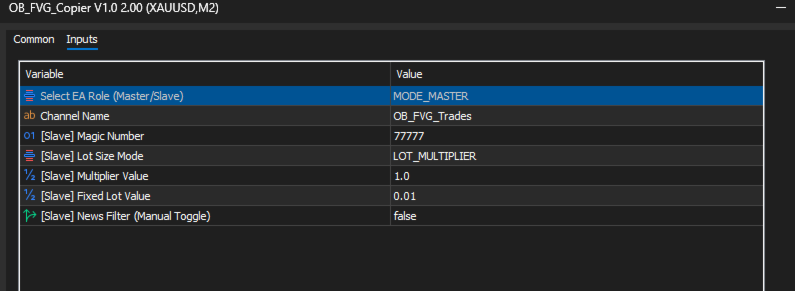
The OB FVG Trade Copier is a professional-grade, unified trade copying system designed to mirror trades between Master and Slave accounts seamlessly. Built with a unified architecture, a single EA file serves as both the sender (Master) and receiver (Slave) simply by toggling the EA Mode in the settings. It utilizes ultra-fast local file sharing via the terminal's Common folder to ensure near-instantaneous trade execution, modification, and closure synchronization across multiple MetaTrader terminals on the same PC or VPS.

It features a highly intuitive, drag-and-drop graphical user interface (GUI) with 10 built-in dynamic color themes that automatically adapt your chart's background and candlestick colors.

Key Features

🔄 Unified Core Engine

  • Master Mode (Sender): Continuously scans the account for open positions and broadcasts their data (Ticket, Symbol, Type, Volume, SL, TP) to a secure, shared text file every second.

  • Slave Mode (Receiver): Reads the broadcast channel every second, executing new trades, mirroring Stop Loss/Take Profit adjustments, and closing trades the moment they are closed on the Master account.

  • Custom Channels: Supports custom "Channel Names," allowing you to run multiple independent master/slave groups on the same machine without cross-talk.

💰 Advanced Risk Management (Slave Settings)

  • Fixed Lot Size: Overrides the Master's trade size and executes all copied trades at a predetermined fixed lot size (e.g., 0.01 ).

  • Lot Multiplier: Dynamically scales the copied trade size based on the Master's volume. (e.g., A multiplier of 2.0 turns a Master's 0.50 lot trade into a 1.00 lot trade on the Slave).

  • News Filter Toggle: A manual override switch to temporarily pause the Slave from taking new trades during high-impact news events.


🎨 Dynamic GUI & Visuals

  • Interactive Panel: Features a draggable, minimizable on-chart control panel displaying your current Role, Channel, Lot Sizing, and News Filter status.

  • 10 Dynamic Themes: Includes a built-in theme engine that reskins the UI panel, chart background, grid, and Bull/Bear candlesticks with a single click.

How It Works Under the Hood

  1. The Broadcast: When set to MODE_MASTER , the EA uses OnTimer() to cycle every 1 second, writing current active trade parameters to a .txt file located in the MetaTrader Terminal\Common\Files directory.

  2. The Reception: When set to MODE_SLAVE , the EA reads this same file. It uses a virtual memory string ( MemoryRAM ) and custom trade comments ( OBFVG_[MasterTicket] ) to ensure trades are never duplicated.

  3. The Sync: If the Slave detects an open trade on its account that is no longer listed in the Master's text file, it immediately triggers the SyncClosures function to close the trade, keeping both accounts in perfect harmony.

推荐产品
The “ Ticks Overcome Signal ” indicator, as outlined in your provided code, is a custom tool designed for use with MetaTrader 4 (MT4), a popular platform for Forex trading. This indicator seems to focus on tracking the momentum and direction of price movements by counting consecutive up and down ticks. Here’s an overview of the psychological aspects, logic benefits, and usage instructions for this indicator on MT4: Decision Support : Traders often face psychological challenges in decision-making
FREE
Program Overview: This program is a trading tool designed to monitor and analyze the 7 major currency pairs. It is a variant of a similar program used for tracking stock indices, but this version focuses on the seven major currency pairs. The program helps in identifying and calculating significant price movements (gaps) between the high and low prices of these currency pairs over a specified time frame. It then provides insights through comments and alerts based on the calculated gaps. Major Cu
BuntuFx Copier Pro is a fast and reliable trade copier for synchronizing orders between Master and Slave accounts on MetaTrader 4 and MetaTrader 5. Main Features MT4 and MT5 cross-platform copying Market and pending order synchronization Automatic SL, TP, partial close, and order close copying Multiple lot modes: multiplier, fixed lot, risk percentage, and lot sequence Symbol mapping and suffix support Magic number, symbol, direction, and comment filters Reverse trading mode Layer-based copying
FREE
Description: Please tick "Show object descriptions" in chart properties to enable hrays views That utility converts a trendline into a horizontal ray known as tool for drawing supply and demand zones. Simply create a trendline on a chart and once selected, it will get converted. Ray remains horizontal while dragging.  Quick ray plot: press "R" key to create horizontal ray. It will be snapped to the nearest OHLC value Further versions will be improved. For feature request please post new comm


Demo version of the paid product - Copy MT4 copier , limited to lot size of 0.01 Universal copier of deals from MetaTrader 4 to MetaTrader 4 ( MT5<->MT5 version is available ; with both versions, you can copy MetaTrader 5<->MetaTrader 4, MetaTrader 4<->MetaTrader 5, MetaTrader 5<->MetaTrader 5, MetaTrader 4<->MetaTrader 4). Spread filter. Select the best price (start copying positions with a profit or loss). Configure the lot size, fixed or ratio-based (provider signals can be copied with an inc
FREE
Exp Swing
Vladislav Andruschenko
4.45 (65)
它使用称为 Swinger (Pendulum, Cheburashka) 的著名策略模型 - 交替放置增加手数的挂单。 策略在于放置两个相反的挂单。当价格向某个方向移动时,触发一个挂单,同时增加另一个订单的手数。 EA 提供三种类型的挂单(TypeofTrade) 放置后自动开仓(即时开仓AutoTrade) 手动开仓后的开仓管理(Manual opening ManualTrade) 按高/低水平开盘(过去的 TFTrade 柱线的高低) OCO(一个取消另一个)订单是一种由两个订单组成的条件订单。如果第二个订单被执行,第一个订单就会自动取消。 Swing - 完整说明 MT5 version 如何购买 如何安装     如何获取日志文件     如何测试和优化     Expforex 的所有产品 这个怎么运作? 开始时,EA 发出两个订单 - 买入止损 和 卖出止损 ,距离当前价格的距离为 StopOrderDeltaifUSE。 如果 Buy Stop 触发,则 Sell Stop 将被删除,并且将放置一个交易量为 BuyStop   *   Martin 的 Sel
FREE
The indicator enables measurement and analysis of accumulated volume (tick), in any chosen swing. The user's task is to mark individual measuring sections with the help of a "crayon's". The indicator automatically sums the volumes of individual candles. Volume analysis is a basic element of the VSA (volume spread analysis) technique. A method of using an indicator is shown on the film. Parameters description Anchor_mode - If true, one end of the measuring line is always hooked on the current ca
Welcome to S3S Trade Manager MT4, the best risk management tool available, created to improve the efficiency, accuracy, and intuitiveness of trading. This is a complete solution for smooth trade planning, position management, and improved risk control, not just a tool for placing orders. With flexibility across all markets, from forex and indices to commodities and cryptocurrency, S3S Trade Manager MT4 can accommodate your needs whether you're a novice making your first moves, an experienced tra
The utility displays in a convenient form the historical trades made on the account. You can filter trades by magic or comcent, display only profitable or losing trades, and only buy or sell trades. Using this utility, you can see trade entry and exit points, stop loss and take profit levels, trade profit, magic number and comment, order ticket and order size - you only need to run the utility on the chart of the currency pair you want information on get and customize the input parameters. MT5
自动盈亏平衡水平 使用   此   工具 ,   您 可以 激活 自动 止损 移动, 当 交易 达到 预期 利润时.  对于   短期   交易者   尤其   重要.   偏移选项也可用: 可以保护部分利润. 多功能工具 : 66+ 功能, 包括此工具  |   联系我  如有任何问题  |   MT5版本 激活自动盈亏平衡功能的过程: 1.   选择符号或交易   将为其激活自动盈亏平衡功能: 对于当前   [Symbol]   / 对于   [ALL]   所有交易 / 或特定交易   [Ticket] . 除了[Symbol]或[ALL]规则外 - 您可以为特定交易设置单独规则, 通过其票号: 单独[Ticket]的规则将优先. 2. 选择您要激活自动盈亏平衡的   交易类型   : [ALL]: 所有活跃交易; [Longs]: 仅买入交易; [Shorts]: 仅卖出交易; 3.   [When profit] : 只有当   交易达到指定利润金额时 , SL才会被移动. 4.   [+ Offset] : 您可以设置   额外的SL偏移 , 向 TP水平方向. 因此,
VN Trade Panel II
Vyacheslav Nekipelov
4 (1)
The new version of the trading panel, which now has the ability to separately close Buy and Sell orders, display targets for all orders on the chart, as well as the ability to use the panel to trade with brokers working on the FIFO rule. Also, the new version adds option buttons for separate management of open orders. It has a convenient visualized interface and intuitive control without a lot of additional tabs to which traders have to be distracted and switch their attention. Thanks to this,
Stay updated with Multicurrency Overview!! The algorithm of this EA releases an average of the movement percentage of all the Forex currencies linked to a single currency, isolating it, letting us to comprehend its real and specific trend. Above on the left, a panel show us efficiently the trend of the currency, in the timeframe actually used. The second panel will keep you updated on macroeconomic news. P.N.:The news time is based on your pc clock time, this way you won't have any problem reg
ChartTrader is a professional trading tool that every trader needs in their toolbox. It has been developed to work with the MT4 Platform. ChartTrader offers a number of options to make placing orders in the Forex market quick and easy. The GUI sits on the chart window so there is no need to navigate to separate windows when placing orders. The program allows you to set pending and instant orders. It has a built in risk management system, so every trade can risk a percentage or a fixed amount in
The utility copies trades from the signal provider accounts (master accounts, one or multiple providers) to unlimited number of receiver accounts (slave accounts). The provider is defined by the 'provider' parameter (any combination of numbers and letters). For example, there are two providers. Run the utility in master mode on them, and set different values to the provider parameter. On the account designated for copying these signals, run two utilities in slave mode in different windows, setti
Trade Copier Local MT4 is a fast local trade copier for copying trades between multiple MT4 and MT5 accounts. One EA works in both Master and Slave modes. Simply select the required Copier Mode and use the same product on your MetaTrader terminals. Copy trades between: • MT5 → MT5 • MT5 → MT4 • MT4 → MT5 • MT4 → MT4 Perfect for: • Trading multiple accounts at once • Linking multiple trading accounts • Personal account mirroring • Signal providers • Account managers • Prop trading setups #
History Pattern Search
Yevhenii Levchenko
该指标建立当前报价,可以与历史报价进行比较,并在此基础上进行价格走势预测。指示器有一个文本字段,用于快速导航到所需日期。 选项: 符号 - 选择指标将显示的符号; SymbolPeriod - 选择指标从中获取数据的时段; IndicatorColor - 指示器颜色; HorisontalShift - 由指标绘制的报价移动指定的柱数; Inverse - true 反转引号,false - 原始视图; ChartVerticalShiftStep - 图表垂直移动(键盘上的向上/向下箭头); 接下来是文本字段的设置,您可以在其中输入日期,您可以通过按“回车”立即跳转到该日期。 接下来是文本字段的设置,您可以在其中输入日期,您可以通过按“回车”立即跳转到该日期。
Reversal Monster Mini
Abdulfattah Yahya Mohammed Alhazmi
The Most advanced and comprehensive EA to trade Trend Reversals/Pullbacks It is a very profitable EA, to trade trends breakout, and manage trades, takeprofit, stoploss, move to breakeven, and trailing stop. The   “Reversal Monster EA”   trades Reversal/Pullbacks when the current price of the pair pullback to a predefined horizontal level or trendline on the currency chart. The opening of the position can be immediate after pullback to the drawn trendline or after closing the candle below/above
FREE
TimeFilter simple 4
Andrej Nikitin
1 (1)
The indicator is an inter-week hourly filter. When executing trading operations, the indicator allows considering time features of each trading session. Permissive and restrictive filter intervals are set in string form. The used format is [first day]-[last day]:[first hour]-[last hour]. See the screenshots for examples. Parameters: Good Time for trade - intervals when trading is allowed. Bad Time for trade - intervals when trading is forbidden. time filter shift (hours) - hourly shift. percenta
The indicator allows you to trade binary options. The recommended time frame is М1 and the expiration time is 1,2,3 minutes. The indicator suitable for auto and manual trading. A possible signal is specified as a arrows above/under a candle. You should wait until the candle closes! Arrows are not re-painted Trade sessions: TOKYO section (Half-end) Currency pairs: USD/JPY Working time frame: M1 Expiration time: 1,2,3 minutes. The indicator also shows good results when using the martingale strateg
FREE
If you found this EA, it's probably because you want to get a funded account with a prop firm, but you see a rule that most of traders fear :   Maximum Daily Drawdown.  I've been through this problem myself as   I'm a prop firm trader   and I've made a bot to solve this rule, and you can get it to solve this problem too. How does it work ? When you first setup this EA, you need to input the   initial deposit   which corresponds to the size of your funded account. For exemple if you get a 10k$ f
SmartLot MT4
Nikita Chernyshov
演示账户免费版   | MT4 版本 The SmartLot for  MT4   是一款交互式且简单的面板,用于快速计算手数,直接从图表设置挂单和市价单。 不适用于策略测试器 。要测试该工具,请下载适用于模拟账户的免费版本。说明和文件位于描述顶部。 功能: 图形界面: 带有盈亏区域颜色标记的交互式入场、止损、止盈线。 实时计算: 当更改止损/止盈水平时,面板会自动重新计算风险/利润值(货币单位 / 点数 / %)。 执行: 通过点击图形线上的按钮来开单。支持主要订单类型。 风险管理: 用于处理动态手数(存款百分比)或固定交易量的内置模块。 独立魔术码: 可为每个订单单独指定魔术码。 如果在安装或使用中遇到任何问题 — 欢迎随时联系,我将乐意为您提供帮助。
Auto trade V20 is a trading tool like Robot or Expert Advisor that is used for automatic trading, this type is Martingale EA, the recommended broker is FBS, EU Pair, default setting. If you want to find the best setting, please look for it by backtesting it, so that you find the best setting and help your trading become more profitable, please try this tool to help you trade. minimum deposit 200 $ cen lot 0.01, pipstep in points.
CopierMT4
Dmitry Fedoseev
Copier for the MetaTrader4 terminal. Designed to copy trade from one terminal to another. Compatible with the version for the MetaTrader5 terminal; if available, copying can be performed between different terminals (regardless of the type of accounts: hedging or netting). The number of accounts to which copying is possible is not limited (depends only on the computing power of your computer). Directions for copying the version for MetaTrader 4 together with the version for MetaTrader 5: MT5 Net
This panel is a part of the SupDem-Pro trading system and is used to search for the best opportunities for any available instruments. Which can be selected manually in the Market Watch (open it with CTRL + M). Using this trading panel in combination with ShvedSupDem-Pro_Zone allows to analyze multiple currency pairs with a single click. The panel allows to load any instruments from the Market Watch, from 6 major currency pairs up to all instruments (480). The indicator parameters Button Width -
FREE
FREE UNTIL FEBRUARY 14, 2023 SPEND MORE TIME WITH YOUR FAMILY. ENJOY LIFE… DO NOTHING. This version is only auto set of Takeprofit and StopLoss Main Version  of  TropangFX:   MT4 Version  |  MT5 Version Recommended timeframe:   H1 Supported currency pairs:  GBPUSD, EURUSD, EURCHF ,   USDCAD, USDCHF ,  AUDCAD, EURCAD, EURAUD and many more... Requirements The EA requires good brokerage conditions:   low spread   and   slippage   during the rollover time. I advise using a really   good ECN brok
FREE
Volume Profile 是专业和机构交易者使用的最强大的分析工具之一。与仅在屏幕底部显示交易发生时间的传统成交量指标不同,Volume Profile 准确显示了这些交易发生的价格水平。这为您提供了市场结构的清晰 X 光透视图,让您能够准确看到聪明的资金 (smart money) 和机构在何处积累或派发其头寸。 Volume Profile 如何检测机构订单和 Support/Resistance(支撑/阻力) 通过根据价格比例水平绘制成交量,该指标根据实际的历史交易自然地揭示了真实的供需区域。根据标准的 Volume Profile 规则,您可以通过以下方式解读市场: Point of Control (POC): 这是在选定时间段内交易量最大的特定价格水平。POC 代表了买卖双方接受的最公平价格。机构围绕这一水平建立他们庞大的头寸。在交易中,POC 充当了一块巨大的磁铁和非常强大的 Support 或 Resistance 水平。如果价格远离 POC,它通常会自然地被吸引回 POC。 Value Area (VA): 这是大部分交易量发生的价格范围,通常设置为总交易量的 7
Expert Advisor for MT4 Useful utility MUST have for all traders.  With 1 click button, you're able to close all your open positions. Its come with a warning pop up notification when you click to close all your trades, to avoid an accident press the button. Just press 'Yes' to confirm or 'No' to cancel it. The expert will close all your open positions no matter what pairs you currently open or directions. Just attach the expert on 1 of your chart, and you're good to go.
This tool will perform Trailing stop loss and Break even management for orders. Helps you limit or reduce the time spend watching orders on the screen, especially when you need to go to sleep. Just add this EA to 1 chart, you can manage all pairs. You can filter orders by comment, magic number, symbol, and order ticket number. When Breakeven it can add shift/offset pips (to cover the commission...). You can try in strategy tester before purchase. The EA will add Buy and Sell alternately, so yo
This is a DEMO version of the Smarter Trade Manager Smarter Trade Manager  is an advanced trade management tool that can monitor and manage your manual and EA trades according to the settings you choose. It works as an Expert Advisor (EA), it does not open any trades but it closes trades as per the auto closing settings or when manually pressing any of the close buttons. FEATURES: Three-dimensional  interactive  view of your trades Trade Summary, P/L, Alerts, Closure by  Currency Trade Summary,
FREE
Apex TPGrid
Carl Christian Nyberg
ApexTPGrid is a powerful Trade Management Utility designed to professionalize your grid and averaging strategies. Whether you trade manually or use other EAs, this utility takes control of your open "basket" of orders to manage them to a safe exit. The standout feature is the Swap-Aware Logic . We all know the pain of holding a grid for weeks, only to close at "breakeven" and realize negative swaps ate your capital. ApexTPGrid solves this by automatically calculating all accumulated costs (Swap
FREE
该产品的买家也购买
欢迎来到 Trade Manager EA——这是一个终极风险管理工具,旨在使交易变得更直观、精准和高效。它不仅仅是一个下单工具,而是一个用于无缝交易计划、仓位管理和风险控制的全面解决方案。不论您是新手交易员、资深交易员,还是需要快速执行的剥头皮交易员,Trade Manager EA 都可以满足您的需求,适用于外汇、指数、大宗商品、加密货币等各种市场。 借助 Trade Manager EA,复杂的计算已成过去。只需分析市场,在图表上用水平线标记入场、止损和止盈,设置您的风险水平,Trade Manager 就会立即计算出理想的头寸规模,并实时显示以点、账户货币计价的止损和止盈。每笔交易都得以轻松管理。 主要功能: 头寸规模计算器 :根据定义的风险瞬间确定交易规模。 简单的交易计划 :在图表上用可拖动的水平线直接计划交易,设置入场、止损和止盈。 实时显示 SL 和 TP :以账户货币、点或分显示止损和止盈,便于分析。 高级保护工具 盈亏平衡选项 : 基本盈亏平衡 :当您的交易达到设定水平时自动保护利润。 多级盈亏平衡 :设置多达 4 个级别以逐步保护利润。 尾随止损选项 : 基本尾随
Local Trade Copier EA MT4
Juvenille Emperor Limited
4.96 (111)
Local Trade Copier EA MT4 是一款快速、灵活的交易复制工具,用于在同一台 Windows 电脑或 Windows VPS 上的多个 MetaTrader 4 账户之间复制和管理交易。 它将本地交易同步与 Receiver 端的手数管理、风险管理、交易过滤、品种映射、交易管理和账户保护功能结合在一起。 只需约 1 分钟 即可完成 Transmitter 和 Receiver 终端的设置,并可在同一经纪商或不同经纪商的账户之间复制手动交易或 EA 交易。在合适的条件下,本地 MetaTrader 终端之间的交易信息可以在 0.5 秒以内 完成同步。实际交易执行速度取决于经纪商延迟、网络状况、电脑/VPS 性能以及终端负载。 购买前先试用免费演示版 您可以在 MT4 模拟账户上测试 功能完整的 Local Trade Copier EA MT4 免费演示版 ,每次可使用 4 小时 : 下载 Local Trade Copier EA MT4 免费演示版 将下载的文件放入: MT4 → 文件 → 打开数据文件夹 → MQL4 → Experts 然后重新启动 MT
Exp COPYLOT CLIENT for MT4
Vladislav Andruschenko
4.69 (65)
MetaTrader 4 专业交易复制器 快速、专业、可靠的 MetaTrader 4 交易复制器。 COPYLOT 可在 MetaTrader 4 与 MetaTrader 5 终端之间复制外汇交易,并为不同账户类型和交易场景提供灵活的同步方案。 COPYLOT MT4 版本支持: MetaTrader 4 → MetaTrader 4 MetaTrader 5 Hedge → MetaTrader 4 MetaTrader 5 Netting → MetaTrader 4   MT5 版本 完整说明 + DEMO + PDF 如何购买 如何安装 如何获取日志文件 如何测试与优化 Expforex 的全部产品 您也可以使用 MetaTrader 5 版本,在 MetaTrader 5 → MetaTrader 5 和 MetaTrader 4 → MetaTrader 5 之间进行复制: COPYLOT CLIENT for MT5 COPYLOT 是一款专业级交易复制器,可稳定运行于 2、3 甚至 10 个终端之间。 支持从模拟账户和投资者密码账户进行复制 可同时运行在多个终端上
Trade Assistant MT4
Evgeniy Kravchenko
4.43 (197)
它有助于计算每笔交易的风险,容易安装新的订单,具有部分关闭功能的订单管理, 7 种类型的追踪止损和其他有用的功能。 附加材料和说明 安装说明 - 应用程序说明   线条功能  - 在图表上显示开仓线、止损线、止盈线。 有了这个功能,就可以很容易地设置一个新的订单,并在开仓前看到它的附加特性。   风险管理  - 风险计算功能在考虑到设定的风险和止损单的大小的情况下,计算新订单的成交量。它允许你设置任何大小的止损,同时观察设定的风险。 批量计算按钮 - 启用 / 禁用风险计算。 在 " 风险 " 一栏中设置必要的风险值,从 0 到 100 的百分比或存款的货币。 在 " 设置 " 选项卡上选择风险计算的变量: $ 货币, % 余额, % 资产, % 自由保证金, % 自定义, %AB 前一天, %AB 前一周, %AB 前一个月。   R/TP 和 R/SL - 设置止盈和止损的关系。 这允许你设置相对于损失的利润大小。 例如, 1 : 1 - 这决定了 TP = SL 的大小。 2 : 1 - 这意味着 TP 是 SL 的两倍。 RR - 它禁用比率。   订单管理 该面板支持市场
PZ Trade Pad Pro MT4
PZ TRADING SLU
3.67 (3)
这是一个可视化的交易面板,可帮助您轻松进行交易管理,避免人为错误并增强交易活动。它结合了易于使用的视觉界面以及完善的风险和位置管理方法。 [ 安装指南 | 更新指南 | 故障排除 | 常见问题 | 所有产品 ] 易于使用 从图表轻松交易 精确的风险管理交易,无忧 保本是重中之重 让利润不受您的关注 尽快享受无风险交易 所有已开通交易的自动追踪止损 交易开始后立即设置初始止损 进行交易后,EA将执行以下任务: 初始止损/获利被自动放置 它会尽快锁定自由行(可选) 它将止损首次移动到盈亏平衡点(可选) 它使用您所需的方法跟踪止损,直到止损为止 其他很酷的功能是: 出色的终端活动报告 单一但功能强大的尾随止损方法 干净的图表界面 没有输入参数 我进行交易后会怎样? 这是您进行交易后EA的操作: 它放置初始止损并获利订单。 尽快搭便车并确保保本。默认情况下,这是通过在达到盈亏平衡点时关闭50%的交易来完成的,默认情况下为5点。这意味着,如果您日后被淘汰,您将一无所获(可选)。 盈亏平衡后,跟踪止损开始运行。 它跟踪止损,直到止损为止,让利润运行。 尾随止损如何运作? 追踪止损表示为所管
Trade Manager Pro MT4
Bryan Djoufack Nguessong
这是一个使你的交易更容易的工具,它将耗时的任务如订单管理和风险管理放在一个或几个点击上。 功能介绍 风险管理  根据风险字段中指定的%或$的风险自动计算手数,并让您通过放置SL TP等线来输入,并显示实时风险回报。 TrueRisk,所以在计算外汇对的手数时,它包括了佣金,所以当你指定1%时,你的风险是1%,所有的交易费用是1%,或者不是,你自己选择。 大宗交易处理程序,让你在一次点击中输入超过一个符号每个头寸最大交易量的10倍,而不是自己慢慢打开每个头寸。(必须不超过符号规格中提到的交易量限制或超过显示的每个头寸最大交易量的10倍)。 输入指数或其他资产,即使自动计算的手数不尊重四舍五入的手数。(1, 0.1 和 0.01 手的步数处理) 交易管理  只需点击一下 ,你就可以。 设置收支平衡的开仓,包括佣金和点差或不包括,由您选择。 通过在文本字段中指定SL或TP的新价格来批量改变已建仓位的SL或TP,并根据输入的新SL和TP价格来设置买入或卖出。 批量关闭头寸,而不是单独缓慢地关闭它们。 批量删除限价单。 AUTO BE功能,让您设置AUTO BREAKEV
Trade copier MT4
Alfiya Fazylova
4.62 (37)
Trade Copier 是一种专业实用程序,旨在复制和同步交易账户之间的交易。 复制发生从供应商的帐户/终端到收件人的帐户/终端,安装在同一台计算机或 vps 上。 在购买之前,您可以在演示帐户上测试演示版本。 演示 这里 。 完整说明 这里 。 主要功能和优点: 支持复制MT4>MT4、MT4>MT5、MT5>MT4,包括МТ5 netting账户。 供应商和收件人模式在同一产品中实现。 简单直观的界面,允许您直接从图表中实时控制复制。 连接中断或终端重新启动时不会丢失设置和位置。 允许您选择要复制的符号,也可以替换接收者的符号,例如 EURUSD> USDJPY。 允许为每个符号设置个性化的复制设置。 支持回拷贝。 能够仅复制某些订单。 允许您设置开仓交易价格的最大差异和最大时间延迟。 正确复制部分订单关闭的执行。 计算复制手数的几种方法。 同步止盈和止损。有几种方法可以计算它们的位置。 支持通过执行在“Market account”上工作,其中 SL / TP 仅在开仓后设置。 如何使用简单的设置复制交易 将供应商终端和接收终端安装在同一台计算机或 VPS 上。 在供应商终端上
Trading History MT4
Siarhei Vashchylka
5 (9)
Trading History - A program for trading and money management on the history of quotes in stratagy tester. It can work with pending and immediate orders, and is equipped with trailing stop, breakeven and take profit functions. Very good for training and testing different strategies. Manual (Be sure to read before purchasing) Advantages 1. Allows you to test any trading strategy in the shortest possible time 2. An excellent simulator for trading training. You can gain months of trading experience
Telegram to MT4 Coppy
Sergey Batudayev
4.09 (11)
Telegram 到 MT4: 终极信号复制解决方案 使用 Telegram 转 MT4 简化您的交易流程,这款先进的实用程序旨在将交易信号直接从 Telegram 频道和聊天复制到您的 MetaTrader 4 平台,无需 DLL 文件。这款强大的解决方案确保信号执行的无缝衔接,拥有无与伦比的精度和丰富的自定义选项,从而节省您的时间并提高您的效率。 [ Instructions and DEMO ] 主要特点 直接 Telegram API 集成 通过电话号码和安全码进行身份验证。 使用用户友好的 EXE 桥轻松获取和管理聊天 ID。 添加、删除和刷新多个频道/聊天以同时复制信号。 使用高级过滤器进行信号解析 跳过包含自定义例外词(例如“报告”、“摘要”)的不需要的信号。 支持灵活的 SL 和 TP 格式:价格、点数或点数。 当信号指定点而不是价格时自动计算入场点。 订单定制和灵活性 使用多种模式定制订单规模:固定手数、动态手数(% 风险)或特定符号手数。 使用信号数据或自定义参数调整 SL/TP。 配置滑点、挂单到期和重试设置以实现完美执行。 综合符号管理 排除特定符号或匹配自定义
需要支持?如何设置?有问题?请用您的语言在这里提问,快速回复: https://www.mql5.com/en/market/product/139089/comments 试用版下载 Copy Cat More (跟单猫) MT4 交易跟单器 (Trade Copier) 不仅仅是一个简单的本地交易跟单器;它是一套 完整的风险管理与执行框架 (risk management and execution framework), 专为当今的交易挑战而设计。从自营公司 (prop firm) 挑战到个人投资组合管理,它凭借 稳健的执行、资金保护、灵活的配置和先进的交易处理的结合,适应各种情况。 该跟单器同时支持   主控端 (Master,发送方) 与 受控端 (Slave,接收方)   两种模式,可实时同步市价单与挂单、交易修改、部分平仓以及对锁平仓 (Close By) 操作。它兼容模拟与真实账户、交易或投资者登录,并通过持久化交易记忆 (Persistent Trade Memory) 系统确保恢复——即使 EA、终端或 VPS 重启也不例外。可借助唯一 ID 同时管理多个主控
Telegram to MT4 Multi-Channel Copier   可将您 Telegram 和 Discord 频道中的交易信号自动复制到 MetaTrader 4。无需机器人、无需浏览器扩展、无需手动复制。信号一到 Telegram 或 Discord,EA 几秒内就在您的终端开仓。 在复制某个频道之前,内置回测器还能告诉您该频道在您的账户上会有怎样的表现。 产品包含两个组件:一个监听您 Telegram 频道的 Windows 应用程序,以及在 MT4 终端执行信号的本 EA。同时提供 MT5 版本   点此 . 设置指南与应用下载:   https://www.mql5.com/en/blogs/post/768988 了解如何 回测任何 Telegram 信号频道 。 当前价格将来会上调。 工作原理 应用通过您自己的 Telegram 账号连接,因此能看到您关注的所有频道、群组、话题和机器人,包括私密和 VIP 频道。信号到达时,应用读取它,EA 按您的手数和设置在终端中开仓。 整个过程全自动,无需守在电脑前。专为 24/7 无人值守运行设计:Telegram 连接
Trade Assistant Pro 36 in 1
Makarii Gubaydullin
4.76 (21)
多功能交易工具:手数计算器、网格订单、风险回报比、交易管理、供需区、价格行为分析等 演示版   |   用户手册 交易助手 不能在策略测试器中运行:您可以下载 演示版 来测试此 实用工具 。 如有任何问题 /改进想法/发现错误 ,请 联系我 如需MT5版本,请点击 此处 简化、加速并自动化您的交易 流程 。通过此 仪表板 扩展标准终端功能。 交易面板 适用于任何交易品种:外汇、股票、指数、加密货币等。 1. 开立新交易 :手数/风险/风险回报比计算:手动交易的风险管理 手数计算器(基于风险规模计算交易量) 风险计算器(基于手数计算风险金额) 风险回报比 网格订单: + 动态间距选项和分割手数选项 订单激活触发器,+ 买入止损限价/卖出止损限价:MT4也可用 虚拟止损,虚拟止盈(隐藏止损,隐藏止盈:经纪商不可见) 智能止损/入场价位:如果K线收盘价超越此价位(避免错误触发) 隐藏订单(虚拟订单) 计划订单:即使市场休市也可下单(周末计划器) 附加多级止盈(多重获利了结) OCO订单(一单取消另一单),具有不同ID 交易可视化 + 图表上调整 以买入价(Bid)设置的止损/入场价位:避
Shepherd Safety EA
AW Trading Software Limited
4.92 (13)
AW Shepherd Safety EA 是一款用于管理已开仓位的智能交易系统。首单由交易者通过面板开出,之后由智能交易系统自行管理篮子:结合趋势过滤加开补仓单,按 TakeProfit、追踪或止损平掉该方向的订单,并在图表上显示平仓水平。 买单和卖单分开管理,两个方向可以同时持仓。补仓单并非价格走过设定间距就开出,而是要等 Parabolic SAR、两条 MA 或K线颜色显示价格朝持仓方向反转之后才开出。手动开出的仓位或由其他智能交易系统开出的仓位,只要 Orders Magic number 一致,智能交易系统同样会接管。 智能交易系统如何管理仓位: 1 交易者点击 Open Buy 或 Open Sell 按钮开出首单,手数取自 Order Size 字段。 2 当价格逆向移动达到 Minimal step between recovery orders 且趋势过滤显示反转时,智能交易系统开出补仓单,手数按 Type of increase orders 计算。 3 目标从该方向全部订单的盈亏平衡价起算:每加一张补仓单,盈亏平衡价都会向当前价格靠近。 4 该方向按 Type
Rhino Chart Drawing Tools 为 MetaTrader 4 提供类似 TradingView 的绘图工作流程。包含 54 种绘图工具 、可自定义工具栏、收藏夹、快速样式设置、对象设置、模板和对象管理器。 用户手册: 如何使用本产品 免费演示版本: 下载演示版本 MetaTrader 5 版本: Rhino Drawing Tools for MT5 绘图工具 类别 对象列表 线条 趋势线、射线、延长线、水平线、垂直线、水平射线、十字线、趋势角度、箭头、路径、折线和信息线。 通道 平行通道、回归通道、水平通道、分离通道和斐波那契平行通道。 斐波那契 回撤、扩展、通道、速度扇形和时间周期。 江恩 江恩箱和江恩扇。 形状 矩形、旋转矩形、椭圆、圆形、三角形和折线。 标注 文本、备注、标注框、价格标签、指示牌、旗帜和箭头标记。 形态 XABCD、ABCD、Cypher、头肩形、三角形、三驱动、艾略特推动浪和艾略特调整浪。 投影 多头仓位、空头仓位、预测、价格范围、日期范围以及日期和价格范围。 画笔 自由画笔和荧光笔。 时间和价格坐标 绘图对象使用 时间和价格 坐标保存
Multi Account Local Trade Copier 是一款快速的 MetaTrader 本地跟单工具:在同一台 Windows 电脑或 VPS 上的 MT4/MT5 终端之间复制交易,从一个主账户复制到多个接收账户 —— 您自己的真实、模拟和自营公司账户,同一经纪商或不同经纪商均可。它是 事件驱动 的:主终端在每笔交易发生的瞬间立即发布,接收端会 测量并记录每一笔复制的真实延迟 — 通常为 50-150 毫秒 。无 DLL,无网络桥接,无配置文件。 一个 EA,两种模式 在源终端上以 MASTER 模式挂载,在每个目标终端上以 RECEIVER 模式挂载。使用 Master ID = AUTO 时,接收端会自动找到活跃的主终端:拖入图表即可。一个主终端可以供给 无限个接收端 ,一个终端可以运行多个接收端,甚至同一个终端可以同时充当主终端和接收端。 每个接收端都有自己独立的设置 :一个按风险 % 复制,另一个按余额比例,另一个反向复制 — 资金管理始终在接收端完成。与 Multi Account Local Trade Copier MT5 配合可覆盖全部四种组合:MT5>
TradePanel MT4
Alfiya Fazylova
4.84 (95)
交易面板是一款多功能交易助手。该应用包含超过50种手动交易功能,并允许您自动执行大多数交易任务。 应用程序说明 : https://www.mql5.com/zh/blogs/post/761102 用于模拟账户的应用程序试用版: https://www.mql5.com/zh/blogs/post/762579 如何安装应用程序: https://www.mql5.com/zh/blogs/post/762580 如何在可视化模式下测试应用程序: https://www.mql5.com/zh/blogs/post/770278 如何在VPS MetaTrader上安装应用程序: https://www.mql5.com/zh/blogs/post/770196 贸易. 只需单击一下即可执行交易操作: 打開掛單和頭寸,並自動計算風險。 一鍵打開多個訂單和頭寸。 打開訂單網格。 按組別關閉掛單和頭寸。 反轉頭寸方向(關閉買入>打開賣出,關閉賣出>打開買入)。 鎖定頭寸(通過開啟缺少的頭寸,使買入和賣出頭寸的數量相等)。 一鍵部分關閉所有頭寸。 將所有頭寸的止盈和止損設置在同一價格水平。
该指标具有三个主要工具:放大镜(缩放图表)、标尺(时间和价格刻度)和十字准线。 您可以用鼠标移动它并自定义不同的显示格式,自定义每个元素的大小和颜色。 放大镜(缩放图表)允许您显示任何时间范围和不同比例的蜡烛。 默认热键:“Q”- 更高的时间范围,“A”- 更低的时间范围,“W”- 减小蜡烛尺寸,“S”- 增加蜡烛尺寸,“Z”- 显示/隐藏缩放图表 您可以在评论页面找到最新的演示。 → 演示版仅适用于 USDJPY 货币对 . 时间刻度根据时间周期标记图表。 您可以设置时移,以便您可以在刻度上看到您的当地时间,而不是经纪商的时间(因此它会在图表上显示您的当地时间,而不是 MT 时间)。 时间格式可以设置为 24 小时制或 12 小时制。 热键“T”- 显示/隐藏时间刻度。 价格刻度垂直标记图表。 您可以设置显示数字和四舍五入价格的格式。 热键“P”- 显示/隐藏价格等级。 十字线可以显示价格、时间、柱数、点数、百分比、根据指定手数计算的利润(按手数计算的利润)、根据指定金额计算的手数(按风险手数)。 热键“C”- 显示/隐藏十字准线。 如果金额计算不正确,请尝试启用“如果符号货
Trade Indicator Assistant is a powerful MT4 utility designed to turn indicators into automated trading systems. Its main feature is the ability to automatically detect an indicator’s   BUY and SELL signal buffers , without requiring you to know the buffer numbers, search through indicator settings, or modify the indicator source code. Bonus Indicator: After purchasing Trade Indicator Assistant, contact me to receive Trade Signal Pro completely free as a bonus indicator. [Download Demo Version]
跟单->方便快捷的界面交互,用户上手即用       ->>>> 推荐在windows电脑,或者VPS Windows上使用 特色功能: 多样化个性跟单设置: 1.对不同的信号源可以设置不同的手数模式 2.不同的信号源分别设置正向反向跟单 3.信号分别设置注释 4.是否根据合约手数校准手数 多样化个性跟单设置2: 1.对不同的品种可以设置不同的手数模式 2.不同的品种分别设置正向反向跟单 3.信号分别设置注释 4.是否根据合约手数校准手数 注释过滤,MAGIC过滤,信号手数过滤,本地品种过滤 净持仓模式(该模式下手数计算仅支持倍率) 工作时间设置 反向同步接收端的平仓 订单绑定功能:任意订单可以绑定到设置信号源订单上 (双击表格更改) 账户风险控制  基本功能: 跟单正常交互速度0.5s以下 自动检测信号源,并显示信号源账号列表 自动匹配品种,不同平台常用交易品种(后缀不同等特殊情况)95%自动匹配,基本无需手动设置,品种映射表可随意双击更改对应品种.(映射表具有快速搜索品种功能) 4种手数计算模式(1.倍率 2.固定手数 3.自适应资金风险 4.源账户资金比例风险) 特殊手数模式
Trade Manager MT4 DaneTrades
Levi Dane Benjamin
4.09 (11)
交易管理器可帮助您快速进入和退出交易,同时自动计算风险。 包括帮助您防止过度交易、报复性交易和情绪化交易的功能。 交易可以自动管理,账户绩效指标可以在图表中可视化。 这些功能使该面板成为所有手动交易者的理想选择,并有助于增强 MetaTrader 4 平台。多语言支持。 MT5版本  |  用户指南+演示 交易经理在策略测试器中不起作用。 如需演示,请参阅用户指南 风险管理 根据%或$自动调整风险 可选择使用固定手数或根据交易量和点自动计算手数 使用 RR、点数或价格设置盈亏平衡止损 追踪止损设置 最大每日损失百分比,在达到目标时自动平仓所有交易。 保护账户免遭过多提款并阻止您过度交易 最大每日损失(以美元为单位)在达到目标时自动关闭所有交易。 保护账户免遭过多提款并阻止您过度交易 一键实现所有交易的盈亏平衡 自动计算从手机/电话发送的交易的风险 OCO 在设置中可用 交易和头寸管理 通过设置每月、每周、每天、每小时或每分钟的最大交易次数,停止过度交易和报复性交易。 高级挂单管理。 调整何时关闭挂单的规则 追踪挂单 支持市价订单和挂单 每日最大利润目标(以美元为单位)以确保头寸并停止
The product will copy all telegram signal to MT4   ( which you are member  ) , also it can work as remote copier.  Easy to set up, copy order instant, can work with almost signal formats, image signal, s upport to translate other language to English Work with all type of channel or group, even channel have "Restrict Saving Content", work with  multi channel, multi MT5 Work as remote copier: with signal have ticket number, it will copy exactly via ticket number. Support to backtest signal. How to
Take a Break
Eric Emmrich
5 (31)
Take a Break pauses your Expert Advisors when trading is a bad idea: before news, after a daily loss, outside your trading hours, or when a rule you wrote yourself says so. When the pause is over, your EAs simply continue. Account protection for all your EAs in one tool: news filter, drawdown and equity protection, time filter and custom rules. One EA on one chart protects the whole account, the free indicator gives every chart its own rules on top. Free demo | What is new in 26.09 | Support Ass
The AlgoKing Lightning Bolt Strategy is a trade manager and has multiple indicators built for a complete trading strategy.  Here is a list of indicators built in. Indicators Auto drawn Support and Resistance signals Auto drawn RSI Divergence signals Auto drawn Fibonacci Retracement signals with buy and sell entry lines. Lightning Bolt reversal signals. Auto drawn trend lines. Trade Management Auto take partials at simple moving average targets. Auto take partial and stop losses at Fibonacci ret
News Filter EA: Advanced Algo Trading Assistant News Filter EA is an advanced algo trading assistant designed to enhance your trading experience. By using the   News Filter EA , you can integrate a Forex economic news filter into your existing expert advisor, even if you do not have access to its source code. In addition to the news filter, you can also specify   trading days   and   hours   for your expert. The News Filter EA also includes   risk management   and   equity protection   features
FCK CurrencyStrength Pro
Patel Hitendrakumar Mahendrabhai
Hi Friends, " FCK Currency Strength Pro " is a auto & semi auto trading expert with direction of pair. Buy-Sell separate or multi currency in one click. The strategy of  FCK Currency Strength Pro  is a combination of custom indicator, Trendlines, Support & Resistance levels ( Price Action ) and most important secretive trading algorithm mentioned above. Download News Ex4 and csv file You need the following SDSnews.ex4 in MQL4/Libraries and the daylightsavings.csv in MQL4/Files. Only 4 of 5 copi
KT Equity Protector MT4
KEENBASE SOFTWARE SOLUTIONS
3.75 (4)
An equity protection EA for MetaTrader that enforces your loss limits and profit target for you: when your account reaches a rule you set, it closes your trades on every symbol, before one bad day turns into a lost account. It suits prop firm challenges and personal accounts alike. Attach it to one chart, answer a few questions in the on-chart setup wizard, and it watches your whole account in the background while you trade by hand or with other EAs. What it protects Daily loss limit: a percenta
Trade Dashboard MT4
Fatemeh Ameri
4.96 (55)
疲于复杂的订单下达和手动计算?Trade Dashboard 是您的解决方案。凭借其用户友好的界面,订单下达变得轻而易举,只需点击一下,您就可以开设交易、设置止损和止盈水平、管理交易手数,并计算风险回报比,让您只需专注于您的策略。告别手动计算,使用 Trade Dashboard 简化您的交易体验。 立即下载演示版本 。 您可以在这里找到仪表盘功能和特性的详细信息 。 加入 Telegram 频道 。 购买后请给我发消息以获取支持。如果您需要添加更多功能,可以在产品的评论区留下您的想法,我愿意听取任何建议,希望您能在使用我的产品时获得最佳体验 。 这是 MT5 版本。 风险管理:使用 Trade Dashboard,可以将您的风险设置为账户余额或权益的百分比,或将风险设置为总金额。在图表上直观地定义您的止损,让工具准确计算每个货币对的适当手数。该工具还可以根据您期望的风险回报比自动设置止盈水平。它甚至可以在手数计算中涵盖佣金和点差费用。此外,您的止损和止盈可以转变为虚拟水平,隐藏于经纪商。通过 Trade Dashboard 的高级风险管理功能,掌控风险,保护您的资本。 交易线
本地交易复制器,可在同一台电脑或VPS上的MetaTrader终端之间进行复制。MT5和MT4之间的复制可以双向进行。复制的交易量可以按账户净值百分比、账户货币或镜像主账户的风险份额计算;交易选择可通过交易品种、魔数、备注和规模等筛选条件进行。控制面板管理未平仓交易的各项功能:虚拟止损/止盈、盈亏平衡、追踪止损、篮子平仓和定时平仓。每日、总和交易量限制可保护账户,并在突破限制前提前触发。 用户手册和免费演示 ( 用户手册 )( 演示:安装和首次运行 ) 演示版本可在模拟账户上运行:代码相同,功能齐全,无时间限制。交易者可自行选择交易来源和风险等级;执行、品种名称匹配和复制管理均由产品自动完成。 产品功能 该产品具备三种功能。源账户发布自身账户的交易,但不执行任何交易操作;接收方账户最多可同时复制八个源账户的交易;自复制方账户则将自身账户的交易复制到该账户。交易量通过八种方法计算:权益百分比、镜像主账户风险份额、固定资金风险、两个账户的比率、乘数、固定手数、每千账户资金的手数以及主账户手数的1:1比例。计算基于风险资金而非手数:当两个经纪商使用不同的合约规模时,指定的风险保持
Easy Trade Executor 是一款用于 MT4 快速仓位计算、交易执行和交易管理的工具。 直接在图表上设置开仓价、止损和止盈水平,自动计算仓位大小,并通过几次点击即可按照预设风险开仓。 为什么选择 Easy Trade Executor? Easy Trade Executor 专为那些不仅需要风险计算,还希望直接在图表上快速高效管理交易的交易者而设计。 该工具将仓位计算、订单执行和交易管理整合到一个统一的工作流程中,使您能够专注于交易,而无需手动计算或频繁切换终端窗口。 Easy Trade Executor 提供: 基于风险的自动仓位计算; 直接从图表放置市价单和挂单; 用于自动化交易管理的追踪止损; 一键平仓; 50% 部分平仓; 包含佣金和隔夜利息的保本调整; 简洁且极简的界面; 适合新手和经验丰富交易者的高效工作流程。 直接在图表上开仓 Easy Trade Executor 允许您通过交互式线条   直接在图表上完成交易设置   。 只需设置以下水平: 开仓价 止损 止盈 工具将根据您设定的风险自动计算仓位大小。 当线条被移动时,所有交易参数都会实时更新,使
RS Trade Copier - 超快 本地跟单系统,配备 真正的 图形界面。别再手动输入账号了。告别200多个晦涩的参数设置。 一款可靠且灵活的工具,用于在 MT4 和 MT5 多个终端之间复制交易操作。适合专业交易员、信号服务商以及个人投资者使用。能够以高精度和低延迟将一个或多个信号源(Provider)的 交易操作同步 到一个或多个接收端(Client)。支持简单自动配置和高级手动设置。不会干扰手动或其他 EA 开的订单。完全 在 MT4 本地运行 ,无需第三方服务器。 RS Trade Copier 与其他解决方案的对比 RS Trade Copier 其他解决方案 设置 可视化分步向导。 设置大约需要 1 分钟。 200 多个晦涩的输入参数。 设置大约需要 20 分钟。 速度 异步交易操作。* 批量平仓 50 个头寸仅需 ~1 秒。 缓慢的顺序执行。 批量平仓 50 个头寸需要约 25 秒。 界面 真正的图形界面,支持 11 种语言的工具提示。 无需手册即可上手。 EA 属性中“输入参数”选项卡下的长长参数列表。 需要阅读所有文档。 批量操作 完全支持。 接收端上的批量平仓
作者的更多信息
TPS Gold Scalper EA - MT5 Edition: Seize Gold Trading Opportunities with Aggressive Precision Minimum Equity :- 1000 $ Trading Timeframes :- M1 / M5 / M15 / H1 Recommended pair :- XAUUSD Experience the next level of gold trading with the TPS Gold Scalper EA - MT5 Edition. Designed for traders who thrive on high-risk, high-reward strategies, this advanced trading robot is your ticket to harnessing rapid price movements in the gold market. Aggressive Scalping Algorithm: The TPS Gold Scalper EA
TPS SMC 7 in 1
Gopal Goswami
TPS SMC [7-in-1] for MetaTrader 5 The TPS SMC is a premium, all-in-one custom indicator engineered for MetaTrader 5. Faithfully ported from a highly regarded TradingView Pine Script, this indicator consolidates seven elite analytical modules into a single, highly optimized MT5 environment. It is purpose-built for traders who utilize Smart Money Concepts (SMC), order flow, and volume delta to navigate complex markets like XAUUSD, Forex majors, and indices. By eliminating the need to stack multipl
FREE
This Expert Advisor (EA) is an advanced, highly customizable grid-trading system designed for MetaTrader 5. Rather than entering at market price, it strictly utilizes pending orders to capture volatility breakouts or mean reversions, wrapping the strategy in robust risk management and a polished user interface. Core Trading Engine The EA operates on a pending-order grid system, entirely avoiding instant market execution. Grid Modes: It can operate in two distinct modes: Breakout: Places Buy
FREE
TPS Gold Scalper Pro
Gopal Goswami
1 (1)
TPS Gold Scalper Pro EA - Your Ultimate Scalping Solution Introducing the TPS Gold Scalper Pro EA, your advanced and powerful tool for successful scalping in the forex market. Designed to capitalize on short-term price fluctuations, TPS Gold Scalper Pro brings precision and efficiency to your trading strategy. Whether you're an experienced trader or just starting out, this expert advisor can help you achieve consistent profits through its innovative features and intelligent algorithms. Minimum
FREE
Volume Delta Grid EA
Gopal Goswami
5 (1)
Volume Delta Grid EA The Volume Delta Grid EA is an advanced, automated trading system for MetaTrader 5 that merges institutional-style order flow concepts—specifically Relative Volume (RVOL) and Volume Delta —with dynamic grid and basket management strategies. Rather than relying on lagging price oscillators, this EA identifies high-probability breakout and trend-continuation zones by analyzing intra-bar buying and selling pressure. It then manages the trades using a highly customizable grid
FREE
Overview The Multi-Strategy Advanced EA is a highly robust, fully automated Expert Advisor for MetaTrader 5. Designed for Hedging accounts , it operates as a sophisticated trading engine that concurrently monitors up to 5 independent timeframes using 4 distinct technical strategies. Rather than relying on a single entry logic, this EA builds a diversified portfolio of trades. It is fortified with an institutional-grade risk management system, including advanced order-flow filtering, news avoid
FREE
Overview The OFT Auto FIBO - EA (v1.40) by Trading Public School is a fully automated, Multi-Timeframe (MTF) algorithmic trading system for MetaTrader 5. It is designed to identify swing highs and lows across up to six different timeframes simultaneously, calculating precise Fibonacci retracement zones (specifically the 50% to 61.8% equilibrium/golden zone) to determine market bias. By default, the EA operates on a contrarian/retracement logic, anticipating market pullbacks, and features a rob
FREE
TPS Trading Indicator
Gopal Goswami
1 (1)
TPS Trading Indicator: Comprehensive Technical Overview The TPS Trading Indicator is an advanced, trend-following technical analysis tool engineered for MetaTrader 5. Built with a focus on filtering out market noise and identifying high-probability entry zones, this indicator utilizes a powerful "Dual Confirmation" system. By combining the price-smoothing capabilities of Renko calculations with the directional momentum of the Supertrend algorithm, it delivers precise, actionable signals. While h
Advanced Multi-Strategy EA v4.0 (with 20-Indicator Dashboard) Advanced Multi-Strategy EA v4.0 is a highly versatile, institutional-grade automated trading system designed for MetaTrader 5. It bridges the gap between traditional technical analysis and modern Smart Money Concepts (SMC) by combining strict multi-timeframe (MTF) trend filtering with 13 selectable, highly specific entry triggers—including Fair Value Gap (FVG) pullbacks. Built with a stunning on-chart UI, this EA provides real-time
FREE
Recommended on M15 and higher timeframes Sends alerts and notifications when the zone is create Sends alerts and notifications if zones are retested You will see the trading zones and identify the most profitable points to open positions. The indicator marks the supply and demand zones. With this show you will now make profitable trades that will set the trends. Shows all support and resistance zones. Can work in all time zones. No need to mess with complicated settings, all settings are
FREE
#forex  #sharemarket #trading   Disclaimer :- My videos, presentations, and writings are strictly for educational purposes and should not be considered investment advice. I cannot guarantee the accuracy of any information provided. It is essential to conduct your own research and consult a qualified financial advisor before making any investment decisions. I bear no responsibility for any financial losses or negative outcomes resulting from the use of my content. Please exercise caution and seek
FREE
Ema bb rsi
Gopal Goswami
EMA + RSI + Bollinger Bands Trend EA (MetaTrader 5) This Expert Advisor (EA) is a fully automated, multi-timeframe trading system designed for MetaTrader 5. It trades by aligning with the long-term trend and entering the market during short-term, extreme pullbacks. By combining moving averages for trend direction with momentum oscillators for precision entries, it aims to capture high-probability reversals within an established trend. Core Trading Strategy The EA utilizes a strict multi-tie
FREE
#forex  #sharemarket #trading   Disclaimer :- My videos, presentations, and writings are strictly for educational purposes and should not be considered investment advice. I cannot guarantee the accuracy of any information provided. It is essential to conduct your own research and consult a qualified financial advisor before making any investment decisions. I bear no responsibility for any financial losses or negative outcomes resulting from the use of my content. Please exercise caution and seek
FREE
"TPS Trade Panel: Your Gateway to Effortless Trading Introducing the TPS Trade Panel – the ultimate tool to streamline and enhance your trading experience across financial markets. Whether you're a novice or a seasoned trader, this feature-rich panel empowers you to execute trades swiftly and make informed decisions with ease. Efficient Order Execution: Execute trades across multiple financial instruments without the need to navigate through complex menus. With a few clicks, you can open, clo
FREE
OB FVG Trade Copier: Unified Master & Slave EA Version: 2.00 Type: Trade Copier / Risk Management Utility Compatibility: MetaTrader 4 & MetaTrader 5 (Cross-compatible codebase) Overview The OB FVG Trade Copier is a professional-grade, unified trade copying system designed to mirror trades between Master and Slave accounts seamlessly. Built with a unified architecture, a single EA file serves as both the sender (Master) and receiver (Slave) simply by toggling the EA Mode in the settings. It uti
FREE
Key Features: Trade Copy MT4 to MT4 . #forex  #sharemarket #trading   Disclaimer :- My videos, presentations, and writings are strictly for educational purposes and should not be considered investment advice. I cannot guarantee the accuracy of any information provided. It is essential to conduct your own research and consult a qualified financial advisor before making any investment decisions. I bear no responsibility for any financial losses or negative outcomes resulting from the use of my con
FREE
Golden Cross EA is an automated trading solution designed to capitalize on the 'Golden Cross' pattern, a powerful bullish signal generated when a short-term moving average crosses above a longer-term moving average. This expert advisor identifies and acts upon this favorable market condition, executing buy trades to potentially capture upward price momentum. The EA features customizable lot size, stop loss, and optional trailing stop functionality, enhancing trading flexibility and risk manageme
"TPS Smart Trade Pro EA is a sophisticated and versatile trading tool meticulously crafted to elevate your trading experience. This expert advisor offers a wide array of advanced features, including intelligent trade entry and exit strategies, dynamic lot sizing, adjustable stop loss and take profit levels, and the option to employ a trailing stop for optimal risk management. Designed by trading experts at Trading Public School, TPS Smart Trade Pro EA seamlessly integrates with your trading pl
TPS Zero Scalper EA is a high-performance automated trading solution meticulously engineered to excel in rapid-paced market conditions. Built by the experts at Trading Public School, this EA is specifically designed for scalpers seeking precision and speed in their trading strategies. With TPS Zero Scalper EA, you gain access to a powerful algorithm that swiftly identifies micro-market trends and price differentials. The EA's lightning-fast execution and advanced risk management tools allow yo
Introducing TPS Bengal Tiger EA: Unleash the Fierce Power of the Market Roar into the world of forex trading with the TPS Bengal Tiger EA, your ultimate companion for conquering the financial markets. Just like the majestic Bengal Tiger, this expert advisor is designed to prowl the trading landscape with precision and strength. Ferocious Performance: TPS Bengal Tiger EA combines cutting-edge algorithms with a predator's instinct, swiftly navigating the volatile forex terrain to seize profit o
"TPS Manual & Auto Trading EA: Your Ultimate Trading Partner This is Plug on Play to enjoy Manual Trading Management , Mobile Trading :- install on vps after  Use this ea work with mobile . Take your trading experience to the next level with the TPS Manual & Auto Trading EA – the perfect blend of human expertise and automated precision. Seamless Transition: Seamlessly switch between manual and automated trading modes to match your preferred trading style and market conditions. Retain contro
TPS Gold Scalper EA - High-Risk Edition: Seize Gold Trading Opportunities with Aggressive Precision Minimum Equity :- 1000 $ Trading Timeframes :- H1 Recommended pair :- XAUUSD Experience the next level of gold trading with the TPS Gold Scalper EA - High-Risk Edition. Designed for traders who thrive on high-risk, high-reward strategies, this advanced trading robot is your ticket to harnessing rapid price movements in the gold market. Aggressive Scalping Algorithm: The TPS Gold Scalper EA is p
TPS GBP & EUR Scalper Pro EA: Unleash the Power of Precision Scalping Experience the cutting-edge of scalping technology with the TPS GBP & EUR Scalper Pro EA. This expert advisor is meticulously designed to capitalize on micro market movements in the GBP and EUR currency pairs, offering you unparalleled precision and profitability in your trading. Ultra-Fast Execution: The TPS GBP & EUR Scalper Pro EA operates with lightning speed, executing trades in the blink of an eye. Take advantage of r
TPS DynamicFX Pro EA: Revolutionizing Forex Trading with AI Precision Unlock the future of forex trading with the TPS DynamicFX Pro EA, a groundbreaking expert advisor meticulously designed to navigate the complexities of the financial markets with unmatched accuracy and efficiency. Harnessing the power of advanced artificial intelligence, this EA is the ultimate tool for both novice traders seeking consistent profits and seasoned professionals aiming to enhance their trading strategies. Minimum
Introducing the TPS Pair Hedging EA – Your Ultimate Solution for Precise Pair Trading Strategies! Are you seeking to navigate the intricate world of forex pair trading with finesse and efficiency? Look no further than the TPS Pair Hedging EA, your advanced trading companion designed to excel in dynamic market conditions. The TPS Pair Hedging EA empowers traders with a cutting-edge algorithm that seamlessly identifies and capitalizes on correlated movements within currency pairs. Through intellig
Revolutionize Your Gold Trading with TPS AI Gold Scalper Minimum Equity :- 1000 $ Trading Timeframes :- H1 Recommended pair :- XAUUSD Manual Lot Size Calculation Formula :- 1000 $ = 0.01 Lot   &   Increase Lot Size Each 2000$ = 0.01 ( As Per Flow Proper Risk Management Formula ) Disclaimer :- TPS AI Gold Scalper, presentations, and writings are strictly for educational purposes and should not be considered investment advice. I cannot guarantee the accuracy of any information provided. It is ess
TPS TrendTrading EA v1.10 Advanced Trend-Continuation & Pattern Recognition System The TPS TrendTrading EA is a highly sophisticated, fully automated algorithmic trading system designed for MetaTrader 4. It operates on a robust "Same-Side CTF (Current Timeframe)" strategy, merging Higher Timeframe (HTF) trend direction with precise Current Timeframe (CTF) pullbacks. Rather than relying on simple indicator crosses, the EA uses a complex internal pattern-recognition engine to identify 25 unique ca
TradeAssist Pro v1.06 Overview TradeAssist Pro is an all-in-one manual trading assistant and technical analysis toolkit for MetaTrader 5. It provides a modular, interactive on-chart dashboard designed for rapid execution, advanced trade management, and automated Smart Money Concepts (SMC) charting. Dashboard Structure & Tabs 1. Trade Tab (Execution & Orders) 1-Click Trading: Execute Buy/Sell market orders instantly. Dynamic Position Sizing: Toggle between fixed lot sizes or auto-calculated lo
Automated High-Performance Grid & Smart Capital Preservation System, Main Pair : XAUUSD (GOLD) Time Frame Use : M5   "or"  Higher Minimum equity required : 1000$  Strategy Upgrade as per current market condition, testing from jan 2026. TPS Scalpers Pro is an elite, fully automated algorithmic trading system engineered for MetaTrader 5. Designed for modern multi-directional trading, this Expert Advisor (EA) blends a highly responsive trend-momentum engine with an advanced, defensive grid recover
TPS Pro
Gopal Goswami
Automated High-Performance Grid & Smart Capital Preservation System, Time Frame Use : M1 / M5   "or"  Higher Minimum equity required : 1000$  TPS Scalpers Pro   is an elite, fully automated algorithmic trading system engineered for MetaTrader 5. Designed for modern multi-directional trading, this Expert Advisor (EA) blends a highly responsive trend-momentum engine with an advanced, defensive grid recovery matrix. It is built specifically for traders who require a system that can aggressively cap
筛选:
无评论
回复评论