Drawdown Tracker MT5

KNOW YOUR REAL DRAWDOWN. TODAY, THIS SESSION AND FOR THE WHOLE LIFE OF THE ACCOUNT.

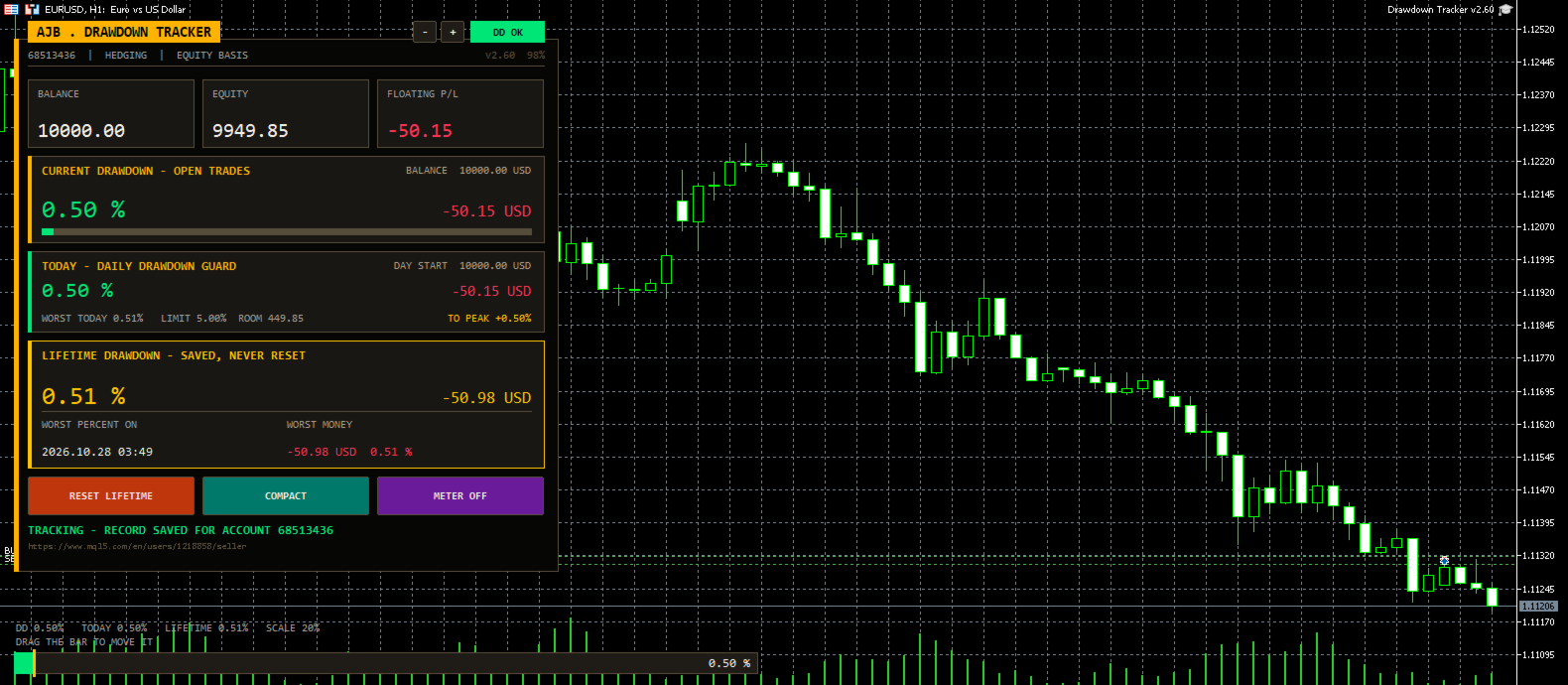
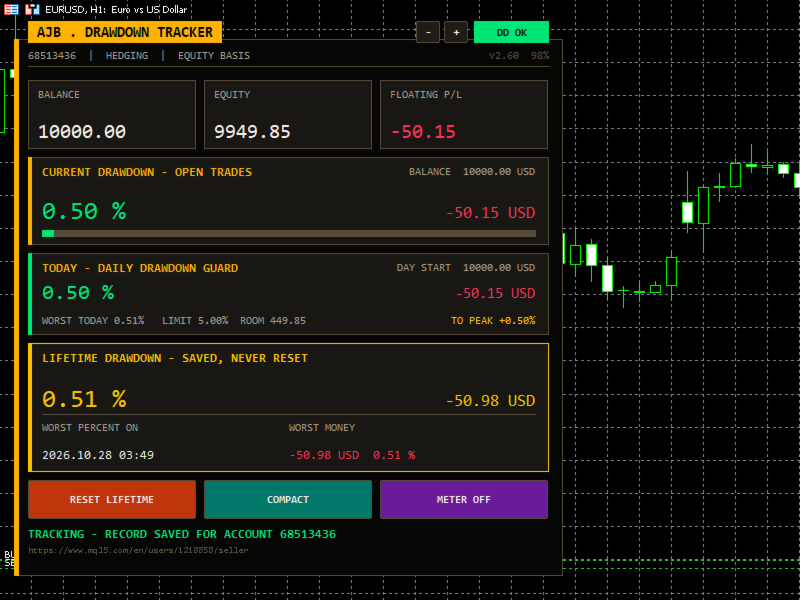
Your broker shows equity. It does not show how deep the account has ever fallen, how much room you have left today or how far you are from your best balance. Drawdown Tracker keeps those numbers on one calm card and saves them, so they are still there after a restart.

Try it free first: load it in the MetaTrader 5 Strategy Tester in visual mode and watch every card update tick by tick before you put it on a live chart.

At a glance

  • Current drawdown of the open trades in percent and money, with a colour bar.
  • New: a Daily Drawdown Guard with today's drawdown from the day's starting balance, the worst of the day, your daily limit, the money left before it and an alert.
  • Lifetime drawdown that is saved per account and never resets by itself, with the date of the worst moment.
  • Session drawdown since the utility was attached, plus a per-symbol table of lots, profit and load.
  • A draggable meter at the bottom of the chart and alerts you can switch on.

Start here

  • Attach it to any chart and any timeframe. One chart covers the whole account.
  • Set DailyLimitPct to the daily loss rule you follow (5 percent by default, 0 switches it off).
  • Choose how far back the lifetime record reaches with LifetimeStart.
  • Leave it running. It never opens, changes or closes a trade.

Why it exists

Most traders remember their best week and forget their worst hour. Yet the worst hour decides whether a strategy is safe, whether a lot size is too big and whether a funded account survives. This utility was written to remember that hour for you, honestly, and to show it every time you look at the chart.

What is new in this version

  • Daily Drawdown Guard card: today's drawdown, worst of the day, daily limit with room left, a once-a-day alert and the gain needed to get back to your all-time peak. Useful for anyone who trades under a daily loss rule.
  • A new ink-and-amber card design with a title tab, a status pill (DD OK, CAUTION, LIMIT HIT) and a status line at the bottom. It sits on the left and scales itself to the screen.
  • The meter now always stays in the left half of the chart, so the right side and the price scale stay clean.
  • Problems saving the record, creating objects or starting the timer are now written to the Experts log instead of failing silently.
  • The chart mouse settings are restored exactly as they were when the utility is removed.
  • Daily figures are stored under keys that include the login, the server and the chart symbol, so two accounts or two charts never mix.

The cards

  • Header: login, account type and the basis used (equity or balance), plus the version and the current size.
  • Account (full view): login, name, broker, server time, total deposits and withdrawals.
  • Balance / Equity / Floating: three tiles with live values.
  • Current drawdown: what the open trades cost right now, measured from the balance.
  • Today: drawdown from the day's starting value, worst of the day, limit, room and recovery to peak.
  • Lifetime: the deepest drop from the high water mark, with date and money. It is rebuilt from your real trade history on the first run.
  • Session (full view): the deepest drop since the utility was attached.
  • Symbols (full view): every symbol with open positions, sorted from the weakest, with a scroll strip when there are many.
  • Buttons: Reset Lifetime (asks three times), Compact / Full view and Meter on / off. The small minus and plus buttons change the size.

How deposits and withdrawals are handled

A deposit is never counted as profit and a withdrawal is never counted as a loss. The high water mark moves with the money you add or take out, and you choose whether the lifetime percentage stays as it was or is recalculated on the new balance.

Every input explained

  • UpdateSeconds: how often the panel refreshes, in seconds. Default 1.
  • DrawdownBasis: measure from equity (includes floating loss) or from balance (closed trades only).
  • VisibleSymbolRows: symbol rows shown before the list scrolls. Default 5.
  • StartCompact: start in the smaller compact view.
  • LifetimeStart: the lifetime record covers the whole history, starts from a date, or starts from today and then keeps running.
  • LifetimeStartDate: the start date when the option above is a date.
  • PanelCorner: corner of the chart for the panel. Left upper by default.
  • PanelMarginX / PanelMarginY: distance from the chart edges in pixels.
  • PanelWidthPx: design width of the panel; 0 uses the default.
  • PanelScalePercent: fixed size in percent; 0 lets it fit the screen.
  • MaxPanelHeightPct / MaxPanelWidthPct: the largest share of the chart the panel may use. Defaults 80 and 45.
  • AutoCompactSmall: switch to the compact view on small charts.
  • PanelFont, ArabicFont, NumberFont: fonts for labels, Arabic text and numbers.
  • ShowArabic: show an Arabic line under each English label.
  • OnDepositAction: ask each time, always keep the lifetime figure, or always recalculate it on the new balance.
  • AskOnAccountChange: when you log in to another account, offer to wipe the old account's record (always with confirmation).
  • AutoSaveRecord: keep saving the record to disk while running.
  • ShowChartMeter: show the drawdown meter on the chart.
  • MeterDraggable: let you move the meter with the mouse.
  • MeterWidthPercent / MeterHeightPx: size of the meter. It never grows past the left half.
  • MeterResetPos: put the meter back to its default place.
  • MeterFullScalePct: drawdown that fills the meter and the bars. Default 20.
  • AlertOnDDPercent: alert when current drawdown reaches this level; 0 is off.
  • AlertOnNewRecord: alert when a new lifetime record is set.
  • ShowDailyGuard: show the Today card.
  • DailyLimitPct: your daily drawdown limit in percent of the day's starting value; 0 is off. Default 5.
  • AlertOnDailyLimit: one alert per day when the limit is reached.
  • ColBackground, ColCard, ColTitleBar, ColText, ColTextDim: panel, card, title tab and text colours.
  • ColAccent, ColLifetime, ColSession: colours of the current, lifetime and session figures.
  • ColProfit / ColLoss: colours for gains and losses.
  • InpMinBarsBetweenSignals: bars to wait before the same kind of alert can fire again; 0 alerts every time. Default 10.

Good to know

  • It is a utility: it reads the account and never trades.
  • Records are kept per account and server, so several accounts on one PC never mix.
  • Drawdown that happened inside a trade that is already closed cannot be seen in the history; from the moment it runs, every tick is measured.
  • No DLLs, works on any symbol and timeframe, hedging and netting accounts.

A small request

If Drawdown Tracker helps you keep your risk honest, a short review on this page tells other traders what it is like in daily use. Run it in the Strategy Tester first and decide for yourself.
推荐产品
Trade Control Panel
Jerry Jilun Anak Liban
Trade Control Panel Function Normal One Click Function Close All Close All Profit Close All Loss Close All Pending Order Close All Sell Close All Buy Advance One Click Function 1.  Close Partial Lot Sell by Percent It will help you partial close for all open position by desire percent you wanted. No longer partial close one by one for every open position Manual input for desire percent 2. Close Partial Lot Buy by Percent It will help you partial close for all open position by desire percent

Multiple Order Manager
Ameerul Afiq Bin Abd Halim
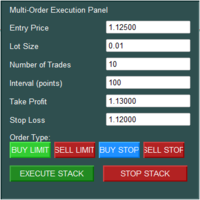
The Multi-Order Execution is an Expert Advisor for MetaTrader 5, designed to simplify the placement of multiple pending orders through a convenient on-chart control panel. The EA supports four pending order types: Buy Limit, Sell Limit, Buy Stop, and Sell Stop. Traders can configure the entry price, lot size, number of orders, price interval, take-profit (TP), and stop-loss (SL) directly from the chart. The EA automatically calculates each order's entry price based on the selected order type and
Pro Trade Manager Panel 将您的手动交易流程集中到 MetaTrader 5 图表上的一个面板:可视化规划交易,由面板按您的风险自动计算仓位,发送订单,然后管理并保护它们。适用于外汇、贵金属、指数及其他品种。 可视化交易计划 在图表上绘制入场、止损和止盈区域,可拖动调整。 支持 1、2 或 3 个止盈位(分批手数)。可选阶梯止损:TP1 后止损移至入场价,TP2 后移至 TP1。 一键切换买入 / 卖出。自动选择 Limit 或 Stop 挂单,也可市价成交。 实时显示手数、金额风险、止损距离和盈亏比。 多个交易计划(新) 图表上可同时保留最多 8 个 BUY 和 SELL 计划,每个计划都有自己的风险、手数、分批止盈和 Step SL。 在图表上、面板列表或顶部栏中点击计划即可编辑;选中的计划以金色框突出显示,其他计划变暗。 用 + BUY / + SELL 添加计划,用顶部栏或计划角落的小 x 删除;点击图表空白处可取消选择。 适用任何品种的按风险计算手数 输入账户币种的风险金额或固定手数,面板根据止损距离计算其余参数。 遵守品种的手数步长、最小和最大手数。适
小单快跑是一个快速、简洁的一键下单面板,适用于 MetaTrader 5。一键开仓、平仓、保本,止盈和止损自动设置——不再需要手动输入止盈距离。 主要功能: - 一键按钮:买(BUY)、卖(SELL)、平仓(CLOSE)、保本(BREAK EVEN) - 止盈和止损自定义(按点数)——任意设置你想要的点数 - 灵活的风险回报比——自由组合止损和止盈,轻松实现 1:1、1:2、1:3、1:4、1:5 等比例 - 实时价格显示(卖价) - K线倒计时——查看当前K线剩余时间 - 当日盈亏显示——浮动盈亏和已平仓盈亏 使用方法: 1. 设置止损和止盈(按点数)。 2. 点击 BUY 或 SELL。 3. 订单自动开仓并设置好止盈止损。 面板始终显示在图表上,让你随时快速应对市场。 输入参数: - 止损点数(Stop Loss) - 止盈点数(Take Profit) - 手数(Lot size) - 魔术号(Magic number) - 面板坐标(Panel X/Y) - 颜色设置 作者:一心
各位交易员好!我是您的交易助手。话不多说,让我来告诉你我的专长: 1. 我擅长管理您的持仓,不论你在哪一端下单,我都能第一时间帮你加上合理的止损线以及移动止损。 2. 我能帮你规避追涨杀跌,从根源根除守不住原则的人性弱点。 3. 我会在最佳点位给你发出通知消息到您移动端的MT5客户端,供您参考,当然,您需要将您移动设备内 MetaTrader 5 APP里 的  MetaQuotes ID 注册到  MetaTrader 5 客户端-->选项-->通知--> MetaQuotes ID的编辑框内并勾选开启通知点确定 。 4. 我很好地支持在策略测试中进行手动模拟操盘练习。 5. 联系我您还能获得一个配套的附加AI辅助客户端超级助理程序。 备注:本 项目不承诺您一定能盈利,它只是交易助理工具。 消息通知的效果展示请参阅截图效果。 期待您选择我成为您的助理,让我们共同奔赴财务自由!!!
RMT Capital Firewall
Denis David Garcia Camejo
RMT Capital Firewall is a risk guard, equity protector and drawdown limiter for MetaTrader 5. It watches daily loss, drawdown, an equity floor, open risk and positions without a stop loss, warns before a limit, and — only if you authorise it — closes the positions in the scope you chose and stays latched until you re-arm. Every decision is recorded as a structured audit line in the Experts journal. The problem it solves A daily-loss or drawdown rule is easy to write down and hard to keep when a
MT5 新闻过滤工具:根据内置经济日历,在重要新闻前后平仓或保护持仓,并暂停 EA。 News Window Guardian(新闻窗口守护) 在重大经济新闻前后保护账户上的每一个 EA 和每一笔手动交易。只需加载到一个图表:它读取 MetaTrader 5 内置的经济日历,找出您关心的数据发布,在每个保护窗口内平仓或清仓、删除挂单、把止损移到保本、阻止新开仓,并可暂停其他 EA。窗口结束后自动恢复交易。 无需 WebRequest、无需 DLL、无需设置 GMT 偏移。 日历来自 MT5 终端本身,使用交易服务器时间:不需要添加网址白名单,VPS 防火墙不会导致失效,也不会因时区设置错误而出错。适用于任何 EA(无需源码)、任何品种和周期、对冲和净额账户。 筛选哪些新闻 货币 :如 USD、EUR、GBP、JPY、CHF、CAD、AUD、NZD,或全部。 影响程度 :仅高、中和高、或全部。 每次发布 之前和之后的分钟数 。 关键词规则(独立分钟数) :例如 Nonfarm|NFP=30/30; FOMC|Federal Funds=45/45; CPI=20/20 ,可选让规则也匹配
Strategy Manager is a  Multi-Time-Frame & Multi-Currency  Dashboard for  Metatrader 4 and 5. Thanks to a free, external graphical user interface, build your own strategy by combining any indicators and loading them into the dashboard to see the result ! In addition, you can precisely  set-up your Auto-trading & Notifications and use indicators for Stop-Loss, partial profit or limit. Filter your automatic trading & notifications with forex calendar and more. Open and Manage your orders directly w
The real‑time view of what is happening inside the market. Footprint Secrets brings detailed analysis directly into MetaTrader 5. It shows where volume is trading, how buyers and sellers are interacting, and how liquidity shifts as the market evolves. Designed for traders who want a precise, real‑time understanding of market behavior. Check out the free preview version here:  https://www.mql5.com/en/market/product/172398 Benefits for the Trader See the real activity behind price . Footprint ch
SMT Trade Planner 是一款专业的 MetaTrader 图表上风险计算器和交易执行面板。它根据您的风险设置计算手数大小,显示可直接在图表上拖动的入场价、止损和止盈线,根据可配置的风险规则验证交易,并允许一键执行交易。   工作原理 将 Trade Planner 附加到任何图表。面板显示账户信息和快速选择风险按钮。图表上出现三条水平线:入场价(蓝色)、止损(红色)和止盈(绿色)。拖动任何线条调整交易设置。所有计算实时更新。方向根据止损相对于入场价的位置自动检测。满意后点击买入或卖出执行交易。   面板部分 账户:实时显示余额、净值和可用保证金。风险设置:四个快速选择按钮。交易计划:方向、入场价、止损和止盈及点数距离。LINK模式在拖动时保持SL/TP比率。手数大小:基于风险百分比的最优手数,始终向下取整。分析:止损金额含点差和佣金、止盈利润、点差成本、佣金、毛R:R和净R:R。点差监控:带颜色编码的当前点差。风险规则:每条规则显示通过或失败。执行按钮:买入、卖出、全部平仓、重置、隐藏线条。   主要功能 可拖动的入场、止损和止盈线实时更新所有计算。关联SL/TP模式保持
必须安装免费的 Windows Telegram Bridge SENDORIQ Telegram Signal Copier MT5 使用 Bot API 或 MTProto 时,均需要免费的 SENDORIQ Telegram Bridge v1.32。 Bridge 需要单独安装在 Windows x64 上,并在接收 Telegram 消息期间持续运行。MQL5 Market 提供的是 MetaTrader 5 EA;Bridge 接收来自获授权 Telegram 来源的消息,并将解析后的信号传递给 EA。无需安装 SENDORIQ Control Center。 安装教程与免费 Bridge 下载: SENDORIQ Telegram Signal Copier MT5 - Installation and Setup Guide (MQL5 Blog) . 教程包含 ZIP 下载地址、SHA-256 校验值、截图以及两种连接方式的设置步骤。 Telegram 连接方式 Bot API: 使用您自己创建的 Telegram 机器人的 Token;机器人必须能够读取每个已配置来
Correlation Risk Manager
Eugenio Gustavo Guilarte Homayden
You think you're diversified. Your correlations say otherwise. MetaTrader shows you every position you hold. The margin, the floating P/L, the lot size, all of it. What it doesn't show you is whether your trades are secretly the same bet. And that's usually what takes the account down. Say you open five trades, 1% risk on each. Feels like 5% at stake. Spread out, sensible. But three of them are long the same dollar move under different tickers, so when one bad print hits, all three drop together
Daily Loss Guard Pro MT5 watches your account and stops trading when a limit you set is reached. It closes positions, deletes pending orders and blocks new trades. It never opens a trade itself and gives no signals. Attach it to any one chart of the account. It works alongside manual trading and other Expert Advisors, and checks every second on a timer, on every tick and on every trade event. Limits Daily loss: in percent or in account currency, based on the day-start balance, the day-start equi
Guardian Coordinator – 多 EA 风险管理器与回撤守护,适用于 Prop Firm 与资金账户。Guardian Coordinator 是风险协调工具:它自己不交易,也不承诺盈利。它位于您账户上所有 EA 之上,阻止它们在彼此不知情的情况下叠加隐藏风险。 如果您同时运行多个 EA,这正是大多数交易者缺失的一环:两个机器人可能悄悄累积相关性敞口、在同一品种上开出对立仓位,或者共同把账户推过自营交易公司的限额——而任何单个 EA 都不知道其他 EA 在做什么。Guardian Coordinator 知道。 它的功能 - EA 注册表:按 magic number 注册最多 15 个 EA 并加标签(如 "111:Scalper, 222:Swing")。手动交易与未注册 EA 按您的规则处理:忽略、报告或平仓。 - 全账户敞口预算:对所有已注册 EA 设置统一上限,按总手数和/或风险百分比(基于止损)。预算用尽后,新仓位按您的规则处理。 - 冲突检测:同一品种上的对立仓位会被识别,并报告或解决。 - 全账户每日亏损上限,统计所有 EA 的总和——这正是自营交易公司
PnL Calendar
Keni Chetankumar Gajanan -
PnL Calendar - analyse to profit PnL Calendar turns your trading history into a clear calendar view, so you can see profitable days, monitor risk in real time, and combine multiple broker accounts into a single portfolio picture using the Multi-Broker data export feature. The Calendar Panel breaks profit down by day, week, month, and year, while the Account Panel tracks balance, equity, margin alerts, multi-timeframe summaries, and overnight gap adjustments. The Risk Dashboard adds leverage, dra
Trade Report to CSV
Hirabayashi Masayuki
Trade Report to CSV — Your Trade History, One Clean Row at a Time Tired of MT5's built-in reports leaving you wanting more? This script turns your closed trade history into a tidy, ready-to-analyze CSV — one row per trade, no digging required. Fields exported Entry time, Type (BUY/SELL), Lots, Symbol, Entry price, Stop loss, Take profit, Close time, Close price, Commission, Swap, Profit, Profit in pips, Magic number, Holding time, Close reason (SL/TP/manual/EA), Comment Highlights Choose you
FREE
Utility TimeLs Close Positions 是一个用于在 MetaTrader 5 中管理和自动关闭仓位的工具。 它允许根据时间、交易品种、方向、魔术号码和备注内容灵活控制仓位的关闭方式和时间。 您可以选择在特定的星期几关闭交易 您可以设置一个具体时间来关闭所有持仓 您可以通过交易品种、方向(买/卖)、魔术号码或备注进行过滤 您可以设置最多三个一次性定时关闭操作(交易1、交易2、交易3),每个都有独立的过滤条件 您可以开启或关闭图表上的信息面板,显示当前设置和即将执行的关闭操作 您可以自定义图表中文字的字体大小和颜色 Utility TimeLs Close Positions is a tool for managing and automating trade closing operations in MetaTrader 5.
一键平掉您想平的订单。Smart Close Panel 在图表上放置六个按钮:全部平仓、只平盈利单、只平亏损单、只平买单、只平卖单,或删除挂单。每个按钮在点击前就显示将要平掉的订单数量和它们的盈亏。 行情快速反转时,在“交易”标签里一单一单地平仓既慢又容易出错。有了这个面板,您可以在一秒内拿走所有盈利单的利润,或砍掉所有亏损单。 六个按钮 Close ALL :所有持仓。 PROFIT :只平盈利的订单。 LOSS :只平亏损的订单。 BUY / SELL :只平买单或只平卖单。 Delete PENDING :删除所有挂单。 每个按钮显示订单数量和当前盈亏,例如“PROFIT (3) +45.20”。没有订单的组显示为灰色。 两个开关 Symbol: 所有品种,或只当前图表的品种。 Close: 100 %(全部)或 50 %(一半)。一半按经纪商的手数步长向下取整。手数太小无法拆分的订单会被跳过,并提示您。 安全 点击两次确认:第一次点击按钮变成橙色,3 秒内再点一次才平仓。可以关闭此功能。 结果行:“Closed 3 trades: +45.20 USD”。如果某单无法平仓,会
All In One Trade Manager is a trade manager and one-click trading panel for manual traders on MetaTrader 5. It works as a trading assistant, risk manager and position size calculator in one dashboard. It brings together everything below in one panel: order entry with risk sizing automatic trade management advanced order types account protection statistics Its entry checks run in the background and tell you, before you click BUY or SELL, when something speaks against the trade. Also available
一键保本功能:同币种、 不 同订单类型 ( sell 或 buy )的多个订单 ,在整体盈利的条件下,设置同一数值的止损线或止盈线。 比如目前有 10 个 EURUSD 订单,其中 sell 订单 7 个, buy 订单 3 个。当总体盈利的情况下,如果设置整体 sell 订单止盈 50 点: ( 1 )当 7 个 sell 订单 的合计盈利大于 3 个 buy 订单合计亏损时, EA 将自动计算 7 个 sell 订单的止损线和 3 个 buy 订单的止盈线为同一数值,并将这一数值设置在总仓位盈利 50 点的位置上。 ( 2 )当 3 个 buy 订单的合计盈利大于 7 个 sell 订单合计亏损时, EA 将自动计算 3 个 buy 订单的止损线和 7 个 sell 订单的止盈线为同一数值,并将这一数值设置在总仓位盈利 50 点的位置上。 使用方法: ( 1 )将 One Click Breakeven 作为 EA 加载到需要保本的图表窗口上,点击 “Open” 。 ( 2 )每增加一个订单,需点击一次 “Open” 。 注意事项: 某些订单未能设置止损或止盈线,是因为市场价和订单
Robot Manual Order Manager is a tool that allows you to automatically include Stop Loss, Breakeven, Take Profit and partials in open trades. Be it a market order or a limit order. Besides, it automatically conducts your trade, moving your stop or ending trades, according to the parameters you choose. To make your operations more effective, the Manual Orders Manager Robot has several indicators that can be configured to work on your trade. Among the options you can count on the features: Conducti
KS Hotkey Trading Panel Pro 是一款适用于 MetaTrader 5 的智能交易系统(EA),支持通过键盘快捷键进行快速交易,并提供一个可点击的图表内操作面板。 主要功能 快捷键交易 — 支持以下单键操作: 市价买入 / 卖出 限价买入 (Buy Limit) / 限价卖出 (Sell Limit) 止损买入 (Buy Stop) / 止损卖出 (Sell Stop) 平仓所有持仓 仅平多单 / 仅平空单 删除所有挂单 调整交易手数(上箭头 / 下箭​​头) 显示 / 隐藏面板 图表内操作面板 — 显示所有快捷键设置、当前手数、实时账户信息(余额、净值、点差、买入/卖出持仓数量)以及对应各项操作的“GO”按钮。 可折叠面板 — 通过切换按钮(或快捷键)将完整面板收起为细长条。 可配置参数: 初始手数及调整步长 止损 / 止盈(以点数为单位,0 表示不设置) 挂单距离(偏移量) 滑点 魔术数字 (Magic Number) 仅针对当前图表品种(或所有品种)执行平仓/删除操作 所有快捷键(支持自定义单键) 面板位置(图表任
One Click Trader  is a tool designed for MetaTrader 4 platform, which enables you to take your trading to the next level. It enables you to open, manage and close your trades in simple an efficient way by just one click of your mouse button. "-"   ,  "+"  change OCT window size  Up arrow minimizes the OCT panel Down arrow maximizes the OCT panel Right arrow displays the next panel with additional features Left arrow hides the panel with additional features Red  SELL  button enables you to open s
Overview The Expert Advisor sends notifications to a mobile phone, via e-mail or plays a sound in case any changes are detected on the trading account: opening/closing positions, changing order or position parameters, balance or leverage. Also, the Expert Advisor can inform that Equity on the trading account has dropped below a specified value or Free Margin is small compared to Margin. The Expert Advisor does not trade, it only monitors your account. Launching the Expert Advisor You should all
ICT Strategy SMC Opening Range Gap
Theophilus Kipchirchir Kibett -
Opening Range Gap (ORG) Automatically maps the daily Opening Range Gap — one of the most-watched institutional reference points — directly on your chart. The Opening Range Gap is the price void left between the previous session's close and the new session's open. Smart-money traders treat this zone as a magnet and a decision point: price often returns to fill it, reacts at its edges, or uses it as a launchpad for the day's expansion. This indicator removes the guesswork — it detects the gap the
该工具可以帮助你一键平仓所有持仓订单,只需要点击“Close all”.如果你只想平仓盈利中的订单时,就点击“Close profitable"按钮,点击之后,所有浮盈中的订单都会被全部平掉;如果你只想平仓浮亏中的订单,就点击“Close losable”按钮,点击之后,所有浮亏中的订单就会被全部平掉。 该工具经过一年的真实测试,一键平仓功能非常完善,平仓及时,延迟范围较小,当然,延迟和你所处的地区以及网络环境也有关系,这一点还请注意。 在历史数据的回测过程中,该工具表现更加完美,100张订单全部平仓完成最多只需要0.495秒。在真实交易过程中,本人最多持仓订单数量只有26笔,全部平仓完成的时间是1.28秒。
Trade Guardian Risk Manager is a MT5 utility Expert Advisor dedicated to risk control and equity protection. Many know how to trade. Few know when to stop. Trade Guardian formalizes discipline and mechanically enforces your limits when emotions or over-exposure take over. Risk management utility No trading logic — Does NOT open trades : does not open positions, does not provide signals, contains no strategy, and does not guarantee results. Operating principle — Equity Monitoring + rule enf
Signals for Telegram
Elidio Xavier Guimaraes
It is a utility that posts customized messages on Telegram based on account trading activity. Once the utility is on the chart, with each new position opened from the same chart symbol the utility is added, a customized message will be sent to the Telegram group defined in the input parameters. The utility will post to the Telegram group if a new position is opened and if it is the same symbol as the chart the utility is running on. If you are using an Expert Advisor for Buy and Sell and want to
PropBlaster Daily Loss Guard - Daily Loss Limit Guard Free risk-management utility that stops you from breaking your daily loss limit. It closes rule-breaking trades, can close everything at the limit, caps trades per day and makes a stop loss mandatory. It never opens a trade. 100 % native MQL5 - no DLLs, no web requests. Quick start 1. Attach the EA to one chart only (any symbol) and allow Algo Trading. It watches the whole account. 2. Set the daily loss limit in % and the server hour at whi
FREE
Complete Pending Orders Grid System opens any combinations of Buy Stop, Sell Stop, Buy Limit and Sell Limit pending orders and closes all existing pending orders. You just need to drop this script on the chart of a desired currency pair. Before placing all pending orders, the input window is opened allowing you to modify all input parameters: DeleteAllPendings – if 'true', then all pending orders (for current currency) are deleted. BuyStop – if 'true', Buy Stop order is opened. SellStop – if 'tr
该产品的买家也购买
Trade Assistant MT5
Evgeniy Kravchenko
4.43 (216)
它有助于计算每笔交易的风险,容易安装新的订单,具有部分关闭功能的订单管理, 7 种类型的追踪止损和其他有用的功能。   附加材料和说明 安装说明   -   应用程序说明 线条功能  - 在图表上显示开仓线、止损线、止盈线。 有了这个功能,就可以很容易地设置一个新的订单,并在开仓前看到它的附加特性。   风险管理  - 风险计算功能在考虑到设定的风险和止损单的大小的情况下,计算新订单的成交量。它允许你设置任何大小的止损,同时观察设定的风险。 批量计算按钮 - 启用 / 禁用风险计算。 在 " 风险 " 一栏中设置必要的风险值,从 0 到 100 的百分比或存款的货币。 在 " 设置 " 选项卡上选择风险计算的变量: $ 货币, % 余额, % 资产, % 自由保证金, % 自定义, %AB 前一天, %AB 前一周, %AB 前一个月。   R/TP 和 R/SL - 设置止盈和止损的关系。 这允许你设置相对于损失的利润大小。 例如, 1 : 1 - 这决定了 TP = SL 的大小。 2 : 1 - 这意味着 TP 是 SL 的两倍。 RR - 它禁用比率。   订单管理 该面板支
Farmed Hedge Yield Farming | All Markets (Manual - Hybrid - Semi/Automated EA) VERIFIED TRADING RESULTS - Farmed Hedge Yield Axi Copy:  https://www.mql5.com/en/signals/2356376 - Farmed Hedge Yield Exn Copy:   https://www.mql5.com/en/signals/2356404 - Farmed Hedge Yield V Copy:  https://www.mql5.com/en/signals/2357156 IMPORTANT NOTICE: FarmedHedge is a MANUAL-FOCUSED TRADING UTILITY ,not a fully automated EA. Results shown on this Signal include manual trades and overall strategic management.
欢迎来到 Trade Manager EA——这是一个终极风险管理工具,旨在使交易变得更直观、精准和高效。它不仅仅是一个下单工具,而是一个用于无缝交易计划、仓位管理和风险控制的全面解决方案。不论您是新手交易员、资深交易员,还是需要快速执行的剥头皮交易员,Trade Manager EA 都可以满足您的需求,适用于外汇、指数、大宗商品、加密货币等各种市场。 借助 Trade Manager EA,复杂的计算已成过去。只需分析市场,在图表上用水平线标记入场、止损和止盈,设置您的风险水平,Trade Manager 就会立即计算出理想的头寸规模,并实时显示以点、账户货币计价的止损和止盈。每笔交易都得以轻松管理。 主要功能: 头寸规模计算器 :根据定义的风险瞬间确定交易规模。 简单的交易计划 :在图表上用可拖动的水平线直接计划交易,设置入场、止损和止盈。 实时显示 SL 和 TP :以账户货币、点或分显示止损和止盈,便于分析。 高级保护工具 盈亏平衡选项 : 基本盈亏平衡 :当您的交易达到设定水平时自动保护利润。 多级盈亏平衡 :设置多达 4 个级别以逐步保护利润。 尾随止损选项 : 基本尾随
Telegram to MT5 Multi-Channel Copier   可将您 Telegram 和 Discord 频道中的交易信号自动复制到 MetaTrader 5。无需机器人、无需浏览器扩展、无需手动复制。信号一到 Telegram 或 Discord,EA 几秒内就在您的终端开仓。 在复制某个频道之前,内置回测器还能告诉您该频道在您的账户上会有怎样的表现。 产品包含两个组件:一个监听您 Telegram 频道的 Windows 应用程序,以及在 MT5 终端执行信号的本 EA。同时提供 MT4 版本   点此 . 购买前先试用:   应用程序可免费下载。连接您自己的频道,查看每条信号的读取结果。Backtest 选项卡和实际交易需要已购买或已租用的 EA。本页面的免费演示版只能在策略测试器中运行,而策略测试器无法读取 Telegram 和 Discord。 设置指南与应用下载:   https://www.mql5.com/zh/blogs/post/779480 了解如何 回测任何 Telegram 信号频道 。 当前价格将来会上调。 工作原理 应用通过您自己的 Te
EA Overfitter
Stephen J Martret
5 (4)
回测看起来很漂亮。但它明天、下周、下个月还能继续赚钱吗? EA Overfitter 让您的 EA 在 100 段它从未见过的价格历史上重新运行。一个分数告诉您这个优势是否真实。 回测告诉您的,是 EA 在某一段价格历史上的表现——那段恰好发生过的历史。您无法从中判断,这个结果有多少来自策略本身,又有多少只是那一条特定路径带来的。 EA Overfitter 回答的正是这个问题。它构建最多 100 段您的 EA 从未交易过的合成价格历史,让策略在全部这些历史上重新运行,并展示它所产生的完整结果区间。您得到的不再是一条幸运或不幸路径上的单个数字,而是一幅真实的图景:策略在陌生数据上多久能赚钱、典型结果是什么样(而不是最好的那一次),以及您的回测离它有多远。 这些世界是由您自己的近期历史重建而成,因此这不是预测——任何从历史数据出发的检验都不可能是预测。它告诉您的是:这个优势是否依赖于价格的某一种特定排列,以及回测数字距离典型结果有多远。在投入资金之前,这才是值得回答的问题。 三个步骤 1. 构建。在图表上选择时间区间和世界数量,然后按 Build。EA Overfitter 会
TradePanel MT5
Alfiya Fazylova
4.89 (174)
交易面板是一款多功能交易助手。该应用包含超过50种手动交易功能,并允许您自动执行大多数交易任务。 应用程序说明 : https://www.mql5.com/zh/blogs/post/761102 用于模拟账户的应用程序试用版: https://www.mql5.com/zh/blogs/post/762579 如何安装应用程序: https://www.mql5.com/zh/blogs/post/762580 如何在可视化模式下测试应用程序: https://www.mql5.com/zh/blogs/post/770278 如何在VPS MetaTrader上安装应用程序: https://www.mql5.com/zh/blogs/post/770196 贸易. 只需单击一下即可执行交易操作: 打開掛單和頭寸,並自動計算風險。 一鍵打開多個訂單和頭寸。 打開訂單網格。 按組別關閉掛單和頭寸。 反轉頭寸方向(關閉買入>打開賣出,關閉賣出>打開買入)。 鎖定頭寸(通過開啟缺少的頭寸,使買入和賣出頭寸的數量相等)。 一鍵部分關閉所有頭寸。 將所有頭寸的止盈和止損設置在同一價格水平。
News Trade EA MT5
Konstantin Kulikov
4.55 (11)
在此向大家介绍一款我本人使用多年的机器人。该产品支持半自动和全自动交易模式。 >>> Chat <<< 本程序包含基于经济日历新闻的灵活交易设置功能。不支持策略测试器检验。仅可进行实际操作。 下載最新的設定檔: https://www.mql5.com/en/blogs/post/747929 訊號監控: https://www.mql5.com/en/signals/author/test-standart 请参考博客中各类参数说明自行实现个性化设置   : https://www.mql5.com/en/blogs/post/748545   。 主要默认设置说明 单一图表英镑/GBP(英镑美元/GBPUSD、欧元英镑/EURGBP、英镑日元/GBPJPY、英镑加拿大元/GBPCAD、英镑澳大利亚元/GBPAUD、英镑瑞士法郎/GBPCHF)货币对操作。英镑/GBP是波动性最大的货币,能够为用户顺利完成交易提供更多机会。 Use_Symbols_from_Line = true; Symbols_Line = GBPUSD, EURGBP, GBPJPY, GBPCAD, GB
按照自己的交易规则复制 Telegram 信号 Telegram to MT5 Signal Trader 可将 Telegram 公开及私密频道和群组中的文字交易信号自动复制到 MetaTrader 5。通过一个桌面应用管理多个信号提供者和 MT5 账户,并为 每个提供者单独设置风险和交易参数 。 复制信号无需 Telegram 机器人,也无需配置 API。 只需通过手机号或二维码登录您自己的 Telegram 账户,然后选择您已加入的频道或群组。您无需创建机器人,也无需提供 Telegram API 令牌、API ID 或 API hash。 自行选择仓位大小,将平仓分配到多个止盈价位,并自动执行保本止损和移动止损。在跟随信号提供者的同时,掌握信号的实际交易方式。 本产品由这款 MT5 EA 和必须配合使用的 Windows 桌面应用组成。请参阅 安装指南及应用下载 。 管理多个信号提供者和账户 为每个提供者单独设置: 为每个频道设置专属的仓位计算方式、入场规则、止损、止盈和交易管理参数。 灵活分配至不同账户: 将同一提供者的信号复制到多个已连接的 MT5 账户,并为每个账户使用不
================================================================================ POC BREAKOUT - V20.72. Full Professional Grade Toolkit ================================================================================ POC Breakout is a full MetaTrader 5 trading dashboard for discretionary traders who want breakout signals, Point of Control (POC) context, volume profiles, order flow, market structure, news, alerts, and advanced trade planning in one professional workspace. Attached directly to you
The product will copy all telegram signal to MT5 ( which you are member) , also it can work as remote copier.  Easy to set up, copy order instant, can work with almost signal formats, image signal,  s upport to translate other language to English Work with all type of channel or group, even channel have "Restrict Saving Content", work with  multi channel, multi MT5 Work as remote copier: with signal have ticket number, it will copy exactly via ticket number. Support to backtest signal. How to s
下一次更新 — 版本 2.52 即将推出![全新功能] 准备迎接 4 项重大新功能,全面提升您的市场分析能力与交易流程! 我们将通过 4 项全新功能,进一步提升市场分析水平,满足您的交易需求。现为您介绍: 1. TRADE OVERVIEW DASHBOARD 2. CONFLUENCE AT ZONE 3. STRONG & WEAK HIGH/LOW 4. OTE 1. TRADE OVERVIEW DASHBOARD 一个帮助您更轻松地了解整体市场状况的仪表盘,为您的交易决策提供参考指引,帮助您系统地分析市场并规划交易,所有信息尽在一个屏幕中。 多时间周期市场概览(Multi-Timeframe Market Overview) 更清晰地了解市场方向与价格结构 快速查看市场状况 为系统化市场分析和入场规划提供指引。 2. CONFLUENCE AT ZONE 当价格进入关键区域时……您将了解有多少项支持因素相互吻合。 关键区域是交易决策至关重要的地方。但仅仅是价格进入某个区域还不够。此功能可帮助您在入场交易前,识别相互吻合的因素,包括信号及其他相关因素,从而进行更全面的分析,并
EA Auditor
Stephen J Martret
5 (7)
EA Auditor is an independent analysis tool for traders evaluating Expert Advisors and trading signals on MetaTrader 5. It audits backtest reports, reviews posted developer signals, and cross-verifies the two against each other to help traders assess strategies before committing capital. The MQL5 market offers a wide range of Expert Advisors from many developers, with varying approaches, quality, and transparency. EA Auditor provides a consistent, data-driven framework for reviewing them, answer
EA Portfolio Control & Cloud Monitoring for MetaTrader 5 Your EAs manage trades. KONTROL_01 manages your EAs. A control system for traders running multiple Expert Advisors on the same account. Coordinate EA activity, manage trading risks and monitor your setup remotely. A detailed User Manual is available via DM after purchase. IN PRACTICE Multiple EAs. No coordination. Your EAs trade independently, unaware of each other's activity. KONTROL_01 coordinates them, limits simultaneous activity a
Local Trade Copier EA 是针对需要从外部来源执行交易信号或需要同时管理多个账户的个人交易者或账户经理的解决方案,无需 MAM 或 PAMM 账户。它可以从多达 8 个主帐户复制到无限的从帐户 [ 安装指南 | 更新指南 | 故障排除 | 常见问题 | 所有产品 ] 100% 自托管 容易安装和使用 不使用安装程序、配置文件、服务器、内存管道或 DLL 1000 次激活可永久使用 EA 本地执行,无网络延迟 它实现了您需要的所有功能: 最多8个主账户和无限从属账户 适用于所有经纪人和 DD/NDD/ECN/STP 执行 适用于具有不同帐户货币的帐户 在真实账户和模拟账户之间工作不明显 支持主从账户中的符号名称后缀 按幻数和订单评论过滤 不会干扰其他交易 可选择复制 SL 和 TP 水平 可选择复制挂单 支持符号翻译 支持部分关闭 反向模式 灵活的交易规模: - 固定地段 - 乘数 - 成比例的 - 与乘数成比例 EA 可以使用投资者或任何账户的主密码复制交易。 如何将交易从一个主账户复制到一个或多个从账户 在源终端中安装 EA 将 EA 加载到任何图表并选择“MA
RETAILBERG FOOTPRINT CHART PRO — Order-Flow Workspace for MetaTrader 5 Version 7.00  |  Professional System  |  31 tools  |  One chart A full 150-page illustrated User Manual is included. Please read the full manual to understand this feature packed footprint chart elements and ui. https://www.mql5.com/en/blogs/post/777982 DEMO / STRATEGY TESTER — PLEASE READ FIRST
Power Candles Strategy Scanner:自我优化的多品种交易设置扫描器 一个风吹草动就提醒的扫描器,只会让您学会忽略它。一根K线收盘时行情一热闹,提醒接连不断,您真正要做的那个交易设置就被淹没在噪音里。 Power Candles Strategy Scanner 在您 Market Watch 中的每个品种上运行自我优化的 Power Candles 引擎,只针对通过您自己筛选条件的内容发出提醒:最后一根已收盘K线的强度、交易设置的盈亏比、实时点差,以及您交易的资产类别。一旦某个品种进入您的列表,扫描器就会通知您。被您筛掉的一切保持安静,同一根K线收盘的所有命中合并成一条消息送达。 购买前先看看面板和每一个筛选条件。 截图、完整功能导览以及与 Power Candles 的配合流程: stein.investments/products/power-candles-scanner 本工具属于 Stein Investments 生态系统:18 款以上工具,外加 Max,您的一对一 AI 交易导师。  全天候在线,深入了解每一个指标,在您需要把事情想清楚的那一刻
Dealer's Panel No signal decides anything here — a hand does. One click, and the panel calculates what's underneath: lot size from risk, target from a 30-step balance ladder that remembers exactly how far an account has climbed. Toggle between market and pending without touching an input field. Set a stop, and the take-profit can write itself — a fixed share of the balance, translated into price with no arithmetic left for the trader to get wrong. One trade live at a time; it won't let a seco
Bneu Prop Firm Pass System
Marvinson Salavia Caballero
5 (1)
BNEU PROP FIRM PASS SYSTEM v2.37 PRODUCT OVERVIEW Bneu Prop Firm Pass System is a professional risk management and account protection utility for MetaTrader 5. Attach to any chart and configure your account rules. The system monitors daily loss, maximum drawdown, profit target, trading days, open risk, margin usage, news events, pending orders, weekend restrictions, and rollover restrictions from one dashboard. It includes a 5-tab premium dashboard, prop firm presets, custom rules, Risk Sentine
REVDEN AI Desk:依托 REVDEN 的市场背景,在与您自己的 AI 的一场对话中运作您的交易 设想一下,在一场对话中运作您的全部交易。 REVDEN AI Desk 将这一切带入 MetaTrader 5:您询问自己的 AI 如何解读市场,它依据 REVDEN 对您所交易品种的完整背景信息作答,包括这些品种的状态、风险画像和即将到来的数据发布。它的提案附带入场、止损、目标和风险,您批准合适的那些。您的规则也以同样的方式修改:写下需要改变的内容,您的 AI 就会为您起草新的规则手册,采用与否由您决定。围绕这场对话,整个市场呈现在同一个屏幕上。 查看交易台和设置指南。 每个界面、每项设置,以及与您自己的 AI 共同迈出的第一步: stein.investments/products/revden-ai-desk 与您的 AI 进行一场对话,用一个屏幕纵览市场,两者共享同一个数据基础。  用您自己的话: 就在图表旁边,询问市场、某个品种或某项提案。  依托 REVDEN 的背景信息: 您的 AI 读取您所选每个品种的状态、风险画像、即将到来的数据发布,以及您的持仓和您的规则手
EasyInsight AIO MT5
Alain Verleyen
4.92 (12)
EASY Insight AIO – 全能智能交易一站式解决方案 概述 想象一下,您可以在几秒钟内扫描整个市场——外汇、黄金、加密货币、指数,甚至股票——无需手动筛选图表、繁琐安装或配置指标。 EASY Insight AIO 是您专为 AI 交易打造的即装即用数据导出工具。它将整个市场快照一次性输出为简洁的 CSV 文件,直接支持 ChatGPT、Claude、Gemini、Perplexity 等各类 AI 平台的即时分析。 无需窗口切换,无需图表叠加,也没有任何杂乱。只需纯净、结构化的数据自动导出,让您专注于基于数据的高效决策,无需再盯盘耗时。 为什么选择 EASY Insight AIO? 真正的一体化 • 无需设置,无需安装指标,无图表叠加。只需安装、运行并导出——就是这么简单。 多资产全覆盖 • 扫描分析外汇、金属、加密货币、指数、股票——您的券商所能提供的一切市场。 AI 专属数据导出 • 高度结构化、针对 AI 优化的 CSV 文件,直接适配主流智能工具和平台。 完整导出内容: • 三个可选周期的货币强度分析 • 净多头头寸变化体现市场情绪 • 成交量变化、
Grid Manual MT5
Alfiya Fazylova
4.74 (23)
Grid Manual是一个交易面板,用于处理订单网格。 该实用程序是通用的,具有灵活的设置和直观的界面。 它不仅可以在亏损方向上设置订单网格,还可以在盈利方向上设置订单网格。 交易者不需要创建和维护订单网格,实用程序会这样做。 打开一个订单就足够了,Grid manual会自动为它创建一个订单网格,并伴随它直到非常关闭。 完整说明和演示版 此處 。 该实用程序的主要特性和功能: 伴隨以任何方式打開的訂單,包括從移動終端打開的訂單。 適用於兩種類型的網格:“限制”和“停止”。 使用兩種方法計算網格間距:固定和動態(基於 ATR 指標)。 允許您更改未結訂單網格的設置。 顯示圖表上每個網格的盈虧平衡水平。 顯示每個網格的利潤率。 允許您一鍵關閉網格中的盈利訂單。 讓您一鍵關閉每個訂單網格。 允許您對訂單網格應用追踪止損功能。 允許您在訂單網格上應用將訂單網格的止損轉移到盈虧平衡水平的功能。 相對於訂單網格的盈虧平衡水平自動重新排列止盈(僅在限價網格模式下,距離取決於所選的計算類型:“保守”或“激進”)。 最多可管理 20 個訂單網格,每個網格最多可包含 100 個訂單。 計算初始手數時,
DrawDown Limiter
Haidar Lionel Haj Ali
5 (23)
DrawDown Limiter v5.0 — 高级账户保护控制器 DrawDown Limiter v5.0 是一款运行于客户端的交易账户保护控制器,用于监控您的交易账户,并在达到您所设定的风险、盈利、新闻、时间计划、Rollover 或持仓数量限制时自动采取相应措施。 它可以通过一个独立图表监控 手动交易、自动化策略、多个 EA、挂单以及浮动持仓 。它既可以保护整个交易账户,也可以通过 Magic Number 仅监控特定 EA 或一组 EA。 DrawDown Limiter 的目的不仅仅是显示回撤,而是 主动执行您设定的交易规则 ,并在保护条件保持有效期间持续执行这些规则。 DrawDown Limiter v5.0 不仅用于监控您的亏损程度,还用于控制策略何时可以继续运行、哪些风险敞口可以保留、何时必须停止交易,以及自动化交易环境何时可以安全恢复运行。 需要帮助或有任何问题?  请查看   DrawDown Limiter 用户指南 我是  Lio ,欢迎随时联系我!  我们始终愿意为您解答问题、提供帮助并持续改进产品。 统一的保护系统 DrawDown Limiter v
YuClusters
Yury Kulikov
4.93 (43)
Attention: You can view the program operation in the free version  YuClusters DEMO .  YuClusters is a professional market analysis system. The trader has unique opportunities to analyze the flow of orders, trade volumes, price movements using various charts, profiles, indicators, and graphical objects. YuClusters operates on data based on Time&Sales or ticks information, depending on what is available in the quotes of a financial instrument. YuClusters allows you to build graphs by combining da
Premium Trade Manager - 内置交易导师的图表面板 Premium Trade Manager 将一位交易导师嵌入您的图表,并在其下搭载完整的执行引擎。像往常一样建立交易,然后让您的 AI 交易导师 Max 读取这笔具体的交易,结合您的实时账户给出直接判断,再由您决定是否下单:止损是否符合纪律化交易的要求、风险规模是否合理、高影响新闻事件是否即将发布、您是否接近资金盘限额。其下是完整的执行引擎,负责点击之后的一切:一键按风险下单、您在图表上拖动规划且交易进行中仍可随时调整的计划、最多四个分批止盈级别、七种移动止损方式、实时资金盘合规检查、新闻屏蔽保护,以及对自身成本进行评级的点差功能。决策由您做出。Max 给出第二次审视。面板负责此后的一切。 购买前先亲手体验。 直接在浏览器中点击实时面板,这是在购买前感受其工作方式的最快途径。 stein.investments/products/premium-trade-manager Max 是您的一对一 AI 交易导师,他直接内置于面板之中。  他了解您的账户、您的设置和您的规则,用您自己的语言回答,并在每笔交易下单前进
Trade Indicator Assistant   is a powerful MT5 utility designed to turn indicators into automated trading systems. Its main feature is the ability to automatically detect an indicator’s   BUY and SELL signal buffers , without requiring you to know the buffer numbers, search through indicator settings, or modify the indicator source code. Bonus Indicator:   After purchasing Trade Indicator Assistant, contact me to receive   Trade Signal Pro   completely free as a bonus indicator. [Download Demo V
Prop Guardian Risk Manager MT5 – Drawdown, Risk & Hedge Protection for Prop Firm and Managed Accounts Prop Guardian Risk Manager is a professional risk-control utility for MetaTrader 5, designed for prop firm traders, money managers and anyone who wants strict account-level risk protection. It does not generate trading signals, strategy entries or trading decisions. Instead, it runs in the background, monitors your account risk and can automatically block new exposure, close managed positions or
TgCopier
Christian Omar Vargas Morales
将您的 Telegram 频道中的交易信号直接复制到 MetaTrader —— 全自动、实时执行。无需外部服务器,无月费。 TgCopier 把您 Telegram 频道中发布的信号转化为 MetaTrader 账户上的真实订单。它通过官方 Telegram API(api.telegram.org)直接读取您自己的 Telegram 机器人 —— 中间没有任何第三方服务器,无需订阅任何服务,也不存在会掉线的中转环节。您的数据只在您的机器人和您的终端之间流转。 它能理解真实信号提供者的书写方式,因此您无需重新排版:它可识别 BUY / SELL、入场价(单一价格或 3355-3358 这样的区间)、止损,以及多个止盈 —— 即使写成「TP1 / TP2 / TP3」或「Take Profit 1: ...」也能识别。 工作原理 1) 通过 @BotFather 免费创建一个机器人并复制其 token。 2) 将该机器人加入接收信号的频道或群组(频道需设为管理员;群组需关闭 Group Privacy)。 3) 将 token 填入 EA,在 WebRequest 中允许 ap
The Patch
Mian Rameez Ali
The Patch It never opens a trade. It walks behind the ones that did. Every open position, every pending order — checked twice a second for the one thing that's easy to forget: a stop, a target. Found bare, it doesn't ask. It writes the missing number in, measured in points from wherever the position began, and moves on to the next. No strategy, no opinion on direction. Just the quiet assumption that nothing should ever sit on the market unprotected — not because someone decided it shouldn't,
AlgoRadar
Stephen J Martret
5 (4)
AlgoRadar is an on-chart analytics dashboard for MT5 that aggregates Expert Advisor performance across multiple accounts, brokers, and platforms, including both MT4 and MT5 data, into a single live view on your MT5 chart. All analysis runs from the chart interface, with no external applications or manual report processing required. EA Analysis and Ranking For traders running multiple Expert Advisors, AlgoRadar provides a consolidated view of each EA's performance across accounts. Active EAs a
Auto DCA EA
Truong Giang Hoang
5 (1)
All new interface and function Add telegram notify (you have to get Telegram bot API and chat ID). With this ea, you can earn 10-40% even more profit/month! 1. This EA is used to automatically take profit or DCA your orders on MT5 according to the parameters you set. You can enter first order on your phone or MT5 terminal on your computer and it automatically take profit or DCA your orders. 2. Enter buy/sell limit-stop price * Buy limit price/ Sell limit price/ Buy stop price/ Sell stop price:
作者的更多信息
Simple SMA Cross EA
AL MOOSAWI ABDULLAH JAFFER BAQER
Try it in the Strategy Tester before anything else: load Simple SMA Cross EA on EURUSD H1, switch on visual mode and watch the panel follow the two moving averages, mark every cross with an arrow and open one trade with its stop-loss and take-profit already attached. TWO MOVING AVERAGES, ONE CLEAR RULE, ONE TRADE AT A TIME. Simple SMA Cross EA is an Expert Advisor for MetaTrader 5 built on the oldest and most widely understood idea in technical trading: when a fast simple moving average crosses
Hope EA MT5
AL MOOSAWI ABDULLAH JAFFER BAQER
Test it free first: load Hope EA in the MetaTrader 5 Strategy Tester, turn on visual mode, and watch how little it does while it waits and what it does when price turns against it. PATIENT ENTRIES. A LADDER WITH LIMITS. A BOOK THAT REMEMBERS. Hope EA is a two-sided grid for traders who prefer a quiet robot to a busy one. It enters only after a slow momentum reading turns back from an extreme, adds levels only when price has really moved, and pays down its oldest order with the profit of its newe
Happy and Steady
AL MOOSAWI ABDULLAH JAFFER BAQER
Happiness in Forex Means Winning! What if we made your winnings "Steady Winnings!" This will make you happier! (Forex is risky, you may loose all your capital) We implemented a safe and reliable strategy, that proved itself since 2010 until today! It passed COVID 19 fluctuations without any issues! The idea behind the expert to to be a super scalping expert, attacking few pips at a time. This happens while using big lot size, thus insuring handsome profit. Expert entries are very selective, w
Safe and Steady Profits Pro
AL MOOSAWI ABDULLAH JAFFER BAQER
Safety in Forex trading is the main concern of the traders! There is no use to trade today, and loose everything tomorrow! (Trading is risky, and there are no guarantees for winning)   Here comes the power of our expert! The idea behind it is safety to the investors fund, then comes the profit. Thus this expert wont be the expert that will double your account by xx fold. It will be the expert you can rely on for steady, hassle free profits. To do so, the targets pips are minimal to insure
Penny Collector EA
AL MOOSAWI ABDULLAH JAFFER BAQER
Some users are very comfortable keeping their trades for ages, while other users are happy to get the least and leave :) Please please do not take unnecessary risks. (Trading is risky, and there are no guarantees for winning)   We wish you successful trading. (Trading is risky, and there are no guarantees for winning)   Check our other products which will be added to the market soon.
Penny Collector Pro
AL MOOSAWI ABDULLAH JAFFER BAQER
5 (1)
Some users are very comfort 2 able keeping their trades for ages, while other users are happy to get the least and leave :) If you cannot wait on your trades, then this expert will be the best for you! The expert tries to enter trades on a high probability of success, and in most cases it do catch the right wave. If not , don't worry because the expert will deal with the situation by itself and will take the trades to profits! (Trading is risky, and there are no guarantees for winning) You
Drag Race Scalper
AL MOOSAWI ABDULLAH JAFFER BAQER
Scalping! What a thrill! Forex trading had been a source of income and thrill at the same time! (Forex is risky, you may loose all your capital) With our new Expert Advisor "Drag Race Scalper" , you will earn both. (Forex is risky, you may loose all your capital) We tried to use a safe, profitable, and fast formula and this is what we ended by! A drag racing scalper! (Forex is risky, you may loose all your capital) In this scalper you would expect few points per trade only. This expert is fo
Against The Surf EA
AL MOOSAWI ABDULLAH JAFFER BAQER
Trading Forex has a million way! One of the innovative ways is to go against the surf! Here we fight the market and work out to get our bread and butter from it :) (Trading is risky, and you may loose!) From here began the idea! Fighting the market. The Expert uses a combination of : Hedging, Grid and trend strategies to operate. This operation allows it to arrive safely even if it worked against the surf! (Trading is risky, and you may loose!) Please find the 99.9% tick data back test res
Cent Collector
AL MOOSAWI ABDULLAH JAFFER BAQER
Cent Collector is the second Expert advisor of the "Collector" Series :) The first was Penny collector :  https://www.mql5.com/en/market/product/61215?source=Site +Profile+Seller And here is the second EA : Cent Collector Those Experts are designed for Scalpers who cannot wait for ages.. As soon as the Expert realizes the profit it cash out and leave. If things went wrong, the Expert will work on managing itself by averaging and will cash out as soon as it could. This version is called Cent
Yen Collector
AL MOOSAWI ABDULLAH JAFFER BAQER
Yen Collector is the Third Expert advisor of the "Collector" Series :) The first was Penny collector :  https://www.mql5.com/en/market/product/61215?source=Site +Profile+Seller The second one was Cent collector:  https://www.mql5.com/en/market/product/65344?source=Site +Profile+Seller And here is the third EA : Yen Collector Those Experts are designed for Scalpers who cannot wait for ages.. As soon as the Expert realizes the profit it cash out and leave. If things went wrong, the Expert will w
Super Hedge Fighter EA
AL MOOSAWI ABDULLAH JAFFER BAQER
5 (1)
**非常重要:请调整“订单间距”设置。将其减少至最佳结果的范围,从2到10。** 在外汇和波动性市场中交易可能非常复杂和风险重重。几乎没有任何策略能在100%时间内都有效! 使用我们新的专家顾问“Super Hedge Fighter EA”,你将从新的角度看待市场! 你将不再害怕波动性,因为它将成为你的收入来源。 “Super Hedge Fighter EA”是专为不稳定时期设计的,可以完美应对市场的剧烈波动。 它也可以通过稍微调整设置来适应稳定市场。 虽然外汇交易始终存在风险,但你现在可以以专业的方式应对这些风险! 该EA采用纯趋势跟踪策略,按照当前市场的方式运行。 你还可以选择使用马丁格尔策略,这将加速交易退出。如果你的账户资金充足,这将非常有利。 EA最重要的特点是使用对冲!如果市场方向发生变化,EA将会相应地打开新的订单。每个新订单将与旧订单形成完美对冲!这样,如果你选择了合适的经纪商,可能会将保证金要求降到0%。因此,你将告别保证金追加,因为市场的任何变化都会减少你的保证金需求。 **注意:**是的,回撤可能会增加,所以不要只关注保证金水平而忽视这一
Market Master EA
AL MOOSAWI ABDULLAH JAFFER BAQER
2.5 (2)
非常重要:请调整“订单间距”... 调小它以获得良好的结果。调高它会让EA变得更安全。 外汇交易有无数种方式! 其中一种创新的方式是逆流而上! 在这里,我们与市场斗争,努力从中赚取我们的生计 :) (交易有风险,可能会亏损!) 从这里开始了这个想法!与市场作斗争。 该专家顾问使用了:对冲、网格和趋势策略的组合。 这种操作方式使得它即使逆流而上也能安全到达! (交易有风险,可能会亏损!) 请在附件中找到99.9% tick数据回测结果。 警告: 1- 该EA是逆势操作的! 2- 不要在小账户上使用该策略。 3- 根据货币的波动性调整订单间距。默认设置适用于波动性适中的货币。 账户类型:对冲 杠杆:杠杆越高越好 时间框架:不依赖于任何时间框架。 最后的话:永远不要让市场拿走你辛苦赚来的钱!交易有风险,负责任地交易。 祝你交易成功。 你可以在这里找到我们的其他产品: https://www.mql5.com/en/users/1218858/seller#products 如何专业使用EA? 1- 你可以通过缩小每个订单之间的距离来使用它作为剥头皮技术。 这样会给你带来可观的利润,但也有被市
Magnet Scalper Pro
AL MOOSAWI ABDULLAH JAFFER BAQER
In this EA you will have two sources of income: 1- Direct trades 2- Rebates from your broker. Thus insure to register under an IB that shares with you their revenues Scalping! What a thrill! Forex trading had been a source of income and thrill at the same time! (Forex is risky, you may loose all your capital) With our new Expert Advisor "Magnet Scalper Pro" , you will earn both. (Forex is risky, you may loose all your capital) We tried to use a safe, profitable, and fast formula and this i
Speedy EA
AL MOOSAWI ABDULLAH JAFFER BAQER
Trading using Experts are the best ways to win in Forex! Here are our second Expert Advisor, where you can Set and forget! Time frame: M1 All currency Pairs will work perfectly on the EA Account type: All (If hedging is not allowed, please disable either Sell or Buy) Please please do not take unnecessary risks. (Trading is risky, and there are no guarantees for winning)   We wish you successful trading. (Trading is risky, and there are no guarantees for winning)   Check our other pro
Diamond EA
AL MOOSAWI ABDULLAH JAFFER BAQER
Minimum deposit is 1000$ , or 1000 Cent = 10$. (Recommended 1500$) Every 1000$ = 0.01 Lot. Please stick to the rules, as we want you to win, win and win! (Trading is risky, and there are no guarantees for winning)                                         Time frame: M1                                                 Leverage : Higher the better Spread: Lower the better Account type : All types (EA may enter hedge positions, if you want to disable this feature deactivate either Buy, or Sell
Impala EA
AL MOOSAWI ABDULLAH JAFFER BAQER
Minimum deposit is 1000$ , or 1000 Cent = 10$. (Recommended 1500$) Every 1000$ = 0.01 Lot. Please stick to the rules, as we want you to win, win and win! (Trading is risky, and there are no guarantees for winning)                                         Time frame: M1                                                 Leverage : Higher the better Spread: Lower the better Account type : All types (EA may enter hedge positions, if you want to disable this feature deactivate either Buy, or Sell f
EX Pro EA
AL MOOSAWI ABDULLAH JAFFER BAQER
Time frame: M1                                                 Leverage : Higher the better Spread: Lower the better Account type : All types (EA may enter hedge positions, if you want to disable this feature deactivate either Buy, or Sell from the setting) Please please do not take unnecessary risks. (Trading is risky, and there are no guarantees for winning)   We wish you successful trading. (Trading is risky, and there are no guarantees for winning
Fox EA
AL MOOSAWI ABDULLAH JAFFER BAQER
Time frame: M1                                                 Leverage : Higher the better Spread: Lower the better Account type : All types (EA may enter hedge positions, if you want to disable this feature deactivate either Buy, or Sell from the setting) Please please do not take unnecessary risks. (Trading is risky, and there are no guarantees for winning)   We wish you successful trading. (Trading is risky, and there are no guarantees for winning)
Good Mood Trading EA
AL MOOSAWI ABDULLAH JAFFER BAQER
Time frame: M1                                                 Leverage : Higher the better Spread: Lower the better Account type : All types (EA may enter hedge positions, if you want to disable this feature deactivate either Buy, or Sell from the setting) Please please do not take unnecessary risks. (Trading is risky, and there are no guarantees for winning)   We wish you successful trading. (Trading is risky, and there are no guarantees for winning
Hope EA MT4
AL MOOSAWI ABDULLAH JAFFER BAQER
Time frame: M1                                                 Leverage : Higher the better Spread: Lower the better Account type : All types (EA may enter hedge positions, if you want to disable this feature deactivate either Buy, or Sell from the setting) Please please do not take unnecessary risks. (Trading is risky, and there are no guarantees for winning)   We wish you successful trading. (Trading is risky, and there are no guarantees for winning
Moderate EA
AL MOOSAWI ABDULLAH JAFFER BAQER
Time frame: M1                                                 Leverage : Higher the better Spread: Lower the better Account type : All types (EA may enter hedge positions, if you want to disable this feature deactivate either Buy, or Sell from the setting) Please please do not take unnecessary risks. (Trading is risky, and there are no guarantees for winning)   We wish you successful trading. (Trading is risky, and there are no guarantees for winning
More Pro EA
AL MOOSAWI ABDULLAH JAFFER BAQER
Time frame: M1                                                 Leverage : Higher the better Spread: Lower the better Account type : All types (EA may enter hedge positions, if you want to disable this feature deactivate either Buy, or Sell from the setting) Please please do not take unnecessary risks. (Trading is risky, and there are no guarantees for winning)   We wish you successful trading. (Trading is risky, and there are no guarantees for winning
Nu Pro EA
AL MOOSAWI ABDULLAH JAFFER BAQER
Time frame: M1                                                 Leverage : Higher the better Spread: Lower the better Account type : All types (EA may enter hedge positions, if you want to disable this feature deactivate either Buy, or Sell from the setting) Please please do not take unnecessary risks. (Trading is risky, and there are no guarantees for winning)   We wish you successful trading. (Trading is risky, and there are no guarantees for winning
Shooting Star EA
AL MOOSAWI ABDULLAH JAFFER BAQER
Time frame: M1                                                 Leverage : Higher the better Spread: Lower the better Account type : All types (EA may enter hedge positions, if you want to disable this feature deactivate either Buy, or Sell from the setting) Please please do not take unnecessary risks. (Trading is risky, and there are no guarantees for winning)   We wish you successful trading. (Trading is risky, and there are no guarantees for winning
Tiger EA MT4
AL MOOSAWI ABDULLAH JAFFER BAQER
Time frame: M1                                                 Leverage : Higher the better Spread: Lower the better Account type : All types (EA may enter hedge positions, if you want to disable this feature deactivate either Buy, or Sell from the setting) Please please do not take unnecessary risks. (Trading is risky, and there are no guarantees for winning)   We wish you successful trading. (Trading is risky, and there are no guarantees for winning
Treasure EA
AL MOOSAWI ABDULLAH JAFFER BAQER
Time frame: M1                                                 Leverage : Higher the better Spread: Lower the better Account type : All types (EA may enter hedge positions, if you want to disable this feature deactivate either Buy, or Sell from the setting) Please please do not take unnecessary risks. (Trading is risky, and there are no guarantees for winning)   We wish you successful trading. (Trading is risky, and there are no guarantees for winning
LevelGuard Smart SMA EA
AL MOOSAWI ABDULLAH JAFFER BAQER
LevelGuard SmartSMA Master Support & Resistance Trading with Precision LevelGuard SmartSMA leverages the power of moving averages to help you trade confidently across markets. Designed to identify dynamic support and resistance levels, this EA delivers precise trade entries and exits, empowering traders to capitalize on market movements with ease. How It Works Core Strategy: Uses a central SMA (e.g., 50 or 200-period) as a dynamic support or resistance line. Additional SMAs (optional) provide s
Basic SMA Price Cross EA
AL MOOSAWI ABDULLAH JAFFER BAQER
Explore Our Full EA Collection Visit our website for an extensive range of expertly crafted Expert Advisors designed to empower traders of all levels. Whether you're new to trading or a seasoned professional, our tools are tailored to meet your needs. Affordable Trading for Everyone We believe in making trading accessible to everyone. That’s why all our Expert Advisors are priced at just $65 each, helping our community achieve success without breaking the bank. Unlock the Power of Automation Th
Lion’s Roar - Trend Strength Indicator Are you ready to take control of your trading journey? The Lion’s Roar - Trend Strength Indicator is here to help you identify and harness powerful market trends with precision and confidence. Designed with traders in mind, this advanced tool is built on a robust strategy that combines trend direction with momentum validation using the Average True Range (ATR). This indicator is not pre-optimized, giving YOU the freedom to tailor it to your unique trading
Visual Titan Force Indicator MT4
AL MOOSAWI ABDULLAH JAFFER BAQER
Unleash Market Volatility with the Titan Force Indicator! Are you ready to dominate the market by capitalizing on volatility? The Titan Force Indicator is your ultimate trading tool, designed for traders who thrive during periods of heightened market activity. Not Optimized for You – Yet! This indicator is a canvas for your creativity. It's been crafted to let you optimize it according to your unique trading strategies and preferences. Your skills, your edge! How Does the Titan Force Indicator
筛选:
无评论
回复评论