Drawdown Tracker MT5
- ユーティリティ
- バージョン: 2.60
- アップデート済み: 28 10月 2026
- アクティベーション: 5

KNOW YOUR REAL DRAWDOWN. TODAY, THIS SESSION AND FOR THE WHOLE LIFE OF THE ACCOUNT.
Your broker shows equity. It does not show how deep the account has ever fallen, how much room you have left today or how far you are from your best balance. Drawdown Tracker keeps those numbers on one calm card and saves them, so they are still there after a restart.
Try it free first: load it in the MetaTrader 5 Strategy Tester in visual mode and watch every card update tick by tick before you put it on a live chart.
At a glance
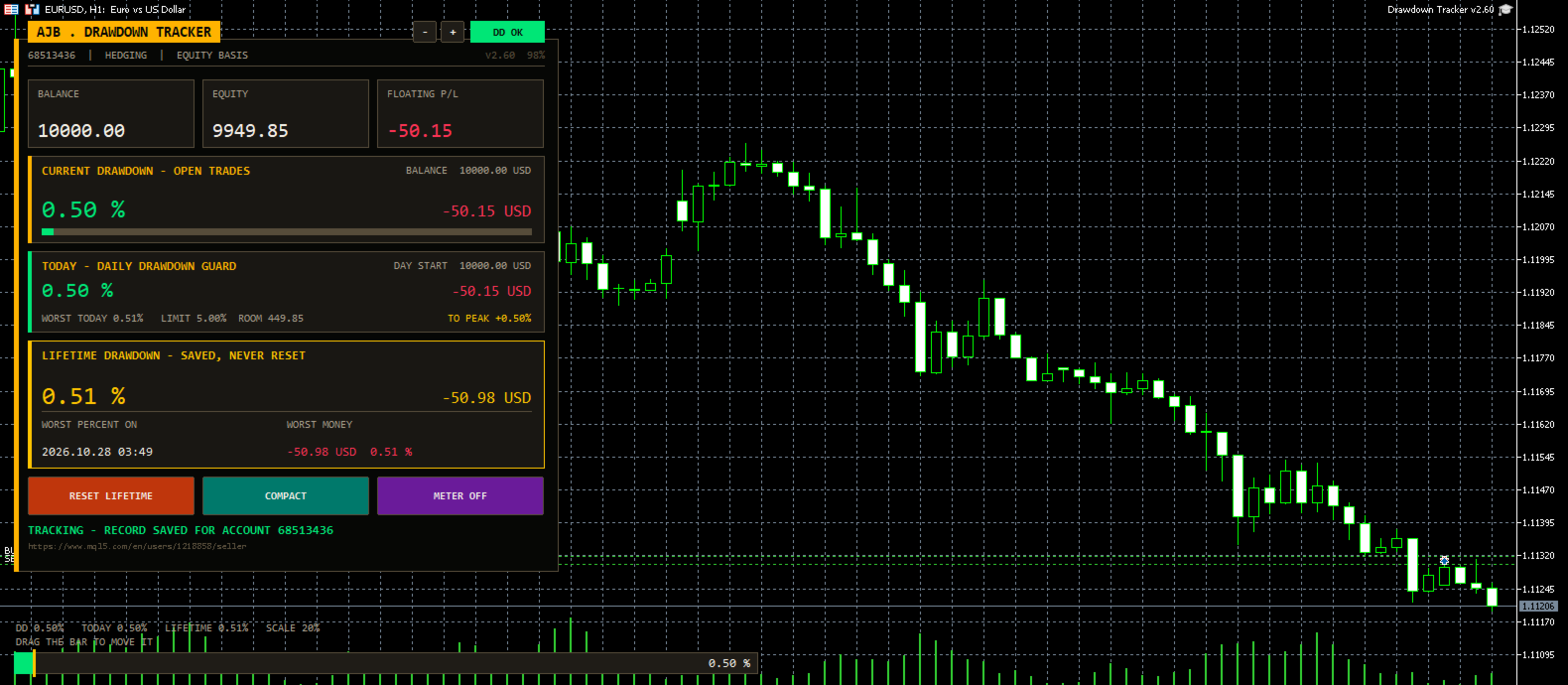
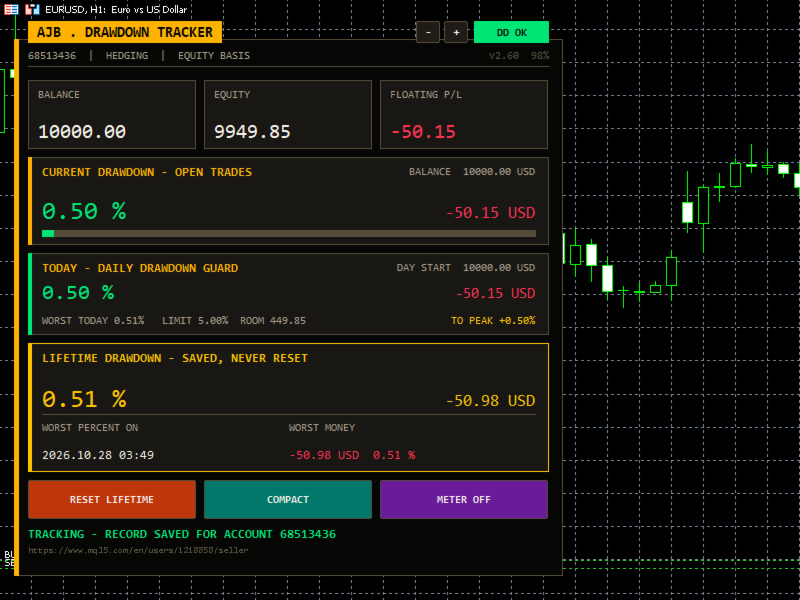
- Current drawdown of the open trades in percent and money, with a colour bar.
- New: a Daily Drawdown Guard with today's drawdown from the day's starting balance, the worst of the day, your daily limit, the money left before it and an alert.
- Lifetime drawdown that is saved per account and never resets by itself, with the date of the worst moment.
- Session drawdown since the utility was attached, plus a per-symbol table of lots, profit and load.
- A draggable meter at the bottom of the chart and alerts you can switch on.
Start here
- Attach it to any chart and any timeframe. One chart covers the whole account.
- Set DailyLimitPct to the daily loss rule you follow (5 percent by default, 0 switches it off).
- Choose how far back the lifetime record reaches with LifetimeStart.
- Leave it running. It never opens, changes or closes a trade.
Why it exists
Most traders remember their best week and forget their worst hour. Yet the worst hour decides whether a strategy is safe, whether a lot size is too big and whether a funded account survives. This utility was written to remember that hour for you, honestly, and to show it every time you look at the chart.
What is new in this version
- Daily Drawdown Guard card: today's drawdown, worst of the day, daily limit with room left, a once-a-day alert and the gain needed to get back to your all-time peak. Useful for anyone who trades under a daily loss rule.
- A new ink-and-amber card design with a title tab, a status pill (DD OK, CAUTION, LIMIT HIT) and a status line at the bottom. It sits on the left and scales itself to the screen.
- The meter now always stays in the left half of the chart, so the right side and the price scale stay clean.
- Problems saving the record, creating objects or starting the timer are now written to the Experts log instead of failing silently.
- The chart mouse settings are restored exactly as they were when the utility is removed.
- Daily figures are stored under keys that include the login, the server and the chart symbol, so two accounts or two charts never mix.
The cards
- Header: login, account type and the basis used (equity or balance), plus the version and the current size.
- Account (full view): login, name, broker, server time, total deposits and withdrawals.
- Balance / Equity / Floating: three tiles with live values.
- Current drawdown: what the open trades cost right now, measured from the balance.
- Today: drawdown from the day's starting value, worst of the day, limit, room and recovery to peak.
- Lifetime: the deepest drop from the high water mark, with date and money. It is rebuilt from your real trade history on the first run.
- Session (full view): the deepest drop since the utility was attached.
- Symbols (full view): every symbol with open positions, sorted from the weakest, with a scroll strip when there are many.
- Buttons: Reset Lifetime (asks three times), Compact / Full view and Meter on / off. The small minus and plus buttons change the size.
How deposits and withdrawals are handled
A deposit is never counted as profit and a withdrawal is never counted as a loss. The high water mark moves with the money you add or take out, and you choose whether the lifetime percentage stays as it was or is recalculated on the new balance.
Every input explained
- UpdateSeconds: how often the panel refreshes, in seconds. Default 1.
- DrawdownBasis: measure from equity (includes floating loss) or from balance (closed trades only).
- VisibleSymbolRows: symbol rows shown before the list scrolls. Default 5.
- StartCompact: start in the smaller compact view.
- LifetimeStart: the lifetime record covers the whole history, starts from a date, or starts from today and then keeps running.
- LifetimeStartDate: the start date when the option above is a date.
- PanelCorner: corner of the chart for the panel. Left upper by default.
- PanelMarginX / PanelMarginY: distance from the chart edges in pixels.
- PanelWidthPx: design width of the panel; 0 uses the default.
- PanelScalePercent: fixed size in percent; 0 lets it fit the screen.
- MaxPanelHeightPct / MaxPanelWidthPct: the largest share of the chart the panel may use. Defaults 80 and 45.
- AutoCompactSmall: switch to the compact view on small charts.
- PanelFont, ArabicFont, NumberFont: fonts for labels, Arabic text and numbers.
- ShowArabic: show an Arabic line under each English label.
- OnDepositAction: ask each time, always keep the lifetime figure, or always recalculate it on the new balance.
- AskOnAccountChange: when you log in to another account, offer to wipe the old account's record (always with confirmation).
- AutoSaveRecord: keep saving the record to disk while running.
- ShowChartMeter: show the drawdown meter on the chart.
- MeterDraggable: let you move the meter with the mouse.
- MeterWidthPercent / MeterHeightPx: size of the meter. It never grows past the left half.
- MeterResetPos: put the meter back to its default place.
- MeterFullScalePct: drawdown that fills the meter and the bars. Default 20.
- AlertOnDDPercent: alert when current drawdown reaches this level; 0 is off.
- AlertOnNewRecord: alert when a new lifetime record is set.
- ShowDailyGuard: show the Today card.
- DailyLimitPct: your daily drawdown limit in percent of the day's starting value; 0 is off. Default 5.
- AlertOnDailyLimit: one alert per day when the limit is reached.
- ColBackground, ColCard, ColTitleBar, ColText, ColTextDim: panel, card, title tab and text colours.
- ColAccent, ColLifetime, ColSession: colours of the current, lifetime and session figures.
- ColProfit / ColLoss: colours for gains and losses.
- InpMinBarsBetweenSignals: bars to wait before the same kind of alert can fire again; 0 alerts every time. Default 10.
Good to know
- It is a utility: it reads the account and never trades.
- Records are kept per account and server, so several accounts on one PC never mix.
- Drawdown that happened inside a trade that is already closed cannot be seen in the history; from the moment it runs, every tick is measured.
- No DLLs, works on any symbol and timeframe, hedging and netting accounts.
A small request
If Drawdown Tracker helps you keep your risk honest, a short review on this page tells other traders what it is like in daily use. Run it in the Strategy Tester first and decide for yourself.