 MetaTrader 5
 Experts
 Indicators
 Scripts
 Libraries
 Storage
Watch how to download trading robots for free
Find us on Twitter!
Join our fan page
Join our fan page
You liked the script? Try it in the MetaTrader 5 terminal

CHO Smoothed EA - expert for MetaTrader 5
Vladimir Karputov

Create a personal work for me: https://www.mql5.com/en/job/new?prefered=barabashkakvn
- Views:
- 6503
- Rating:
- Published:
- Updated:
-
 You are missing trading opportunities:
- Free trading apps
- Over 8,000 signals for copying
- Economic news for exploring financial markets
Registration Log inYou agree to website policy and terms of use
If you do not have an account, please register -
 Need a robot or indicator based on this code? Order it on Freelance
Go to Freelance
Trading strategy
The EA uses a custom indicator 'CHO Smoothed' - the indicator uses two lines: the iCHO line (Chaikin Oscillator, CHO) and the iCHO line smoothed using 'Moving Average'. The indicator is created on the specified timeframe 'Working timeframe' - the same timeframe is used to determine the moment of the birth of a new bar (if it is necessary for the parameters 'Trailing on ...' and 'Search signals on ...'). In the settings, you can set more stringent signals - for this, the 'Use ZeroLevel' parameter must be set to 'true'.
Trading signals:
The signal is the intersection of two lines of the indicator. If set to strict mode ( 'Use ZeroLevel' parameter must be set to 'true'), then 'BUY' open signals will only be below zero, and 'SELL' open signals will only be above zero.

Rice. 1. CHO Smoothed EA
Peculiarities:
- The EA can be optimized for the working timeframe ('Working timeframe')
- There can be only one 'entry to the market' deal per bar (this is an internal parameter, it is not included in the input parameters and it has nothing to do with the 'Only one positions' parameter)
- When working in the ' inside bar ' mode (parameter 'Search signals on ...' equals ' bar #0 (at every tick) ') the current bar is bar #0, when working in the mode ' only at the moment of birth of a new bar ' (parameter 'Search signals on ...' equals 'bar #1 (on a new bar) ) current bar is bar #1
- 'Trade mode parameter: ' - restriction in which direction to trade. Can take the values 'Allowed only BUY positions', 'Allowed only SELL positions' and 'Allowed BUY and SELL positions'
- 'Use time control' parameter - time interval for searching trading signals from 'Start Hour'::'Start Minute' to 'End Hour'::'End Minute' . The time range can be set both within the day and with the transition through the day
Now more about each group of parameters:
Trading settings:
'Working timeframe' - working timeframe. The timeframe on which indicators are created and on which a new bar is searched. Stop Loss, Take Profit and Trailing are set in Points . Any of the parameters ('Stop Loss', 'Take Profit', 'Trailing Stop') can be disabled - for this, set the selected parameter to '0.0'. How trailing works is shown in the pictures in the TrailingStop code.
Position size management (lot calculation)
The lot can be either permanent ('Money management' set to 'Constant lot' and set the lot size to 'The value for "Money management"') and dynamic - in percent risk per trade ('Money management' set to 'Risk in percent for a deal' and set the risk percentage in 'The value for "Money management"'). You can also set a constant lot equal to the minimum lot - 'Money management' set to 'Lots Min'.
Time control:
This section sets the time range for searching for trading signals. The time range is enabled via 'Use time control' and sets the time interval for searching for signals from 'Start Hour'::'Start Minute' to 'End Hour'::'End Minute'. The time range can be set both within the day and with the transition through the day. Does not affect trailing.
Additional features:
Flag 'Positions: Only one' set to 'true' allows the EA to have no more than one position in the market.
WARNING: 'Positions: Only one' set to 'true' does not override 'Positions: Close opposite' set to 'true'! In other words: the opposite position(s) will be closed first
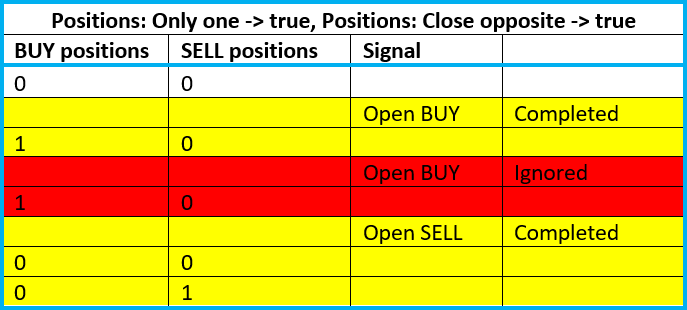
The flag 'Positions: Reverse' is responsible for signal reversal. An interesting flag 'Positions: Close opposite' - when set to 'true' before opening a position, it is guaranteed to remove opposite positions. 'Print log' prints an extended log of all operations. The 'Freeze and StopsLevels Coefficient' parameter sets the coefficient for stop and freeze levels for cases when these levels for a symbol are equal to zero. The recommended value is '3'.
 Two iMA Formula
Study of the dependencies of two iMA (Moving Average, MA)
CHO Smoothed Arrow
Signals (Arrow objects) of iCHO indicator (Chaikin Oscillator, CHO) and smoothed iCHO intersections
 Real Trade Copy MT5
Utility for copying transactions from one MT5 account or MT4 account to another MT5 account.
CCI Color
iCCI (Commodity Channel Index, CCI) indicator as a colored line