
MR Volume POC Levels 4
- Göstergeler
- Sürüm: 4.4
- Güncellendi: 20 Mart 2026
- Etkinleştirmeler: 20

The idea of the indicator arose after the "MR Volume Profile 4" indicator was made. When creating the "MR Volume Profile 4" indicator, we spent a lot of time comparing the volumes with those from the volume profile in the NinjaTrader 8 terminal with CQG data feed. The settings of EURUSD-6E, GBPUSD-6B, AUDUSD-6A, and other currency pairs were compared. After making sure that everything was working according to our requirements, we made the "MR Dynamic POC 4" indicator, following the model used in NinjaTrader 8. Ultimately, we decided to take a step forward and create a new generation indicator that will track the actions of the "Big" players in the financial markets. This is how the "MR Volume POC Levels 4" indicator appeared. Over time, we further developed our idea...
The important advantages of the indicator are the following:
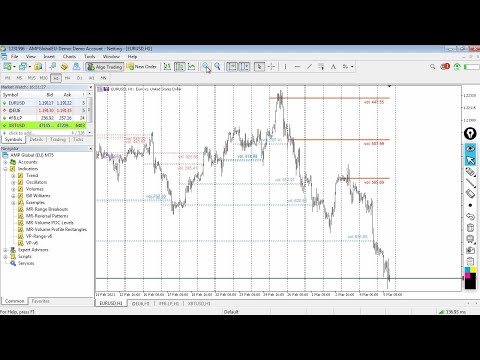
- Indicator shows the POC (Point of Control) volume levels for the selected period of time.
- "Point of Control" (POC) is not a line, but a zone.
- Which zones are relevant and which are not, is determined by the author's methodology.
- Using the indicator, you can track the actions of "Big" players in the market. At the extreme points of price movement (maximum, minimum), Market-Makers provide liquidity to "Big" players who change the direction of price movement.
- At Volume POC Levels there is always a reaction. Whether the price movement will reverse its direction is decided only by the "Big" players in the market.
- The indicator shows "points" from the new concept of the "MR Dynamic POC 4" indicator. Dynamic POC points are shown from the end of the "Volume Profile".
- The last Dynamic POC Point (with gray text) shows a volume for which the indicator has not yet decided how to mark it - as a volume of sellers, as a volume of buyers, or the volume is closed and of no interest.
- In combination with the "MR Reversal Patterns 4" indicator, you can track key places where volumes are absorbed and then new volumes appear in the opposite direction.
- In combination with the "MR Range Breakouts 4" indicator, you can see where important volumes are left after the exit from the "Balances" and "Ranges". In addition, you can see how the volumes are absorbed in the "Range" and accumulate positions of buyers and sellers.
- "MR Volume POC Levels 4" is based on indicator "VP: Volume Profile v6.0. © FXcoder".
If you liked the indicator, please support our work by giving it 5 stars!
For MetaTrader 5 https://www.mql5.com/en/market/product/63565
How to use indicators - Article
Indicator settings:
Points in 1 Pip: - Offers you a choice of the number of Points in 1 Pip.
Volume types: - Offers you a choice to use tick volumes or real volumes. To use real volumes, your Broker must provide them in the MetaTrader terminal.
Section Visual Trading Styles Settings
Style 1: Show POC Levels - Shows or hides POC levels. If the option is "false", the option to show dynamic POC points is turned on by default.
Style 2: Show Dynamic POC Points - Shows or hides "Dynamic POC Points".
Style 3: Show Volume Data Text - Shows or hides "Text" with information about the number of volumes for the POC level.
Style 4: Delete inactive POC Levels - Deletes all inactive POC levels.
Section Default Volume Choice
On D1 show "Volumes" from: W1 - You can choose "Volumes" from which time frame to display.
On H4 show "Volumes" from: D1 - You can choose "Volumes" from which time frame to display.
On H1 show "Volumes" from: D1 - You can choose "Volumes" from which time frame to display.
On M30 show "Volumes" from: H4 - You can choose "Volumes" from which time frame to display.
On M15 show "Volumes" from: H4 - You can choose "Volumes" from which time frame to display.
On M5 show "Volumes" from: H4 - You can choose "Volumes" from which time frame to display.
On M1 show "Volumes" from: H1 - You can choose "Volumes" from which time frame to display.
Section Default Bars Calculation Settings
MN - Number of Bars to calculate: - The number of monthly Bars to calculate the indicator.
W1 - Number of Bars to calculate: - The number of weekly Bars to calculate the indicator.
D1 - Number of Bars to calculate: - The number of daily Bars to calculate the indicator.
H4 - Number of Bars to calculate: - The number of 4-hour Bars to calculate the indicator.
H1 to M1 - Number of Bars to calculate: - The number of Bars to calculate the indicator from a time frame lower than 4 hours.
Section Manual Calculation Settings
Show Manual Calculation settings: - Enables or disables the Manual settings. If showing only Manual calculation settings, the Default settings do not work.
Default "Volume" choice: - You can choose "Volumes" from which time frame to display.
Default Number of Bars to calculate: - The default number of Bars to calculate for the indicator.
Section Alert settings for POC Levels
Alert when price entered at POC Level: - Displays a notification when a price is entered at the POC level.
Alert when POC Level is closed: - Displays a notification when the price closes at the POC level.
Section POC Levels Settings
POC Levels width in Pips: - Specifies the width of the zone for POC levels in pips.
Don't show POC Volumes less than: - The filter shows or hides POC levels below the specified values. When a value of "0" is selected, all POC levels are displayed.
POC Levels: Sellers color - Background color of sellers POC levels.
POC Levels: Buyers color - Background color of buyers POC levels.
Section Dynamic POC Points Settings
"Dynamic POC Points" width: - Specifies the width of the "Dynamic POC Points".
"Dynamic POC Points" and "Text" color: - Specifies the color of "Dynamic POC Points" and data "Text".
Section Volume Level Data Text Settings
Volume data "Text" font size: - You can choose the font size of the text.
Volume data "Text" position in Pips: - Position to display "Text" data in pips.
Volume data "Text": Sellers color - Color of the sellers data "Text".
Volume data "Text": Buyers color - Color of the buyers data "Text".



























































cool indicator!!!!