CheckOnlineStatus

Check Online-Status monitors your terminal.

If its connection to the server is interrupted for longer time, you will receive an email and/or a push notification, depending on what your settings. You can find out how long the terminal has been offline and can judge the quality of your brokers and/or the provider of your VPS after some time. Remember, the terminal manages and controls your money. Everything hangs in the air if it has no connection to the server!

Check Online-Status displays the three important elements about the online status of the terminal:

  1. prev_calculated: sometimes the terminal sets prev_calculated to zero, forcing an indicator to recalculate the historical bars of the chart.
  2. ping: Sometimes the terminal switches to another server of the broker.
  3. connected: Displays the connection status. A '~' symbolizes an working connection, # a disconnection, that means the server is not responding by what ever reason. An '*' at the end of the line indicates that an e-mail has been sent.

The last entry about the status is shown in the first line of their respective section. Displayed are the server time and the local time of the pc (vps).

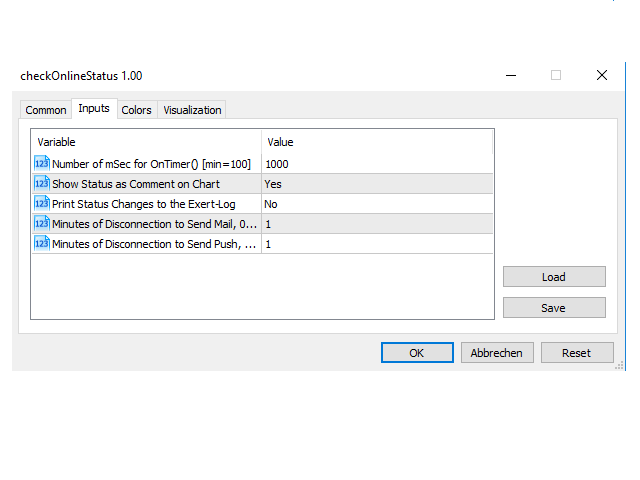
You can define the following input variables for the indicator:

  1. Number of mSec for OnTimer()[min=100] - To specify the time interval in milliseconds (mSec) after which Check Online-Status the online status is checked again. The minimum is 100 mSec, smaller values would unnecessarily overload the system. But remember that Check online status is activated by OnCalculate() (every new tick) and OnTimer().
  2. Show Status as Comment on Chart (Yes/No) - Display of information as comment on the main chart.
  3. Print Status Changes to the Exert-Log (Yes/No) - Print the messages to the expert log.
  4. Minutes of Disconnection to Send Mail, 0=no Mails - E-mails are sent if the terminal is not connected to the server for longer than the entered number of minutes. 0 means that no e-mails will be sent.
  5. Minutes of Disconnection to Send Push, 0=no Push - Push notifications are sent if the terminal is not connected to the server for longer than the entered number of minutes. 0 means that no push notifications will be sent.

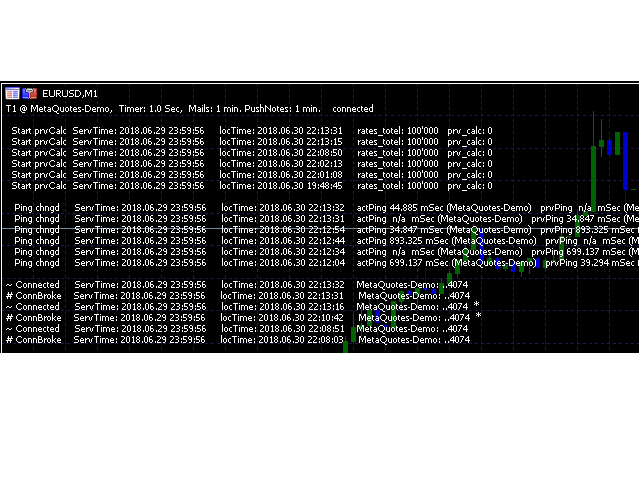
If the indicator displays the status on the chart as a comment, you see:

  • In the top line you see the name of the directory of your terminal (the first 6 characters), the server of your broker, the settings and whether a connection currently exists or not.
  • Below that the three sections: 1) the loaded bars of the actual chart, 2) the recent ping and 3) the connection.

If available, the last 6 events are displayed, each in one line. In the image of the chart you can see for example that the terminal lost the connection to the server (the demo server of MetaQuotes) on Saturday 30 June 2018 at 22:10:42 and was able to restore it about 3 minutes later. Both times emails and/or push notifications were sent because the interruption lasted longer than the set 1 minute.


The Emails and the Push-Notification

In the subject of the email you see:

MAIL-T1 MetaQuotes-Demo, 2018.06.30 22:13 connected

T1 is the directory (respectively its first 6 characters) of the terminal, then follows the name of the server and the time at which the email was sent.

In the body of the email you see the last 6 lines about the connections the same way you seem them on the chart:

~ Connected     ServTime: 2018.06.29 23:59:56     locTime: 2018.06.30 22:13:16    MetaQuotes-Demo: ..4074  *
# ConnBroke    ServTime: 2018.06.29 23:59:56     locTime: 2018.06.30 22:10:42     MetaQuotes-Demo: ..4074  *
~ Connected     ServTime: 2018.06.29 23:59:56     locTime: 2018.06.30 22:08:51    MetaQuotes-Demo: ..4074  
# ConnBroke    ServTime: 2018.06.29 23:59:56     locTime: 2018.06.30 22:08:03     MetaQuotes-Demo: ..4074
~ Connected     ServTime: 2018.06.29 23:59:56     locTime: 2018.06.30 22:01:50    MetaQuotes-Demo: ..4074  
# ConnBroke    ServTime: 2018.06.29 23:59:56     locTime: 2018.06.30 22:01:45     MetaQuotes-Demo: ..4074

Push notifications have a subject line, but, due to the limitation to 255 characters, only the latest status message!

After a push notification has been sent, the next one can only be sent 1 minute later. This is to prevent too many push notification being sent.

I hope it helps you!

PS.: Please note further information at the beginning of the discussion!
Önerilen ürünler
RRtoolbox - Professional Tools: Risk:Reward Trading Tool (SL/TP Horizontals + Pending orders + Diagonals), Alerts set on trend lines (for alerts on diagonal levels), SelfManagement (BE, partials...), close/cancelling by time, Statistics, Info and trading on chart. One-Click Trading with Visual Risk:Reward Management RRtoolbox is a comprehensive trading panel that combines one-click order execution,  statistics and  powerful visual Risk:Reward tools, alerts set with trendlines, on chart butt
CosmiCLab SMC FIBO CosmiCLab SMC FIBO is a professional trading indicator designed for traders who use Smart Money Concepts (SMC), market structure analysis and Fibonacci retracement levels. The indicator automatically detects market swings and builds Fibonacci levels based on the latest impulse movement. It also identifies market structure changes such as BOS (Break of Structure) and CHOCH (Change of Character), helping traders understand the current market direction. CosmiCLab SMC FIBO also pr
BTC Trading Assistant EA (MT5) Manual trading assistant that helps place and manage trades with automated risk and stop management. Overview BTC Trading Assistant EA is a utility Expert Advisor for MetaTrader 5 intended for manual traders. It provides a chart interface to execute BUY/SELL/CLOSE actions and automates selected trade management functions such as position sizing, initial SL/TP placement, break-even, trailing stop and optional partial profit taking. This EA does not generate trade si
Trading Utility for Forex Currency Pairs Only not for Gold  Functions Auto Lot Calculation based on Risk Auto stoploss  Auto TakeProfit Breakeven Auto Close Half % Close in percentage with respect to the PIPs Pending Orders BuyLimit Sell Limit with distances BuyStop Sell Stop    with distances Trading Informations Risk in percentage For Multiple trades Combine Takeprofit and Combine Stoplosses
Pattern Recognition EA
Claudiu-georgian Zavera
Pattern Recognition EA - From Learn to Earn. The market repeats itself. This EA finds every past repeat of the current candle sequence - and lets history vote the direction. ONE SHAPE. EVERY REPEAT IN HISTORY VOTES. The last N candles on your signal timeframe form a shape. The EA scans the history you choose - a fixed number of bars or everything your broker provides - for the SAME shape, and checks what happened next, every single time. Only when enough repeats exist AND a clear majority of t
Trading tool combining a sophisticated equity stop-loss, dynamic take-profit management (Breakeven & Trailing), and symbol-group-based closing logic. It is a complete risk management and trade supervision tool. Features: All features of `Equity Master Stop v1` (floating profit/loss limits, exit protection, skip hours). Take-Profit Override: Can force a TP on any order to lock in a `MAX_FLOATING_PROFIT`. Step Breakeven: Locks in increasing amounts of profit as a trade moves favorably (e.g., aft
Like you when I first started trading, It was overwhelming...learning about indicators, about lotsize, leverage and many more things. Its been almost 3 years. I am more knowledgeable in trading. My trading continues to improve as I work on my strategy, technical analysis, trading psychology and trade management. One thing I am not worried about though is being able to close my trades quicky if a trade goes against me or if the trade has reached my take profit level with the help of my Close Trad
Overview Mirror Signals Service EA (Text only)   is a powerful monitoring Expert Advisor that automatically sends   real-time Telegram notifications   for all important trade events on your MetaTrader 5 account. It is engineered specifically for   signal providers ,   trade-copier operators ,   auditors ,   educators , and   professional trading services   that require immediate, detailed, and reliable reporting. Everything from   entries, exits, SL/TP changes, comment changes, trailing sto
Grid Trading EA is a semi-automated one-click trading EA for both Normal Trading and Grid/Martingale Trading . Normal Trading Simply click Buy or Sell directly from the chart. The EA will automatically manage trades by: Setting Stop Loss and Take Profit Managing Trailing Stop Grid / Martingale Trading (For Hedging Account Type Only) When Grid Trading mode is enabled, the EA will automatically open additional grid orders at specified distances while increasing the lot size based on your settings.
Fabii Half Trend Baseline
Fabien Georges Andre Guillemaud
Üst zaman diliminin trendine karşı işlem yapmayı bırakın. İki baseline, tek grafik. Repaint yok. Her parite, her zaman dilimi. 2 dakikada grafiğinizde. Strategy Tester içinde ücretsiz demo. Get more indicators here Baselines, volatility filters and oscillators. No repaint. Neden ihtiyacınız var Grafiğinizde bir çizgi yeşile döndüğü için işleme girersiniz. Sonra üst zaman dilimini açarsınız ve daha büyük trendin ters yönde olduğunu görürsünüz. Sinyal gerçekti. Ama arkasındaki trend sizin taraf
NHK Local Time Scale NHK Local Time Scale displays your PC/local time directly on the MT5 chart , alongside the broker's native chart time. The trader can easily compare both time zones for any candle. Benefits for Traders: Quickly convert Broker Time ↔ Local/PC Time . Helps accurately set News Stop/News Filter times. Makes London, New York, Asian and other trading sessions easier to identify in your local time. Helps verify that EA session and news time settings are correct. Reduces mistakes ca
FREE
Advanced Risk Return Tool , MetaTrader 5 için görsel bir Risk/Getiri planlama ve yönetim aracıdır. Araç, doğrudan grafik üzerinde Alış ve Satış yapıları oluşturmanıza ve yönetmenize, Giriş, Hedef ve Stop seviyelerini görsel olarak konumlandırmanıza olanak tanır. Ayrıca Risk/Getiri oranı, pip mesafeleri, hacim ve finansal değerleri görüntüler. Yapılar etkileşimlidir ve fare kullanılarak doğrudan grafik üzerinde ayarlanabilir. Temel Özellikler Görsel Risk/Getiri Yapıları Araç panelinden doğrudan B
FREE
Exp5 Duplicator
Vladislav Andruschenko
4.78 (9)
Duplicator for MetaTrader 5 — tek terminal içinde profesyonel pozisyon çoğaltıcı MetaTrader 5 içinde önceden açılmış pozisyonları otomatik olarak çoğaltmak, hacmi artırmak, özel lot ayarları uygulamak ve kopyaları hassas kurallarla yönetmek isteyen yatırımcılar için güvenilir bir Expert Advisor. Manuel işlem, algoritmik sistemler ve tek terminal içinde mevcut pozisyonların esnek yönetimi için pratik bir araçtır. Duplicator for MT5 kendi işlem stratejisine göre pozisyon açmaz. Görevi, MetaTrader
CoPilot — Günlük Trading Panosu Sayılarınızı bilin. Netlikle işlem yapın. MT4 Sürümü CoPilot Nedir? CoPilot, tüm günlük performans istatistiklerinizi doğrudan grafik üzerinde gerçek zamanlı olarak görüntüleyen profesyonel düzeyde bir trading asistanıdır — her işlemde güncellenen bir canlı öz sermaye eğrisi ile birlikte. Grafikten ayrılmadan serinye anında görünürlük ihtiyacı duyan aktif yatırımcılar için tasarlanan CoPilot, tüm sembollerdeki günün her kapatılmış işlemini toplar ve temiz, renk ko
Chart Pro Classic Dark v1.00 Chart Pro Classic Dark is a professional MT5 chart styling and customization tool designed to give your charts a clean, modern, and professional dark appearance. Key Features Dark Black Background — Applies a clean black background to the chart. ️ Candlestick Chart — Automatically configures the chart to use candlesticks. Bullish Candles — Green/Lime bullish candles. Bearish Candles — White bearish candles. Grid Removal — Hides the chart grid for a clean
FREE
Prop Firm Shield Full
Pablo Adolfo Cantos
Prop Firm Shield is a risk management panel for MetaTrader 5, built for prop firm traders who need control over their daily limits. You configure each limit and the tool watches the account around the clock, acting automatically when a limit is reached: closing positions, deleting pending orders and blocking new trading until the next day. Features: - Daily Take Profit - three modes: fixed USD, percent of the day-start balance, or target balance - Daily Stop Loss - three modes: fixed USD, percen
Inverted_Chart_EA Utility Expert Advisor Inverted_Chart_EA creates and maintains a mirror-inverted chart of any symbol and timeframe. It automatically generates a custom instrument (e.g. US30_INV ) and keeps its price history updated in real time, with bars mirrored around a chosen pivot. This utility gives traders a new way to analyze the market from a different perspective by flipping the chart upside down. Why use an inverted chart? Highlight hidden patterns – price formations that look ordin
BreakEvan Utility  Is a simple tool in a panel with this utilities: This utility will draw a Golden Line in the chart applied showing the breakeven price, considering all the positions opened for that specific symbol. Also the information panel shows: Balance Breakeven Price for that chart Force Breakeven (for that symbol) as ON/OFF Force Breakeven Global (takes into account all trades opened) as ON/OFF Total Lots opened for Symbol Total Lots opened Global And two buttons: Force Breakeven: Whe
RBreaker
Zhong Long Wu
RBreaker Gold Indicators is a short-term intraday trading strategy for gold futures that combines trend following and intraday reversal approaches. It not only captures profits during trending markets but also enables timely profit-taking and counter-trend trading during market reversals. This strategy has been ranked among the top ten most profitable trading strategies by the American magazine   Futures Truth   for 15 consecutive years. It boasts a long lifecycle and remains widely used and st
Noize Absorption Index - is the manual trading system that measures the difference of pressure between bears forces and bulls forces. Green line - is a noize free index that showing curent situation. Zero value of index shows totally choppy/flat market.Values above zero level shows how powerfull bullish wave is and values below zero measures bearish forces.Up arrow appears on bearish market when it's ready to reverse, dn arrow appears on weak bullish market, as a result of reverse expectation.
Range Volume Hybrid Generator
Trade The Volume Waves Single Member P.C.
1. Introduction Range Volume Hybrid (RVH) is a MetaTrader 5 Expert Advisor that creates custom chart symbols using a unique dual-condition bar formation method. Unlike traditional charts where bars close based on a single criterion (time, range, or volume), RVH bars close only when BOTH a minimum price range AND a minimum volume threshold are met simultaneously.  Download also and install RVH Monito r Indicator - to control the EA from the custom charts (it's Free)  https://www.mql5.com/en/marke
Gerçek para riskinden önce prop firm zorluklarında ustalaşın!   Gelişmiş simülatörümüz, özgün prop firm ticaret ortamlarını yeniden oluşturarak pratik yapmanıza, strateji geliştirmenize ve güvenle zorlukları geçmenize yardımcı olur. Simülatörümüzü kullanarak, demo veya gerçek hesaplar kullanarak herhangi bir prop firm zorluğunu simüle edebilir, hem manuel ticaret stratejilerini hem de EA'lar aracılığıyla otomatik ticareti destekleyebilir, özelleştirilmiş dönemler için kişiselleştirilmiş zorlukla
Expert TP SL v04 - Professional Trading Assistant with AI Motivation System Advanced manual trading tool with automatic risk management, overtrading protection, and intelligent psychological support for disciplined trading. PRODUCT OVERVIEW Expert TP SL v04 is a comprehensive trading assistant designed for manual traders who want to maintain emotional discipline while automating risk calculations. This isn't just another order placement tool - it's a complete trading psychology system that pr
Imagine flying a real aircraft without ever stepping into a flight simulator. That's what trading is like. You have to simulate your strategy before you can take it to a live market. It is good if you can simulate things speedily before even stepping into any live market, or before coming up with an automated system.  People don't have all day to stare at a higher timeframe chart until the entry signal finally arrives. That's why I built this so that you can simulate your strategy with speed. Th
FREE
TrendVision AI
Murtadha Majid Jeyad Al-Khuzaie
TrendVision AI – Smart Trend Channels & Price Forecasting for MetaTrader 5 Discover market structure and explore potential future price direction with TrendVision AI, an advanced technical indicator for MetaTrader 5 that combines automatic trendline analysis with a machine-learning-based price forecasting model. How Does TrendVision AI Work? TrendVision AI analyzes historical candlestick data within a configurable lookback window. It automatically draws two trendlines directly on the chart:
FREE
Resmi BlueDigitsFx Ekosistemi Erişimi Altyapı güncellemelerine, işlem kaynaklarına, ürün yayınlarına ve resmi BlueDigitsFx ekosistemine erişim sağlayın. Telegram Ekosistemi Web Sitesi MT4 Sürümü BlueDigitsFx Spike And Strike Reversal MT5 — Piyasa Dönüşleri ve Momentum Analizi İçin Bileşik Osilatör BlueDigitsFx Spike And Strike Reversal , yatırımcıların potansiyel piyasa dönüşlerini, momentum değişimlerini ve tükenme koşullarını belirlemelerine yardımcı olmak için birden fazla gösterge sinyal
EA otomatik kar al, otomatik al/sat, hacim yöneticisi, yanal işlem, takip eden açık nokta 1 – Otomatik al/sat aç EA ayarlara göre otomatik olarak al veya sat açar: kar, zararı durdur, hacim. Hacim yönetimi: toplam emir sayısı ve sabit boyut 2 – Otomatik kar al: ayarlara göre minimum karla kar al, minimum ve maksimum karlara göre kar al düğmesi 3 – Emir işleme: EA'da ayarlanan pip sayısına göre pozisyonun 3 seviyede zararı durdur vardır 4 – Yanal işlem: yanal tepe noktasında satış emri aç – yana
MACD Sniper Pro
Noppawat Tumjai
MACD Sniper Pro is an advanced automated trading system designed for traders seeking high-precision entries and robust risk management. By combining the classic momentum of MACD Crossover with a strict ADX Volatility Filter and Dynamic ATR Management , this EA completely eliminates emotional trading and filters out dangerous flat/sideways markets. Unlike standard MACD indicators that suffer during consolidation, MACD Sniper Pro verifies trend strength before entering and protects your capital us
Truvana Trend Campaign Manager EA (TCM) Advanced Basket Management & Profit Locking Tool for Trend Traders Short Description Turn strong trends into managed campaigns. Truvana TCM is a professional trade management EA designed for traders who already know how to identify trends and execute entries. The EA automatically manages basket expansion, validates risk before adding positions, and locks profits using a broker-side Basket Stop Price (BSP). No martingale. No grid recovery. No signal genera
Ultimate Pro Trading Panel — All-In-One Manual & Grid Trading Dashboard Pro Trading Panel   is an all-in-one on-chart control panel that gives discretionary and semi-automated traders a complete toolkit for entries, exits, risk management, and grid trading — without leaving the chart. Every function is visual, draggable, and updates in real time. If you want to test this utility feel free to download the basic preview version of this tool here:  https://www.mql5.com/en/market/product/181435 Who
Bu ürünün alıcıları ayrıca şunları da satın alıyor
Trade Assistant MT5
Evgeniy Kravchenko
4.43 (216)
It helps to calculate the risk per trade, the easy installation of a new order, order management with partial closing functions, trailing stop of 7 types and other useful functions. Additional materials and instructions Installation instructions - Application instructions Line function -   shows on the chart the Opening line, Stop Loss, Take Profit. With this function it is easy to set a new order and see its additional characteristics before opening.   Risk management  - The risk calculation
Trade Manager EA’ye hoş geldiniz! Ticaretin daha sezgisel, hassas ve verimli hale gelmesi için tasarlanmış nihai risk yönetim aracı ile tanışın. Bu sadece bir emir verme aracı değil; ticaret planlaması, pozisyon yönetimi ve risk kontrolü için kapsamlı bir çözüm. İster yeni başlayan bir yatırımcı olun, ister deneyimli bir trader ya da hızlı emir gerektiren bir scalper, Trade Manager EA ihtiyaçlarınıza uyum sağlar ve forex, endeksler, emtialar ve kripto paralar dahil tüm piyasalarda esneklik sunar
Local Trade Copier EA MT5
Juvenille Emperor Limited
4.94 (149)
Local Trade Copier EA MT5, aynı Windows bilgisayarı veya Windows VPS üzerinde çalışan birden fazla MetaTrader 5 hesabı arasında işlemleri kopyalamak ve yönetmek için hızlı ve esnek bir işlem kopyalayıcıdır. Yerel işlem senkronizasyonunu, Receiver tarafında lot büyüklüğü, risk yönetimi, işlem filtreleme, sembol eşleştirme, işlem yönetimi ve hesap koruması kontrolleriyle birleştirir. Transmitter ve Receiver terminallerinizi yaklaşık 1 dakika içinde ayarlayın ve aynı veya farklı brokerlardaki hesa
Telegram to MT5 Multi-Channel Copier   , Telegram ve Discord kanallarınızdaki alım-satım sinyallerini doğrudan MetaTrader 5'e otomatik kopyalar. Bot yok, tarayıcı uzantısı yok, elle kopyalama yok. Sinyal Telegram'a veya Discord'a düşer ve EA birkaç saniye içinde terminalinizde işlemi açar. Ve bir kanalı kopyalamadan önce, yerleşik backtester o kanalın hesabınızda ne yapmış olacağını gösterir. Ürün iki bileşenden oluşur: Telegram kanallarınızı dinleyen bir Windows uygulaması ve sinyalleri MT5 ter
Farmed Hedge Yield Farming | All Markets (Manual - Hybrid - Semi/Automated EA) VERIFIED TRADING RESULTS - Farmed Hedge Yield Axi Copy:  https://www.mql5.com/en/signals/2356376 - Farmed Hedge Yield Exn Copy:   https://www.mql5.com/en/signals/2356404 - Farmed Hedge Yield V Copy:  https://www.mql5.com/en/signals/2357156 IMPORTANT NOTICE: FarmedHedge is a MANUAL-FOCUSED TRADING UTILITY ,not a fully automated EA. Results shown on this Signal include manual trades and overall strategic management.
Telegram sinyallerini kendi işlem kurallarınızla kopyalayın Telegram to MT5 Signal Trader , herkese açık ve özel Telegram kanallarındaki ve gruplarındaki metin tabanlı işlem sinyallerini otomatik olarak MetaTrader 5'e kopyalar. Tek bir masaüstü uygulamasından birden fazla sinyal sağlayıcısını ve MT5 hesabını yönetin; her sağlayıcı için ayrı risk ve işlem ayarları belirleyin. Sinyal kopyalamak için Telegram botu veya API kurulumu gerekmez. Kendi Telegram hesabınızla telefon numarası veya QR kod k
TradePanel MT5
Alfiya Fazylova
4.88 (170)
Trade Panel, çok işlevli bir ticaret asistanıdır. Uygulama, manuel ticaret için 50'den fazla ticaret fonksiyonu içerir ve çoğu ticaret görevini otomatikleştirmeyi mümkün kılar. Uygulama talimatları: https://www.mql5.com/en/blogs/post/756482 Demo hesabı için uygulamanın deneme sürümü: https://www.mql5.com/en/blogs/post/750865 Uygulamayı nasıl kurulur: https://www.mql5.com/en/blogs/post/756239 Uygulamayı görsel modda nasıl test edilir: https://www.mql5.com/en/blogs/post/770277 Uygulamayı VPS MetaT
================================================================================ POC BREAKOUT - V20.72. Full Professional Grade Toolkit ================================================================================ POC Breakout is a full MetaTrader 5 trading dashboard for discretionary traders who want breakout signals, Point of Control (POC) context, volume profiles, order flow, market structure, news, alerts, and advanced trade planning in one professional workspace. Attached directly to you
Strategy Ledger Pro
Abdullah Uygar Tuna
5 (11)
Şimdi Türkçe dil desteği ile. Strategy Ledger Pro , MetaTrader 5 için salt okunur bir hesap analiz panelidir. Hesap sonuçlarını Uzman Danışman (EA), strateji, sembol ve magic numaraya göre ayırır; böylece her birinin gerçekte ne kattığını görürsünüz. Panel 11 dilde kullanılabilir: English, Français, Deutsch, Español, Italiano, Português, Русский, Türkçe, 中文, 日本語 ve 한국어. Demoyu indirmeden önce. Market, her ücretli ürünün demosunu yalnızca Strateji Test Cihazında çalıştırır. Bu panel kendi hesabı
News Trade EA MT5
Konstantin Kulikov
4.55 (11)
Birkaç yıldır kullandığım çok yararlı bir robotu tanıtıyorum. Hem yarı otomatik hem de tam otomatik modlarda kullanılabilir. >>> Chat <<< Program, ekonomik takvim haberlerinde esnek ticaret ayarlarını içeriyor. Stratejiler test cihazında kontrol edilemez. Sadece gerçek bir iş. Terminal ayarlarında, haberler sitesini izin verilen URL'ler listesine eklemeniz gerekir. Servisler > Araçlar > Danışmanlar'a tıklayın. "Aşağıdaki URL'ler için WebRequest'e İzin Ver:" kutucuğunu işaretle. Aşağıdakini ekl
Master Your Trading Discipline   Stop losing your hard-earned gains to overtrading and emotional decisions. The Discipline Tool is your ultimate trading assistant, ensuring strict risk management in real-time. Key Protection Features: Advanced Drawdown Defense : Automatically halts trading if your daily drawdown exceeds a preset threshold (percentage or dollar amount). Real-Time Equity Lock : Safeguard profits by referencing peak equity, ensuring drawdown stays within control. Hard Profit Target
Entry In The Zone with SMC Multi Timeframe is a real-time market analysis tool based on Smart Money Concepts (SMC), designed to analyze market structure, price direction, and key trading zones. It supports both Single-Timeframe and Multi-Timeframe Analysis, providing a clearer view of overall market structure across multiple timeframes, with real-time BUY / SELL signals designed with a strict focus on No-Repaint principles.   The signals are designed to help filter unclear setups and evaluate tr
The product will copy all telegram signal to MT5 ( which you are member) , also it can work as remote copier.  Easy to set up, copy order instant, can work with almost signal formats, image signal,  s upport to translate other language to English Work with all type of channel or group, even channel have "Restrict Saving Content", work with  multi channel, multi MT5 Work as remote copier: with signal have ticket number, it will copy exactly via ticket number. Support to backtest signal. How to s
Exp COPYLOT CLIENT for MT5
Vladislav Andruschenko
3.97 (35)
MetaTrader 5 için profesyonel işlem kopyalayıcı MetaTrader için hızlı, profesyonel ve güvenilir bir işlem kopyalayıcı . COPYLOT , MT4 ve MT5 terminalleri arasında Forex işlemlerini kopyalamanıza olanak tanır ve Hedge ile Netting hesaplarını destekler. COPYLOT MT5 sürümü şunları destekler: - MT5 Hedge → MT5 Hedge - MT5 Hedge → MT5 Netting - MT5 Netting → MT5 Hedge - MT5 Netting → MT5 Netting - MT4 → MT5 Hedge - MT4 → MT5 Netting MT4 sürümü Tam açıklama + DEMO + PDF Nasıl satın alınır Nasıl kurul
EASY Insight AIO – Akıllı ve zahmetsiz yatırım için hepsi bir arada çözüm Genel Bakış Tüm piyasayı — Forex, Altın, Kripto, Endeksler ve hatta Hisseler — saniyeler içinde, manuel grafik incelemesi, gösterge kurulumu ya da karmaşık ayarlar olmadan analiz edebildiğinizi hayal edin. EASY Insight AIO , yapay zekâ destekli yatırım için nihai, kullanıma hazır dışa aktarma aracınızdır. Tüm piyasanın kapsamlı bir anlık görüntüsünü tek bir temiz CSV dosyasında sunar; bu dosya ChatGPT, Claude, Gemini, Pe
Desteğe mi ihtiyacınız var? Nasıl kurulur? Sorunuz mu var? Buradan kendi dilinizde sorun, hızlı yanıt: https://www.mql5.com/en/market/product/139088/comments Çalışan Demo İndir Copy Cat More (Taklitçi Kedi) — İşlem Kopyalayıcı (Trade Copier) MT5 , yerel bir işlem kopyalayıcı ve bugünün ticaret zorlukları için tasarlanmış eksiksiz bir risk yönetimi ve yürütme çerçevesidir. Prop firm challenge'larından kişisel portföy yönetimine kadar, sağlam yürütme, sermaye koruması, esnek yapılandırma ve geli
MT5 to Telegram Signal Provider , hesabınızı bir sinyal sağlayıcı haline getirerek belirtilen sinyalleri Telegram'ın sohbetine, kanalına veya grubuna göndermeyi sağlayan kullanımı kolay, tamamen özelleştirilebilir bir araçtır. Rakip ürünlerin çoğunun aksine, DLL içe aktarması yapmaz. [ Demo ] [ Kılavuz ] [ MT4 Versiyonu ] [ Discord Versiyonu ] [ Telegram Kanalı ]  New: [ Telegram To MT5 ] Kurulum Adım adım bir kullanıcı kılavuzu mevcuttur. Telegram API'si hakkında bilgi gerekmemektedir; ihtiyac
Telegram To MT5 — Sinyal Kopyalayıcı Telegram kanallarınızdaki işlem çağrılarını gerçek MT5 emirlerine dönüştürün — otomatik olarak, istediğiniz kadar hesapta ve risk ile kurallar tamamen sizin kontrolünüzde. Telegram To MT5, Telegram'da zaten takip ettiğiniz VIP / sinyal kanallarını MetaTrader 5 terminalinize bağlar. Ücretsiz bir eşlik eden masaüstü uygulaması mesajları okur (botlara izin vermeyen kanallardan bile), ve bu Expert Advisor bunları hesabınızda yürütür — kendi risk ayarlarınızı, sem
Signal TradingView to MT5 Pro Automator TradingView ve MetaTrader 5 arasında anında profesyonel uygulama TradingView alarmları ile MT5'teki gerçek uygulama arasındaki en güçlü iletişim köprüsüyle ticaret stratejinizi otomatikleştirin. Hız, esneklik ve kusursuz risk yönetimi talep eden yatırımcılar için tasarlanan bu Uzman Danışman (Expert Advisor), herhangi bir alarm mesajını hassas bir piyasa (market) veya limit emrine dönüştürür. GÜÇLÜ YÖNLER VE AVANTAJLAR Evrensel Ayrıştırma Motoru (Tescilli)
Power Candles Strateji Tarayıcısı - Kendi Kendini Optimize Eden Çoklu Sembol Kurulum Bulucu Power Candles Strateji Tarayıcısı , Power Candles göstergesini çalıştıran aynı kendinden optimize edici motoru, Piyasa İzleyicinizdeki her sembol üzerinde yan yana çalıştırır. Tek bir panel, şu anda istatistiksel olarak hangi sembollerin işlem yapılabilir olduğunu, her birinde hangi stratejinin kazandığını, en uygun Stop Loss / Take Profit çiftini gösterir ve yeni bir sinyal geldiği anda size bildirim gön
Trade copier MT5
Alfiya Fazylova
4.61 (57)
Trade Copier, ticaret hesapları arasındaki işlemleri kopyalamak ve senkronize etmek için tasarlanmış profesyonel bir yardımcı programdır. Kopyalama, tedarikçinin hesabından/terminalinden alıcının aynı bilgisayarda veya vps'de kurulu olan hesabına/terminaline gerçekleşir. Satın almadan önce demo sürümünü bir demo hesabında test edebilirsiniz. Demo versiyonu burada . Tüm talimatlar burada . Ana işlevler ve avantajlar: Emirlerin kopyalanmasını destekler: МТ5> МТ5, МТ4> МТ5, МТ5> МТ4. Emirlerin kopy
The Patch It never opens a trade. It walks behind the ones that did. Every open position, every pending order — checked twice a second for the one thing that's easy to forget: a stop, a target. Found bare, it doesn't ask. It writes the missing number in, measured in points from wherever the position began, and moves on to the next. No strategy, no opinion on direction. Just the quiet assumption that nothing should ever sit on the market unprotected — not because someone decided it shouldn't,
MetaTrader 5 için Trading Panel — grafik ve klavyeden profesyonel tek tıkla işlem kontrolü Aktif traderlar için geliştirilmiş güçlü bir Trading Panel; işlemleri standart MetaTrader arayüzüne göre çok daha hızlı açmanıza, yönetmenize ve kapatmanıza yardımcı olur. Bu çözüm; pozisyonları, bekleyen emirleri, toplam kârı ve işlem yürütmesini tek bir profesyonel çalışma alanında kontrol etmek isteyen kullanıcılar için tasarlanmıştır. Bu sadece sıradan bir yardımcı araç değildir. MetaTrader 5 için ger
Grid Manual MT5
Alfiya Fazylova
4.73 (22)
Grid Manual, sipariş ızgarasıyla çalışmak için kullanılan bir ticaret yardımcı programıdır. Yardımcı program evrenseldir, esnek ayarlara ve sezgisel bir arayüze sahiptir. Sadece kayıpların ortalaması yönünde değil, aynı zamanda kazanç artışı yönünde de bir emir ızgarası ile çalışır. Tüccarın bir emir ızgarası oluşturmasına ve eşlik etmesine gerek yoktur, bu yardımcı programı yapacaktır. Emri açmanız yeterlidir ve Grid manual otomatik olarak ona bir emir ızgarası oluşturacak ve kapanana kadar ona
Your EAs cannot see each other, but Anchor can. Anchor gives you one place to coordinate your EAs, manage risk, and decide when trading is allowed. It works alongside the trading bots you already use without any changes to them. The Problem One EA opens a trade. Then another starts trading. The next thing you know, you wake up to multiple grids built across your account. Each EA may be doing exactly what it was designed to do, but together they can place far more risk on your account than you in
RETAILBERG FOOTPRINT CHART PRO — Order-Flow Workspace for MetaTrader 5 Version 7.00  |  Professional System  |  31 tools  |  One chart A full 150-page illustrated User Manual is included. Please read the full manual to understand this feature packed footprint chart elements and ui. https://www.mql5.com/en/blogs/post/777982 DEMO / STRATEGY TESTER — PLEASE READ FIRST
Telegram'dan MT5'e:   Nihai Sinyal Kopyalama Çözümü Telegram'dan MT5'e işlemlerinizi basitleştirin, DLL'lere ihtiyaç duymadan işlem sinyallerini doğrudan Telegram kanallarından ve sohbetlerinden MetaTrader 5 platformunuza kopyalayan modern araç. Bu güçlü çözüm hassas sinyal yürütme, kapsamlı özelleştirme seçenekleri sağlar, zamandan tasarruf sağlar ve verimliliğinizi artırır. [ Instructions and DEMO ] Temel Özellikler Doğrudan Telegram API Entegrasyonu Telefon numarası ve güvenli kod ile kimlik
Bu ürün, haber saatlerinde tüm uzman danışmanları ve manüel grafikleri filtreler, böylece manüel ticaret kurulumlarınızı veya diğer uzman danışmanlar tarafından girilen işlemleri yok edebilecek ani fiyat dalgalanmaları konusunda endişelenmenize gerek kalmaz. Bu ürün, herhangi bir haber yayınlanmadan önce açık pozisyonlarınızı ve bekleyen emirlerinizi yönetebilen tam bir sipariş yönetim sistemi ile birlikte gelir.   The News Filter'ı   satın aldığınızda, gelecekteki uzman danışmanlar için yerleşi
Trade Indicator Assistant   is a powerful MT5 utility designed to turn indicators into automated trading systems. Its main feature is the ability to automatically detect an indicator’s   BUY and SELL signal buffers , without requiring you to know the buffer numbers, search through indicator settings, or modify the indicator source code. Bonus Indicator:   After purchasing Trade Indicator Assistant, contact me to receive   Trade Signal Pro   completely free as a bonus indicator. [Download Demo V
Floor Watch
Syed Tauqeer Hussain Shah
Floor Watch One number, watched every thirty seconds: how far equity has fallen since the day began — or since its highest point, if it's told to trail the peak instead of the open. Cross the line and it doesn't argue. Every open position closes, every pending order vanishes, and anything that slips through afterward gets shut the moment it appears. Not asked. Removed. The floor holds until the clock turns 5 AM Pakistan time — then, and only then, does the day start over. One rule. No except
Yazarın diğer ürünleri
Check Online-Status monitors your terminal. If its connection to the server is interrupted for longer time, you will receive an email and/or a push notification, depending on what your settings. You can find out how long the terminal has been offline and can judge the quality of your brokers and/or the provider of your VPS after some time. Remember, the terminal manages and controls your money. Everything hangs in the air if it has no connection to the server! Check Online-Status displays the th
Filtrele:
Değerlendirme yok
Değerlendirmeye yanıt