Quick Panel Pro

5

Cet EA est un outil de trading professionnel qui intègre une gestion flexible des risques et 6 ensembles de panneaux de trading.

caractéristiques

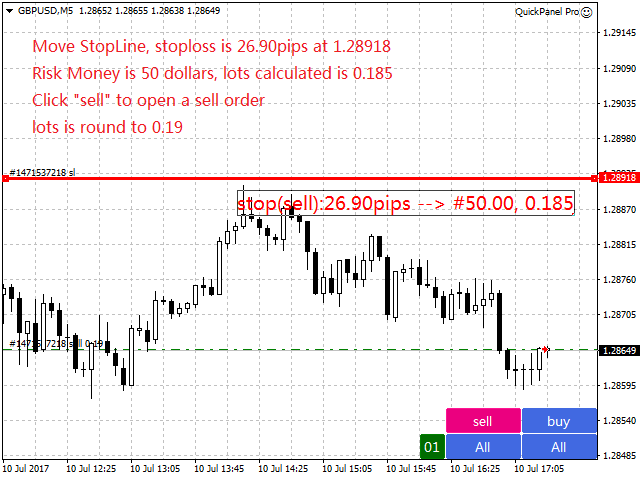
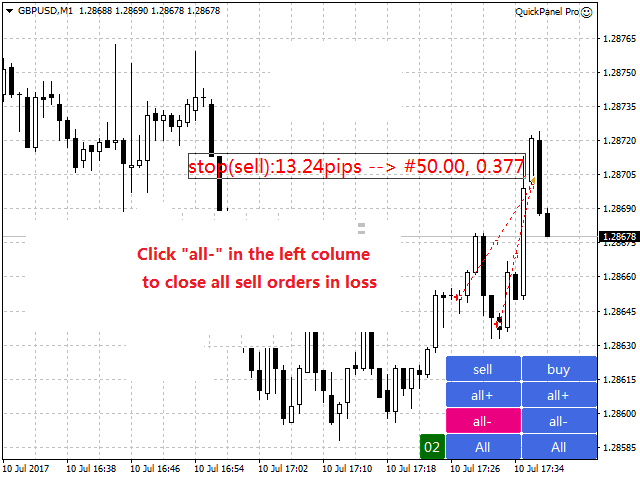
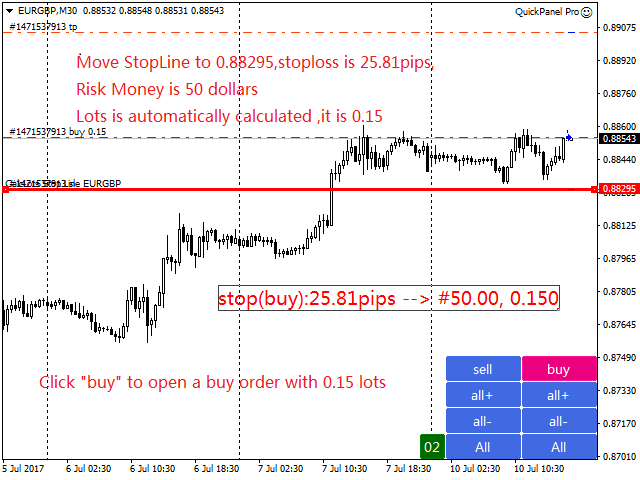
  • Les calculs par lots sont rapides et faciles. Lorsque vous déplacez la ligne d'arrêt, les calculs s'effectuent immédiatement.
  • La plupart des transactions commerciales peuvent être effectuées rapidement en cliquant simplement sur ce panneau.
  • Vous pouvez rapidement basculer entre les panneaux en cliquant simplement sur les boutons verts.
  • EA peut être exécuté dans Strategy Tester. Cette fonctionnalité vous permet de vous entraîner et de vérifier vos stratégies. (C'est gratuit, alors essayez-le.)
  • Modifiez le stop loss et prenez des bénéfices d'un simple clic de souris (pas de backtesting)
  • Affichez le prix moyen dans une case à fond jaune et tracez une ligne pour le prix moyen.   Cliquez ici
Panneau de contrôle

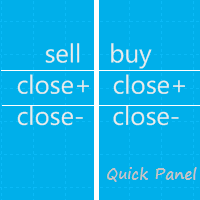
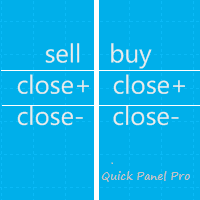
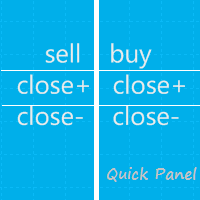
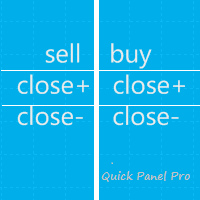
Le tableau de bord se compose de deux colonnes. La colonne de gauche est destinée à la vente et la colonne de droite à l’achat.

  • Ventes : ouvrez une commande client.
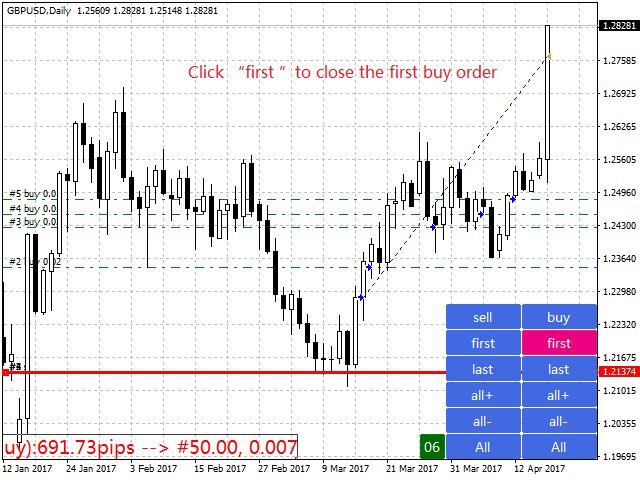
  • Premièrement : clôturez votre premier ordre de vente. Le premier concerne les horaires d’ouverture.
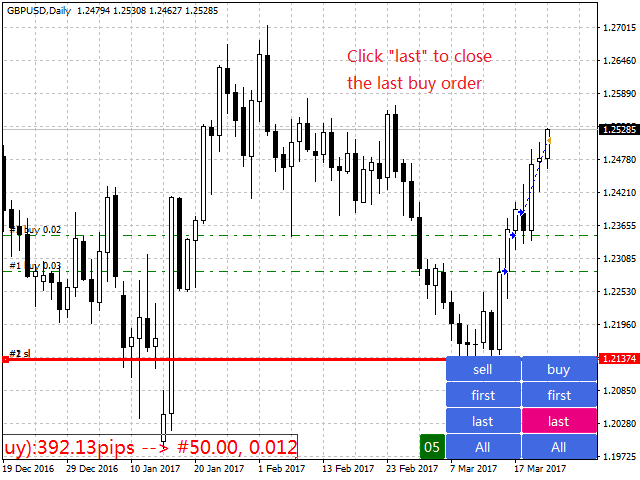
  • Enfin : clôturez la dernière commande client. La dernière chose à considérer concerne les heures de bureau.
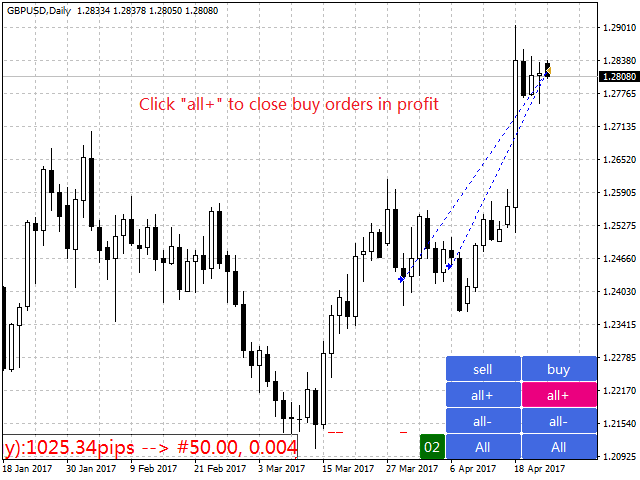
  • all+ : Ordre de vente pour clôturer une position rentable.
  • all- : met fin à un ordre de vente à perte.
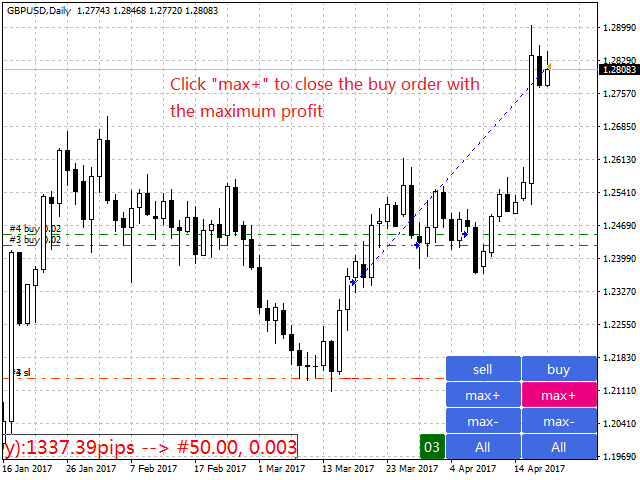
  • max+ : termine l'ordre de vente avec un profit maximum.
  • max- : Clôture l'ordre de vente avec une perte maximale.
  • min+ : clôturez l'ordre de vente avec un profit minimum.
  • min- : clôturez l'ordre de vente avec une perte minimale.
  • Tout : ferme tous les ordres de vente.
  • Achat : ouvrez une commande.
  • Premièrement : complétez votre première commande. Le premier concerne les horaires d’ouverture.
  • Dernier : complétez votre commande finale. La dernière chose à considérer concerne les heures de bureau.
  • all+ : clôturez l'ordre d'achat avec profit.
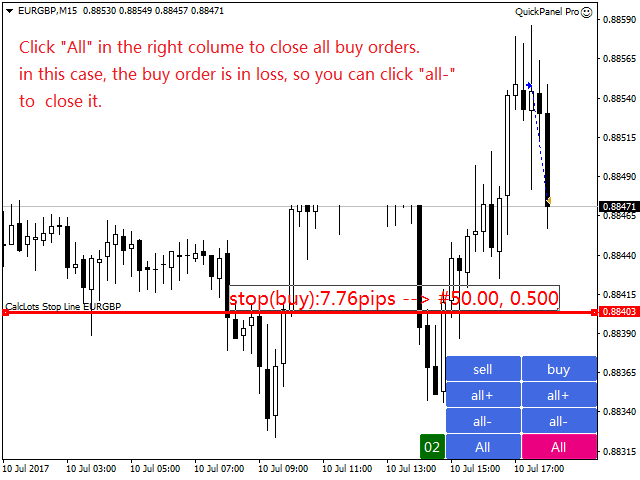
  • all- : Un ordre d'achat pour liquider une position à perte.
  • max+ : termine la commande avec un profit maximum.
  • max- : Clôture la commande avec une perte maximale.
  • min+ : termine la commande avec un profit minimal.
  • min- : Clôture la commande avec une perte minimale.
  • Tous : Toutes les commandes sont clôturées.


saisir
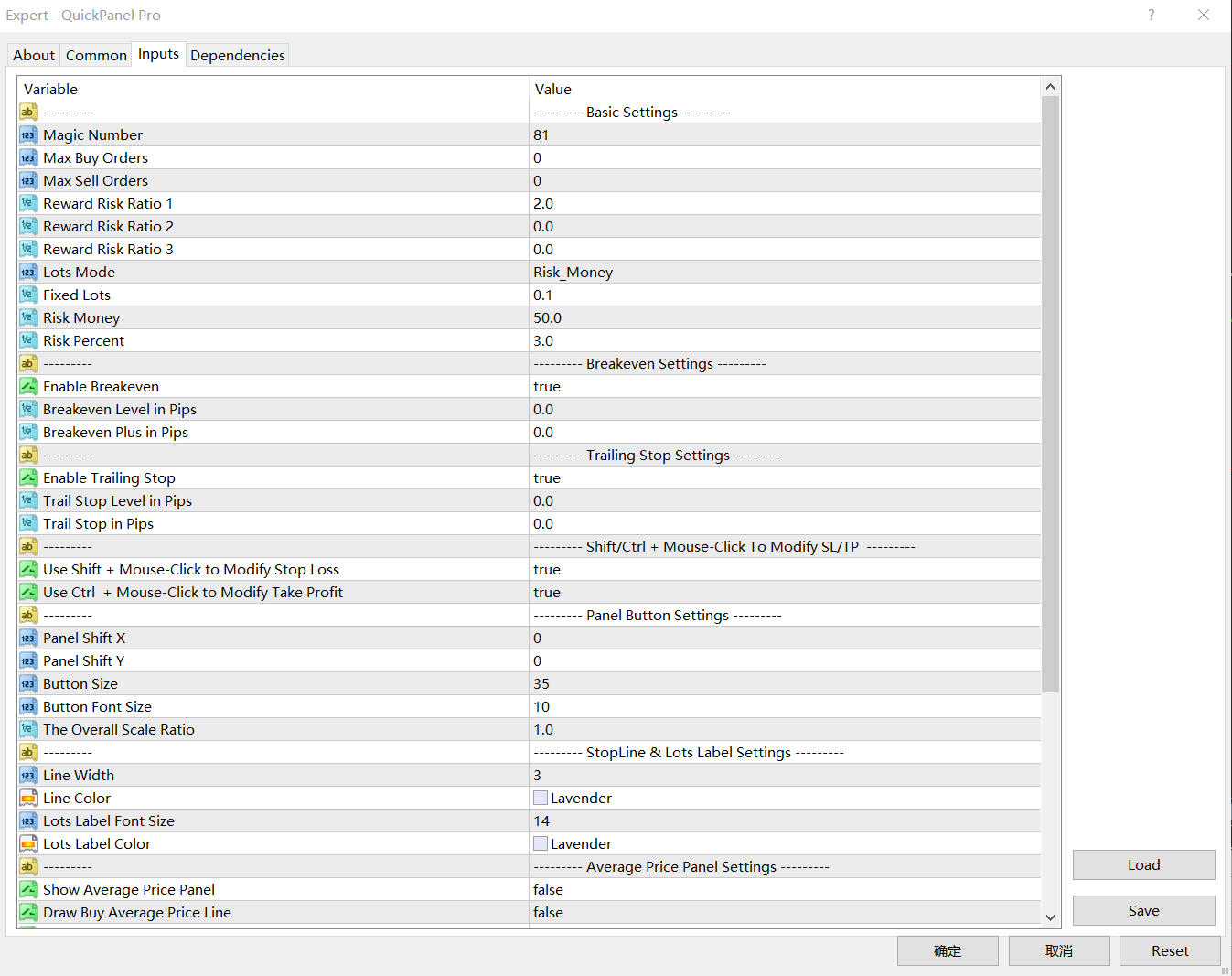
  • Numéro magique : le nombre magique pour les commandes initiées par cet EA.
  • Quantité maximale de commande : Il s’agit de la quantité maximale de commande. A 0, il n'y a pas de limite.
  • Quantité maximale de commande client : quantité maximale de commande client. A 0, il n'y a pas de limite.
  • Ratio risque-récompense 1 : Il s'agit du ratio initial entre le Take Profit et le Stop Loss. Si la valeur est définie sur 0, l'EA ne lancera pas de commandes.
  • Indice risque-récompense 2 – Un deuxième indice pour Take Profit et Stop Loss.   Si la valeur est définie sur 0, l'EA ne lancera pas de commandes.
  • Indice risque-récompense 3 : Le troisième indice pour Take Profit et Stop Loss. Si la valeur est définie sur 0, l'EA ne lancera pas de commandes.
  • Mode batch : saisie avec trois options. Les options sont Fix_Lots, Risk_Money ou Risk_Percentage.
  • Taille de lot fixe : si vous sélectionnez « Fixed_Lots » comme LotsMode, EA utilisera une taille de lot fixe pour le trading.
  • Capital-risque : si vous sélectionnez Risk_Money comme LotsMode, EA calculera la taille du lot en fonction de la valeur du capital-risque. RiskMoney est le montant d'argent que vous pouvez perdre grâce à votre commande.
  • Pourcentage de risque : si vous sélectionnez Risk_Percent comme LotsMode, EA calcule la taille du lot en pourcentage de la marge disponible.

Définissez le seuil de rentabilité : BreakevenLevelPips>0 et BreakevenPlusPips >=0. Sinon, le seuil de rentabilité ne fonctionnera pas.

  • Seuil de rentabilité (points) : Le bénéfice (points) auquel la fonction de seuil de rentabilité est activée.
  • Breakeven Plus : le seuil de rentabilité plus cette entrée correspond à la perte du seuil de rentabilité.

Définissez le trail stop loss : TrailStopLevelPips>0 et TrailStopPips>0 ; Sinon, le stop loss ne fonctionnera pas

  • Niveau d'arrêt de suivi (points) : profit (en points) lorsque la fonction d'arrêt de suivi est activée
  • Trailing Stop (Points) : La distance entre le stop loss (points) et le prix du marché.
Composition du panneau :
  • Panneau ShiftX : l'espace horizontal dans le coin inférieur droit.
  • Panneau ShiftY : distance verticale à partir du coin inférieur droit.
  • Taille du bouton – Définissez la hauteur du bouton. La largeur est trois fois la hauteur.
  • Taille de police du bouton – Définissez une taille de police pour le bouton.
  • Redimensionnement général : redimensionne l'ensemble du panneau.
Paramètres de la ligne d'arrêt
  • Largeur de ligne : la largeur de ligne de StopLine.
  • Couleur de la ligne : La couleur de la ligne d’arrêt.
  • Taille de police de l’étiquette du lot : taille de la police de l’étiquette du lot.
  • Couleur de l'étiquette du lot : couleur du texte de l'étiquette du lot.

Calcul par lots

La taille du lot est déterminée par le capital-risque, le stop loss (en pips) et la valeur du pip.

Le capital-risque est le montant d’argent que vous pouvez perdre à cause de votre commande.

Le stop loss est la distance entre la ligne stop loss et le prix du marché.

Disons que vous sélectionnez Risk_Money comme LotMode, définissez Risk_Money sur 50 $, Risk Capital sur 50 et déplacez StopLine vers une position à 100 pips du prix du marché sur le graphique EURUSD. La valeur du pip pour l'EURUSD est de 10, donc la taille du lot est calculée comme suit :

  • Taille du lot = 50/(100*10) = 0,05.

Dans ce cas, la perte par commande est relativement fixée à 50$.

Pourquoi n'est-il pas complètement réparé ? En effet, les taux croisés n'ont pas de valeurs à virgule fixe telles que EURGBP, EURAUD et AUDNZD.

Si vous sélectionnez Risk_Percent et définissez RiskPercent sur 3, en supposant un solde de compte de 1 000 $, le calcul est le suivant :

  • Capital-risque=1000*3%=30
  • Taille du lot = 30/(100*10) = 0,03.

Dans ce cas, la perte par commande n'est pas fixe et dépend du pourcentage et du solde.


Avis 4
shuanger0602
134
shuanger0602 2018.09.10 06:03 
 

使用了八个月来评价,仓位管理必不可少,又可以复盘练习,功能很强大

Produits recommandés
Expert candle finder for forex in MetaTrader 4 Expert candle finder is one of the practical trader assistant experts that is used in the forex financial market, this expert accurately identifies the candlestick patterns on the price chart as a signal, all the found candles. informs you. This expert is run on your Meta trader platform and in a very precise way, it examines all the currency pairs that are in your watch list and every currency pair that had a professional and good candlestick patt
Waddah Attar Easy Positions Risk Management This EA gives you a full ability to close one position or close all positions . Close buy or sell trades in any position . Close profit or loss position . by clicking on a command button on the chart with confirmation message . Show you  a full information about your positions like : count - lots - average price - points - profit -  profit % - used margin for this position and the risk percent . and also the scrolled table of trades that position has
Equity X MT4
Alessandro Grossi
Equity X è una utility che chiude tutte le posizioni ed eventuali ordini pendenti ad un importo prestabilito, è possibile fissare il bilancio del tuo conto quando il netto e uguale o superiore oppure uguale inferiore all'importo desiderato Ha integrato un sistema per la notifica mobile instantanea che genera il messaggio ad operazione avvenuta Uno strumento che permette di ottimizzare al massimo il rendimento del tuo investimento, è possibile utilizzarlo anche come gestore virtuale di take prof
Parameters Lots = 0.01 Stop loss= 50 Take Profit=50 Delay= 2 Buy = true Sell=true LotMultiplier=2 PointMultiplier=1.5 Magic=111 MaxSlippage=30 Start Time=00:00 Stop Time=23:00 GMT Offset=0 that is a utility for trade, you can aitomaticly trading whit vps. And your invest can growing up to 100% or 1000%. you can back test before you buy this for analisis how this utility traing for you.
Jet Punch
Didit Haryadi Saputra
Jet Punch is another best expert advisor for MT4,  can help you make money while you sleep by automatically entering and exiting trades. It trades by opening trades every day and closing them at the right time to ensure you always earn a profit. The software is very simple and can be used by both beginner and experienced traders.  Jet Punch was tested and has successfully passed the stress test with slippage and commission approximate to the real market condition. Recommendations: Currency pair:
The purpose   of this utility is to manage one or more subwindow in the same chart by opening and closing them through a button or the keyboard keys How it works: If you want to handle more than one subwindow you need to reinstall the indicator . In this case some setups has to be customized onlu in the last subwindow installed and others setups in the installed subwindow during the first time installation. They are denoted in the input rispectively as ' LW ' and ' IW '. First of all install
Spread Logger EA
Troy Atle Kristiansen
Executive Summary: Spread Logger EA is a MetaTrader 4 monitoring and analytics tool that collects, ranks and logs spread conditions across multiple symbols. It is optimized for overnight spread analysis around rollover periods but can be configured for any trading session. The goal is to identify the best time spots for entries when you trade night sessions or are using night scalpers which is very sensitive for high spread fluctuations. It will help you Identify the best broker for you preferr
The FFx Hidden Manager panel will help you to manage easily your orders directly on the chart. Below all features described: TP, SL and TrailingStop are hidden Each order has its own lines on chart Drag & Drop any line to change the TP/SL as per your need Option to move automatically the SL line at breakeven when TP #1 is reached Option to choose the TP/SL type (by pips or price) Option to choose the TrailingStop type (by pips, MA, Fractals, PSAR or ATR) Define which order(s) you want to manage
Broker Analysis Utility
AL MOOSAWI ABDULLAH JAFFER BAQER
Broker Analysis Utility – Your Ultimate Broker Performance Monitor! Get Full Transparency on Your Broker's Execution Quality! Are you a trader who values precision, transparency, and performance? Broker Analysis Utility is an essential tool designed to monitor your broker's execution quality, connection stability, spreads, slippage, and trading costs in real-time. Whether you are a scalper, day trader, or long-term investor, understanding your broker's performance is crucial to optimizing your
Break Moment
Svyatoslav Kucher
5 (2)
Break Moment is a unique proprietary indicator with extensive capabilities and a variety of settings. It can be used as a signal generator or as an auxiliary tool. For the calculations, the price channel is determined. When it is broken, if all conditions of the additional filter are met, it displays a signal in the form of a histogram. Break Moment can be used to determine the main trend, as it has 2 filters for determining it in addition to everything else. If these filters are activated, the
HungrySpider
Aleksandr Hudilainen
2 (1)
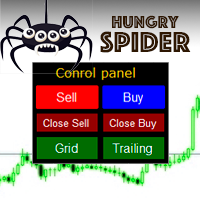
Hungry Spider EA is a convenient trading panel and a useful assistant to manage your trades and to set a grid of orders ( not pending orders ) with a push notification option. Hungry Spider is a trading panel to help you save time while trading. The EA does not open orders, but it sets a grid. The grid then opens at actual prices without using pending orders. The grid can be turned on and off in a single click. The EA includes a Trailing Stop function, which can also be activated in a single cli
EasySet Panel
Joe Treacher
5 (1)
Easy Set Trade Panel Trade Smarter, Not Harder Take the stress out of trade setup and risk management with the Easy Set Trade Panel — a streamlined, drag-and-drop interface designed for speed, precision, and simplicity. Key Features: Effortless Trade Setup : Just drag your Entry, Stop, and Take Profit lines on the chart. The panel calculates the exact lot size for your trade based on your risk preferences. ️ Smart Risk Management : Choose how you want to control risk: % of Account (e.g., Ri
Vizzion
Joel Protusada
Vizzion is a fully automated scalping Expert Advisor that can be run successfully using GBPJPY currency pair at H1 timeframe. Very Important This Expert Advisor can not run with any EAs in the same account. As part of the money management plan, it calculates and monitors the Margin Level % and assumes that all open trades are created by it. If you want an Expert Advisor that trades in a daily basis, this EA is not for you because using this requires a patience to wait for a few days or weeks on
Gyroscopes
Nadiya Mirosh
Gyroscope        professional forex expert   (for EURUSD, GBPUSD, USDJPY, AUDUSD, USDCHF, EURGBP, EURJPY, NZDUSD, USDCAD, EURCHF, AUDJPY, CADJPY pairs)   alyzing the market using the Elliot Wave Index. Elliott wave theory is the interpretation of processes in financial markets through a system of visual models (waves) on price charts. The author of the theory, Ralph Elliott, identified eight variants of alternating waves (of which five are in the trend and three are against the trend). The mov
A Utility used for accounts with multiple open positions with Magic numbers added via Expert Advisors or manually. The Utility closes specific Magic number open positions when a certain profit in currency $ has been reached. The Utility also closes specific Magic numbers open positions with a break-even feature when the Expert Advisors or manually a certain amount of open positions has been placed. The Utility also closes all buy stops and sell stops when the "Take profit sum $" has been reache
Modify BUY order
Hafis Mohamed Yacine
Modify BUY orders_v1.0 Managing Orders   During trading, you may need to modify   orders, i.e.   to change stop levels or  take profit. This can be done with one click with  THE SCRIPT Modify BUY orders v1.0 The script modifies all orders (market )  with specified Take Profit and Stop Loss.(pip or price) If the take profit or(and) stop loss is incorrect, then the value is not changed. Parameters SCRIPT; Take Profit (PIP) Stop Loss (PIP) Take Profit (price) Stop Loss (price)
For MT5: TP SL Calculator This tool helps you to automatically calculate profit at Take - Profit price and loss at Stop - Loss price. Feature: - Calculate profit at TP price. Apply to all operators (BUY / BUY LIMIT / BUY STOP / SELL / SELL LIMIT / SELL STOP), with TP price is greater than 0. Profit is expressed in money and points. - Calculate loss at SL price. Apply to all operators (BUY / BUY LIMIT / BUY STOP / SELL / SELL LIMIT / SELL STOP), with SL price is greater than 0. Loss is express
Trendiness Index
Libertas LLC
5 (3)
"The trend is your friend" is one of the best known sayings in investing, because capturing large trendy price movements can be extremely profitable. However, trading with the trend is often easier said than done, because many indicators are based on price reversals not trends. These aren't very effective at identifying trendy periods, or predicting whether trends will continue. We developed the Trendiness Index to help address this problem by indicating the strength and direction of price trend
Tradingscenes Trading Panel     How will Trading Panel work ? Trading Panel is created as an Expert Advisor, which will enable traders to set pending orders, or mass pending orders in different types Limit orders with additional functions for taking profit as partial, trailing stop and also taking profit with differences price levels; let’s explain in every single functions for you as following parts: Read the full description here:   https://drive.google.com/file/d/10O10dBLLUcdT3MdPvKqO7L3CIFR
"Auto FIBO Pro" Crypto_Forex indicator - est un excellent outil auxiliaire dans le trading ! - L'indicateur calcule et place automatiquement sur le graphique les niveaux de Fibo et les lignes de tendance locales (couleur rouge). - Les niveaux de Fibonacci indiquent les zones clés où le prix peut s'inverser. - Les niveaux les plus importants sont 23,6 %, 38,2 %, 50 % et 61,8 %. - Vous pouvez l'utiliser pour le scalping inversé ou pour le trading en grille de zones. - Il existe également de nombr
A simple script that closes all current orders. Terminate once close all positions, so please don't worry about constantly closing your order. How to use : Drag the script from the navigator to the chart to activate it. Do remember to enable algo trading to use this script. There are different versions of the script that can choose whether to close all buy/sell posiitons, if you need this, do contact me in MQL5.
Boom Coded News MT4
Muhammad Faiz Fathi Bin Mohd Marzuki
This EA does not make entry,you must setup first. After setup this EA will execute order based on input parameter. For MT5 version : CLICK HERE TO BUY MT5 VERSION EA BOOM CODED NEWS Time-Locked Entry System Executes one precise market order exactly at your predefined MT4 server time (HH:MM:SS). Single Trade Per News Designed to avoid overtrading — ideal for news. Recommended on high impact news like NFP,CPI,FOMC and other red high impact news Auto-Off After Entry EA can automatic
Trend Ray
Andriy Sydoruk
The indicator shows the potential trend direction by cyclical-wave dependence. Thus, all the rays of the intersection will be optimal rays, in the direction of which the price is expected to move, taking into account the indicator period. Rays can be used as a direction for potential market movement. But we must not forget that the approach must be comprehensive, the indicator signals require additional information to enter the market.
CRT Candle Range Theory HTF MT4 - Ultimate CRT Indicator : Concepts ICT avancés et système de trading Malaysian SnR Maîtrisez les traces des Market Makers avec l'indicateur Candle Range Theory le plus avancé. Libérez la véritable puissance des Smart Money Concepts (SMC) et tradez avec la même précision que les institutions grâce à l'Ultimate CRT Indicator. Conçu exclusivement pour les traders sérieux, cet indicateur automatiza la théorie CRT, un pilier central des concepts ICT (Inner Circle Trad
This utility tool help you to close all orders which is having loss immediatly with only ONE CLICK, its work is very fast. You can choose which symbol you want or close all symbols so it will helpful for you in your trading to manage trading faster. If you want it work on all symbols, you just need to leave symbol parameter blank (like in default setting). If you want it work on 1 symbol only (for example EURUSD orders) you need to put symbol =EURUSD (see screenshot below). This is a script, so
Margin Call Shield – Defend Your Margin on Your Terms Margin Call Shield   is a tool for MetaTrader 4 traders who want to decide for themselves which open positions are closed during margin call situations before the platform does so automatically based on its internal rules. By default, the broker or platform decides which positions to close, often using undisclosed algorithms. Margin Call Shield lets you set this order according to your own strategy. Why Was Margin Call Shield Created? In a  
NFTraderLite
Wayne Gavin Hattingh
NFTrader Lite Displays Resistance / Support Lines Displays Take Profit and Stop Loss Easy adjust Take Profit/Stop Loss and Lot Size Open Buy/Sell with one click Displays Take Profit/Stop Loss in money value Easy to hide the panel when in trading Take your trading to the next step with easy to use panel display For more information please visit us at www.nextforce-ig.com
This utility can compare simultaneously time frames of different instruments and keep under control   the nine major time frames  of an instrument. It is composed by two changers, a crosshair and some additional components : the  multicharts time frames changer   is designed to simultaneously compare time frames for up  to thirty different sy th symbols with the  keyboard or the button the multicharts symbols changer can  link up to nine charts and control simultaneously the nine major time fra
HotKeys MT4
Alexey Valeev
3 (1)
This utility provides the ability to use hot keys in manual trading instantly responding to the current market situation. You can assign hot keys to open/close positions by their type, close all positions on the current chart and remove all orders on the current chart. You can also assign hot keys for five predefined trade volumes and switch between them if necessary with no need to change the volume manually from time to time. It is also possible to set the auto calculation of a trade volume in
This utility is a full game with a ball on a chart of a currency pair. The ball jumps along the line of the moving average, and it is controlled by arrows or the keys "w a s d". Try to keep the ball from falling out of bounds. There are several levels of difficulty, if at first it’s difficult, you can set a simple level, and when you train, increase difficulty. In this version, there are many more levels and there is an adversary who is chasing you. When adding a game to a window with a chart,
Les acheteurs de ce produit ont également acheté
Exp COPYLOT CLIENT for MT4
Vladislav Andruschenko
4.69 (65)
Copieur de trades professionnel pour MetaTrader 4 Un copieur de trades rapide, fiable et professionnel pour MetaTrader 4 . COPYLOT permet de copier des opérations Forex entre les terminaux MetaTrader 4 et MetaTrader 5 , avec une synchronisation flexible adaptée à différents types de comptes et styles de trading. La version COPYLOT MT4 prend en charge : MetaTrader 4 → MetaTrader 4 MetaTrader 5 Hedge → MetaTrader 4 MetaTrader 5 Netting → MetaTrader 4   Version MT5 Description complète + DEMO + PDF
Local Trade Copier EA MT4
Juvenille Emperor Limited
4.96 (112)
Local Trade Copier EA MT4 est un copieur de trades rapide et flexible permettant de copier et de gérer des trades entre plusieurs comptes MetaTrader 4 sur le même ordinateur Windows ou Windows VPS. Il combine la synchronisation locale des trades avec des contrôles côté Receiver pour la taille des lots, la gestion du risque, le filtrage des trades, le mappage des symboles, la gestion des trades et la protection du compte. Configurez vos terminaux Transmitter et Receiver en environ 1 minute et co
Trade Indicator Assistant is a powerful MT4 utility designed to turn indicators into automated trading systems. Its main feature is the ability to automatically detect an indicator’s   BUY and SELL signal buffers , without requiring you to know the buffer numbers, search through indicator settings, or modify the indicator source code. Bonus Indicator: After purchasing Trade Indicator Assistant, contact me to receive Trade Signal Pro completely free as a bonus indicator. [Download Demo Version]

Bienvenue sur Trade Manager EA, l’outil ultime de gestion des risques conçu pour rendre le trading plus intuitif, précis et efficace. Ce n’est pas seulement un outil d’exécution d’ordres ; c’est une solution complète pour la planification des trades, la gestion des positions et le contrôle des risques. Que vous soyez débutant, trader expérimenté ou scalpeur ayant besoin d’une exécution rapide, Trade Manager EA s’adapte à vos besoins, offrant une flexibilité sur tous les marchés, des devises et i

Trade Assistant MT4
Evgeniy Kravchenko
4.43 (197)
It helps to calculate the risk per trade, the easy installation of a new order, order management with partial closing functions, trailing stop of 7 types and other useful functions. Additional materials and instructions Installation instructions   -   Application instructions   -   Trial version of the application for a demo account Line function -   shows on the chart the Opening line, Stop Loss, Take Profit. With this function it is easy to set a new order and see its additional characteris
TradePanel MT4
Alfiya Fazylova
4.84 (95)
Trade Panel est un assistant commercial multifonction. L'application contient plus de 50 fonctions de trading pour le trading manuel et permet d'automatiser la plupart des tâches commerciales. Instructions d'utilisation + tutoriel vidéo : https://www.mql5.com/fr/blogs/post/772371 Version d'essai de l'application pour un compte démo : https://www.mql5.com/fr/blogs/post/762644 Comment installer l'application : https://www.mql5.com/fr/blogs/post/762645 Comment tester l'application en mode visuel :
Telegram to MT4 Multi-Channel Copier   copie automatiquement les signaux de trading de vos canaux Telegram directement vers MetaTrader 4. Pas de bots, pas d'extensions de navigateur, pas de copie manuelle. Un signal arrive sur Telegram et l'EA ouvre le trade dans votre terminal en quelques secondes. Et avant de copier un canal, le backtester intégré vous montre ce que ce canal aurait fait sur votre compte. Le produit comprend deux composants : une application Windows qui écoute vos canaux Telegr
Indicateur de force des devises pour MetaTrader 4 Cet indicateur de force des devises lit jusqu'à 28 paires majeures et en tire un chiffre par devise, pour les 8 principales : USD, EUR, GBP, JPY, CHF, CAD, AUD et NZD. Au lieu d'ouvrir graphique après graphique pour savoir qui mène, vous lisez un seul panneau sur votre graphique MetaTrader 4 et vous savez quelle devise est achetée et laquelle est vendue. Ce que le panneau affiche Une barre de force classée pour chacune des 8 devises, avec son pou
Partial Closure EA MT4
Juvenille Emperor Limited
5 (3)
Partial Closure EA MT4 vous permet de clôturer partiellement n'importe quelle position sur votre compte, manuellement selon un pourcentage choisi de la taille du lot et/ou par numéro de ticket, ou automatiquement selon des pourcentages définis des niveaux de TP/SL, en clôturant un pourcentage de la taille de lot initiale sur jusqu’à 10 niveaux de take profit et 10 de stop loss. Il peut gérer toutes ou certaines des transactions de votre compte en spécifiant ou en excluant certains numéros magiq
Trade Dashboard MT4
Fatemeh Ameri
4.96 (54)
Trade Dashboard simplifies how you open, manage, and control your trades, with built-in lot size calculation. It allows you to execute trades, manage risk, and control positions directly on the chart, with tools such as partial close, breakeven, and trailing stop. Designed to reduce manual work and help you stay focused on your trading decisions. A demo version is available for testing. Detailed explanations of features are provided within the MQL5 platform. Installation instructions are include
The product will copy all telegram signal to MT4   ( which you are member  ) , also it can work as remote copier.  Easy to set up, copy order instant, can work with almost signal formats, image signal, s upport to translate other language to English Work with all type of channel or group, even channel have "Restrict Saving Content", work with  multi channel, multi MT5 Work as remote copier: with signal have ticket number, it will copy exactly via ticket number. Support to backtest signal. How to
Telegram to MT4 Coppy
Sergey Batudayev
4.09 (11)
Télégramme vers MT4 :   la solution ultime pour copier des signaux Simplifiez votre trading avec   Telegram vers MT4   , l'utilitaire de pointe conçu pour copier les signaux de trading directement depuis les canaux et chats Telegram vers votre plateforme MetaTrader 4, sans DLL. Cette solution robuste garantit une exécution fluide des signaux avec une précision et des options de personnalisation inégalées, vous faisant gagner du temps et optimisant votre efficacité. [ Instructions and DEMO ] Cara
Trade Manager MT4 DaneTrades
Levi Dane Benjamin
4.09 (11)
Trade Manager pour vous aider à entrer et sortir rapidement des transactions tout en calculant automatiquement votre risque. Y compris des fonctionnalités pour vous aider à éviter le sur-trading, le trading de vengeance et le trading émotionnel. Les transactions peuvent être gérées automatiquement et les mesures de performances du compte peuvent être visualisées dans un graphique. Ces fonctionnalités rendent ce panneau idéal pour tous les traders manuels et contribuent à améliorer la plateforme
Trade copier MT4
Alfiya Fazylova
4.61 (36)
Trade Copier est un utilitaire professionnel conçu pour copier et synchroniser les commandesentre les comptes de trading. Les commandes sont copiées du compte/terminal du fournisseur vers le compte/terminal du destinataire, qui sont installés sur le même ordinateur ou vps. PROMOTION - Si vous avez déjà acquis le "Trade copier MT4", vous pouvez obtenir le "Trade copier MT5" gratuitement (pour la copie MT4 > MT5 et MT4 < MT5). Pour obtenir des informations plus détaillées sur les conditions, veuil
Trailing Stop and Breakeven Manager - Trail Architect MT4 Auto Trailing Stop and Breakeven Manager for MT4. Protect profit with automatic break even, then trail your stop loss using Classic, Step, ATR or Candle trailing - all from one professional panel. Every trader knows the pain: a winning trade turns into a loss because the stop loss was never moved. Watching the chart all day just to move your stop to break even and trail the stop loss by hand is exhausting - and one missed move can wipe o
Télécharger la version d'essai fonctionnelle Copy Cat More (Chat Copieur) — Copieur de Trades (Trade Copier) MT4 n'est pas un simple copieur de trades local ; c'est un cadre complet de gestion du risque et d'exécution (risk management and execution framework) conçu pour les défis du trading d'aujourd'hui. Des challenges de prop firm à la gestion de portefeuille personnel, il s'adapte à chaque situation grâce à sa combinaison d' exécution robuste, de protection du capital, de configuration fle
Copieur ->Interaction d'interface pratique et rapide, les utilisateurs peuvent l'utiliser immédiatement       ->>>> Recommandé pour une utilisation sur des ordinateurs Windows ou VPS Windows Caractéristiques: Paramètres de copy trading diversifiés et personnalisés : 1. Différents modes de lot peuvent être définis pour différentes sources de signaux 2. Différentes sources de signaux peuvent être définies pour le copy trading avant et arrière 3. Les signaux peuvent être définis avec des commentai
King Trade Copier MT4
Mohammed Maher Al-sayed Mohammed Ahmed Saleh
5 (1)
King Trade Copier MT4 – Lightning-Fast Local Trade Copier (Master + Slave in ONE file) King Trade Copier is a professional local trade copier that mirrors every trading action from one Master account to unlimited Slave accounts on the same PC or VPS — with an internal copy latency of just a few milliseconds. It was built by a real trader for daily real-money use, with one goal: whatever happens on the Master must happen on the Slave, instantly and without exceptions. Watch the demo video to s
News Filter EA MT4
Rashed Samir
5 (10)
News Filter EA: Advanced Algo Trading Assistant News Filter EA is an advanced algo trading assistant designed to enhance your trading experience. By using the   News Filter EA , you can integrate a Forex economic news filter into your existing expert advisor, even if you do not have access to its source code. In addition to the news filter, you can also specify   trading days   and   hours   for your expert. The News Filter EA also includes   risk management   and   equity protection   features
Prop Guardian Risk Manager MT4 – Drawdown, Risk & Hedge Protection for Prop Firm and Managed Accounts Prop Guardian Risk Manager is a professional risk-control utility for MetaTrader 4, designed for prop firm traders, money managers and anyone who wants strict account-level risk protection. It does not generate trading signals, strategy entries or trading decisions. Instead, it runs in the background, monitors your account risk and can automatically block new exposure, close managed trades or ac
X2 Copy MT4
Liubov' Shkandrii
Rapide. Précis. Innovant. Technologique. Découvrez la copie instantanée de transactions avec le révolutionnaire X2 Copy MT4. Avec seulement 10 secondes d'installation simple, vous obtenez un outil puissant pour synchroniser les transactions entre les terminaux MetaTrader sur un seul ordinateur ou Windows VPS avec une vitesse sans précédent. Que vous gériez plusieurs comptes, suiviez des signaux ou déployiez votre stratégie, X2 Copy MT4 s'adapte à votre flux de travail avec une précision et un co
Multi Copy
Kaijun Wang
5 (1)
Copieur ->Interaction d'interface pratique et rapide, les utilisateurs peuvent l'utiliser immédiatement       ->>>> Recommandé pour une utilisation sur des ordinateurs Windows ou VPS Windows Fonctions de base : La vitesse d'interaction normale du copy trading est inférieure à 0,5 s Détecter automatiquement les sources de signal et afficher une liste des comptes de sources de signal Associez automatiquement les symboles, 95 % des symboles de trading couramment utilisés sur différentes plateformes
Trend Line Optimizer
Evgenii Aksenov
4.11 (19)
Il s'agit d'un optimiseur de paramètres automatique pour l'indicateur Trend Line PRO Vous pouvez facilement et rapidement trouver les paramètres optimaux pour votre indicateur Trend Line PRO préféré.  L'optimisation ne prend que quelques secondes. L'optimiseur vous permet de trouver les meilleurs paramètres pour chaque paire et période: Amplitude, TP1-TP3, StopLoss, ainsi que les valeurs pour Time Filter et HTF Filter sur la section sélectionnée de l'histoire (Days)  Pour optimiser différents
Risk manager Risk manager - it will simplify the tracking of drawdown and will notify you (alert) when the specified risk is reached, and close/lock orders when the critical DD risk level is reached. If the specified drawdown is exceeded, you can choose two options for actions: All orders will be closed that mean loss will be fixed on depo. The terminal also closes. Instead of fixing the loss on depo, the opposite order will be opened - orders locking will occure. Not a single order will be c
TPSpro Risk Manager
Roman Podpora
3.67 (3)
Gestionnaire des risques TPSpro       est un système unique de contrôle professionnel des risques pour les traders de toute formation et de tout capital. Vous permet d'éviter les pertes dans les échanges et les erreurs graves dans les transactions. TPSpro Risk Manager est nécessaire à la gestion des risques, principalement pour les scalpers et les day traders, mais il est utilisé avec succès par les traders de tout style de trading. Le panneau comporte 3 colonnes, chacune contenant des informat
Trade Reverse Copie4
Chukwuemeka Kingsley Anyanwu
5 (1)
Feel free to contact me for any extra features :) [SEE MT5 VERSION  https://www.mql5.com/en/market/product/128846 The Local Reverse Copier is an Expert Advisor designed to synchronize positions between a Master account and a Slave account with a twist: it reverses the trades. When a buy position is opened on the Master account, the EA opens a sell position on the Slave account, and vice versa. This allows for a unique form of trade copying where positions are mirrored in opposite directions bet
Lot Architect — Trade Panel and Position Size Calculator for MT4 Lot Architect is a trade panel and risk-based position size calculator for MetaTrader 4. It helps calculate lot size from the selected risk, displays trade parameters before entry, and supports Market, Limit and Stop orders from the chart. The utility is designed for traders who want a structured workflow for position sizing, stop-loss placement, take-profit planning and order execution. Purpose Before opening a trade, a trader nee
EA Local Trade Copier Pro MT4: The Ultimate DLL-Free Trade Duplicator Are you tired of complicated trade copiers that require unsafe external DLLs, crash your terminal, or confuse you with separate "Master" and "Client" files? Experience the next generation of trade copying with EA Local Trade Copier Pro MT4. Engineered for maximum stability, lightning-fast execution, and ultimate simplicity, this utility allows you to seamlessly copy trades between multiple MetaTrader terminals on the same Wind
Basket EA MT4
Juvenille Emperor Limited
5 (5)
Basket EA MT4 est un outil puissant de capture de bénéfices et un système complet de protection de compte, le tout réuni dans une solution simple et facile à utiliser. Son objectif principal est de vous donner un contrôle total sur le profit et la perte global de votre compte en gérant toutes les positions ouvertes au niveau du panier (basket), plutôt que traitement individuellement. Le EA propose une gamme complète de fonctions au niveau du panier : take profit, stop loss, break even et trailin
Le MT4 to Telegram Signal Provider est un outil facile à utiliser et entièrement personnalisable qui permet d'envoyer des signaux à Telegram, transformant ainsi votre compte en fournisseur de signaux. Le format des messages est entièrement personnalisable ! Cependant, pour une utilisation simple, vous pouvez également opter pour un modèle prédéfini et activer ou désactiver des parties spécifiques du message. [ Démonstration ]   [ Manuel ] [ Version MT5 ] [ Version Discord ] [ Canal Telegram ]  N
Plus de l'auteur
L'indicateur comprend deux parties. Partie I : Les bougies colorées montrent la tendance majeure Les bougies colorées permettent d'identifier l'état du marché grâce à des chandeliers colorés. Comme le montrent les captures d'écran, si la couleur est Aqua, le marché est dans une situation où vous devez placer des ordres longs ou sortir des ordres courts. Si la couleur est Tomate, c'est le moment de placer des ordres courts ou de sortir des ordres longs. Si la couleur change, il est préférable d'a
Slippage Monitor MT5
Ziheng Zhuang
4.33 (3)
This EA is designed to monitor the slippage of opening and closing orders, and save the records in csv file. It is useful to record the slippage and evaluate brokers. The record files are saved in the folder  MT5_Data_Folder\MQL5\Files.  Go to   "File " --> "Open Data Folder"   . Warning :   Do NOT open the files directly, otherwise it will affect the exectution of EA, just copy them to another folder and open them. Usage: Open a chart and load the EA on it, just need only one EA to run, it mo
FREE
Slippage Monitor
Ziheng Zhuang
4.8 (5)
This EA is designed to monitor the slippage of opening and closing orders, and save the records in files. It is useful to record the slippage and evaluate brokers. The record files are saved in the folder  MT4_Data_Folder\MQL4\Files.  Go to "File " --> "Open Data Folder" . Warning : Do NOT open the files directly, otherwise it will affect the exectution of EA, just copy them to another folder and open them. Usage: Open a chart and load the EA on it, just need only one EA to run, it monitors al
FREE
This is a MetaTrader 5 script. It helps to summarize all trades into every symbol. Input Select Period: This is 7-option input. It includes Last Month, This Month, Last Week, This Week, Today, All History, and Date Specified. Specify Starting Date: Enter a date if you selected Date Specified in "Select Period" input. Specify Ending Date: Enter a date if you selected Date Specified in "Select Period" input. The summary is saved into a file in MQL5\Files folder. MT4 Version:   https://www.mql5.co
FREE
This is a MetaTrader 4 script. It helps to summarize all trades into every symbol. Input Select Period: This is 7-option input. It includes Last Month, This Month, Last Week, This Week, Today, All History, and Date Specified. Specify Starting Date: Enter a date if you selected Date Specified in "Select Period" input. Specify Ending Date: Enter a date if you selected Date Specified in "Select Period" input. The summary is saved into a file in MQL4\Files folder. Also, there is pop-up window for a
FREE
Ce conseiller offre les fonctionnalités suivantes : Position ouverte : ouvrez un ordre long ou court lorsque le prix franchit la ligne de tendance. Liquidation : Liquidez les positions longues ou courtes lorsque le prix franchit la ligne de tendance. Trailing Stop Loss – L'EA suit la ligne de tendance et continue d'augmenter le stop loss pour les ordres à long terme ou de réduire le stop loss pour les ordres à court terme. La ligne peut être une ligne de tendance ou une ligne horizontale.      
Account Export
Ziheng Zhuang
5 (1)
This is a MetaTrader 4 script. It helps to export all trades into a CSV file as per Symbol and selected periods. Input Select Symbol: This is 2-option input. Select current symbol or all symbols to export its orders. Select Period: This is 7-option input. It includes Last Month, This Month, Last Week, This Week, Today, All History, and Date Specified. Specify Starting Date: Enter a date if you selected Date Specified in "Select Period" input. Specify Ending Date: Enter a date if you selected Da
FREE
Ce panel est composé de conseillers experts et propose six groupes de panels de trading. Version MT5 :   cache panneau rapide caractéristiques La plupart des opérations de trading peuvent être effectuées rapidement en cliquant sur les boutons de ce panneau. Changer de panneau est aussi simple que de cliquer sur le bouton vert. EA peut être exécuté sur les graphiques visuels de Strategy Tester et fournit un moyen simple de s'entraîner au trading sur la base de données historiques. Modifiez le st
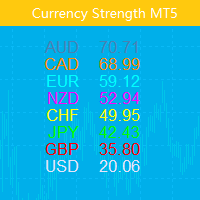
Cet indicateur montre la force relative de huit principales devises (USD, EUR, GBP, AUD, NZD, CAD, CHF, JPY). Les valeurs de force sont normalisées dans la plage de 0 à 100. Une valeur supérieure à 60 signifie fort. Un nombre inférieur à 40 indique une faiblesse. Le principe de base Étant donné huit devises, USD, EUR, GBP, AUD, NZD, CAD, CHF, JPY, où chaque paire de deux peut être combinée, ce qui donne un total de 28 paires, un algorithme inverse est utilisé pour extraire la force des huit devi
This indicator shows the main trend on the current chart. Features This indicator includes two bands, one is the inner white bands, another is the outer blue bands. If the white dotted line crosses down the white solid line, this means that the trend has changed to be bearish. If the white dotted line crosses up the white solid line, this means that the trend has changed to be bullish. Once the crossing happened, it will not repaint. Settings ShowColorCandle: if 'true', it will show the color
Beta Bands
Ziheng Zhuang
5 (1)
This indicator shows main trend, entry zone and exit zone. This is a muti-timeframe indicator, so it is always repainting in the current period of the higher timeframe. Features Colorful Histogram: it indicates the main trend, the tomato means the market is bearish,and the sky blue means the market is bullish. Inner Blue Bands: it is entry zone for entry market, the market is relatively safe for entry. Outer Yellow Bands: it is exit zone for exit market, the market is oversold or overbought.
Ce conseiller est un tableau de bord qui vous permet de trader plusieurs paires en un seul clic. Cliquez sur       ouvrir       Ce bouton ouvre une commande pour la paire sélectionnée. Cliquez sur       fermer       Ce bouton ferme la commande pour la paire sélectionnée. Le lot de commande est le numéro saisi par l'utilisateur. Les nombres positifs correspondent aux ordres d’achat, tandis que les nombres négatifs correspondent aux ordres de vente. Cliquez sur   le bouton Fermer   pour fermer la
This indcator shows the trend with the color histogram. It is simple and easy to use. Usage: If the histogram changes from the aqua to the fuchsia, which means the trend is up. If the histogram changes from the fuchsia to the aqua,which means the trend is down. Inputs: MaPeriods: the periods of moving average. f1: the multiplier of inner bands f2: the multiplier of outer bands Popup Window Alert Email Alert Mobile Push Alert Alerts When the trend changes from the long trend to the short trend or
Pair Power Matrix
Ziheng Zhuang
3.67 (3)
This indicator is designed to show the pair power of the major 28 paris with RSI,Stochostic,and CCI. The power value is sorted from the weak to the strong. The weaker pairs: the pairs occurs at least 2 times in the top 3 rows The stronger pairs:   the pairs occurs at least 2 times in the bottom 3 rows Users can add another symbol, so it can calculate 28+1 symbols. My advice: https://www.mql5.com/en/blogs/post/729880 A free EA with Pair Power Matrix  ---  https://www.mql5.com/en/blogs/post/7328
The purpose of the inidcator is to identify the reversal point. The blue arrow is buy signal and the yellow star is its stop loss. The red arrow is sell signal and the yellow star is its stop loss. Alert feature: if there is a signal, the indicator will send alerts of  popup window,email or mobile push. Inputs: Popup Window Alert: it is false in default Email Alert : it is false in default Mobile Push Alert: it is false in default. MetaTrader 5 Version: Reversal Point Please note that the singal
L'indicateur comprend deux parties. Partie I : Les bougies colorées montrent la grande tendance Les bougies de couleur consistent à identifier l'état du marché à l'aide de chandeliers de couleur. Comme le montrent les captures d'écran, si la couleur est Aqua, le marché est dans un état dans lequel vous devez passer des ordres longs ou quitter des ordres courts. Si la couleur est Tomate, c'est le moment de passer des commandes courtes ou de sortir des commandes longues. Si la couleur change, il v
montre. Ce conseil concerne uniquement la couverture de compte. Version MetaTrader 4       Quick Panel Pro caractéristiques Les calculs par lots sont rapides et faciles. Lorsque vous déplacez la ligne d'arrêt, les calculs s'effectuent immédiatement. La plupart des transactions commerciales peuvent être effectuées rapidement en cliquant simplement sur ce panneau. Vous pouvez rapidement basculer entre les panneaux en cliquant simplement sur les boutons verts. Modifiez le stop loss et prenez des
Remarque : Cette EA ne fonctionne que sur les comptes sans risque. Version Métatrader 4       panneau rapide Ce panel est un groupe de six conseillers experts qui constituent un panel de négociation. caractéristiques La plupart des tâches de trading peuvent être effectuées rapidement en cliquant sur les boutons de ces panneaux. Basculer entre les panneaux est aussi simple que de cliquer sur le bouton vert. EA peut être exécuté sur les graphiques visuels de Strategy Tester et fournit un moyen s
Gamma Bands   This indcator shows the trend with the color histogram. It is simple and easy to use. Usage: If the histogram changes from the aqua to the fuchsia, which means the trend is up. If the histogram changes from the fuchsia to the aqua,which means the trend is down. Inputs: MaPeriods: the periods of moving average. f1: the multiplier of inner bands f2: the multiplier of outer bands   Popup Window Alert Email Alert Mobile Push Alert Alerts When the trend changes for the long trend to the
The purpose of the inidcator is to identify the reversal point. The blue arrow is buy signal and the yellow star is its stop loss. The red arrow is sell signal and the yellow star is its stop loss. Please note that the singal is against trend,it could be continual fail. Alert feature: if there is a signal, the indicator will send alerts of  popup window,email or mobile push. Inputs: Popup Window Alert: it is false in default Email Alert : it is false in default Mobile Push Alert: it is false in
Ce conseiller offre les fonctionnalités suivantes : Position ouverte : ouvrez un ordre long ou court lorsque le prix franchit la ligne de tendance. Liquidation : Liquidez les positions longues ou courtes lorsque le prix franchit la ligne de tendance. Trailing Stop Loss – L'EA suit la ligne de tendance et continue d'augmenter le stop loss pour les ordres à long terme ou de réduire le stop loss pour les ordres à court terme. La ligne peut être une ligne de tendance ou une ligne horizontale.      
Ce conseiller est un tableau de bord qui vous permet de trader plusieurs paires en un seul clic. Cliquez sur       ouvrir       Ce bouton ouvre une commande pour la paire sélectionnée. Cliquez sur       fermer       Ce bouton ferme la commande pour la paire sélectionnée. Le lot de commande est le numéro saisi par l'utilisateur. Les nombres positifs correspondent aux ordres d’achat, tandis que les nombres négatifs correspondent aux ordres de vente. Cliquez sur   le bouton Fermer   pour fermer la
Cet indicateur montre la force relative de huit principales devises (USD, EUR, GBP, AUD, NZD, CAD, CHF, JPY). Les valeurs de force sont normalisées dans la plage de 0 à 100. Une valeur supérieure à 60 signifie fort. Un nombre inférieur à 40 indique une faiblesse. billet Only Show Current Pair   -       Si vrai, seule la paire de graphiques actuelle est affichée. Sinon, les huit courbes seront affichées. Bars To Show     – Nombre de barres pour afficher la courbe de force. Ma Periods To Smooth
Filtrer:
HAO LONG
37
HAO LONG 2023.02.22 16:52 
 

L'utilisateur n'a laissé aucun commentaire sur la note

Ziheng Zhuang
40974
Réponse du développeur Ziheng Zhuang 2023.02.22 17:10
你好,谢谢5星好评.
我会提供一个参数供用户设置按钮大小,稍等.
Smoly94
16
Smoly94 2022.11.13 07:52 
 

L'utilisateur n'a laissé aucun commentaire sur la note

Fredy Tello
409
Fredy Tello 2021.09.09 23:41 
 

L'utilisateur n'a laissé aucun commentaire sur la note

shuanger0602
134
shuanger0602 2018.09.10 06:03 
 

使用了八个月来评价,仓位管理必不可少,又可以复盘练习,功能很强大

Répondre à l'avis