Fast VWAP
- Göstergeler
-
Jeffrey Lloyd Lauzon
 Welcome to themt4developer!
I am a C++ systems programmer and specialized MQL4 developer focused on building professional-grade trading utilities, custom indicators, automated Expert Advisors, and advanced chart dashboards for MetaTrader. - Sürüm: 1.0
Fast VWAP (Highly Optimized Intraday Dashboard)
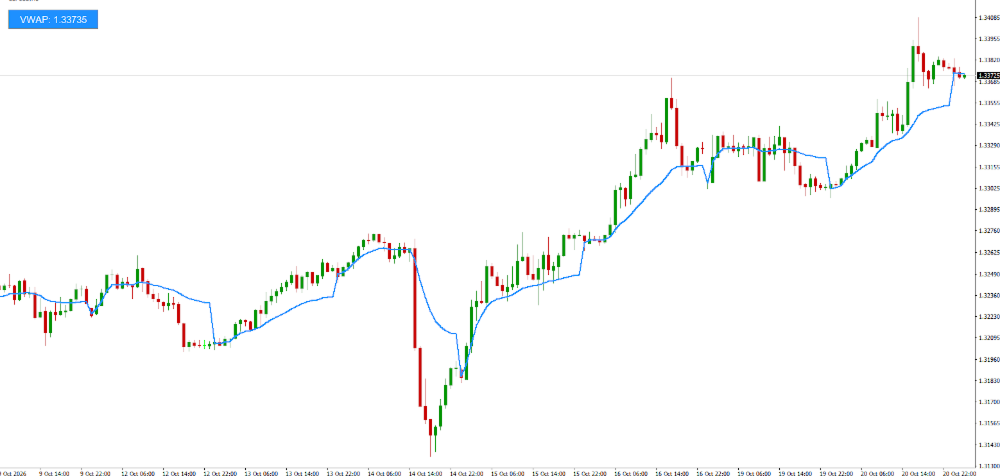
The Fast VWAP Matrix is an institutional-grade technical overlay designed to isolate volume-weighted fair value and intraday structural balance across active execution cycles. By processing price action dynamically through volume-weighting thresholds, this utility completely eliminates calculation delay and gives traders an instant visual panel of asset distribution on a single window.
Utilizing specialized single-pass memory arrays, this matrix tracks volume accumulation loops relative to selected session anchors. It transforms complex computational weight metrics into clean visual states, helping traders spot volume premium and discount zones long before standard moving averages react.
Core Technical Features
* True Multi-Period Anchor Reset: Simultaneously processes pricing calculations across Daily, Weekly, or Monthly session boundaries to match your structural strategy.
* Volume Fair Value Detection: Automatically flags institutional accumulation and dynamic support/resistance zones using tick volume distribution.
* Intuitive Color-Coded State Machine: Instantly adapts indicator buffer rendering to contrast flawlessly with the main chart workspace.
* Actionable Value Panel Output: Translates the final volume-weighted average price into an explicit numeric dashboard readout configured down to the fractional pip.
* Institutional Solid Workspace Panel: Includes a flat background container option that avoids overlapping UI artifacts and outlines your data cleanly on a sleek, modern layout.
* Zero Terminal Lag / High Performance Architecture: Engineered with an optimized single-pass linear O(N) loop execution that runs smoothly, completely avoiding terminal lag on Linux/Wine, VPS, or native Windows setups.
Interactive Status & Interpretation Logic
The dashboard tracks real-time data calculations and formats the active metric readout based on asset decimal precision automatically:
* Dynamic Line Plotting: Draws a chronological, volume-weighted fair value baseline directly across asset candles to serve as a mean-reversion anchor.
* Centered Value Overlay: Formats and displays the live value calculation string explicitly within a flat panel box, utilizing a clean layout structure.
* Solid Flat Geometry: Employs a flat container layout frame that removes messy frames, drop-shadow margins, or traditional sunken borders.
Adjustable Input Parameters
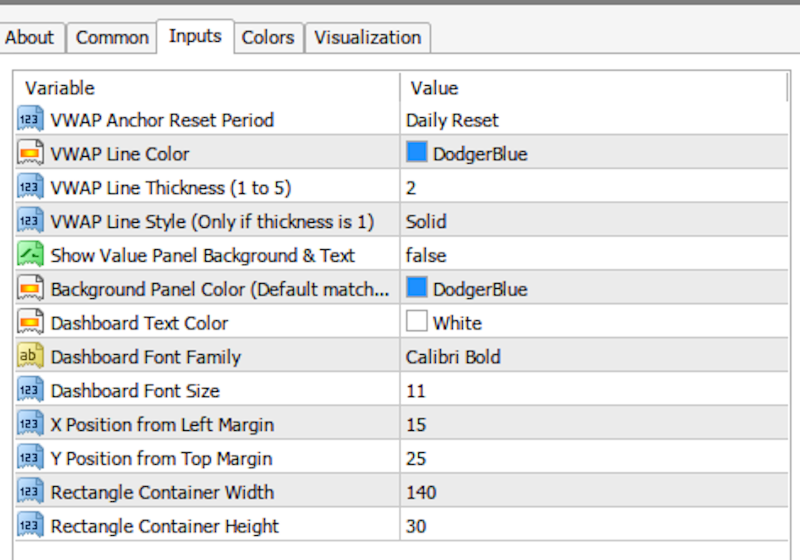
Tailor the calculation matrix completely to your personalized risk strategy directly through the input dashboard:
* InpAnchorPeriod (Default: Daily Reset): Adjusts the lookback accumulation barrier for volume loops.
* InpLineColor (Default: DodgerBlue): Sets your primary dynamic tracking trendline color.
* InpLineWidth (Default: 2): Modifies line thickness for instant visual clarity.
* InpLineStyle (Default: Solid): Selects custom dotted or dashed line variations (applicable when line width is set to 1).
* InpShowPanel (Default: true): Turns the visual text dashboard box and solid background rectangle on or off.
* InpBgColor (Default: DodgerBlue): Sets the background panel box color to match user preferences.
* InpLabelColor (Default: White): Changes the typography fill color inside the metric container.
* InpLabelFont (Default: Calibri Bold): Dictates your preferred charting typography family.
* InpLabelSize (Default: 11): Scales font size readability within the active metrics block.
* InpXOffset / InpYOffset (Default: 15 / 25): Fine-tune pixel layout coordinate positions from screen boundaries.
* InpPanelWidth / InpPanelHeight (Default: 140 / 30): Scale metric container sizes seamlessly on your screen interface.
The Fast VWAP Matrix is an institutional-grade technical overlay designed to isolate volume-weighted fair value and intraday structural balance across active execution cycles. By processing price action dynamically through volume-weighting thresholds, this utility completely eliminates calculation delay and gives traders an instant visual panel of asset distribution on a single window.
Utilizing specialized single-pass memory arrays, this matrix tracks volume accumulation loops relative to selected session anchors. It transforms complex computational weight metrics into clean visual states, helping traders spot volume premium and discount zones long before standard moving averages react.
Core Technical Features
* True Multi-Period Anchor Reset: Simultaneously processes pricing calculations across Daily, Weekly, or Monthly session boundaries to match your structural strategy.
* Volume Fair Value Detection: Automatically flags institutional accumulation and dynamic support/resistance zones using tick volume distribution.
* Intuitive Color-Coded State Machine: Instantly adapts indicator buffer rendering to contrast flawlessly with the main chart workspace.
* Actionable Value Panel Output: Translates the final volume-weighted average price into an explicit numeric dashboard readout configured down to the fractional pip.
* Institutional Solid Workspace Panel: Includes a flat background container option that avoids overlapping UI artifacts and outlines your data cleanly on a sleek, modern layout.
* Zero Terminal Lag / High Performance Architecture: Engineered with an optimized single-pass linear O(N) loop execution that runs smoothly, completely avoiding terminal lag on Linux/Wine, VPS, or native Windows setups.
Interactive Status & Interpretation Logic
The dashboard tracks real-time data calculations and formats the active metric readout based on asset decimal precision automatically:
* Dynamic Line Plotting: Draws a chronological, volume-weighted fair value baseline directly across asset candles to serve as a mean-reversion anchor.
* Centered Value Overlay: Formats and displays the live value calculation string explicitly within a flat panel box, utilizing a clean layout structure.
* Solid Flat Geometry: Employs a flat container layout frame that removes messy frames, drop-shadow margins, or traditional sunken borders.
Adjustable Input Parameters
Tailor the calculation matrix completely to your personalized risk strategy directly through the input dashboard:
* InpAnchorPeriod (Default: Daily Reset): Adjusts the lookback accumulation barrier for volume loops.
* InpLineColor (Default: DodgerBlue): Sets your primary dynamic tracking trendline color.
* InpLineWidth (Default: 2): Modifies line thickness for instant visual clarity.
* InpLineStyle (Default: Solid): Selects custom dotted or dashed line variations (applicable when line width is set to 1).
* InpShowPanel (Default: true): Turns the visual text dashboard box and solid background rectangle on or off.
* InpBgColor (Default: DodgerBlue): Sets the background panel box color to match user preferences.
* InpLabelColor (Default: White): Changes the typography fill color inside the metric container.
* InpLabelFont (Default: Calibri Bold): Dictates your preferred charting typography family.
* InpLabelSize (Default: 11): Scales font size readability within the active metrics block.
* InpXOffset / InpYOffset (Default: 15 / 25): Fine-tune pixel layout coordinate positions from screen boundaries.
* InpPanelWidth / InpPanelHeight (Default: 140 / 30): Scale metric container sizes seamlessly on your screen interface.