
MP TGAlert
- Yardımcı programlar
- Sürüm: 2.0
- Etkinleştirmeler: 5

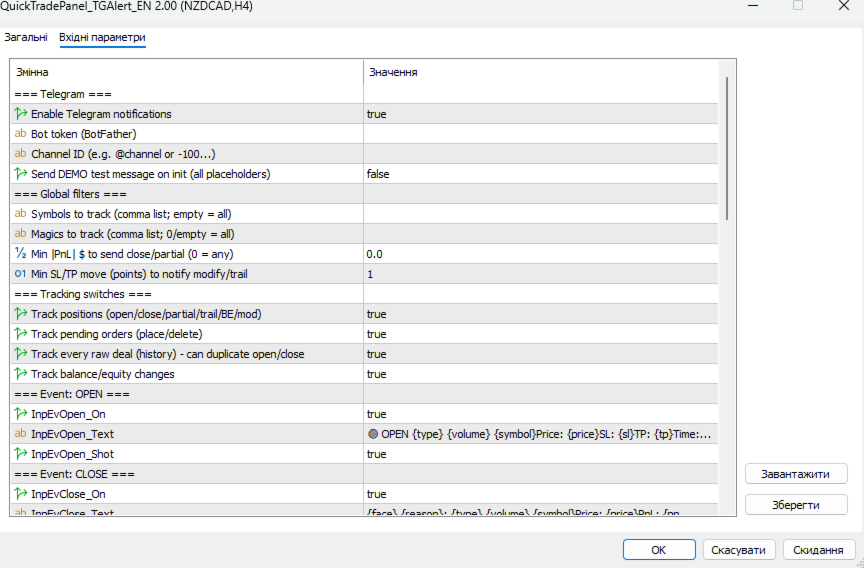
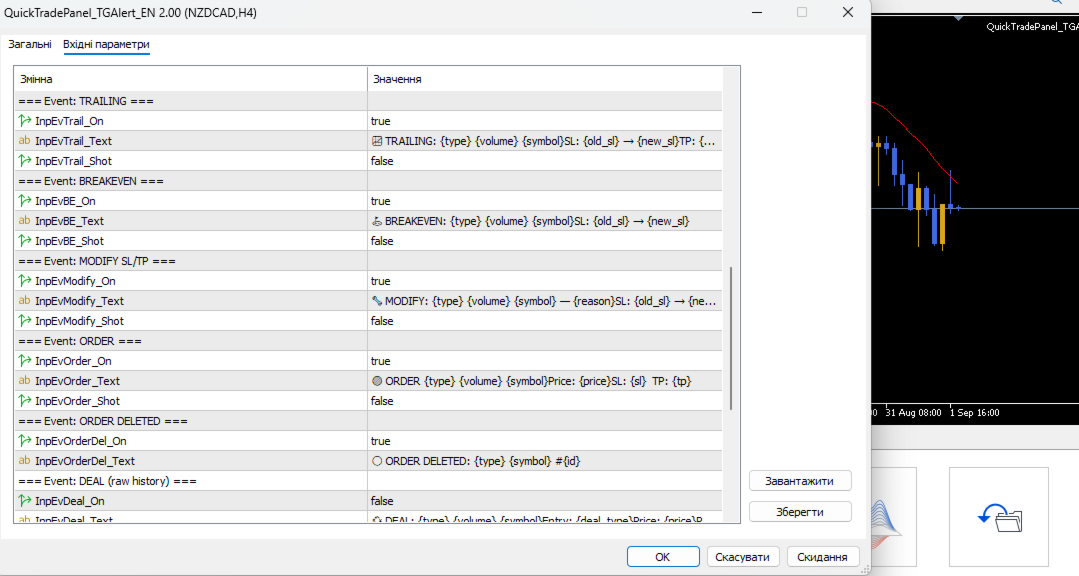
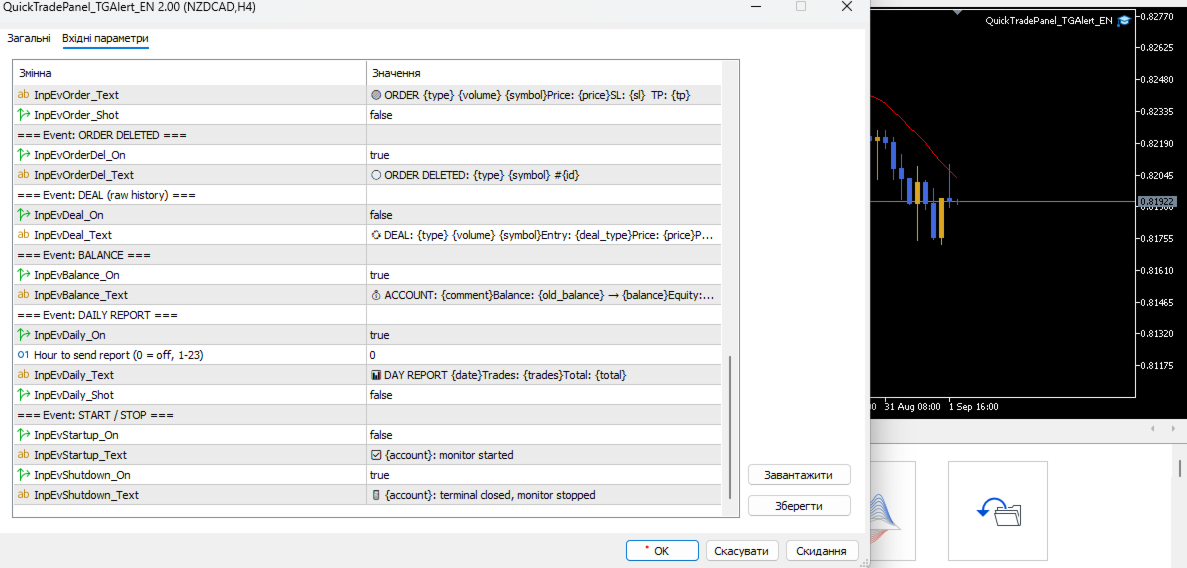
One job, maximum flexibility: the expert watches all activity on your trading account and sends you a Telegram message and/or chart screenshot for any chosen event type. Every event, message template and filter is user-configurable.
🎯 What it is for
- You trade manually and want to know instantly about your trades in Telegram (openings, closings, TP/SL, trailing, breakeven, partial close).
- You run EAs — have a single notification channel for every trade on the account without opening the terminal.
- You want to step away and still receive a daily trading report at the end of the day.
- You want full control of message text — format, emoji, prices, PnL — in your own style.
📬 Tracked events
| Event | Icon | Description | Screenshot |
|---|---|---|---|
| Position opened | 🟢 | New deal alert: type, volume, symbol, price, SL, TP | ✅ (on) |
| Position closed | 🔴 | PnL + reason: Take Profit 😊 / Stop Loss 😡 / manual 🤔 | ✅ (on) |
| Partial close | 🔸 | Volume reduced + realized PnL | optional |
| Trailing stop | 📈 | SL moved into profit | optional |
| Breakeven (BE) | ⛳ | SL moved to the entry zone | optional |
| SL/TP modified | 🔧 | Any other stop modification (manual/EA) | optional |
| Pending order | 🟠 | Placed/deleted: type, price, SL, TP | optional |
| Raw deal | 💱 | Every history operation (for advanced users) | — |
| Account balance | 💰 | Deposit/withdrawal, balance & equity change | — |
| Daily report | 📊 | Day summary: trades, total PnL (at set hour) | optional |
| Start / Stop | ✅/🚪 | Monitor started / terminal closed | — |
🧩 Full message customization — placeholders
Each event has its own message template. Any text can be composed from placeholders:
| Placeholder | Value |
|---|---|
| {symbol} | Symbol (XAUUSD, EURUSD...) |
| {type} | BUY / SELL / order type |
| {volume} / {old_volume} | Current / previous volume |
| {price} / {open} | Deal price / open price |
| {sl} / {tp} | Current Stop Loss / Take Profit |
| {old_sl} {new_sl} {old_tp} {new_tp} | SL/TP changes |
| {pnl} | Profit/loss (incl. swap and commission) |
| {reason} | Reason: Take Profit, Stop Loss, Manual... |
| {deal_type} | ENTRY_IN / ENTRY_OUT / ENTRY_INOUT |
| {face} | Emoji 😊 😡 🤔 |
| {comment} / {magic} / {id} | Comment, magic, ticket |
| {time} / {date} | Time / date |
| {account} {balance} {equity} {old_balance} | Account data |
| {trades} / {total} | Trades today / total PnL |
Template example
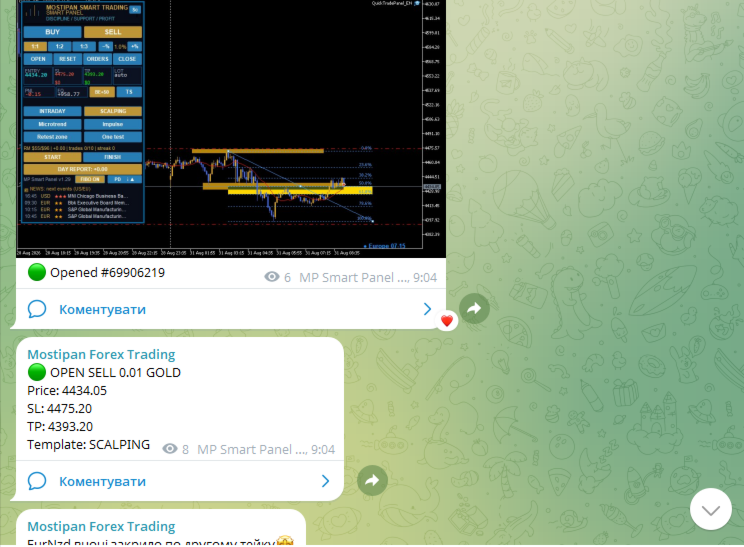
Open template: 🟢 OPEN {type} {volume} {symbol} Price: {price} SL: {sl} TP: {tp} Time: {time} Telegram result: 🟢 OPEN BUY 0.10 XAUUSD Price: 2390.50 SL: 2380.00 TP: 2410.00 Time: 19:45
🔍 Global filters
| Parameter | Purpose | ||
|---|---|---|---|
| InpFilterSymbols | Track only these symbols (comma list; empty = all) | ||
| InpFilterMagics | Track only these EA magics (empty/0 = all) | ||
| InpFilterMinPnl | Min | PnL | in $ to notify closing/partial — anti-spam |
| InpMinMovePts | Min SL/TP move (points) to be treated as trail/modify |
⚙️ Tracking switches
InpTrackPositions · InpTrackOrders · InpTrackDeals · InpTrackBalance
Enable only the sources you need — less load and fewer duplicates. For example, Deals is usually off so it does not duplicate openings/closings.
📷 Screenshots
- Sent together with the message for events with screenshot enabled.
- The expert waits for the file to be written (up to 2 s), then uploads it as a photo.
- Files are saved to MQL5\Files\ (prefix QT_scr_ ).
🧪 Connection test
InpTestSend = true — on startup the expert sends a demo message with all placeholders, so you immediately see how each field looks.
📦 Telegram settings
| Parameter | Description |
|---|---|
| InpTG_Token | Bot token (from @BotFather) |
| InpTG_ChatID | Chat/channel ID ( -100... for channels, or @username) |
| InpTG_Enabled | Enable sending |
| InpTestSend | Demo message on startup |
🚀 How to run
- Create a bot via @BotFather, get the token.
- Find out the ChatID (via @userinfobot, or create a channel → -100... ).
- In the terminal: Tools → Options → Expert Advisors → add https://api.telegram.org to the allowed URLs.
- Attach QuickTradePanel_TGAlert_EN.ex5 to any chart.
- Fill in Token/ChatID, optionally enable InpTestSend , configure texts and filters.
⚠️ Without adding https://api.telegram.org to the allowed URLs the expert cannot send messages (WebRequest error).








































Kullanıcı değerlendirmeye herhangi bir yorum bırakmadı