PUGS Multi Set Template Scheduler Pro

A single "controller" EA that schedules and applies MT4 templates to up to 5 target charts at user-defined times, with daily profit targets, two-tier max-loss kill switches, max-profit lock-in, a weekend filter, delayed cross-chart wakeup and a live dashboard. Ships with a free helper utility PUGS-Chart ID to instantly identify any chart's ID.

📖 Full Product Description

What it does

PUGS Multi-Set Template Scheduler Pro is a "master controller" Expert Advisor that you attach to one chart. From that single chart, it can manage up to five independent "Sets", each pointing at a different target chart anywhere in your MT4 terminal. Each Set runs on its own schedule and its own risk rules.

Instead of babysitting five different charts and manually swapping templates, indicators or EAs throughout the day, you let this EA do it for you — at fixed times, when profit targets are hit, or when loss limits are breached.

Why you need it

If you trade more than one strategy, you already know the pain:

  • EAs need different templates / parameter sets at different hours
  • You must stop trading once a daily profit target is hit
  • You must cut losses before they spiral out of control
  • You need templates to actually load on remote charts (the cross-chart ChartApplyTemplate call is notoriously flaky in MT4 — this EA solves that with retry logic + a delayed period-flip wakeup)

This EA handles all of the above from one place.

Key Features

✅ 5 Independent Sets – Each Set controls a different target chart with its own schedule, profit targets, loss limits and magic numbers.

✅ Two-Stage Template Scheduling (Time A → Time B) – At Time A the EA applies Template A (your "trading on" template). At Time B it switches to Template B (your "trading off / flatten" template), but only if the day's net profit has reached your MinNetProfit AND there are no open trades.

✅ Two-Tier Max-Loss Kill Switch

  • Tier 1 (1× Max Loss) – armed only after Time B. If today's net loss hits MaxLossLimit , all trades for the Set's magic numbers are force-closed, pending orders cancelled, and Template B applied.
  • Tier 2 (2× Max Loss) – armed 24/7 from the moment the EA starts. If today's net loss hits 2 × MaxLossLimit , the same emergency shutdown triggers immediately, regardless of time.

✅ Max-Profit Lock-In – Once today's net profit reaches MaxNetProfit and no trades are open, Template B is applied so the strategy stops trading for the day.

✅ Force-Close of Cross-Symbol Trades – When closing trades the EA uses MarketInfo() on each trade's own symbol, so it correctly closes XAUUSD trades even if the controller chart is BTCUSD (a common bug in similar tools).

✅ Delayed Cross-Chart Wakeup – After a template is applied to a remote chart, the EA flips the chart's timeframe 2 seconds later and flips it back. This forces MT4 to fully reload indicators/EAs on that chart — eliminating the "template applied but EAs didn't load" problem.

✅ Retry Logic with Smart Logging – Up to 15 retries per template apply, with readable error descriptions and reduced log spam.

✅ New-Day Reset – When the server date changes, all flags are cleared. If there are no open trades for a Set, Template B is re-applied so the next session starts cleanly.

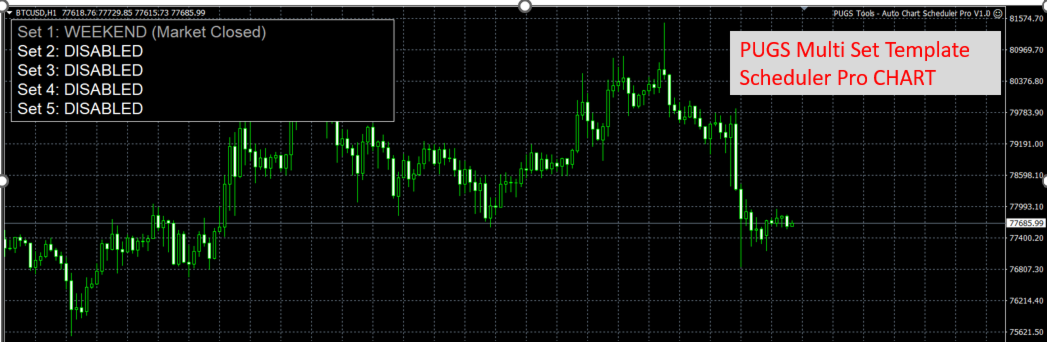
✅ Weekend Filter – The EA pauses execution on Saturdays and Sundays (configurable server time), but the dashboard keeps refreshing so you always know it is alive.

✅ Live On-Chart Dashboard – A compact panel shows, for every Set: chart ID, today's net P/L, current state (Waiting / Active / Hunting / Sleeping / Weekend / Disabled / Chart Not Found), and for Set 5 the live countdown to Template X.

✅ Magic-Number Groups – Each Set accepts a comma-separated list of magic numbers, so it can manage a whole basket of trades on the target chart.

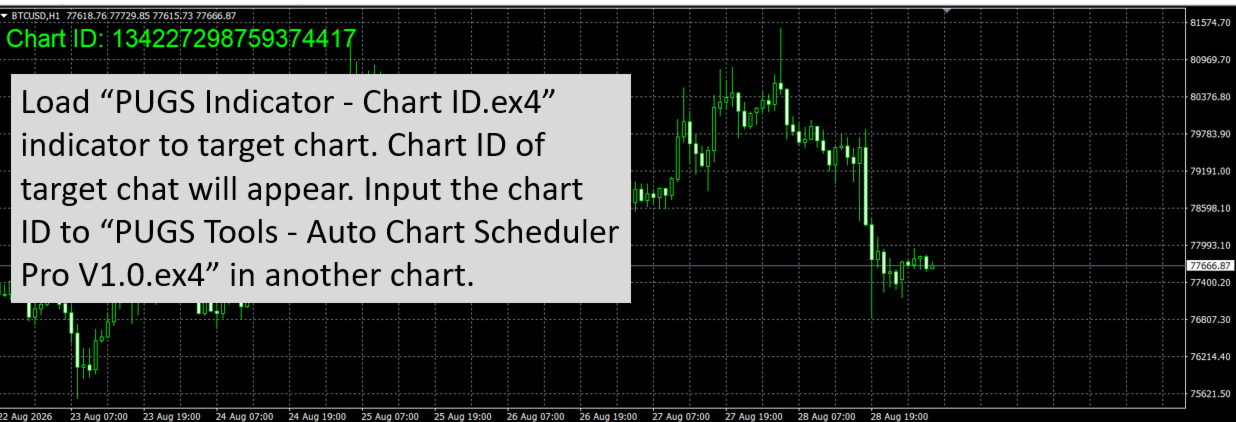
✅ Free Bonus Utility – PUGS-Chart ID – Attaching this tiny helper to any chart prints that chart's unique ID straight to the Experts log, ready to be pasted into the EA's inputs. No more guessing chart IDs.

Use Cases

  • Switch from a "London breakout" template to a "range" template at 14:00.
  • Switch from a day-trading EA to a swing-trading EA on the same chart at 21:00.
  • Stop all trading once +$200 is hit or –$200 is breached.
Run 5 different strategy charts with one central risk manager.

⚙️ Input Parameters (Per Set)

Parameter
Description
TargetChartID The Chart ID of the chart this Set will control. Find it with the free PUGS-Chart ID utility.
TemplateA Template to apply at Time A (your "trading on" template). Must exist in MQL4/Files/Templates/ of the data folder, or the standard Templates folder.
TemplateB Template to apply at Time B / on profit / on kill switch (your "trading off" template).
TimeA Server time to apply Template A (format HH:MM ).
TimeB Server time to apply Template B (format HH:MM ).
MinNetProfit Required net profit (today, in account currency) before Template B is allowed at Time B.
MaxNetProfit If reached and no open trades, Template B is applied (locks in the day).
UseMaxLoss Enable the 1× post-Time-B loss limit.
UseDoubleMaxLoss Enable the 2× 24/7 loss limit.
MaxLossLimit The base loss amount (in account currency).
MagicNumbersList Comma-separated magic numbers, e.g. 1001,1002,1003 .

⚠️ Important Notes

  • Times are evaluated against server time, not your local time.
  • Net profit is calculated only from trades matching the Set's magic numbers, in the current server day.
  • If a target chart is closed mid-session, the EA will report "CHART NOT FOUND" on the dashboard and resume automatically if the chart is reopened.
  • All times use 24-hour format with leading zeros (e.g. 09:00 , not 9:00 ).
  • Highly recommended to load this EA on BTCUSD chart as it runs 24/7.

📦 Package Contents

  1. PUGS-MultiSetTemplateScheduler Pro V1.0.ex4 – the main scheduler EA.
  2. PUGS-ChartID.ex4 – free bonus utility to identify chart IDs. (contact to receive this)


Önerilen ürünler
This tool monitors your current Expert Advisors and manages stop losses and take profits. You can customize which EAs and/or which currencies to monitor. It is primarily meant for EAs that you feel manage stop losses and/or take profits poorly. If you want this tool to be able to monitor manual trades, please use '0' (zero) as the magic number. Supports hidden stoploss and take profit Supports ATR-calculated dynamic stoploss Supports Breakeven for individual trades Supports Trailing stop Lower r
One Click Trader is a tool designed for MetaTrader 4 platform, which enables you to take your trading to the next level. It enables you to open, manage and close your trades in simple an efficient way by just one click of your mouse button. Up arrow minimizes the OCT panel Down arrow maximizes the OCT panel Right arrow displays the next panel with additional features Left arrow hides the panel with additional features Red SELL button enables you to open short market orders Red SELL STOP button e
如果产品有任何问题或者您需要在此产品上添加功能,请联系我 Contact/message me if you encounter any issue using the product or need extra feature to add on the base version. There is Demo version of this panel Dashboard Super Three MA Demo in my product list, please try it out to get familiar with all functionalities free, LINK . This system basically utilizes PA and three adjustable Moving Average as the main indicator set to generate trading signal. With the feature that all MA_timeframe, MA_period, MA_applied_price are ad
如果产品有任何问题或者您需要在此产品上添加功能,请联系我 Contact/message me if you encounter any issue using the product or need extra feature to add on the base version. There is Demo version of this panel Dashboard Symphonie Trader System Demo in my product list, please try it out to get familiar with all functionalities free, LINK . This system basically utilizes Symphonie Indicator Set (Extreme, Emotion, Trend, and Sentiment) as the core indicators to generate trading signal mainly on time-frame M15. The signal will b
Wolseley Panel MT4 FREE
Walter Wolseley Pessoa Batista De Lima
WOLSELEY's Trading Panel - BASIC - - Feel free to contact me at instagram   @walter_robos  or whatsapp/telegram +5592981173937 View your history in a structured and detailed manner, with efficiency rate and profit rate separated by day, week, month and total, as well as asset details, server time and positions&orders in progress. This panel was created looking on HEDGE-type accounts, but it can be used on NETTING-type accounts without any problems. In the PREMIUM version of this Panel you have
EA Dashboard MT4
Teerathad Booranawisedkul
FREE 7-DAY TRIAL After your trial ends, continue using this essential trading tool for only $30 one-time payment. This utility is designed to assist traders in monitoring account status, open positions, and trading performance in real time. It provides consolidated information related to account metrics, risk exposure, and statistical performance to support trading analysis and decision-making. The product does not execute trades automatically and does not provide trading signals. It is intende
News Hedging Pro  is a unique robot that allows you to trade during the most critical news announcement periods by your predefined strategy. You can preset the strategy to trade, and then it will trade that news automatically when the news comes. News release gives opportunity to have pips since the price usually has big move at that time. Now with this tool, trading news become easier, more flexible and more exciting than ever. No waiting, no confusing anymore. Product Links Fully  Description
Açık pozisyonları ve bekleyen emirleri yönetmek için yardımcı program. Yerleşik trailing stop beş moda ve yedi seçeneğe sahiptir. Grafikte serbestçe hareket ettirilebilen bir sanal zararı durdur ve sanal bir kar al vardır. Yerleşik ticaret simülatörünün yardımıyla, strateji test cihazında EA'nın nasıl çalıştığını kontrol edebilirsiniz. UTralVirtual için bir kılavuz "Yorumlar" bölümünde bulunabilir. Faydalar 5 trailing stop modu: sanal, normal, toplam, yüzde ve mobil durdurma kaybı; 7 trailing s
MARKET MAKER EXPERT is an customizable advanced, fully automated Grid Trading Expert Advisor developed to trade on MULTIPAIR MODE ( EURUSD,USDJPY,USDCHF,USDCAD,EURCHF ), by spreading out risks. Expanding Grid is its speciality. It focuses on opening a large number of orders. The currency pairs have been chosen carefully to run this system. Once it analyze the market, it does a hedge order immediately, (so margin levels are not affected on the initial trade) Starts grid when the price move aga
如果产品有任何问题或者您需要在此产品上添加功能,请联系我 Contact/message me if you encounter any issue using the product or need extra feature to add on the base version. There is Demo version of this panel Dashboard Super MA RSI CCI Demo in my product list, pls try it out to get familiar with all functionalities free . Dashboard Super MA RSI CCI is an intuitive, and handy graphic tool to help you to: Have 28 pairs under control with one dashboard Monitor price movement, identify possible trend based on MA, RSI, and CCI i
Send periodic (Health Check) notification from your MT4 terminal to your mobile phone to be sure that your MT4 terminal is still running. When you did not receive the notification, it means that your terminal is unavailable. Optional information like Account Equity and Trading Pairs are also available. Notification Period - 1 Hour, 2 Hours, 4 Hours, 8 Hours, 12 Hours, 24 Hours Attach EA to any H1 chart
Sailing Gold Code
Nguyen Hang Hai Ha
This version includes the source-code for EA Sailing Gold . If you wish to purchase only the compiled commercial version of the EA, please visit HERE . Expert Advisor   Sailing Gold   is a fully automated Expert Advisor designed exclusively for trading Gold (XAUUSD) on MetaTrader 4. The EA combines momentum analysis, volatility-based market modeling, and an advanced scalping algorithm to identify high-probability trading opportunities while applying intelligent position management for consisten
Simple Telegram Trade Alert Genel Bakış : Simple Telegram Trade Alert, MetaTrader 4 (MT4) kullanıcıları için tasarlanmış basit ama etkili bir Uzman Danışman (EA)'dır ve kullanıcılara Telegram üzerinden ticari aktiviteleri hakkında anlık bildirimler sunar. Bu EA, birkaç basit adımla pozisyonlar açıldığında veya kapandığında, giriş fiyatı, kâr alma (TP), zarar durdurma (SL), hesabın para birimindeki kâr/zarar, bakiye değişim yüzdesi ve toplam bakiye gibi temel bilgileri detaylandıran uyarılar gön
This tool working You can buy or sell from the button of this tool, the lot size can be filled manually, as for the close all buy button to end all buy positions, close all sell button to end all sell positions, Close All profit button to end  All  profit position, Close All Loss button to end all loss position, Delete Pending button to delete all Pending order, close all orders to end all orders. The variable, you can use close all percent for close all orders when profit in percent, if close
Comprehensive on chart trade panel with the unique ability to be controllable from mobile as well. Plus has a library of downloadable configuration, e.g. exit rules, extra panel buttons, pending order setup and more. Please see our product video. Works with all symbols not just currency pairs. Features On chart panel plus controllable from free app for Windows, iPhone and Android Built-in script engine with library of downloadable configuration, e.g. add 'Close All Trades in Profit' button, exit
BreakEven ProSync EA – Trade Management & Risk Control Tool Overview BreakEven ProSync EA is an expert advisor for   MetaTrader 4  that helps traders manage open positions efficiently by   automating stop-loss adjustments   and ensuring position synchronization. This tool is designed for traders who want to standardize their stop-loss and take-profit levels across multiple trades while integrating a break-even function. The EA works by calculating the  average price   of all open positions and
This utility allows you to easily close profit or loss positions. You can close profit or loss positions by clicking each buttons. If profit or loss positions reaches or exceed value specified as pips, they would be closed. This panel would be placed left bottom corner of the chart. If the users want to change the placement and functions contact me. Important :  -Check allow live trading. -Enable Auto Trade trading.
Ultimate MT4 to Telegram (UMT) sends controlled trades (via symbol, magic, comment) to your telegram channel. It sends open and closed trades, including pending orders and TP/SL modifications, along with chart screenshots, to any telegram channel. Additionally, you can send trade reports of open trades and summary profit/pip reports for day, week, or month. You can customize the design of the trade actions or reports with variables and emoticons.  A beautiful panel allows you to visualize all t
Hello, boys and girls! Script allows you either to quickly save opened charts and then close all charts opened by visual tester mode or just faster close all charts. Feel free to take a look at video manual about how to use this script on my YouTube channel. Also, feel free to join my telegram channel , where time to time I publish some exclusive stuffs. Feel free to leave feedback and thoughts how to improve this script - I'd highly appreciate that. All the best.
Why choose Trading Pal EA: This is a EA utility that auto-manage your   positions ' Stop-Loss (SL) and Take-Profits (TP) dynamically. When opening a single   position , it is easy to set the SL and TP manually. But when dealing with multiple   positions , it can be very tedious or   overwhelming   to fill in so many SL and TP values consistently, especially in a short span of time, like in scalping. Over time and after many such trades, trading itself can become a chore. That is where this EA c
This Expert provides a panel to manage all positions you have on different pairs or any instruments. not only you can close your positions just by clicking the amount of profit or loss shown on the related cell, but also you can customize whatever you see on the panel from font size  to lines and background colors. Remember ,  auto trading on MT4 panel must be active, but in our Expert we have provided a key on the panel to activate or deactivate the panel to avoid closing by accident. Any qu
如果产品有任何问题或者您需要在此产品上添加功能,请联系我 Contact/message me if you encounter any issue using the product or need extra feature to add on the base version. There is Demo version of this panel Dashboard Genesis Matrix Trading Demo in my product list, please try it out to get familiar with all functionalities free, LINK . This system basically utilizes Genesis Indi Set (TVI, CCI, GannHilo, and T3) as the core indicators to generate trading signal mainly on time-frame M15. The signal will be further filtered a
Details of each condition Type 1. Set no use Hedging Martingale, to open the order by yourself only through the push button. TP and SL follow setting. Set Setting_Hedging =false;     Use_Signal =false;  Type 2. Semi Auto Recovery Zone You have to open the order by yourself only through the push button. If in the wrong direction and Set true on Hedging Martingale, EA will fix the order with the zone system by use Hedging Martingale Set Setting_Hedging =true;     Use_Signal =false;  Type 3. Use
Gold King AI MT4
Rodrigo Arana Garcia
5 (1)
Bu fiyata sadece 1/5 kopya kaldı ---> Bir sonraki fiyat 250$ // MT5 sürümü Gold King AI, pekiştirmeli öğrenme kullanarak sağlam ticaret algoritmaları oluşturmak, eğitmek, değerlendirmek ve dağıtmak için özel olarak tasarlanmış açık kaynaklı bir Python çerçevesi olan TensorTrade kullanılarak oluşturulmuştur. Algoritma, New York ticaret seansı sırasında çalışır. İlgi alanlarını belirlemek için piyasayı birkaç saat analiz ettikten sonra, fiyat bu seviyelere ulaştığında yürürlüğe giren bekleyen emi
Exp Swing
Vladislav Andruschenko
4.45 (65)
Swinger (Pendulum, Cheburashka) adı verilen ünlü bir stratejinin modelini kullanır - bekleyen emirlerin artan lotla alternatif olarak yerleştirilmesi. Strateji iki zıt bekleyen emrin verilmesinde yatmaktadır. Fiyat belirli bir yönde hareket ettiğinde bekleyen bir emir tetiklenirken diğer emrin lot büyüklüğü artar. EA, üç tür bekleyen açılış emri sağlar (TypeofTrade) Yerleştirme sonrası otomatik açılma (Anlık açılış AutoTrade) Manuel açma sonrası açma ve yönetim (Manuel açma ManualTrade) Yüksek/
FREE
Transform Your MT4 Trading: From Chaos to Command Center in One Click! Struggling with manual position sizing? Losing track of multiple entries? Watching your basket trades spiral out of control? Stop the madness. The Trade Panel Manager MT4 is the professional-grade EA that elite traders use to dominate the markets. This isn't just another trade manager – it's your complete trading command center that handles everything from lightning-fast single trades to sophisticated multi-position basket
如果产品有任何问题或者您需要在此产品上添加功能,请联系我 Contact/message me if you encounter any issue using the product or need extra feature to add on the base version. There is a Demo version of this panel Dashboard Currency Strength Meter AdvancedDemo in my product list, please try it out to get familiar with all functionalities free, LINK . The Dashboard Currency Strength Meter Advanced gives you a quick visual guide to which currencies are strong, and which ones are weak over the customized 4 time-frames and period.
Özel İşlem İndirimi – %40 İndirim Gelişmiş İşlem Yöneticisi – Daha Hızlı, Daha Akıllı ve Daha Güvenli Manuel İşlemler İçin Nihai Hepsi Bir Arada Çözüm. Anında işlem yürütme, görsel işlem planlama ve güçlü risk yönetimini tek bir sezgisel araçta birleştiren profesyonel grafik paneli olan NextGen Trade Manager AI ile manuel işlemlerinizi dönüştürün. Emirleri yürütün, riski yönetin ve kârlarınızı koruyun, hem de grafiğinizden ayrılmadan. Hassasiyetlerini ve verimliliklerini artırmak isteyen tüm
Ok, let's go :) Never again open a trade exceeding your risk with this ea. Settings: Corner Boton: Here you can chose where to place the panel. Position X Position Y: Both are to fine the position Width buttons: Here you can chose the width of the buttons. Heigt buttons: To chose the high of the buttons. Font Size: Changes the font size. Border color: to change the border color of the buttons. Reverse color: to change color of the Reverse button. Partial color: to change color of the Partial but
Market Monitor
Rodrigo Rethka Goncalves
Market Monitor – Smart Asset Performance Dashboard for MT4 Turn your MetaTrader 4 into a professional trading intelligence center! Market Monitor is a powerful monitoring tool that displays, in real time, the most relevant performance metrics of each symbol being traded — helping you make faster, smarter, and more strategic decisions. What Does This Indicator Do? Market Monitor scans all open and historical orders, consolidates the data by symbol, and displays everything in visual pa
Bu ürünün alıcıları ayrıca şunları da satın alıyor
Local Trade Copier EA MT4
Juvenille Emperor Limited
4.96 (111)
Local Trade Copier EA MT4, aynı Windows bilgisayarı veya Windows VPS üzerinde çalışan birden fazla MetaTrader 4 hesabı arasında işlemleri kopyalamak ve yönetmek için hızlı ve esnek bir işlem kopyalayıcıdır. Yerel işlem senkronizasyonunu, Receiver tarafında lot büyüklüğü, risk yönetimi, işlem filtreleme, sembol eşleştirme, işlem yönetimi ve hesap koruması kontrolleriyle birleştirir. Transmitter ve Receiver terminallerinizi yaklaşık 1 dakika içinde ayarlayın ve aynı veya farklı brokerlardaki hesa
Trade Manager EA’ye hoş geldiniz! Ticaretin daha sezgisel, hassas ve verimli hale gelmesi için tasarlanmış nihai risk yönetim aracı ile tanışın. Bu sadece bir emir verme aracı değil; ticaret planlaması, pozisyon yönetimi ve risk kontrolü için kapsamlı bir çözüm. İster yeni başlayan bir yatırımcı olun, ister deneyimli bir trader ya da hızlı emir gerektiren bir scalper, Trade Manager EA ihtiyaçlarınıza uyum sağlar ve forex, endeksler, emtialar ve kripto paralar dahil tüm piyasalarda esneklik sunar
Exp COPYLOT CLIENT for MT4
Vladislav Andruschenko
4.69 (65)
MetaTrader 4 için profesyonel işlem kopyalayıcı MetaTrader 4 için hızlı, güvenilir ve profesyonel bir işlem kopyalayıcı. COPYLOT , MetaTrader 4 ve MetaTrader 5 terminalleri arasında Forex işlemlerinin kopyalanmasını sağlar ve farklı hesap türleri ile işlem senaryoları için esnek senkronizasyon sunar. COPYLOT MT4 sürümü şunları destekler: MetaTrader 4 → MetaTrader 4 MetaTrader 5 Hedge → MetaTrader 4 MetaTrader 5 Netting → MetaTrader 4   MT5 sürümü Tam açıklama + DEMO + PDF Nasıl satın alınır Nası
Trade Assistant MT4
Evgeniy Kravchenko
4.43 (197)
It helps to calculate the risk per trade, the easy installation of a new order, order management with partial closing functions, trailing stop of 7 types and other useful functions. Additional materials and instructions Installation instructions   -   Application instructions   -   Trial version of the application for a demo account Line function -   shows on the chart the Opening line, Stop Loss, Take Profit. With this function it is easy to set a new order and see its additional characteris
Telegram to MT4 Multi-Channel Copier   , Telegram ve Discord kanallarınızdaki alım-satım sinyallerini doğrudan MetaTrader 4'e otomatik kopyalar. Bot yok, tarayıcı uzantısı yok, elle kopyalama yok. Sinyal Telegram'a veya Discord'a düşer ve EA birkaç saniye içinde terminalinizde işlemi açar. Ve bir kanalı kopyalamadan önce, yerleşik backtester o kanalın hesabınızda ne yapmış olacağını gösterir. Ürün iki bileşenden oluşur: Telegram kanallarınızı dinleyen bir Windows uygulaması ve sinyalleri MT4 ter
TradePanel MT4
Alfiya Fazylova
4.84 (95)
Trade Panel, çok işlevli bir ticaret asistanıdır. Uygulama, manuel ticaret için 50'den fazla ticaret fonksiyonu içerir ve çoğu ticaret görevini otomatikleştirmeyi mümkün kılar. Uygulama talimatları : https://www.mql5.com/en/blogs/post/756482 Demo hesabı için uygulamanın deneme sürümü: https://www.mql5.com/en/blogs/post/750865 Uygulamayı nasıl kurulur: https://www.mql5.com/en/blogs/post/756239 Uygulamayı görsel modda nasıl test edilir: https://www.mql5.com/en/blogs/post/770277 Uygulamayı VPS Meta
Trade copier MT4
Alfiya Fazylova
4.62 (37)
Trade Copier, ticaret hesapları arasındaki işlemleri kopyalamak ve senkronize etmek için tasarlanmış profesyonel bir yardımcı programdır. Kopyalama, tedarikçinin hesabından/terminalinden alıcının aynı bilgisayarda veya vps'de kurulu olan hesabına/terminaline gerçekleşir. Satın almadan önce demo sürümünü bir demo hesabında test edebilirsiniz. Demo versiyonu burada . Tüm talimatlar burada . Ana işlevler ve avantajlar: Emirlerin kopyalanmasını destekler: МТ4> МТ4, МТ4> МТ5, МТ5> МТ4. Emirlerin kopy
Trade Indicator Assistant is a powerful MT4 utility designed to turn indicators into automated trading systems. Its main feature is the ability to automatically detect an indicator’s   BUY and SELL signal buffers , without requiring you to know the buffer numbers, search through indicator settings, or modify the indicator source code. Bonus Indicator: After purchasing Trade Indicator Assistant, contact me to receive Trade Signal Pro completely free as a bonus indicator. [Download Demo Version]
Fotokopi->Kullanışlı ve hızlı arayüz etkileşimi, kullanıcılar hemen kullanabilir       ->>>> Windows bilgisayarlarda veya VPS Windows'ta kullanılması önerilir Özellikler: Çeşitlendirilmiş ve kişiselleştirilmiş kopyalama ticareti ayarları: 1. Farklı sinyal kaynakları için farklı lot modları ayarlanabilir 2. İleri ve geri kopyalama ticareti için farklı sinyal kaynakları ayarlanabilir 3. Sinyaller yorumlarla ayarlanabilir 4. Lotun sözleşme lotuna göre kalibre edilip edilmeyeceği Çeşitlendirilmiş v
Telegram'dan MT4'e:   Nihai Sinyal Kopyalama Çözümü Telegram ile MT4'e   işlemlerinizi kolaylaştırın, DLL'lere ihtiyaç duymadan doğrudan Telegram kanallarından ve sohbetlerinden MetaTrader 4 platformunuza işlem sinyallerini kopyalamak için tasarlanmış son teknoloji yardımcı program. Bu sağlam çözüm, sinyallerin benzersiz hassasiyet ve özelleştirme seçenekleriyle sorunsuz bir şekilde yürütülmesini sağlayarak size zaman kazandırır ve verimliliğinizi artırır. [ Instructions and DEMO ] Temel Özellik
Çalışan Deneme Sürümünü İndir Copy Cat More (Taklitçi Kedi) — İşlem Kopyalayıcı (Trade Copier) MT4 sadece basit bir yerel işlem kopyalayıcı değildir; bugünün ticaret zorlukları için tasarlanmış eksiksiz bir risk yönetimi ve yürütme çerçevesidir (risk management and execution framework). Prop firm challenge'larından kişisel portföy yönetimine kadar, sağlam yürütme, sermaye koruması, esnek yapılandırma ve gelişmiş işlem yönetimi karışımıyla her duruma uyum sağlar. Kopyalayıcı hem   Master (Mast
News Filter EA: Advanced Algo Trading Assistant News Filter EA is an advanced algo trading assistant designed to enhance your trading experience. By using the   News Filter EA , you can integrate a Forex economic news filter into your existing expert advisor, even if you do not have access to its source code. In addition to the news filter, you can also specify   trading days   and   hours   for your expert. The News Filter EA also includes   risk management   and   equity protection   features
Trade Dashboard simplifies how you open, manage, and control your trades, with built-in lot size calculation. It allows you to execute trades, manage risk, and control positions directly on the chart, with tools such as partial close, breakeven, and trailing stop. Designed to reduce manual work and help you stay focused on your trading decisions. A demo version is available for testing. Detailed explanations of features are provided within the MQL5 platform. Installation instructions are include
Take a Break pauses your Expert Advisors when trading is a bad idea: before news, after a daily loss, outside your trading hours, or when a rule you wrote yourself says so. When the pause is over, your EAs simply continue. Account protection for all your EAs in one tool: news filter, drawdown and equity protection, time filter and custom rules. One EA on one chart protects the whole account, the free indicator gives every chart its own rules on top. Free demo | What is new in 26.09 | Support Ass
EchoTrade Telegram Signal Backtester VALIDATE TELEGRAM SIGNALS IN MINUTES - STOP GUESSING, START BACKTESTING Stop blowing accounts on "VIP" signals that don't deliver. The EchoTrade Telegram Signal Backtester is the professional solution to audit, verify, and optimize any Telegram signal provider's performance on historical data. Most signal providers show you their wins but hide their losses. This tool reveals the naked truth. By combining a powerful Data Manager (included) with an advanced MT4
The Multicharts Crosshair draws a cross hair in any linked chart. The indicator can be used for comparison of symbol price levels in different time frame or to compare candles of different instruments in the same time frame How it works: It can works from every linked charts where the indicator is installed towards the others or from the chart where is istalled towards the following linked charts . It can be shown just pressing a the key of keyboard. After installing the indicators in the char
MT4 to Telegram Signal Provider , Telegram'a sinyal göndermeyi sağlayan ve hesabınızı bir sinyal sağlayıcısına dönüştüren kullanımı kolay ve tamamen özelleştirilebilir bir araçtır. Mesajların formatı tamamen özelleştirilebilir! Ancak basit kullanım için, önceden tanımlanmış bir şablonu seçebilir ve mesajın belirli kısımlarını etkinleştirebilir veya devre dışı bırakabilirsiniz. [ Demo ]  [ Kullanım Kılavuzu ] [ MT5 Sürümü ] [ Discord Sürümü ] [ Telegram Kanalı ]  New: [ Telegram To MT5 ] Kurulum
Smart Trend Line Alert is a unique professional Trend Line, Support Line and Resistance Line Touch and Break out Alert with awesome Alert History feature, designed to help traders easily manage many charts and symbols without staring at the monitor. Features Candle Break Out Alert, Price Touch Alert and Time Line Alert; 1 click for converting any drawn line into an alert line (Trend line and Horizontal line or Trend Line By Angle); Alerts History able to re-open closed charts or re-draw deleted
The product will copy all telegram signal to MT4   ( which you are member  ) , also it can work as remote copier.  Easy to set up, copy order instant, can work with almost signal formats, image signal, s upport to translate other language to English Work with all type of channel or group, even channel have "Restrict Saving Content", work with  multi channel, multi MT5 Work as remote copier: with signal have ticket number, it will copy exactly via ticket number. Support to backtest signal. How to
Riskinizi otomatik olarak hesaplarken işlemlere hızlı bir şekilde girip çıkmanıza yardımcı olacak Ticaret Yöneticisi. Aşırı Ticaret, İntikam Ticareti ve Duygusal Ticaretten korunmanıza yardımcı olacak özellikler içerir. İşlemler otomatik olarak yönetilebilir ve hesap performans ölçümleri bir grafikte görselleştirilebilir. Bu özellikler, bu paneli tüm manuel yatırımcılar için ideal kılar ve MetaTrader 4 platformunun geliştirilmesine yardımcı olur. Çoklu Dil desteği. MT5 Sürümü  |  Kullanım Kılavu
VirtualTradePad mt4 Extra
Vladislav Andruschenko
4.85 (61)
1 tıklama ile ticaret için Ticaret Paneli.   Pozisyonlar ve emirlerle çalışmak!   Grafikten veya klavyeden alım satım. Alım satım panelimizi kullanarak, grafikten tek bir tıklamayla alım satım yapabilir ve alım satım işlemlerini standart MetaTrader kontrolünden 30 kat daha hızlı gerçekleştirebilirsiniz. Bir tüccar için hayatı kolaylaştıran ve bir tüccarın ticaret faaliyetlerini çok daha hızlı ve daha rahat gerçekleştirmesine yardımcı olan parametrelerin ve işlevlerin otomatik hesaplamaları. Graf
FCK CurrencyStrength Pro
Patel Hitendrakumar Mahendrabhai
Hi Friends, " FCK Currency Strength Pro " is a auto & semi auto trading expert with direction of pair. Buy-Sell separate or multi currency in one click. The strategy of  FCK Currency Strength Pro  is a combination of custom indicator, Trendlines, Support & Resistance levels ( Price Action ) and most important secretive trading algorithm mentioned above. Download News Ex4 and csv file You need the following SDSnews.ex4 in MQL4/Libraries and the daylightsavings.csv in MQL4/Files. Only 4 of 5 copi
Close If Profit or Loss with Trailing for MetaTrader 4 — toplam kâr veya toplam zarar ile otomatik kapatma MetaTrader 4 için pratik bir işlem yönetimi aracıdır. Toplam kâr veya toplam zarar belirlediğiniz seviyeye ulaştığında, seçilen pozisyonları otomatik olarak kapatabilir. Expert Advisor açık işlemleri izler, değişken kâr/zarar sonucunu hesaplar, Trailing Profit kullanabilir ve pozisyonları manuel müdahaleden daha hızlı yönetmenize yardımcı olur. MetaTrader 4 hâlâ manuel trader’lar, scalper’
Partial Closure EA MT4
Juvenille Emperor Limited
5 (3)
Partial Closure EA MT4 , hesabınızdaki herhangi bir işlemi kısmen kapatmanıza olanak tanır. İşlemleri, lot büyüklüğünün seçilen bir yüzdesiyle ve/veya işlem biletiyle manuel olarak veya TP/SL seviyelerindeki belirli yüzdelerle otomatik olarak kapatabilir; bu, başlangıç lot büyüklüğünün yüzdesini en fazla 10 take profit ve 10 stop loss seviyesinde kapatır. Belirli magic numaralarını, yorumları veya sembolleri belirterek veya hariç tutarak hesabınızdaki tüm veya seçili işlemleri yönetebilir. İpu
RS Trade Copier - gerçek grafik arayüze sahip, ultra hızlı yerel işlem kopyalayıcı. Hesap numaralarını elle girmeyi bırakın. Artık 200'den fazla anlaşılmaz giriş parametresiyle uğraşmak yok. Birden fazla MT4 ve MT5 terminali arasında işlem operasyonlarını kopyalamak için güvenilir ve esnek bir araçtır. Hem profesyonel yatırımcılar, sinyal hizmetleri hem de bireysel yatırımcılar için uygundur. Bir veya birden fazla Sağlayıcıdan bir veya birden fazla Alıcıya ticareti senkronize eder ve bunu yüksek
Smart Copy Local MT4
Kyra Nickaline Watson-gordon
5 (7)
Smart Copy is an Easy-to-Use EA that supports Multi Copying Metatrader4 and Metatrader5 and Local/Remote Copying. (Remote Version is coming soon) Free version is available on Smart Copy Local Free MT4 Specifications :     Real Time, Multi Terminal - Multi Account - MT4/MT5 trade copying     Copy from netting to hedge and hedge to netting is supported.     Fast and instant copy     All settings are input visually.     Easy modifying symbol names, prefix, suffix     Enable/Disable copying s
Want automatically to put the pending order, take profit and stop loss? This EA will do it on your behalf! The Fibo Heart EA strategy will place limit order after the ‘check point’ breakout. The position will be triggered when the price make a successful retest. If not, the pending order will automatically deleted after price hit certain level. You also have option to enable market order (instant execution) and custom take profit in the inputs setting. This EA must be attached with Fibo Heart In
Trade Copier Global: The name speaks for itself. This copier allows you to copy orders between MT4 terminals even if they are not installed on the same computer. Features Copying trades between MT4 terminals around the world with a short delay. Automatically recognizes symbol prefixes. Can connect many Slaves to the same Master. Supports pending and market orders. Supports partial order close (with limitations, see below) Can send messages and notifications to the Slaves from the Master Several
Unlimited Trade Copier Pro is a tool to copy trade remotely to multiple MT4, MT5 and cTrader accounts at different computers/locations over internet. This is an ideal solution for you if you are a signal provider and want to copy your trades to other receivers globally on your own rules. One provider can copy trades to multiple receivers and one receiver can get trade from multiple providers as well. The provider can even set the subscription expiry for each receiver, so that receiver will not b
King Trade Copier MT4
Mohammed Maher Al-sayed Mohammed Ahmed Saleh
5 (1)
King Trade Copier, aynı bilgisayarda veya VPS'te çalışan MetaTrader terminallerini birbirine bağlar. Bir hesapta açılan işlemler diğerlerinde de görünür. Dosya her iki rolü de taşır, bu yüzden aynı indirme, Mode'u neye ayarladığınıza bağlı olarak gönderici ya da alıcı olur. Her grafikte panel, bu terminalin gönderip göndermediğini ya da alıp almadığını gösterir, karşı taraftaki hesabın adını verir, yanıt veren alıcıları sayar ve son sinyalin yaşını bildirir. Kopyalanmayan bir emir, kaybolmak ye
Yazarın diğer ürünleri
Key Features: Custom Image:   The script allows you to set any image of your choice as the chart background. The image file should be in the   .bmp   format and located in the MQL4/Images folder of your MetaTrader 4 data folder. Automatic Replacement:   If an image is already set as the chart background, the script will automatically replace it with the new image. How It Works: The script operates in the following manner: Initialization:   Upon execution, the script checks if an object named “ i
FREE
Filtrele:
Değerlendirme yok
Değerlendirmeye yanıt