Capital Waves Pro
- Uzmanlar
- Sürüm: 2.20
- Etkinleştirmeler: 5

Avviso importante: Capital Waves Pro è un Expert Advisor automatizzato e non rappresenta una garanzia di profitto. Può generare operazioni in perdita e drawdown. Testare il sistema nel Tester Strategia di MetaTrader 5 e su un conto demo prima di valutarne l'utilizzo in reale.
Panoramica del prodotto
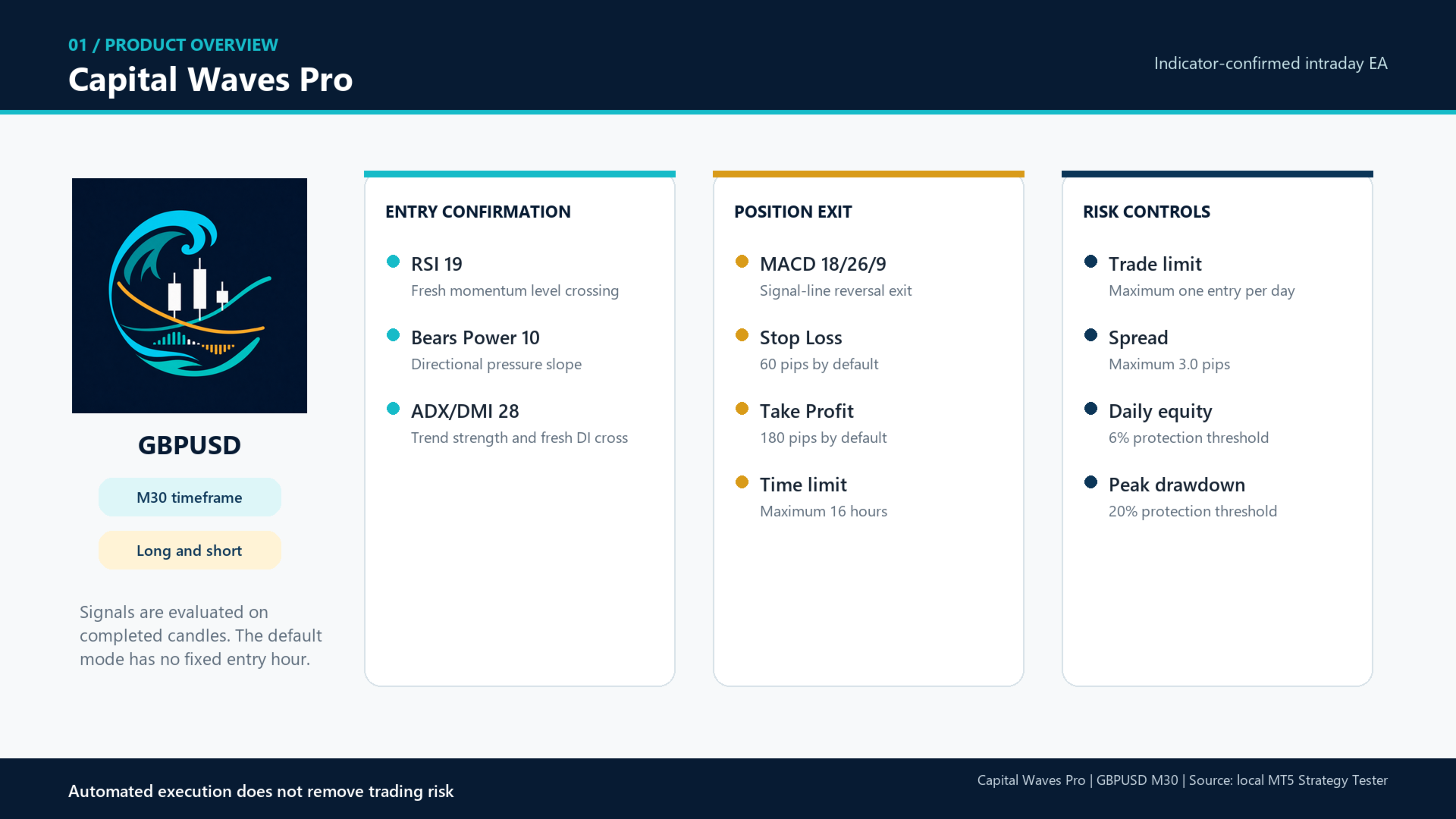
Capital Waves Pro è un Expert Advisor intraday basato su regole, sviluppato per la coppia GBPUSD sul timeframe M30. Valuta le candele chiuse e combina momentum, forza direzionale e conferma del trend prima di aprire una posizione. Nella modalità predefinita, gli ingressi non sono legati a un'ora fissa.
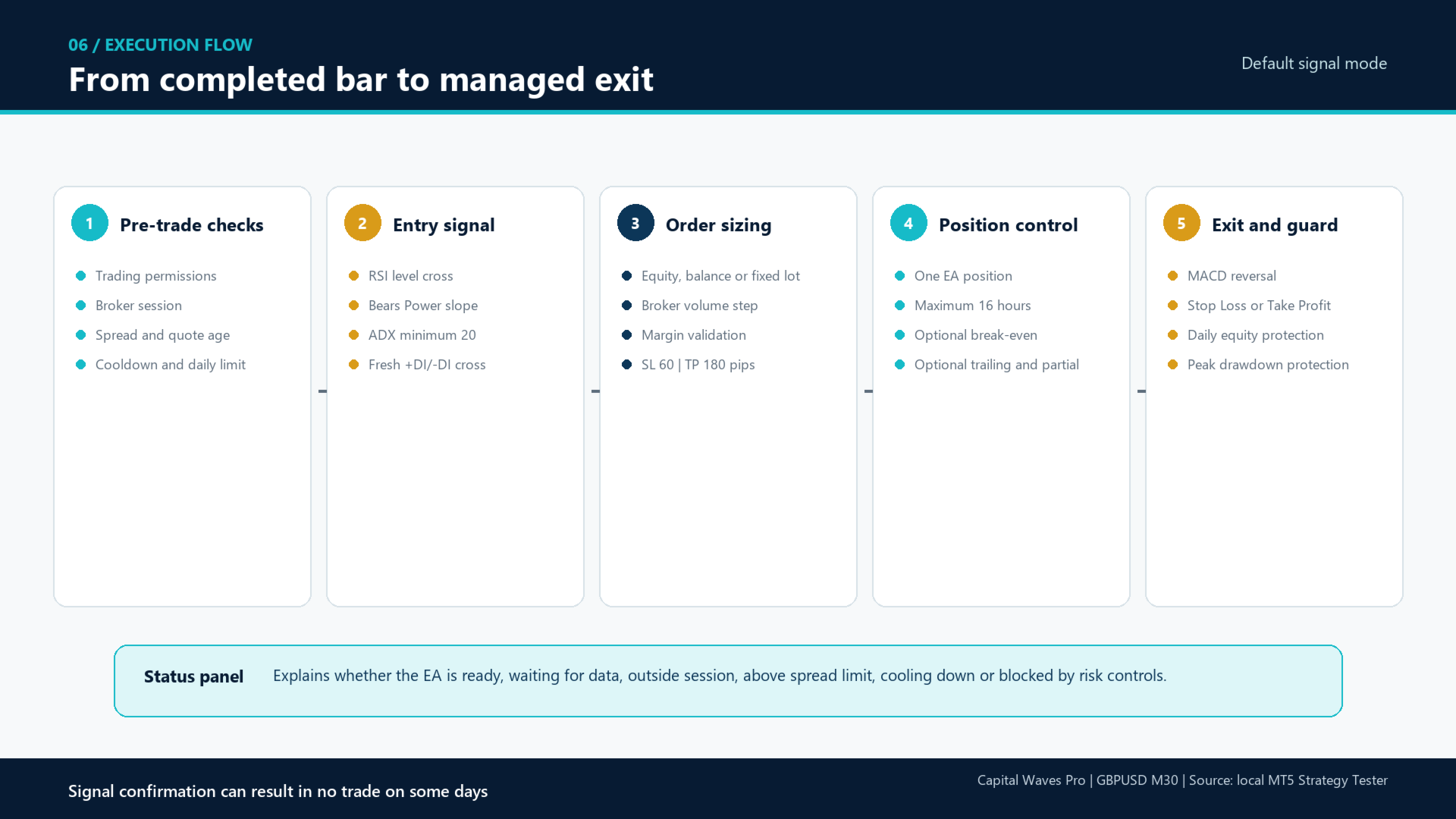
La strategia predefinita combina RSI, Bears Power e ADX/DMI per la conferma dell'ingresso. Il MACD fornisce la chiusura principale basata su indicatore. Ogni posizione riceve uno Stop Loss e un Take Profit iniziali, mentre strumenti aggiuntivi di protezione e gestione della posizione possono essere abilitati dall'utente.
| Elemento | Configurazione raccomandata |
|---|---|
| Piattaforma | MetaTrader 5 |
| Tipo di prodotto | Expert Advisor |
| Simbolo | GBPUSD, inclusi i suffissi del broker come GBPUSD.a o GBPUSD-Z |
| Timeframe | M30 |
| Direzione | Long e Short |
| Tipo di conto | Netting o Hedging |
| Stile di trading | Partecipazione al trend intraday confermata da indicatori |
| Limite di posizioni | Una sola posizione dell'EA sul simbolo contemporaneamente |
Come funziona l'ingresso predefinito
I segnali vengono calcolati sulla base delle candele M30 chiuse. Un'operazione viene presa in considerazione solo quando tutte le conferme abilitate sono concordi.
| Indicatore | Ruolo nel modello di ingresso | Impostazione predefinita |
|---|---|---|
| RSI | Conferma il momentum attraverso un nuovo incrocio di livello. I segnali Long utilizzano un incrocio al di sopra di 55; i segnali Short utilizzano l'incrocio simmetrico al di sotto di 45. | Periodo 19, livello 55 |
| Bears Power | Conferma se la pressione ribassista sta migliorando o peggiorando rispetto alla barra chiusa precedente. | Periodo 10, conferma dell'inclinazione |
| ADX e DMI | L'ADX verifica la forza del trend. Un nuovo incrocio +DI/-DI conferma la direzione. | Periodo 28, ADX minimo 20 |
Nessuna operazione giornaliera forzata: la modalità di segnale predefinita attende una valida conferma dagli indicatori. In alcuni giorni potrebbero non esserci operazioni. L'impostazione del numero massimo di operazioni al giorno è un limite, non un obiettivo.
Come vengono chiuse le posizioni
- Inversione del MACD: la chiusura predefinita basata su indicatore chiude una posizione Long a seguito di un incrocio ribassista della linea principale e della linea di segnale del MACD, e una posizione Short a seguito di un incrocio rialzista.
- Stop Loss iniziale: 60 pip di default.
- Take Profit iniziale: 180 pip di default.
- Tempo massimo di mantenimento: 16 ore di default.
- Chiusura opzionale tramite Bande di Bollinger: disponibile ma disabilitata nella configurazione predefinita.
- Gestione opzionale: breakeven, una singola chiusura parziale, trailing stop fisso e trailing stop basato su ATR sono disponibili ma disabilitati di default.
Configurazione predefinita
| Gruppo di parametri | Comportamento predefinito |
|---|---|
| Modalità di ingresso | Original Signals: ingresso basato solo su indicatori, senza orario fisso |
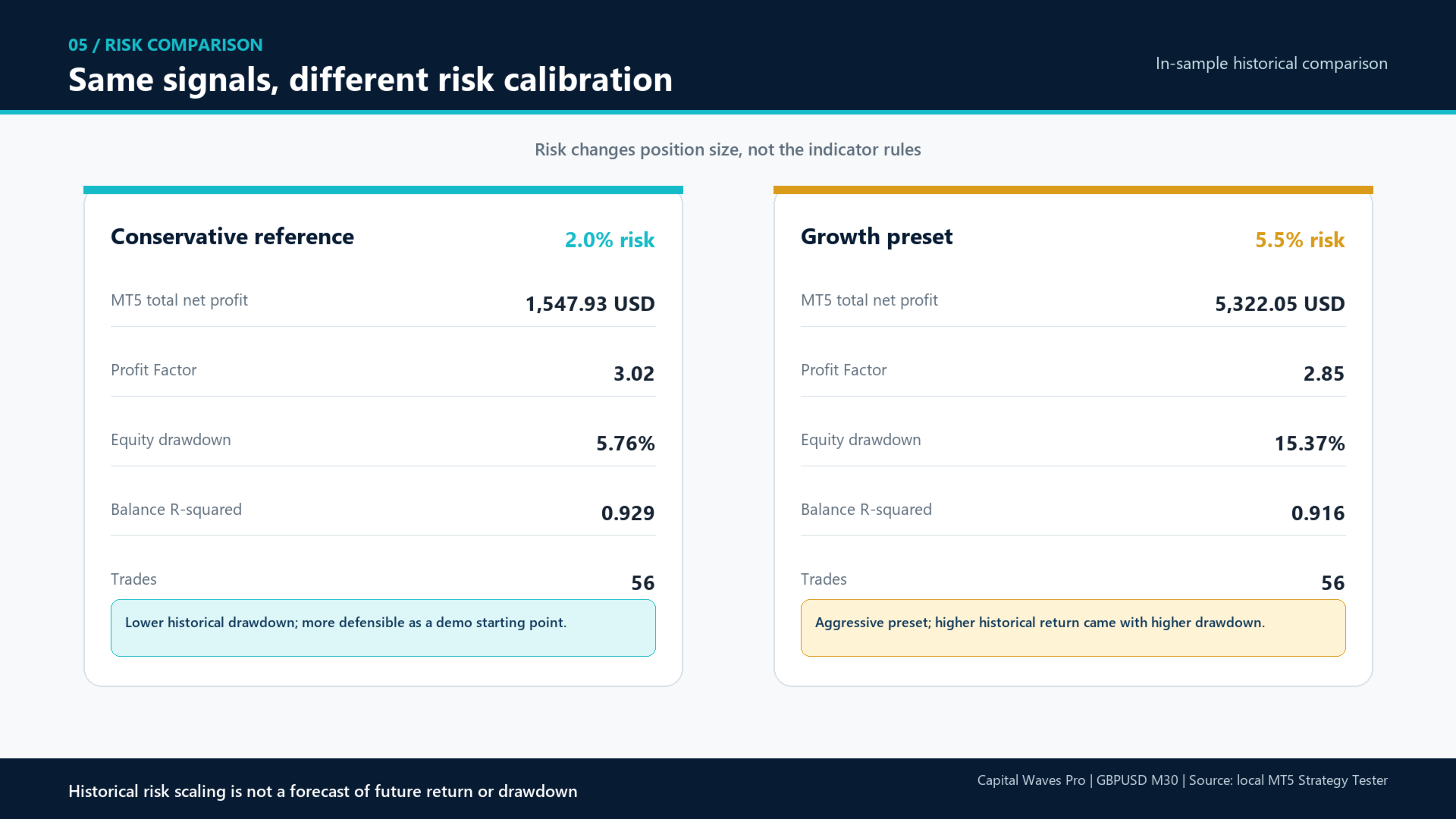
| Calcolo del rischio | 5.5% del capitale (equity) per operazione |
| Spread massimo | 3.0 pip |
| Pausa dopo la chiusura (Cooldown) | 90 minuti |
| Ingressi massimi | 1 al giorno per il server del broker |
| Protezione perdita giornaliera sul capitale | 6% |
| Protezione drawdown dal picco di capitale | 20% |
| Giorni di trading | Dal lunedì al venerdì |
| Filtro notizie | Disponibile, disabilitato di default |
Avvertenza sui rischi: un rischio del 5.5% del capitale per operazione è aggressivo ed è stato utilizzato per il preset orientato alla crescita fornito. Un punto di partenza più conservativo è compreso tra l'1% e il 2% su un conto demo. Ridurre il rischio modifica sia il rendimento potenziale che il drawdown. L'utente rimane responsabile della selezione di un livello di rischio adeguato al proprio conto.
Calcolo della dimensione della posizione
Sono disponibili tre modalità per il calcolo della dimensione della posizione:
- Fixed lot: utilizza la dimensione del lotto fissa selezionata dall'utente.
- Percent of balance: calcola il volume in base al saldo del conto, alla percentuale di rischio e alla distanza dello Stop Loss.
- Percent of equity: calcola il volume in base al capitale attuale, alla percentuale di rischio e alla distanza dello Stop Loss. Questa è la modalità predefinita.
L'EA utilizza il valore del tick, l'incremento di volume, il volume minimo, il volume massimo e il limite di volume del simbolo forniti dal broker per il calcolo dell'ordine. Se il volume calcolato è inferiore al minimo richiesto dal broker e l'override del lotto minimo è disabilitato, l'operazione viene saltata anziché aumentare automaticamente il rischio.
Filtri di esecuzione e protezione
- Filtro per lo spread massimo
- Verifica della freschezza delle quotazioni
- Filtro opzionale sui salti di prezzo (gap) sulla nuova candela
- Verifica della sessione di trading del broker
- Finestra di sessione configurabile per giorno della settimana e orario del server
- Pausa dopo la chiusura della posizione (Cooldown)
- Limite massimo di ingressi al giorno
- Limite opzionale di perdite consecutive
- Filtro opzionale basato sul calendario economico di MetaTrader 5
- Controllo del margine richiesto, validazione della distanza di stop del broker e tentativi automatici in caso di errori temporanei
Il pannello di stato sul grafico spiega il motivo per cui l'EA è in attesa o sta bloccando un ingresso, indicando le condizioni relative a spread, sessione, pausa, rischio, limite giornaliero e dati degli indicatori.
Installazione e primo utilizzo
- Installare il prodotto dal MQL5 Market in MetaTrader 5.
- Aprire un grafico GBPUSD M30. I suffissi del broker sono accettati.
- Applicare Capital Waves Pro al grafico.
- Abilitare "Algo Trading" in MetaTrader 5 e autorizzare il trading algoritmico nelle impostazioni dell'EA.
- Mantenere la modalità indicatore predefinita per eseguire la strategia documentata.
- Selezionare un livello di rischio adeguato. I nuovi utenti dovrebbero iniziare con l'1% - 2% su un conto demo.
- Confermare che il pannello di stato indichi che l'EA è pronto e in attesa di un segnale.
- Utilizzare una connessione Internet stabile o una VPS adeguata se è richiesto un funzionamento continuo.
Riferimento storico del Tester Strategia
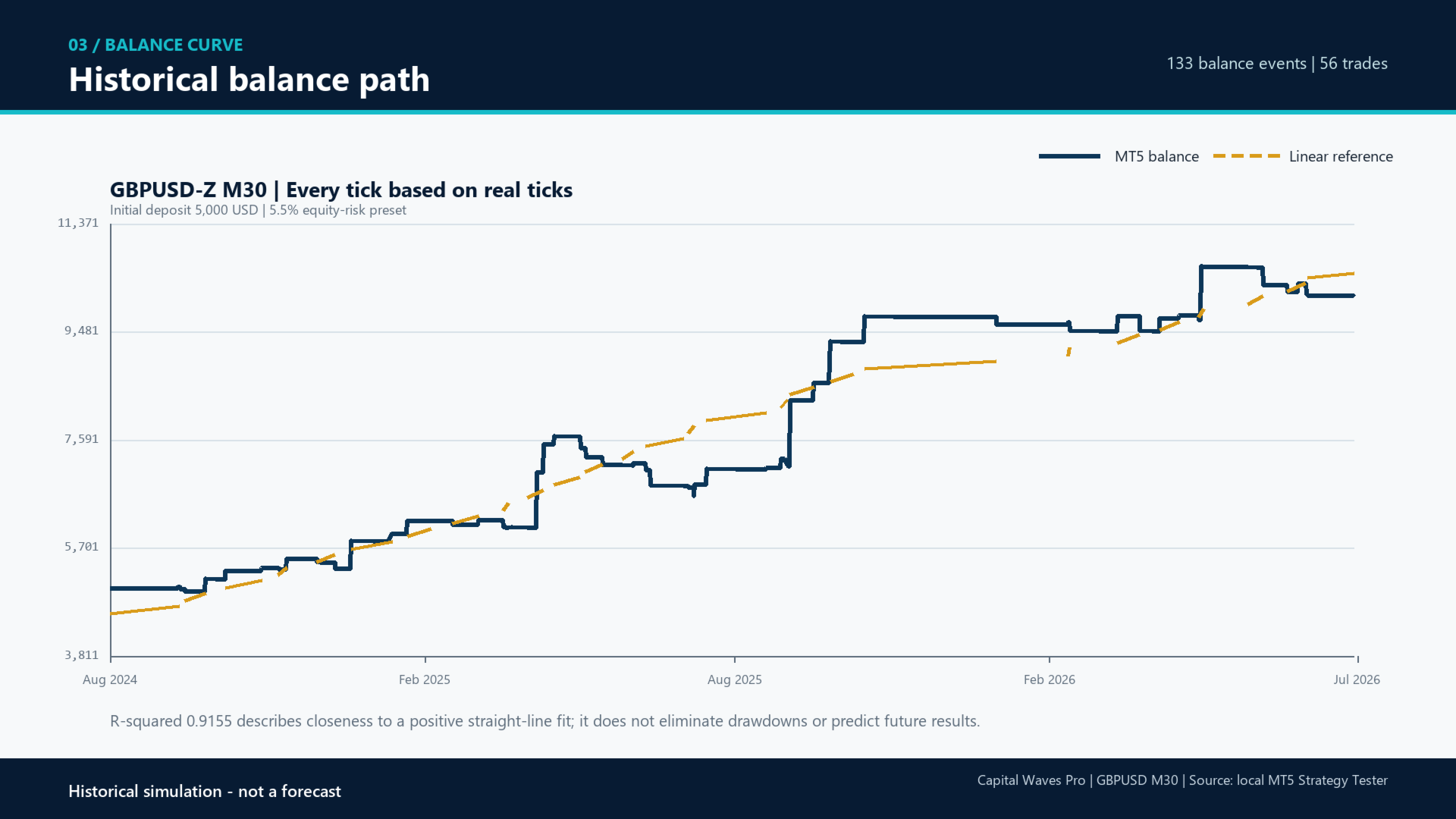
Esclusivamente una simulazione storica: non rappresenta uno storico reale di trading né una previsione.
| Elemento di test | Risultato riportato da MT5 |
|---|---|
| Periodo | 1° agosto 2024 - 31 luglio 2026 |
| Simbolo e timeframe | GBPUSD-Z, M30 |
| Modello | Ogni tick basato su tick reali |
| Qualità dello storico | 100% tick reali |
| Deposito iniziale | 5,000 USD |
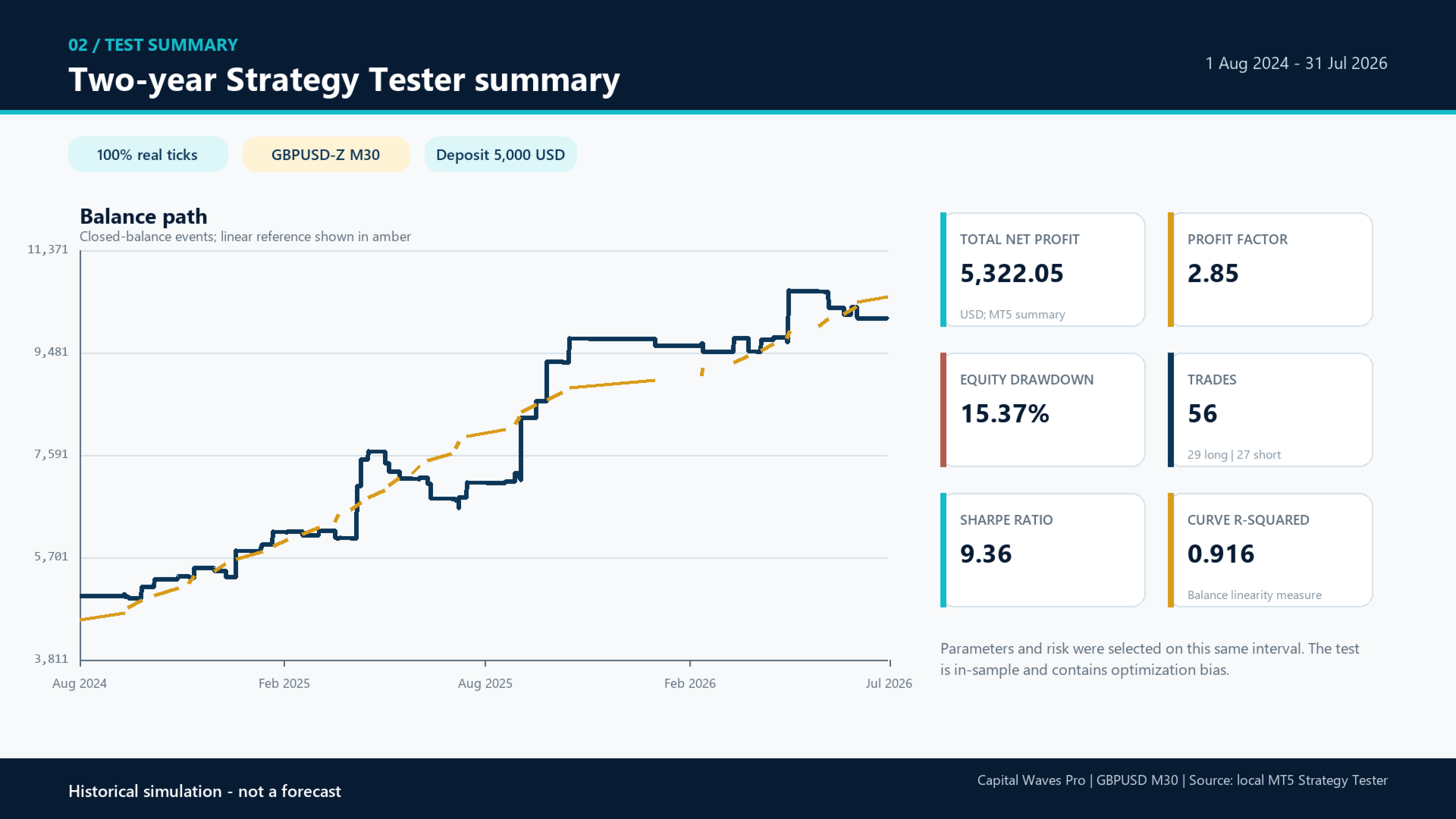
| Profitto netto totale | 5,322.05 USD secondo il riepilogo MT5 |
| Fattore di profitto (Profit Factor) | 2.85 |
| Numero di operazioni | 56 |
| Drawdown massimo del capitale | 15.37% |
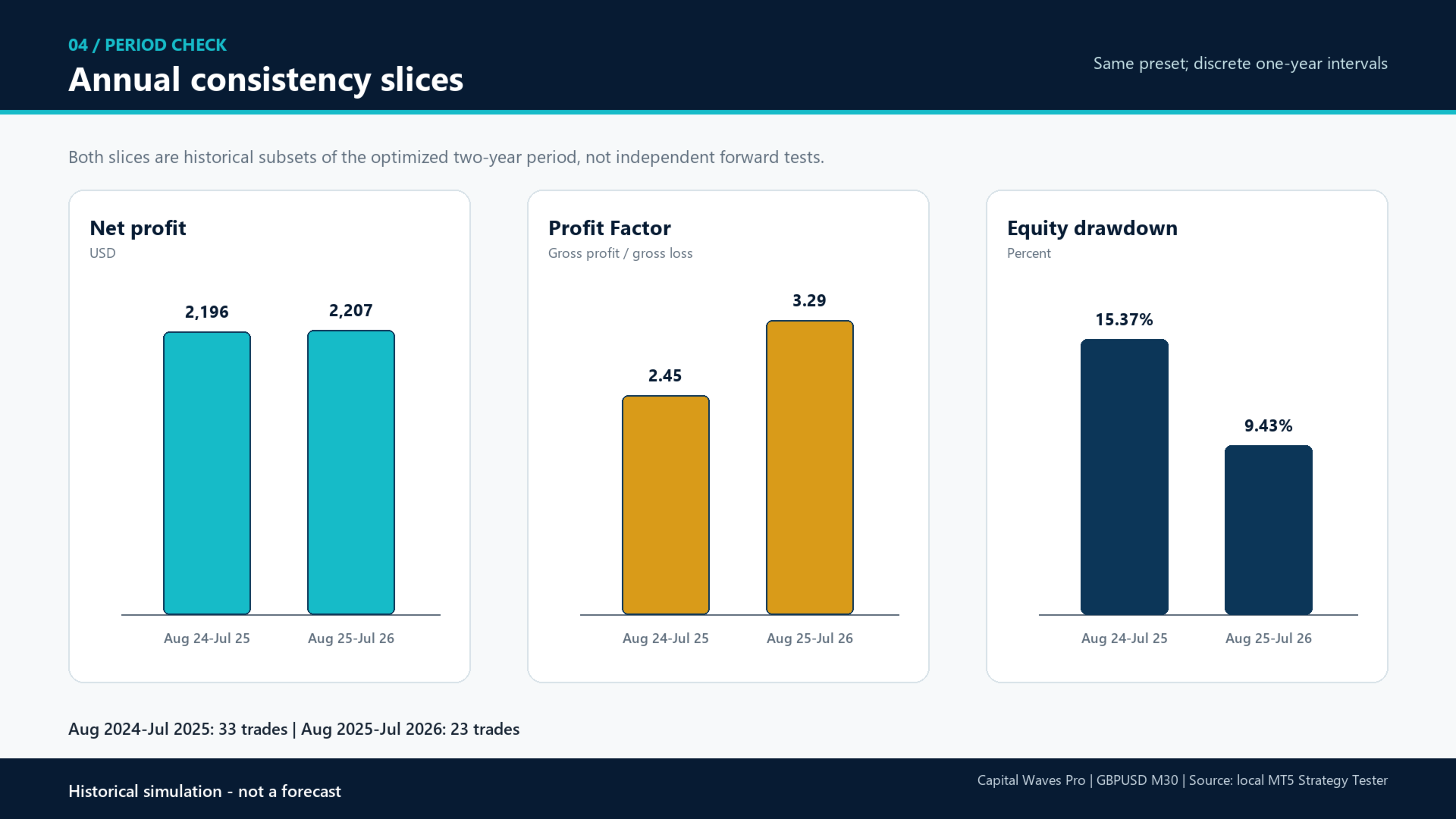
I parametri e l'impostazione del rischio sono stati selezionati utilizzando lo stesso intervallo storico. Il risultato è quindi in-sample e contiene un bias di ottimizzazione. Il campione include solo 56 operazioni. Non deve essere considerato una prova di redditività o stabilità futura. Broker diversi, spread, commissioni, swap, slippage, leva finanziaria, dati sui tick e condizioni di mercato possono modificare sostanzialmente il risultato.
Domande frequenti (FAQ)
L'EA apre un'operazione ogni giorno?
No. La modalità predefinita opera solo quando tutte le condizioni degli indicatori abilitati sono soddisfatte. L'impostazione di un'operazione al giorno è un limite massimo, non una garanzia di attività giornaliera.
Entra a un orario fisso?
No, non nella modalità predefinita Original Signals. I parametri relativi a ora e minuto di ingresso giornaliero rimangono disponibili per opzioni legacy secondarie, ma vengono ignorati nella modalità di segnale predefinita documentata.
Posso usare un altro simbolo o timeframe?
Il prodotto è progettato e testato per GBPUSD in M30. Può mostrare un avviso su un grafico diverso e rifiutarlo opzionalmente tramite la modalità Strict Chart. L'utilizzo di un altro simbolo o timeframe rientra al di fuori della configurazione documentata.
Supporta i suffissi dei simboli del broker?
Sì. I nomi contenenti GBPUSD, come GBPUSD.a o GBPUSD-Z, sono accettati.
Utilizza martingala, griglia, arbitraggio o trading di recupero?
No. L'EA non moltiplica la dimensione del lotto dopo una perdita, non crea griglie di recupero né utilizza logiche di arbitraggio.
Può mantenere più posizioni aperte?
No. Consente una sola posizione gestita da questo EA sul simbolo alla volta.
Posso fare trading manuale sullo stesso simbolo?
Una posizione manuale o una posizione con un altro magic number sullo stesso simbolo blocca i nuovi ingressi dell'EA. Questo evita che l'EA confonda la propria gestione operativa con posizioni non correlate. Il trading manuale su altri simboli non viene bloccato direttamente.
I limiti di perdita giornaliera e drawdown si basano solo su questo EA?
No. Vengono calcolati sul capitale totale del conto. Pertanto, altri EA e posizioni manuali possono influire su queste soglie di protezione. Quando viene raggiunta una soglia, Capital Waves Pro chiude le proprie posizioni e blocca i nuovi ingressi; non chiude posizioni non correlate.
Cosa succede dopo il riavvio di MetaTrader o della VPS?
Su un conto reale, il riferimento del capitale giornaliero, il riferimento del picco di capitale e lo stato della chiusura parziale vengono memorizzati tramite le Variabili Globali (Global Variables) del terminale MetaTrader. L'impostazione Reset Protection State deve essere utilizzata solo quando l'utente desidera intenzionalmente cancellare tale stato di protezione salvato.
Il filtro notizie è incluso nei test storici?
No. Il filtro notizie opzionale utilizza il calendario economico integrato di MetaTrader 5 durante l'operatività in tempo reale ed è automaticamente disabilitato all'interno del Tester Strategia. Pertanto, i test storici non simulano questo filtro opzionale.
Perché un segnale apparentemente valido potrebbe essere saltato?
I motivi possibili includono spread superiore al limite configurato, quotazione non aggiornata, sessione del broker chiusa, periodo di pausa (Cooldown) attivo, limite di operazioni giornaliere raggiunto, limite di protezione del conto, margine insufficiente, volume inferiore al minimo del broker, posizione già esistente o storico degli indicatori non pronto. Il pannello di stato mostra il motivo attuale.
Qual è il deposito minimo richiesto?
Non esiste un minimo universale perché dimensione del contratto, leva, valore del tick, lotto minimo e requisiti di margine variano a seconda del broker. Il calcolo della dimensione della posizione potrebbe ignorare un'operazione se il rischio selezionato è troppo ridotto per il volume minimo del broker. Testare sempre con il broker e le impostazioni del conto previsti.
I miei risultati saranno identici al test pubblicato?
Non è possibile attendersi un risultato identico. I test storici sono simulazioni e l'esecuzione reale include spread variabili, commissioni, swap, latenza e slippage. Le condizioni future del mercato saranno inoltre diverse dall'intervallo di ottimizzazione.
Dovrei modificare i parametri degli indicatori?
Si raccomanda di testare la configurazione pubblicata prima di apportare modifiche. Le modifiche ai parametri creano un profilo strategico differente e devono essere convalidate autonomamente. Evitare di selezionare parametri solo perché migliorano uno specifico test storico.
Supporto
Il supporto è fornito tramite i commenti al prodotto su MQL5 e i messaggi privati MQL5. Quando si segnala un problema tecnico, includere la versione di MetaTrader 5, il broker, il nome del simbolo, il timeframe, il tipo di conto, i messaggi rilevanti delle schede Esperti e Giornale, oltre al file di impostazioni (.set) utilizzato. Non inviare password del conto o altre credenziali private.
Il trading su valute estere comporta rischi. Le prestazioni passate non garantiscono risultati futuri. Utilizzare impostazioni adeguate alla propria situazione finanziaria e alla propria tolleranza al rischio.