Bears Graph Pro
- Uzmanlar
- Sürüm: 3.1
- Güncellendi: 15 Temmuz 2026
- Etkinleştirmeler: 10

Bears Graph Pro
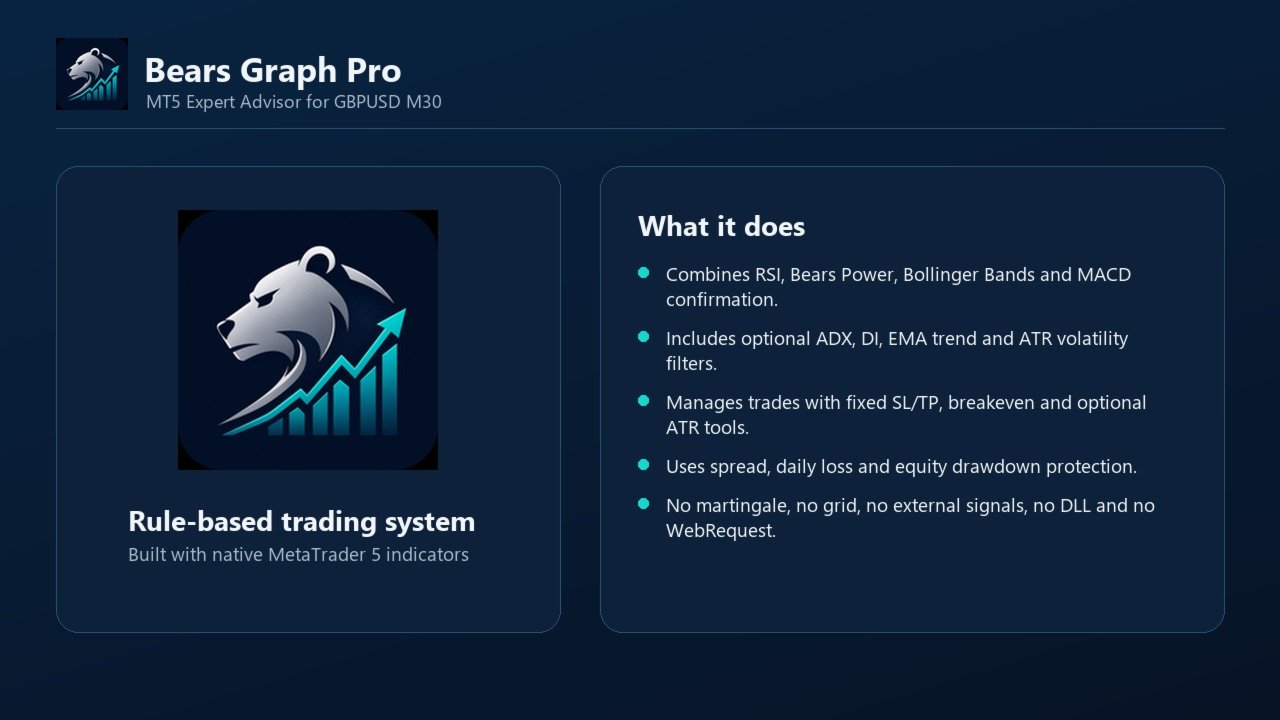
Bears Graph Pro, M30 zaman diliminde GBPUSD paritesi için tasarlanmış bir MetaTrader 5 Expert Advisor (Uzman Danışman) yazılımıdır. RSI, Bears Power, Bollinger Bands, MACD, ADX, EMA trend filtresi ve ATR volatilite filtresi gibi birden fazla yerleşik MetaTrader göstergesini yapılandırılabilir tek bir işlem sisteminde birleştirir.
Robotun temel fikri basittir: Yönlü fiyat hareketlerini arar, sinyali momentum ve piyasa yapısı ile doğrular, ardından işlemi sabit stop loss, take profit, başa baş noktası (breakeven) ve isteğe bağlı volatilite araçlarıyla yönetir. Varsayılan ayar dosyası (preset) GBPUSD M30 için hazırlanmıştır, ancak kullanıcıların robotu kendi aracı kurum şartlarına göre test edip uyarlayabilmesi için tüm girdi parametreleri erişime açıktır.
Bears Graph Pro; martingale, grid, arbitraj, haber ticareti, harici sinyaller, DLL içe aktarımları veya WebRequest kullanmaz. Tamamen standart MetaTrader 5 fonksiyonları ve yerleşik göstergeleri ile inşa edilmiştir.
Ana Konsept
Yazılım, fiyat momentumu ile Bears Power aracılığıyla ölçülen satıcı baskısı arasındaki ilişkiye dayanır. Bears Power, mevcut en düşük fiyatı bir üssel hareketli ortalama ile karşılaştıran standart bir MetaTrader osilatörüdür. Pratik anlamda, satıcıların baskısının devam edip etmediğini veya bu baskının değişip değişmediğini değerlendirmeye yardımcı olur.
RSI temel momentum filtresi olarak kullanılır. Robotun sadece tek bir gösterge yön değiştirdiği için işleme girmesini engeller. Bollinger Bands piyasa yapısını analiz etmek ve çıkış aracı olarak kullanılır. MACD ek bir momentum onayı için etkinleştirilebilir. ADX ve DI zayıf veya belirsiz piyasa evrelerini filtrelemeyi sağlar. ATR ise volatilite çok düşük veya aşırı yüksek olduğunda işlem yapmaktan kaçınmaya yardımcı olur.
Sonuç olarak ortaya birden fazla doğrulama katmanına ve risk kontrolüne sahip, kurallara dayalı bir alım satım robotu çıkar. Amaç rastgele veya sürekli işlem açmak değil, seçilen ayar dosyasına uygun koşulların oluşmasını beklemektir.
İşlem Mantığı
Yazılım iki farklı sinyal modunu destekler:
- Cross mode (Kesişim modu) — Bears Power aynı yönde hareket ederken RSI göstergesinin seçilen RSI seviyesini kesmesini bekler. Bu, GBPUSD M30 nihai ayar dosyasındaki varsayılan mantıktır. Daha seçicidir ve daha net giriş noktalarını hedefler.
- Active mode (Aktif mod) — Alış ve satış girişleri için ayrı RSI seviyeleri ve bir Bears Powereğim filtresi kullanır. Bu mod daha sık işlem yapmak için tasarlanmıştır, ancak daha fazla işlem her zaman daha iyi kalite anlamına gelmediğinden dikkatli test edilmelidir.
Robot alış ve satış pozisyonları açabilir. Uzun (long) ve kısa (short) sinyaller ayrı ayrı işlenir ve emrin gönderilmesinden önce her işlem spread, günlük risk, hesap çekilmesi (drawdown), bekleme süresi (cooldown) ve isteğe bağlı zaman filtrelerine göre kontrol edilir.
Giriş Filtreleri
- RSI filtresi — Momentum ölçer. Yüksek RSI değeri genel olarak daha güçlü boğa momentumunu, düşük RSI değeri ise daha güçlü ayı momentumunu gösterir.
- Bears Power filtresi — Hareketli ortalamaya göre satıcı baskısını ölçer. Robot, zayıf girişleri önlemek için Bears Power hareketini, eğimini ve isteğe bağlı seviye filtresini kullanabilir.
- Bollinger Bands — Fiyatın bantlarla etkileşimi mevcut hareketin güç kaybettiğine işaret ettiğinde çıkış mantığı için kullanılabilir.
- MACD filtresi — Giriş yönünün genel momentum ile uyumlu olduğunu doğrulamaya yardımcı olur. Nihai ayar dosyasında bu filtre etkindir.
- ADX ve DI filtresi — Trend gücünü ve +DI ile -DI arasındaki yönsel uyumu filtreleyebilir.
- EMA trend filtresi — Hareketli ortalama yapısına bağlı olarak alış veya satış sinyallerini sınırlandırabilir.
- ATR volatilite filtresi — Aşırı durgun veya aşırı volatil piyasa koşullarında işlem yapmaktan kaçınır.
Çıkış ve İşlem Yönetimi
- Sabit Stop Loss ve Take Profit — Pip cinsinden klasik sabit stop loss ve take profit değerleri.
- Başa baş noktası (Breakeven) — Pozisyon belirli bir kâr mesafesine ulaştıktan sonra stop loss seviyesini giriş fiyatına taşıyabilir.
- ATR tabanlı stop seviyeleri — Piyasa volatilitesine dayalı isteğe bağlı dinamik stop loss ve take profit mantığı.
- ATR izleyen stop (Trailing Stop) — Sabit bir mesafe yerine volatiliteyi takip eden isteğe bağlı izleyen stop.
- Minimum stop güncellemesi — Gereksiz emir trafiğini azaltmak için çok küçük stop loss değişikliklerini göz ardı eder.
- Çubuk başına tek stop güncellemesi — Stop loss değişikliklerini sınırlayarak işlem yönetimini daha düzenli tutar.
Risk Yönetimi
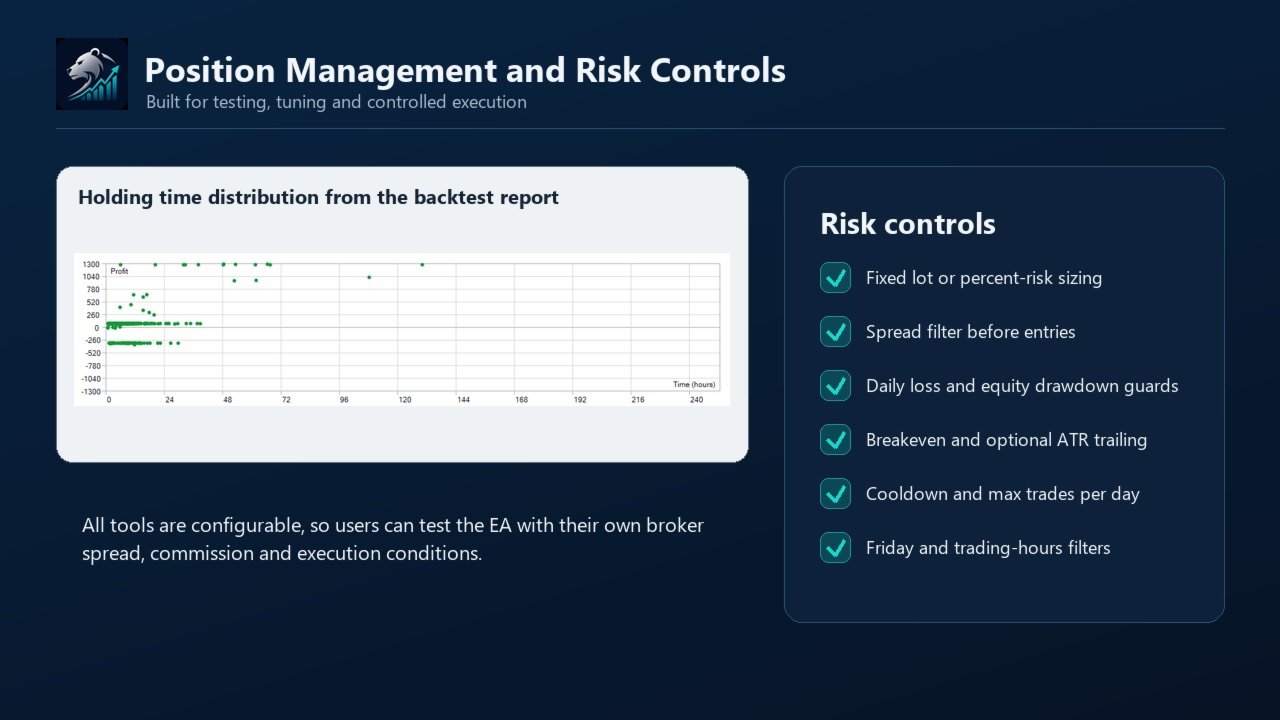
Bears Graph Pro, kullanıcı tarafından ayarlanabilen çeşitli risk kontrolleri içerir:
- Sabit lot veya yüzde riskine dayalı pozisyon büyüklüğü
- Yeni işlemler için spread filtresi
- Günlük maksimum işlem sayısı
- İşlemler arasında bekleme süresi (cooldown)
- Günlük maksimum kayıp koruması
- İsteğe bağlı günlük kâr kilidi
- Maksimum özsermaye çekilme (drawdown) koruması
- Özsermaye zirvesinden düşüşlere karşı isteğe bağlı koruma (Peak Guard)
- Emir göndermeden önce teminat (margin) kontrolü
- Aracı kurum hacim adımına göre lot normalizasyonu
Farklı aracı kurumlarda spread, komisyon, işlem yürütme hızı, sembol basamak sayısı, taşıma maliyeti (swap) ve likidite farklılıkları nedeniyle aynı robot farklı performans gösterebileceğinden bu kontroller hayati önem taşır.
Önerilen Kurulum
- Sembol: GBPUSD
- Zaman Dilimi: M30
- Hesap Türü: Tümü
- Test Modeli: Gerçek tikler (Real ticks)
- Ayar Dosyası: Bears Graph Pro - FINAL GBPUSD M30 Regime.set
Robot diğer sembollerde ve zaman dilimlerinde test edilebilir, ancak varsayılan ayarların her piyasaya uyacağı varsayılmamalıdır. Robotu canlı bir hesapta kullanmadan önce, spread ve komisyon dahil olmak üzere kendi aracı kurum verilerinizle Strateji Sınayıcı üzerinde testlerinizi gerçekleştirin.
Backtest Bilgileri
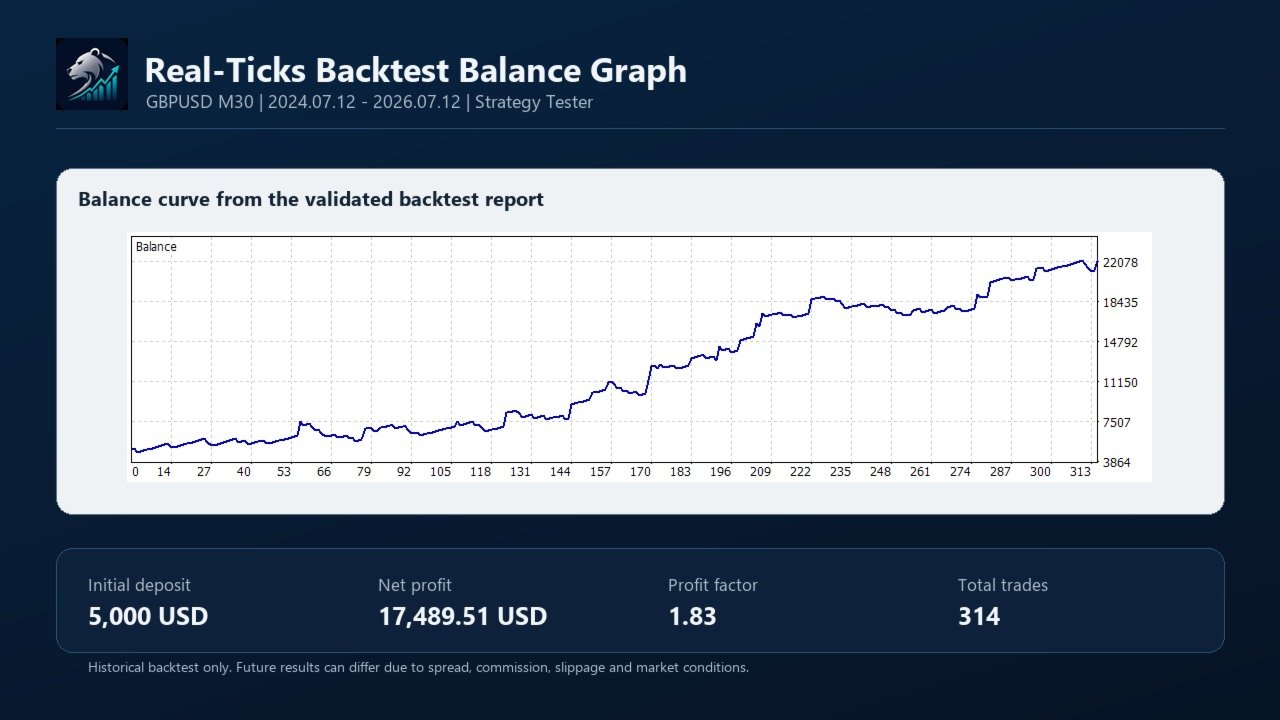
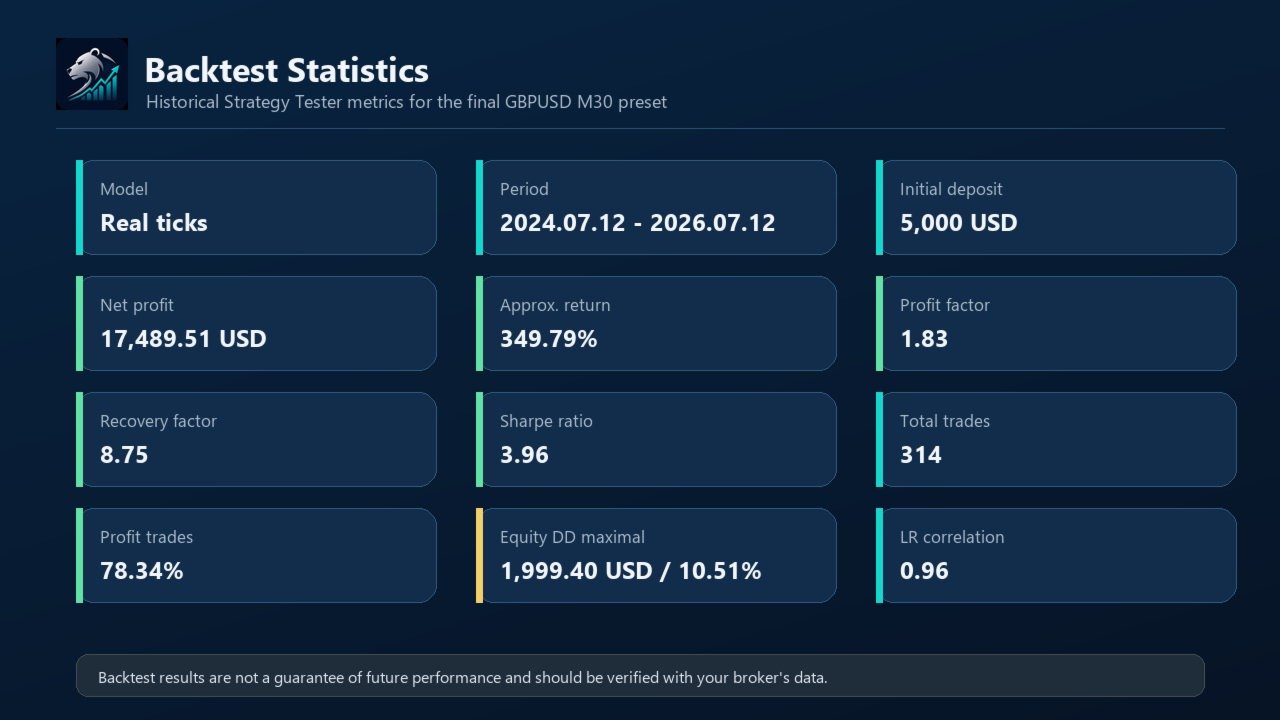
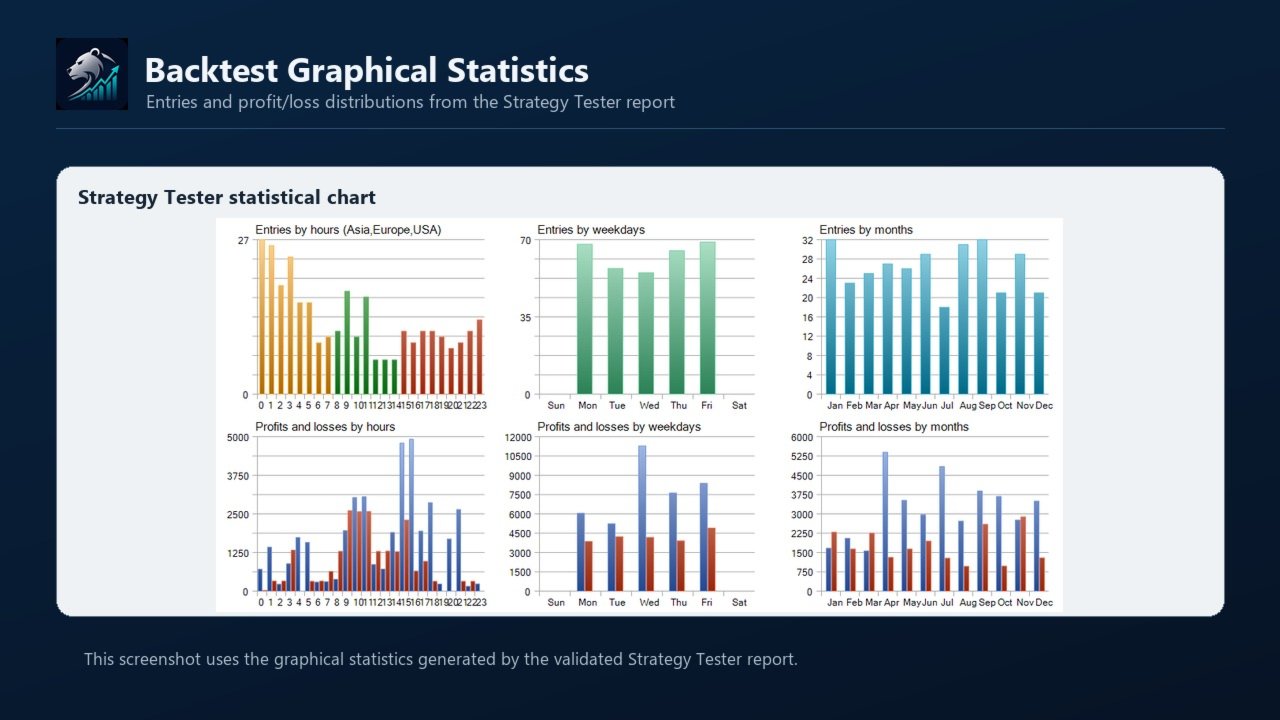
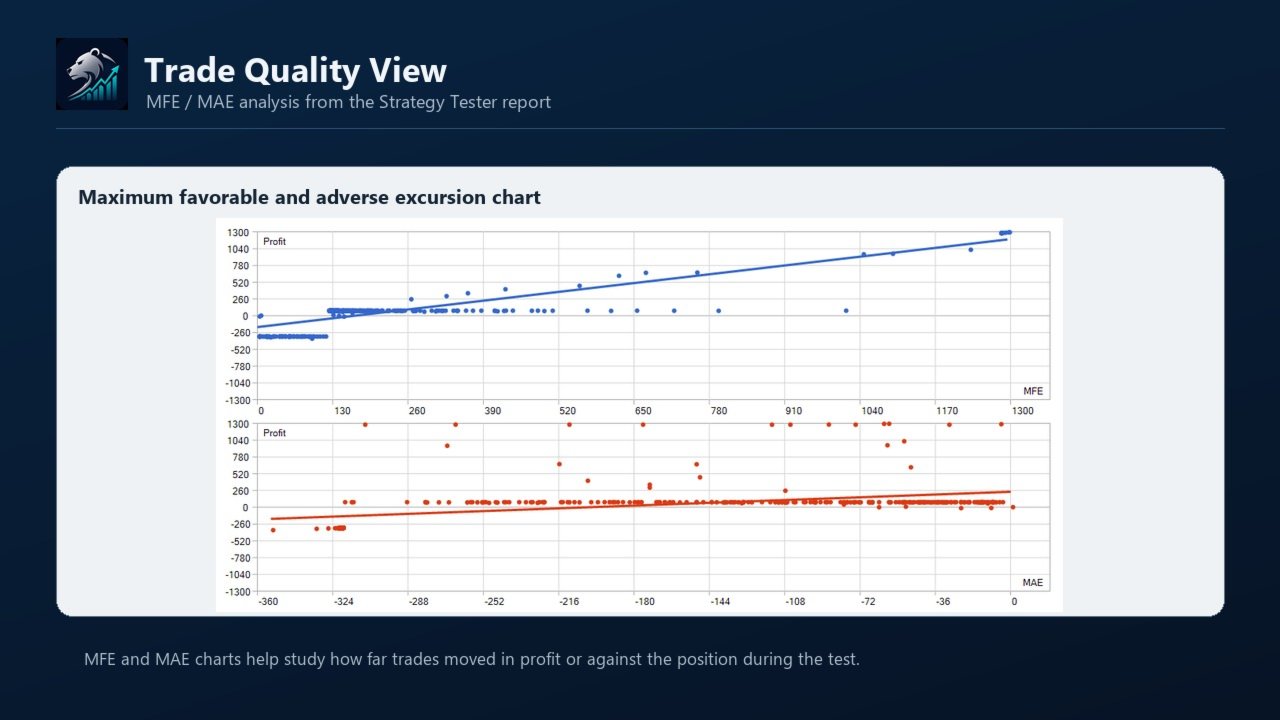
Aşağıdaki sonuç Strateji Sınayıcı kullanılarak yapılan geçmişe dönük bir testtir. Gelecekteki performansı garanti etmez ve gerçek işlem sonucu olarak yorumlanmamalıdır.
- Sembol: GBPUSD
- Zaman Dilimi: M30
- Model: Gerçek tikler
- Dönem: 12.07.2024 - 12.07.2026
- Başlangıç Bakiyesi: 5.000 USD
- Kaldıraç: 1:500
- Net Kâr: 17.489,51 USD
- Tahmini Getiri: %349,79
- Kâr Faktörü (Profit Factor): 1,83
- Toparlanma Faktörü (Recovery Factor): 8,75
- Sharpe Oranı: 3,96
- Toplam İşlem: 314
- Kârlı İşlem Oranı: %78,34
- Maksimum Özsermaye Çekilmesi: 1.999,40 USD / %10,51
- Göreceli Özsermaye Çekilmesi: %25,06
- Doğrusal Korelasyon (LR Correlation): 0,96
Backtest çalışmaları bir stratejinin geçmiş veriler üzerinde nasıl performans gösterdiğini incelemek için yararlıdır, ancak piyasa riskini ortadan kaldırmaz. Gerçek sonuçlar spread, komisyon, kayma (slippage), yürütme kalitesi, aracı kurum kuralları ve gelecekteki piyasa koşulları nedeniyle farklılık gösterebilir.
Girdi Parametreleri
Strateji Ayarları (Strategy Settings)
- Signal_Mode — Giriş mantığını seçer. Cross modu daha seçicidir, Active modu daha sık sinyal üretmek için tasarlanmıştır.
- Stop_Loss_Pips — Sabit stop kullanıldığında pip cinsinden sabit stop loss mesafesi.
- Take_Profit_Pips — Sabit take profit kullanıldığında pip cinsinden sabit take profit mesafesi.
- RSI_Period — RSI göstergesinin periyodu.
- RSI_Level — Cross modunda kullanılan ana RSI seviyesi.
- Active_RSI_Buy_Level — Active modunda alış girişleri için kullanılan RSI seviyesi.
- Active_RSI_Sell_Level — Active modunda satış girişleri için kullanılan RSI seviyesi.
- Bears_Period — Bears Power göstergesinin periyodu.
- Bears_Level — Bears Power için isteğe bağlı referans seviyesi.
- Use_Bears_Level_Filter — Bears Power seviye filtresini etkinleştirir veya devre dışı bırakır.
- Min_Bears_Slope_Pips — Active modunda kullanılan minimum Bears Power eğimi.
- Bands_Period — Bollinger Bands göstergesinin periyodu.
- Bands_Deviation — Bollinger Bands için sapma değeri.
- Close_On_Bands_Cross — Robotun Bollinger Bands çıkış mantığına göre işlemleri kapatmasına izin verir.
- Close_On_Opposite — Karşıt bir sinyal oluştuğunda robotun mevcut pozisyonu kapatmasına izin verir.
Filtre Ayarları (Filter Settings)
- Use_Trend_Filter — EMA trend filtresini etkinleştirir veya devre dışı bırakır.
- Fast_EMA_Period — Trend filtresi tarafından kullanılan hızlı EMA periyodu.
- Slow_EMA_Period — Trend filtresi tarafından kullanılan yavaş EMA periyodu.
- Use_ATR_Filter — ATR volatilite filtresini etkinleştirir veya devre dışı bırakır.
- ATR_Period — ATR göstergesinin periyodu.
- Min_ATR_Pips — Yeni işlemler için izin verilen minimum ATR değeri.
- Max_ATR_Pips — Yeni işlemler için izin verilen maksimum ATR değeri.
- Use_ADX_Filter — ADX trend gücü filtresini etkinleştirir veya devre dışı bırakır.
- ADX_Period — ADX göstergesinin periyodu.
- Min_ADX — ADX filtresi etkinken gerekli olan minimum ADX değeri.
- Use_DI_Direction — Etkinleştirildiğinde +DI ve -DI yönlerinin uyumlu olmasını gerektirir.
- Use_MACD_Filter — MACD momentum filtresini etkinleştirir veya devre dışı bırakır.
- MACD_Fast_EMA — MACD için hızlı EMA periyodu.
- MACD_Slow_EMA — MACD için yavaş EMA periyodu.
- MACD_Signal_SMA — MACD için sinyal çizgisi SMA periyodu.
- Use_ATR_Stops — ATR tabanlı stop loss ve take profit mantığını etkinleştirir.
- ATR_Stop_Multiplier — ATR tabanlı stop loss hesabında kullanılan çarpan.
- Risk_Reward — ATR tabanlı stop seviyeleri etkinken kullanılan risk-ödül oranı.
- Use_Trading_Hours — Girişleri seçilen işlem saatleriyle sınırlandırır.
- Trading_Start_Hour — Sunucu saatine göre yeni girişler için başlangıç saati.
- Trading_End_Hour — Sunucu saatine göre yeni girişler için bitiş saati.
- Avoid_Friday_Late — Cuma günleri geç saatlerde yeni işlem açılmasını engeller.
- Friday_Cutoff_Hour — Cuma günü işlemlerin durdurulacağı saat.
- Cooldown_Bars — Bir işlemden sonra yeni bir işlem açmadan önce beklenmesi gereken minimum çubuk sayısı.
- Max_Trades_Per_Day — Günlük maksimum yeni işlem sayısı. Bu sınırı kaldırmak için 0 yapın.
- Max_Spread_Pips — Yeni işlemler için izin verilen maksimum spread.
Risk Ayarları (Risk Settings)
- Lot_Mode — Sabit lot veya yüzde riskine göre pozisyon boyutlandırmasını seçer.
- Fixed_Lots — Sabit lot modu seçildiğinde kullanılan lot büyüklüğü.
- Risk_Percent — Yüzde modu seçildiğinde işlem başına bakiyeden alınan risk yüzdesi.
- Max_Daily_Loss_Percent — Günlük özsermaye kayıp sınırına ulaşıldığında yeni girişleri durdurur.
- Max_Daily_Gain_Percent — İsteğe bağlı günlük kâr kilidi. Devre dışı bırakmak için 0 yapın.
- Max_Equity_DD_Percent — Hesap çekilmesi belirlenen sınıra ulaşırsa yeni girişleri durdurur.
- Peak_Equity_Guard_Percent — Özsermaye zirvesinden yaşanan düşüş sonrasında isteğe bağlı duraklatma.
- Peak_Guard_Pause_Bars — Zirve koruması tetiklendikten sonra duraklatılacak çubuk sayısı.
- Min_Tester_Trades — Optimizasyon skoru için gereken minimum işlem sayısı.
- Use_Breakeven — Başa baş noktası yönetimini etkinleştirir veya devre dışı bırakır.
- Breakeven_Trigger_Pips — Başa baş seviyesinin uygulanması için gereken pip cinsinden kâr mesafesi.
- Breakeven_Lock_Pips — Başa baş stop seviyesi ile kilitlenen kâr miktarı.
- Use_ATR_Trailing — ATR tabanlı izleyen stopu etkinleştirir veya devre dışı bırakır.
- ATR_Trail_Multiplier — ATR izleyen stop mesafesi için kullanılan çarpan.
- Min_Stop_Update_Pips — Emrin değiştirilmesi için gereken minimum stop loss iyileştirme miktarı.
- Stop_Update_Once_Per_Bar — Stop loss değişikliklerini çubuk başına tek bir güncelleme ile sınırlar.
Uzman Danışman Ayarları (Expert Settings)
- Magic_Number — Robotun kendi işlemlerini tanıması için kullandığı benzersiz kimlik numarası.
- Slippage_Points — Emir gönderimi sırasında izin verilen maksimum kayma (slippage) miktarı.
Pratik Notlar
İlk testiniz için GBPUSD M30 için sunulan varsayılan ayar dosyasını kullanın. Aracı kurumunuzun spread veya komisyon oranları farklıysa test etmeden önce lot büyüklüğünü ve spread filtresini ayarlayın. Strateji Sınayıcı'dan demo hesaba geçerken muhafazakar bir risk seviyesi önerilir.
Sonuçları kendi aracı kurum verilerinizle karşılaştırmak için Strateji Sınayıcı'yı kullanın. İyi bir çalışma yöntemi, önce varsayılan ayar dosyasını test etmek, ardından tek seferde yalnızca az sayıda parametreyi değiştirmektir. Bu, hangi ayarın sonucu değiştirdiğini anlamayı kolaylaştırır.
Destek
Kurulum, ayarlar veya bir test sonucunun yorumlanmasıyla ilgili yardıma ihtiyacınız olursa, ürün yorumları bölümünü veya MQL5 mesajlaşma sistemini kullanabilirsiniz.