Fox Edge Scalper
- Uzmanlar
- Sürüm: 7.63
- Güncellendi: 23 Eylül 2026
- Etkinleştirmeler: 10

Fox Edge Scalper - Multi-Strategy Grid EA with Trend Filters and Margin Protection
Fox Edge Scalper is an automated trading system built around three selectable position-management strategies (Martingale, Averaging, and Smart Hybrid Hedging), combined with a multi-filter entry engine and a dedicated risk-control layer. Instead of relying on a single fixed method, the EA lets the strategy, the entry conditions, and the protection rules be configured independently, so the same core engine can be adapted to different account sizes and trading styles.
Strategy modes
- Martingale: lot size steps up in groups after a defined number of layers, for accounts designed to recover a losing sequence with fewer, larger steps.
- Averaging: layers are added at a more measured pace, aimed at smoothing the average entry price rather than maximizing recovery speed.
- Smart Hybrid Hedging: combines grid layering with an opposite-side hedge and a cross-close mechanism that can use realized profit from one side to help close losing positions on the other, subject to a configurable maximum profit share.
Entry engine
Trade entries are filtered through a combination of Bollinger Bands, RSI, and an ATR-based volatility filter, so entries can be restricted to a defined volatility range instead of firing in every market condition. An optional reversal detection module (engulfing pattern with RSI confirmation) and a trend strength filter (dual EMA with a configurable threshold) allow the EA to distinguish between range conditions and a strong directional move, and a separate Trend Continuation Entry mode lets the EA keep participating in a confirmed strong trend instead of only fading price back toward the bands.
Position and lot management
Lot progression for grid layers is grouped rather than increased on every layer, with an absolute lot cap available as a safety ceiling. A separate Trend Follow Layer acts as a recovery mechanism once floating loss passes a defined threshold, adding positions in the direction of the trend at a controlled distance and pace. Auto-compounding can scale the base lot with account balance growth.
Risk and protection controls
- Small Account / Margin Protection: before sending a new order, the EA checks available free margin and can automatically shrink the lot to fit, or skip the entry with a rate-limited log message instead of retrying every tick. This directly targets the "not enough money" and oversized log file issues that can occur on small or under-funded accounts.
- Basket TP, SL, and break-even, with an optional trailing take-profit and a combined basket target across both sides.
- Maximum drawdown percentage and a separate Hard Close percentage that liquidates all positions unconditionally once reached.
- A dedicated Recovery Mode with its own entry and exit drawdown thresholds (with hysteresis) to change position management behavior once the account is under stress, without needing to hit Hard Close first.
Session, target, and instrument control
Trading can be restricted to specific sessions using a GMT/time filter and a session list, and an optional news filter is available. A Daily Profit Target (fixed USD or percentage of balance) can close all positions once reached, either immediately or at the end of the session. Seven instrument presets (Forex Major, Forex Minor/Cross, Forex Exotic/Gold, US indices, Crude Oil, Volatile Crypto, Stable Crypto/Alt) adjust the underlying distance and filter settings to the typical behavior of each asset class, in addition to full manual/custom configuration.
Dashboard
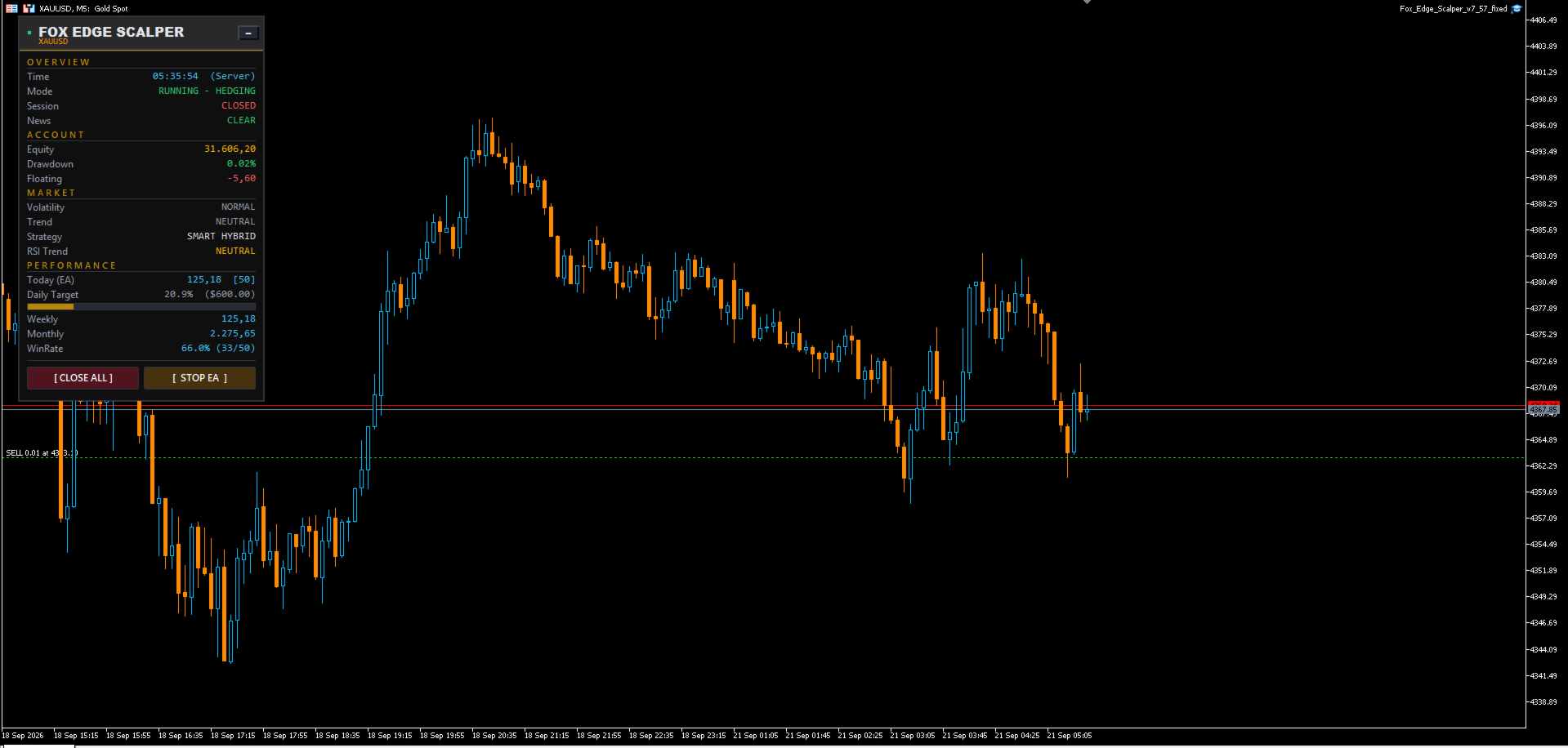
An on-chart panel shows the active strategy, floating profit, basket TP/BE/Combined TP status, and today/weekly/monthly profit, with manual Close All and Start/Stop buttons for direct control without opening the Expert Advisor settings.
Important notes before use
Fox Edge Scalper uses grid, martingale, and hedging techniques depending on the selected strategy. These methods can open multiple positions on the same symbol as price moves against the initial entry, and floating drawdown can increase before a basket target is reached; this is a structural characteristic of these methods, not a defect. Test on a demo account first, review every input group relevant to your chosen strategy, and select a lot size and drawdown limits appropriate for your account balance and broker leverage before trading live.
Recommended setup
- Netting or hedging account, as supported by your broker and required by the selected strategy.
- Stable VPS with low latency to the broker server for consistent order execution and basket management.
- Start with conservative lot and drawdown settings until behavior on your account and instrument is well understood, then adjust using the relevant instrument preset.
- Use a cent account to run this EA
Support
Questions and support requests are handled through the product's comments section on this page.