Smart Reversal Recovery
- Göstergeler
- Sürüm: 1.200
- Güncellendi: 1 Ağustos 2026
- Etkinleştirmeler: 5

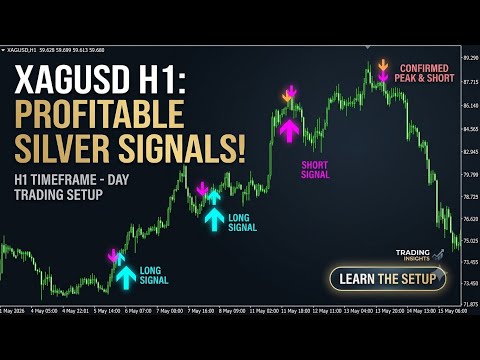
GSL Smart Gold & Silver PRO is an institutional-grade, rule-based technical indicator custom-engineered specifically for trading XAUUSD (Gold) and XAGUSD (Silver).
By combining advanced trend tracking with dedicated Smart Sell and Buy Cover logic, this system filters out false market noise and delivers clear, actionable market structure signals.
🌟 Key Advantages & Features
-
100% Non-Repaint Guarantee: All signals (Buy, Sell, Buy Cover, Sell Cover) are printed strictly on candle close. Once a bar closes and a signal is generated, it remains fixed forever. Signals will never disappear, shift, or repaint retroactively.
-
Smart Sell & Buy Cover Logic: Unlike traditional single-arrow indicators, this system incorporates a dual-action mechanism:
-
Buy / Sell Signals: Precise entry triggers for trend direction.
-
Buy Cover / Sell Cover Triggers: Objective exit conditions engineered to secure profits before deep momentum pullbacks occur.
-
-
Optimized Exclusively for H1 Timeframe: Precious metals exhibit significant volatility on lower timeframes. The H1 (1-Hour) timeframe offers the optimal technical balance—reducing false spikes while capturing substantial intraday and swing momentum moves on XAUUSD & XAGUSD
-
Peak Sell Signal: Engineered to pinpoint precise structural tops, enabling high-efficiency short entries right at the peak for maximum Risk-to-Reward ratio.
-
Smart Buy Cover (Invalidation Rule): Automatically triggers an exit to cover the Sell position whenever the peak signal is invalidated, ensuring strict risk control and protecting capital if market momentum continues upward.
🔄 What's New in Version 2.0 (Update Log)
Version 2.0 Optimization:
Dedicated Dual-Asset Focus: Core algorithm refined exclusively for XAUUSD and XAGUSD.
H1 Logic Upgrade: Enhanced noise-filtering algorithms tuned specifically for the 1-Hour chart structure.
Improved Execution Logic: Revised Sell Cover and Buy Cover math conditions for higher signal accuracy.