TrendSync MACD Pro
- Göstergeler
- Juliano Guzlinki Pacheco
- Sürüm: 1.30
- Güncellendi: 6 Temmuz 2026
- Etkinleştirmeler: 10
Earlier, cleaner MACD crossovers — synchronized with the higher-timeframe trend, non-repainting, with a full alert system. For MetaTrader 5.
Overview
The classic MACD is a great momentum tool, but it lags — its crossovers often arrive after the move has already started. TrendSync MACD Pro rebuilds the MACD with a zero-lag smoothing technique, so crossovers are earlier and cleaner, and then synchronizes them with the higher-timeframe trend — the decision layer most traders actually need:
- It shows every raw crossover so you never lose sight of the underlying momentum.
- It highlights only the meaningful turning points — crossovers that agree with the higher-timeframe trend and clear a momentum threshold.
- It is non-repainting: signals are evaluated and locked on the close of each bar. A signal that appears will not move or disappear later.
The result is a clean, honest read of momentum that you can use for manual entries, confirmation, or alerting — on Forex, metals, indices or crypto.
How it works
1. Zero Lag MACD. The fast and slow moving averages are de-lagged using a double-EMA correction ( 2 × EMA − EMA(EMA) ). The MACD is the difference between the de-lagged fast and slow lines; the signal line is itself a zero-lag smoothing of the MACD (or a classic SMA, your choice). A crossover of MACD over Signal is a BUY; a crossover under is a SELL.
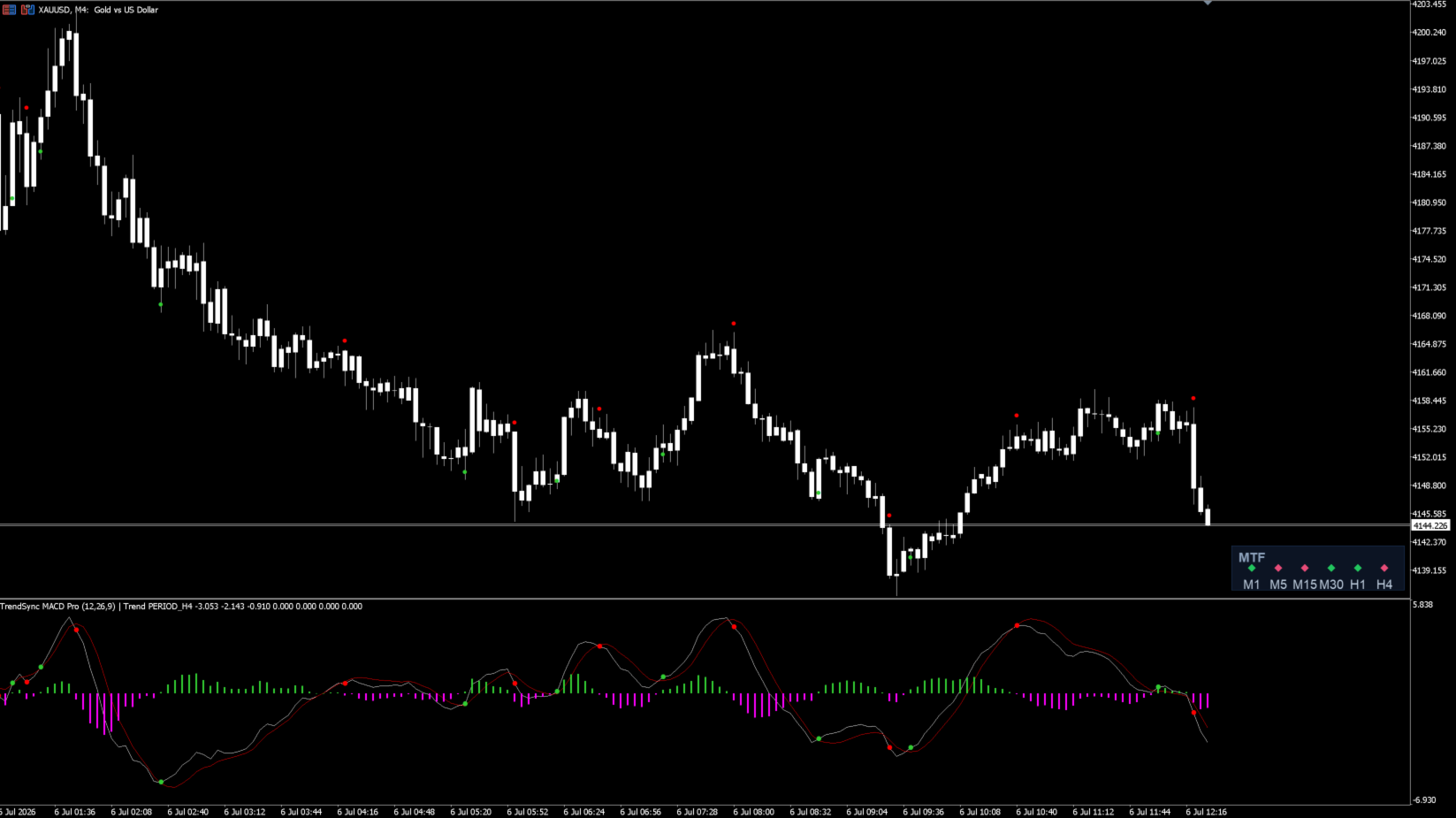
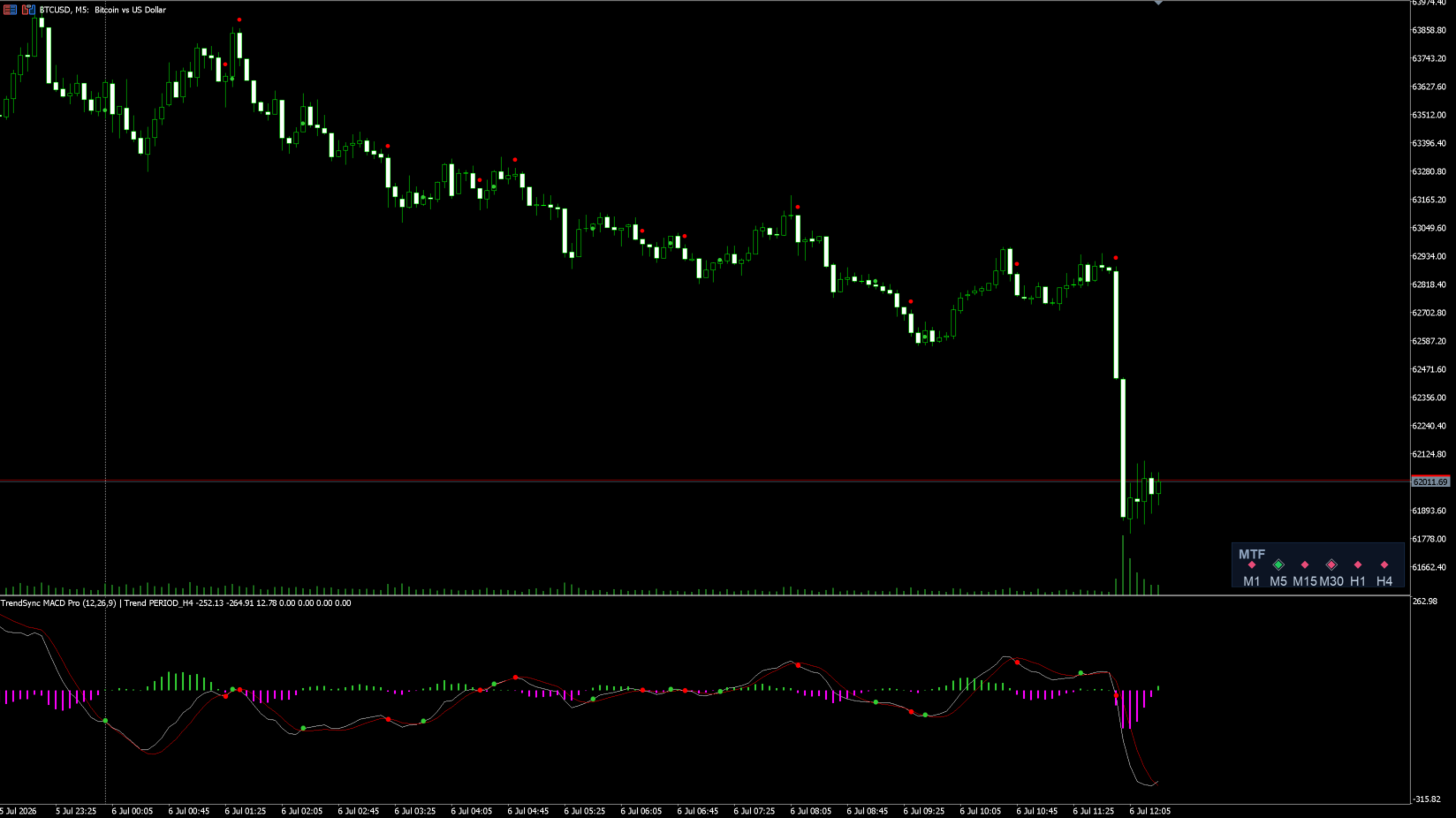
2. Two signal layers. Every crossover is drawn as a small dot ("raw cross"). On top of that, the indicator runs a position-state engine and highlights the actual inversions — the turning points where a trend-aligned, filtered signal would flip the bias. These highlighted markers are the ones to watch.
3. Multi-timeframe trend filter. A second Zero Lag MACD runs on a higher timeframe you choose. When the filter is on, BUY inversions are only highlighted while the higher timeframe is bullish, and SELL inversions only while it is bearish — keeping you on the right side of the larger move.
4. Momentum filter. An optional minimum-distance-from-zero rule ignores weak crossovers that happen too close to the zero line, which is where choppy, low-conviction signals tend to cluster.
5. Non-repainting by design. Signals are computed on closed bars only. The forming candle never paints a provisional signal that could vanish — what you see is what was confirmed.
What you see on the chart
In the indicator sub-window:
- White MACD line and red Signal line.
- Green / magenta histogram (MACD minus Signal).
- Small green / red dots on every raw crossover.
- Larger highlighted dots on the confirmed inversions.
On the price chart:
- Small green / red arrows for raw crossovers (optional).
- Bold BUY (aqua) and SELL (yellow) arrows with labels at the confirmed inversions.
- A gray mark where the position would be flattened by a higher-timeframe trend flip (optional).
Settings explained
Timeframes
- SignalTF — the timeframe the signals are calculated on. Keep it on the chart's timeframe for a 1:1 match; attach the indicator to the timeframe you actually trade.
- TrendTF — the higher timeframe used for the trend filter. A common choice is roughly 5–10× the signal timeframe.
Zero Lag MACD
- AppliedPrice — the price source (Close, Open, Median, Typical, Weighted, etc.). Close is the standard; Median/Typical/Weighted produce a slightly smoother input.
- FastLength / SlowLength / SignalLength — the classic MACD periods (defaults 12 / 26 / 9).
- useEma — EMA (true) or SMA (false) for the internal moving averages.
- useOldAlgo — false uses a zero-lag signal line; true uses a classic SMA signal line.
Filters
- UseTrendFilter — when on, only inversions aligned with the higher timeframe are highlighted.
- MinDistanceFromZero — minimum absolute MACD value at the crossover for it to qualify as an inversion. Raise it to filter out weak crosses near zero. 0 disables it.
Inversion / Exit (shapes the highlighted markers)
- ExitOnTrendFlip — go flat when the higher timeframe flips against the current bias.
- ExitOnOppositeSignal — close and reverse on the opposite filtered crossover (stop-and-reverse).
Calculation
- Lookback — how many bars back to evaluate and draw.
- VerboseLog — prints each inversion to the Experts log (useful for verification).
Display
- ShowSubwindowDots — dots on the MACD line in the sub-window.
- ShowChartArrows — master switch for price-chart arrows.
- ShowRawCrossArrows — small arrows for raw crossovers on the price chart.
- ShowExitMarks — mark trend-flip exits on the price chart.
- ShowLabels — show the BUY / SELL text at inversions.
- ArrowOffsetPoints — distance of the arrows from the candle, in points.
Alerts (on the just-closed bar)
- AlertPopup — Alert() popup with the terminal's default sound.
- AlertSound — play a sound file as a repeating alarm.
- SoundFile — the sound file name (from the terminal's Sounds folder).
- AlarmSeconds — keep the sound alarm repeating for this many seconds (e.g., 10). Set 0 to play once.
- AlertPush — send a push notification to the MetaTrader mobile app. Requires a MetaQuotes ID in Tools → Options → Notifications.
- AlertOnInversion — alert on the highlighted inversions.
- AlertOnRawCross — alert on every raw crossover.
Every alert is also written to the Experts log, so you can always confirm a signal fired even while testing your sound or push setup.
Best way to use it
- Attach it to the timeframe you trade. The signal engine works on the chart's timeframe; for scalping that might be M1–M5, for intraday M15–H1.
- Pick a higher trend timeframe. Set TrendTF to a higher timeframe so the filter keeps you aligned with the larger move (for example, an M2 chart with an M10 or M15 trend, or an M15 chart with an H1 or H4 trend).
- Treat the highlighted inversions as your primary signal. The small raw dots show raw momentum; the highlighted BUY / SELL arrows are the trend-aligned, filtered turning points. Use the raw dots for context and the highlighted ones for action.
- Filter the chop. In ranging conditions, raise MinDistanceFromZero to skip weak crosses near the zero line, and keep UseTrendFilter on.
- Choose your exit style. Use ExitOnTrendFlip for a "stay flat unless the higher timeframe agrees" approach, or ExitOnOppositeSignal for a continuous stop-and-reverse bias.
- Let the alerts watch the market for you. Enable the popup and the repeating sound alarm so you are notified the moment a bar closes with a signal; add push to get it on your phone.
- Combine it with your own structure and risk management. This is a momentum and timing tool — it works best alongside support/resistance, market structure, and disciplined position sizing.
Example starting points (test on demo and adjust)
- Fast scalping (XAUUSD / indices, M1–M2): SignalTF = current, TrendTF = M10–M15, UseTrendFilter = on, MinDistanceFromZero raised slightly to cut noise.
- Intraday (FX majors, M15): SignalTF = current, TrendTF = H1–H4, UseTrendFilter = on, ExitOnTrendFlip = on.
- Swing context (H1–H4): SignalTF = current, TrendTF = H4–D1, MinDistanceFromZero = 0, focus on highlighted inversions only.
These are sensible starting configurations, not fixed recommendations — every symbol and session behaves differently, so verify on your instrument before committing.
Compatibility
- Platform: MetaTrader 5.
- Markets: any symbol — Forex, metals, indices, commodities, crypto.
- Timeframes: all.
- Lightweight: the signal engine recalculates once per closed bar, so it stays easy on the platform even with the alarm running.
Notes
TrendSync MACD Pro is a decision-support and visualization tool. All signals are based on closed-bar data and do not repaint. It does not place trades and makes no guarantee of profit — trading carries risk, and past behavior of any signal is not a promise of future results. Always test on a demo account first and use sound risk management. Nothing here is financial advice.