
QuantSystem MTF Direction Panel
- Göstergeler
-
Elias Balian Zimmermann
 Hello to all readers,
As the founder of QuantCore Systems, I develop and optimize Expert Advisors for MetaTrader 5. My focus lies on rule-based trading logic, structured backtesting, transparent risk control, and the development of automated trading systems for liquid markets. - Sürüm: 2.10
QuantSystem Multi Timeframe Panel is a free MetaTrader 5 indicator that displays the current market direction across several important timeframes in a clean chart dashboard.
The indicator was developed to give traders a fast, clear and structured overview of the current multi-timeframe market situation. Instead of opening each timeframe manually and checking several indicators separately, the panel summarizes the most relevant information directly on the chart.
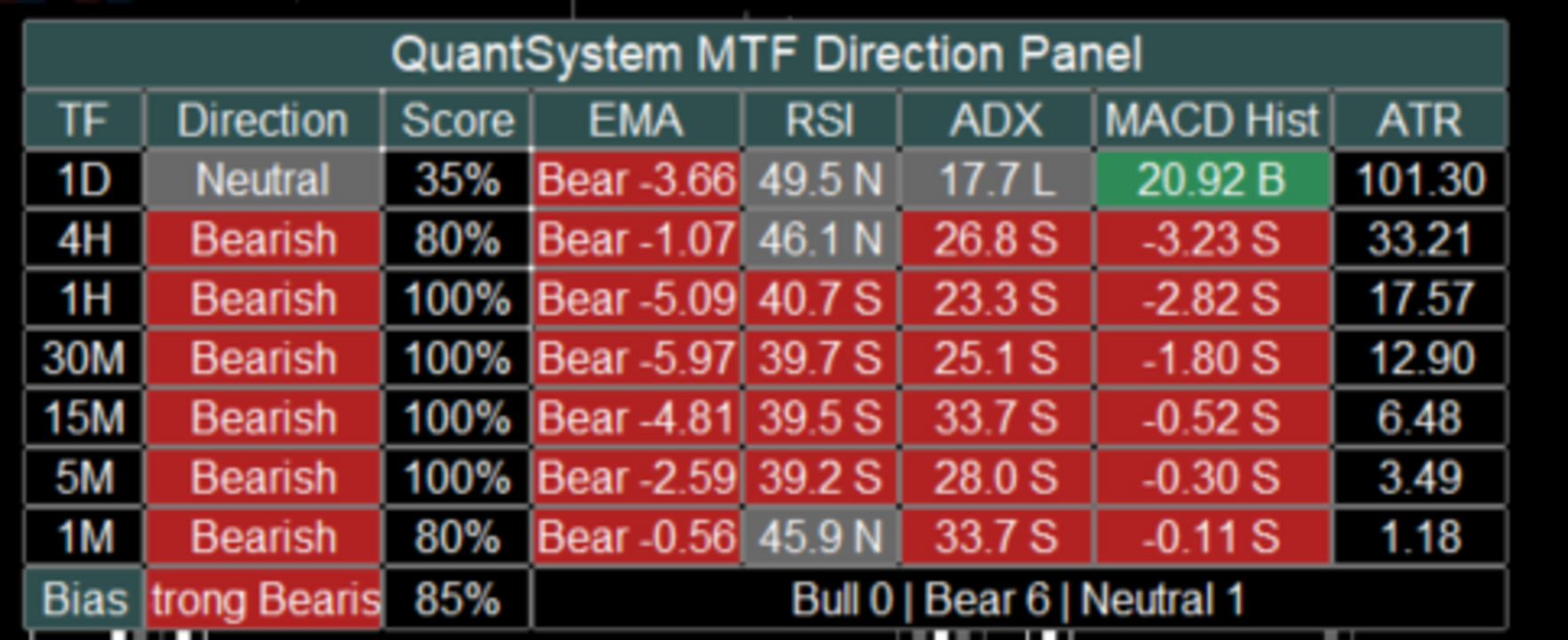
By default, the tool analyzes the following timeframes: 1D, 4H, 1H, 30M, 15M, 5M and 1M. For each timeframe, the panel calculates an individual market direction based on several technical components such as EMA, RSI, ADX, MACD Histogram and ATR.
The user can decide which values should be displayed in the panel and which components should be included in the score calculation. This allows the panel to be used either in a compact format or as a more detailed analysis dashboard.
The indicator is not designed as a standalone trading system. It is built as a professional market context and orientation tool for manual traders, systematic traders and users of automated trading strategies.
Main Idea of the IndicatorMany traders use multi-timeframe analysis to get a better understanding of the current market structure. However, a common mistake is focusing only on the current chart while ignoring the higher timeframes.
For example, an M1 chart may look bullish in the short term, while 1H, 4H and 1D are still clearly bearish. In such situations, a trader may be trading against the larger market structure without immediately noticing it.
This is exactly where QuantSystem Multi Timeframe Panel is designed to help. The panel shows at a glance which timeframes are bullish, which timeframes are bearish, which timeframes are neutral, how strong the current direction is, whether several timeframes are aligned in the same direction and whether the market is clearly directional or mixed.
This gives the user a fast visual overview without overloading the chart with many separate indicators.
What the Panel DisplaysThe panel consists of several columns. Some columns are always visible, while others can be enabled or disabled in the input settings.
The columns TF, Direction and Score are always visible.
The TF column shows the corresponding timeframe, for example 1D, 4H, 1H, 30M, 15M, 5M and 1M.
The Direction column shows the calculated direction of each timeframe. Possible values are Bullish, Bearish and Neutral. The direction is not based on only one value. Instead, it is calculated from a weighted combination of different technical components. By default, EMA, RSI, ADX and MACD can be included in this evaluation.
The Score column shows the strength of the calculated direction in percent. A high score means that several active analysis components are pointing in the same direction. A score of 100 percent means that all active score components confirm the same direction. A lower score means that the signals are more mixed or that some components are neutral or opposite.
In addition, the following optional columns can be displayed: EMA, RSI, ADX, MACD Hist and ATR. Each of these columns can be enabled or disabled separately through the inputs. This allows the user to customize the panel and keep the chart clean.
EMA ColumnThe EMA column shows the direction of the moving average structure.
By default, the indicator uses a Fast EMA with a length of 9 and a Slow EMA with a length of 21.
The logic is simple: if the Fast EMA is above the Slow EMA, the EMA component is evaluated as bullish. If the Fast EMA is below the Slow EMA, the EMA component is evaluated as bearish.
In compact mode, the EMA column does not display both full EMA prices. Instead, it shows the direction and the difference between the Fast EMA and the Slow EMA. This keeps the panel much cleaner and easier to read.
Example: Bull 2.35 means that the Fast EMA is above the Slow EMA. Bear -4.18 means that the Fast EMA is below the Slow EMA.
The EMA difference also gives the user an idea of how far both moving averages are apart. This means the panel does not only show direction, but also provides a basic sense of EMA separation.
RSI ColumnThe RSI column shows the current RSI value of each timeframe.
By default, the indicator uses an RSI period of 14, an RSI midline of 50 and a neutral zone of 5 points.
With the default settings, this means: RSI above 55 is evaluated as bullish, RSI below 45 is evaluated as bearish and RSI between 45 and 55 is evaluated as neutral.
The RSI value is displayed in a compact format, for example 56.8 B, 43.2 S or 49.5 N.
B stands for bullish, S stands for bearish and N stands for neutral.
The neutral zone is important because RSI values around the 50 level often do not provide a clear directional signal. Without a neutral zone, every small movement above or below 50 would immediately be interpreted as bullish or bearish. The neutral zone makes the evaluation smoother and cleaner.
ADX ColumnThe ADX column shows trend strength and trend direction using ADX, PlusDI and MinusDI.
By default, the indicator uses an ADX period of 14 and a minimum ADX value of 18.
The logic is: if ADX is below the minimum value, the ADX component is evaluated as weak or neutral. If ADX is above the minimum value and PlusDI is greater than MinusDI, the component is evaluated as bullish. If ADX is above the minimum value and MinusDI is greater than PlusDI, the component is evaluated as bearish.
Example displays are 26.8 B, 31.2 S or 14.5 L.
B stands for bullish, S stands for bearish and L stands for low or too weak.
ADX is useful because it does not only evaluate direction, but also checks whether there is enough trend strength. This can help identify weak or unclear market phases.
MACD Histogram ColumnThe MACD column does not display MACD Main and MACD Signal as two long values. Instead, it shows the difference between both lines.
The calculation is: MACD Histogram = MACD Main minus MACD Signal.
By default, the indicator uses MACD Fast 12, MACD Slow 26 and MACD Signal 9.
The logic is: if the MACD Histogram is greater than 0, the MACD component is evaluated as bullish. If the MACD Histogram is below 0, the MACD component is evaluated as bearish.
Example displays are 1.25 B or -3.42 S.
This format is much clearer than displaying both full MACD values. The user can immediately see whether MACD momentum is bullish or bearish.
ATR ColumnThe ATR column shows the current average price movement of each timeframe.
By default, the indicator uses an ATR period of 14.
ATR is currently displayed as a volatility value and is not included in the Direction Score calculation by default. This is intentional, because ATR does not provide a direct bullish or bearish direction. ATR mainly shows how much the market is currently moving.
A higher ATR value means higher market volatility. This can be especially useful in markets such as Gold, indices, Forex or cryptocurrencies, where volatility plays an important role.
How the Direction Is CalculatedThe direction of each timeframe is calculated through a weighted point system.
By default, EMA, RSI, ADX and MACD can be included in the score.
The default weighting is: EMA Weight 35, RSI Weight 20, ADX Weight 25 and MACD Weight 20.
Together, this equals 100 points.
If all active components are bearish, the timeframe receives a bearish score of 100 percent. If some components are bullish while others are bearish or neutral, the score is calculated accordingly.
Example: EMA bearish gives 35 points to bearish, RSI neutral gives no points, ADX bearish gives 25 points to bearish and MACD bullish gives 20 points to bullish. The indicator then compares bullish and bearish points. The stronger side determines the direction, as long as the minimum score requirement is reached.
Neutral StateThe indicator can also display a neutral state.
This is controlled by the settings Allow Neutral State and Min Directional Score.
By default, the minimum score is set to 60.
This means: if the stronger direction is below 60 percent, the timeframe is evaluated as neutral.
This prevents the indicator from showing a clear direction too quickly when the market situation is actually mixed.
Overall BiasAt the bottom of the panel, the indicator displays an overall market bias.
Possible values are Strong Bullish, Mild Bullish, Mixed, Mild Bearish and Strong Bearish.
This overall bias is based on how many of the analyzed timeframes are bullish, bearish or neutral.
By default, the Strong Alignment Count is set to 5. This means that if at least 5 out of 7 timeframes point in the same direction, the panel displays a strong bias.
Example: if 5 timeframes are bearish, the panel displays Strong Bearish. If 5 timeframes are bullish, the panel displays Strong Bullish.
If there is no clear majority, the panel displays a mixed or milder market condition.
Closed Candle ModeAn important setting is Use Closed Candle Mode.
When this option is enabled, the indicator uses only already closed candles for the higher timeframes.
This is important because values on open higher-timeframe candles can still change while the candle is forming.
For example, a 4H candle can look bullish during its formation, but close bearish by the end of the period. With Closed Candle Mode enabled, the panel works more conservatively and more stable because it only uses confirmed candle values.
If the user wants to see the most current live values, this option can be disabled. The panel will then react faster, but values may change more often during the still-open candle.
Compact DisplayThe Compact Display setting controls how compactly values are shown inside the panel.
When Compact Display is enabled, the panel shows short and clean values.
Examples: EMA Bear -3.20, RSI 43.5 S, ADX 28.4 S, MACD Hist -1.25 S and ATR 4.80.
When Compact Display is disabled, some values can be displayed in a more detailed format.
For most users, compact mode is recommended because it keeps the panel easier to read and uses less chart space.
Displayed ColumnsThe user can choose which values are displayed in the panel through the input settings.
The relevant settings are Show EMA, Show RSI, Show ADX, Show MACD and Show ATR.
If a column is disabled, it disappears from the panel. The basic columns TF, Direction and Score always remain visible.
This allows each user to decide whether they want a simple overview or a more detailed analysis panel.
A simple setup can display only TF, Direction and Score. A detailed setup can additionally display EMA, RSI, ADX, MACD Hist and ATR.
Score ComponentsIn addition to the visible columns, the user can choose which components are included in the score calculation.
The relevant settings are Use EMA In Score, Use RSI In Score, Use ADX In Score and Use MACD In Score.
This is important because display and calculation are controlled separately.
For example, a user can display RSI in the panel but exclude RSI from the score calculation. Another user can base the score only on EMA and ADX, while MACD and RSI are shown only as additional information.
This makes the indicator flexible and adaptable to different trading styles.
Adjustable Periods and ParametersThe indicator provides several inputs that allow the user to customize the calculation.
In the EMA Settings, the user can adjust Fast MA Length, Slow MA Length, MA Method, Applied Price, Use EMA In Score and EMA Weight.
In the RSI Settings, the user can adjust RSI Period, RSI Midline, RSI Neutral Zone, Use RSI In Score and RSI Weight.
In the ADX Settings, the user can adjust ADX Period, Minimum ADX, Use ADX In Score and ADX Weight.
In the MACD Settings, the user can adjust MACD Fast, MACD Slow, MACD Signal, Use MACD In Score and MACD Weight.
In the ATR Settings, the user can adjust the ATR Period.
In the Bias Settings, the user can adjust Allow Neutral State, Min Directional Score and Strong Alignment Count.
Panel Position and DesignThe user can also customize the visual appearance of the panel.
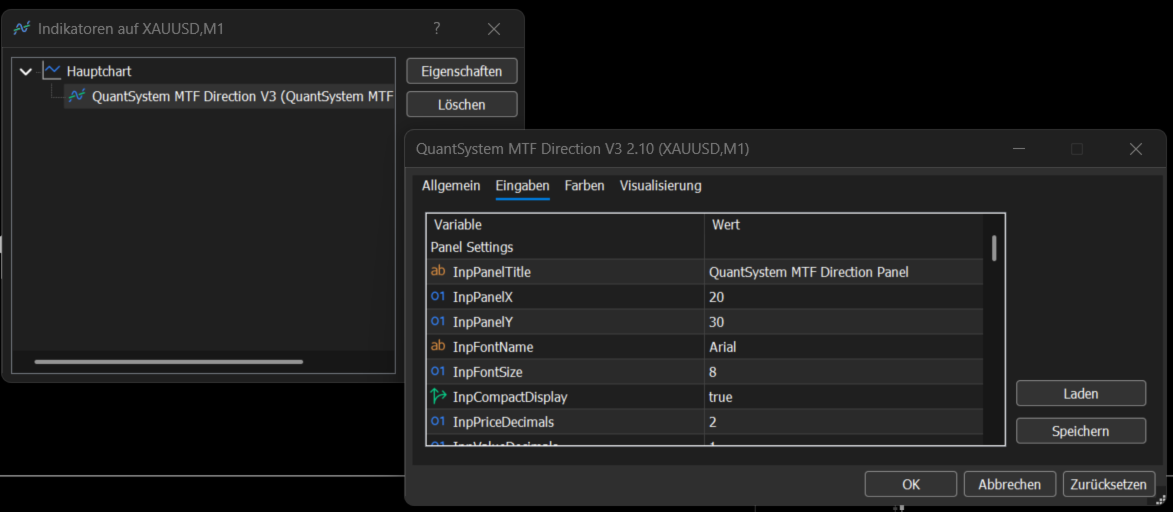
This includes Panel X, Panel Y, Font Name, Font Size, Compact Display, Price Decimals, Value Decimals, MACD Decimals and the colors.
Panel X and Panel Y can be used to move the dashboard on the chart. If the panel should be moved further to the right, Panel X can be increased. If the panel should be moved further down, Panel Y can be increased.
Colors for bullish, bearish, neutral, header, text and borders can also be adjusted.
AlertsThe indicator includes an optional alert function.
If Enable Bias Alerts is activated, an alert can be triggered when the Overall Bias changes.
Examples of possible changes are Strong Bearish to Mixed, Mixed to Strong Bullish or Mild Bullish to Strong Bullish.
This function can be useful if the user wants to be notified when the multi-timeframe structure changes significantly.
Notes About the ScreenshotsThe screenshots show different display versions of the indicator directly on a MetaTrader 5 chart.
The screenshots show how the panel appears in the main chart window, how multiple timeframes are analyzed at the same time, how Direction and Score are displayed for each timeframe, how optional values such as EMA, RSI, ADX, MACD Histogram and ATR appear in detailed mode and how the Overall Bias is summarized at the bottom of the panel.
The screenshots are visual examples of how the indicator can look in practical chart use. Depending on the symbol, timeframe, broker data, enabled inputs and selected panel position, the display may differ slightly.
Suitable MarketsThe indicator can generally be used on all markets available in MetaTrader 5.
Examples include Gold, Forex, indices, cryptocurrencies, commodities and stock CFDs.
The panel can be especially useful in markets where multi-timeframe structure plays an important role, for example XAUUSD, EURUSD, GBPUSD, US100, US500, BTCUSD and ETHUSD.
The indicator is not limited to a specific symbol.
Practical UseThe indicator can be used for different purposes, for example as a fast multi-timeframe market overview, as a trend filter for manual trades, as additional confirmation before an entry, for identifying mixed market phases, for comparing short-term and long-term timeframes and for supporting the analysis of trend strength, momentum and volatility.
One possible use case: if 1D, 4H and 1H are bearish while M1 is temporarily bullish, the user can quickly recognize that the short-term move may only be a correction within a larger bearish structure.
On the other hand, strong alignment across several timeframes can indicate a clearer market phase.
Important NoticeQuantSystem Multi Timeframe Panel is not a standalone trading system and does not provide guaranteed buy or sell signals.
The indicator is designed only for technical market analysis and for better understanding the current multi-timeframe structure.
Trading involves risk. Technical indicators, historical price movement or current market structures do not guarantee future results. Every user should perform their own testing, adjust the settings to their own trading style and use appropriate risk management.





















QuantSystem has a good spread of MTF price strength measures to determine an overall bias for market direction. However, for me it was way too heavy on available resources (cpu /data). This was particularly noticeable during US market opening, when price data updating was much slower than usual, while trying to process and feed all the hungry parameters in the indicator. As soon as I disabled it, my price data once again returned to it's usual high speed updating, with negligible lag. As a free indicator it is quite substantial and has many positive attributes, but definitely needs to lighten up a bit (if possible) to be user friendly to me. Also, has extensive information in Overview, but have not had any communication with owner.
You are also welcome to contact me privately.