CustomsTF Master

CustomTF Master — 16 Custom Timeframes + Live Switcher Panel

One Indicator. No DLL. No Scripts. No Extra Files. Upgrade your MT4 Terminal!

THE PROBLEM THIS SOLVES

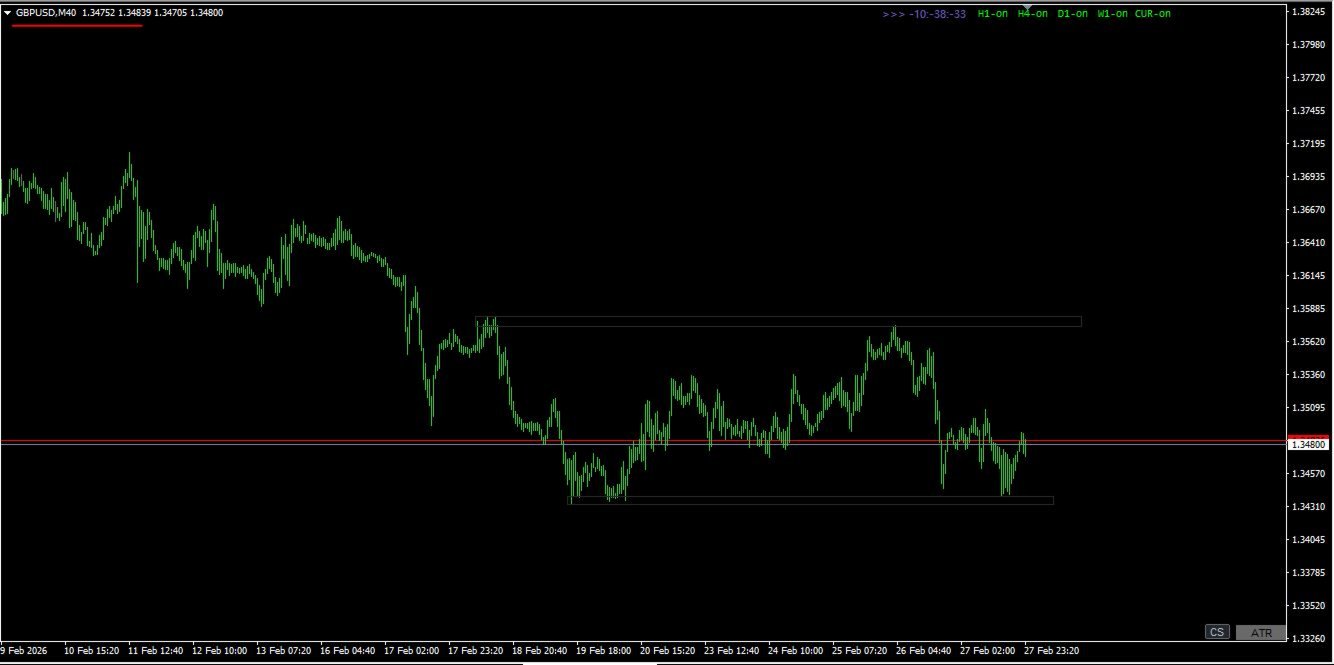
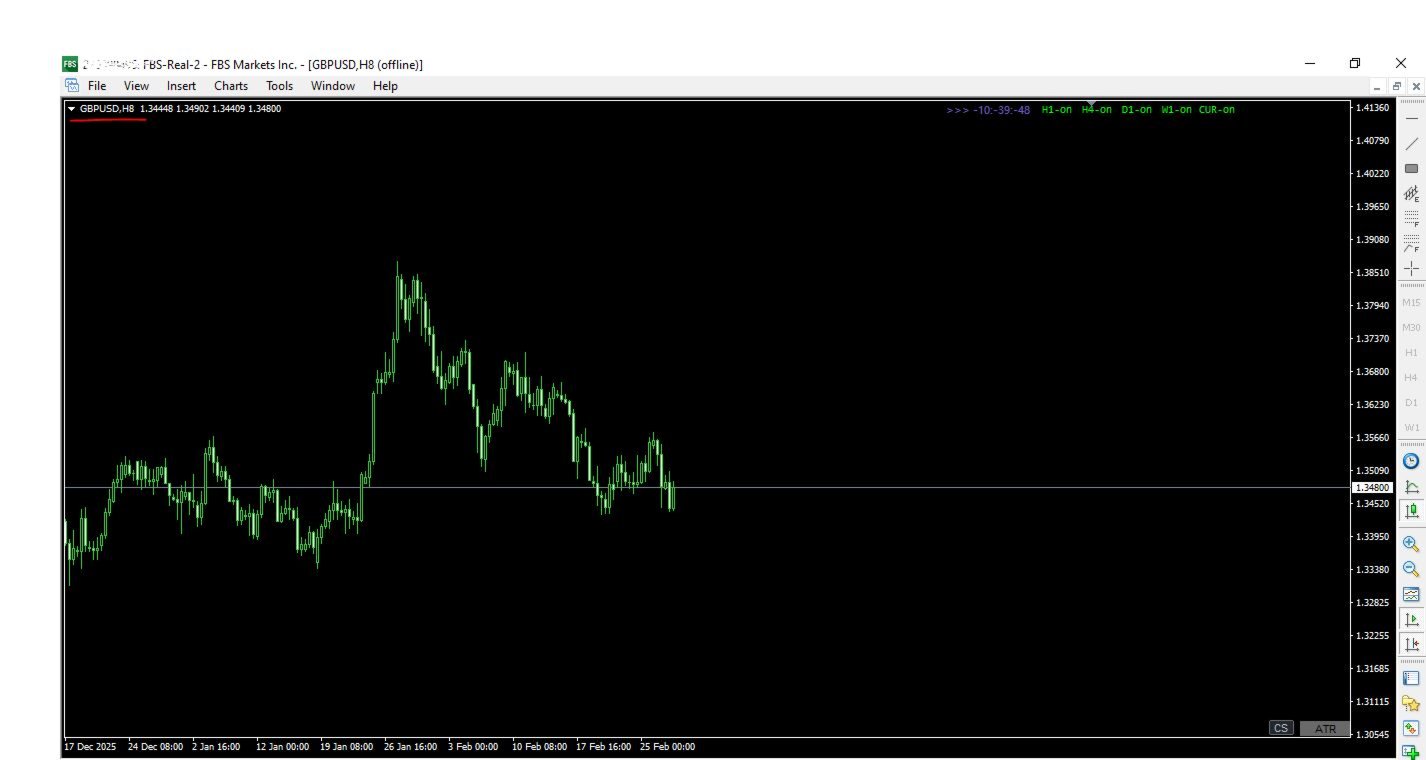
MetaTrader 4 ships with only 9 timeframes: M1, M5, M15, M30, H1, H4, D1, W1, MN. Serious traders know that some of the most powerful price action setups form on timeframes MT4 simply does not offer — M2, M8, M10, M20, M40, M45, H2, H3, H5, H6, H8, H12, H16, H32, and more totalling 25 timeframes at your disposal compared to current MT4's 9 and MT5's 20 timeframes respectively.

The standard workaround is MT4's built-in Period Converter script. But it requires manual setup for every timeframe, every symbol, every session. It runs as a script — meaning it blocks your workflow, needs restarting after every MT4 reboot, and gives you no panel to switch between charts quickly.

CustomTF Master eliminates all of that in a single drag-and-drop. Essential for Price Action traders and other traders who have built a working system on the MT4 terminal and reluctant to move to MT5 and the stress of having to convert your work tools to MQL5, this is for you.

WHAT YOU GET

16 fully live custom timeframes — simultaneously: M2 · M8 · M10 · M20 · M40 · M45 · H2 · H3 · H5 · H6 · H8 · H12 · H16 · H32 · D3 · W2

Every timeframe updates live on every incoming tick. Bid/ask line moves. Candles form in real time. Exactly as they do on standard MT4 charts — because this indicator uses the identical internal mechanism as MT4's own Period Converter.

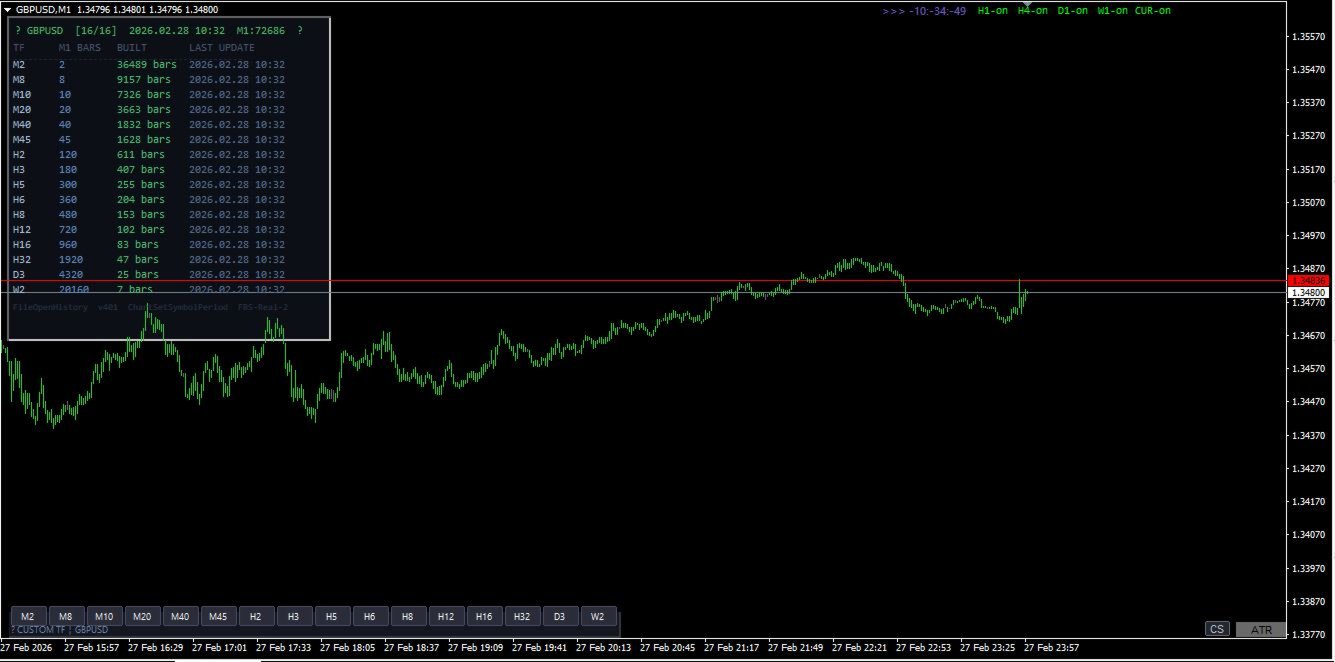
One-click switcher panel: 11 or 16 labelled buttons sit permanently on your M1 chart. Click M8 — your M8 chart comes to front. Click H32 — H32 comes to front. The active button highlights blue so you always know which custom TF is in focus. No menu diving. No manual chart opening.

Live dashboard: A compact status panel shows — for every TF — how many bars have been built, when the last update occurred, and how much M1 history is available. If history is insufficient for a higher TF you get a clear orange warning with the exact fix.

Fully configurable: Every TF can be individually enabled or disabled. Dashboard and panel position, button colours, button size, and font size are all input-adjustable without recompilation.

TECHNICAL SPECIFICATION

Property Detail
Type Indicator (.mq4)
Chart M1 only (one instance per symbol)
DLL required No
AutoTrading required No
MT4 build compatibility All builds (tested 1380+)


SETUP — 3 STEPS

  1. Tools → Options → Charts — set both "Max bars in chart" and "Max bars in history" to 9999999. Click OK.
  2. Open an M1 chart for your symbol. Press the HOME key to scroll to the oldest available bar — this triggers MT4 to download full M1 history from your broker. Wait until the chart stops extending leftward.
  3. Drag CustomTF_Master onto the M1 chart. The dashboard appears within seconds. All 16 TFs build automatically. Click any button to open that chart live.

That is the entire setup. No scripts to run. No folders to navigate. No DLL permission dialogs. No AutoTrading toggle to worry about.

MULTI-SYMBOL USAGE

Attach one instance per symbol on that symbol's M1 chart. Each instance operates completely independently — separate file handles, separate chart IDs, separate dashboard. You can run EURUSD, GBPUSD, XAUUSD and any other symbols simultaneously with no interference between instances.

REQUIREMENTS

  • MetaTrader 4 (any broker, any build)
  • Active market data connection for the symbol
  • Sufficient M1 history from your broker (dashboard shows exact count with warning if insufficient — higher TFs like H32, D3, W2 need more M1 bars)

FREQUENTLY ASKED QUESTIONS

Why does MT4's built-in Period Converter not do this already? The built-in converter is a script — it processes one timeframe per instance, requires manual chart opening from File → Open Offline, blocks execution while running, and must be restarted after every MT4 reboot. CustomTF Master handles all 16 TFs in a single indicator instance that persists across restarts with a built-in click-to-open panel.

Will my existing indicators work on the custom TF charts? Any indicator that does not call MT4's standard period functions (iMA, iRSI etc with standard TF constants) will work. Indicators that use only price data (OHLCV) from the chart they are attached to work perfectly. Note that MT4's built-in indicators will not recognise custom periods — this is an MT4 engine limitation that cannot be bypassed by any third-party tool.

Does this work with custom symbols / synthetic pairs? Yes, as long as the symbol has M1 data available in your MT4 terminal.

What happens to the offline charts when I close MT4? MT4 saves offline chart windows in its profile. On next startup all previously opened custom TF charts reopen automatically. The indicator resumes writing to them on the first incoming tick.

WHAT IS OR WILL BE INCLUDED

  • CustomTF_Master_Ind.mq4 — the complete indicator source file
  • Setup guide (PDF)
  • Version update notifications and additional timeframes based on your request.
Önerilen ürünler
Çok İşlevli Ticaret Aracı: Lot Hesaplayıcı, Grid Emirleri, R/R Oranı, Ticaret Yöneticisi, Arz ve Talep Bölgeleri, Fiyat Hareketi ve Daha Fazlası Demo Sürüm   |   Kullanım Kılavuzu Ticaret Asistanı strateji test cihazında çalışmaz: bu yardımcı programı test etmek için Demo Sürümünü BURADAN indirebilirsiniz. Herhangi bir soru /iyileştirme fikri/hatalar için benimle iletişime geçin MT5 sürümüne ihtiyacınız varsa, burada mevcuttur Ticaret sürecinizi basitleştirin, hızlandırın ve otomatikleştirin. St
Full Dashboard Trade Panel
Opengates Success International
Full Dashboard Trade Panel Utility is built to perform overall task of trades and order managements to make trading an easy task for every trader that bought and using it. It comprises of three sections with each having a shift setting for a convenient placement as desired: 1.        Trades Managements Panel 2.        Basket Trades Panel 3.        Symbol and Time frame Changer Each of these three sections has its own unique functions and roles to perform for a complete enjoyable forex trading ex
Otomatik Trade Kapatma: zamana göre veya Kâr / Zarar tetikleyicisi Bu araçla, belirli bir koşul altında trade'leri otomatik olarak kapatabilirsiniz. Çok fonksiyonlu araç : 66+ özellik, bu araç dahil  |   Sorularınız için iletişime geçin   |   MT5 versiyonu Otomatik Kapatmayı etkinleştirmek için aşağıdaki parametreleri ayarlamanız gerekir (panelde): 1. Sembol   fonksiyonun uygulanacağı: belirli bir   [Symbol]   / veya   [ALL]   tüm semboller. 2.   Koşul,   ne zaman kapatılacağı: [if total] / [if
Bu ürün, birçok fonksiyonla siparişlerinizi ve hesabınızı kontrol etmenizi sağlayacaktır. 1- 1 lot büyüklüğü için hesap büyüklüğünüze/SL büyüklüğünüze/çift puan değerine bağlı olarak doğru lot büyüklüğünü hesaplayacaktır. 2- Satırların yerlerine bağlı olarak size mevcut sipariş durumunu verecektir (target sl tp ). 3- 1 butona basıldığında tüm emirleri hedef/sl'ye taşıyacaktır. 4- Size hesabınız ve emirlerinizi açmak için gereken teminat hakkında bilgi verecektir. 5- Tüm emirleri (sembol ve
The Navigator is a next-generation panel very easy to use. Apply this indicator on the chart to navigate very quickly through all the symbol and timeframes listed in input. The arrows manage the zoom and time frames. You can customize both the graphic colors and the list of symbols to display. A quick and easy tool that it will help to analyse the charts. Input Values Show_TF_Panel (true/false) it permits to show/hide panel with TF and Arrows 32 symbols COLORS AND SIZE SETTINGS BUTTON_WIDTH But
Protect your EA from unauthorized use. With EA Locker you can generate individual licenses for your EA to your customers. Product blog page You can download MT5 version here Protection consists of three parts: 1. Your Unique EA identifier 2. User Identifier 3. Expiration date Description of parts: 1. EA ID is your internal EA identifier. Itcan be the short name of the EA. (MyGridEA, TradeCopierEA...) 2. User identifier can be anything user specific data (Mt4 account number, Account number + U
️ QDB Guardian EA — Intelligent Equity Protection for Serious Traders Protect your hard-earned profits with precision. QDB Guardian EA monitors your account’s total equity in real time and automatically secures gains once your target profit is reached. Built for traders who value capital preservation as much as growth, it acts as a global equity manager , ensuring your trading account never gives back more than you intend. Key Features Equity-Based Protection — QDB Guardian works at the ac
This tool will perform Trailing stop loss and Break even management for orders. Helps you limit or reduce the time spend watching orders on the screen, especially when you need to go to sleep. Just add this EA to 1 chart, you can manage all pairs. You can filter orders by comment, magic number, symbol, and order ticket number. When Breakeven it can add shift/offset pips (to cover the commission...). You can try in strategy tester before purchase. The EA will add Buy and Sell alternately, so yo
Riskinizi otomatik olarak hesaplarken işlemlere hızlı bir şekilde girip çıkmanıza yardımcı olacak Ticaret Yöneticisi. Aşırı Ticaret, İntikam Ticareti ve Duygusal Ticaretten korunmanıza yardımcı olacak özellikler içerir. İşlemler otomatik olarak yönetilebilir ve hesap performans ölçümleri bir grafikte görselleştirilebilir. Bu özellikler, bu paneli tüm manuel yatırımcılar için ideal kılar ve MetaTrader 4 platformunun geliştirilmesine yardımcı olur. Çoklu Dil desteği. MT5 Sürümü  |  Kullanım Kılavu
Trading Control Pad is a useful tool for all traders. To send BUY/SELL, pending order, modify and automatic setting SL and TP in one click by the current symbol. The Trading Control Pad can help you being comfortable and quickly trading.  Pad can help you automatic and manual partially close some lot at the target, breakeven and trailing stop. The Trading Control Pad features / Functionality Showing the currency pair, the total positions, the number of buy and sell orders. Standard tools for op
Grid Trading EA is a semi-automated one-click trading EA for both Normal Trading and Grid/Martingale Trading . Normal Trading Simply click Buy or Sell directly from the chart. The EA will automatically manage trades by: Setting Stop Loss and Take Profit Managing Trailing Stop Grid / Martingale Trading When Grid Trading mode is enabled, the EA will automatically open additional grid orders at specified distances while increasing the lot size based on your settings. Inputs & Settings Lots — Initia
YK-Fibo Pivot Indicator: Trade Smarter with Fibonacci Pivot Points The YK-Fibo Pivot Indicator is a powerful technical analysis tool that combines the precision of Fibonacci retracements with the insights of Pivot Points. Whether you're a novice or seasoned trader, this indicator empowers you to spot profitable opportunities in the market with ease. Why Choose YK-Fibo Pivot? Pinpoint Support & Resistance: By calculating Fibonacci levels based on the previous day's high, low, and close prices, y
This utility is designed to help you with your Manual Trading. It allows different ways of closing trades. It can display total number of BUY and SELL orders individually and also their individual profits. It can enter trades without stopl loss and take profits. However upon selecting UseStopLossTakeProfit from the settings it can use best possible stop loss and take profits based on the market conditions. Upon selecting the CloseOppositeTrades  from the settings it can close opposite trades. Fo
Genesis Matrix Pro is a professional multi-timeframe trend detection indicator designed to help traders identify high-quality market alignment with clarity and structure. It combines 12 different technical indicators into one visual alignment matrix, allowing traders to quickly see when market conditions are bullish, bearish, or neutral. A signal is generated only when the selected strategies are aligned, helping reduce noise and improve decision-making. PLEASE CONTACT ME AFTER PURCHASE TO GET
Product Name: Risk Commander: Trade Assistant & Strategy Simulator Risk Commander is more than just a trade panel—it is a complete Manual Trading Ecosystem . It serves two powerful purposes: Live Assistant: Helps you execute trades with speed, precision, and perfect risk management in real-time markets. Training Simulator: Fully compatible with the Strategy Tester (Visual Mode) , allowing you to practice manual trading on historical data without risking a cent. NEW! Built-in Simulator Mode Stop
Angry bull Option Binary
Fabio Oliveira Magalhaes
1 (1)
Angry Bull Option Binary   This is a Binary Options robot, which contains 7 strategies, you can backtest it to check what the best strategies are Settings Initial Batch Value Dynamic Investment = If activated it will use an automatic lot according to its capital Balance ($) w/ backtest = Starting balance to backtest PorcRiscoInvestment = It will be the value of % for the automatic lot if it is activated Expiration (in minutes) = It will be the expiration time of orders in Binary Options Magic
Like you when I first started trading, It was overwhelming...learning about indicators, about lotsize, leverage and many more things. Its been almost 3 years. I am more knowledgeable in trading. My trading continues to improve as I work on my strategy, technical analysis, trading psychology and trade management. One thing I am not worried about though is being able to close my trades quicky if a trade goes against me or if the trade has reached my take profit level with the help of my Close Tra
TesterPro
Miguel Angel Barahona Ochoa
TesterPro, MT4 *Strategy Tester* için tasarlanmış bir paneldir. Alım ve satım emirlerini simüle etmenize, lot büyüklüğünü, *take profit* ve *stop loss* değerlerini ayarlamanıza olanak tanır. Açık emirlerinizi istediğiniz zaman değiştirebilir ve kısmen kapatabilirsiniz. Ayrıca, fareyle ilgili çizgileri sürükleyerek *take profit* ve *stop loss* seviyelerini kolayca ayarlayabilirsiniz. *Backtesting* sırasında ** TesterPro **, kazançlı işlemler, kayıplar, toplam kâr ve açık kâr dahil olmak üzere p
ZIWOX TRADE LIST Description: Feeling weary with your small screen? and you need to close your trade list tab to have a larger perspective of chart? Require better management of your trade list? such as win rate, risk/reward ratio? Its a simple tools, but usefull. consolidate your trade list, active positions, opened positions and pending orders onto a distinct chart embellished with refined visuals. It contains with a lots of usefull information. Feautures: List your trades and positions sort
In Forex trading, the 1-day relative performance statistic gives an overview of the movements of various currency pairings in a single day. For traders who want to quickly make trading decisions and comprehend short-term market movements, this statistic is essential. Here's a thorough explanation of the 1-day relative performance, its importance, and a closer look at several particular Finviz cases. Understanding 1-Day Relative Performance The percentage change in a currency pair's value between
GGP Trade Copier  EA is an automatic trading bot that can help traders automatically replicate the trading strategies and operations from one trading terminal to others by experiencing exceptionally fast trade copying system. Its easy-to-use setup allows you to copy trades between multiple MetaTrader terminals on the same Windows computer or Windows VPS with lightning-fast copying speeds of under 0.5 seconds. The software supports multiple trading varieties, including Forex, commodities, stocks,
NNFX Tool
Nguyen Thi Kieu Oanh
NNFX TOOL – The Essential Order Management Tool for the Modern Trader A "small but mighty" EA, designed to optimize your trading workflow: High Performance: Lightweight yet powerful operation, ensuring precise and efficient order execution. Versatile: Perfect for NNFX method followers, while being incredibly user-friendly for beginners and sophisticated enough for pro-traders. SPECIAL FEATURE - Mobile Trading Support: Automatically sets immediate Stop Loss (SL) and Take Profit (TP) for pending
FREE
・ Overview and required environment Generates a duplicate of the limit order reservation for only one order, either a manual order or an order placed from another tool or service. For analysis that makes an order decision, please do your best by yourself, such as collecting materials, guiding rules of thumb, and using other analysis tools and EA together. ・ Installation and operation after installation Easy to deploy. As an "EA that can be bought and sold automatically", just operate it on an a
High-speed trades duplicator, specially designed for copying trades with adjusted lot size and direction at same account.  It can be aslo useful for subscribers of SIGNALS service. If you are a subscriber of trading signals then you can see that trading lot size could be different from signal provider to subscriber. Provider can use too big or too small lot size that can be inappropriate for your deposite amount (too risky). Another feature of this copier is a trading direction reverse. It can b
Unexpected changes in the market mean that we have to close positions at a certain time, but many times we are defeated by their volatility, so when we manage to close all our positions manually, they are not executed at the time we want, you have to wait to finish each one of the requests, wasting time and getting an unfavorable result. Panic Button is designed to ease those bad times. The Expert Advisor will help you close those positions automatically and without the delays caused by doing t
Telebot4 to Telegram
Chukwuemeka Kingsley Anyanwu
###   TeleBot4 - Trade Copier from MT4 to Telegram [MANUAL] TeleBot4 is an innovative MQL4 program designed to seamlessly bridge your MetaTrader 4 trading experience with Telegram. This powerful tool allows traders to send real-time trade notifications directly to their Telegram channels and groups, ensuring they never miss an important market move. **Key Features:** - **Real-Time Trade Alerts:** Instantly receive notifications for every trade executed on your MT4 account, including order op
Crystal CopyCat Pro Trade Copier Ultra-Fast Master–Slave Copier with Zero-Delay Execution and Cross-Platform MT5 Compatibility Architecture:   MT4 → MT4 and MT4 → MT5 Full Compatibility MT5 Version Free :   https://www.mql5.com/en/market/product/144569 MT5 Version Pro :  https://www.mql5.com/en/market/product/165051 Complete User Setup Guide:-  https://www.mql5.com/en/blogs/post/764222   1. Overview Crystal CopyCat Ultimate 5.0 is a next-generation trade copy engine engineered for professi
️ ORION 2P PROTOCOL: The Architecture of Inevitable Profit Stop chasing the market. Start dictating the rules. Conventional trading is a lost battle against chaos. ORION 2P PROTOCOL is not an indicator, and it is not advice: it is a Binary Logic Algorithmic Protocol engineered for a single mission: the systematic extraction of value. While others attempt to guess the direction, we have constructed a mathematical cage. The Anatomy of Perfection: The Dual Layer The heart of the system beats t
YPY Check Your Broker is a universal multifunctional software complex which uses primary tick data. It allows traders to perform comparative analysis of the trading conditions and execution quality, identify abnormal BID prices outside the indicative quotes. It also reflects the facts of redrawing bars in the terminal, spread extension, controls the leverage stop out level values, speed of execution and server connection breaks, maintains a detailed statistics on the slippages. The YPY Check You
BreakEven Grid Utility for MT4 BreakEven Grid is a powerful utility for manual trade management on the MetaTrader 4 platform. It provides a convenient on-screen panel with buttons to help you manage your open positions with a single click.  Features: Set BE+Profit: Automatically sets Take Profit to breakeven + desired profit in pips or money. Close BUY/SELL: Instantly close all Buy or Sell orders for the current symbol. Close +$/-$/Old/New: Close only profitable, losing, oldest or newest tra
Bu ürünün alıcıları ayrıca şunları da satın alıyor
Trade Manager EA’ye hoş geldiniz! Ticaretin daha sezgisel, hassas ve verimli hale gelmesi için tasarlanmış nihai risk yönetim aracı ile tanışın. Bu sadece bir emir verme aracı değil; ticaret planlaması, pozisyon yönetimi ve risk kontrolü için kapsamlı bir çözüm. İster yeni başlayan bir yatırımcı olun, ister deneyimli bir trader ya da hızlı emir gerektiren bir scalper, Trade Manager EA ihtiyaçlarınıza uyum sağlar ve forex, endeksler, emtialar ve kripto paralar dahil tüm piyasalarda esneklik sunar
VirtualTradePad PRO SE MT4 — MetaTrader 4 için gelişmiş işlem paneli ve grafik çalışma alanı VirtualTradePad PRO SE , MetaTrader 4 için profesyonel bir işlem paneli ve trade yönetim çalışma alanıdır. Traderların işlemleri tek bir grafik tabanlı arayüzden daha hızlı açmasına, yönetmesine, korumasına, kapatmasına ve analiz etmesine yardımcı olur. Ürün, basit bir buton setinden daha fazlasına ihtiyaç duyan aktif manuel traderlar için oluşturulmuştur. PRO SE; tek tıkla emir yürütme, bekleyen emirler
Exp COPYLOT CLIENT for MT4
Vladislav Andruschenko
4.69 (65)
MetaTrader 4 için profesyonel işlem kopyalayıcı MetaTrader 4 için hızlı, güvenilir ve profesyonel bir işlem kopyalayıcı. COPYLOT , MetaTrader 4 ve MetaTrader 5 terminalleri arasında Forex işlemlerinin kopyalanmasını sağlar ve farklı hesap türleri ile işlem senaryoları için esnek senkronizasyon sunar. COPYLOT MT4 sürümü şunları destekler: MetaTrader 4 → MetaTrader 4 MetaTrader 5 Hedge → MetaTrader 4 MetaTrader 5 Netting → MetaTrader 4   MT5 sürümü Tam açıklama + DEMO + PDF Nasıl satın alınır Nası
Telegram'dan MT4'e:   Nihai Sinyal Kopyalama Çözümü Telegram ile MT4'e   işlemlerinizi kolaylaştırın, DLL'lere ihtiyaç duymadan doğrudan Telegram kanallarından ve sohbetlerinden MetaTrader 4 platformunuza işlem sinyallerini kopyalamak için tasarlanmış son teknoloji yardımcı program. Bu sağlam çözüm, sinyallerin benzersiz hassasiyet ve özelleştirme seçenekleriyle sorunsuz bir şekilde yürütülmesini sağlayarak size zaman kazandırır ve verimliliğinizi artırır. [ Instructions and DEMO ] Temel Özellik
Custom Alerts AIO: Tüm Piyasaları Takip Et — Hiçbir Kurulum Gerekmez Genel Bakış Custom Alerts AIO , hiçbir ek yapılandırma gerektirmeyen, kullanıma hazır bir piyasa izleme çözümüdür. Gerekli tüm göstergeler — FX Power, FX Volume, FX Dynamic, FX Levels, IX Power — iç yapısına gömülüdür. Grafik görüntülemesi olmadan çalışır, bu da onu sessiz ve verimli bir şekilde gerçek zamanlı alarm üretimi için mükemmel hale getirir. Brokerınızın sunduğu tüm varlık sınıflarını destekler: Forex, Metaller, End
TradePanel MT4
Alfiya Fazylova
4.84 (95)
Trade Panel, çok işlevli bir ticaret asistanıdır. Uygulama, manuel ticaret için 50'den fazla ticaret fonksiyonu içerir ve çoğu ticaret görevini otomatikleştirmeyi mümkün kılar. Satın almadan önce demo hesapta demo sürümü test edebilirsiniz. Demo hesap için uygulamanın deneme sürümünü indirin: https://www.mql5.com/en/blogs/post/750865 . Talimatların tamamı buraya . Ticaret. Tek tıklamayla ticaret işlemleri yapmayı sağlar: Risk otomatik hesaplaması ile bekleyen emirleri ve pozisyonları açmak. Bird
THIS EA IS A SEMI-AUTO EA, IT NEEDS USER INPUT. Manual & Test Version Please TEST this product before   BUYING  and watch my video about it. Contact me for user support or bug reports, or if you want the MT5 version! MT5 Version I do not guarantee any profits or financial success using this EA. With this Expert Advisor, you can: Implement your own   Zone Recovery   strategy to capitalize on trending markets. Create   Grid   trading strategies, to profit from ranging markets. Place orders easil
The product will copy all telegram signal to MT4   ( which you are member  ) , also it can work as remote copier.  Easy to set up, copy order instant, can work with almost signal formats, image signal, s upport to translate other language to English Work with all type of channel or group, even channel have "Restrict Saving Content", work with  multi channel, multi MT5 Work as remote copier: with signal have ticket number, it will copy exactly via ticket number. Support to backtest signal. How to
News Filter EA: Advanced Algo Trading Assistant News Filter EA is an advanced algo trading assistant designed to enhance your trading experience. By using the   News Filter EA , you can integrate a Forex economic news filter into your existing expert advisor, even if you do not have access to its source code. In addition to the news filter, you can also specify   trading days   and   hours   for your expert. The News Filter EA also includes   risk management   and   equity protection   features
Unlimited Trade Copier Pro is a tool to copy trade remotely to multiple MT4, MT5 and cTrader accounts at different computers/locations over internet. This is an ideal solution for you if you are a signal provider and want to copy your trades to other receivers globally on your own rules. One provider can copy trades to multiple receivers and one receiver can get trade from multiple providers as well. The provider can even set the subscription expiry for each receiver, so that receiver will not b
MT4 to Telegram Signal Provider , Telegram'a sinyal göndermeyi sağlayan ve hesabınızı bir sinyal sağlayıcısına dönüştüren kullanımı kolay ve tamamen özelleştirilebilir bir araçtır. Mesajların formatı tamamen özelleştirilebilir! Ancak basit kullanım için, önceden tanımlanmış bir şablonu seçebilir ve mesajın belirli kısımlarını etkinleştirebilir veya devre dışı bırakabilirsiniz. [ Demo ]  [ Kullanım Kılavuzu ] [ MT5 Sürümü ] [ Discord Sürümü ] [ Telegram Kanalı ]  New: [ Telegram To MT5 ] Kurulum
The Expert Advisor will help you forward all pop-up alert with screenshot from  MetaTrader 4 to Telegram channel/ group, also forward all notifications to Telegram. Parameters  -  Telegram Bot Token - create bot on Telegram and get token.  -  Telegram Chat ID  - input your Telegram user ID,  group / channel ID  -  Forward Alert - default true, to forward alert.  -  Send message as caption of Screenshot - default false, set true to send message below Screenshot  How to setup and guide  - Telegram
MT4 to Discord Signal Provider , ticaret sinyallerini doğrudan Discord'a göndermek için tasarlanmış kullanıcı dostu ve tamamen özelleştirilebilir bir araçtır. Bu araç, ticaret hesabınızı etkili bir sinyal sağlayıcısına dönüştürür. Mesaj formatlarını tarzınıza uyacak şekilde özelleştirin! Kolay kullanım için önceden tasarlanmış şablonlardan seçim yapın ve hangi mesaj öğelerini dahil etmek veya çıkarmak istediğinize karar verin. [ Demo ] [ Kullanım Kılavuzu ] [ MT5 Versiyonu ] [ Telegram Versiyonu
Bu ürün, haber saatlerinde tüm uzman danışmanları ve manüel grafikleri filtreler, böylece manüel ticaret kurulumlarınızı veya diğer uzman danışmanlar tarafından girilen işlemleri yok edebilecek ani fiyat dalgalanmaları konusunda endişelenmenize gerek kalmaz. Bu ürün, herhangi bir haber yayınlanmadan önce açık pozisyonlarınızı ve bekleyen emirlerinizi yönetebilen tam bir sipariş yönetim sistemi ile birlikte gelir. The News Filter'ı satın aldığınızda, gelecekteki uzman danışmanlar için yerleşik ha
Smart Channel M4
Vahidreza Heidar Gholami
The trend in the market can be predicted using trend lines but the problem is you don’t know where exactly the price is going to touch the trend line where you can put your pending orders on. Smart Channel Expert Advisor makes it possible to put an advanced channel around the price data, which can be configured to handle placing orders, opening and closing positions, managing risk per trade, spread, slippage, and trailing stop-loss and take-profit automatically. Features Money Management (Calcul
This EA Utility allows you to manage (with advanced filtering) unlimited open orders (manual or EA) with 16 trailing stop methods: fixed, percent, ATR Exit, Chandelier Exit, Moving Average, Candle High Low Exit, Bollinger Bands, Parabolic, Envelope, Fractal, Ichimoku Kijun-Sen, Alligator, Exit After X Minutes or Bars, RSI and Stochastic. The trailing stop can be either real or virtual, and you can exit fully or with a partial close percent on touch or bar close.  Moreover, you can add (overrid
Kopyalama Ustası MT4       MetaTrader 4 ve MetaTrader 5 terminalleri için bir ticaret kopyalama aracıdır. Her iki yönde de kopyalamayı destekler: MT4'ten MT5'e, MT5'ten MT4'e ve aynı tipteki hesaplar arasında MT4'ten MT4'e. Doğru çalışabilmesi için tüm terminallerin aynı PC veya VPS üzerinde çalışması gerekmektedir. [ Instruction  and Demo ]  MetaTrader 4'e kopyalamak için ayrı bir sürüm —       Kopyalama Ustası MT5       - gereklidir. Başlıca Özellikler: Kopyalama Modları Hem Master hem de Rec
Auto Trade Copier is designed to copy trades to multiple MT4, MT5 and cTrader accounts/terminals with 100% accuracy. The provider and receiver accounts must be on the same PC/VPS. With this tool, you can copy trades to receiver accounts on the same PC/VPS. All trading actions will be copied from provider to receiver perfectly. This version can be used on MT4 accounts only. For MT5 accounts, you must use Auto Trade Copier for MT5 . Reference: - For MT4 receiver, please download Trade Receiver Fre
Elevate Your Trading Signals with Our Advanced Telegram Bridge EA It’s time to captivate your audience with real-time trading updates that are both professional and visually appealing. Contact me to receive a trial and see the demo channel! We have significantly invested in user friendly features that create a unique experience for customers and providers.  SIGNAL BRIDGE is able to deliver 100% COPIER FRIENDLY SIGNALS for all business cases, even bypassing Metatrader logics where other EAs stru
News filter, equity guard & session control for all your EAs — one tool, full protection Take a Break has evolved from a basic news filter into a comprehensive account protection solution . It pauses your other Expert Advisors during news events or based on custom filters. When trading resumes, it automatically restores your entire chart setup , including all EA settings. Why traders choose Take a Break One news filter for all your EAs — no more relying on individual built-in filters that may o
The product will copy all  Discord  signal   to MT4   ( which you are member  ) , also it can work as remote copier.  Easy to set up. Work with almost signal formats, support to translate other language to English Work with multi channel, multi MT4. Work with Image signal. Copy order instant, auto detect symbol. Work as remote copier: with signal have ticket number, it will copy exactly via ticket number. How to setup and guide: Let read all details about setup and download Discord To MetaTrader
The Expert Advisor is a risk manager helping users to control their trading. In the settings, it is possible to specify the parameters at which the risk manager force closes the opened trades and closes the terminal as well, if it is needed to prevent opening trades on emotions, which do not correspond to the trading strategy. Risk Manager settings Check limit to close - check the equity limit Limit to close (account currency)   - equity limit that is checked when  Check limit to close is activ
EchoTrade Telegram to MT5 Copier Seamless, Instant, and Reliable Signal Copying - Direct from Telegram to MetaTrader 4! The product does not run in the strategy tester but you can get free trial version   here  for testing before purchase. Tired of manually executing trades from Telegram signals? EchoTrade automates the process, instantly copying trades from any Telegram channel or group directly into your MT5 account—accurately, efficiently, and without delay. Key Features: Universal Compatib
Easy Trade – Akıllı, Basit ve Güçlü İşlem Yönetimi Easy Trade, riski kontrol altında tutmak ve işlemleri sorunsuz gerçekleştirmek isteyen MetaTrader kullanıcıları için hepsi bir arada işlem yönetim çözümüdür. Gerçek kullanıcı geri bildirimleriyle sıfırdan tasarlanan Easy Trade, işlemleri birden fazla sembolde yürütmeyi, izlemeyi ve yönetmeyi kolaylaştırır – iş akışınızı karmaşıklaştırmadan. İster manuel olarak scalping yapın ister küçük bir işlem portföyü yönetin, Easy Trade dikkatinizi olması
Comprehensive on chart trade panel with the unique ability to be controllable from mobile as well. Plus has a library of downloadable configuration, e.g. exit rules, extra panel buttons, pending order setup and more. Please see our product video. Works with all symbols not just currency pairs. Features On chart panel plus controllable from free app for Windows, iPhone and Android Built-in script engine with library of downloadable configuration, e.g. add 'Close All Trades in Profit' button, exit
Crystal Trade Manager PRO – MT4 İçin Gelişmiş Risk Yönetimi ve İşlem Kontrol Sistemi Ücretsiz Sürüm: https://www.mql5.com/en/market/product/150632 Genel Bakış Crystal Trade Manager PRO (CTM), MetaTrader 4 için geliştirilmiş profesyonel bir işlem yürütme ve risk yönetimi aracıdır. Disiplinli işlem yürütme, güçlü sermaye koruması ve MT4 içinde akıllı otomasyon isteyen trader’lar için tasarlanmıştır. Sistem; riski yönetir, equity’yi korur, günlük sınırları uygular, SL/TP’yi otomatik ayarlar ve prof
Riskless Pyramid
Snapdragon Systems Ltd
5 (1)
Introduction This powerful MT4 trade mangement EA offers a way potentially to aggressively multiply trade profits in a riskfree manner. Once a trade has been entered with a defined stoploss and take profit target then the EA will add three pyramid add-on trades in order to increase the overall level of profit. The user sets the total combined profit target to be gained if everything works out. This can be specified either as a multiple of the original trade profit or as a total dollar amount. Fo
If you need an advisor on any arrow indicator signals - this utility will definitely help you.  You will be able, with the help of this utility to form an unlimited number of EAs on YOUR signals , with your set of settings, with your copyright and complete source code . You will be able to use the resulting EAs unlimitedly , including adding them to the Market and other resources. Free simple version of the generation script to help you understand how it works - here What does the utility do? 
DrawDown Limiter MT4
Haidar Lionel Haj Ali
5 (8)
Drawdown Limiter EA You are in the right place if you were searching for Drawdown control, Drawdown limiter, Balance protection, Equity Protection or Daily Drawdown Limit related to Prop Firm, FTMO, or Funded account trading, or if you want to protect your trading account. Have you suffered from controlling your drawdown when trading funded accounts? This EA is meant for you. Prop firms usually set a rule called “Trader Daily Drawdown”, and if it is not respected, you are disqualified.  I am an
Özel İşlem İndirimi – %40 İndirim Gelişmiş İşlem Yöneticisi – Daha Hızlı, Daha Akıllı ve Daha Güvenli Manuel İşlemler İçin Nihai Hepsi Bir Arada Çözüm. Anında işlem yürütme, görsel işlem planlama ve güçlü risk yönetimini tek bir sezgisel araçta birleştiren profesyonel grafik paneli olan NextGen Trade Manager AI ile manuel işlemlerinizi dönüştürün. Emirleri yürütün, riski yönetin ve kârlarınızı koruyun, hem de grafiğinizden ayrılmadan. Hassasiyetlerini ve verimliliklerini artırmak isteyen tüm
Yazarın diğer ürünleri
FisherYur4ik by Yuri
Nnamdi Kennedy Ifeorah
Fisher Yur4ik Indicator is a momentum indicator originated by Yuri Prokiev (Russian). I combined the Fisher Test indicator with other indicators to sieve/filter signals. It is not used as a standalone indicator but in combination to filter out Price Action signals.  I have uploaded this indicator (Fisher test) for download alongside the 3Bar_Play signal indicator for signals to appear. It is free.
FREE
Bu, 3Bar_Play olarak bilinen Fiyat Eylemine dayalı bir stratejidir ve 3Bar şamdan formasyonuna dayalıdır. Al/sat sinyal okları çıkmadan önce filtre ve onaylar için ek göstergeler eklenir. Bir yükseliş trendinde, düşüş trendinde veya yatay piyasada işlem görebilir. Eklenen göstergeler şunları içerir: Stokastik - Momentum Balıkçı - Trend ATR - Sinyal okunun tabanındaki Kaybı Durdur yerleşimini de açıkça tanımlayan Oynaklık (ATR Kaybı Durdurma yöntemini kullanarak). Ödül Riski, iyi bir risk yöneti
The GT_SqueezeBreakOut signal indicator is a momentum based strategy using the bollinger bands and standard deviation indicators (which indicate periods of low volatility and eventual breakout) as well as the Fisher momentum/trend indicator to filter quality trade signals.  It shows the squeeze (price consolidation) periods on chart and also signals on breakout of squeeze/price consolidation. You get instant alert/ push notification both on chart and on any other device used to receive alert sig
This MT4 Trading Journal Indicator is a   powerful, professional-grade tool   that transforms the standard MetaTrader 4 platform into a comprehensive trading management system. Its unique multi-instance capability, customizable interface, and automatic tracking features make it an exceptional value proposition for traders seeking organization and discipline in their trading activities. 1. VISUAL BRANDING & CUSTOMIZATION Dynamic Color Coordination : The title bar automatically matches the toggle
GOLD vs USD
Nnamdi Kennedy Ifeorah
Enhanced GOLD–USD RSI Correlation System 4.0 The Gold Standard in Gold Trading: Multi-Confirmation RSI System+Raw Geometric index with Real-Time Alerts INTRODUCTION GOLD vs USD RSI/Geometric Cross Indicator   is a professional-grade trading system that revolutionizes Gold/USD analysis by providing multi-dimensional confirmation signals. Built for serious traders who demand precision, this indicator combines traditional RSI momentum with advanced relative strength analysis to identify high-proba
Currency Strength Table HYBRID v1.33   - Professional Multi-Timeframe Currency Strength Analyzer (PRO) BREAKTHROUGH CURRENCY ANALYSIS SOLUTION FOR SERIOUS FOREX TRADERS!  *Note: Most suitable for Professionals, Advanced & Intermediate traders!   * ADDITIONAL BONUS:   Rent for 3months and get a free ex.4 dual switch momentum (RSI+Prcie/Bid Ratio) Currency Bar Meter . See attached screenshot 6 .  Limited offer (first 50 purchases). The Ultimate All-In-One Currency Strength Dashboard EXPLAINED. St
GT Tools CPM – Currency Power Meter Dual Engine Strength Dashboard (Price Momentum + RSI Momentum) See the Real Power Behind the Market GT Tools CPM (Currency Power Meter) is a professional-grade multi-currency strength dashboard designed to reveal the true underlying power of individual currencies — not just pairs. Instead of guessing which pair to trade, CPM shows you: Which currency is strongest Which currency is weakest How momentum is shifting Whether price structure or RSI momentum
Filtrele:
Değerlendirme yok
Değerlendirmeye yanıt